首页 文章 精选 留言 我的

精选列表

搜索[SVG格式],共10000篇文章
优秀的个人博客,低调大师

使用Fiddler为满足某些特定格式的网络请求返回mock响应

假设我想对本地Java程序发起的调用SAP Hybris web service https://jerrywang.com:9002/rest/v2/electronics/users/ 这个网络请求生成一个mock响应。 在Fiddler session监控列表里,找到要生成mock响应的请求,进入AutoResponder标签页,将Enable rules前面的勾选中,创建一条新的rule,点击Generate File: 此时在我Fiddler安装目录的Captures文件夹下面生成了一个200_SimpleHTML.html文件: C:Usersi042416DocumentsFiddler2CapturesResponses 使用记事本编辑这个文件: 重新使用Java应用发送HTTP请求,这条rule生效: 此时Java应用收到了Fiddler构造的mock响应: 本文来自云栖社区合作伙伴“汪子熙”,了解相关信息可以关注微信公众号"汪子熙"。

优秀的个人博客,低调大师

SpringBoot 2.0整合jackson配置日期格式化和反序列化

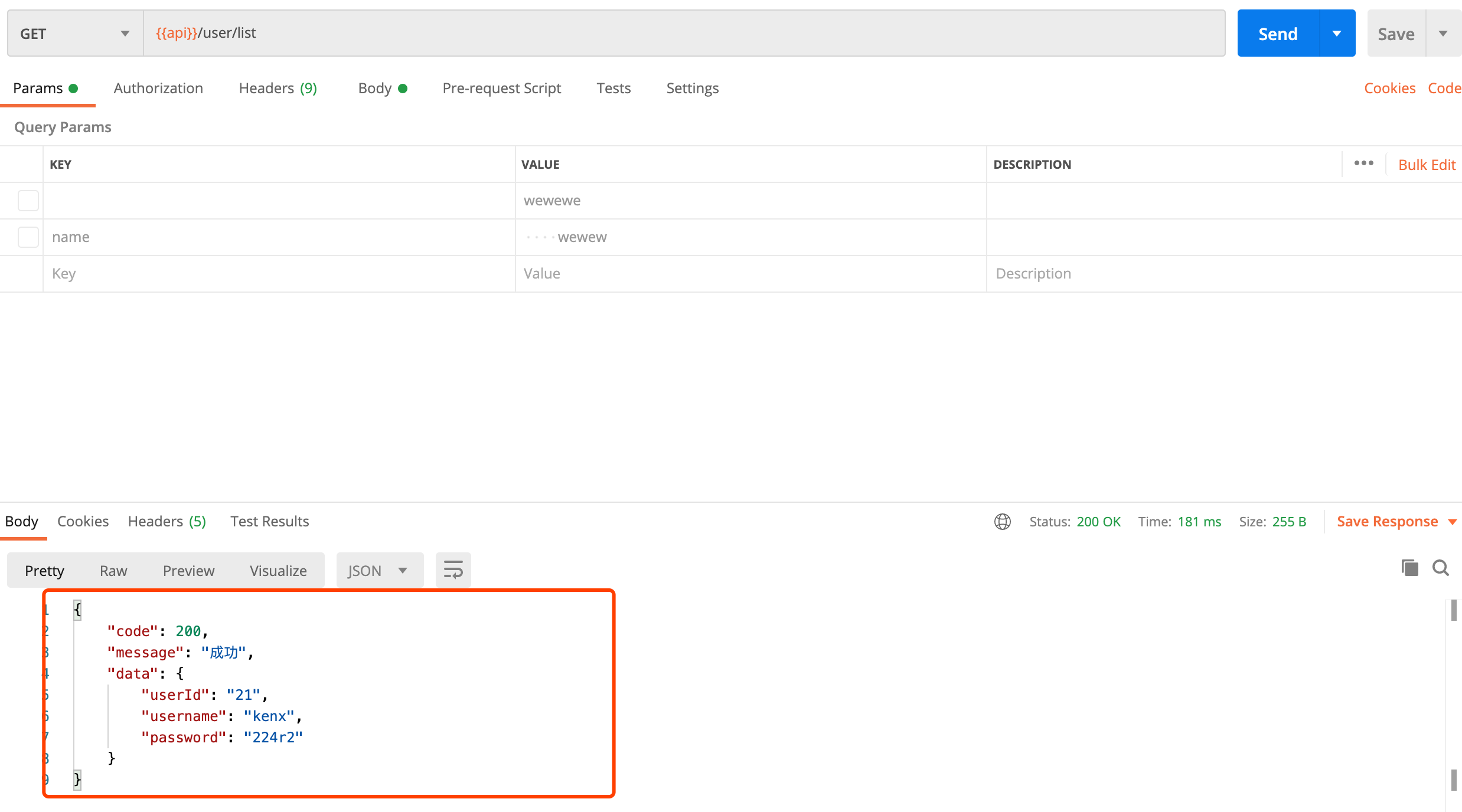
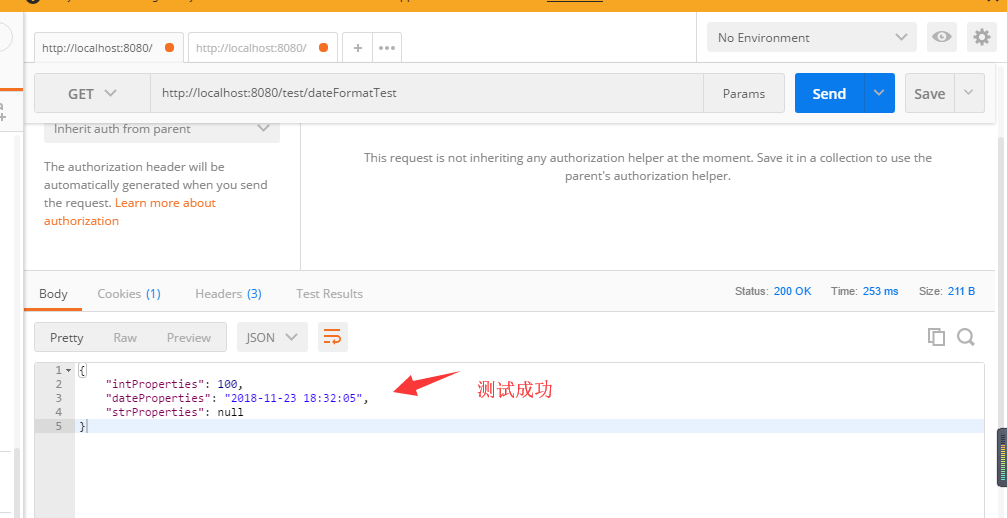
网上杂七杂八的说法不一,大多数都是抄来抄去,没有实践,近期在项目频繁遇到boot+jackson处理日期的问题,故开此贴。 首先是POM <?xml version="1.0" encoding="UTF-8"?> <project xmlns="http://maven.apache.org/POM/4.0.0" xmlns:xsi="http://www.w3.org/2001/XMLSchema-instance" xsi:schemaLocation="http://maven.apache.org/POM/4.0.0 http://maven.apache.org/xsd/maven-4.0.0.xsd"> <modelVersion>4.0.0</modelVersion> <groupId>io.cj.learning</groupId> <artifactId>boot2exam</artifactId> <version>0.0.1-SNAPSHOT</version> <packaging>jar</packaging> <name>boot2exam</name> <description>Demo project for Spring Boot</description> <parent> <groupId>org.springframework.boot</groupId> <artifactId>spring-boot-starter-parent</artifactId> <version>2.0.0.RELEASE</version> <relativePath/> <!-- lookup parent from repository --> </parent> <properties> <project.build.sourceEncoding>UTF-8</project.build.sourceEncoding> <project.reporting.outputEncoding>UTF-8</project.reporting.outputEncoding> <java.version>1.8</java.version> </properties> <dependencies> <dependency> <groupId>org.springframework.boot</groupId> <artifactId>spring-boot-starter-data-redis</artifactId> </dependency> <dependency> <groupId>org.springframework.boot</groupId> <artifactId>spring-boot-starter-web</artifactId> </dependency> <dependency> <groupId>org.springframework.boot</groupId> <artifactId>spring-boot-starter-test</artifactId> <scope>test</scope> </dependency> <dependency> <groupId>org.springframework.boot</groupId> <artifactId>spring-boot-starter-web</artifactId> <version>RELEASE</version> <scope>compile</scope> </dependency> <dependency> <groupId>org.springframework.boot</groupId> <artifactId>spring-boot-starter-web</artifactId> <version>RELEASE</version> <scope>compile</scope> </dependency> </dependencies> <build> <plugins> <plugin> <groupId>org.springframework.boot</groupId> <artifactId>spring-boot-maven-plugin</artifactId> </plugin> </plugins> </build> </project> 然后是yml文件 (当然yml这东西很多人不喜欢,我也写了个properties版本的) spring: jackson: #参数意义: #JsonInclude.Include.ALWAYS 默认 #JsonInclude.Include.NON_DEFAULT 属性为默认值不序列化 #JsonInclude.Include.NON_EMPTY 属性为 空(””) 或者为 NULL 都不序列化 #JsonInclude.Include.NON_NULL 属性为NULL 不序列化 default-property-inclusion: ALWAYS time-zone: GMT+8 date-format: yyyy-MM-dd HH:mm:ss 上面配置对应的properties文件版本: #jackson相关配置 spring.jackson.date-format = yyyy-MM-dd HH:mm:ss #时区必须要设置 spring.jackson.time-zone= GMT+8 #ALWAYS的意思是即时属性为null,仍然也会输出这个key spring.jackson.default-property-inclusion=ALWAYS 然后来定义一个Controller和JAVA Bean Controller: package io.cj.learning.boot2exam.controller; import io.cj.learning.boot2exam.model.DateFormatTest; import org.springframework.web.bind.annotation.*; import java.text.SimpleDateFormat; import java.util.Date; @RestController @RequestMapping(value="/test") public class TestController { /** * 测试时间序列化, java.util.date 类型 -> String * @return */ @RequestMapping(value="/dateFormatTest", method = RequestMethod.GET) @ResponseBody public DateFormatTest dateFormatTest(){ DateFormatTest dateFormatTest = new DateFormatTest(); dateFormatTest.setIntProperties(100); dateFormatTest.setDateProperties(new Date()); return dateFormatTest; } /** * 测试时间反序列化 String -> java.util.date 类型 */ @RequestMapping(value="/dateFormatTest2" ,method = RequestMethod.POST) public void dateFormatTest2(@RequestBody DateFormatTest model){ SimpleDateFormat sdf = new SimpleDateFormat("yyyy-MM-dd HH:mm:ss"); System.out.println(model.getIntProperties()); System.out.println(sdf.format(model.getDateProperties())); System.out.println(model.getStrProperties()); } } Java Bean: package io.cj.learning.boot2exam.model; import java.util.Date; /** * 一个model,里面带一个日期类型 */ public class DateFormatTest { private Integer intProperties; private Date dateProperties; private String strProperties; public Integer getIntProperties() { return intProperties; } public void setIntProperties(Integer intProperties) { this.intProperties = intProperties; } public Date getDateProperties() { return dateProperties; } public void setDateProperties(Date dateProperties) { this.dateProperties = dateProperties; } public String getStrProperties() { return strProperties; } public void setStrProperties(String strProperties) { this.strProperties = strProperties; } } 启动主类: package io.cj.learning.boot2exam; import org.springframework.boot.SpringApplication; import org.springframework.boot.autoconfigure.SpringBootApplication; @SpringBootApplication public class Boot2examApplication { public static void main(String[] args) { SpringApplication.run(Boot2examApplication.class, args); } } 测试: 试一下,首先是日期序列化, 请求一下试试 然后是反序列化,也请求一个试试:

资源下载

更多资源
Nacos

Nacos

Nacos /nɑ:kəʊs/ 是 Dynamic Naming and Configuration Service 的首字母简称,一个易于构建 AI Agent 应用的动态服务发现、配置管理和AI智能体管理平台。Nacos 致力于帮助您发现、配置和管理微服务及AI智能体应用。Nacos 提供了一组简单易用的特性集,帮助您快速实现动态服务发现、服务配置、服务元数据、流量管理。Nacos 帮助您更敏捷和容易地构建、交付和管理微服务平台。

Rocky Linux

Rocky Linux

Rocky Linux(中文名:洛基)是由Gregory Kurtzer于2020年12月发起的企业级Linux发行版,作为CentOS稳定版停止维护后与RHEL(Red Hat Enterprise Linux)完全兼容的开源替代方案,由社区拥有并管理,支持x86_64、aarch64等架构。其通过重新编译RHEL源代码提供长期稳定性,采用模块化包装和SELinux安全架构,默认包含GNOME桌面环境及XFS文件系统,支持十年生命周期更新。

Sublime Text

Sublime Text

Sublime Text具有漂亮的用户界面和强大的功能,例如代码缩略图,Python的插件,代码段等。还可自定义键绑定,菜单和工具栏。Sublime Text 的主要功能包括:拼写检查,书签,完整的 Python API , Goto 功能,即时项目切换,多选择,多窗口等等。Sublime Text 是一个跨平台的编辑器,同时支持Windows、Linux、Mac OS X等操作系统。

WebStorm

WebStorm

WebStorm 是jetbrains公司旗下一款JavaScript 开发工具。目前已经被广大中国JS开发者誉为“Web前端开发神器”、“最强大的HTML5编辑器”、“最智能的JavaScript IDE”等。与IntelliJ IDEA同源,继承了IntelliJ IDEA强大的JS部分的功能。


用户登录
用户注册