(android开源库android-gif-drawable)第一篇 eclipse使用这个开源库
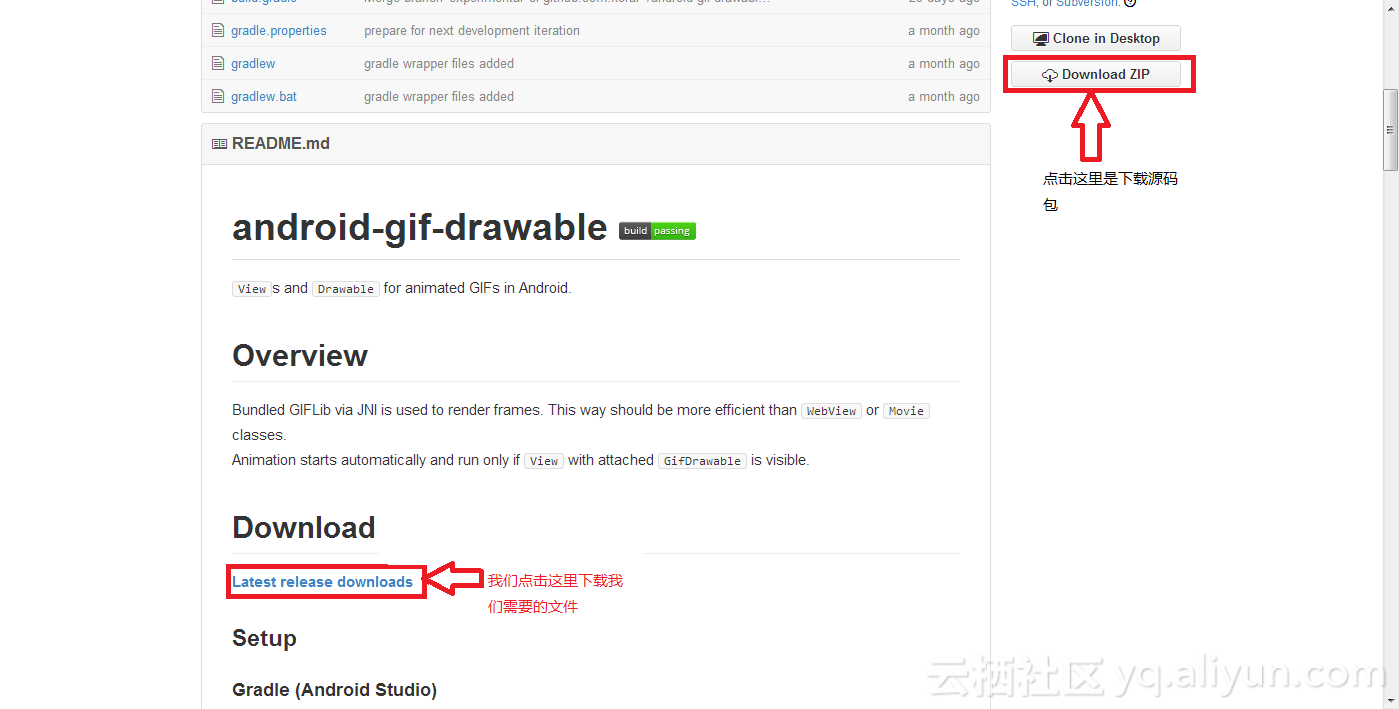
如果想显示gif图片 推荐使用Glide开源库 android-gif-drawable我就不推荐了 android开源库android-gif-drawable的使用 android的开源库是用来在android上显示gif图片的。我在网上查了一下,大家说这个框架写的不错,加载大的gif图片 不会内存溢出,于是我就想试试这个开源库,我下了作者的源代码和例子,但是我却跑不起来。不知道为什么,我又到网上去找使用这个开源库的例子发现有一个,我也下载了下来,发现还是跑不起来。我决定自己好好试试这个源代码,终于在我的努力下现在可以用了。废话完了 现在教大家怎么用这个库。大家不想看怎么做的 可以到后面下载DEMO代码。 1.android-gif-drawable的源代码下载地址:https://github.com/koral--/android-gif-drawable 2.点开它,如下图所示 3.点击下载后,我们可以看到下面这个界面 PS:是下载.aar文件 我写错了 4.下载好这个文件后,我们右键选择打开方式为 5.然后解压这个文件到一个空的文件夹,复制也可以 6.然后得到如下 7.点开jni文件夹得到如下 8.复制这4个文件夹和开源库的JAR包(classes.jar)到你android代码中位置如下图所示 9.下面是作者教大家的使用方法 PS: 想看原版的 请到这里来看:https://github.com/koral--/android-gif-drawable From XML The simplest way is to use GifImageView (or GifImageButton) like a normal ImageView: <pl.droidsonroids.gif.GifImageView android:layout_width="match_parent" android:layout_height="match_parent" android:src="@drawable/src_anim" android:background="@drawable/bg_anim" /> If drawables declared by android:src and/or android:background are GIF files then they will be automatically recognized as GifDrawables and animated. If given drawable is not a GIF then mentioned Views work like plainImageView and ImageButton. GifTextView allows you to use GIFs as compound drawables and background. <pl.droidsonroids.gif.GifTextView android:layout_width="match_parent" android:layout_height="match_parent" android:drawableTop="@drawable/left_anim" android:drawableStart="@drawable/left_anim" android:background="@drawable/bg_anim" /> From Java code GifImageView, GifImageButton and GifTextView have also hooks for setters implemented. So animated GIFs can be set by calling setImageResource(int resId) and setBackgroundResource(int resId) GifDrawable can be constructed directly from various sources: //asset file GifDrawable gifFromAssets = new GifDrawable( getAssets(), "anim.gif" ); //resource (drawable or raw) GifDrawable gifFromResource = new GifDrawable( getResources(), R.drawable.anim ); //byte array byte[] rawGifBytes = ... GifDrawable gifFromBytes = new GifDrawable( rawGifBytes ); //FileDescriptor FileDescriptor fd = new RandomAccessFile( "/path/anim.gif", "r" ).getFD(); GifDrawable gifFromFd = new GifDrawable( fd ); //file path GifDrawable gifFromPath = new GifDrawable( "/path/anim.gif" ); //file File gifFile = new File(getFilesDir(),"anim.gif"); GifDrawable gifFromFile = new GifDrawable(gifFile); //AssetFileDescriptor AssetFileDescriptor afd = getAssets().openFd( "anim.gif" ); GifDrawable gifFromAfd = new GifDrawable( afd ); //InputStream (it must support marking) InputStream sourceIs = ... BufferedInputStream bis = new BufferedInputStream( sourceIs, GIF_LENGTH ); GifDrawable gifFromStream = new GifDrawable( bis ); //direct ByteBuffer ByteBuffer rawGifBytes = ... GifDrawable gifFromBytes = new GifDrawable( rawGifBytes ); InputStreams are closed automatically in finalizer if GifDrawable is no longer needed so you don't need to explicitly close them. Calling recycle() will also close underlaying input source. Note that all input sources need to have ability to rewind to the begining. It is required to correctly play animated GIFs (where animation is repeatable) since subsequent frames are decoded on demand from source. Animation control GifDrawable implements an Animatable and MediaPlayerControl so you can use its methods and more: stop() - stops the animation, can be called from any thread start() - starts the animation, can be called from any thread isRunning() - returns whether animation is currently running or not reset() - rewinds the animation, does not restart stopped one setSpeed(float factor) - sets new animation speed factor, eg. passing 2.0f will double the animation speed seekTo(int position) - seeks animation (within current loop) to given position (in milliseconds) Only seeking forward is supported getDuration() - returns duration of one loop of the animation getCurrentPosition() - returns elapsed time from the beginning of a current loop of animation Using MediaPlayerControl Standard controls for a MediaPlayer (like in VideoView) can be used to control GIF animation and show its current progress. Just set GifDrawable as MediaPlayer on your MediaController like this: @Override protected void onCreate ( Bundle savedInstanceState ) { super.onCreate( savedInstanceState ); GifImageButton gib = new GifImageButton( this ); setContentView( gib ); gib.setImageResource( R.drawable.sample ); final MediaController mc = new MediaController( this ); mc.setMediaPlayer( ( GifDrawable ) gib.getDrawable() ); mc.setAnchorView( gib ); gib.setOnClickListener( new OnClickListener() { @Override public void onClick ( View v ) { mc.show(); } } ); } Retrieving GIF metadata getLoopCount() - returns a loop count as defined in NETSCAPE 2.0 extension getNumberOfFrames() - returns number of frames (at least 1) getComment() - returns comment text (null if GIF has no comment) getFrameByteCount() - returns minimum number of bytes that can be used to store pixels of the single frame getAllocationByteCount() - returns size (in bytes) of the allocated memory used to store pixels of given GifDrawable getInputSourceByteCount() - returns length (in bytes) of the backing input data toString() - returns human readable information about image size and number of frames (intended for debugging purpose) 10.DEMO下载地址:http://pan.baidu.com/s/1gdd27v1