【Android电量】Battery Historian环境部署
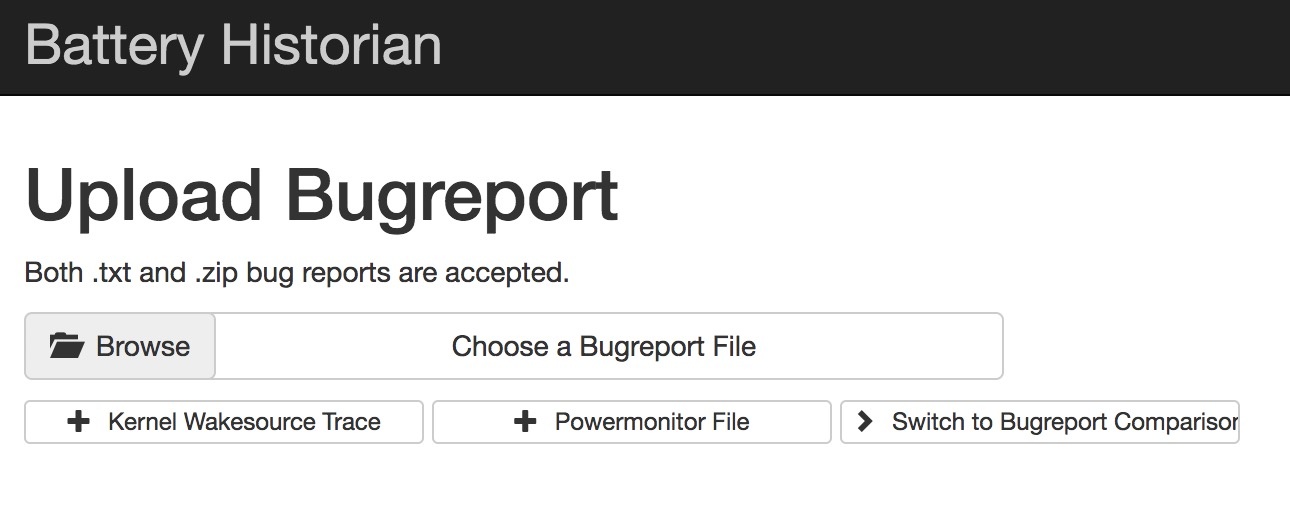
1、Install Docker Desktop for Mac (ps: Requires Apple Mac OS Sierra 10.12 or above.)手动下载安装 https://docs.docker.com/docker-for-mac/install/ 使用 Homebrew 安装 brew cask install docker(推荐) 2、Run the Battery Historian image. 使用命令 docker run -d -p 9999:9999 bhaavan/battery-historian 加载启动镜像 (有问题的镜像,不要用) docker run -p 9998:9998 gcr.io/android-battery-historian/stable:3.0 --port 9998 (亲测可用镜像) didi@localhost ~ docker run -p 9998:9998 gcr.io/android-battery-historian/stable:3.0 --port 9998 Unable to find image 'gcr.io/android-battery-historian/stable:3.0' locally 3.0: Pulling from android-battery-historian/stable c62795f78da9: Pull complete d4fceeeb758e: Pull complete 5c9125a401ae: Pull complete 0062f774e994: Pull complete 6b33fd031fac: Pull complete a6bd6e1d0bdb: Pull complete 76cf9d0635af: Pull complete 856d20d533e0: Pull complete e63a73f6a528: Pull complete 1a75578c9353: Pull complete 24f3649604d9: Pull complete 10f637765748: Pull complete e06a9fa76cf2: Pull complete Digest: sha256:265a37707f8cf25f2f85afe3dff31c760d44bb922f64bbc455a4589889d3fe91 Status: Downloaded newer image for gcr.io/android-battery-historian/stable:3.0 2019/04/15 12:46:23 Listening on port: 9998 2019/04/15 12:48:19 Trace starting analysisServer processing for: GET 2019/04/15 12:48:19 Trace finished analysisServer processing for: GET 2019/04/15 12:48:20 Trace starting analysisServer processing for: GET 2019/04/15 12:48:20 Trace finished analysisServer processing for: GET 2019/04/15 12:48:27 Trace starting analysisServer processing for: POST 2019/04/15 12:48:27 Trace starting reading uploaded file. 2330165 bytes 2019/04/15 12:48:28 failed to extract battery info: could not find battery time info in bugreport 2019/04/15 12:48:28 failed to extract time information from bugreport dumpstate: open /usr/lib/go-1.6/lib/time/zoneinfo.zip: no such file or directory 2019/04/15 12:48:28 Trace started analyzing "bugreport-ALP-AL00-HUAWEIALP-AL00-2019-04-15-14-31-10.zip~bugreport-ALP-AL00-HUAWEIALP-AL00-2019-04-15-14-31-10/bugreport-ALP-AL00-HUAWEIALP-AL00-2019-04-15-14-31-10.txt" file. 2019/04/15 12:48:28 Trace finished processing checkin. 2019/04/15 12:48:28 Trace finished processing summary data. 2019/04/15 12:48:28 Trace finished generating Historian plot. 2019/04/15 12:48:28 Trace finished analyzing "bugreport-ALP-AL00-HUAWEIALP-AL00-2019-04-15-14-31-10.zip~bugreport-ALP-AL00-HUAWEIALP-AL00-2019-04-15-14-31-10/bugreport-ALP-AL00-HUAWEIALP-AL00-2019-04-15-14-31-10.txt" file. 2019/04/15 12:48:29 Trace ended analyzing file. 2019/04/15 12:48:29 Trace finished analysisServer processing for: POST didi@localhost /usr/local/Cellar/go/1.12.4/src/github.com/google/battery-historian master docker ps -all CONTAINER ID IMAGE COMMAND CREATED STATUS PORTS NAMES c19bb05d9198 bhaavan/battery-historian "/bin/sh -c 'go run …" 19 minutes ago Up 19 minutes 0.0.0.0:9999->9999/tcp sad_shaw didi@localhost /usr/local/Cellar/go/1.12.4/src/github.com/google/battery-historian master didi@localhost /usr/local/Cellar/go/1.12.4/src/github.com/google/battery-historian master docker images REPOSITORY TAG IMAGE ID CREATED SIZE bhaavan/battery-historian latest 9a3a9fd0ca2f 2 years ago 922MB 3、Open BHRun historian and visit http://localhost:9999 4、Upload Report Both .txt and .zip bug reports are accepted. To take a bug report from your Android device, you will need to enable USB debugging under Settings > System > Developer Options To obtain a bug report from your development device running Android 7.0 and higher: $ adb bugreport bugreport.zip didi@localhost ~ adb bugreport bugreport.zip /data/user_de/0/com.android.shell/files/bugreports/bugreport-ALP-AL00-HUAWEIALP-AL00-2019-04-15-11-08-01.zip: 1 file pulled. 23.2 MB/s (2295220 bytes in 0.094s) // 手机本地 didi@localhost ~ adb pull /data/user_de/0/com.android.shell/files/bugreports/bugreport-ALP-AL00-HUAWEIALP-AL00-2019-04-15-12-08-32.zip /Users/didi/Documents/ # 导出到电脑 /data/user_de/0/com.android.shell/files/bugreports/bugreport-ALP-AL00-HUAWEIALP-AL00-2019-04-15-12-08-32.zip: 1 file pulled. 24.1 MB/s (2415380 bytes in 0.096s) For devices 6.0 and lower: $ adb bugreport > bugreport.txt 5、Start analyzing! Timeline: System stats: App stats: