Jest 单元测试快速上手指南
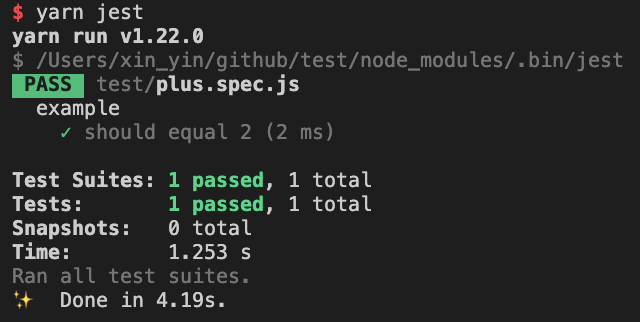
技术交流群: https://fiora.suisuijiang.com/原文链接: https://github.com/yinxin630/blog/issues/38 Jest[1] 是一款简单, 容易上手且功能十分强大的测试框架 安装 yarn add -D jest 使用 创建 test 目录, 添加 plus.spec.js 文件 describe('example',()=>{it('shouldequal2',()=>{expect(1+1).toBe(2);});}); 执行 yarn jest 或者 yarn jest test/plus.spec.js 运行测试用例 成功结果 失败结果 输出测试覆盖率 在根目录创建 jest.config.js 配置文件 module.exports={collectCoverage:true,}; 创建 plus.js 模块 module.exports=functionplus(a,b){returna+b;} 修改测试用例使用模块 constplus=require('../plus');describe('example',()=>{it('shouldequal2',()=>{expect(plus(1,1)).toBe(2);});}); 再次执行测试, 输出覆盖率如下 在浏览器中打开 coverage/lcov-report/index.html 可以浏览覆盖率结果页面 忽略部分文件或者代码行的覆盖率 修改 plus.ts 模块, 添加更多分支 exportdefaultfunctionplus(a:number,b:number){if(a+b>100){return0;}elseif(a+b<0){return0;}else{returna+b;}} 重新执行测试, 覆盖率输出结果 你可以完善测试用例, 或者可能有些文件(譬如 config)和代码分支并不需要测试, 可以将其在测试覆盖率结果中排除, 参考如下配置 忽略目录下所有文件 在 jest.config.js 中添加 collectCoverageFrom:['**/*.{ts,tsx}','!**/node_modules/**','!**/[directorypath]/**',], 以 ! 开头的表示忽略与其匹配的文件 忽略单个文件 在该文件顶部添加 /* istanbul ignore file */ 忽略一个函数, 一块分支逻辑或者一行代码 在该函数, 分支逻辑或者代码行的上一行添加 /* istanbul ignore next */ 支持 Typescript 执行 yarn add -D typescript ts-jest @types/jest 安装 typescript 和声明 并在 jest.config.js 中添加 preset: 'ts-jest' 将 plus.js 重命名为 plus.ts exportdefaultfunctionplus(a:number,b:number){returna+b;} 同样的, 将 plus.spec.js 重命名为 plus.spec.ts importplusfrom'../plus'describe('example',()=>{it('shouldequal2',()=>{expect(plus(1,1)).toBe(2);});}); 执行测试, 结果和之前一致 执行单测时不校验 ts 类型 有时你可能会希望不校验 ts 类型, 仅执行代码测试, 比如需要在 CI 中将类型校验和单元测试分为两个任务 在 jest.config.js 中添加如下内容 globals:{'ts-jest':{isolatedModules:true,},} 测试 React 组件 安装 react 依赖 yarn add react react-dom 和声明 yarn add -D @types/react安装 react 测试库 yarn add -D @testing-library/react @testing-library/jest-dom 添加 typescript 配置文件 tsconfig.json {"compilerOptions":{"target":"es2018","strict":true,"moduleResolution":"node","jsx":"react","allowSyntheticDefaultImports":true,"esModuleInterop":true,"lib":["es2015","es2016","es2017","dom"]},"exclude":["node_modules"]} 新增测试组件 Title.tsx import React from 'react';function Title() { return ( <h1>Title</h1> );}export default Title; 新增测试用例 test/Title.spec.tsx /** * @jest-environment jsdom */import React from 'react';import { render } from '@testing-library/react';import '@testing-library/jest-dom/extend-expect';import Title from '../Title';describe('Title', () => { it('should render without error', () => { const { getByText } = render(<Title />); const $title = getByText('Title'); expect($title).toBeInTheDocument(); });}); 执行 yarn jest test/Title.spec.ts 查看结果 处理静态资源引用 react 组件有时引用一些静态资源, 譬如图片或者 css 样式表, webpack 会正确的处理这些资源, 但是对 Jest 来讲, 这些资源是无法识别的 创建 Title.less 样式表 h1 { color: red;} 修改 Ttitle.tsx, 添加样式引用 import './Title.less'; 执行测试会报错 我们需要配置 transform 对其处理 在根目录创建 jest.transformer.js constpath=require('path');module.exports={process(src,filename){return`module.exports=${JSON.stringify(path.basename(filename))};`;},}; 这里是将资源文件名作为模块导出内容 修改 jest.config.js 添加如下配置 transform:{'\\.(less)$':'<rootDir>/jest.transformer.js',//正则匹配,处理less样式}, 然后重新执行测试就可以了 处理 css in js 如果你使用了类似 linaria[2] 这种 css in js 方案, 其中的 css 样式模板字符串是不支持运行时编译的 修改 Title.tsx import React from 'react';import { css } from 'linaria';const title = css` color: red;`;function Title() { return <h1 className={title}>Title</h1>;}export default Title; 运行测试会报错 linaria 是通过 babel 插件将其预编译为 class 名的, 这里可以 mock 一下 css 函数, 返回一个随机值作为 class 名 在根目录创建 jest.setup.js jest.mock('linaria',()=>({css:jest.fn(()=>Math.floor(Math.random()*(10**9)).toString(36)),})); 修改 jest.config.js 添加如下配置 setupFilesAfterEnv:['./jest.setup.js'], 重新执行测试就可以了 测试交互事件 新增 Count.tsx 组件 import React, { useState } from 'react';function Count() { const [count, updateCount] = useState(0); return ( <div> <span data-testid="count">{count}</span> <button data-testid="button" onClick={() => updateCount(count + 1)}> +1 </button> </div> );}export default Count; 新增 test/Count.spec.tsx 组件 /** * @jest-environment jsdom */import React from 'react';import { render, fireEvent } from '@testing-library/react';import '@testing-library/jest-dom/extend-expect';import Count from '../Count';describe('Count', () => { it('should render without error', () => { const { getByTestId } = render(<Count />); const $count = getByTestId('count'); const $button = getByTestId('button'); expect($count).toHaveTextContent('0'); fireEvent.click($button); expect($count).toHaveTextContent('1'); });}); 这里通过 testId 来查找元素, 使用 fireEvent[3] 触发 click 事件 测试函数调用 新增 Button.tsx 组件 import React from 'react';type Props = { onClick: () => void;};function Button({ onClick }: Props) { return <button onClick={onClick}>button</button>;}export default Button; 添加 test/Button.spec.tsx 测试用例 /** * @jest-environment jsdom */import React from 'react';import { render, fireEvent } from '@testing-library/react';import '@testing-library/jest-dom/extend-expect';import Button from '../Button';describe('Button', () => { it('should render without error', () => { const handleClick = jest.fn(); // mock 函数 const { getByText } = render(<Button onClick={handleClick} />); // 传递 props const $button = getByText('button'); fireEvent.click($button); expect(handleClick).toHaveBeenCalled(); // 期望其被调用 });}); 测试包含定时器的逻辑 //timer.tsletcache='cache';exportdefaultfunctiontimer(){setTimeout(()=>{cache='';},1000);returncache;} //test/timer.spec.tsimporttimerfrom'../timer'jest.useFakeTimers();//替代原生计时器describe('timer',()=>{it('shouldclearcacheaftertimerout',()=>{expect(timer()).toBe('cache');jest.advanceTimersByTime(1000);//让计时器前进1000msexpect(timer()).toBe('');})}) mock 依赖模块 要测试的模块可能依赖于其他模块或者第三方 npm 包的结果, 我们可以使用 Mock Functions[4] 对其进行 mock //test/mock.spec.tsimport{mocked}from'ts-jest/utils';importplusfrom'../plus';jest.mock('../plus');describe('mock',()=>{it('shouldreturnmockvalue',()=>{mocked(plus).(50);expect(plus(1,1)).toBe(50);});}); 还有官网 mock axios npm 模块的例子 https://jestjs.io/docs/en/mock-functions#mocking-modules mock 环境变量和命令行参数 有的模块会从环境变量和命令行参数取值, 并且可能是在模块初始化时获取的 //process.tsconst{env,argv}=process;exportfunctiongetEnvironmentValue(){returnenv.Value;}exportfunctiongetProcessArgsValues(){returnargv[2];} 这种情况我们需要在每个测试用例中, 使用动态 require 来运行时引入改模块, 并且设置其每次引入时删除 cache //test/process.spec.tsdescribe('mockprocess',()=>{beforeEach(()=>{jest.resetModules();});it('shouldreturnenvironmentvalue',()=>{process.env={Value:'value',};const{getEnvironmentValue}=require('../process');expect(getEnvironmentValue()).toBe('value');});it('shouldreturnprocessargsvalue',()=>{process.argv=['value'];const{getProcessArgsValues}=require('../process');expect(getProcessArgsValues()).toBe('value');});}); 参考资料 [1]Jest: https://jestjs.io/ [2]linaria: https://github.com/yinxin630/blog/issues/36 [3]fireEvent: https://testing-library.com/docs/dom-testing-library/api-events [4]Mock Functions: https://jestjs.io/docs/en/mock-function-api 本文分享自微信公众号 - 牧码的星星(gh_0d71d9e8b1c3)。如有侵权,请联系 support@oschina.cn 删除。本文参与“OSC源创计划”,欢迎正在阅读的你也加入,一起分享。