首页 文章 精选 留言 我的

精选列表

搜索[学习],共10000篇文章
优秀的个人博客,低调大师

专家组发文建议 Nasa 学习开源许可证知识

11 月 3 日,六位来自来自美国海军研究实验室、丹麦技术大学和其他大学的专家: John D. Haiducek、Thom R. Edwards、 Wade Duvall、 Sarah R.Cannon、 Kai Germaschewski 、Jason E. Kooi ,联名在 arXiv 上发表了一篇简短的论文,叫“ 澄清 NASA 开源需求的建议书”。 该论文提出: NASA 内部对开源的认知混乱不堪 ,建议 NASA 开展开源许可协议相关的知识培训。 虽然 NASA 有一些鼓励开发开源软件的政策,但里面的科学家对“开源软件”、“自由软件”和“许可协议”等开源术语的具体含义并没有完全理解,很多科学家以为“开源”就是指公布软件的源代码。这就导致了很多 NASA 宣称“开源”的软件,事实上违反了 OSI 定义的开源十项标准,完全不能在 Linux 发行版上面发布。 事实上,对开源的认知模糊不仅限于 NASA 的软件开发者,每一个程序员在正式投入工作生产之前,都接受过完整的软件知识和技术培训,但似乎很少人会上过知识产权相关的课程,对开源的认知也仅限于“开放源代码供大众使用”,开源的知识普及任重而道远。 据 The Register 报导,他们已经就此事询问了 NASA 实验室的意见 ,但由于周末休息,暂时未得到回应。 附:关于 OSI 的开源十项标准:

优秀的个人博客,低调大师

python学习-使用textfsm解析华为交换机配置进行巡检

客户这里,有将近200台左右的接入交换机,全部是华为S57系列的。现在需要对交换机状态进行巡检,检查交换机CPU,内存,电源,风扇状态。如果是人工巡检就得一台一台登录查看,效率非常低下。由于客户这里没有使用网管软件,全凭人肉运维。=。=现在想使用python来进行巡检,并把结果统计到一张表格里面,这样不就非常省事了么 # 现状 以下是设备资产列表,记录的设备的名称,管理地址等信息 ![image.png](https://s2.51cto.com/images/20210702/1625239371485010.png?x-oss-process=image/watermark,size_14,text_QDUxQ1RP5Y2a5a6i,color_FFFFFF,t_100,g_se,x_10,y_10,shadow_20,type_ZmFuZ3poZW5naGVpdGk=) 以下是交换机检查命令的输出结果,分别使用display fan,display cpu,display mem,display power,display enviroment ![image.png](https://s2.51cto.com/images/20210702/1625237306170640.png?x-oss-process=image/watermark,size_14,text_QDUxQ1RP5Y2a5a6i,color_FFFFFF,t_100,g_se,x_10,y_10,shadow_20,type_ZmFuZ3poZW5naGVpdGk=) ![image.png](https://s2.51cto.com/images/20210702/1625237385485393.png?x-oss-process=image/watermark,size_14,text_QDUxQ1RP5Y2a5a6i,color_FFFFFF,t_100,g_se,x_10,y_10,shadow_20,type_ZmFuZ3poZW5naGVpdGk=) 现在我们获取到这些状态了,接下的问题是如何解析这些文本并保存? ## 问题: 1.如何批量保存状态文本? 2.保存后如何解析这些文本? 3.解析文本出来后,如何格式存储到表格中? 针对如上问题,采取如下思路解决 ## 思路: 1.使用pandas模块读取表格,获取需要ssh登录的设备信息 2.使用netmiko模块批量发送命令给交换机 3.将回显的结果批量保存到指定路径下 4.批量读取这些文本,使用textfsm解析文本, 5.将解析结果使用pandas模块分门别类的保存一张表格中的不同sheet 有了思路,就好解决了,为了实现以上的思路,需要了解python的一些模块的使用 ## netmiko 此模块用于简化paramiko与网络设备之间的ssh连接,可在windows与Unix平台使用 常用方法 net_connect.send_command() # 向下发送命令,返回输出(基于模式) net_connect.send_command_timing() # 沿通道发送命令,返回输出(基于时序) net_connect.send_config_set() # 将配置命令发送到远程设备 net_connect.send_config_from_file() # 发送从文件加载的配置命令 net_connect.save_config() # 将running#config保存到startup#config net_connect.enable() # 输入启用模式 net_connect.find_prompt() # 返回当前路由器提示符 net_connect.commit() # 在Juniper和IOS#XR上执行提交操作 net_connect.disconnect() # 关闭连接 net_connect.write_channel() # 通道的低级写入 net_connect.read_channel() # 通道的低级写入 ## TextFSM TextFSM是Google开发的一种开源Python模块,可以基于模板的状态机来解析半格式化文本,从而实现对网络设备CLI输出信息进行结构化数据处理,最终将文本内容输出为Python的字典或列表格式(或者是两者组合)。 详细内容可以访问该模块的GitHub:https://github.com/google/textfsm。 关于TextFSM具体使用,还可以参考锐捷的资料 https://www.ruijie.com.cn/fa/xw-hlw/86889/ 我的TextFSM就是照着锐捷的模板借鉴使用 ## 相关脚本 ### 华为TextFSM - 解析fan ```text Value SLOT_ID (\d/\d|\d) Value FAN_ID (\d) Value STATUS (\S+) Start ^Slot ${SLOT_ID}: Fan ${FAN_ID} is ${STATUS} -> Record ``` - 解析power ```text Value POWER_ID (\d|\S+\d) Value STATUS (Normal|Abnorma) Start ^SlotID\s+.* State ^\s+${POWER_ID}\s+.* ${STATUS} -> Record ``` - 解析温度 ```text Value ID (\d) Value TEMP (\d+) Start ^SlotID\s+CurrentTemperature ^\s+${ID}\s+${TEMP} -> Record ``` - 解析cpu和mem 因为cpu和mem比较简单,可以直接使用正则表达式,无需使用TextFSM ```python r'CPU utilization for five seconds:\s+\d+%' r'Memory Using Percentage Is:\s+\d+%' ``` ## 脚本 直接看注释把 ```python import netmiko import pandas as pd import os import time from textfsm import TextFSM import re import glob #此模块是匹配路径下所有文件 class Conn(): #Conn类,同时netmiko模块ssh连接设备并发送命令 @property #将方法转换为属性,方便更改 def ip(self): return self._ip @ip.setter def ip(self,ip): self._ip=ip @property def device_name(self): return self._device_name @device_name.setter def device_name(self,device_name): self._device_name=device_name def __init__(self): ''' 构造属性,定义登录设备的账户密码信息 ''' self.username='admin' self.password='xxxxx' def save_config(self): ''' 保存配置方法 ''' ssh_login=netmiko.Netmiko(ip=self._ip,username=self.username,password=self.password,device_type='huawei') #初始化连接 path='backup/' #定义保存的文本的路径 config=ssh_login.send_command('di cu') #发送命令 config_file=self._device_name+'-'+self._ip+'.txt' #定义文本文件名称 backup_file=os.path.join(path,config_file) #拼接路径 with open (backup_file,'w') as f: #保存写入 f.write(config) def check_status(self,path): ''' 获取状态信息的方法,获取cpu,fan等信息 ''' ssh_login=netmiko.Netmiko(ip=self._ip,username=self.username,password=self.password,device_type='huawei') command=['display fan','display cpu','display environment','display power','display memory-usage','display temperature all'] #批量发送命令 status=ssh_login.send_config_set(command) filename=self._device_name+'-'+self._ip+'.txt' status_file=os.path.join(path,filename) with open (status_file,'w') as f: f.write(status) #使用text-fsm检查交换机配置状态 #生成表格 list_device_name=[] #定义列表保存信息 list_fans_status=[] list_power_status=[] list_cpu_status=[] list_mem_status=[] list_temp_status=[] count_fan_dict={} #定义字典,保存状态信息 count_power_dict={} count_cpumem_dict={} count_temp_dict={} class CHCEK(): ''' 解析状态的类 ''' def __init__(self,file): self._file=None with open(file,'r',encoding='utf-8') as f: #构造初始化方法,定义读取文件,即保存的状态信息 self.dev_text=f.read() def fans_status_S86X(self): ''' 解析fan ''' temp_fans_status=TextFSM(open(r'textfsm/huawei_display_fan_dis.textfsm')) #读取textfsm模板解析 info_fans_status=temp_fans_status.ParseTextToDicts(self.dev_text) #保存为列表 print (info_fans_status) return info_fans_status def power_status_S86X(self): #解析power temp_power_status=TextFSM(open(r'textfsm/huawei_display_power_dis.textfsm')) info_power_status=temp_power_status.ParseTextToDicts(self.dev_text) print (info_power_status) return info_power_status def cpu_status_S86X(self): ''' temp_power_status = TextFSM(open(r'textfsm/ruijie_show_cpu_S86X.textfsm')) self.info_power_status = temp_power_status.ParseTextToDicts(self.dev_text) ''' cpu_status=re.findall(r'CPU utilization for five seconds:\s+\d+%',self.dev_text) #使用正则表达式解析cpu cpu_status=''.join(cpu_status) info_cpu_status=re.findall(r'\d+%',cpu_status) #第二次匹配,更加准确 print(info_cpu_status) return info_cpu_status def mem_status_X86x(self): #解析内存利用率 mem_status=re.findall(r'Memory Using Percentage Is:\s+\d+%',self.dev_text) #正则匹配 mem_status=''.join(mem_status) info_mem_status=re.findall(r'\d+%',mem_status) print (info_mem_status) return info_mem_status def temp_status_S86X(self): ''' 解析温度 ''' temp_temp_status = TextFSM(open(r'textfsm/huawei_display_temp_dis.textfsm')) info_temp_status = temp_temp_status.ParseTextToDicts(self.dev_text) print(info_temp_status) return info_temp_status def handle(path): ''' 处理解析出来的信息 ''' filelocation=glob.glob(path) #获取路径下的所有文件 for file in filelocation: print(file) device_name=file.split('.txt')[0].split(r'\\')[-1] #读取文件名,字符拆分为设备名 device_name=device_name.replace('check_status_dis\\','') print (device_name) list_device_name.append(device_name) #添加到设备名列表 check=CHCEK(file=file) #实例化化CHECK()对象 fans_status=check.fans_status_S86X() #获取fan信息 list_fans_status.append(fans_status) #保存fan信息,以下类似 power_status=check.power_status_S86X() list_power_status.append(power_status) cpu_status=check.cpu_status_S86X() list_cpu_status.append(cpu_status) mem_status=check.mem_status_X86x() list_mem_status.append(mem_status) temp_status=check.temp_status_S86X() list_temp_status.append(temp_status) def to_excel(): #保存到表格 count_fan_dict['device_name']=list_device_name #字典,定义键名 device_name,值为列表,设备信息,以下类似 count_fan_dict['fans_status']=list_fans_status count_power_dict['device_name']=list_device_name count_power_dict['powers_status']=list_power_status count_cpumem_dict['device_name']=list_device_name count_cpumem_dict['cpu_status']=list_cpu_status count_cpumem_dict['mem_status']=list_mem_status count_temp_dict['device_name'] = list_device_name count_temp_dict['temp_status']=list_temp_status df1=pd.DataFrame.from_dict(count_fan_dict,orient='index') #pandas方法,把字典转换为DATAFRAME,保持索引 df1=df1.T #行类转换,以下类似 df2=pd.DataFrame.from_dict(count_power_dict,orient='index') df2=df2.T df3=pd.DataFrame.from_dict(count_cpumem_dict,orient='index') df3=df3.T df4=pd.DataFrame.from_dict(count_temp_dict,orient='index') df4=df4.T with pd.ExcelWriter('result-dis.xls') as w: #保存到excel表格 df1.to_excel(w,sheet_name='fans_status',index='SN') #保存到sheet ,名称为fans_status,索引名称为SN,代表序号,以下类似 df2.to_excel(w, sheet_name='power_status', index='SN') df3.to_excel(w, sheet_name='cpu&mem_status', index='SN') df4.to_excel(w, sheet_name='temp', index='SN') if __name__=='__main__': clock=time.strftime("%a %b %d %H:%M:%S %Y", time.localtime()) #定义时间格式 conn=Conn() #实例化Conn(),登录设备 df = pd.DataFrame(pd.read_excel('交换机信息-汇聚.xls')) #读取设备配置信息 df_dict = df.groupby(['设备名称'])['MGT地址'].sum() #分组保存列,形成,以设备名为键,管理地址为值的字典 dict_device =df_dict.to_dict() # 保存为字典 path=r'check_status_dis/' #定义输出结果路径 for k,v in dict_device.items(): #循环字典 print (k) print (v) try: conn.ip=v #赋值地址信息给属性 conn.device_name=k #conn.save_config() conn.check_status(path) #调用check_status方法,开始从发送命令并保存 print(' device_name:{}--ip:{} is download status file ok!!!time is {}'.format(k, v, clock)) except Exception as e : print('{} is loss , msg:-{},time is {}'.format(k, e, clock), file=open('back_error_log.txt', 'a')) #将无法登录的设备信息保存到文本中 handle(path=path+'*.txt') #进行处理 to_excel() #结果保存到excel ``` 保存完成后,输出的excel表格如下所示: ![image.png](https://s2.51cto.com/images/20210702/1625240160619306.png?x-oss-process=image/watermark,size_14,text_QDUxQ1RP5Y2a5a6i,color_FFFFFF,t_100,g_se,x_10,y_10,shadow_20,type_ZmFuZ3poZW5naGVpdGk=) ![image.png](https://s2.51cto.com/images/20210702/1625240193724568.png?x-oss-process=image/watermark,size_14,text_QDUxQ1RP5Y2a5a6i,color_FFFFFF,t_100,g_se,x_10,y_10,shadow_20,type_ZmFuZ3poZW5naGVpdGk=) ![image.png](https://s2.51cto.com/images/20210702/1625240224836973.png?x-oss-process=image/watermark,size_14,text_QDUxQ1RP5Y2a5a6i,color_FFFFFF,t_100,g_se,x_10,y_10,shadow_20,type_ZmFuZ3poZW5naGVpdGk=) ![image.png](https://s2.51cto.com/images/20210702/1625240254134739.png?x-oss-process=image/watermark,size_14,text_QDUxQ1RP5Y2a5a6i,color_FFFFFF,t_100,g_se,x_10,y_10,shadow_20,type_ZmFuZ3poZW5naGVpdGk=) 有了这张表,再人工筛选下表格,就能找出来那些设备有问题。 这样就实现了最简单的设备健康检查及巡检。 从结果来看,确认有交换机电源有问题。 ## 需要改进的地方 1. 单线程,运行起来比较慢,后续可以使用线程池实现多线程 2. 没有逻辑判断,需要人工检查哪些正常,哪些异常 3. 后续使用ntc-templates,并自定义模板,这样不用把信息保存到本地,可以省一个步骤 详细的脚本,见我代码库 https://gitee.com/yashirochaos/yangchao/blob/master/python3%E5%B7%A5%E4%BD%9C%E4%BD%BF%E7%94%A8/30%E4%BA%A4%E6%8D%A2%E6%9C%BA%E5%81%A5%E5%BA%B7%E6%A3%80%E6%9F%A5/2%E5%8D%8E%E4%B8%BA%E4%BA%A4%E6%8D%A2%E6%9C%BA%E6%A3%80%E6%9F%A5/check_switch_status_huawei_v3.py


优秀的个人博客,低调大师

HarmonyOS学习路之开发篇——公共事件与通知(二)

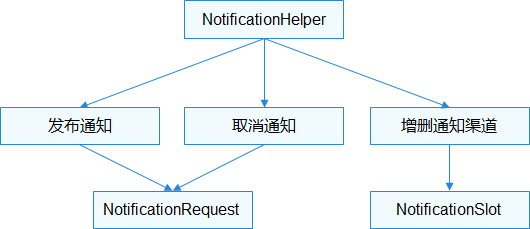
通知 HarmonyOS提供了应用的通知功能,即在应用外层通过使用应用图标进行一些事件的通知。常见的使用场景: 显示接收到短消息、即时消息等。 显示应用的推送消息,如广告、版本更新等。 显示当前正在进行的事件,如播放音乐、导航、下载等。 接口说明 通知相关基础类包含NotificationSlot、NotificationRequest和NotificationHelper。基础类之间的关系如下所示: 图1 通知基础类关系图 NotificationSlot NotificationSlot可以对提示音、振动、锁屏显示和重要级别等进行设置。一个应用可以创建一个或多个NotificationSlot,在发布通知时,通过绑定不同的NotificationSlot,实现不同用途。 NotificationSlot的级别目前支持如下几种, 由低到高: LEVEL_NONE: 表示通知不发布。 LEVEL_MIN:表示通知可以发布,但是不显示在通知栏,不自动弹出,无提示音;该级别不适用于前台服务的场景。 LEVEL_LOW:表示通知可以发布且显示在通知栏,不自动弹出,无提示音。 LEVEL_DEFAULT:表示通知发布后可在通知栏显示,不自动弹出,触发提示音。 LEVEL_HIGH:表示通知发布后可在通知栏显示,自动弹出,触发提示音。 NotificationRequest NotificationRequest用于设置具体的通知对象,包括设置通知的属性,如:通知的分发时间、小图标、大图标、自动删除等参数,以及设置具体的通知类型,如普通文本、长文本等。 具体的通知类型:目前支持六种类型,包括普通文本NotificationNormalContent、长文本NotificationLongTextContent、图片NotificationPictureContent、多行NotificationMultiLineContent、社交NotificationConversationalContent、媒体NotificationMediaContent。 NotificationHelper NotificationHelper封装了发布、更新、删除通知等静态方法。 效果演示 HarmonyOS通知Demo演示 开发步骤 通知的开发指导分为创建NotificationSlot、发布通知和取消通知等开发场景。 第一步、初始化NotificationSlot public static final String SLOT_ID = "high"; public static final String SLOT_NAME = "Order notification"; //-------------------- .... @Override public void onStart(Intent intent) { super.onStart(intent); super.setUIContent(ResourceTable.Layout_main_ability_slice); ... defineNotificationSlot(Const.SLOT_ID, Const.SLOT_NAME, NotificationSlot.LEVEL_HIGH); ... } //--------------------- private void defineNotificationSlot(String id, String name, int importance) { // 创建notificationSlot对象 NotificationSlot notificationSlot = new NotificationSlot(id, name, importance); // 设置振动提醒 notificationSlot.setEnableVibration(true); // 设置锁屏模式 notificationSlot.setLockscreenVisibleness(NotificationRequest.VISIBLENESS_TYPE_PUBLIC); Uri uri = Uri.parse(Const.SOUND_URI); notificationSlot.setSound(uri); try { NotificationHelper.addNotificationSlot(notificationSlot); } catch (RemoteException ex) { HiLog.error(LABEL_LOG, "%{public}s", "defineNotificationSlot remoteException."); } } 第二步、发布通知 private void publishNotification(String title, String text) { //构建NotificationRequest对象,应用发布通知前,通过NotificationRequest的setSlotId()方法与NotificationSlot绑定,使该通知在发布后都具备该对象的特征 notificationId = 0x1000001; NotificationRequest request = new NotificationRequest(notificationId).setSlotId(Const.SLOT_ID) .setTapDismissed(true); //调用setContent()设置通知的内容 request.setContent(createNotificationContent(title, text)); IntentAgent intentAgent = createIntentAgent(MainAbility.class.getName(), IntentAgentConstant.OperationType.START_ABILITY); request.setIntentAgent(intentAgent); //调用publishNotification()发布通知 try { NotificationHelper.publishNotification(request); } catch (RemoteException ex) { HiLog.error(LABEL_LOG, "%{public}s", "publishNotification remoteException."); } } 第三步、取消通知 取消通知分为取消指定单条通知和取消所有通知,应用只能取消自己发布的通知。 调用cancelNotification()取消指定的单条通知。 private void cancel() { try { NotificationHelper.cancelNotification(notificationId); } catch (RemoteException ex) { HiLog.error(LABEL_LOG, "%{public}s", "cancel remoteException."); } } 调用cancelAllNotifications()取消所有通知 private void cancelAll() { try { NotificationHelper.cancelAllNotifications(); } catch (RemoteException ex) { HiLog.error(LABEL_LOG, "%{public}s", "cancelAll remoteException."); } }

优秀的个人博客,低调大师

HarmonyOS学习路之开发篇——公共事件与通知(一)

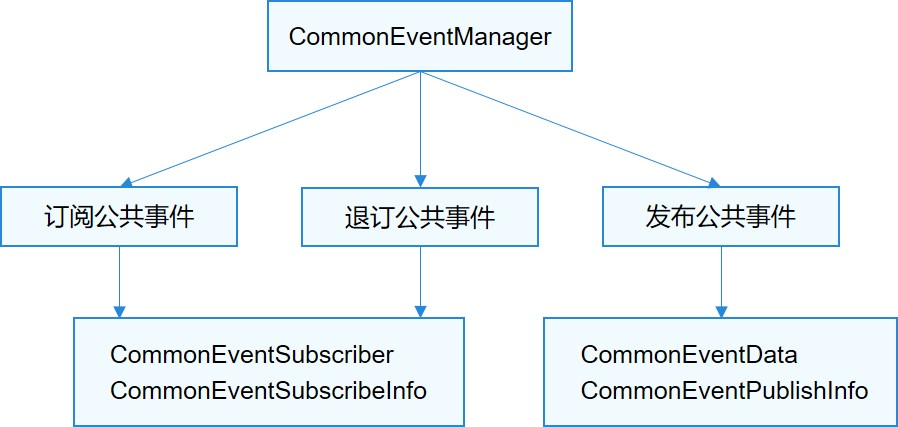
公共事件与通知开发概述 HarmonyOS通过CES(Common Event Service,公共事件服务)为应用程序提供订阅、发布、退订公共事件的能力,通过ANS(Advanced Notification Service,即通知增强服务)系统服务来为应用程序提供发布通知的能力。 公共事件可分为系统公共事件和自定义公共事件。 系统公共事件:系统将收集到的事件信息,根据系统策略发送给订阅该事件的用户程序。例如:用户可感知亮灭屏事件,系统关键服务发布的系统事件(例如:USB插拔,网络连接,系统升级等)。 自定义公共事件:应用自定义一些公共事件用来处理业务逻辑。 通知提供应用的即时消息或通信消息,用户可以直接删除或点击通知触发进一步的操作。 IntentAgent封装了一个指定行为的Intent,可以通过IntentAgent启动Ability和发布公共事件。 应用如果需要接收公共事件,需要订阅相应的事件。 公共事件开发 接口说明 公共事件相关基础类包含CommonEventData、CommonEventPublishInfo、CommonEventSubscribeInfo、CommonEventSubscriber和CommonEventManager。基础类之间的关系如下图所示: 图1 公共事件基础类关系图 CommonEventData CommonEventData封装公共事件相关信息。用于在发布、分发和接收时处理数据。在构造CommonEventData对象时,相关参数需要注意以下事项: code为有序公共事件的结果码,data为有序公共事件的结果数据,仅用于有序公共事件场景。 intent不允许为空,否则发布公共事件失败。 CommonEventPublishInfo CommonEventPublishInfo封装公共事件发布相关属性、限制等信息,包括公共事件类型(有序或粘性)、接收者权限等。 有序公共事件:主要场景是多个订阅者有依赖关系或者对处理顺序有要求,例如:高优先级订阅者可修改公共事件内容或处理结果,包括终止公共事件处理;或者低优先级订阅者依赖高优先级的处理结果等。 粘性公共事件:指公共事件的订阅动作是在公共事件发布之后进行,订阅者也能收到的公共事件类型。主要场景是由公共事件服务记录某些系统状态,如蓝牙、WLAN、充电等事件和状态。 CommonEventSubscribeInfo CommonEventSubscribeInfo封装公共事件订阅相关信息,比如优先级、线程模式、事件范围等。 线程模式(ThreadMode):设置订阅者的回调方法执行的线程模式。ThreadMode有HANDLER,POST,ASYNC, BACKGROUND四种模式,目前只支持HANDLER模式。 HANDLER:在Ability的主线程上执行。 POST:在事件分发线程执行。 ASYNC:在一个新创建的异步线程执行。 BACKGROUND:在后台线程执行。 CommonEventSubscriber CommonEventSubscriber封装公共事件订阅者及相关参数。 CommonEventSubscriber.AsyncCommonEventResult类处理有序公共事件异步执行。 目前只能通过调用CommonEventManagersubscribeCommonEvent()进行订阅。 CommonEventManager CommonEventManager是为应用提供订阅、退订和发布公共事件的静态接口类。 Demo实例程序 效果演示 HarmonyOS 公共事件Demo演示 发布公共事件 四种公共事件:无序的公共事件、带权限的公共事件、有序的公共事件、粘性的公共事件。 发布无序的公共事件:构造CommonEventData对象,设置Intent,通过构造operation对象把需要发布的公共事件信息传入intent对象。然后调用 CommonEventManager.publishCommonEvent(CommonEventData) 接口发布公共事件。 public void publishDisorderedEvent() { Intent intent = new Intent(); Operation operation = new Intent.OperationBuilder().withAction(event).build(); intent.setOperation(operation); CommonEventData eventData = new CommonEventData(intent); try { CommonEventManager.publishCommonEvent(eventData); showTips(context, "Publish succeeded"); } catch (RemoteException e) { HiLog.error(LABEL_LOG, "%{public}s", "publishDisorderedEvent remoteException."); } } 发布携带权限的公共事件:构造CommonEventPublishInfo对象,设置订阅者的权限。 在config.json中申请所需的权限 "reqPermissions": [ { "name": "ohos.samples.permission", "reason": "get right", "usedScene": { "ability": [ ".MainAbilitySlice" ], "when": "inuse" } } ] 发布带权限的公共事件示例代码如下 public void publishPermissionEvent() { Intent intent = new Intent(); Operation operation = new Intent.OperationBuilder().withAction(event).build(); intent.setOperation(operation); CommonEventData eventData = new CommonEventData(intent); CommonEventPublishInfo publishInfo = new CommonEventPublishInfo(); String[] permissions = {"ohos.sample.permission"}; publishInfo.setSubscriberPermissions(permissions); try { CommonEventManager.publishCommonEvent(eventData, publishInfo); showTips(context, "Publish succeeded"); } catch (RemoteException e) { HiLog.error(LABEL_LOG, "%{public}s", "publishPermissionEvent remoteException."); } } 发布有序的公共事件:构造CommonEventPublishInfo对象,通过setOrdered(true)指定公共事件属性为有序公共事件,也可以指定一个最后的公共事件接收者。 public void publishOrderlyEvent() { MatchingSkills skills = new MatchingSkills(); Intent intent = new Intent(); Operation operation = new Intent.OperationBuilder().withAction(event).build(); intent.setOperation(operation); CommonEventData eventData = new CommonEventData(intent); skills.addEvent(event); CommonEventPublishInfo publishInfo = new CommonEventPublishInfo(); publishInfo.setOrdered(true); try { CommonEventManager.publishCommonEvent(eventData, publishInfo); showTips(context, "Publish succeeded"); } catch (RemoteException e) { HiLog.error(LABEL_LOG, "%{public}s", "publishOrderlyEvent remoteException."); } } 发布粘性公共事件:构造CommonEventPublishInfo对象,通过setSticky(true)指定公共事件属性为粘性公共事件。 发布者首先在config.json中申请发布粘性公共事件所需的权限 "reqPermissions": [ { "name": "ohos.permission.COMMONEVENT_STICKY", "reason": "get right", "usedScene": { "ability": [ ".MainAbilitySlice" ], "when": "inuse" } } ] 发布粘性公共事件 public void publishStickyEvent() { Intent intent = new Intent(); Operation operation = new Intent.OperationBuilder().withAction(event).build(); intent.setOperation(operation); CommonEventData eventData = new CommonEventData(intent); CommonEventPublishInfo publishInfo = new CommonEventPublishInfo(); publishInfo.setSticky(true); try { CommonEventManager.publishCommonEvent(eventData, publishInfo); showTips(context, "Publish succeeded"); } catch (RemoteException e) { HiLog.error(LABEL_LOG, "%{public}s", "publishStickyEvent remoteException."); } } 订阅公共事件 1、创建CommonEventSubscriber派生类,在onReceiveEvent()回调函数中处理公共事件。 class TestCommonEventSubscriber extends CommonEventSubscriber { TestCommonEventSubscriber(CommonEventSubscribeInfo info) { super(info); } @Override public void onReceiveEvent(CommonEventData commonEventData) { } } 2、构造MyCommonEventSubscriber对象,调用CommonEventManager.subscribeCommonEvent()接口进行订阅。 String event = "测试"; MatchingSkills matchingSkills = new MatchingSkills(); matchingSkills.addEvent(event); // 自定义事件 CommonEventSubscribeInfo subscribeInfo = new CommonEventSubscribeInfo(matchingSkills); TestCommonEventSubscribersubscriber = new TestCommonEventSubscriber(subscribeInfo); try { CommonEventManager.subscribeCommonEvent(subscriber); } catch (RemoteException e) { HiLog.error(LABEL, "Exception occurred during subscribeCommonEvent invocation."); } 如果订阅的公共事件是有序的,可以调用setPriority()指定优先级。 String event = "测试"; MatchingSkills matchingSkills = new MatchingSkills(); matchingSkills.addEvent(event); // 自定义事件 CommonEventSubscribeInfo subscribeInfo = new CommonEventSubscribeInfo(matchingSkills); subscribeInfo.setPriority(100); // 设置优先级,优先级取值范围[-1000,1000],值默认为0。 TestCommonEventSubscribersubscriber subscriber = new TestCommonEventSubscribersubscriber (subscribeInfo); try { CommonEventManager.subscribeCommonEvent(subscriber); } catch (RemoteException e) { HiLog.error(LABEL, "Exception occurred during subscribeCommonEvent invocation."); } 3、针对在onReceiveEvent中不能执行耗时操作的限制,可以使用CommonEventSubscriber的goAsyncCommonEvent()来实现异步操作,函数返回后仍保持该公共事件活跃,且执行完成后必须调用AsyncCommonEventResult .finishCommonEvent()来结束。 EventRunner runner = EventRunner.create(); // EventRunner创建新线程,将耗时的操作放到新的线程上执行 MyEventHandler myHandler = new MyEventHandler(runner); // MyEventHandler为EventHandler的派生类,在不同线程间分发和处理事件和Runnable任务 @Override public void onReceiveEvent(CommonEventData commonEventData){ final AsyncCommonEventResult result = goAsyncCommonEvent(); Runnable task = new Runnable() { @Override public void run() { ........ // 待执行的操作,由开发者定义 result.finishCommonEvent(); // 调用finish结束异步操作 } }; myHandler.postTask(task); } 退订公共事件 在Ability的onStop()中调用CommonEventManager.unsubscribeCommonEvent()方法来退订公共事件。调用后,之前订阅的所有公共事件均被退订。 public void unSubscribeEvent() { if (subscriber == null) { HiLog.info(LABEL_LOG, "%{public}s", "CommonEvent onUnsubscribe commonEventSubscriber is null"); return; } try { CommonEventManager.unsubscribeCommonEvent(subscriber); showTips(context, "UnSubscribe succeeded"); } catch (RemoteException e) { HiLog.error(LABEL_LOG, "%{public}s", "unsubscribeEvent remoteException."); } destroy(); } private void destroy() { subscriber = null; eventListener = null; unSubscribe = true; }

优秀的个人博客,低调大师

Greenplum6 数据库数据库学习_基本语法

Greenplum6 数据库分布 1. hash分布 2. 随机分布 3. 复制分布 基本语法介绍 1. 获取语法 [gpadmin@mdw logs]$ psql psql (9.4.24) Type "help" for help. postgres=# \h Available help: ABORT ALTER TEXT SEARCH TEMPLATE CREATE RESOURCE GROUP DROP FUNCTION LOAD ALTER AGGREGATE ALTER TRIGGER CREATE RESOURCE QUEUE DROP GROUP LOCK ALTER COLLATION ALTER TYPE CREATE ROLE DROP INDEX MOVE ALTER CONVERSION ALTER USER CREATE RULE DROP LANGUAGE NOTIFY ALTER DATABASE ALTER USER MAPPING CREATE SCHEMA DROP MATERIALIZED VIEW PREPARE ALTER DEFAULT PRIVILEGES ALTER VIEW CREATE SEQUENCE DROP OPERATOR PREPARE TRANSACTION ALTER DOMAIN ANALYZE CREATE SERVER DROP OPERATOR CLASS REASSIGN OWNED ALTER EVENT TRIGGER BEGIN CREATE TABLE DROP OPERATOR FAMILY REFRESH MATERIALIZED VIEW ALTER EXTENSION CHECKPOINT CREATE TABLE AS DROP OWNED REINDEX ALTER EXTERNAL TABLE CLOSE CREATE TABLESPACE DROP PROTOCOL RELEASE SAVEPOINT ALTER FOREIGN DATA WRAPPER CLUSTER CREATE TEXT SEARCH CONFIGURATION DROP RESOURCE GROUP RESET ALTER FOREIGN TABLE COMMENT CREATE TEXT SEARCH DICTIONARY DROP RESOURCE QUEUE REVOKE ALTER FUNCTION COMMIT CREATE TEXT SEARCH PARSER DROP ROLE ROLLBACK ALTER GROUP COMMIT PREPARED CREATE TEXT SEARCH TEMPLATE DROP RULE ROLLBACK PREPARED ALTER INDEX COPY CREATE TRIGGER DROP SCHEMA ROLLBACK TO SAVEPOINT ALTER LANGUAGE CREATE AGGREGATE CREATE TYPE DROP SEQUENCE SAVEPOINT ALTER LARGE OBJECT CREATE CAST CREATE USER DROP SERVER SECURITY LABEL ALTER MATERIALIZED VIEW CREATE COLLATION CREATE USER MAPPING DROP TABLE SELECT ALTER OPERATOR CREATE CONVERSION CREATE VIEW DROP TABLESPACE SELECT INTO ALTER OPERATOR CLASS CREATE DATABASE DEALLOCATE DROP TEXT SEARCH CONFIGURATION SET ALTER OPERATOR FAMILY CREATE DOMAIN DECLARE DROP TEXT SEARCH DICTIONARY SET CONSTRAINTS ALTER PROTOCOL CREATE EVENT TRIGGER DELETE DROP TEXT SEARCH PARSER SET ROLE ALTER RESOURCE GROUP CREATE EXTENSION DISCARD DROP TEXT SEARCH TEMPLATE SET SESSION AUTHORIZATION ALTER RESOURCE QUEUE CREATE EXTERNAL TABLE DO DROP TRIGGER SET TRANSACTION ALTER ROLE CREATE FOREIGN DATA WRAPPER DROP AGGREGATE DROP TYPE SHOW ALTER RULE CREATE FOREIGN TABLE DROP CAST DROP USER START TRANSACTION ALTER SCHEMA CREATE FUNCTION DROP COLLATION DROP USER MAPPING TABLE ALTER SEQUENCE CREATE GROUP DROP CONVERSION DROP VIEW TRUNCATE ALTER SERVER CREATE INDEX DROP DATABASE END UNLISTEN ALTER SYSTEM CREATE LANGUAGE DROP DOMAIN EXECUTE UPDATE ALTER TABLE CREATE MATERIALIZED VIEW DROP EVENT TRIGGER EXPLAIN VACUUM ALTER TABLESPACE CREATE OPERATOR DROP EXTENSION FETCH VALUES ALTER TEXT SEARCH CONFIGURATION CREATE OPERATOR CLASS DROP EXTERNAL TABLE GRANT WITH ALTER TEXT SEARCH DICTIONARY CREATE OPERATOR FAMILY DROP FOREIGN DATA WRAPPER INSERT ALTER TEXT SEARCH PARSER CREATE PROTOCOL DROP FOREIGN TABLE LISTEN postgres=# 2. 创建数据库 [gpadmin@mdw logs]$ createdb testDB -E utf-8 [gpadmin@mdw logs]$ psql -h 10.10.10.101 -p 5432 -d testDB -U gpadmin psql (9.4.24) Type "help" for help. testDB=# \q [gpadmin@mdw logs]$ export PGDATABASE=testDB [gpadmin@mdw logs]$ psql psql (9.4.24) Type "help" for help. testDB=# 3. 建表语句 - GreenPlum中创建表需要指定表的分布键。 - 如果表需要用某个字段分区,可以通过partition by 将表建成分区表。 - 可以使用like操作创建与like的表一样结构的表,功能类似create table t1 as select * from t2 limit 0。 - 可以使用inherits实现表的继承,具体实现参考postgresql文档。 --语法查询 \h create table --创建表 create table test001(id int,name varchar(128)); --id 为分布键 create table test002(id int,name varchar(128)) distributed by (id); --同上 testDB=# create table test001(id int,name varchar(128)); NOTICE: Table doesn't have 'DISTRIBUTED BY' clause -- Using column named 'id' as the Greenplum Database data distribution key for this table. HINT: The 'DISTRIBUTED BY' clause determines the distribution of data. Make sure column(s) chosen are the optimal data distribution key to minimize skew. CREATE TABLE testDB=# create table test002(id int,name varchar(128)) distributed by (id); CREATE TABLE testDB=# create table test003(id int,name varchar(128)) distributed by (id,name) --多个分布键 testDB=# create table test003(id int,name varchar(128)) distributed by (id,name); CREATE TABLE create table test004(id int,name varchar(128)) distributed randomly; --随机分布键 testDB=# create table test004(id int,name varchar(128)) distributed randomly; CREATE TABLE create table test005(id int primary key ,name varchar(128)); create table test006(id int unique ,name varchar(128)); testDB=# create table test005(id int primary key ,name varchar(128)); CREATE TABLE testDB=# create table test006(id int unique ,name varchar(128)); CREATE TABLE testDB=# 采用随机分布策略的表默认将主键,或者唯一键作为分布键,因为每个Segment都是一个单一的数据库,单个数据库可以确保唯一性,多个数据库节点就无法保证全局的跨库唯一性,故只能按照唯一键分布,同一个值的数据都在一个节点上,以此来保证唯一性。 --如果指定的分布键与主键盘不一样,那么分布键会被更改为主键。在greenplum6 中这句话貌似显示不兼容,如下: create table test007(id int unique,name varchar(128)) distributed by (id,name); testDB=# create table test007(id int unique,name varchar(128)) distributed by (id,name); ERROR: UNIQUE constraint and DISTRIBUTED BY definitions are incompatible HINT: When there is both a UNIQUE constraint and a DISTRIBUTED BY clause, the DISTRIBUTED BY clause must be a subset of the UNIQUE constraint. testDB=# 按照它的要求进行修改,我们distribute by 修改成id testDB=# create table test007(id int unique,name varchar(128)) distributed by (id); CREATE TABLE testDB=# ---创建一模一样的 表 create table test_like (like test001); --使用like 创建表的时候,只是表结构会跟原表一摸一样,表的特殊属性并不会一样,例如压缩,只增(appendonly)等属性,如果不指定分布键,默认分布键与原表一致。 testDB=# create table test_like (like test001); NOTICE: table doesn't have 'DISTRIBUTED BY' clause, defaulting to distribution columns from LIKE table CREATE TABLE testDB=# create table as 和select into 有一样的功能。都可以根据直接执行select 的结果创建一个新的表。创建一个表的时候,如果默认不指定分布键,那么Greenplum根据执行select 得到的结果集来选择,不用再次重分布数据的字段作为表的分布键。 testDB=# create table test2 as select * from test002; NOTICE: Table doesn't have 'DISTRIBUTED BY' clause. Creating a NULL policy entry. SELECT 4 testDB=# create table test1 as select * from test001; NOTICE: Table doesn't have 'DISTRIBUTED BY' clause. Creating a NULL policy entry. SELECT 4 手工加入distributed by,指定分布键,这样就会根据指定分布键再建表。 testDB=# create table test02 as select * from test002 distributed by(id); SELECT 4 select into 不能指定分布键,只能使用默认的分布键 testDB=# select * into test01 from test001; NOTICE: Table doesn't have 'DISTRIBUTED BY' clause. Creating a NULL policy entry. SELECT 4 4. 插入语句 插入语句 执行insert语句注意分布键不要为空,否则分布键默认变成null',数据都被保存到一个节点上会导致分布不均 insert into test001 values (100,'tom'),(101,'lily'),(102,'jack'),(103,'linda'); insert into test002 values (200,'tom'),(101,'lily'),(202,'jack'),(103,'linda'); 5. 更新语句 不能批量对分布键执行update,因为分布键执行update需要将数据重分布. testDB=# update test002 set id=203 where id=202; UPDATE 1 testDB=# 6. 删除语句delete--truncate 在Greenplum 3.x 的版本中,如果delete 操作涉及子查询,子查询的结果还涉及到数据重分布,这样的删除语句会报错,Greenplum 4.x以上,支持该操作。 testDB=# delete from test001 where name in (select name from test002); DELETE 4 testDB=# 如果对整张表执行delete会比较慢,建议使用truncate. truncate执行truncate直接删除表的物理文件,然后创建新的数据文件。如果有sql正在操作这张表,那么truncate会被锁住,直到表上面的所有锁会被释放。 7. 查询语句 testDB=# select * from test001 x,test002 y where x.id=y.id; id | name | id | name -----+-------+-----+------- 103 | linda | 103 | linda 101 | lily | 101 | lily (2 rows) 8. 执行计划 testDB=# explain select * from test001 x,test002 y where x.id=y.id; QUERY PLAN ------------------------------------------------------------------------------- Gather Motion 6:1 (slice1; segments: 6) (cost=0.00..862.00 rows=5 width=18) -> Hash Join (cost=0.00..862.00 rows=1 width=18) Hash Cond: (test001.id = test002.id) -> Seq Scan on test001 (cost=0.00..431.00 rows=1 width=9) -> Hash (cost=431.00..431.00 rows=1 width=9) -> Seq Scan on test002 (cost=0.00..431.00 rows=1 width=9) Optimizer: Pivotal Optimizer (GPORCA) (7 rows) testDB=# explain select * from test001 x,test002 y where x.id=y.id; QUERY PLAN ------------------------------------------------------------------------------- Gather Motion 6:1 (slice1; segments: 6) (cost=0.00..862.00 rows=5 width=18) -> Hash Join (cost=0.00..862.00 rows=1 width=18) Hash Cond: (test001.id = test002.id) -> Seq Scan on test001 (cost=0.00..431.00 rows=1 width=9) -> Hash (cost=431.00..431.00 rows=1 width=9) -> Seq Scan on test002 (cost=0.00..431.00 rows=1 width=9) Optimizer: Pivotal Optimizer (GPORCA) (7 rows) 第一步: 数据库先顺序扫描test002表,扫描大概有431单位的消耗,有1行数据,平均长度为9个字节。 其中1是一个估算值,是一个segment的数据量,如果数据分布均匀,大概是总数据量除以segment的个数。 由于这个gp集群有6个segment节点,因此可以推算test002大概有6条数据。 第二步: 扫描test002表,并计算hash值,将其保存在内存中。 第三步: 顺序扫描test001表 第四步: 在扫描test001表的过程中,与test002表进行hash后的结果关联(hash join),关联条件是(test001.id = test002.id) 第五步:将数据汇总到master上,master 将数据结果进行汇总并展现。 常用函数 字符串函数 testDB=# select 'green'||'plum' as dbname; dbname ----------- greenplum (1 row) testDB=# select split_part(col,'|',1) ,split_part(col,'|',2) from (values('hello|world!'),('greenplum|database')) t(col); --values 特有语法,可以堪称一张表,有两行数据,表明为t,字段名为col split_part | split_part ------------+------------ hello | world! greenplum | database (2 rows) values('hello|world!'),('greenplum|database'); testDB=# values('hello|world!'),('greenplum|database'); column1 -------------------- hello|world! greenplum|database (2 rows) testDB=# select substr('hello world!',2,3); select position('world' in 'hello world'); testDB=# select substr('hello world!',2,3); substr -------- ell (1 row) testDB=# select position('world' in 'hello world'); position ---------- 7 (1 row) 时间函数 [root@mdw ~]# su - gpadmin Last login: Wed Apr 14 14:45:20 CST 2021 on pts/0 ^[[A^[[A[gpadmin@export PGDATABASE=testDB [gpadmin@mdw ~]$ psql -h 10.10.10.101 -p 5432 -d testDB -U gpadmin psql (9.4.24) Type "help" for help. testDB=# select '2021-03-23 1:0:0'::timestamp + interval '10 days 2 hours 10 seconds'; ?column? --------------------- 2021-04-02 03:00:10 (1 row) testDB=# select now(),current_date,current_time,current_timestamp; now | date | timetz | now -------------------------------+------------+--------------------+------------------------------- 2021-04-14 15:48:52.166167+08 | 2021-04-14 | 15:48:52.166167+08 | 2021-04-14 15:48:52.166167+08 (1 row) 当月第一天 testDB=# select date_trunc('months',now())::date; date_trunc ------------ 2021-04-01 (1 row) 获取当前时间距离2021-01-3 10:10:10 过了多少秒 testDB=# select extract(EPOCH from now() -'2021-01-3 10:10:10'); date_part --------------- 8746923.35616 (1 row) 时间域有重叠返回t,不重叠f testDB=# select (DATE '2020-02-16',DATE '2020-12-21') OVERLAPS (DATE '2020-10-30',DATE '2021-1-15'); overlaps ---------- t (1 row) testDB=# select (DATE '2020-02-16',INTERVAL '100 days') OVERLAPS (DATE '2020-10-30',DATE '2021-1-15'); overlaps ---------- f (1 row) testDB=# 其他常用函数 * 序列号生成函数 testDB=# select * from generate_series(10,20); generate_series ----------------- 10 11 12 13 14 15 16 17 18 19 20 (11 rows) testDB=# create table test_gen as select generate_series(1,10000) as id ,'hello'::text as name distributed by (id); SELECT 10000 testDB=# select sum(num) from generate_series(1,2000,2) num; sum --------- 1000000 (1 row) * 字符串列转行函数 testDB=# create table test_string (id integer,str varchar(50)) distributed by (id); CREATE TABLE testDB=# insert into test_string values(1,'hello'),(1,'world'),(2,'greenplum'),(2,'database'),(2,'system'); INSERT 0 5 testDB=# select * from test_string; id | str ----+----------- 2 | greenplum 2 | database 2 | system 1 | hello 1 | world (5 rows) testDB=# select id,string_agg(str,'|' order by str) from test_string group by id; id | string_agg ----+--------------------------- 2 | database|greenplum|system 1 | hello|world (2 rows) testDB=# select id,string_agg(str,'|') from test_string group by id; id | string_agg ----+--------------------------- 2 | greenplum|database|system 1 | hello|world (2 rows) * 字符串行转列 testDB=# create table test_string2 as select id,string_agg(str,'|') as str from test_string group by id distributed by (id); SELECT 2 testDB=# select * from test_string2 ; id | str ----+--------------------------- 2 | greenplum|database|system 1 | hello|world (2 rows) testDB=# select id,regexp_split_to_table(str,E'\\|') str from test_string2; id | str ----+----------- 2 | greenplum 2 | database 2 | system 1 | hello 1 | world (5 rows) * hash函数 testDB=# select md5('helloworld'); md5 ---------------------------------- fc5e038d38a57032085441e7fe7010b0 (1 row) testDB=# select hashbpchar('helloworld'); hashbpchar ------------ 1836618988 (1 row) testDB=# ## 参考 ``` https://www.cnblogs.com/kingle-study/p/10550785.html 《GreenPlum企业应用实战》 ```

资源下载

更多资源
Mario

Mario

马里奥是站在游戏界顶峰的超人气多面角色。马里奥靠吃蘑菇成长,特征是大鼻子、头戴帽子、身穿背带裤,还留着胡子。与他的双胞胎兄弟路易基一起,长年担任任天堂的招牌角色。

Spring

Spring

Spring框架(Spring Framework)是由Rod Johnson于2002年提出的开源Java企业级应用框架,旨在通过使用JavaBean替代传统EJB实现方式降低企业级编程开发的复杂性。该框架基于简单性、可测试性和松耦合性设计理念,提供核心容器、应用上下文、数据访问集成等模块,支持整合Hibernate、Struts等第三方框架,其适用范围不仅限于服务器端开发,绝大多数Java应用均可从中受益。

Rocky Linux

Rocky Linux

Rocky Linux(中文名:洛基)是由Gregory Kurtzer于2020年12月发起的企业级Linux发行版,作为CentOS稳定版停止维护后与RHEL(Red Hat Enterprise Linux)完全兼容的开源替代方案,由社区拥有并管理,支持x86_64、aarch64等架构。其通过重新编译RHEL源代码提供长期稳定性,采用模块化包装和SELinux安全架构,默认包含GNOME桌面环境及XFS文件系统,支持十年生命周期更新。

Sublime Text

Sublime Text

Sublime Text具有漂亮的用户界面和强大的功能,例如代码缩略图,Python的插件,代码段等。还可自定义键绑定,菜单和工具栏。Sublime Text 的主要功能包括:拼写检查,书签,完整的 Python API , Goto 功能,即时项目切换,多选择,多窗口等等。Sublime Text 是一个跨平台的编辑器,同时支持Windows、Linux、Mac OS X等操作系统。

用户登录
用户注册