首页 文章 精选 留言 我的

精选列表

搜索[Python],共10000篇文章
优秀的个人博客,低调大师

Python抓取分析“创造101 ”菊姐微博

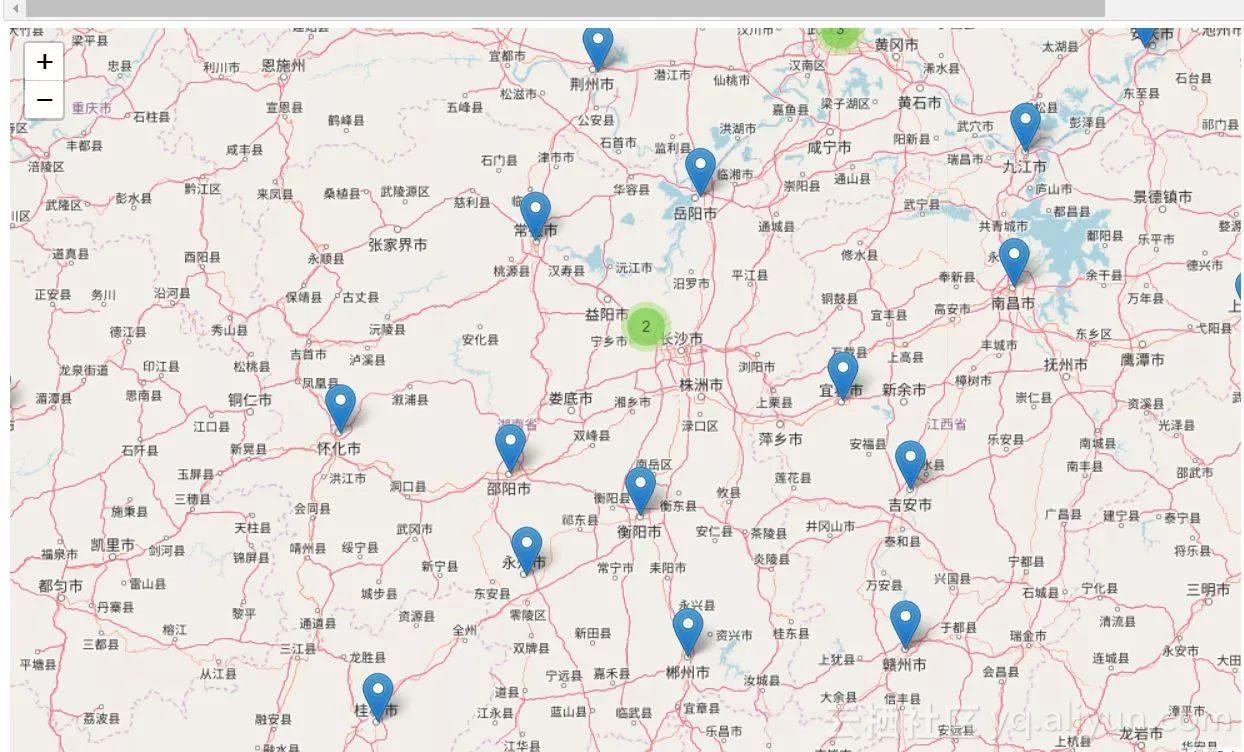
前一段时间,创造101很火,这个火是可以理解的,毕竟中国首部女团节目。但是还有一个人不知道为啥突然也火了,那就是我们的菊姐。关于菊姐为什么火,网上已经有很多发文了,这里就不再赘述了。我们抓取了菊姐的最新微博评论,将评论分词以后制作成如下词云图。 这里的海外指大陆+港澳台以外的其他所有地方。除海外用户以外就北上广的用户最多了,这些地方的互联网用户基数本来就大。 因为北京上海比较特殊,北京上海的一些区相当于北京上海这两个省下面的市区,所以你会看到一些北京上海的区域也进入了榜单,比如说朝阳群众。 但是大家都很爱学习,都想要代码学习学习,所以今天就专门来一篇讲讲代码。 在开始具体的代码讲解之前,我需要说明一下关于菊粉人数中摩羯座人数最多这个结论的一些争议,有人评论说微博用户如果不设置年龄的话,默认就是1月1,也就是摩羯座,所以摩羯座人数比较多。先

优秀的个人博客,低调大师

Python爬虫——你们要的王者荣耀高清图

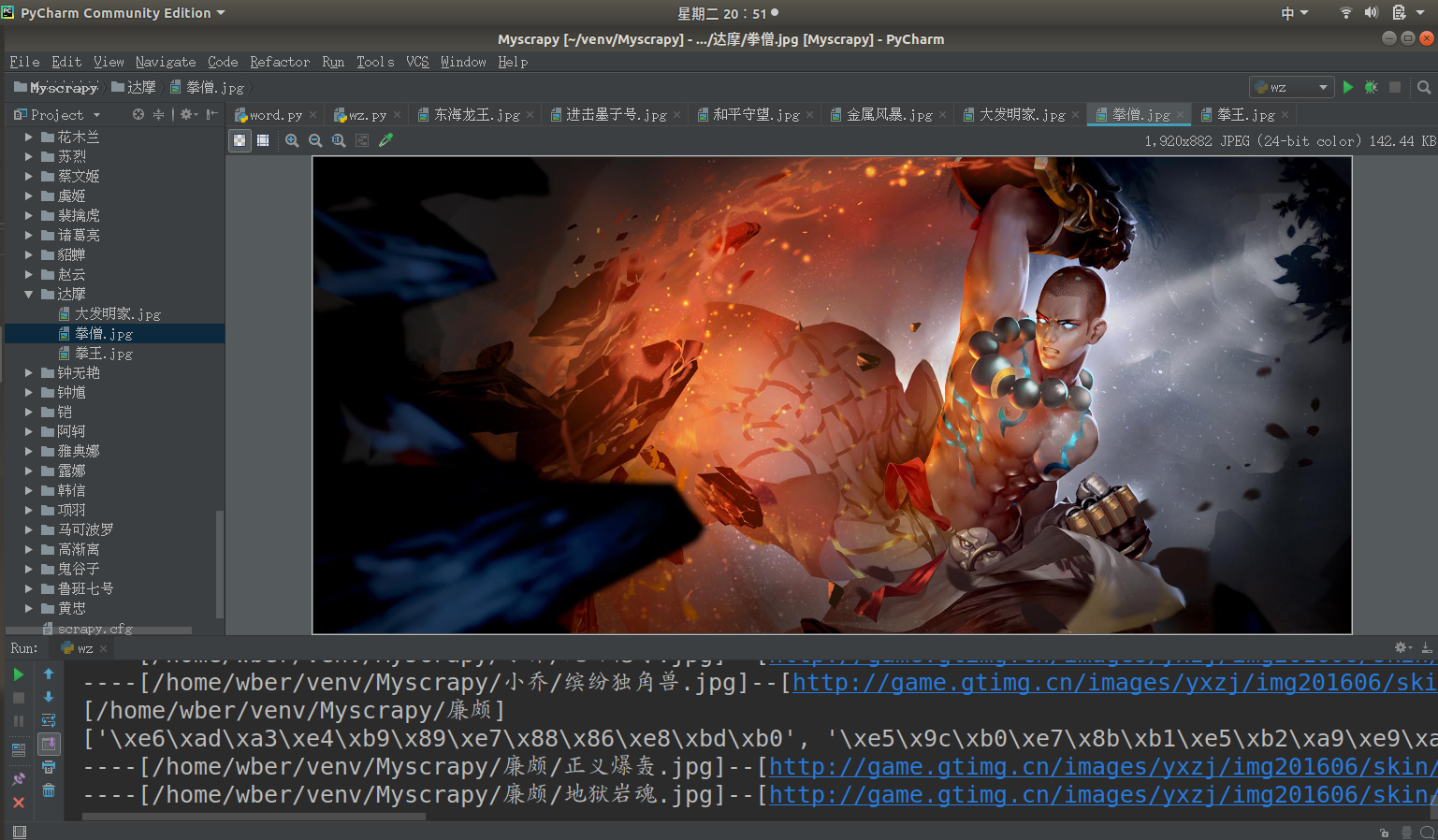
曾经144区的王者 学了计算机后 头发逐渐从李白变成了达摩 秀发有何用,变秃亦变强 (emmm徒弟说李白比达摩强,变秃不一定变强) 前言 前几天开了农药的安装包,发现农药是.Net实现的游戏 虽然游戏用的语言和排位一样让人恼火 但感觉图片美工还是可以的 比如: 不知...不知道你们是不是和我一样喜欢 玩阴阳师呢,我可是Ssr只有两只狗子的非酋呢 正文 在http://pvp.qq.com/web201605/herolist.shtml可以看到全英雄列表。 按F12查看元素 看到下面这一堆<li></li>标签了吗 里面的href就是每个英雄的详情地址 图片就在这个链接中 拿到selector body > div.wrapper > div > div > div.herolist-box > div.herolist-content > ul > li > a 英雄列表获取源码: 1 def getHeroList(): 2 '''取所以英雄存入list中''' 3 hero = {} 4 res = requests.get(mainurl) 5 sp = BeautifulSoup(res.content, "html.parser") 6 lists = sp.select('body > div.wrapper > div > div > div.herolist-box > div.herolist-content > ul > li') 7 for li in lists: 8 oj = li.select('a')[0]; 9 hero['url'] = oj['href'] 10 hero['name'] = oj.text 11 # 正则表达式取ename编号 12 ename = re.findall('herodetail/(\d+)\.shtml', oj['href'])[0] 13 hero['ename'] = ename 14 herolist.append(hero) 15 hero = {} 16 return herolist 进入英雄详情之后 可以发现,要保存图片的地址也在<li></li>中 他的selector是: body > div.wrapper > div.zk-con1.zk-con > div > div > div.pic-pf > ul > li > i > img 只需要将这个图片保存下来就可以了 代码: 1 def saveImg(filepath, imgUrl): 2 '''下载图片并保存''' 3 r = requests.get(imgUrl, stream=True) 4 with open(filepath, 'wb') as f: 5 for chunk in r.iter_content(chunk_size=1024): 6 if chunk: 7 f.write(chunk) 8 f.flush() 9 f.close() 全部代码: 1 # -*- coding: utf-8 -*- 2 3 import os 4 import re 5 import requests 6 from bs4 import BeautifulSoup 7 8 import sys 9 reload(sys) 10 sys.setdefaultencoding('utf-8') 11 12 baseurl = 'http://pvp.qq.com/web201605' 13 mainurl = 'http://pvp.qq.com/web201605/herolist.shtml' 14 herolist = [] 15 16 17 def getHeroList(): 18 '''取所以英雄存入list中''' 19 hero = {} 20 res = requests.get(mainurl) 21 sp = BeautifulSoup(res.content, "html.parser") 22 lists = sp.select('body > div.wrapper > div > div > div.herolist-box > div.herolist-content > ul > li') 23 for li in lists: 24 oj = li.select('a')[0]; 25 hero['url'] = oj['href'] 26 hero['name'] = oj.text 27 # 正则表达式取ename编号 28 ename = re.findall('herodetail/(\d+)\.shtml', oj['href'])[0] 29 hero['ename'] = ename 30 herolist.append(hero) 31 hero = {} 32 return herolist 33 34 35 def saveImg(filepath, imgUrl): 36 '''下载图片并保存''' 37 r = requests.get(imgUrl, stream=True) 38 with open(filepath, 'wb') as f: 39 for chunk in r.iter_content(chunk_size=1024): 40 if chunk: 41 f.write(chunk) 42 f.flush() 43 f.close() 44 45 46 if __name__ == '__main__': 47 hlist = getHeroList() 48 for hero in herolist: 49 herodir = os.path.join(os.getcwd(), hero['name']) 50 heropage = baseurl + '/' + hero['url'] 51 print('[%s]' % (herodir)) 52 res = requests.get(heropage) 53 sop = BeautifulSoup(res.content, "html.parser") 54 li = sop.select('body > div.wrapper > div.zk-con1.zk-con > div > div > div.pic-pf > ul ')[0]['data-imgname'] 55 li = str(li).split('|') 56 print(li) 57 # 遍历所有皮肤 58 for i in range(len(li)): 59 imgurl = 'http://game.gtimg.cn/images/yxzj/img201606/skin/hero-info/' \ 60 + hero['ename'] + '/' + hero['ename'] + '-bigskin-' + str(i + 1) + '.jpg' 61 imgname = os.path.join(herodir, li[i] + ".jpg") 62 print('----[%s]--[%s]---' % (imgname, imgurl)) 63 # 创建英雄目录 64 if os.path.exists(herodir) == False: 65 os.mkdir(herodir) 66 saveImg(imgname, imgurl) 图片生成在同级目录

优秀的个人博客,低调大师

Python爬虫(二)——豆瓣图书决策树构建

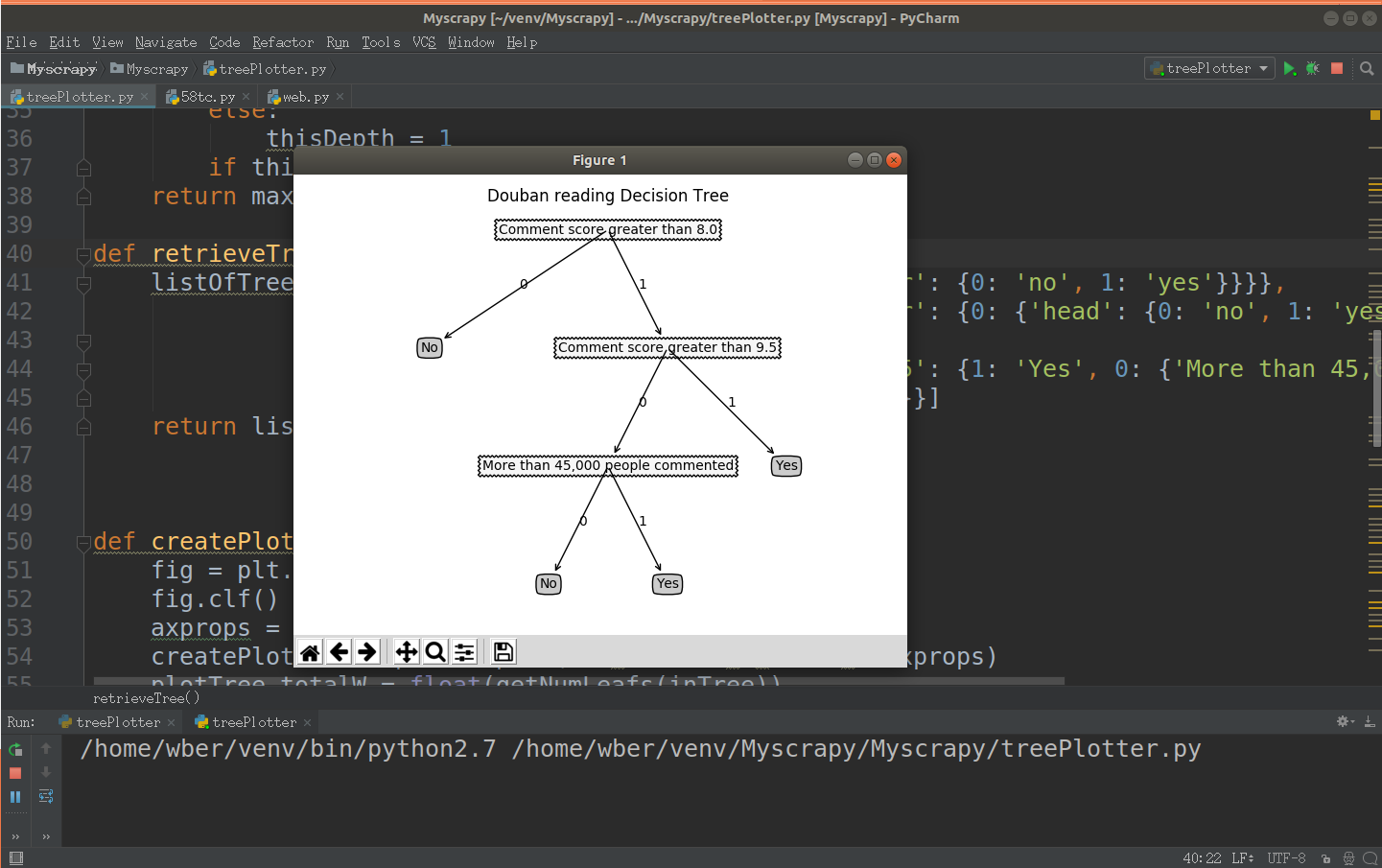
前文参考:https://www.cnblogs.com/LexMoon/p/douban1.html Matplotlib绘制决策树代码: 1 # coding=utf-8 2 import matplotlib.pyplot as plt 3 4 decisionNode = dict(boxstyle='sawtooth', fc='10') 5 leafNode = dict(boxstyle='round4',fc='0.8') 6 arrow_args = dict(arrowstyle='<-') 7 8 9 10 def plotNode(nodeTxt, centerPt, parentPt, nodeType): 11 createPlot.ax1.annotate(nodeTxt, xy=parentPt, xycoords='axes fraction',\ 12 xytext=centerPt,textcoords='axes fraction',\ 13 va='center', ha='center',bbox=nodeType,arrowprops\ 14 =arrow_args) 15 16 17 def getNumLeafs(myTree): 18 numLeafs = 0 19 firstStr = list(myTree.keys())[0] 20 secondDict = myTree[firstStr] 21 for key in secondDict: 22 if(type(secondDict[key]).__name__ == 'dict'): 23 numLeafs += getNumLeafs(secondDict[key]) 24 else: 25 numLeafs += 1 26 return numLeafs 27 28 def getTreeDepth(myTree): 29 maxDepth = 0 30 firstStr = list(myTree.keys())[0] 31 secondDict = myTree[firstStr] 32 for key in secondDict: 33 if(type(secondDict[key]).__name__ == 'dict'): 34 thisDepth = 1+getTreeDepth((secondDict[key])) 35 else: 36 thisDepth = 1 37 if thisDepth > maxDepth: maxDepth = thisDepth 38 return maxDepth 39 40 def retrieveTree(i): 41 #预先设置树的信息 42 listOfTree = [{'no surfacing':{0:'no',1:{'flipper':{0:'no',1:'yes'}}}}, 43 {'no surfacing':{0:'no',1:{'flipper':{0:{'head':{0:'no',1:'yes'}},1:'no'}}}}, 44 {'Comment score greater than 8.0':{0:{'Comment score greater than 9.5':{0:'Yes',1:{'More than 45,000 people commented': { 45 0: 'Yes',1: 'No'}}}},1:'No'}}] 46 return listOfTree[i] 47 48 def createPlot(inTree): 49 fig = plt.figure(1,facecolor='white') 50 fig.clf() 51 axprops = dict(xticks = [], yticks=[]) 52 createPlot.ax1 = plt.subplot(111,frameon = False,**axprops) 53 plotTree.totalW = float(getNumLeafs(inTree)) 54 plotTree.totalD = float(getTreeDepth(inTree)) 55 plotTree.xOff = -0.5/plotTree.totalW;plotTree.yOff = 1.0 56 plotTree(inTree,(0.5,1.0), '') 57 plt.title('Douban reading Decision Tree\n') 58 plt.show() 59 60 def plotMidText(cntrPt, parentPt,txtString): 61 xMid = (parentPt[0]-cntrPt[0])/2.0 + cntrPt[0] 62 yMid = (parentPt[1] - cntrPt[1])/2.0 + cntrPt[1] 63 createPlot.ax1.text(xMid, yMid, txtString) 64 65 def plotTree(myTree, parentPt, nodeTxt): 66 numLeafs = getNumLeafs(myTree) 67 depth = getTreeDepth(myTree) 68 firstStr = list(myTree.keys())[0] 69 cntrPt = (plotTree.xOff+(1.0+float(numLeafs))/2.0/plotTree.totalW,\ 70 plotTree.yOff) 71 plotMidText(cntrPt,parentPt,nodeTxt) 72 plotNode(firstStr,cntrPt,parentPt,decisionNode) 73 secondDict = myTree[firstStr] 74 plotTree.yOff = plotTree.yOff - 1.0/plotTree.totalD 75 for key in secondDict: 76 if type(secondDict[key]).__name__ == 'dict': 77 plotTree(secondDict[key],cntrPt,str(key)) 78 else: 79 plotTree.xOff = plotTree.xOff + 1.0/plotTree.totalW 80 plotNode(secondDict[key],(plotTree.xOff,plotTree.yOff),\ 81 cntrPt,leafNode) 82 plotMidText((plotTree.xOff,plotTree.yOff),cntrPt,str(key)) 83 plotTree.yOff = plotTree.yOff + 1.0/plotTree.totalD 84 85 if __name__ == '__main__': 86 myTree = retrieveTree(2) 87 createPlot(myTree) 运行结果:


资源下载

更多资源
Mario

Mario

马里奥是站在游戏界顶峰的超人气多面角色。马里奥靠吃蘑菇成长,特征是大鼻子、头戴帽子、身穿背带裤,还留着胡子。与他的双胞胎兄弟路易基一起,长年担任任天堂的招牌角色。

Nacos

Nacos

Nacos /nɑ:kəʊs/ 是 Dynamic Naming and Configuration Service 的首字母简称,一个易于构建 AI Agent 应用的动态服务发现、配置管理和AI智能体管理平台。Nacos 致力于帮助您发现、配置和管理微服务及AI智能体应用。Nacos 提供了一组简单易用的特性集,帮助您快速实现动态服务发现、服务配置、服务元数据、流量管理。Nacos 帮助您更敏捷和容易地构建、交付和管理微服务平台。

Rocky Linux

Rocky Linux

Rocky Linux(中文名:洛基)是由Gregory Kurtzer于2020年12月发起的企业级Linux发行版,作为CentOS稳定版停止维护后与RHEL(Red Hat Enterprise Linux)完全兼容的开源替代方案,由社区拥有并管理,支持x86_64、aarch64等架构。其通过重新编译RHEL源代码提供长期稳定性,采用模块化包装和SELinux安全架构,默认包含GNOME桌面环境及XFS文件系统,支持十年生命周期更新。

WebStorm

WebStorm

WebStorm 是jetbrains公司旗下一款JavaScript 开发工具。目前已经被广大中国JS开发者誉为“Web前端开发神器”、“最强大的HTML5编辑器”、“最智能的JavaScript IDE”等。与IntelliJ IDEA同源,继承了IntelliJ IDEA强大的JS部分的功能。

用户登录
用户注册