首页 文章 精选 留言 我的

精选列表

搜索[安装],共10000篇文章
优秀的个人博客,低调大师

Openstack 实战讲解之-----------04-控制节点glance服务安装配置

一、Glance介绍: 1.1 glance主要是由三部分组成: glance-api:接收云系统镜像的创建,删除,读取请求,类似nova-api,通过其他模块(glance-registry及image store)来完成诸如镜像的查找、获取、上传、删除等操作,api监听端口9292。 glance-registry:云系统的镜像注册服务,用于与mysql数据库交互,存储或获取镜像的元数据(metadata);提供镜像元数据相关的REST接口,通过glance-registry,可以向数据库中写入或获取镜像各种数据,glance-registry监听端口9191,glance数据库中有两张表,一张是image表,另一张是image property表。image表保存了镜像格式、大小等信息;image property表则主要保存镜像的定制化信息。 imagestore:是一个存储的接口层,通过这个接口,glance可以获取镜像,image store支持的存储有Amazon的S3、Openstack本身的Swift还有注入ceph,sheepdog,GFS等分布式存储。image store是镜像保存与获取的接口,它仅仅是一个接口层,具体的实现需要外部的存储支持 二、Glance配置 2.1 项目以及端点配置 2.1.1 创建glance镜像服务 1 2 3 4 5 6 7 8 9 10 [root@linux-node1~] #openstackservicecreate--nameglance--description"OpenStackImage"image +-------------+----------------------------------+ |Field|Value| +-------------+----------------------------------+ |description|OpenStackImage| |enabled|True| | id |be8d1f87ce294817acb351f03f5ef4e3| |name|glance| | type |image| +-------------+----------------------------------+ 2.1.2 创建镜像服务API端点,一般需要创建三个(public,internal,admin) 1 2 3 4 5 6 7 8 9 10 11 12 13 14 15 16 17 18 19 20 21 22 23 24 25 26 27 28 29 30 31 32 33 34 35 36 37 38 39 40 41 42 [root@linux-node1~] #openstackendpointcreate--regionRegionOneimagepublichttp://192.168.56.11:9292 +--------------+----------------------------------+ |Field|Value| +--------------+----------------------------------+ |enabled|True| | id |f060541cb88741b79bbd4f3e3e44aa0d| |interface|public| |region|RegionOne| |region_id|RegionOne| |service_id|be8d1f87ce294817acb351f03f5ef4e3| |service_name|glance| |service_type|image| |url|http: //192 .168.56.11:9292| +--------------+----------------------------------+ [root@linux-node1~] #openstackendpointcreate--regionRegionOneimageinternalhttp://192.168.56.11:9292 +--------------+----------------------------------+ |Field|Value| +--------------+----------------------------------+ |enabled|True| | id |dcd57aa6f23e4cc085540a47d399c6cb| |interface|internal| |region|RegionOne| |region_id|RegionOne| |service_id|be8d1f87ce294817acb351f03f5ef4e3| |service_name|glance| |service_type|image| |url|http: //192 .168.56.11:9292| +--------------+----------------------------------+ [root@linux-node1~] #openstackendpointcreate--regionRegionOneimageadminhttp://192.168.56.11:9292 +--------------+----------------------------------+ |Field|Value| +--------------+----------------------------------+ |enabled|True| | id |cfb42dc406cc4a7ba19105c6886b2aa6| |interface|admin| |region|RegionOne| |region_id|RegionOne| |service_id|be8d1f87ce294817acb351f03f5ef4e3| |service_name|glance| |service_type|image| |url|http: //192 .168.56.11:9292| +--------------+----------------------------------+ 2.1.3 服务列表的查看 2.2 连接数据配置 1 2 3 4 [root@linux-node1~] #vim/etc/glance/glance-api.conf#glance-api配置-> 1748connection=mysql+pymysql: //glance :glance@192.168.56.11 /glance [root@linux-node1~] #vim/etc/glance/glance-registry.conf#registry配置 1038connection=mysql+pymysql: //glance :glance@192.168.56.11 /glance 2.2.1 初始化同步到数据库 1 2 3 4 5 6 7 警告可以忽略 [root@linux-node1~] #su-s/bin/sh-c"glance-managedb_sync"glance Option "verbose" fromgroup "DEFAULT" isdeprecated for removal.Itsvaluemaybesilentlyignored in thefuture. /usr/lib/python2 .7 /site-packages/oslo_db/sqlalchemy/enginefacade .py:1171:OsloDBDeprecationWarning:EngineFacadeisdeprecated;pleaseuseoslo_db.sqlalchemy.enginefacade expire_on_commit=expire_on_commit,_conf=conf) /usr/lib/python2 .7 /site-packages/pymysql/cursors .py:166:Warning:(1831,u "Duplicateindex'ix_image_properties_image_id_name'definedonthetable'glance.image_properties'.Thisisdeprecatedandwillbedisallowedinafuturerelease." ) result=self._query(query) 2.2.2 数据库检查验证 1 2 3 4 5 6 7 8 9 10 11 12 13 14 15 16 17 18 19 20 21 22 23 24 25 [root@linux-node1~] #mysql-uglance-pglance-h192.168.56.11-e"useglance;showtables" +----------------------------------+ |Tables_in_glance| +----------------------------------+ |artifact_blob_locations| |artifact_blobs| |artifact_dependencies| |artifact_properties| |artifact_tags| |artifacts| |image_locations| |image_members| |image_properties| |image_tags| |images| |metadef_namespace_resource_types| |metadef_namespaces| |metadef_objects| |metadef_properties| |metadef_resource_types| |metadef_tags| |migrate_version| |task_info| |tasks| +----------- 2.3 连接keystone配置 1 2 3 4 5 6 7 8 9 10 11 12 13 14 15 [root@linux-node1~] #vim/etc/glance/glance-api.conf 3178[keystone_authtoken]下面添加 #连接keystone配置 3179auth_uri=http: //192 .168.56.11:5000 #url地址 3180auth_url=http: //192 .168.56.11:35357 3181memcached_servers=192.168.56.11:11211 #memcached地址 3182auth_type=password 3183project_domain_name=default 3184user_domain_name=default 3185project_name=service 3186username=glance 3187password=glance 打开3990flavor=keystone的注释 #配置认证服务访问 打开1864stores= file ,http的注释 #配置本地文件系统和镜像存储位置 打开1896default_store= file 的注释 #默认存储文件类型 打开2196filesystem_store_datadir= /var/lib/glance/images 的注释 #默认镜像存储位置 编辑glance-registry配置文件 1 2 3 4 5 6 7 8 9 10 11 12 vim /etc/glance/glance-registry .conf 1127[keystone_authtoken]下面添加 1128auth_uri=http: //192 .168.56.11:5000 1129auth_url=http: //192 .168.56.11:35357 1130memcached_servers=192.168.56.11:11211 1131auth_type=password 1132project_domain_name=default 1133user_domain_name=default 1134project_name=service 1135username=glance 1136password=glance 打开1910flavor=keystone注释 2.4 启动服务 1 2 3 4 5 [root@linux-node1~]#systemctlenableopenstack-glance-api.service\ openstack-glance-registry.service [root@linux-node1~]#systemctlstartopenstack-glance-api.service\ openstack-glance-registry.service 2.4.1端口查看 2.5 上传镜像 注: 把镜像放到任意目录下,执行以下命令,进入那个目录,否则要加绝对路径 1 2 3 4 5 6 7 8 9 10 11 12 13 14 15 16 17 18 19 20 21 22 23 [root@linux-node1~] #openstackimagecreate"cirros"--filecirros-0.3.4-x86_64-disk.img--disk-formatqcow2--container-formatbare--public +------------------+------------------------------------------------------+ |Field|Value| +------------------+------------------------------------------------------+ |checksum|ee1eca47dc88f4879d8a229cc70a07c6| |container_format|bare| |created_at|2016-12-27T17:55:14Z| |disk_format|qcow2| | file | /v2/images/63d8947e-5224-40b6-92e5-8c939e75d45e/file | | id |63d8947e-5224-40b6-92e5-8c939e75d45e| |min_disk|0| |min_ram|0| |name|cirros| |owner|7ae0fb7deb5342d885a07c2c890a1ff4| |protected|False| |schema| /v2/schemas/image | |size|13287936| |status|active| |tags|| |updated_at|2016-12-27T17:55:15Z| |virtual_size|None| |visibility|public| +------------------+------------------------------------------------------+ 检查上传结果 1 2 3 4 5 6 [root@linux-node1~] #openstackimagelist#老版本的使用命令glanceimage-list +--------------------------------------+--------+--------+ |ID|Name|Status| +--------------------------------------+--------+--------+ |63d8947e-5224-40b6-92e5-8c939e75d45e|cirros|active| +--------------------------------------+--------+--------+ 本文转自 kesungang 51CTO博客,原文链接:http://blog.51cto.com/sgk2011/1887253,如需转载请自行联系原作者

优秀的个人博客,低调大师

Centos0S7手动安装OpenStack Pike版--(glance)

#Configure Glance mysql -uroot -ppasswd123 -e "CREATE DATABASE glance" mysql -uroot -ppasswd123 -e "GRANT ALL PRIVILEGES ON glance.TO 'glance'@'localhost' IDENTIFIED BY 'passwd123'" mysql -uroot -ppasswd123 -e "GRANT ALL PRIVILEGES ON glance.TO 'glance'@'%' IDENTIFIED BY 'passwd123'" openstack user create --domain default --password passwd123 glance openstack role add --project service --user glance admin openstack service create --name glance --description "OpenStack Image" image openstack endpoint create --region RegionOne image publichttp://controller:9292 openstack endpoint create --region RegionOne image internalhttp://controller:9292 openstack endpoint create --region RegionOne image adminhttp://controller:9292 openstack-config --set /etc/glance/glance-api.conf database connection mysql+pymysql://glance:passwd123@controller/glance openstack-config --set /etc/glance/glance-api.conf keystone_authtoken auth_urihttp://controller:5000 openstack-config --set /etc/glance/glance-api.conf keystone_authtoken auth_urlhttp://controller:35357 openstack-config --set /etc/glance/glance-api.conf keystone_authtoken memcached_servers controller:11211 openstack-config --set /etc/glance/glance-api.conf keystone_authtoken auth_type password openstack-config --set /etc/glance/glance-api.conf keystone_authtoken project_domain_name Default openstack-config --set /etc/glance/glance-api.conf keystone_authtoken user_domain_name Default openstack-config --set /etc/glance/glance-api.conf keystone_authtoken project_name service openstack-config --set /etc/glance/glance-api.conf keystone_authtoken username glance openstack-config --set /etc/glance/glance-api.conf keystone_authtoken password passwd123 openstack-config --set /etc/glance/glance-api.conf paste_deploy flavor keystone openstack-config --set /etc/glance/glance-api.conf glance_store stores file,http openstack-config --set /etc/glance/glance-api.conf glance_store default_store file openstack-config --set /etc/glance/glance-api.conf glance_store filesystem_store_datadir /var/lib/glance/images/ /etc/glance/glance-registry.conf openstack-config --set /etc/glance/glance-registry.conf database connection mysql+pymysql://glance:passwd123@controller/glance openstack-config --set /etc/glance/glance-registry.conf keystone_authtoken auth_urihttp://controller:5000 openstack-config --set /etc/glance/glance-registry.conf keystone_authtoken auth_urlhttp://controller:35357 openstack-config --set /etc/glance/glance-registry.conf keystone_authtoken memcached_servers controller:11211 openstack-config --set /etc/glance/glance-registry.conf keystone_authtoken auth_type password openstack-config --set /etc/glance/glance-registry.conf keystone_authtoken project_domain_name Default openstack-config --set /etc/glance/glance-registry.conf keystone_authtoken user_domain_name Default openstack-config --set /etc/glance/glance-registry.conf keystone_authtoken project_name service openstack-config --set /etc/glance/glance-registry.conf keystone_authtoken username glance openstack-config --set /etc/glance/glance-registry.conf keystone_authtoken password passwd123 openstack-config --set /etc/glance/glance-registry.conf paste_deploy flavor keystone su -s /bin/sh -c "glance-manage db_sync" glance systemctl enable openstack-glance-api.service openstack-glance-registry.service systemctl start openstack-glance-api.service openstack-glance-registry.service systemctl status openstack-glance-api.service openstack-glance-registry.service source admin-openrc openstack image create "centos7" --file CentOS-7-x86_64-GenericCloud.qcow2 --disk-format qcow2 --container-format bare --public openstack image list 本文转自 OpenStack2015 博客,原文链接: http://blog.51cto.com/andyliu/2069164 如需转载请自行联系原作者

优秀的个人博客,低调大师

redis的shell安装脚本,实现在linux下本机主从架构

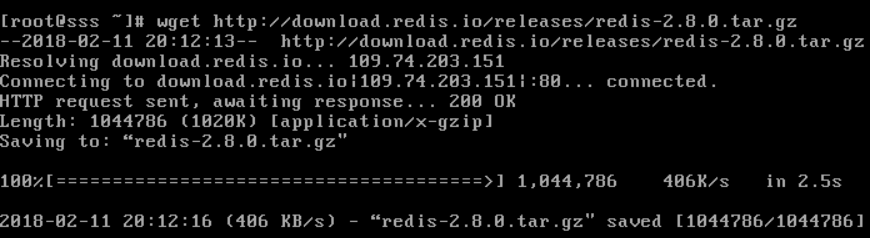
1 2 3 4 5 6 7 8 9 10 11 12 13 14 15 16 17 18 19 20 21 22 23 24 25 26 27 28 29 30 31 32 33 34 35 36 #!/bin/bash # create by lihuibin # date 2014-04-15 # desc install redis basedir=` pwd ` homepath= /usr/local/redis [ -d $homepath ] && { echo "redis already installed " exit } || { echo "begin init redis dir" for i in bin etc data log ; do mkdir -pv $homepath/$i done } [ -f redis-2.8.8. tar .gz ] || { echo "begin to download redis package" wget http: //download .redis.io /releases/redis-2 .8.8. tar .gz echo " download redis package completed" } echo "begin to make source code" tar xzf redis-2.8.8. tar .gz cd redis-2.8.8 make echo "make source code completed" cd src cp -r redis-benchmark redis-check-aof redis-check-dump redis-sentinel redis-cli redis-server $homepath /bin [ -f $basedir /redis .conf ] && { echo "start redis-server" for conf in redis.conf redis_salve.conf ; do cp $basedir/$conf $homepath /etc/ $homepath /bin/redis-server $homepath /etc/ $conf done } || { echo "not found $basedir/redis.conf" } 主:6379 从:6380 主:redis.conf 1 2 3 4 5 6 7 8 9 10 11 12 13 14 15 16 17 18 19 20 21 22 23 24 25 26 27 28 29 30 31 32 33 34 35 36 37 38 39 40 41 42 43 44 daemonize yes pidfile /var/run/redis .pid port 6379 tcp-backlog 511 timeout 0 tcp-keepalive 0 loglevel notice logfile "/usr/local/redis/log/redis.log" databases 16 save 900 1 save 300 10 save 60 10000 stop-writes-on-bgsave-error yes rdbcompression yes rdbchecksum yes dbfilename dump.rdb dir /usr/local/redis/data slave-serve-stale-data yes slave- read -only no repl-disable-tcp-nodelay no slave-priority 100 appendonly no appendfilename "appendonly.aof" appendfsync everysec no-appendfsync-on-rewrite no auto-aof-rewrite-percentage 100 auto-aof-rewrite-min-size 64mb lua- time -limit 5000 slowlog-log-slower-than 10000 slowlog-max-len 128 notify-keyspace-events "" hash -max-ziplist-entries 512 hash -max-ziplist-value 64 list-max-ziplist-entries 512 list-max-ziplist-value 64 set -max-intset-entries 512 zset-max-ziplist-entries 128 zset-max-ziplist-value 64 activerehashing yes client-output-buffer-limit normal 0 0 0 client-output-buffer-limit slave 256mb 64mb 60 client-output-buffer-limit pubsub 32mb 8mb 60 hz 10 aof-rewrite-incremental-fsync yes 从:redis_salve.conf 1 2 3 4 5 6 7 8 9 10 11 12 13 14 15 16 17 18 19 20 21 22 23 24 25 26 27 28 29 30 31 32 33 34 35 36 37 38 39 40 41 42 43 44 45 daemonize yes pidfile /var/run/redis_salve .pid port 6380 tcp-backlog 511 timeout 0 tcp-keepalive 0 loglevel notice logfile "/usr/local/redis/log/redis_slave.log" databases 16 save 900 1 save 300 10 save 60 10000 stop-writes-on-bgsave-error yes rdbcompression yes rdbchecksum yes dbfilename dump_salve.rdb dir /usr/local/redis/data slave-serve-stale-data yes slave- read -only no repl-disable-tcp-nodelay no slave-priority 100 appendonly no appendfilename "appendonly.aof" appendfsync everysec no-appendfsync-on-rewrite no auto-aof-rewrite-percentage 100 auto-aof-rewrite-min-size 64mb lua- time -limit 5000 slowlog-log-slower-than 10000 slowlog-max-len 128 notify-keyspace-events "" hash -max-ziplist-entries 512 hash -max-ziplist-value 64 list-max-ziplist-entries 512 list-max-ziplist-value 64 set -max-intset-entries 512 zset-max-ziplist-entries 128 zset-max-ziplist-value 64 activerehashing yes client-output-buffer-limit normal 0 0 0 client-output-buffer-limit slave 256mb 64mb 60 client-output-buffer-limit pubsub 32mb 8mb 60 hz 10 aof-rewrite-incremental-fsync yes SLAVEOF 127.0.0.1 6379 本文转自birdinroom 51CTO博客,原文链接:http://blog.51cto.com/birdinroom/1401493,如需转载请自行联系原作者

优秀的个人博客,低调大师

安装openstack过程中的又一次libvirt错误

2012-05-08 09:27:35.674+0000: 6128: error : virConfError:106 : /etc/libvirt/qemu.conf:343: expecting a value 2012-05-08 09:27:35.674+0000: 6128: error : virStateInitialize:854 : Initialization of QEMU state driver failed 2012-05-08 09:27:35.985+0000: 6128: error : virExecWithHook:328 : Cannot find 'pm-is-supported' in path: No such file or directory 2012-05-08 09:27:35.985+0000: 6128: warning : lxcCapsInit:77 : Failed to get host power management capabilities 2012-05-08 09:27:35.985+0000: 6128: error : virExecWithHook:328 : Cannot find 'pm-is-supported' in path: No such file or directory 2012-05-08 09:27:35.985+0000: 6128: warning : umlCapsInit:87 : Failed to get host power management capabilities 2012-05-08 09:27:35.986+0000: 6128: error : daemonRunStateInit:1157 : Driver state initialization failed 2012-05-08 09:27:36.824+0000: 6181: info : libvirt version: 0.9.8 2012-05-08 09:27:36.824+0000: 6181: error : virConfError:106 : /etc/libvirt/qemu.conf:343: expecting a value 2012-05-08 09:27:36.824+0000: 6181: error : virStateInitialize:854 : Initialization of QEMU state driver failed 本文转自 jxwpx 51CTO博客,原文链接:http://blog.51cto.com/jxwpx/858150,如需转载请自行联系原作者

资源下载

更多资源
Mario

Mario

马里奥是站在游戏界顶峰的超人气多面角色。马里奥靠吃蘑菇成长,特征是大鼻子、头戴帽子、身穿背带裤,还留着胡子。与他的双胞胎兄弟路易基一起,长年担任任天堂的招牌角色。

腾讯云软件源

腾讯云软件源

为解决软件依赖安装时官方源访问速度慢的问题,腾讯云为一些软件搭建了缓存服务。您可以通过使用腾讯云软件源站来提升依赖包的安装速度。为了方便用户自由搭建服务架构,目前腾讯云软件源站支持公网访问和内网访问。

Spring

Spring

Spring框架(Spring Framework)是由Rod Johnson于2002年提出的开源Java企业级应用框架,旨在通过使用JavaBean替代传统EJB实现方式降低企业级编程开发的复杂性。该框架基于简单性、可测试性和松耦合性设计理念,提供核心容器、应用上下文、数据访问集成等模块,支持整合Hibernate、Struts等第三方框架,其适用范围不仅限于服务器端开发,绝大多数Java应用均可从中受益。


Rocky Linux

Rocky Linux

Rocky Linux(中文名:洛基)是由Gregory Kurtzer于2020年12月发起的企业级Linux发行版,作为CentOS稳定版停止维护后与RHEL(Red Hat Enterprise Linux)完全兼容的开源替代方案,由社区拥有并管理,支持x86_64、aarch64等架构。其通过重新编译RHEL源代码提供长期稳定性,采用模块化包装和SELinux安全架构,默认包含GNOME桌面环境及XFS文件系统,支持十年生命周期更新。

用户登录
用户注册