首页 文章 精选 留言 我的

精选列表

搜索[快速入门],共10010篇文章
优秀的个人博客,低调大师

[雪峰磁针石博客]计算机视觉opcencv工具深度学习快速实战2 opencv快速入门

opencv基本操作 # -*- coding: utf-8 -*- # Author: xurongzhong#126.com wechat:pythontesting qq:37391319 # 技术支持 钉钉群:21745728(可以加钉钉pythontesting邀请加入) # qq群:144081101 591302926 567351477 # CreateDate: 2018-11-17 import imutils import cv2 # 读取图片信息 image = cv2.imread("jp.png") (h, w, d) = image.shape print("width={}, height={}, depth={}".format(w, h, d)) # 显示图片 cv2.imshow("Image", image) cv2.waitKey(0) # 访问像素 (B, G, R) = image[100, 50] print("R={}, G={}, B={}".format(R, G, B)) # 选取图片区间 ROI (Region of Interest) roi = image[60:160, 320:420] cv2.imshow("ROI", roi) cv2.waitKey(0) # 缩放 resized = cv2.resize(image, (200, 200)) cv2.imshow("Fixed Resizing", resized) cv2.waitKey(0) # 按比例缩放 r = 300.0 / w dim = (300, int(h * r)) resized = cv2.resize(image, dim) cv2.imshow("Aspect Ratio Resize", resized) cv2.waitKey(0) # 使用imutils缩放 resized = imutils.resize(image, width=300) cv2.imshow("Imutils Resize", resized) cv2.waitKey(0) # 顺时针旋转45度 center = (w // 2, h // 2) M = cv2.getRotationMatrix2D(center, -45, 1.0) rotated = cv2.warpAffine(image, M, (w, h)) cv2.imshow("OpenCV Rotation", rotated) cv2.waitKey(0) # 使用imutils旋转 rotated = imutils.rotate(image, -45) cv2.imshow("Imutils Rotation", rotated) cv2.waitKey(0) # 使用imutils无损旋转 rotated = imutils.rotate_bound(image, 45) cv2.imshow("Imutils Bound Rotation", rotated) cv2.waitKey(0) # apply a Gaussian blur with a 11x11 kernel to the image to smooth it, # useful when reducing high frequency noise 高斯模糊 # https://www.pyimagesearch.com/2016/07/25/convolutions-with-opencv-and-python/ blurred = cv2.GaussianBlur(image, (11, 11), 0) cv2.imshow("Blurred", blurred) cv2.waitKey(0) # 画框 output = image.copy() cv2.rectangle(output, (320, 60), (420, 160), (0, 0, 255), 2) cv2.imshow("Rectangle", output) cv2.waitKey(0) # 画圆 output = image.copy() cv2.circle(output, (300, 150), 20, (255, 0, 0), -1) cv2.imshow("Circle", output) cv2.waitKey(0) # 划线 output = image.copy() cv2.line(output, (60, 20), (400, 200), (0, 0, 255), 5) cv2.imshow("Line", output) cv2.waitKey(0) # 输出文字 output = image.copy() cv2.putText(output, "https://china-testing.github.io", (10, 25), cv2.FONT_HERSHEY_SIMPLEX, 0.7, (0, 255, 0), 2) cv2.imshow("Text", output) cv2.waitKey(0) 原图: 选取图片区间 ROI (Region of Interest) 缩放 按比例缩放 旋转 使用imutils无损旋转 高斯模糊 画框 画圆 划线 输出文字 执行时的输出 $ python opencv_tutorial_01.py width=600, height=322, depth=3 R=41, G=49, B=37 本节英文原版代码下载 关于旋转这块,实际上pillow做的更好。比如同样逆时针旋转90度。 opencv的实现: import imutils import cv2 image = cv2.imread("jp.png") rotated = imutils.rotate(image, 90) cv2.imshow("Imutils Rotation", rotated) cv2.waitKey(0) pillow的实现: from PIL import Image im = Image.open("jp.png") im2 = im.rotate(90, expand=True) im2.show() 更多参考: python库介绍-图像处理工具pillow中文文档-手册(2018 5.*) 参考资料 技术支持qq群144081101(代码和模型存放) 本文最新版本地址 本文涉及的python测试开发库 谢谢点赞! 本文相关海量书籍下载 2018最佳人工智能机器学习工具书及下载(持续更新) 代码下载:https://itbooks.pipipan.com/fs/18113597-320636142 代码github地址:https://github.com/china-testing/python-api-tesing/tree/master/opencv_crash_deep_learning 识别俄罗斯方块 # -*- coding: utf-8 -*- # Author: xurongzhong#126.com wechat:pythontesting qq:37391319 # 技术支持 钉钉群:21745728(可以加钉钉pythontesting邀请加入) # qq群:144081101 591302926 567351477 # CreateDate: 2018-11-19 # python opencv_tutorial_02.py --image tetris_blocks.png import argparse import imutils import cv2 ap = argparse.ArgumentParser() ap.add_argument("-i", "--image", required=True, help="path to input image") args = vars(ap.parse_args()) image = cv2.imread(args["image"]) cv2.imshow("Image", image) cv2.waitKey(0) # 转为灰度图 gray = cv2.cvtColor(image, cv2.COLOR_BGR2GRAY) cv2.imshow("Gray", gray) cv2.waitKey(0) # 边缘检测 edged = cv2.Canny(gray, 30, 150) cv2.imshow("Edged", edged) cv2.waitKey(0) # 门限 thresh = cv2.threshold(gray, 225, 255, cv2.THRESH_BINARY_INV)[1] cv2.imshow("Thresh", thresh) cv2.waitKey(0) # 发现边缘 cnts = cv2.findContours(thresh.copy(), cv2.RETR_EXTERNAL, cv2.CHAIN_APPROX_SIMPLE) cnts = cnts[0] if imutils.is_cv2() else cnts[1] output = image.copy() # loop over the contours for c in cnts: # draw each contour on the output image with a 3px thick purple # outline, then display the output contours one at a time cv2.drawContours(output, [c], -1, (240, 0, 159), 3) cv2.imshow("Contours", output) cv2.waitKey(0) # draw the total number of contours found in purple text = "I found {} objects!".format(len(cnts)) cv2.putText(output, text, (10, 25), cv2.FONT_HERSHEY_SIMPLEX, 0.7, (240, 0, 159), 2) cv2.imshow("Contours", output) cv2.waitKey(0) # we apply erosions to reduce the size of foreground objects mask = thresh.copy() mask = cv2.erode(mask, None, iterations=5) cv2.imshow("Eroded", mask) cv2.waitKey(0) # 扩大 mask = thresh.copy() mask = cv2.dilate(mask, None, iterations=5) cv2.imshow("Dilated", mask) cv2.waitKey(0) # a typical operation we may want to apply is to take our mask and # apply a bitwise AND to our input image, keeping only the masked # regions mask = thresh.copy() output = cv2.bitwise_and(image, image, mask=mask) cv2.imshow("Output", output) cv2.waitKey(0) 原图和灰度图: 边缘检测 门限 轮廓 查找结果 腐蚀和扩张 屏蔽和位操作 串在一起执行 $ python opencv_tutorial_02.py --image tetris_blocks.png


优秀的个人博客,低调大师

干货|大数据Hadoop快速入门教程

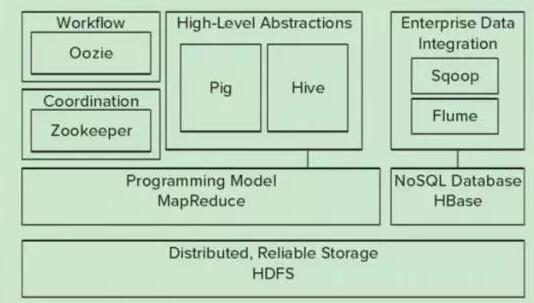
1、Hadoop生态概况 Hadoop是一个由Apache基金会所开发的分布式系统集成架构,用户可以在不了解分布式底层细节情况下,开发分布式程序,充分利用集群的威力来进行高速运算与存储,具有可靠、高效、可伸缩的特点。 Hadoop的核心是YARN,HDFS,Mapreduce,常用模块架构如下 2、HDFS 源自谷歌的GFS论文,发表于2013年10月,HDFS是GFS的克隆版,HDFS是Hadoop体系中数据存储管理的基础,它是一个高度容错的系统,能检测和应对硬件故障 HDFS简化了文件一致性模型,通过流式数据访问,提供高吞吐量应用程序数据访问功能,适合带有大型数据集的应用程序,它提供了一次写入多次读取的机制,数据以块的形式,同时分布在集群不同物理机器 3、Mapreduce 源自于谷歌的MapReduce论文,用以进行大数据量的计算,它屏蔽了分布式计算框架细节,将计算抽象成map和reduce两部分 4、HBASE(分布式列存数据库) 源自谷歌的Bigtable论文,是一个建立在HDFS之上,面向列的针对结构化的数据可伸缩,高可靠,高性能分布式和面向列的动态模式数据库 5、zookeeper 解决分布式环境下数据管理问题,统一命名,状态同步,集群管理,配置同步等 6、HIVE 由Facebook开源,定义了一种类似sql查询语言,将SQL转化为mapreduce任务在Hadoop上面执行 7、flume 日志收集工具 8、yarn分布式资源管理器 是下一代mapreduce,主要解决原始的Hadoop扩展性较差,不支持多种计算框架而提出的,架构如下 9、spark spark提供了一个更快更通用的数据处理平台,和Hadoop相比,spark可以让你的程序在内存中运行 10、kafka 分布式消息队列,主要用于处理活跃的流式数据 11、Hadoop伪分布式部署 目前而言,不收费的Hadoop版本主要有三个,都是国外厂商,分别是 1、Apache原始版本 2、CDH版本,对于国内用户而言,绝大多数选择该版本 3、HDP版本 这里我们选择CDH版本hadoop-2.6.0-cdh5.8.2.tar.gz,环境是CentOS7.1,jdk需要1.7.0_55以上 [root@hadoop1 ~]# useradd hadoop 我的系统默认自带的java环境如下 增加如下环境变量 做好如下授权 这里以Hadoop用户来进行管理和启动Hadoop的各种服务 查看服务启动情况 本文作者:佚名 来源:51CTO

优秀的个人博客,低调大师

数据指标体系如何搭建才最有效,从0到1带你快速入门丨02期直播回顾

一、指标管理背景介绍 大数据时代数字化转型背景下,企业所需要的往往不单单是数据,而是数据背后映射的业务洞察,相比较数据我们更加关心的是其体现的业务价值以及覆盖的业务场景。 庞大的数据只有和业务相结合转化为信息,经过处理呈现才能真正体现他们的价值。指标作为数据计算的结果,是直接反映衡量业务效果的依据,应用在企业的方方面面,如数据报表、分析平台及日常取数等。 ​ 数据指标作为数据计算的结果,是企业数据价值的直观体现,在业务扩张、指标计算需求的暴增背景下,随之而来的指标管理问题也越来越多,例如指标管理不统一、指标口径不一致、指标流程不规范等,这些问题造成指标管理混乱,数据价值未得到充分发挥。 要解决以上问题,帮助企业建立指标体系,我们需要充以下三个方面入手: ●指标平台 建立统一的指标管理平台,集中管理数据指标,沉淀指标资产 ●指标体系 有一套标准规范的指标搭建方法论,搭建企业级数据指标体系 ●流程管理 搭载统一的流程控制机制,全面把控数据指标的生命周期 二、指标体系建设方法论 如何帮助企业搭建指标体系,我们主要从以下五步骤入手,从0到1帮助搭建指标体系 ​ 搭建目标 搭建指标体系的第一步就是明确搭建目标,大部分企业由于目标不清晰造成指标管理混乱,通过指标体系的搭建,我们要实现“一个指标、一个口径、一次加工、多次使用”,做到统一指标口径,减少重复工作,结果统一输出。 ●统一关键指标 创建公司级统一的关键指标,帮助企业通过统一的指标框架来助力业务业务扩张。 ● 减少重复工作 为每一个成员提供统一的平台来协同,了解企业整体数据业务情况,减少数据团队重复性工作和时间花费 ●结果统一输出 针对指标结果,提供一套能将指标和上层应用结合起来的输出方式,发挥数据指标最大的价值 需求分析 明确目标之后,我们开始着手去构建指标体系,在设计指标之前,我们首先要进行需求分析。 同一个企业,不同的业务线、不同的部门,甚至是同一部门的不同人员,提出来的指标计算需求都会有所不同。所以在需求分析的阶段,我们要做到基于不同行业的业务情况,分析数据指标需求,合理划分主题,才能更好地为后续指标设计提供业务支撑。 ​ 指标设计 明确需求后,我们要进行指标体系构建的核心——指标设计,指标设计可分为基础、组成、分类、落地这四个方面,下面我们就来详细介绍: ● 指标设计基础 针对业务需求现状,明确指标的使用者,建立指标分层意识,按照从上往下的方式建立三层指标,层层分解,业务溯源。 ​ ● 指标设计组成 指标设计的组成包含维度、度量、统计周期及过滤条件。 ​ ● 指标设计分类 指标可分为原子指标、派生指标、符合指标和自定义指标。 ​ ● 指标设计落地 最终我们基于上面的方法论,将业务数据指标进行完整地规划落地。 ​ 指标开发 设计明确后,我们就要进行指标的开发工作,真正将我们设计的指标逻辑落实到实处,有输出有应用。指标开发整体包括开发指标和日常运维两部分。 ​ 指标呈现 指标开发完就是指标的上层应用呈现了,也就是上文提到的【多次使用】,一个业务指标,可以根据不同的应用场景,呈现在业务使用的方方面面。 ​ 三、指标体系案例解析 在上文中我们介绍了指标体系建设的方法论,接下来我们将结合实际的项目来为大家分享指标体系建设如何在实际的项目中落地。首先我们为大家介绍下指标管理产品: 一站式指标综合开发管理平台(EasyIndex),覆盖了指标规范定义到开发落地的过程,同时提供上层的综合查询、共享服务、取数分析等应用。消除数据的二义性,降低业务和技术的沟通成本,搭建企业级数据指标体系,沉淀企业指标资产,支撑业务场景分析,精准辅助决策。 ​ 接下来我们以某银行客户的案例,来为大家介绍指标体系建设的实际应用。 某银行客户在初期已完成底层数仓表的建设,但由于业务扩张,数据体量扩大,存在各种大量的数据计算,临时取数的场景,同时存在一些零散的业务指标,需要基于不同的业务场景合理规划杂乱的指标内容 ● 客户痛点 1、指标体系:指标定义混乱,没有完整的指标规划体系,存在同名不同义、同义不同名等情况 2、指标开发:业务取数需求频繁,数据开发每天需要做大量的临时取数工作,开发资源紧张,开发门槛高,过程不可视 3、指标运维:数据计算任务单独维护,无法保证计算结果 4、指标管理:不同部门的指标分散管理,重复建设,指标之间的关系不清晰无法溯源等 ● 建设方案 1、构建完善的指标体系,合理规划现有指标内容 2、提供一个便捷低开发门槛的开发方式,提高指标开发效率 3、提供一个统一串起来的调度运维入口 4、提供一个统一的指标开放平台,能够看到当前所有的指标资产 ​ ● 建设流程 1、需求分析阶段 业务需求调研,了解指标搭建的具体业务使用场景,和业务就整体的搭建思路进行沟通 2、指标设计阶段 围绕着业务场景,按照原子、派生、复合的建设方法论,进行指标的设计,评审通过后落地 3、指标开发阶段 进行数据探查和清洗,明确指标设计对应的具体数据逻辑,对指标进行开发,落地指标计算结果 4、指标验证阶段 对于开发完成的指标进行验证,包括逻辑一致性的验证,数据准确性的验证,场景适用度的验证 5、指标上线应用 上线验证完成的指标内容,提供指标服务供业务系统获取指标数据,在使用过程中不断迭代指标 ● 业务效果 1、绩效考核指标资产沉淀 4大主题分类,包括存款业务、贷款业务、理财业务、网络金融 5大主题对象,围绕着账号、客户、客户经理、机构、产品五大对象进行的指标体系设计 300+指标资产的沉淀输出 75%的临时取数覆盖率,释放了开发资源 开发效率的提高,10个指标的开发时间平均从5人天缩短到1人天,结果复用率提高 2、指标服务提供给业务系统的指标来源 20+指标API提供服务供上层业务系统调用获取指标信息 业务门户展示指标资产 ​

优秀的个人博客,低调大师

Python黑科技:50行代码运用Python+OpenCV实现人脸追踪+详细教程+快速入门+图像识别+人脸识别+大神讲解

嗨,我最亲爱的伙计们,很高兴我们又见面了。 首先先感谢朋友们的关注。当然我更希望认识与计算机相关的领域的朋友咱们一起探讨交流。重点说一下,我是真人,不是那些扒文章的自媒体组织,大家可以相互交流的! 本篇文章我们来讲一下关于AI相关的人脸追踪,人脸识别相关的一些知识。当然本篇教程为(上)部分,讲一下利用python+opencv来实现人脸识别与追踪,明后天出(下)部分,用python来通过指纹对比实现人脸验证、人脸解锁(大家感兴趣的可以提前关注哦)。 这两节课呢,代码量都不是很多,鄙人尽量多注释点,便于大家理解。那我们就不多啰嗦废话了,直接上干货! OpenCV: opencv目前来讲是十分流行的视觉库,而且可以支持多语言。说到opencv就不得不说它的cascades分类器。 如果我们要判断一张图片是不是有一张脸,早期方式是通过成千上万的分类器去从头匹配到尾,这样看并没有什么什么毛病,但判断的图片多了呢?那可能需要猴年马月。opencv的cascades呢,就把这些用来判断人脸特征的容器划分成多块层层匹配,到一层不匹配就被丢弃。 这好比一群人去公司面试,公司第一个要求是只要男人,那一批女人就走了,公司说只要本科,一批专科走了,公司说要两年工作经验的,又会走一批,直到最后。这样的工作量比每个人面试不管男女都过一遍流程轻松的多。 环境拓扑: 操作系统:windows7 python版本:2.7.14 opencv版本:3.x 环境配置: 1.安装python(额...这个当我没说) 2.安装Opencv 这个从官网下载就OK啦 下载完之后直接解压就行,推荐解压到跟你的python安装的父路径。 3.使用pip安装numpy 打开cmd输入: pip install numpy 进行安装,安装完毕后会给提示。 4.找到你的opencv安装路径(比如我的是D盘) 复制D:opencvopencv3.x

优秀的个人博客,低调大师

[雪峰磁针石博客]数据分析工具pandas快速入门教程4-数据汇聚

我们需要的所有信息可能记录在单独的文件和数据帧中。例如,可能有一个公司信息单独表和股票价格表,数据被分成独立的表格以减少冗余信息。 连接 添加行 4-1.py import pandas as pd df1 = pd.read_csv('data/concat_1.csv') df2 = pd.read_csv('data/concat_2.csv') df3 = pd.read_csv('data/concat_3.csv') print(df1) print(df2) print(df3) row_concat = pd.concat([df1, df2, df3]) print(row_concat) print(row_concat.iloc[3, ]) new_row_series = pd.Series(['n1', 'n2', 'n3', 'n4']) print(pd.concat([df1, new_row_series])) new_row_df = pd.DataFrame([['n1', 'n2', 'n3', 'n4']], columns=['A', 'B', 'C', 'D']) print(new_row_df) print(pd.concat([df1, new_row_df])) print(df1.append(df2)) print(df1.append(new_row_df)) data_dict = {'A': 'n1', 'B': 'n2', 'C': 'n3', 'D': 'n4'} print(df1.append(data_dict, ignore_index=True)) row_concat_i = pd.concat([df1, df2, df3], ignore_index=True) print(row_concat_i) 执行结果 $ python3 4-1.py A B C D 0 a0 b0 c0 d0 1 a1 b1 c1 d1 2 a2 b2 c2 d2 3 a3 b3 c3 d3 A B C D 0 a4 b4 c4 d4 1 a5 b5 c5 d5 2 a6 b6 c6 d6 3 a7 b7 c7 d7 A B C D 0 a8 b8 c8 d8 1 a9 b9 c9 d9 2 a10 b10 c10 d10 3 a11 b11 c11 d11 A B C D 0 a0 b0 c0 d0 1 a1 b1 c1 d1 2 a2 b2 c2 d2 3 a3 b3 c3 d3 0 a4 b4 c4 d4 1 a5 b5 c5 d5 2 a6 b6 c6 d6 3 a7 b7 c7 d7 0 a8 b8 c8 d8 1 a9 b9 c9 d9 2 a10 b10 c10 d10 3 a11 b11 c11 d11 A a3 B b3 C c3 D d3 Name: 3, dtype: object A B C D 0 0 a0 b0 c0 d0 NaN 1 a1 b1 c1 d1 NaN 2 a2 b2 c2 d2 NaN 3 a3 b3 c3 d3 NaN 0 NaN NaN NaN NaN n1 1 NaN NaN NaN NaN n2 2 NaN NaN NaN NaN n3 3 NaN NaN NaN NaN n4 A B C D 0 n1 n2 n3 n4 A B C D 0 a0 b0 c0 d0 1 a1 b1 c1 d1 2 a2 b2 c2 d2 3 a3 b3 c3 d3 0 n1 n2 n3 n4 A B C D 0 a0 b0 c0 d0 1 a1 b1 c1 d1 2 a2 b2 c2 d2 3 a3 b3 c3 d3 0 a4 b4 c4 d4 1 a5 b5 c5 d5 2 a6 b6 c6 d6 3 a7 b7 c7 d7 A B C D 0 a0 b0 c0 d0 1 a1 b1 c1 d1 2 a2 b2 c2 d2 3 a3 b3 c3 d3 0 n1 n2 n3 n4 A B C D 0 a0 b0 c0 d0 1 a1 b1 c1 d1 2 a2 b2 c2 d2 3 a3 b3 c3 d3 4 n1 n2 n3 n4 A B C D 0 a0 b0 c0 d0 1 a1 b1 c1 d1 2 a2 b2 c2 d2 3 a3 b3 c3 d3 4 a4 b4 c4 d4 5 a5 b5 c5 d5 6 a6 b6 c6 d6 7 a7 b7 c7 d7 8 a8 b8 c8 d8 9 a9 b9 c9 d9 10 a10 b10 c10 d10 11 a11 b11 c11 d11 添加列 4-2.py In [1]: from numpy import NaN, NAN, nan In [2]: print(NaN == True, NaN == False, NaN == 0, NaN == '', sep='|') False|False|False|False In [3]: print(NaN == NaN, NaN == nan, NaN == NAN, nan == NAN, sep='|') False|False|False|False In [4]: import pandas as pd In [5]: print(pd.isnull(NaN), pd.isnull(nan), pd.isnull(NAN), sep='|') True|True|True In [6]: print(pd.notnull(NaN), pd.notnull(99), pd.notnull("https://china-testing.github.io"), sep='|') False|True|True 执行结果 $ python3 4-2.py A B C D A B C D A B C D 0 a0 b0 c0 d0 a4 b4 c4 d4 a8 b8 c8 d8 1 a1 b1 c1 d1 a5 b5 c5 d5 a9 b9 c9 d9 2 a2 b2 c2 d2 a6 b6 c6 d6 a10 b10 c10 d10 3 a3 b3 c3 d3 a7 b7 c7 d7 a11 b11 c11 d11 A A A 0 a0 a4 a8 1 a1 a5 a9 2 a2 a6 a10 3 a3 a7 a11 A B C D A B C D A B C D new_col_list 0 a0 b0 c0 d0 a4 b4 c4 d4 a8 b8 c8 d8 n1 1 a1 b1 c1 d1 a5 b5 c5 d5 a9 b9 c9 d9 n2 2 a2 b2 c2 d2 a6 b6 c6 d6 a10 b10 c10 d10 n3 3 a3 b3 c3 d3 a7 b7 c7 d7 a11 b11 c11 d11 n4 A B C D A B C D A B C D new_col_list \ 0 a0 b0 c0 d0 a4 b4 c4 d4 a8 b8 c8 d8 n1 1 a1 b1 c1 d1 a5 b5 c5 d5 a9 b9 c9 d9 n2 2 a2 b2 c2 d2 a6 b6 c6 d6 a10 b10 c10 d10 n3 3 a3 b3 c3 d3 a7 b7 c7 d7 a11 b11 c11 d11 n4 new_col_series 0 n1 1 n2 2 n3 3 n4 0 1 2 3 4 5 6 7 8 9 10 11 0 a0 b0 c0 d0 a4 b4 c4 d4 a8 b8 c8 d8 1 a1 b1 c1 d1 a5 b5 c5 d5 a9 b9 c9 d9 2 a2 b2 c2 d2 a6 b6 c6 d6 a10 b10 c10 d10 3 a3 b3 c3 d3 a7 b7 c7 d7 a11 b11 c11 d11 合并不同区间 4-3.py import pandas as pd df1 = pd.read_csv('data/concat_1.csv') df2 = pd.read_csv('data/concat_2.csv') df3 = pd.read_csv('data/concat_3.csv') df1.columns = ['A', 'B', 'C', 'D'] df2.columns = ['E', 'F', 'G', 'H'] df3.columns = ['A', 'C', 'F', 'H'] print(df1) print(df2) print(df3) row_concat = pd.concat([df1, df2, df3]) print(row_concat) print(pd.concat([df1, df2, df3], join='inner')) print(pd.concat([df1,df3], ignore_index=False, join='inner')) df1.index = [0, 1, 2, 3] df2.index = [4, 5, 6, 7] df3.index = [0, 2, 5, 7] print(df1) print(df2) print(df3) col_concat = pd.concat([df1, df2, df3], axis=1) print(col_concat) print(pd.concat([df1, df3], axis=1, join='inner')) 执行结果 $ python3 4-3.py A B C D 0 a0 b0 c0 d0 1 a1 b1 c1 d1 2 a2 b2 c2 d2 3 a3 b3 c3 d3 E F G H 0 a4 b4 c4 d4 1 a5 b5 c5 d5 2 a6 b6 c6 d6 3 a7 b7 c7 d7 A C F H 0 a8 b8 c8 d8 1 a9 b9 c9 d9 2 a10 b10 c10 d10 3 a11 b11 c11 d11 A B C D E F G H 0 a0 b0 c0 d0 NaN NaN NaN NaN 1 a1 b1 c1 d1 NaN NaN NaN NaN 2 a2 b2 c2 d2 NaN NaN NaN NaN 3 a3 b3 c3 d3 NaN NaN NaN NaN 0 NaN NaN NaN NaN a4 b4 c4 d4 1 NaN NaN NaN NaN a5 b5 c5 d5 2 NaN NaN NaN NaN a6 b6 c6 d6 3 NaN NaN NaN NaN a7 b7 c7 d7 0 a8 NaN b8 NaN NaN c8 NaN d8 1 a9 NaN b9 NaN NaN c9 NaN d9 2 a10 NaN b10 NaN NaN c10 NaN d10 3 a11 NaN b11 NaN NaN c11 NaN d11 Empty DataFrame Columns: [] Index: [0, 1, 2, 3, 0, 1, 2, 3, 0, 1, 2, 3] A C 0 a0 c0 1 a1 c1 2 a2 c2 3 a3 c3 0 a8 b8 1 a9 b9 2 a10 b10 3 a11 b11 A B C D 0 a0 b0 c0 d0 1 a1 b1 c1 d1 2 a2 b2 c2 d2 3 a3 b3 c3 d3 E F G H 4 a4 b4 c4 d4 5 a5 b5 c5 d5 6 a6 b6 c6 d6 7 a7 b7 c7 d7 A C F H 0 a8 b8 c8 d8 2 a9 b9 c9 d9 5 a10 b10 c10 d10 7 a11 b11 c11 d11 A B C D E F G H A C F H 0 a0 b0 c0 d0 NaN NaN NaN NaN a8 b8 c8 d8 1 a1 b1 c1 d1 NaN NaN NaN NaN NaN NaN NaN NaN 2 a2 b2 c2 d2 NaN NaN NaN NaN a9 b9 c9 d9 3 a3 b3 c3 d3 NaN NaN NaN NaN NaN NaN NaN NaN 4 NaN NaN NaN NaN a4 b4 c4 d4 NaN NaN NaN NaN 5 NaN NaN NaN NaN a5 b5 c5 d5 a10 b10 c10 d10 6 NaN NaN NaN NaN a6 b6 c6 d6 NaN NaN NaN NaN 7 NaN NaN NaN NaN a7 b7 c7 d7 a11 b11 c11 d11 A B C D A C F H 0 a0 b0 c0 d0 a8 b8 c8 d8 2 a2 b2 c2 d2 a9 b9 c9 d9 合并多个数据集 4-4.py import pandas as pd person = pd.read_csv('data/survey_person.csv') site = pd.read_csv('data/survey_site.csv') survey = pd.read_csv('data/survey_survey.csv') visited = pd.read_csv('data/survey_visited.csv') print(person) print(site) print(survey) print(visited) visited_subset = visited.iloc[[0, 2, 6], ] o2o_merge = site.merge(visited_subset, left_on='name', right_on='site') print(o2o_merge) m2o_merge = site.merge(visited, left_on='name', right_on='site') print(m2o_merge) ps = person.merge(survey, left_on='ident', right_on='person') vs = visited.merge(survey, left_on='ident', right_on='taken') print(ps) print(vs) 执行结果 $ python3 4-4.py ident personal family 0 dyer William Dyer 1 pb Frank Pabodie 2 lake Anderson Lake 3 roe Valentina Roerich 4 danforth Frank Danforth name lat long 0 DR-1 -49.85 -128.57 1 DR-3 -47.15 -126.72 2 MSK-4 -48.87 -123.40 taken person quant reading 0 619 dyer rad 9.82 1 619 dyer sal 0.13 2 622 dyer rad 7.80 3 622 dyer sal 0.09 4 734 pb rad 8.41 5 734 lake sal 0.05 6 734 pb temp -21.50 7 735 pb rad 7.22 8 735 NaN sal 0.06 9 735 NaN temp -26.00 10 751 pb rad 4.35 11 751 pb temp -18.50 12 751 lake sal 0.10 13 752 lake rad 2.19 14 752 lake sal 0.09 15 752 lake temp -16.00 16 752 roe sal 41.60 17 837 lake rad 1.46 18 837 lake sal 0.21 19 837 roe sal 22.50 20 844 roe rad 11.25 ident site dated 0 619 DR-1 1927-02-08 1 622 DR-1 1927-02-10 2 734 DR-3 1939-01-07 3 735 DR-3 1930-01-12 4 751 DR-3 1930-02-26 5 752 DR-3 NaN 6 837 MSK-4 1932-01-14 7 844 DR-1 1932-03-22 name lat long ident site dated 0 DR-1 -49.85 -128.57 619 DR-1 1927-02-08 1 DR-3 -47.15 -126.72 734 DR-3 1939-01-07 2 MSK-4 -48.87 -123.40 837 MSK-4 1932-01-14 name lat long ident site dated 0 DR-1 -49.85 -128.57 619 DR-1 1927-02-08 1 DR-1 -49.85 -128.57 622 DR-1 1927-02-10 2 DR-1 -49.85 -128.57 844 DR-1 1932-03-22 3 DR-3 -47.15 -126.72 734 DR-3 1939-01-07 4 DR-3 -47.15 -126.72 735 DR-3 1930-01-12 5 DR-3 -47.15 -126.72 751 DR-3 1930-02-26 6 DR-3 -47.15 -126.72 752 DR-3 NaN 7 MSK-4 -48.87 -123.40 837 MSK-4 1932-01-14 ident personal family taken person quant reading 0 dyer William Dyer 619 dyer rad 9.82 1 dyer William Dyer 619 dyer sal 0.13 2 dyer William Dyer 622 dyer rad 7.80 3 dyer William Dyer 622 dyer sal 0.09 4 pb Frank Pabodie 734 pb rad 8.41 5 pb Frank Pabodie 734 pb temp -21.50 6 pb Frank Pabodie 735 pb rad 7.22 7 pb Frank Pabodie 751 pb rad 4.35 8 pb Frank Pabodie 751 pb temp -18.50 9 lake Anderson Lake 734 lake sal 0.05 10 lake Anderson Lake 751 lake sal 0.10 11 lake Anderson Lake 752 lake rad 2.19 12 lake Anderson Lake 752 lake sal 0.09 13 lake Anderson Lake 752 lake temp -16.00 14 lake Anderson Lake 837 lake rad 1.46 15 lake Anderson Lake 837 lake sal 0.21 16 roe Valentina Roerich 752 roe sal 41.60 17 roe Valentina Roerich 837 roe sal 22.50 18 roe Valentina Roerich 844 roe rad 11.25 ident site dated taken person quant reading 0 619 DR-1 1927-02-08 619 dyer rad 9.82 1 619 DR-1 1927-02-08 619 dyer sal 0.13 2 622 DR-1 1927-02-10 622 dyer rad 7.80 3 622 DR-1 1927-02-10 622 dyer sal 0.09 4 734 DR-3 1939-01-07 734 pb rad 8.41 5 734 DR-3 1939-01-07 734 lake sal 0.05 6 734 DR-3 1939-01-07 734 pb temp -21.50 7 735 DR-3 1930-01-12 735 pb rad 7.22 8 735 DR-3 1930-01-12 735 NaN sal 0.06 9 735 DR-3 1930-01-12 735 NaN temp -26.00 10 751 DR-3 1930-02-26 751 pb rad 4.35 11 751 DR-3 1930-02-26 751 pb temp -18.50 12 751 DR-3 1930-02-26 751 lake sal 0.10 13 752 DR-3 NaN 752 lake rad 2.19 14 752 DR-3 NaN 752 lake sal 0.09 15 752 DR-3 NaN 752 lake temp -16.00 16 752 DR-3 NaN 752 roe sal 41.60 17 837 MSK-4 1932-01-14 837 lake rad 1.46 18 837 MSK-4 1932-01-14 837 lake sal 0.21 19 837 MSK-4 1932-01-14 837 roe sal 22.50 20 844 DR-1 1932-03-22 844 roe rad 11.25 参考资料 技术支持qq群144081101 591302926 567351477 钉钉免费群21745728 本文最新版本地址 本文涉及的python测试开发库 谢谢点赞! 本文相关海量书籍下载 源码下载 本文英文版书籍下载

优秀的个人博客,低调大师

[雪峰磁针石博客]数据分析工具pandas快速入门教程5-处理缺失数据

第5章 缺失数据 介绍 很少没有任何缺失值的数据集。 有许多缺失数据的表示。 在数据库中是NULL值,一些编程语言使用NA。缺失值可以是空字符串:''或者甚至是数值88或99等。Pandas显示缺失值为NaN。 本章将涵盖: 什么是缺失值 如何创建缺失值 如何重新编码并使用缺失值进行计算 什么是缺失值 可以从numpy中获得NaN值,在Python中看到缺失值使用几种方式显示:NaN,NAN或nan,他们都是相等的。 NaN不等于0或空字符串''。 In [1]: from numpy import NaN, NAN, nan In [2]: print(NaN == True, NaN == False, NaN == 0, NaN == '', sep='|') False|False|False|False In [3]: print(NaN == NaN, NaN == nan, NaN == NAN, nan == NAN, sep='|') False|False|False|False In [4]: import pandas as pd In [5]: print(pd.isnull(NaN), pd.isnull(nan), pd.isnull(NAN), sep='|') True|True|True In [6]: print(pd.notnull(NaN), pd.notnull(99), pd.notnull("https://china-testing.github.io"), sep='|') False|True|True 缺失值的来源 来自加载数据或数据处理 加载数据 当我们加载数据时,pandas会自动找到该缺少数据的单元格,并填充NaN值。在read_csv函数中,参数na_values, keep_default_na, na_filter用于处理缺失值。比如:na_values=[99]。na_filter设置为False,在读大文件时会提升性能。 5-1.py import pandas as pd visited_file = 'data/survey_visited.csv' print(pd.read_csv(visited_file)) print(pd.read_csv(visited_file, keep_default_na=False)) print(pd.read_csv(visited_file, na_values=[''], keep_default_na=False)) 执行结果 $ python3 5-1.py ident site dated 0 619 DR-1 1927-02-08 1 622 DR-1 1927-02-10 2 734 DR-3 1939-01-07 3 735 DR-3 1930-01-12 4 751 DR-3 1930-02-26 5 752 DR-3 NaN 6 837 MSK-4 1932-01-14 7 844 DR-1 1932-03-22 ident site dated 0 619 DR-1 1927-02-08 1 622 DR-1 1927-02-10 2 734 DR-3 1939-01-07 3 735 DR-3 1930-01-12 4 751 DR-3 1930-02-26 5 752 DR-3 6 837 MSK-4 1932-01-14 7 844 DR-1 1932-03-22 ident site dated 0 619 DR-1 1927-02-08 1 622 DR-1 1927-02-10 2 734 DR-3 1939-01-07 3 735 DR-3 1930-01-12 4 751 DR-3 1930-02-26 5 752 DR-3 NaN 6 837 MSK-4 1932-01-14 7 844 DR-1 1932-03-22 合并数据 import pandas as pd visited = pd.read_csv('data/survey_visited.csv') survey = pd.read_csv('data/survey_survey.csv') print(visited) print(survey) vs = visited.merge(survey, left_on='ident', right_on='taken') print(vs) 执行结果 $ python3 5-2.py ident site dated 0 619 DR-1 1927-02-08 1 622 DR-1 1927-02-10 2 734 DR-3 1939-01-07 3 735 DR-3 1930-01-12 4 751 DR-3 1930-02-26 5 752 DR-3 NaN 6 837 MSK-4 1932-01-14 7 844 DR-1 1932-03-22 taken person quant reading 0 619 dyer rad 9.82 1 619 dyer sal 0.13 2 622 dyer rad 7.80 3 622 dyer sal 0.09 4 734 pb rad 8.41 5 734 lake sal 0.05 6 734 pb temp -21.50 7 735 pb rad 7.22 8 735 NaN sal 0.06 9 735 NaN temp -26.00 10 751 pb rad 4.35 11 751 pb temp -18.50 12 751 lake sal 0.10 13 752 lake rad 2.19 14 752 lake sal 0.09 15 752 lake temp -16.00 16 752 roe sal 41.60 17 837 lake rad 1.46 18 837 lake sal 0.21 19 837 roe sal 22.50 20 844 roe rad 11.25 ident site dated taken person quant reading 0 619 DR-1 1927-02-08 619 dyer rad 9.82 1 619 DR-1 1927-02-08 619 dyer sal 0.13 2 622 DR-1 1927-02-10 622 dyer rad 7.80 3 622 DR-1 1927-02-10 622 dyer sal 0.09 4 734 DR-3 1939-01-07 734 pb rad 8.41 5 734 DR-3 1939-01-07 734 lake sal 0.05 6 734 DR-3 1939-01-07 734 pb temp -21.50 7 735 DR-3 1930-01-12 735 pb rad 7.22 8 735 DR-3 1930-01-12 735 NaN sal 0.06 9 735 DR-3 1930-01-12 735 NaN temp -26.00 10 751 DR-3 1930-02-26 751 pb rad 4.35 11 751 DR-3 1930-02-26 751 pb temp -18.50 12 751 DR-3 1930-02-26 751 lake sal 0.10 13 752 DR-3 NaN 752 lake rad 2.19 14 752 DR-3 NaN 752 lake sal 0.09 15 752 DR-3 NaN 752 lake temp -16.00 16 752 DR-3 NaN 752 roe sal 41.60 17 837 MSK-4 1932-01-14 837 lake rad 1.46 18 837 MSK-4 1932-01-14 837 lake sal 0.21 19 837 MSK-4 1932-01-14 837 roe sal 22.50 20 844 DR-1 1932-03-22 844 roe rad 11.25 用户输入 import pandas as pd from numpy import NaN, NAN, nan num_legs = pd.Series({'goat': 4, 'amoeba': nan}) print(num_legs) scientists = pd.DataFrame({'Name': ['Rosaline Franklin', 'William Gosset'], 'Occupation': ['Chemist', 'Statistician'], 'Born': ['1920-07-25', '1876-06-13'], 'Died': ['1958-04-16', '1937-10-16'], 'missing': [NaN, nan]}) print(scientists) scientists['missing'] = nan print(scientists) 执行结果 $ python3 5-3.py amoeba NaN goat 4.0 dtype: float64 Born Died Name Occupation missing 0 1920-07-25 1958-04-16 Rosaline Franklin Chemist NaN 1 1876-06-13 1937-10-16 William Gosset Statistician NaN Born Died Name Occupation missing 0 1920-07-25 1958-04-16 Rosaline Franklin Chemist NaN 1 1876-06-13 1937-10-16 William Gosset Statistician NaN 重新索引 5-4.py import pandas as pd from numpy import NaN, NAN, nan gapminder = pd.read_csv('data/gapminder.tsv', sep='\t') life_exp = gapminder.groupby(['year'])['lifeExp'].mean() print(life_exp) print(life_exp.reindex(range(2000, 2010))) 执行结果 year 1952 49.057620 1957 51.507401 1962 53.609249 1967 55.678290 1972 57.647386 1977 59.570157 1982 61.533197 1987 63.212613 1992 64.160338 1997 65.014676 2002 65.694923 2007 67.007423 Name: lifeExp, dtype: float64 year 2000 NaN 2001 NaN 2002 65.694923 2003 NaN 2004 NaN 2005 NaN 2006 NaN 2007 67.007423 2008 NaN 2009 NaN Name: lifeExp, dtype: float64 处理缺失数据 统计缺失数据 5-5.py import pandas as pd from numpy import NaN, NAN, nan import numpy as np ebola = pd.read_csv('data/country_timeseries.csv') print(ebola.head()) print(ebola.count()) num_rows = ebola.shape[0] print("num_rows") print(num_rows) num_missing = num_rows - ebola.count() print("num_missing:") print(num_missing) print(np.count_nonzero(ebola.isnull())) print(np.count_nonzero(ebola['Cases_Guinea'].isnull())) print(ebola.Cases_Guinea.value_counts(dropna=False).head()) 执行结果 Date Day Cases_Guinea Cases_Liberia Cases_SierraLeone \ 0 1/5/2015 289 2776.0 NaN 10030.0 1 1/4/2015 288 2775.0 NaN 9780.0 2 1/3/2015 287 2769.0 8166.0 9722.0 3 1/2/2015 286 NaN 8157.0 NaN 4 12/31/2014 284 2730.0 8115.0 9633.0 Cases_Nigeria Cases_Senegal Cases_UnitedStates Cases_Spain Cases_Mali \ 0 NaN NaN NaN NaN NaN 1 NaN NaN NaN NaN NaN 2 NaN NaN NaN NaN NaN 3 NaN NaN NaN NaN NaN 4 NaN NaN NaN NaN NaN Deaths_Guinea Deaths_Liberia Deaths_SierraLeone Deaths_Nigeria \ 0 1786.0 NaN 2977.0 NaN 1 1781.0 NaN 2943.0 NaN 2 1767.0 3496.0 2915.0 NaN 3 NaN 3496.0 NaN NaN 4 1739.0 3471.0 2827.0 NaN Deaths_Senegal Deaths_UnitedStates Deaths_Spain Deaths_Mali 0 NaN NaN NaN NaN 1 NaN NaN NaN NaN 2 NaN NaN NaN NaN 3 NaN NaN NaN NaN 4 NaN NaN NaN NaN Date 122 Day 122 Cases_Guinea 93 Cases_Liberia 83 Cases_SierraLeone 87 Cases_Nigeria 38 Cases_Senegal 25 Cases_UnitedStates 18 Cases_Spain 16 Cases_Mali 12 Deaths_Guinea 92 Deaths_Liberia 81 Deaths_SierraLeone 87 Deaths_Nigeria 38 Deaths_Senegal 22 Deaths_UnitedStates 18 Deaths_Spain 16 Deaths_Mali 12 dtype: int64 num_rows 122 num_missing: Date 0 Day 0 Cases_Guinea 29 Cases_Liberia 39 Cases_SierraLeone 35 Cases_Nigeria 84 Cases_Senegal 97 Cases_UnitedStates 104 Cases_Spain 106 Cases_Mali 110 Deaths_Guinea 30 Deaths_Liberia 41 Deaths_SierraLeone 35 Deaths_Nigeria 84 Deaths_Senegal 100 Deaths_UnitedStates 104 Deaths_Spain 106 Deaths_Mali 110 dtype: int64 1214 29 NaN 29 86.0 3 495.0 2 112.0 2 390.0 2 Name: Cases_Guinea, dtype: int64 处理缺失数据 5-6.py import pandas as pd from numpy import NaN, NAN, nan import numpy as np ebola = pd.read_csv('data/country_timeseries.csv') print(ebola.iloc[0:10, 0:5]) print(ebola.fillna(0).iloc[0:10, 0:5]) # 前向填充 print(ebola.fillna(method='ffill').iloc[0:10, 0:5]) # 后向填充 print(ebola.fillna(method='bfill').iloc[0:10, 0:5]) print(ebola.interpolate().iloc[0:10, 0:5]) print(ebola.shape) ebola_dropna = ebola.dropna() print(ebola_dropna.shape) print(ebola_dropna) ebola['Cases_multiple'] = ebola['Cases_Guinea'] + ebola['Cases_Liberia'] + \ ebola['Cases_SierraLeone'] ebola_subset = ebola.loc[:, ['Cases_Guinea', 'Cases_Liberia', 'Cases_SierraLeone', 'Cases_multiple']] print(ebola_subset.head(n=10)) print(ebola.Cases_Guinea.sum(skipna = True)) print(ebola.Cases_Guinea.sum(skipna = False)) 执行结果 Date Day Cases_Guinea Cases_Liberia Cases_SierraLeone 0 1/5/2015 289 2776.0 NaN 10030.0 1 1/4/2015 288 2775.0 NaN 9780.0 2 1/3/2015 287 2769.0 8166.0 9722.0 3 1/2/2015 286 NaN 8157.0 NaN 4 12/31/2014 284 2730.0 8115.0 9633.0 5 12/28/2014 281 2706.0 8018.0 9446.0 6 12/27/2014 280 2695.0 NaN 9409.0 7 12/24/2014 277 2630.0 7977.0 9203.0 8 12/21/2014 273 2597.0 NaN 9004.0 9 12/20/2014 272 2571.0 7862.0 8939.0 Date Day Cases_Guinea Cases_Liberia Cases_SierraLeone 0 1/5/2015 289 2776.0 0.0 10030.0 1 1/4/2015 288 2775.0 0.0 9780.0 2 1/3/2015 287 2769.0 8166.0 9722.0 3 1/2/2015 286 0.0 8157.0 0.0 4 12/31/2014 284 2730.0 8115.0 9633.0 5 12/28/2014 281 2706.0 8018.0 9446.0 6 12/27/2014 280 2695.0 0.0 9409.0 7 12/24/2014 277 2630.0 7977.0 9203.0 8 12/21/2014 273 2597.0 0.0 9004.0 9 12/20/2014 272 2571.0 7862.0 8939.0 Date Day Cases_Guinea Cases_Liberia Cases_SierraLeone 0 1/5/2015 289 2776.0 NaN 10030.0 1 1/4/2015 288 2775.0 NaN 9780.0 2 1/3/2015 287 2769.0 8166.0 9722.0 3 1/2/2015 286 2769.0 8157.0 9722.0 4 12/31/2014 284 2730.0 8115.0 9633.0 5 12/28/2014 281 2706.0 8018.0 9446.0 6 12/27/2014 280 2695.0 8018.0 9409.0 7 12/24/2014 277 2630.0 7977.0 9203.0 8 12/21/2014 273 2597.0 7977.0 9004.0 9 12/20/2014 272 2571.0 7862.0 8939.0 Date Day Cases_Guinea Cases_Liberia Cases_SierraLeone 0 1/5/2015 289 2776.0 8166.0 10030.0 1 1/4/2015 288 2775.0 8166.0 9780.0 2 1/3/2015 287 2769.0 8166.0 9722.0 3 1/2/2015 286 2730.0 8157.0 9633.0 4 12/31/2014 284 2730.0 8115.0 9633.0 5 12/28/2014 281 2706.0 8018.0 9446.0 6 12/27/2014 280 2695.0 7977.0 9409.0 7 12/24/2014 277 2630.0 7977.0 9203.0 8 12/21/2014 273 2597.0 7862.0 9004.0 9 12/20/2014 272 2571.0 7862.0 8939.0 Date Day Cases_Guinea Cases_Liberia Cases_SierraLeone 0 1/5/2015 289 2776.0 NaN 10030.0 1 1/4/2015 288 2775.0 NaN 9780.0 2 1/3/2015 287 2769.0 8166.0 9722.0 3 1/2/2015 286 2749.5 8157.0 9677.5 4 12/31/2014 284 2730.0 8115.0 9633.0 5 12/28/2014 281 2706.0 8018.0 9446.0 6 12/27/2014 280 2695.0 7997.5 9409.0 7 12/24/2014 277 2630.0 7977.0 9203.0 8 12/21/2014 273 2597.0 7919.5 9004.0 9 12/20/2014 272 2571.0 7862.0 8939.0 (122, 18) (1, 18) Date Day Cases_Guinea Cases_Liberia Cases_SierraLeone \ 19 11/18/2014 241 2047.0 7082.0 6190.0 Cases_Nigeria Cases_Senegal Cases_UnitedStates Cases_Spain Cases_Mali \ 19 20.0 1.0 4.0 1.0 6.0 Deaths_Guinea Deaths_Liberia Deaths_SierraLeone Deaths_Nigeria \ 19 1214.0 2963.0 1267.0 8.0 Deaths_Senegal Deaths_UnitedStates Deaths_Spain Deaths_Mali 19 0.0 1.0 0.0 6.0 Cases_Guinea Cases_Liberia Cases_SierraLeone Cases_multiple 0 2776.0 NaN 10030.0 NaN 1 2775.0 NaN 9780.0 NaN 2 2769.0 8166.0 9722.0 20657.0 3 NaN 8157.0 NaN NaN 4 2730.0 8115.0 9633.0 20478.0 5 2706.0 8018.0 9446.0 20170.0 6 2695.0 NaN 9409.0 NaN 7 2630.0 7977.0 9203.0 19810.0 8 2597.0 NaN 9004.0 NaN 9 2571.0 7862.0 8939.0 19372.0 84729.0 nan 参考资料 技术支持qq群144081101 591302926 567351477 钉钉免费群21745728 本文最新版本地址 本文涉及的python测试开发库 谢谢点赞! 本文相关海量书籍下载 源码下载 本文英文版书籍下载

优秀的个人博客,低调大师

[雪峰磁针石博客]数据分析工具pandas快速入门教程2-pandas数据结构

创建数据 Series和python的列表类似。DataFrame则类似值为Series的字典。 create.py #!/usr/bin/env python3 # -*- coding: utf-8 -*- # create.py import pandas as pd print("\n\n创建序列Series") s = pd.Series(['banana', 42]) print(s) print("\n\n指定索引index创建序列Series") s = pd.Series(['Wes McKinney', 'Creator of Pandas'], index=['Person', 'Who']) print(s) # 注意:列名未必为执行的顺序,通常为按字母排序 print("\n\n创建数据帧DataFrame") scientists = pd.DataFrame({ ' Name': ['Rosaline Franklin', 'William Gosset'], ' Occupation': ['Chemist', 'Statistician'], ' Born': ['1920-07-25', '1876-06-13'], ' Died': ['1958-04-16', '1937-10-16'], ' Age': [37, 61]}) print(scientists) print("\n\n指定顺序(index和columns)创建数据帧DataFrame") scientists = pd.DataFrame( data={'Occupation': ['Chemist', 'Statistician'], 'Born': ['1920-07-25', '1876-06-13'], 'Died': ['1958-04-16', '1937-10-16'], 'Age': [37, 61]}, index=['Rosaline Franklin', 'William Gosset'], columns=['Occupation', 'Born', 'Died', 'Age']) print(scientists) 执行结果: $ ./create.py 创建序列Series 0 banana 1 42 dtype: object 指定索引index创建序列Series Person Wes McKinney Who Creator of Pandas dtype: object 创建数据帧DataFrame Name Occupation Born Died Age 0 Rosaline Franklin Chemist 1920-07-25 1958-04-16 37 1 William Gosset Statistician 1876-06-13 1937-10-16 61 指定顺序(index和columns)创建数据帧DataFrame Occupation Born Died Age Rosaline Franklin Chemist 1920-07-25 1958-04-16 37 William Gosset Statistician 1876-06-13 1937-10-16 61 Series 官方文档:http://pandas.pydata.org/pandas-docs/stable/generated/pandas.Series.html Series的属性 属性 描述 loc 使用索引值获取子集 iloc 使用索引位置获取子集 dtype或dtypes 类型 T 转置 shape 数据的尺寸 size 元素的数量 values ndarray或类似ndarray的Series Series的方法 方法 描述 append 连接2个或更多系列 corr 计算与其他Series的关联 cov 与其他Series计算协方差 describe 计算汇总统计 drop duplicates 返回一个没有重复项的Series equals Series是否具有相同的元素 get values 获取Series的值,与values属性相同 hist 绘制直方图 min 返回最小值 max 返回最大值 mean 返回算术平均值 median 返回中位数 mode(s) 返回mode(s) replace 用指定值替换系列中的值 sample 返回Series中值的随机样本 sort values 排序 to frame 转换为数据帧 transpose 返回转置 unique 返回numpy.ndarray唯一值 series.py #!/usr/bin/python3 # -*- coding: utf-8 -*- # CreateDate: 2018-3-14 # series.py import pandas as pd import numpy as np scientists = pd.DataFrame( data={'Occupation': ['Chemist', 'Statistician'], 'Born': ['1920-07-25', '1876-06-13'], 'Died': ['1958-04-16', '1937-10-16'], 'Age': [37, 61]}, index=['Rosaline Franklin', 'William Gosset'], columns=['Occupation', 'Born', 'Died', 'Age']) print(scientists) # 从数据帧(DataFrame)获取的行或者列为Series first_row = scientists.loc['William Gosset'] print(type(first_row)) print(first_row) # index和keys是一样的 print(first_row.index) print(first_row.keys()) print(first_row.values) print(first_row.index[0]) print(first_row.keys()[0]) # Pandas.Series和numpy.ndarray很类似 ages = scientists['Age'] print(ages) # 统计,更多参考http://pandas.pydata.org/pandas-docs/stable/basics.html#descriptive-statistics print(ages.mean()) print(ages.min()) print(ages.max()) print(ages.std()) scientists = pd.read_csv('../data/scientists.csv') ages = scientists['Age'] print(ages) print(ages.mean()) print(ages.describe()) print(ages[ages > ages.mean()]) print(ages > ages.mean()) manual_bool_values = [True, True, False, False, True, True, False, False] print(ages[manual_bool_values]) print(ages + ages) print(ages * ages) print(ages + 100) print(ages * 2) print(ages + pd.Series([1, 100])) # print(ages + np.array([1, 100])) 会报错,不同类型相加,大小一定要一样 print(ages + np.array([1, 100, 1, 100, 1, 100, 1, 100])) # 排序: 默认有自动排序 print(ages) rev_ages = ages.sort_index(ascending=False) print(rev_ages) print(ages * 2) print(ages + rev_ages) 执行结果 $ python3 series.py Occupation Born Died Age Rosaline Franklin Chemist 1920-07-25 1958-04-16 37 William Gosset Statistician 1876-06-13 1937-10-16 61 <class 'pandas.core.series.Series'> Occupation Statistician Born 1876-06-13 Died 1937-10-16 Age 61 Name: William Gosset, dtype: object Index(['Occupation', 'Born', 'Died', 'Age'], dtype='object') Index(['Occupation', 'Born', 'Died', 'Age'], dtype='object') ['Statistician' '1876-06-13' '1937-10-16' 61] Occupation Occupation Rosaline Franklin 37 William Gosset 61 Name: Age, dtype: int64 49.0 37 61 16.97056274847714 0 37 1 61 2 90 3 66 4 56 5 45 6 41 7 77 Name: Age, dtype: int64 59.125 count 8.000000 mean 59.125000 std 18.325918 min 37.000000 25% 44.000000 50% 58.500000 75% 68.750000 max 90.000000 Name: Age, dtype: float64 1 61 2 90 3 66 7 77 Name: Age, dtype: int64 0 False 1 True 2 True 3 True 4 False 5 False 6 False 7 True Name: Age, dtype: bool 0 37 1 61 4 56 5 45 Name: Age, dtype: int64 0 74 1 122 2 180 3 132 4 112 5 90 6 82 7 154 Name: Age, dtype: int64 0 1369 1 3721 2 8100 3 4356 4 3136 5 2025 6 1681 7 5929 Name: Age, dtype: int64 0 137 1 161 2 190 3 166 4 156 5 145 6 141 7 177 Name: Age, dtype: int64 0 74 1 122 2 180 3 132 4 112 5 90 6 82 7 154 Name: Age, dtype: int64 0 38.0 1 161.0 2 NaN 3 NaN 4 NaN 5 NaN 6 NaN 7 NaN dtype: float64 0 38 1 161 2 91 3 166 4 57 5 145 6 42 7 177 Name: Age, dtype: int64 0 37 1 61 2 90 3 66 4 56 5 45 6 41 7 77 Name: Age, dtype: int64 7 77 6 41 5 45 4 56 3 66 2 90 1 61 0 37 Name: Age, dtype: int64 0 74 1 122 2 180 3 132 4 112 5 90 6 82 7 154 Name: Age, dtype: int64 0 74 1 122 2 180 3 132 4 112 5 90 6 82 7 154 Name: Age, dtype: int64 数据帧(DataFrame) DataFrame是最常见的Pandas对象,可认为是Python存储类似电子表格的数据的方式。Series多常见功能都包含在DataFrame中。 子集的方法 注意ix现在已经不推荐使用。 DataFrame常用的索引操作有: 方式 描述 df[val] 选择单个列 df [[ column1, column2, ... ]] 选择多个列 df.loc[val] 选择行 loc [[ label1 , label2 ,...]] | 选择多行 |df.loc[:, val] | 基于行index选择列 | df.loc[val1, val2] | 选择行列 |df.iloc[row number] | 基于行数选择行 | iloc [[ row1, row2, ...]] Multiple rows by row number | 基于行数选择多行 |df.iloc[:, where] | 选择列 | df.iloc[where_i, where_j] | 选择行列 |df.at[label_i, label_j] | 选择值 |df.iat[i, j] | 选择值 |reindex method | 通过label选择多行或列 |get_value, set_value | 通过label选择耽搁行或列 df[bool] | 选择行df [[ bool1, bool2, ...]] | 选择行df[ start :stop: step ] | 基于行数选择行 #!/usr/bin/python3 # -*- coding: utf-8 -*- # CreateDate: 2018-3-31 # df.py import pandas as pd import numpy as np scientists = pd.read_csv('../data/scientists.csv') print(scientists[scientists['Age'] > scientists['Age'].mean()]) first_half = scientists[: 4] second_half = scientists[ 4 :] print(first_half) print(second_half) print(first_half + second_half) print(scientists * 2) 执行结果 #!/usr/bin/python3 # -*- coding: utf-8 -*- # df.py import pandas as pd import numpy as np scientists = pd.read_csv('../data/scientists.csv') print(scientists[scientists['Age'] > scientists['Age'].mean()]) first_half = scientists[: 4] second_half = scientists[ 4 :] print(first_half) print(second_half) print(first_half + second_half) print(scientists * 2) 执行结果 $ python3 df.py Name Born Died Age Occupation 1 William Gosset 1876-06-13 1937-10-16 61 Statistician 2 Florence Nightingale 1820-05-12 1910-08-13 90 Nurse 3 Marie Curie 1867-11-07 1934-07-04 66 Chemist 7 Johann Gauss 1777-04-30 1855-02-23 77 Mathematician Name Born Died Age Occupation 0 Rosaline Franklin 1920-07-25 1958-04-16 37 Chemist 1 William Gosset 1876-06-13 1937-10-16 61 Statistician 2 Florence Nightingale 1820-05-12 1910-08-13 90 Nurse 3 Marie Curie 1867-11-07 1934-07-04 66 Chemist Name Born Died Age Occupation 4 Rachel Carson 1907-05-27 1964-04-14 56 Biologist 5 John Snow 1813-03-15 1858-06-16 45 Physician 6 Alan Turing 1912-06-23 1954-06-07 41 Computer Scientist 7 Johann Gauss 1777-04-30 1855-02-23 77 Mathematician Name Born Died Age Occupation 0 NaN NaN NaN NaN NaN 1 NaN NaN NaN NaN NaN 2 NaN NaN NaN NaN NaN 3 NaN NaN NaN NaN NaN 4 NaN NaN NaN NaN NaN 5 NaN NaN NaN NaN NaN 6 NaN NaN NaN NaN NaN 7 NaN NaN NaN NaN NaN Name Born \ 0 Rosaline FranklinRosaline Franklin 1920-07-251920-07-25 1 William GossetWilliam Gosset 1876-06-131876-06-13 2 Florence NightingaleFlorence Nightingale 1820-05-121820-05-12 3 Marie CurieMarie Curie 1867-11-071867-11-07 4 Rachel CarsonRachel Carson 1907-05-271907-05-27 5 John SnowJohn Snow 1813-03-151813-03-15 6 Alan TuringAlan Turing 1912-06-231912-06-23 7 Johann GaussJohann Gauss 1777-04-301777-04-30 Died Age Occupation 0 1958-04-161958-04-16 74 ChemistChemist 1 1937-10-161937-10-16 122 StatisticianStatistician 2 1910-08-131910-08-13 180 NurseNurse 3 1934-07-041934-07-04 132 ChemistChemist 4 1964-04-141964-04-14 112 BiologistBiologist 5 1858-06-161858-06-16 90 PhysicianPhysician 6 1954-06-071954-06-07 82 Computer ScientistComputer Scientist 7 1855-02-231855-02-23 154 MathematicianMathematician 修改列 #!/usr/bin/python3 # -*- coding: utf-8 -*- # Author: xurongzhong#126.com wechat:pythontesting qq:37391319 # qq群:144081101 591302926 567351477 # CreateDate: 2018-06-07 # change.py import pandas as pd import numpy as np import random scientists = pd.read_csv('../data/scientists.csv') print(scientists['Born'].dtype) print(scientists['Died'].dtype) print(scientists.head()) # 转为日期 参考:https://docs.python.org/3.5/library/datetime.html born_datetime = pd.to_datetime(scientists['Born'], format='%Y-%m-%d') died_datetime = pd.to_datetime(scientists['Died'], format='%Y-%m-%d') # 增加列 scientists['born_dt'], scientists['died_dt'] = (born_datetime, died_datetime) print(scientists.shape) print(scientists.head()) random.seed(42) random.shuffle(scientists['Age']) # 此修改会作用于scientists print(scientists.head()) scientists['age_days_dt'] = (scientists['died_dt'] - scientists['born_dt']) print(scientists.head()) 执行结果: $ python3 change.py object object Name Born Died Age Occupation 0 Rosaline Franklin 1920-07-25 1958-04-16 37 Chemist 1 William Gosset 1876-06-13 1937-10-16 61 Statistician 2 Florence Nightingale 1820-05-12 1910-08-13 90 Nurse 3 Marie Curie 1867-11-07 1934-07-04 66 Chemist 4 Rachel Carson 1907-05-27 1964-04-14 56 Biologist (8, 7) Name Born Died Age Occupation born_dt \ 0 Rosaline Franklin 1920-07-25 1958-04-16 37 Chemist 1920-07-25 1 William Gosset 1876-06-13 1937-10-16 61 Statistician 1876-06-13 2 Florence Nightingale 1820-05-12 1910-08-13 90 Nurse 1820-05-12 3 Marie Curie 1867-11-07 1934-07-04 66 Chemist 1867-11-07 4 Rachel Carson 1907-05-27 1964-04-14 56 Biologist 1907-05-27 died_dt 0 1958-04-16 1 1937-10-16 2 1910-08-13 3 1934-07-04 4 1964-04-14 /usr/lib/python3.5/random.py:272: SettingWithCopyWarning: A value is trying to be set on a copy of a slice from a DataFrame See the caveats in the documentation: http://pandas.pydata.org/pandas-docs/stable/indexing.html#indexing-view-versus-copy x[i], x[j] = x[j], x[i] Name Born Died Age Occupation born_dt \ 0 Rosaline Franklin 1920-07-25 1958-04-16 66 Chemist 1920-07-25 1 William Gosset 1876-06-13 1937-10-16 56 Statistician 1876-06-13 2 Florence Nightingale 1820-05-12 1910-08-13 41 Nurse 1820-05-12 3 Marie Curie 1867-11-07 1934-07-04 77 Chemist 1867-11-07 4 Rachel Carson 1907-05-27 1964-04-14 90 Biologist 1907-05-27 died_dt 0 1958-04-16 1 1937-10-16 2 1910-08-13 3 1934-07-04 4 1964-04-14 Name Born Died Age Occupation born_dt \ 0 Rosaline Franklin 1920-07-25 1958-04-16 66 Chemist 1920-07-25 1 William Gosset 1876-06-13 1937-10-16 56 Statistician 1876-06-13 2 Florence Nightingale 1820-05-12 1910-08-13 41 Nurse 1820-05-12 3 Marie Curie 1867-11-07 1934-07-04 77 Chemist 1867-11-07 4 Rachel Carson 1907-05-27 1964-04-14 90 Biologist 1907-05-27 died_dt age_days_dt 0 1958-04-16 13779 days 1 1937-10-16 22404 days 2 1910-08-13 32964 days 3 1934-07-04 24345 days 4 1964-04-14 20777 days 数据导入导出 out.py #!/usr/bin/python3 # -*- coding: utf-8 -*- # Author: china-testing#126.com wechat:pythontesting qq群:630011153 # CreateDate: 2018-3-31 # out.py import pandas as pd import numpy as np import random scientists = pd.read_csv('../data/scientists.csv') names = scientists['Name'] print(names) names.to_pickle('../output/scientists_names_series.pickle') scientists.to_pickle('../output/scientists_df.pickle') # .p, .pkl, .pickle 是常用的pickle文件扩展名 scientist_names_from_pickle = pd.read_pickle('../output/scientists_df.pickle') print(scientist_names_from_pickle) names.to_csv('../output/scientist_names_series.csv') scientists.to_csv('../output/scientists_df.tsv', sep='\t') # 不输出行号 scientists.to_csv('../output/scientists_df_no_index.csv', index=None) # Series可以转为df再输出成excel文件 names_df = names.to_frame() names_df.to_excel('../output/scientists_names_series_df.xls') names_df.to_excel('../output/scientists_names_series_df.xlsx') scientists.to_excel('../output/scientists_df.xlsx', sheet_name='scientists', index=False) 执行结果: $ python3 out.py 0 Rosaline Franklin 1 William Gosset 2 Florence Nightingale 3 Marie Curie 4 Rachel Carson 5 John Snow 6 Alan Turing 7 Johann Gauss Name: Name, dtype: object Name Born Died Age Occupation 0 Rosaline Franklin 1920-07-25 1958-04-16 37 Chemist 1 William Gosset 1876-06-13 1937-10-16 61 Statistician 2 Florence Nightingale 1820-05-12 1910-08-13 90 Nurse 3 Marie Curie 1867-11-07 1934-07-04 66 Chemist 4 Rachel Carson 1907-05-27 1964-04-14 56 Biologist 5 John Snow 1813-03-15 1858-06-16 45 Physician 6 Alan Turing 1912-06-23 1954-06-07 41 Computer Scientist 7 Johann Gauss 1777-04-30 1855-02-23 77 Mathematician 注意:序列一般是直接输出成excel文件 更多的输入输出方法: 方式 描述 to_clipboard 将数据保存到系统剪贴板进行粘贴 to_dense 将数据转换为常规“密集”DataFrame to_dict 将数据转换为Python字典 to_gbq 将数据转换为Google BigQuery表格 toJidf 将数据保存为分层数据格式(HDF) to_msgpack 将数据保存到可移植的类似JSON的二进制文件中 toJitml 将数据转换为HTML表格 tojson 将数据转换为JSON字符串 toJatex 将数据转换为LTEXtabular环境 to_records 将数据转换为记录数组 to_string 将DataFrame显示为stdout的字符串 to_sparse 将数据转换为SparceDataFrame to_sql 将数据保存到SQL数据库中 to_stata 将数据转换为Stata dta文件 读CSV文件 read_csv.py #!/usr/bin/python3 # -*- coding: utf-8 -*- # Author: china-testing#126.com wechat:pythontesting QQ群:630011153 # CreateDate: 2018-3-9 # read_csv.py import pandas as pd df = pd.read_csv("1.csv", header=None) # 不读取列名 print("df:") print(df) print("df.head():") print(df.head()) # head(self, n=5),默认为5行,类似的有tail print("df.tail():") print(df.tail()) df = pd.read_csv("1.csv") # 默认读取列名 print("df:") print(df) df = pd.read_csv("1.csv", names=['号码','群号']) # 自定义列名 print("df:") print(df) # 自定义列名,去掉第一行 df = pd.read_csv("1.csv", skiprows=[0], names=['号码','群号']) print("df:") print(df) 执行结果: df: 0 1 0 qq qqgroup 1 37391319 144081101 2 37391320 144081102 3 37391321 144081103 4 37391322 144081104 5 37391323 144081105 6 37391324 144081106 7 37391325 144081107 8 37391326 144081108 9 37391327 144081109 10 37391328 144081110 11 37391329 144081111 12 37391330 144081112 13 37391331 144081113 14 37391332 144081114 15 37391333 144081115 df.head(): 0 1 0 qq qqgroup 1 37391319 144081101 2 37391320 144081102 3 37391321 144081103 4 37391322 144081104 df.tail(): 0 1 11 37391329 144081111 12 37391330 144081112 13 37391331 144081113 14 37391332 144081114 15 37391333 144081115 df: qq qqgroup 0 37391319 144081101 1 37391320 144081102 2 37391321 144081103 3 37391322 144081104 4 37391323 144081105 5 37391324 144081106 6 37391325 144081107 7 37391326 144081108 8 37391327 144081109 9 37391328 144081110 10 37391329 144081111 11 37391330 144081112 12 37391331 144081113 13 37391332 144081114 14 37391333 144081115 df: 号码 群号 0 qq qqgroup 1 37391319 144081101 2 37391320 144081102 3 37391321 144081103 4 37391322 144081104 5 37391323 144081105 6 37391324 144081106 7 37391325 144081107 8 37391326 144081108 9 37391327 144081109 10 37391328 144081110 11 37391329 144081111 12 37391330 144081112 13 37391331 144081113 14 37391332 144081114 15 37391333 144081115 df: 号码 群号 0 37391319 144081101 1 37391320 144081102 2 37391321 144081103 3 37391322 144081104 4 37391323 144081105 5 37391324 144081106 6 37391325 144081107 7 37391326 144081108 8 37391327 144081109 9 37391328 144081110 10 37391329 144081111 11 37391330 144081112 12 37391331 144081113 13 37391332 144081114 14 37391333 144081115 写CSV文件 #!/usr/bin/python3 # -*- coding: utf-8 -*- # write_csv.py import pandas as pd data ={'qq': [37391319,37391320], 'group':[1,2]} df = pd.DataFrame(data=data, columns=['qq','group']) df.to_csv('2.csv',index=False) 读写excel和csv类似,不过要改用read_excel来读,excel_summary_demo, 提供了多个excel求和的功能,可以做为excel读写的实例,这里不再赘述。 参考资料 技术支持qq群144081101 591302926 567351477 钉钉免费群21745728 本文最新版本地址 本文涉及的python测试开发库 谢谢点赞! 本文相关海量书籍下载 源码下载 本文英文版书籍下载

优秀的个人博客,低调大师

用Python爬取了拉勾网的招聘信息+详细教程+趣味学习+快速爬虫入门+学习交流+大神+爬虫入门

关于 一直埋头学习,不知当前趋势,这是学习一门技术过程中最大的忌讳。刚好利用python爬虫,抓取一下拉勾网关于python职位的一些基本要求,不仅能知道岗位的基本技能要求,还能锻炼一下代码能力,学以致用,一举两得。 准备 工具 :python 2.7,PyCharm 类库:urllib2、BeautifulSoup、time、re、sys、json、collections、xlsxwriter 分析及代码实现 进入拉勾网进行分析,要想获取每个岗位的关键词,首先要知道每个岗位详情页面的url,通过对比我们发现,https://www.lagou.com/jobs/4289433.html中,只有4289433这一串数字是不同的,那么就可以知道我们只要获取到每个岗位的这一串数字,我们就可以爬取每个岗位详情页面。 通过F12查看,我们可以看到xhr请求中https://www.lagou.com/jobs/positionAjax.json?px=default&city=%E5%8C%97%E4%BA%AC&needAddtionalResult=false的响应消息里的参数positionId的值为详情页面url的那串数字,如下图 ,那么接下来我们就爬取这个请求来获取所有的positionId。 首先我们通过分析可以看到这是个post请求且form的参数为first、pn、kd,通过不同岗位列表页面的请求,我们可以看到first的取值逻辑是pn为1的时候,first为true,当pn不为1的时候,first的取值为false(其中pn为岗位列表的页数),还有kd为一个固定值(这里是python) def get_positionId(pn): positionId_list = [] url = 'https://www.lagou.com/jobs/positionAjax.json?px=default&city=%E5%8C%97%E4%BA%AC&needAddtionalResult=false' headers = {'User-Agent': 'Mozilla/5.0 (Windows NT 6.1; WOW64) AppleWebKit/537.36 (KHTML, like Gecko) Chrome/59.0.3071.115 Safari/537.36', 'Referer': 'https://www.lagou.com/jobs/list_Python?px=default&city=%E5%8C%97%E4%BA%AC' } if pn == 1: first = 'true' else: first = 'false' data = {'first': first, 'pn': pn, 'kd':kd #这里取变量值,可以获取不同岗位的关键词 } page = get_page(url, headers, data) if page == None: return None max_pageNum = get_pageSize(page) result = page['content']['positionResult']['result'] for num in range(0, max_pageNum): positionId = result[num]['positionId'] positionId_list.append(positionId) return positionId_list #该函数返回一个列表页的所有岗位的positionId 在获取到每个岗位的positionId后,我们就可以根据获取到的positionId进行拼接得到每个岗位详情页面的url,然后爬取这些url,来获取每个岗位的关键词(这里还有一个比较坑人的地方就是通过爬取来的网页内容和通过定位得到的内容竟然是不一样的,害的我纠结了好久),分析该网页如下图: 具体的实现如下: #获取每个岗位的职位要求def get_content(positionId): url = 'https://www.lagou.com/jobs/%s.html' %(positionId) headers = { 'User-Agent': 'Mozilla/5.0 (Windows NT 6.1; WOW64) AppleWebKit/537.36 (KHTML, like Gecko) Chrome/59.0.3071.115 Safari/537.36', 'Referer': 'https://www.lagou.com/jobs/list_Python?px=default&city=%E5%8C%97%E4%BA%AC' } page = get_page(url,headers,data=0) soup = Bs(page, 'html.parser') content = soup.find('dd', class_='job_bt').get_text() return content 接下来就是对获取到的岗位描述进行过滤处理,来获取英文关键词,实现如下: #对获取的关键词列表进行过滤去重,获取top50的关键词#处理岗位描述,获取英文关键词def get_keyword(content): pattern = re.compile('[a-zA-Z]+') keyword = pattern.findall(content) return keyword 然后,在通过collections中的Counter模块获取到这些英文关键词中的top50,实现如下: #对获取的关键词列表进行过滤去重,获取top50的关键词def parser_keyword(keyword_list): for i in range(len(keyword_list)): keyword_list[i] = keyword_list[i].lower() keyword_top = Counter(keyword_list).most_common(50) return keyword_top 最后把top50的关键词保存到Excel中,并且生成分析图,实现如下: #数据保存到Excel中,并且生成报表。def save_excel(keyword_top): row = 1 col = 0 workbook = xlsxwriter.Workbook('lagou.xlsx') worksheet = workbook.add_worksheet('lagou') worksheet.write(0, col, u'关键词') worksheet.write(0, col+1, u'频次') for name, num in keyword_top: worksheet.write(row, col, name) worksheet.write(row, col+1, num) row += 1 chart = workbook.add_chart({'type': 'area'}) chart.add_series({ 'categories': 'lagou!$A$2:$A$51', 'values': 'lagou!$B$2:$B$51' }) chart.set_title({'name': u'关键词排名'}) chart.set_x_axis({'name': u'关键词'}) chart.set_y_axis({'name': u'频次(/次)'}) worksheet.insert_chart('C2', chart, {'x_offset':15, 'y_offset':10}) workbook.close() 结果 具体生成的分析图如下: image.png 如果对您有点帮助的话,麻烦您给点个赞,谢谢。 最后附上全部的代码: 大家如果有问题都可以评论区留言,另外如果需要一个学习交流的平台可以加小编的群:719+139+688,群里面有很多学习资料还有大神的直播分享,希望对大家有所帮助,另外在这个上面我回复可能稍微慢一点,但是你们有问题在评论区留言我都会帮你们解决的。

资源下载

更多资源
Mario

Mario

马里奥是站在游戏界顶峰的超人气多面角色。马里奥靠吃蘑菇成长,特征是大鼻子、头戴帽子、身穿背带裤,还留着胡子。与他的双胞胎兄弟路易基一起,长年担任任天堂的招牌角色。

腾讯云软件源

腾讯云软件源

为解决软件依赖安装时官方源访问速度慢的问题,腾讯云为一些软件搭建了缓存服务。您可以通过使用腾讯云软件源站来提升依赖包的安装速度。为了方便用户自由搭建服务架构,目前腾讯云软件源站支持公网访问和内网访问。

Sublime Text

Sublime Text

Sublime Text具有漂亮的用户界面和强大的功能,例如代码缩略图,Python的插件,代码段等。还可自定义键绑定,菜单和工具栏。Sublime Text 的主要功能包括:拼写检查,书签,完整的 Python API , Goto 功能,即时项目切换,多选择,多窗口等等。Sublime Text 是一个跨平台的编辑器,同时支持Windows、Linux、Mac OS X等操作系统。

WebStorm

WebStorm

WebStorm 是jetbrains公司旗下一款JavaScript 开发工具。目前已经被广大中国JS开发者誉为“Web前端开发神器”、“最强大的HTML5编辑器”、“最智能的JavaScript IDE”等。与IntelliJ IDEA同源,继承了IntelliJ IDEA强大的JS部分的功能。

用户登录
用户注册