hbase 报文 处理 逻辑
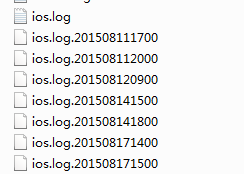
报文格式: 每隔一个小时 出现一个文件类型 报文 ,所以 我们的处理思路是,一个小时做一次处理。 import java.io.FileInputStream; import java.util.Properties; import java.util.concurrent.Executors; import java.util.concurrent.ScheduledExecutorService; import java.util.concurrent.TimeUnit; import com.cmcc.aoi.util.OsUtil; public class HbaseStarter { public static void main(String[] args) throws Exception { Properties properties=new Properties(); String config=""; if(!OsUtil.isLinux()) config= "D:/work/util/aoi-hbase/trunk/src/main/resources/config.properties"; else config = "/home/aoi/aoi-hbase/conf/config.properties"; FileInputStream fis = new FileInputStream(config); properties.load(fis); fis.close(); String hbaseTable = properties.getProperty("com.cmcc.aoi.ua.hbaseTable"); String hbaseFamily = properties.getProperty("com.cmcc.aoi.ua.hbaseFamily"); String sourceFilePath=properties.getProperty("com.cmcc.aoi.ua.sourceFilePath"); String archivelogsPath=properties.getProperty("com.cmcc.aoi.ua.archivelogsPath"); boolean isDebug= Integer.parseInt( properties.getProperty("com.cmcc.aoi.ua.isDebug")) == 0 ? false : true; String sourceFileName = properties.getProperty("com.cmcc.aoi.ua.sourceFileName"); String[] hbaseTableName=hbaseTable.split(","); // table String[] hbaseFamilyName=hbaseFamily.split("&");// family String[] sourceFileNameArr=sourceFileName.split(","); ScheduledExecutorService service = Executors.newScheduledThreadPool(2); service.scheduleAtFixedRate(new DeviceReadThread (sourceFileNameArr[0],hbaseTableName[0],hbaseFamilyName[0].split(","),sourceFilePath,archivelogsPath,isDebug) ,0, 1,TimeUnit.HOURS); service.scheduleAtFixedRate(new AppReadThread (sourceFileNameArr[1],hbaseTableName[1],hbaseFamilyName[1].split(","),sourceFilePath,archivelogsPath,isDebug) ,0, 1,TimeUnit.HOURS); } } import java.io.BufferedReader; import java.io.File; import java.io.FileReader; import java.io.IOException; import java.util.Date; import org.slf4j.Logger; import org.slf4j.LoggerFactory; import Model.Device; import com.alibaba.fastjson.JSON; public class DeviceReadThread extends BaseRunnabler { static Logger logger = LoggerFactory.getLogger(DeviceReadThread.class); public DeviceReadThread(String sourceFileName, String hbaseTable, String[] hbaseFamily, String sourceFilePath, String archivelogsPath, boolean isDebug) { super(sourceFileName, hbaseTable, hbaseFamily, sourceFilePath, archivelogsPath, isDebug); } public void processFile(IOperator hu) { FileReader logReader = null; BufferedReader logBufferedReader = null; try { File logFile = new File(sourceFilePath+sourceFileName); logReader = new FileReader(logFile); logBufferedReader = new BufferedReader(logReader); String temp = logBufferedReader.readLine(); //logger.error(" temp is " + temp ); while ( temp != null) { Device device = JSON.parseObject(temp, Device.class); //logger.error(" device is null ? " + ( device == null ) ); String[][] s = new String[][] { { device.getLid(), hbaseFamily[0], "lid" , device.getLid() } , { device.getLid(), hbaseFamily[1], "date", (new Date()).toString() }, { device.getLid(), hbaseFamily[2], "os", device.getOs() }, { device.getLid(), hbaseFamily[2], "osv", device.getOsv()} }; hu.writeMultRow(hbaseTable, s); logger.info(" hbase util end " ); temp = logBufferedReader.readLine(); } } catch (Exception e) { logger.error(" DeviceReadThread error " ); e.printStackTrace(); } finally { try { logBufferedReader.close(); } catch (IOException e) { e.printStackTrace(); } try { logReader.close(); } catch (IOException e) { e.printStackTrace(); } } } } import java.io.File; import java.util.Arrays; import org.slf4j.Logger; import org.slf4j.LoggerFactory; import com.cmcc.aoi.util.FileUtil; public abstract class BaseRunnabler implements Runnable{ protected static Logger logger = LoggerFactory.getLogger(BaseRunnabler.class); String sourceFileName=""; // 读取文件路径 String hbaseTable=""; // hbase 表名 String [] hbaseFamily=null; // 行列簇名 String sourceFilePath ; String archivelogsPath ; boolean isDebug; public BaseRunnabler(String sourceFileName,String hbaseTable,String [] hbaseFamily ,String sourceFilePath,String archivelogsPath,boolean isDebug ){ this.hbaseTable=hbaseTable; this.hbaseFamily = hbaseFamily; this.sourceFileName=sourceFileName; this.sourceFilePath = sourceFilePath; this.archivelogsPath = archivelogsPath; this.isDebug = isDebug; } @Override public void run() { try{ IOperator hu = new HbaseUtil( hbaseTable,hbaseFamily); hu.createTable(hbaseTable,hbaseFamily ); File file=new File(sourceFilePath); File[] tempFileList = file.listFiles(); Arrays.sort(tempFileList); for (File tempFile: tempFileList) { if (tempFile.isFile() && tempFile.getName().contains(sourceFileName +".") ) { try{ try{ processFile(hu); }catch (Exception e) { logger.error("readfile error ,must continue to protect to read other file "); continue; } removeFile(tempFile); }catch (Exception e2) { logger.error(" one file has an error ,other file must continue to do this task "); } } } }catch (Exception e) { e.printStackTrace(); } } public abstract void processFile(IOperator hu) throws Exception; private void removeFile(File file) { if (isDebug) { File path = new File(archivelogsPath); if (!path.exists()) { path.mkdirs(); } FileUtil.moveFile(file, new File(archivelogsPath,file.getName())); logger.info("remove file :" + file.getName()); }else{ file.delete(); logger.info("delete file :" + file.getName()); } } } 捐助开发者 在兴趣的驱动下,写一个免费的东西,有欣喜,也还有汗水,希望你喜欢我的作品,同时也能支持一下。 当然,有钱捧个钱场(右上角的爱心标志,支持支付宝和PayPal捐助),没钱捧个人场,谢谢各位。 谢谢您的赞助,我会做的更好!