首页 文章 精选 留言 我的

精选列表

搜索[openstack],共3173篇文章
优秀的个人博客,低调大师

openstack实例热迁移

[DEFAULT]scheduler_default_filters=AllHostsFilterallow_resize_to_same_host=Trueallow_migrate_to_same_host=Truecpu_allocation_ration=158.5memory_allocation_ration=158.5max_cores=164start_guests_on_host_boot = Trueresume_guests_state_on_host_boot=Truerpc_backend = rabbitauth_strategy = keystonemy_ip = 192.168.11.152network_api_class = nova.network.neutronv2.api.APIsecurity_group_api = neutronlinuxnet_interface_driver = nova.network.linux_net.NeutronLinuxBridgeInterfaceDriverfirewall_driver = nova.virt.firewall.NoopFirewallDriverdhcpbridge_flagfile=/etc/nova/nova.confdhcpbridge=/usr/bin/nova-dhcpbridgelogdir=/var/log/novastate_path=/var/lib/novalock_path=/var/lock/novaforce_dhcp_release=Truelibvirt_use_virtio_for_bridges=Trueverbose=Trueec2_private_dns_show_ip=Trueapi_paste_config=/etc/nova/api-paste.inienabled_apis=ec2,osapi_compute,metadata[oslo_messaging_rabbit]rabbit_host = ahwater-cloud-controllerrabbit_userid = openstackrabbit_password = 321[keystone_authtoken]auth_uri = http://ahwater-cloud-controller:5000auth_url = http://ahwater-cloud-controller:35357auth_plugin = passwordproject_domain_id = defaultuser_domain_id = defaultproject_name = serviceusername = novapassword = 321[vnc]enabled = Truevncserver_listen = 0.0.0.0vncserver_proxyclient_address = $my_ip#novncproxy_base_url = http://ahwater-cloud-controller:6080/vnc_auto.htmlnovncproxy_base_url = http://192.168.11.150:6080/vnc_auto.html[glance]host = ahwater-cloud-controller[oslo_concurrency]lock_path = /var/lib/nova/tmp[neutron]url = http://ahwater-cloud-controller:9696auth_url = http://ahwater-cloud-controller:35357auth_plugin = passwordproject_domain_id = defaultuser_domain_id = defaultregion_name = RegionOneproject_name = serviceusername = neutronpassword = 321

优秀的个人博客,低调大师

openstack基本命令

1nova △列出所有的虚拟机 nova list △查看所有的nova image nova image-list △查看所有的nova volume nova volume-list △附加volume到虚拟机上 nova volume-attach SERVER-NAME-OR-ID VOLNAME DEVICE(DEVICE形如/dev/vda) △从虚拟机上分离volume nova volume-detach SERVER-NAME-OR-ID VOLNAME △查看当前的虚拟机配置类型 nova flavor-list △查看当前安全组 nova secgroup-list △查看安全组的规则 nova secgroup-list-rules default △查看某个虚拟机信息 nova show NAME-OR-ID △查看申请flating IP列表 nova floating-ip-list △删除虚拟机 nova delete NAME-OR-ID △创建snapshot nova image-create SERVER-ID "snapshot 1" △查看snapshot nova image-list △挂起、恢复、重启虚拟机 nova suspend NAME-OR-ID nova resume NAME-OR-ID nova reboot NAME-OR-ID △查看nova服务运行情况 nova-manage service list △查看floating IP nova-manage floating list 2keystone △列出keystone用户 keystone user-list △查看keystone服务 keystone service-list △查看keystone的endpoint keystone endpoint-list △查看keystone的role keystone role-list △查看keystone租户 keystone tenant-list △查看租户情况 keystone tenant-get ID 3glance △列出全部镜像(比nova image-list更加详细) glance index △查看image具体信息(ID通过glance index查看获得) glance show ID 4cinder △显示存储卷列表(和nova volume-list命令功能相同) cinder list △显示存储卷类型列表 cinder type-list △创建存储卷 cinder create --display-name VOLNAME SIZE(SIZE的单位为GB) △删除存储卷 cinder delete VOLNAME-OR-ID cinder force-delete VOLNAME-OR-ID(强制删除) △重命名存储卷 cinder rename VOLNAME-OR-ID NEW-VOLNAME △显示存储卷信息 cinder show VOLNAME-OR-ID △存储卷元数据 cinder metadata VOLNAME-OR-ID set KEY=VALUE cinder metadata VOLNAME-OR-ID unset KEY △创建存储卷备份 cinder backup-create --display-name BACKUP-VOLNAME VOLNAME-OR-ID △删除存储卷备份 cinder backup-delete VOLNAME-OR-ID △显示存储卷备份信息 cinder backup-show VOLNAME-OR-ID △显示存储卷备份列表 cinder backup-list △创建存储卷快照 cinder snapshot-create --display-name SNAPSHOT-VOLNAME VOLNAME-OR-ID △删除存储卷快照 cinder snapshot-delete VOLNAME-OR-ID △重命名存储卷快照 cinder snapshot-rename VOLNAME-OR-ID NEW-VOLNAME △显示存储卷快照信息 cinder snapshot-show VOLNAME-OR-ID △显示存储卷快照列表 cinder snapshot-list △上传存储卷作为镜像 cinder upload-to-image VOLNAME-OR-ID IMAGE-NAME-OR-ID 5rabbitmq △查看rabbitmq队列 rabbitmqctl list_queues 6其它 △查看keystone进程 ps -ef | grep -i keystone-all △查看keystone日志是否有错误 grep ERROR /var/log/keystone/keystone.log △查看虚拟机里的volume情况 cat /proc/partitions △完整创建一个虚拟机的流程 nova keypair-add oskey > oskey.priv chmod 600 oskey.priv nova flavor-list nova image-list nova boot --flavor 2 --key_name oskey --image ea3ffba1-065e-483f-bfe2-c84184ee76be test1 nova secgroup-add-rule default tcp 22 22 0.0.0.0/0 nova secgroup-add-rule default icmp -1 -1 0.0.0.0/0

优秀的个人博客,低调大师

vmware vms migration to openstack

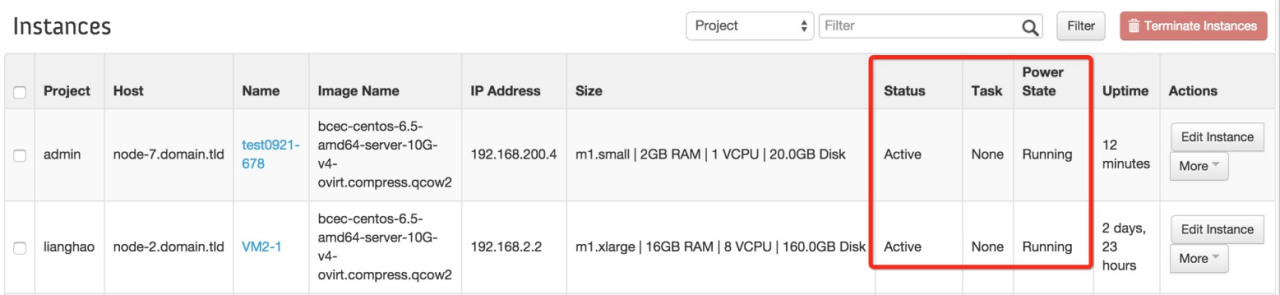
Converting a VMware Workstation virtual machine toKVM Leave a commentPosted byrbgeekonAugust 13, 2013 In this tutorial, I’ll show you the step by step procedure to convert the vmware machine into kvm, during this conversation, I have faced some issues, which I’ll also share with you along with solution. Before converting the vmware machine,I strongly recommend removing the vmware tools and any existing snapshots of the virtualmachine.Then, on the windows machine, convert this multi-file image into a single image: cd "C:\Program Files (x86)\VMware\VMware Workstation" vmware-vdiskmanager.exe -r "D:\VMWare\winxplite\XP-Lite.vmdk" -t 0 "D:\VMWare\winxplite\winxp.vmdk" Note: Please change the path of vmdk file according to your requirement. Copy this new vmdk file to the Linux box using WinSCP: Next, convert the transfered image file (vmdk) into qcow2 format: qemu-img convert winxp.vmdk -O qcow2 winxpvm.img Move the qcow2 image to the/var/lib/libvirt/images/directory and check the permission: mv winxpvm.img/var/lib/libvirt/images/ cd/var/lib/libvirt/images/ ls -l Start virt-manager by running thevirt-managercommand,clickNewto create a newguest.Inthe Virtual Machine Name window, enter a name for your guest. In this example, the virtual machine is namedwinxpvmand also select the “import existing disk image“. ClickForward. Click on “Browse” button: Locate the qcow2 image that we have converted above and select it: Next,choose the amount of RAM and number of virtual CPUs allocated to the guest: In the Summary window, verify the settings for creating the guest. When you are satisfied, clickFinish. Right click on the newly created virtual machine and selectRun: After boot, I got the(0x0000007B) BLUE SCREEN OF DEATH (BSOD): Shutdown the Machine: The main reason for BSOD problem is that most VMware Windows images are installed on SCSI virtual disk but KVM requires IDE device driver for converted images. To solve this problem, copy theMergeIDE.regtext from the below mentioned URL: https://github.com/TJC/kvm-ievms/blob/master/MergeIDE.reg Create a new file: nano mergeide.reg Paste the text inside it that we have copied from the above link: Install all libguestfs related packages: yum install qemu-img '*libguestfs*' Now, we need to merge themergeide.regwith the VM usingvirt-win-regcommand: virt-win-reg --merge winxpvm mergeide.reg Note:You mustnotuse virt-win-reg with the–mergeoption on running virtual machines. If you do this, youwillget irreversible disk corruption in the VM. Start the VM from the virt-manager again: This time, virtual machine will boot successfully:-) Enjoy Hope this will help you! Please Remember me in your prayers!

优秀的个人博客,低调大师

openstack之网络基础

L1:物理层L2:数据链路层,基于mac地址的通信,通过交换机连接;对等传输,即交换机上的一个主机发一个包,连接在该交换机上的所有机器都能收到;L3:网络层,基于ip地址,路由器设备,连接不同网段,进行路由选择; 交换机/路由器的区别:1、工作层级不同,交换机在L2,路由器在L3;2、数据转发依据对象不同:交换机传输基于mac地址的数据帧,路由器传输基于ip地址的ip数据包;3、解决问题不同:交换机使得同网段互通/路由器使得多网段互通; IP Tableip netns exec router-ns iptables -t nat -nL 混杂模块:1、接收所有经过设备(网卡)的数据包2、一般用于网络抓包;3、Floating IP功能实现查看网卡是否打开混杂模式;root@222-132-16-52:~# ifconfig br0br0 Link encap:Ethernet HWaddr c8:0a:a9:57:70:b0 inet addr:222.132.16.52 Bcast:222.132.16.255 Mask:255.255.255.0 inet6 addr: fe80::ca0a:a9ff:fe57:70b0/64 Scope:Link #UP BROADCAST RUNNING MULTICAST# MTU:1500 Metric:1 RX packets:32138224 errors:0 dropped:0 overruns:0 frame:0 TX packets:21550681 errors:0 dropped:0 overruns:0 carrier:0 collisions:0 txqueuelen:0 RX bytes:3797977700 (3.7 GB) TX bytes:4267007875 (4.2 GB)

优秀的个人博客,低调大师

openStack error infos 调试

glance image-create --name "RuiCheck" --disk-format qcow2 --container-format bare --is-public True --progress <nix.qcow2[> ] 0%Error communicating with http://ruiy.ostack.cc:9292 timed out 2015-01-07 05:51:05.745 15583 ERROR nova.wsgi [-] Could not bind to 0.0.0.0:87752015-01-07 05:51:05.752 15583 CRITICAL nova [-] error: [Errno 98] Address already in use2015-01-07 06:50:11.723 3854 ERROR nova.wsgi [-] Could not bind to 0.0.0.0:87752015-01-07 06:50:54.929 3854 CRITICAL nova [-] error: [Errno 98] Address already in use 解决方案联系Ruiy 150 5519 8367 来电前请短信告知原因,

优秀的个人博客,低调大师

openstack添加新功能

#增加按钮功能【例如增加增量功能】 vim /opt/horizon-2012.1/horizon/dashboards/nova/instances_and_volumes/instances/tables.py class SnapshotLink(tables.LinkAction): #创建快照功能,快照流程分析 name = "snapshot" verbose_name = _("Snapshot") url = "horizon:nova:images_and_snapshots:snapshots:create" #连接目录如下: classes = ("ajax-modal", "btn-camera") def allowed(self, request, instance=None): return instance.status in ACTIVE_STATES 说明: vim /opt/horizon-2012.1/horizon/dashboards/nova/images_and_snapshots/snapshots/url.py # from django.conf.urls.defaults import patterns, url from .views import CreateView urlpatterns = patterns('', url(r'^(?P[^/]+)/create', CreateView.as_view(), name='create') #### vim /opt/horizon-2012.1/horizon/dashboards/nova/images_and_snapshots/snapshots/views.py class CreateView(forms.ModalFormView): #vim /opt/horizon-2012.1/horizon/forms/views.py form_class = CreateSnapshot template_name = 'nova/images_and_snapshots/snapshots/create.html' def get_initial(self): redirect = reverse('horizon:nova:instances_and_volumes:index') instance_id = self.kwargs["instance_id"] try: self.instance = api.server_get(self.request, instance_id) except: self.instance = None msg = _("Unable to retrieve instance.") exceptions.handle(self.request, msg, redirect) if self.instance.status != api.nova.INSTANCE_ACTIVE_STATE: msg = _('To create a snapshot, the instance must be in ' 'the "%s" state.') % api.nova.INSTANCE_ACTIVE_STATE raise exceptions.Http302(redirect, message=msg) return {"instance_id": instance_id, "tenant_id": self.request.user.tenant_id} def get_context_data(self, **kwargs): context = super(CreateView, self).get_context_data(**kwargs) context['instance'] = self.instance return context #修改实例:单击Snapshot按钮后出现的对话框如下: name = forms.CharField(max_length="20", label=_("shot Name")) #修改前 #name = forms.CharField(max_length="20", label=_("Snapshot Name")) #修改后 修改完毕,重启apache vim /opt/horizon-2012.1/horizon/forms/views.py import os from django import http from django.views import generic ## cd /usr/lib/python2.6/site-packages/django/views/generic class ModalFormView(generic.TemplateView): vim /usr/lib/python2.6/site-packages/django/views/generic/base.py # class View(object): """ Intentionally simple parent class for all views. Only implements dispatch-by-method and simple sanity checking. """ http_method_names = ['get', 'post', 'put', 'delete', 'head', 'options', 'trace'] def __init__(self, **kwargs): """ Constructor. Called in the URLconf; can contain helpful extra keyword arguments, and other things. """ # Go through keyword arguments, and either save their values to our # instance, or raise an error. for key, value in kwargs.iteritems(): setattr(self, key, value) @classonlymethod def as_view(cls, **initkwargs): """ Main entry point for a request-response process. """ # sanitize keyword arguments for key in initkwargs: if key in cls.http_method_names: raise TypeError(u"You tried to pass in the %s method name as a " u"keyword argument to %s(). Don't do that." % (key, cls.__name__)) if not hasattr(cls, key): raise TypeError(u"%s() received an invalid keyword %r" % ( cls.__name__, key)) def view(request, *args, **kwargs): self = cls(**initkwargs) return self.dispatch(request, *args, **kwargs) # take name and docstring from class update_wrapper(view, cls, updated=()) # and possible attributes set by decorators # like csrf_exempt from dispatch update_wrapper(view, cls.dispatch, assigned=()) return view def dispatch(self, request, *args, **kwargs): # Try to dispatch to the right method; if a method doesn't exist, # defer to the error handler. Also defer to the error handler if the # request method isn't on the approved list. if request.method.lower() in self.http_method_names: handler = getattr(self, request.method.lower(), self.http_method_not_allowed) else: handler = self.http_method_not_allowed self.request = request self.args = args self.kwargs = kwargs return handler(request, *args, **kwargs) def http_method_not_allowed(self, request, *args, **kwargs): allowed_methods = [m for m in self.http_method_names if hasattr(self, m)] logger.warning('Method Not Allowed (%s): %s' % (request.method, request.path), extra={ 'status_code': 405, 'request': self.request } ) return http.HttpResponseNotAllowed(allowed_methods) class TemplateResponseMixin(object): """ A mixin that can be used to render a template. """ template_name = None response_class = TemplateResponse def render_to_response(self, context, **response_kwargs): """ Returns a response with a template rendered with the given context. """ return self.response_class( request = self.request, template = self.get_template_names(), context = context, **response_kwargs ) def get_template_names(self): """ Returns a list of template names to be used for the request. Must return a list. May not be called if render_to_response is overridden. """ if self.template_name is None: raise ImproperlyConfigured( "TemplateResponseMixin requires either a definition of " "'template_name' or an implementation of 'get_template_names()'") else: return [self.template_name] class TemplateView(TemplateResponseMixin, View): #表示有两个父类 """ A view that renders a template. """ def get_context_data(self, **kwargs): return { 'params': kwargs } def get(self, request, *args, **kwargs): context = self.get_context_data(**kwargs) return self.render_to_response(context) #add by xk=新增项==============================================# class IncreaseLink(tables.LinkAction): name = "increase" verbose_name = _("Increase") url = "horizon:nova:images_and_snapshots:snapshots:create" classes = ("ajax-modal", "btn-camera") #def allowed(self, request, instance=None): # retturn instance.status in ACTIVE_STATES #============================================================# Add 虚拟机创建规则功能和主机选择功能 vim /opt/horizon-2012.1/horizon/dashboards/nova/images_and_snapshots/images/forms.py +175 class LaunchForm(forms.SelfHandlingForm): name = forms.CharField(max_length=80, label=_("Server Name")) image_id = forms.CharField(widget=forms.HiddenInput()) tenant_id = forms.CharField(widget=forms.HiddenInput()) user_data = forms.CharField(widget=forms.Textarea, label=_("User Data"), required=False) flavor = forms.ChoiceField(label=_("Flavor"), help_text=_("Size of image to launch.")) #add by xk 2012-12-27 rouler = forms.ChoiceField(label=_("rouler"), help_text=_("Rouler of image to create.")) #-------------------# .. .. api.server_create(request, data['name'], data['image_id'], data['flavor'], #add by xk 2012-12-27 data['rouler'], #--------------------# meta, data.get('keypair'), normalize_newlines(data.get('user_data')), data.get('security_groups'), dev_mapping, instance_count=data.get('count')) messages.success(request, _('Instance "%s" launched.') % data["name"]) 重启apache #效果如下 #=======launch按钮涉及的页面====================================# vim /opt/horizon-2012.1/horizon/dashboards/nova/templates/nova/images_and_snapshots/images/_launch.html vim /opt/horizon-2012.1/horizon/templates/horizon/common/_form_fields.html Managers interact with a particular type of API (servers, flavors, images, etc.) and provide CRUD operations for them. 《开源人》
资源下载

更多资源
Spring

Spring

Spring框架(Spring Framework)是由Rod Johnson于2002年提出的开源Java企业级应用框架,旨在通过使用JavaBean替代传统EJB实现方式降低企业级编程开发的复杂性。该框架基于简单性、可测试性和松耦合性设计理念,提供核心容器、应用上下文、数据访问集成等模块,支持整合Hibernate、Struts等第三方框架,其适用范围不仅限于服务器端开发,绝大多数Java应用均可从中受益。

Rocky Linux

Rocky Linux

Rocky Linux(中文名:洛基)是由Gregory Kurtzer于2020年12月发起的企业级Linux发行版,作为CentOS稳定版停止维护后与RHEL(Red Hat Enterprise Linux)完全兼容的开源替代方案,由社区拥有并管理,支持x86_64、aarch64等架构。其通过重新编译RHEL源代码提供长期稳定性,采用模块化包装和SELinux安全架构,默认包含GNOME桌面环境及XFS文件系统,支持十年生命周期更新。

Sublime Text

Sublime Text

Sublime Text具有漂亮的用户界面和强大的功能,例如代码缩略图,Python的插件,代码段等。还可自定义键绑定,菜单和工具栏。Sublime Text 的主要功能包括:拼写检查,书签,完整的 Python API , Goto 功能,即时项目切换,多选择,多窗口等等。Sublime Text 是一个跨平台的编辑器,同时支持Windows、Linux、Mac OS X等操作系统。

WebStorm

WebStorm

WebStorm 是jetbrains公司旗下一款JavaScript 开发工具。目前已经被广大中国JS开发者誉为“Web前端开发神器”、“最强大的HTML5编辑器”、“最智能的JavaScript IDE”等。与IntelliJ IDEA同源,继承了IntelliJ IDEA强大的JS部分的功能。

用户登录
用户注册