首页 文章 精选 留言 我的

精选列表

搜索[I/O接口化],共10025篇文章
优秀的个人博客,低调大师

openstack i版常用命令

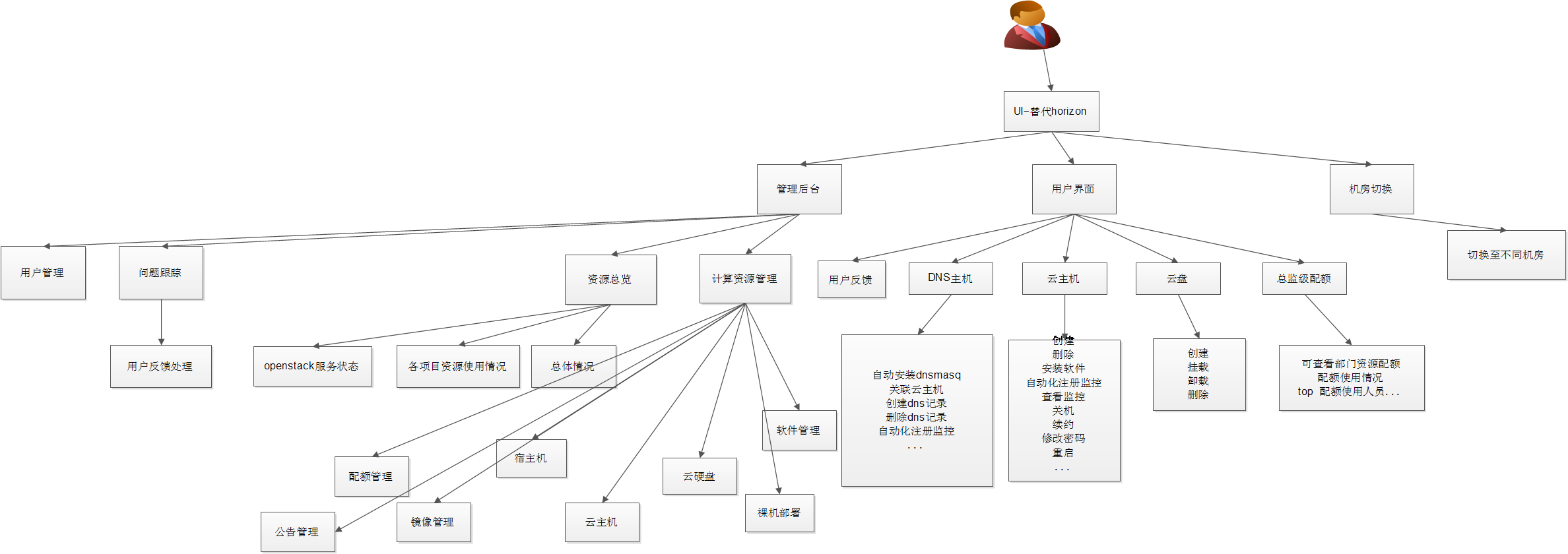
查看openstack的运行状态 nova节点nova service-list (nova-scheduler、nova-conductor、nova-cert、nova-consoleauth)监控服务状态时除nova-consoleauth中有一台作为准备down状态外其余为up neutron节点neutron agent-list (Metadata agent、DHCP agent、Open vSwitch agent) 监控状态时非:-)时为异常 cinder节点 cinder service-list (cinder-backup、cinder-scheduler、cinder-volume) 监控状态时非up时为异常 注: 监控采用api的方式获取,命令加入--debug即可获得api请求cinder --debug service-list 查看云主机信息 特定tenant下所有云主机 nova list 所有tenant下的云主机信息 nova list --all-tenants (admin keyfile) 注:nova api配置限制返回条目nova.conf 1 2 3 #Themaximumnumberofitemsreturnedinasingleresponse #fromacollectionresource(integervalue) osapi_max_limit=1000 根据IP过滤查询 nova list --all-tenant --ip 10.199.133.152 keyfile文件示例 1 2 3 4 5 6 cat keystonerc_admin export OS_USERNAME=admin export OS_TENANT_NAME=admin export OS_PASSWORD=openstack_pass export OS_AUTH_URL=http: //keystone_ip :5000 /v2 .0/ export PS1= '[\u@\h\W(keystone_admin)]\$' 查看详细信息 nova show uuid 1 2 3 4 5 6 7 8 9 10 11 12 13 14 15 16 17 18 19 20 21 22 23 24 25 26 27 28 29 30 31 32 33 34 +--------------------------------------+-------------------------------------------------------------+ |Property|Value| +--------------------------------------+-------------------------------------------------------------+ |OS-DCF:diskConfig|MANUAL| |OS-EXT-AZ:availability_zone|qa-zone| |OS-EXT-SRV-ATTR:host|hh-yun-compute-130128.vclound.com| |OS-EXT-SRV-ATTR:hypervisor_hostname|hh-yun-compute-130128.vclound.com| |OS-EXT-SRV-ATTR:instance_name|instance-00021e62| |OS-EXT-STS:power_state|1| |OS-EXT-STS:task_state|-| |OS-EXT-STS:vm_state|active| |OS-SRV-USG:launched_at|2017-01-04T06:39:22.000000| |OS-SRV-USG:terminated_at|-| |QATOOL_NETnetwork|10.199.133.152| |accessIPv4|| |accessIPv6|| |availability_zone|qa-zone| |config_drive|| |created|2017-01-04T06:38:18Z| |flavor|4core-4g(dc98e6d6-143f-42c2-9482-ee6efb04ff7e)| |hostId|38e138eb165ba7732ce3f40b6830eb158ef8788bdc4279c63e2a024f| | id |e2bbc0ff-a16a-4dea-8c5e-1e9bb7445c13| |image|Centos7_Generic_1503(5aa770b3-8636-4532-9ffd-e1b0dca982be)| |key_name|-| |metadata|{}| |name|harbor-ui.vclound.com| |os-extended-volumes:volumes_attached|[{ "id" : "ee67e9a3-3b63-41dd-bd4a-ef778dbe89d4" }]| |progress|0| |security_groups|default| |status|ACTIVE| |tenant_id|359df7f169214333a7562c7a3095beb8| |updated|2017-01-04T06:39:22Z| |user_id|e69ce5e92b4c427189269c0d6df38fb7| +--------------------------------------+-------------------------------------------------------------+ 查看flavor nova flavor-list 查看镜像 nova image-list glance image-list 查看网络 neutron net-list 查看用zonenova aggregate-list 查看zone下的物理主机 nova aggregate-details qa-zone 创建并启动一台名为adams_test_vm的云主机 创建云主机指定物理主机及密码 nova boot --flavor flavor_name --image image_name --security_group default --nic net-id=net_uuid --availability-zone qa-nova:computer_name vm_host_name --user-data ./passwd.sh --poll 1 2 3 passwd .sh内容如下: #!/bin/bash echo qwe123qwe| passwd --stdinroot 下载镜像 glance image-download image_id --file Win7 上传镜像 glance image-create --name image_name --disk-format qcow2 --file /root/Win7 --container-format bare --is-public True 卸载云盘 nova volume-detach 云主机uuid 云盘uuid 挂载云盘 novavolume-attach云主机uuid 云盘uuid 查看用户信息keystone user-getuser_id 查看tenant信息keystone tenant-get tenant_id 查看compute节点列表nova hypervisor-list 查看compute节点信息nova hypervisor-show compute_node_name 查看宿主机节点上的所有云主机信息nova hypervisor-serverscompute_node_name 查看compute节点资源使用情况nova hypervisor-stats 删除云主机nova delete uuid 创建云盘cinder create size_by_G --availability-zone nova --volume-type ceph-sata --display-name harbor-ui-01 --display-description "ui log disk" --metadata create_user_login=jack01.wu readonly=False create_user_id=xxx attached_mode=rw 迁移云主机nova live-migration uuid compute_node_name (挂载有云硬盘的实例,需要先卸载后操作) 禁用compute节点服务nova service-disable compute_node_name IP分配信息neutron port-list 租户列表keystone tenant-list 配额信息nova quota-show 变更实例配置nova resize instance_uuid|instance_nameflavor_name|flavor_id 重新配置实例nova instance_uuid|instance_nameflavor_name|flavor_id--rebuild-password test Openstack超配设置 1 nova.conf(默认值) 1 2 3 4 5 6 7 8 9 10 11 12 13 14 15 16 17 18 19 20 21 22 23 24 25 26 27 28 CPU #VirtualCPUtophysicalCPUallocationratiowhichaffects #allCPUfilters.Thisconfigurationspecifiesaglobalratio #forCoreFilter.ForAggregateCoreFilter,itwillfallback #tothisconfigurationvalueifnoper-aggregatesetting #found.(floatingpointvalue) #cpu_allocation_ratio=16.0 DISK磁盘超配如云主机使用宿主机存储易导致灾难事故 #Virtualdisktophysicaldiskallocationratio(floating #pointvalue) #disk_allocation_ratio=1.0 MEM #Virtualramtophysicalramallocationratiowhichaffects #allramfilters.Thisconfigurationspecifiesaglobalratio #forRamFilter.ForAggregateRamFilter,itwillfallbackto #thisconfigurationvalueifnoper-aggregatesettingfound. #(floatingpointvalue) #ram_allocation_ratio=1.5 #Enablesdynamicmemoryallocation(ballooning)whensettoa #valuegreaterthan1.Thevalueexpressestheratiobetween #thetotalRAMassignedtoaninstanceanditsstartupRAM #amount.Forexamplearatioof2.0foraninstancewith #1024MBofRAMimplies512MBofRAMallocatedatstartup #(floatingpointvalue) #dynamic_memory_ratio=1.0 从14的开发测试环境开始使用openstack,整体架构初期采用openstack底层、页面抛弃原生Horizon自主开发集成后台界面,实现全套的从物理机裸机至云主机业务上线使用、监控报警的流程。初期采用puppet用于管理云主机,glusterfs文件存储作为后端存储。 后续由于时间及研究未深入原因,puppet不适合用于管理3k+以上云主机,后续采用特定用户密钥+自研发布系统的方式管理云主机的管理软件。及机房断电时glusterfs的恢复能力、文件丢失情况严重问题后续后端采用ceph的rbd块存储的方式稳定提供高可用服务。 大致功能模块如下: 本文转自 qwjhq 51CTO博客,原文链接:http://blog.51cto.com/bingdian/1708902

优秀的个人博客,低调大师

How do I install Daydream on my phone?

Google's philosophy with their newest VR platform is simple. In order to offer the best possible experience in Daydream, there needs to be a minimum list of requirements met. The phone must be capable of delivering two video streams at 60fps with no stutter, and when you turn your head inside a Daydream headset there should be as little motion blur as possible. Unfortunately that means no matter how capable your phone is, if it's got an LCD display Google won't be enabling Daydream by default. The"motion to photon latency"in LCD panels being used in phones right now is just too high, and the end result is a VR experience that doesn't meet Google's quality threshold. That having been said, if you're willing to mess around with your phone a little there may be a way to enable Daydream on your phone without Google's blessing. Editor's Note: VR Heads doesnotrecommend you attempt to force Daydream onto your phone for daily use. The latency caused by LCD panels dramatically increases the potential for nausea in VR. Before you get started Your phone must be running Android 7.0 or higher for this to work.DO NOTattempt if your phone is not running this version. You must have root access enabled on your phone for this to work. If you do not know how to root your phone, do not continue. Locate and install the latest version of Google's Daydream app and Google VR Services to install on your phone. If you are not sure you have the latest version from the source you downloaded from, do not continue. Install a Root Explorer app from the Play Store. This process essentially forces Daydream apps to run on your phone be enabling the code those apps check for in order to determine if your phone is approved by Google. You are installing all of the parts Google enables on a Daydream Ready phone, which includes editing software in your phone that controls permissions. Here's how it works. Step by step instructions Locate/system/etc/permissions/handheld_core_hardware.xmlin your system, and select Edit. Locate Root Permissions and add<feature name="android.software.vr.mode" /> <feature name="android.hardware.vr.high_performance" />to the tag. Reboot your phone. Launch Daydream and place your phone inside the headset. If you can, immediately after you've confirmed Daydream is functional on your phone you should remove root access to keep any other apps from editing files without your knowing. This process bypasses a lot of the security features in Android that keep you safe, and keeping that bypass active on your phone is a bad plan. That having been said, if you're curious to see what all the Daydream excitement is about and aren't buying a new phone anytime soon this will get you there.


资源下载

更多资源
腾讯云软件源

腾讯云软件源

为解决软件依赖安装时官方源访问速度慢的问题,腾讯云为一些软件搭建了缓存服务。您可以通过使用腾讯云软件源站来提升依赖包的安装速度。为了方便用户自由搭建服务架构,目前腾讯云软件源站支持公网访问和内网访问。

Nacos

Nacos

Nacos /nɑ:kəʊs/ 是 Dynamic Naming and Configuration Service 的首字母简称,一个易于构建 AI Agent 应用的动态服务发现、配置管理和AI智能体管理平台。Nacos 致力于帮助您发现、配置和管理微服务及AI智能体应用。Nacos 提供了一组简单易用的特性集,帮助您快速实现动态服务发现、服务配置、服务元数据、流量管理。Nacos 帮助您更敏捷和容易地构建、交付和管理微服务平台。

Rocky Linux

Rocky Linux

Rocky Linux(中文名:洛基)是由Gregory Kurtzer于2020年12月发起的企业级Linux发行版,作为CentOS稳定版停止维护后与RHEL(Red Hat Enterprise Linux)完全兼容的开源替代方案,由社区拥有并管理,支持x86_64、aarch64等架构。其通过重新编译RHEL源代码提供长期稳定性,采用模块化包装和SELinux安全架构,默认包含GNOME桌面环境及XFS文件系统,支持十年生命周期更新。

Sublime Text

Sublime Text

Sublime Text具有漂亮的用户界面和强大的功能,例如代码缩略图,Python的插件,代码段等。还可自定义键绑定,菜单和工具栏。Sublime Text 的主要功能包括:拼写检查,书签,完整的 Python API , Goto 功能,即时项目切换,多选择,多窗口等等。Sublime Text 是一个跨平台的编辑器,同时支持Windows、Linux、Mac OS X等操作系统。

用户登录
用户注册