SpringBoot开发秘籍 - 集成Graphql Query
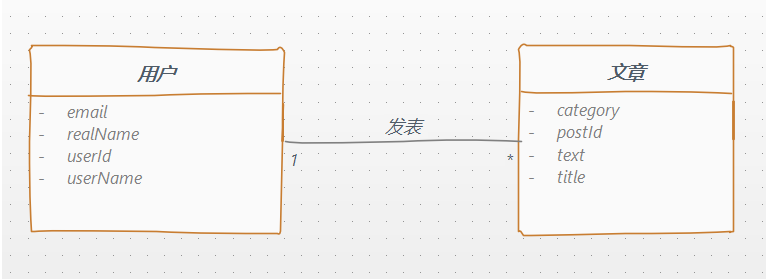
概述 REST作为一种现代网络应用非常流行的软件架构风格受到广大WEB开发者的喜爱,在目前软件架构设计模式中随处可见REST的身影,但是随着REST的流行与发展,它的一个最大的缺点开始暴露出来: 在很多时候客户端需要的数据往往在不同的地方具有相似性,但却又不尽相同。 如同样的用户信息,在有的场景下前端只需要用户的简要信息(名称、头像),在其他场景下又需要用户的详细信息。当这样的相似但又不同的地方多的时候,就需要开发更多的接口来满足前端的需要。 随着这样的场景越来越多,接口越来越多,文档越来越臃肿,前后端沟通成本呈指数增加。 基于上面的场景,我们迫切需要有一种解决方案或框架,可以使得在使用同一个领域模型(DO、DTO)的数据接口时可以由前端指定需要的接口字段,而后端根据前端的需求自动适配并返回对应的字段。 这就是我们今天的主角GraphQL。 场景模拟 考虑下面的场景: 用户 与 文章 是一对多的关系,一个用户可以发表多篇文章,同时又可以根据文章找到对应的作者。 我们需要构建以下几个Graphql查询: 根据用户ID获取用户详情,并获取此用户发表的所有文章 根据文章ID获取文章详情,并获取文章作者的信息 当然项目是基于SpringBoot开发的。 开发实战 在正式开发之前我推荐你在IDEA上安装一下 JS GraphQL插件,这个插件方便我们编写Schema,语法纠错,代码高亮等等。。。 创建一个SpringBoot项目 通过IDEA创建一个SpringBoot项目,并引入对应的jar <dependencies> <dependency> <groupId>org.springframework.boot</groupId> <artifactId>spring-boot-starter</artifactId> </dependency> <dependency> <groupId>org.springframework.boot</groupId> <artifactId>spring-boot-starter-web</artifactId> </dependency> <!--graphqlstart--> <dependency> <groupId>com.graphql-java</groupId> <artifactId>graphql-spring-boot-starter</artifactId> <version>5.0.2</version> </dependency> <dependency> <groupId>com.graphql-java</groupId> <artifactId>graphql-java-tools</artifactId> <version>5.2.4</version> </dependency> <!--graphqlend--> <dependency> <groupId>org.projectlombok</groupId> <artifactId>lombok</artifactId> </dependency> </dependencies> 这里主要需要引入 graphql-spring-boot-starter和 graphql-java-tools。 建立Java实体类 User @Data publicclassUser{ privateintuserId; privateStringuserName; privateStringrealName; privateStringemail; privateList<Post>posts; publicUser(){ } publicUser(intuserId,StringuserName,StringrealName,Stringemail){ this.userId=userId; this.userName=userName; this.realName=realName; this.email=email; } } Post @Data publicclassPost{ privateintpostId; privateStringtitle; privateStringtext; privateStringcategory; privateUseruser; publicPost(){ } publicPost(intpostId,Stringtitle,Stringtext,Stringcategory){ this.postId=postId; this.title=title; this.text=text; this.category=category; } } 定义了两个JAVA实体:Post,User。 编写Schema文件 在resources/schema目录下创建GraphQL Schema文件 schema{ query:Query, } typeQuery{ #获取具体的用户 getUserById(id:Int):User #获取具体的博客 getPostById(id:Int):Post } typeUser{ userId:ID!, userName:String, realName:String, email:String, posts:[Post], } typePost{ postId:ID!, title:String!, text:String, category:String user:User, } 如上,我们通过 type关键字定义了两个对象,User与Post。在属性后面添加!表明这是一个非空属性,通过[Post]表明这是一个Post集合,类似于Java对象中List。 通过Query关键字定义了两个查询对象,getUserById,getPostById,分别返回User对象和Post对象。 关于schema的语法大家可以参考链接:https://graphql.org/learn/schema 编写业务逻辑 PostService @Service publicclassPostServiceimplementsGraphQLQueryResolver{ /** *为了测试,只查询id为1的结果 */ publicPostgetPostById(intid){ if(id==1){ Useruser=newUser(1,"javadaily","JAVA日知录","zhangsan@qq.com"); Postpost=newPost(1,"Hello,Graphql","Graphql初体验","日记"); post.setUser(user); returnpost; }else{ returnnull; } } } UserService @Service publicclassUserServiceimplementsGraphQLQueryResolver{ List<User>userList=Lists.newArrayList(); publicUsergetUserById(intid){ returnuserList.stream().filter(item->item.getUserId()==id).findAny().orElse(null); } @PostConstruct publicvoidinitUsers(){ Postpost1=newPost(1,"Hello,Graphql1","Graphql初体验1","日记"); Postpost2=newPost(2,"Hello,Graphql2","Graphql初体验2","日记"); Postpost3=newPost(3,"Hello,Graphql3","Graphql初体验3","日记"); List<Post>posts=Lists.newArrayList(post1,post2,post3); Useruser1=newUser(1,"zhangsan","张三","zhangsan@qq.com"); Useruser2=newUser(2,"lisi","李四","lisi@qq.com"); user1.setPosts(posts); user2.setPosts(posts); userList.add(user1); userList.add(user2); } } 基于Graphql的查询需要实现 GraphQLQueryResolver接口,由于为了便于演示我们并没有引入数据层,请大家知悉。 配置Graphql 端点 server.port=8080 graphql.servlet.corsEnabled=true #配置端点 graphql.servlet.mapping=/graphql graphql.servlet.enabled=true 配置完端口和端点后我们就可以对我们编写的Graphql接口进行测试了。 接口地址为:localhost:8080/graphql 测试 这里我使用的是Chrome浏览器的 Altair Graphal Client插件,当然你还可以使用其他的客户端工具,如:graphql-playground。 安装插件 浏览器输入chrome://extensions/,在扩展中心搜索Altair后即可添加至浏览器。 查询 启动SpringBoot项目,然后在打开的Altair插件界面,输入Graphql端点 http://localhost:8080/graphql,然后点击 Docs,将鼠标移至需要的查询上,点击 ADD QUERY 即可添加对应的查询。 点击Send Request 即可看到查询结果: 然后我们在Query中可以根据我们的需要新增或删除接口字段并重新请求接口,会看到响应结果中也会根据我们的请求自动返回结果: 小结 Graphql支持的数据操作有: 查询(Query):获取数据的基本查询。 变更(Mutation):支持对数据的增删改等操作。 订阅(Subscription):用于监听数据变动、并靠websocket等协议推送变动的消息给对方。 本节内容我们基于SpringBoot完成了Query的数据操作,实现过程还是相对比较简单。希望此文能让大家对Graphql有一个整体的了解,如果大家对Graphql感兴趣后面还会更新此系列文章,完成对其他数据操作的整合。 以上,希望对你有所帮助! 本文分享自微信公众号 - JAVA日知录(javadaily)。 如有侵权,请联系 support@oschina.cn 删除。 本文参与“OSC源创计划”,欢迎正在阅读的你也加入,一起分享。