首页 文章 精选 留言 我的

精选列表

搜索[Python环境],共10000篇文章
优秀的个人博客,低调大师

python tonado框架简单应用

在上一篇中我们了解了建起tonado的服务,为了方便我们更好的使用这里建议大家仿照django框架去构建。 首先建立static放置静态文件如js,jquery等 建立templates文件放入html 建立upfile文件放置上传文件 建立views文件我们在这个文件下写视图 建立server.py import tornado.web import tornado.ioloop import tornado.httpserver import config #这里是配置文件 from application import Application #这里是建立的路由配置器 if __name__ == "__main__": app=Application() # application.listen(8888) httpServer=tornado.httpserver.HTTPServer(app) # httpServer.listen(8000) httpServer.bind(config.options["port"]) httpServer.start() tornado.ioloop.IOLoop.instance().start() 这里就把服务跟设计代码分离开了,我们就可以愉快的玩耍了 建立config这里面配置文件。 import os BASE_DIRS=os.path.dirname(__file__) #参数 options={ "port":7001, } #配置tornoto的静态文件路径 settings={ 'debug':True, 'static_path':os.path.join(BASE_DIRS,"static"), 'template_path':os.path.join(BASE_DIRS,'templates') } 接下来就构建appliccation import tornado.web import views.index import config class Application(tornado.web.Application): def __init__(self): handlers=[ (r'/',views.index.IndexHandler), (r'/json1',views.index.json1), (r'/redirect',views.index.RedirectHandler), (r'/Errorstack',views.index.Errorindex), tornado.web.url(r'/wenge',views.index.wenge,{'word3':'h1','word4':'h2'},name='wengegood'), (r'/zgr/(\w+)/(\w+)/(\w+)',views.index.zgr), (r'/postfile',views.index.PostFileHandler) ]#这个里面是路由,根据自己的实际情况来 super(Application,self).__init__(handlers,**config.settings)#继承到server.py的Aplication接下来就在views中构建简单的视图玩耍吧 import tornado.web from tornado.web import RequestHandler #name找到所在路由 class IndexHandler(RequestHandler): def get(self,*args,**kwargs): url=self.reverse_url("wengegood") self.write("<a href='%s'>去另外一个界面</a>"%url) # self.write("gggggg") # # self.write("sunck is a good tornado") #json格式返回界面 class json1(RequestHandler): def get(self,*args,**kwargs): per={ 'name':'wenwen', 'age':20, 'sex':'男' } self.write(per) class RedirectHandler(RequestHandler): def get(self,*args,**kwargs): self.redirect("/")#重定向 #自定义错误 class Errorindex(RequestHandler): def write_error(self, status_code, **kwargs): if status_code==500: code=500 self.write('服务器出错') if status_code==404: code=404 self.write('资源不存在') self.set_status(code) def get(self,*args,**kwargs): flag=self.get_query_argument("flag") if flag=='0': self.send_error(404) self.write('hello tornoto') #后台传入参数 class wenge(RequestHandler): def initialize(self,word3,word4): self.word3=word3 self.word4=word4 def get(self, *args, **kwargs): print(self.word3,self.word4) self.write('wenge is a nice men') #url传入参数 class zgr(RequestHandler): def get(self,a,b,c,*args, **kwargs): print(a,b,c) self.write('zgr is a nice man') #post接收参数 class PostFileHandler(RequestHandler): def get(self, *args, **kwargs): a={'a':'sdfa'} self.render('1.html',a) def post(self,*args, **kwargs): name=self.get_body_argument('username') passwd=self.get_body_argument('passwd') hobbylist=self.get_body_arguments('hobby') print(name,passwd,hobbylist) self.write('姓名%s,密码%s,爱好%s'%(name,passwd,hobbylist))

优秀的个人博客,低调大师

python基础----动态导入模块

动态导入模块方法1: import 说明: 1. 函数功能用于动态的导入模块,主要用于反射或者延迟加载模块。 2. __import__(module)相当于import module 举例说明: 首先创建一个模块目录lib,然后在目录内创建一个模块为:aa.pyos.path---->lib/aa.py 模块代码为: class c(object): def __str__(self): return 'C language' 在lib目录平级新建一个测试的模块,使用 import 动态以字符串形式导入lib下的aa模块。 lib = __import__('lib.aa') # 相当于import libc = lib.aa.c()print(c) 动态导入模块方法2:import importlib 实例还是上面的lib.aa模块,这里使用importlib进行动态导入(这个方法好理解,也是官方建议使用的) import importlibaa = importlib.import_module('lib.aa')c = aa.c()print(c)

优秀的个人博客,低调大师

排序算法的python实现

本文所有的排序方法都在列表上进行操作,首先定义交换任意两项位置的函数swap。 def swap (x,i,j): """ 交换x的i,j位置元素 """ temp = x[i] x[i] = x[j] x[j] = temp 1、选择排序 排序算法的逻辑非常简单,首先搜索整个列表,找到最小项的位置,如果该位置不是列表的第1项,就交换这两个位置的元素。然后从列表的第2个元素开始,重复上述过程,直到算法达到整个过程的最后一个位置,图形解释如下 代码如下 def selectionSort (x): i = 0 while i < len(x) - 1 : minindex = i j = i + 1 while j < len(x) : if x[minindex] > x[j]: minindex = j j+= 1 if minindex

优秀的个人博客,低调大师

使用Python进行面部合成

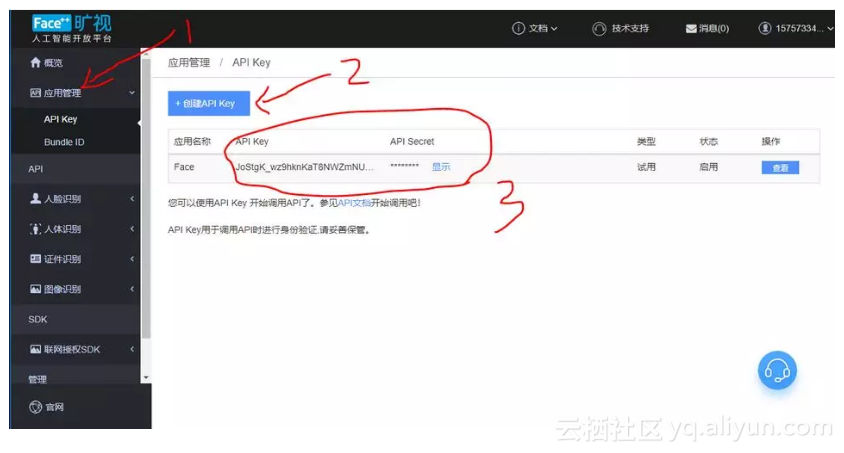
一. 准备工作 1. 此程序使用的是 Face++ 的API,所以需要去Face++官网注册账号: https://www.faceplusplus.com.cn/ 2. 创建应用,获取 key 和 secret 3. 下载 simplejson 模块 ,使用pip就可以下载了 pip install simplejson 二. 程序思路 1. 使用 decect 接口,获取人脸关键点 接口详细文档: https://console.faceplusplus.com.cn/documents/4888373 * return_landmark 参数 不能为 0 不然不会返回人脸关键点 return_landmark Int 是否检测并返回人脸关键点。合法值为: 2 检测。返回 106 个人脸关键点。 1 检测。返回 83 个人脸关键点。 0 不检测 注:本参数默认值为

优秀的个人博客,低调大师

python 文件file操作(2)

文件的属性 所谓属性,就是能够通过一个文件对象得到的东西。 >>> f = open("m1.txt","a") >>> f.name 'm1.txt' >>> f.mode #显示当前文件打开的模式 'a' >>> f.closed #文件是否关闭,如果关闭,返回True;如果打开,返回False False >>> f.close() #关闭文件的内置函数 >>> f.closed True 文件的有关状态 >>> import os >>> file_stat = os.stat("m1.txt") #查看这个文件的状态 >>> file_stat #文件状态是这样的。从下面的内容,有不少从英文单词中可以猜测出来。 posix.stat_result(st_mode=33204, st_ino=5772566L, st_dev=2049L, st_nlink=1, st_uid=1000, st_gid=1000, st_size=69L, st_atime=1407897031, st_mtime=1407734600, st_ctime=1407734600) >>> file_stat.st_ctime #这个是文件创建时间 1407734600.0882277 #换一种方式查看这个时间 >>> import time >>> time.localtime(file_stat.st_ctime) #这回看清楚了。 time.struct_time(tm_year=2014, tm_mon=8, tm_mday=11, tm_hour=13, tm_min=23, tm_sec=20, tm_wday=0, tm_yday=223, tm_isdst=0) 以上关于文件状态和文件属性的内容,在对文件的某些方面进行判断和操作的时候或许会用到。特别是文件属性。比如在操作文件的时候,我们经常要首先判断这个文件是否已经关闭或者打开,就需要用到file.closed这个属性来判断了。 文件的内置函数 >>> dir(file) ['__class__', '__delattr__', '__doc__', '__enter__', '__exit__', '__format__', '__getattribute__', '__hash__', '__init__', '__iter__', '__new__', '__reduce__', '__reduce_ex__', '__repr__', '__setattr__', '__sizeof__', '__str__', '__subclasshook__', 'close', 'closed', 'encoding', 'errors', 'fileno', 'flush', 'isatty', 'mode', 'name', 'newlines', 'next', 'read', 'readinto', 'readline', 'readlines', 'seek', 'softspace', 'tell', 'truncate', 'write', 'writelines', 'xreadlines'] >>> 实验: >>> f = open("m1.txt","r") >>> f.read() 'My name is hiekay.\nMy website is hiekay.github.io\nAha,I like program\n' >>> file.read()能够将文件中的内容全部读取过来。特别注意,这是返回一个字符串,而且是将文件中的内容全部读到内存中。试想,如果内容太多是不是就有点惨了呢?的确是,千万不要去读大个的文件。 >>> contant = f.read() >>> type(contant) <type 'str'> 如果文件比较大了,就不要一次都读过来,可以转而一行一行地,用readline >>> f = open("m1.txt","r") >>> f.readline() #每次返回一行,然后指针向下移动 'My name is hiekay.\n' >>> f.readline() #再读,再返回一行 'My website is hiekay.github.io\n' >>> f.readline() 'Aha,I like program\n' >>> f.readline() #已经到最后一行了,再读,不报错,返回空 '' 读多行,readlines() >>> f = open("m1.txt","r") >>> cont = f.readlines() >>> cont ['My name is hiekay.\n', 'My website is hiekay.github.io\n', 'Aha,I like program\n'] >>> type(cont) <type 'list'> >>> for line in cont: ... print line ... My name is hiekay. My website is hiekay.github.io Aha,I like program 从实验中我们可以看到,readlines和read有一样之处,都是将文件内容一次性读出来,存放在内存,但是两者也有区别,read返回的是str类型,readlines返回的是list,而且一行一个元素,因此,就可以通过for逐行打印出来了。 在print line中,注意观察list里面的每个元素,最后都是一个\n结尾,所以打印的结果会有空行。 对付大点的文件,推荐这么做: >>> f = open("m1.txt","r") >>> f <open file 'm1.txt', mode 'r' at 0xb757c230> >>> type(f) <type 'file'> >>> for line in f: ... print line ... My name is hiekay. My website is hiekay.github.io Aha,I like program 以上都是读文件的内置函数和方法。除了读,就是要写。所谓写,就是将内容存入到文件中。用到的内置函数是write。但是,要写入文件,还要注意打开文件的模式,可以是w,也可以是a,看具体情况而定。 >>> f = open("m1.txt","a") #因为这个文件已经存在,我又不想清空,用追加的模式 >>> f.write("There is a baby.") #这句话应该放到文件最后 >>> f.close() #请看官注意,写了之后,一定要及时关闭文件。才能代表真正写入 看看写的效果: >>> f = open("m1.txt","r") >>> for line in f.readlines(): ... print line ... My name is hiekay. My website is hiekay.github.io Aha,I like program There is a baby. #果然增加了这一行 以上是关于文件的基本操作。高级 : pickle这个模块,是一个很好用的东西。

资源下载

更多资源
腾讯云软件源

腾讯云软件源

为解决软件依赖安装时官方源访问速度慢的问题,腾讯云为一些软件搭建了缓存服务。您可以通过使用腾讯云软件源站来提升依赖包的安装速度。为了方便用户自由搭建服务架构,目前腾讯云软件源站支持公网访问和内网访问。

Nacos

Nacos

Nacos /nɑ:kəʊs/ 是 Dynamic Naming and Configuration Service 的首字母简称,一个易于构建 AI Agent 应用的动态服务发现、配置管理和AI智能体管理平台。Nacos 致力于帮助您发现、配置和管理微服务及AI智能体应用。Nacos 提供了一组简单易用的特性集,帮助您快速实现动态服务发现、服务配置、服务元数据、流量管理。Nacos 帮助您更敏捷和容易地构建、交付和管理微服务平台。

Rocky Linux

Rocky Linux

Rocky Linux(中文名:洛基)是由Gregory Kurtzer于2020年12月发起的企业级Linux发行版,作为CentOS稳定版停止维护后与RHEL(Red Hat Enterprise Linux)完全兼容的开源替代方案,由社区拥有并管理,支持x86_64、aarch64等架构。其通过重新编译RHEL源代码提供长期稳定性,采用模块化包装和SELinux安全架构,默认包含GNOME桌面环境及XFS文件系统,支持十年生命周期更新。

Sublime Text

Sublime Text

Sublime Text具有漂亮的用户界面和强大的功能,例如代码缩略图,Python的插件,代码段等。还可自定义键绑定,菜单和工具栏。Sublime Text 的主要功能包括:拼写检查,书签,完整的 Python API , Goto 功能,即时项目切换,多选择,多窗口等等。Sublime Text 是一个跨平台的编辑器,同时支持Windows、Linux、Mac OS X等操作系统。

用户登录
用户注册