首页 文章 精选 留言 我的

精选列表

搜索[并发工具],共10011篇文章
优秀的个人博客,低调大师

百万并发下的nginx优化之道!!!

@[TOC](文章目录) # 一、nginx地址重写 ### 1、nginx地址重写(rewrite)介绍 nginx地址重写的主要功能是实现URL地址的重定向。服务器获得一个来访的URL请求,然后改写成服务器可以处理的另一个URL 语法格式: rewrite 旧的地址(支持正则) 新的地址 标签(可忽略) ### 2、主文件配置方式与步骤 #### ① 基本配置转发 ```powershell [root@localhost ~]# vim /usr/local/nginx/conf/nginx.conf //编辑主配置文件 server { listen 80; server_name web.com.cn; rewrite "/a.html$" /b.html; //地址重写配置 [root@localhost ~]# /usr/local/nginx/sbin/nginx -s reload //重启nginx服务 ``` #### ② 基本正则转发 ```powershell [root@localhost ~]# vim /usr/local/nginx/conf/nginx.conf //编辑主配置文件 server { listen 80; server_name web.com.cn; rewrite ^/ http://www.baidu.com.cn; //地址重写配置^/指的是匹配/usr/local/nginx/html下的所有网页,访问任何网站的时候都会跳转到baidu.com.cn下 [root@localhost ~]# /usr/local/nginx/sbin/nginx -s reload //重启nginx服务 ``` #### ③ 高级正则地址重写 ```powershell [root@localhost ~]# vim /usr/local/nginx/conf/nginx.conf //编辑主配置文件 server { listen 80; server_name web.com.cn; rewrite ^/(.*)$ http://www.baidu.com.cn/$1; //地址重写配置,使用正则,()代表保留,nginx使用$1代表第一个保留字串,$2则代表第二个保留字串 [root@localhost ~]# /usr/local/nginx/sbin/nginx -s reload //重启nginx服务 ``` # 二、LNMP动态网站 L:linux操作系统 N:Nginx网站服务软件 M:Mysql、MariaDB数据库 P:网站开发语言(PHP) ### 1、LNMP原理: nginx:单独部署,只能处理静态数据; 静态数据:指的是每次打开或者访问的时候,都是看到相同的内容,不会发生变化的 动态数据:每次运行,执行时都可以得到不同的结果 #### ① lnmp对静态数据的处理过程 ![在这里插入图片描述](https://img-blog.csdnimg.cn/20210707233722441.png?x-oss-process=image/watermark,type_ZmFuZ3poZW5naGVpdGk,shadow_10,text_aHR0cHM6Ly9ibG9nLmNzZG4ubmV0L3FxXzQ2MDAxOTMz,size_16,color_FFFFFF,t_70)![在这里插入图片描述](https://img-blog.csdnimg.cn/20210707233801209.png?x-oss-process=image/watermark,type_ZmFuZ3poZW5naGVpdGk,shadow_10,text_aHR0cHM6Ly9ibG9nLmNzZG4ubmV0L3FxXzQ2MDAxOTMz,size_16,color_FFFFFF,t_70) #### ② lnmp对动态数据的处理过程 ![在这里插入图片描述](https://img-blog.csdnimg.cn/20210707233629525.png?x-oss-process=image/watermark,type_ZmFuZ3poZW5naGVpdGk,shadow_10,text_aHR0cHM6Ly9ibG9nLmNzZG4ubmV0L3FxXzQ2MDAxOTMz,size_16,color_FFFFFF,t_70) ![在这里插入图片描述](https://img-blog.csdnimg.cn/20210707233850347.png?x-oss-process=image/watermark,type_ZmFuZ3poZW5naGVpdGk,shadow_10,text_aHR0cHM6Ly9ibG9nLmNzZG4ubmV0L3FxXzQ2MDAxOTMz,size_16,color_FFFFFF,t_70) ![在这里插入图片描述](https://img-blog.csdnimg.cn/20210707233858432.png?x-oss-process=image/watermark,type_ZmFuZ3poZW5naGVpdGk,shadow_10,text_aHR0cHM6Ly9ibG9nLmNzZG4ubmV0L3FxXzQ2MDAxOTMz,size_16,color_FFFFFF,t_70) ![在这里插入图片描述](https://img-blog.csdnimg.cn/20210707233904469.png?x-oss-process=image/watermark,type_ZmFuZ3poZW5naGVpdGk,shadow_10,text_aHR0cHM6Ly9ibG9nLmNzZG4ubmV0L3FxXzQ2MDAxOTMz,size_16,color_FFFFFF,t_70) ### 2、部署LNMP网站 #### ① 搭建nginx ```powershell [root@localhost ~]# yum -y install gcc pcre-devel openssl-devel //安装依赖包 [root@localhost ~]# tar -xf nginx-1.16.1 //解压编译包 [root@localhost ~]# cd nginx-1.16.1 [root@localhost nginx-1.16.1]# --prefix=/usr/local/nginx \ --with-http_ssl_module [root@localhost nginx-1.16.1]# make && make install //编译安装 ``` #### ② 安装MariaDB数据库 ```powershell [root@localhost ~]# yum -y install mariadb-server mariadb mariadb-devel ``` #### ③ 安装php解释器 ```powershell [root@localhost ~]# yum -y install php php-fpm php-mysql ``` #### ④ 启动所有服务 ```powershell [root@localhost ~]# /usr/local/nginx/sbin/nginx //启动nginx服务 [root@localhost ~]# systemctl start mariadb //开启mariadb服务 [root@localhost ~]# systemctl start php-fpm //开启php-fpm服务 [root@localhost ~]# systemctl enable mariadb //设置mariadb服务开机自启 [root@localhost ~]# systemctl enable php-fpm //设置php-fpm服务开机自启 ``` # 三、配置动静分离 ### 1、location语法 ```powershell localtion /test { deny 10.10.10.10; //拒绝10.10.10.10 } localtion /video { /*允许20.20.20.20,其它的禁用*/ allow 20.20.20.20; deny all; } localtion / { allow all; //允许所有 } ``` ### 2、修改配置文件,配置nginx动静分离 ```powershell [root@localhost ~]# vim /usr/local/nginx/conf/nginx.conf // location 处理静态网页 localtion / { root html; index index.html index.htm; } location ~\.php$ { root html; fastcgi_pass 127.0.0.1:9000; //指定转发请求 fastcgi_index index.php; //php为默认页面 include fastcgi.conf; } [root@localhost ~]# /usr/local/nginx/sbin/nginx -s reload //重启服务 [root@localhost ~]# iptables -F // 清空防火墙策略 ```

优秀的个人博客,低调大师

高并发之——线程与多线程

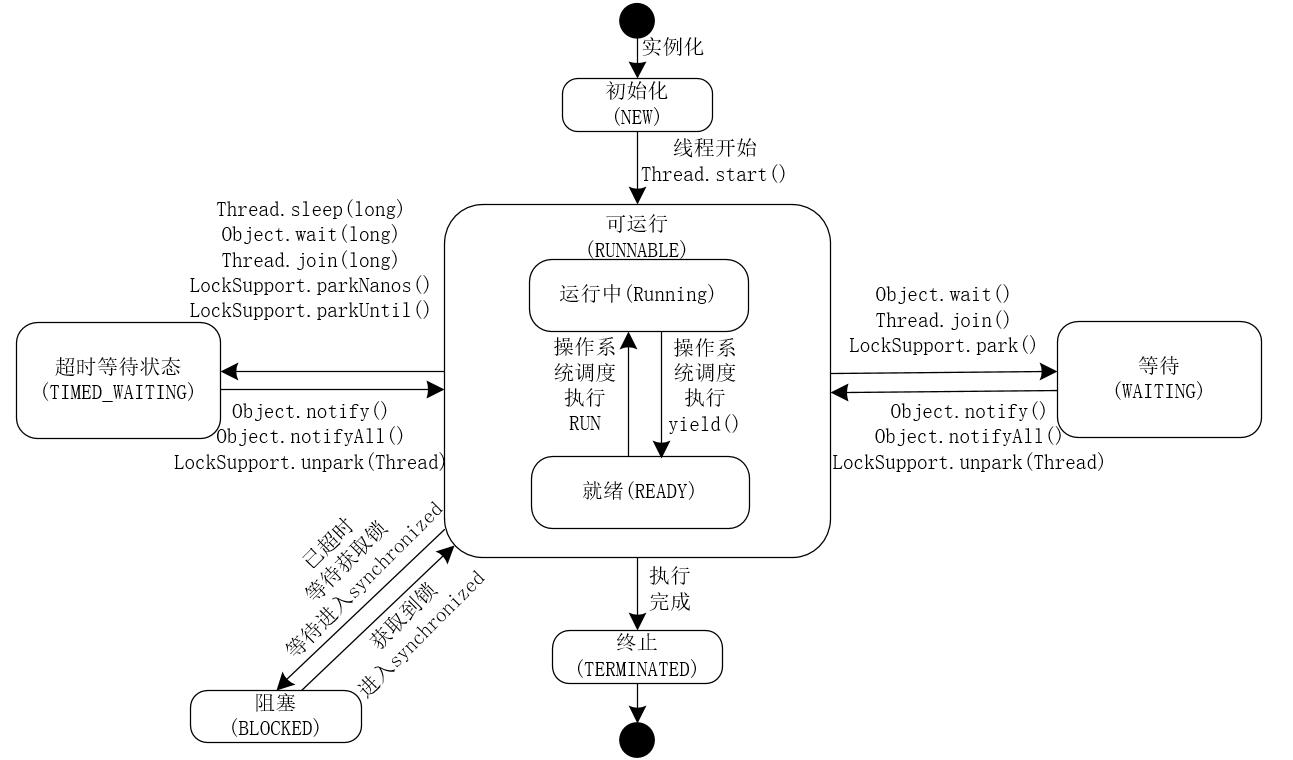
一、线程与多线程 1.线程 在操作系统中,线程是比进程更小的能够独立运行的基本单位。同时,它也是CPU调度的基本单位。线程本身基本上不拥有系统资源,只是拥有一些在运行时需要用到的系统资源,例如程序计数器,寄存器和栈等。一个进程中的所有线程可以共享进程中的所有资源。 2.多线程 多线程可以理解为在同一个程序中能够同时运行多个不同的线程来执行不同的任务,这些线程可以同时利用CPU的多个核心运行。多线程编程能够最大限度的利用CPU的资源。如果某一个线程的处理不需要占用CPU资源时(例如IO线程),可以使当前线程让出CPU资源来让其他线程能够获取到CPU资源,进而能够执行其他线程对应的任务,达到最大化利用CPU资源的目的。 二、实现线程的方式 在Java中,实现线程的方式大体上分为三种,通过继承Thread类、实现Runnable接口,实现Callable接口。简单的示例代码分别如下所示。 继承Thread类代码 package io.binghe.concurrent.executor.test; /** * @author binghe * @version 1.0.0 * @description 继承Thread实现线程 */ public class ThreadTest extends Thread { @Override public void run() { //TODO 在此写在线程中执行的业务逻辑 } } 实现Runnable接口代码 package io.binghe.concurrent.executor.test; /** * @author binghe * @version 1.0.0 * @description 实现Runnable实现线程 */ public class RunnableTest implements Runnable { @Override public void run() { //TODO 在此写在线程中执行的业务逻辑 } } 实现Callable接口代码 package io.binghe.concurrent.executor.test; import java.util.concurrent.Callable; /** * @author binghe * @version 1.0.0 * @description 实现Callable实现线程 */ public class CallableTest implements Callable<String> { @Override public String call() throws Exception { //TODO 在此写在线程中执行的业务逻辑 return null; } } 三、线程的生命周期 1.生命周期 一个线程从创建,到最终的消亡,需要经历多种不同的状态,而这些不同的线程状态,由始至终也构成了线程生命周期的不同阶段。线程的生命周期可以总结为下图。 其中,几个重要的状态如下所示。 NEW:初始状态,线程被构建,但是还没有调用start()方法。 RUNNABLE:可运行状态,可运行状态可以包括:运行中状态和就绪状态。 BLOCKED:阻塞状态,处于这个状态的线程需要等待其他线程释放锁或者等待进入synchronized。 WAITING:表示等待状态,处于该状态的线程需要等待其他线程对其进行通知或中断等操作,进而进入下一个状态。 TIME_WAITING:超时等待状态。可以在一定的时间自行返回。 TERMINATED:终止状态,当前线程执行完毕。 2.代码示例 为了更好的理解线程的生命周期,以及生命周期中的各个状态,接下来使用代码示例来输出线程的每个状态信息。 WaitingTime 创建WaitingTime类,在while(true)循环中调用TimeUnit.SECONDS.sleep(long)方法来验证线程的TIMED_WARTING状态,代码如下所示。 package io.binghe.concurrent.executor.state; import java.util.concurrent.TimeUnit; /** * @author binghe * @version 1.0.0 * @description 线程不断休眠 */ public class WaitingTime implements Runnable{ @Override public void run() { while (true){ waitSecond(200); } } //线程等待多少秒 public static final void waitSecond(long seconds){ try { TimeUnit.SECONDS.sleep(seconds); } catch (InterruptedException e) { e.printStackTrace(); } } } WaitingState 创建WaitingState类,此线程会在一个while(true)循环中,获取当前类Class对象的synchronized锁,也就是说,这个类无论创建多少个实例,synchronized锁都是同一个,并且线程会处于等待状态。接下来,在synchronized中使用当前类的Class对象的wait()方法,来验证线程的WAITING状态,代码如下所示。 package io.binghe.concurrent.executor.state; /** * @author binghe * @version 1.0.0 * @description 线程在Warting上等待 */ public class WaitingState implements Runnable { @Override public void run() { while (true){ synchronized (WaitingState.class){ try { WaitingState.class.wait(); } catch (InterruptedException e) { e.printStackTrace(); } } } } } BlockedThread BlockedThread主要是在synchronized代码块中的while(true)循环中调用TimeUnit.SECONDS.sleep(long)方法来验证线程的BLOCKED状态。当启动两个BlockedThread线程时,首先启动的线程会处于TIMED_WAITING状态,后启动的线程会处于BLOCKED状态。代码如下所示。 package io.binghe.concurrent.executor.state; /** * @author binghe * @version 1.0.0 * @description 加锁后不再释放锁 */ public class BlockedThread implements Runnable { @Override public void run() { synchronized (BlockedThread.class){ while (true){ WaitingTime.waitSecond(100); } } } } ThreadState 启动各个线程,验证各个线程输出的状态,代码如下所示。 package io.binghe.concurrent.executor.state; /** * @author binghe * @version 1.0.0 * @description 线程的各种状态,测试线程的生命周期 */ public class ThreadState { public static void main(String[] args){ new Thread(new WaitingTime(), "WaitingTimeThread").start(); new Thread(new WaitingState(), "WaitingStateThread").start(); //BlockedThread-01线程会抢到锁,BlockedThread-02线程会阻塞 new Thread(new BlockedThread(), "BlockedThread-01").start(); new Thread(new BlockedThread(), "BlockedThread-02").start(); } } 运行ThreadState类,如下所示。 可以看到,未输出任何结果信息。可以在命令行输入“jps”命令来查看运行的Java进程。 c:\>jps 21584 Jps 17828 KotlinCompileDaemon 12284 Launcher 24572 28492 ThreadState 可以看到ThreadSate进程的进程号为28492,接下来,输入“jstack 28492”来查看ThreadSate进程栈的信息,如下所示。 c:\>jstack 28492 2020-02-15 00:27:08 Full thread dump Java HotSpot(TM) 64-Bit Server VM (25.202-b08 mixed mode): "DestroyJavaVM" #16 prio=5 os_prio=0 tid=0x000000001ca05000 nid=0x1a4 waiting on condition [0x0000000000000000] java.lang.Thread.State: RUNNABLE "BlockedThread-02" #15 prio=5 os_prio=0 tid=0x000000001ca04800 nid=0x6eb0 waiting for monitor entry [0x000000001da4f000] java.lang.Thread.State: BLOCKED (on object monitor) at io.binghe.concurrent.executor.state.BlockedThread.run(BlockedThread.java:28) - waiting to lock <0x0000000780a7e4e8> (a java.lang.Class for io.binghe.concurrent.executor.state.BlockedThread) at java.lang.Thread.run(Thread.java:748) "BlockedThread-01" #14 prio=5 os_prio=0 tid=0x000000001ca01800 nid=0x6e28 waiting on condition [0x000000001d94f000] java.lang.Thread.State: TIMED_WAITING (sleeping) at java.lang.Thread.sleep(Native Method) at java.lang.Thread.sleep(Thread.java:340) at java.util.concurrent.TimeUnit.sleep(TimeUnit.java:386) at io.binghe.concurrent.executor.state.WaitingTime.waitSecond(WaitingTime.java:36) at io.binghe.concurrent.executor.state.BlockedThread.run(BlockedThread.java:28) - locked <0x0000000780a7e4e8> (a java.lang.Class for io.binghe.concurrent.executor.state.BlockedThread) at java.lang.Thread.run(Thread.java:748) "WaitingStateThread" #13 prio=5 os_prio=0 tid=0x000000001ca06000 nid=0x6fe4 in Object.wait() [0x000000001d84f000] java.lang.Thread.State: WAITING (on object monitor) at java.lang.Object.wait(Native Method) - waiting on <0x0000000780a7b488> (a java.lang.Class for io.binghe.concurrent.executor.state.WaitingState) at java.lang.Object.wait(Object.java:502) at io.binghe.concurrent.executor.state.WaitingState.run(WaitingState.java:29) - locked <0x0000000780a7b488> (a java.lang.Class for io.binghe.concurrent.executor.state.WaitingState) at java.lang.Thread.run(Thread.java:748) "WaitingTimeThread" #12 prio=5 os_prio=0 tid=0x000000001c9f8800 nid=0x3858 waiting on condition [0x000000001d74f000] java.lang.Thread.State: TIMED_WAITING (sleeping) at java.lang.Thread.sleep(Native Method) at java.lang.Thread.sleep(Thread.java:340) at java.util.concurrent.TimeUnit.sleep(TimeUnit.java:386) at io.binghe.concurrent.executor.state.WaitingTime.waitSecond(WaitingTime.java:36) at io.binghe.concurrent.executor.state.WaitingTime.run(WaitingTime.java:29) at java.lang.Thread.run(Thread.java:748) "Service Thread" #11 daemon prio=9 os_prio=0 tid=0x000000001c935000 nid=0x6864 runnable [0x0000000000000000] java.lang.Thread.State: RUNNABLE "C1 CompilerThread3" #10 daemon prio=9 os_prio=2 tid=0x000000001c88c800 nid=0x6a28 waiting on condition [0x0000000000000000] java.lang.Thread.State: RUNNABLE "C2 CompilerThread2" #9 daemon prio=9 os_prio=2 tid=0x000000001c880000 nid=0x6498 waiting on condition [0x0000000000000000] java.lang.Thread.State: RUNNABLE "C2 CompilerThread1" #8 daemon prio=9 os_prio=2 tid=0x000000001c87c000 nid=0x693c waiting on condition [0x0000000000000000] java.lang.Thread.State: RUNNABLE "C2 CompilerThread0" #7 daemon prio=9 os_prio=2 tid=0x000000001c87b800 nid=0x5d00 waiting on condition [0x0000000000000000] java.lang.Thread.State: RUNNABLE "Monitor Ctrl-Break" #6 daemon prio=5 os_prio=0 tid=0x000000001c862000 nid=0x6034 runnable [0x000000001d04e000] java.lang.Thread.State: RUNNABLE at java.net.SocketInputStream.socketRead0(Native Method) at java.net.SocketInputStream.socketRead(SocketInputStream.java:116) at java.net.SocketInputStream.read(SocketInputStream.java:171) at java.net.SocketInputStream.read(SocketInputStream.java:141) at sun.nio.cs.StreamDecoder.readBytes(StreamDecoder.java:284) at sun.nio.cs.StreamDecoder.implRead(StreamDecoder.java:326) at sun.nio.cs.StreamDecoder.read(StreamDecoder.java:178) - locked <0x0000000780b2fd88> (a java.io.InputStreamReader) at java.io.InputStreamReader.read(InputStreamReader.java:184) at java.io.BufferedReader.fill(BufferedReader.java:161) at java.io.BufferedReader.readLine(BufferedReader.java:324) - locked <0x0000000780b2fd88> (a java.io.InputStreamReader) at java.io.BufferedReader.readLine(BufferedReader.java:389) at com.intellij.rt.execution.application.AppMainV2$1.run(AppMainV2.java:64) "Attach Listener" #5 daemon prio=5 os_prio=2 tid=0x000000001c788800 nid=0x6794 waiting on condition [0x0000000000000000] java.lang.Thread.State: RUNNABLE "Signal Dispatcher" #4 daemon prio=9 os_prio=2 tid=0x000000001c7e3800 nid=0x3354 runnable [0x0000000000000000] java.lang.Thread.State: RUNNABLE "Finalizer" #3 daemon prio=8 os_prio=1 tid=0x000000001c771000 nid=0x6968 in Object.wait() [0x000000001cd4f000] java.lang.Thread.State: WAITING (on object monitor) at java.lang.Object.wait(Native Method) - waiting on <0x0000000780908ed0> (a java.lang.ref.ReferenceQueue$Lock) at java.lang.ref.ReferenceQueue.remove(ReferenceQueue.java:144) - locked <0x0000000780908ed0> (a java.lang.ref.ReferenceQueue$Lock) at java.lang.ref.ReferenceQueue.remove(ReferenceQueue.java:165) at java.lang.ref.Finalizer$FinalizerThread.run(Finalizer.java:216) "Reference Handler" #2 daemon prio=10 os_prio=2 tid=0x000000001c770800 nid=0x6590 in Object.wait() [0x000000001cc4f000] java.lang.Thread.State: WAITING (on object monitor) at java.lang.Object.wait(Native Method) - waiting on <0x0000000780906bf8> (a java.lang.ref.Reference$Lock) at java.lang.Object.wait(Object.java:502) at java.lang.ref.Reference.tryHandlePending(Reference.java:191) - locked <0x0000000780906bf8> (a java.lang.ref.Reference$Lock) at java.lang.ref.Reference$ReferenceHandler.run(Reference.java:153) "VM Thread" os_prio=2 tid=0x000000001a979800 nid=0x5c2c runnable "GC task thread#0 (ParallelGC)" os_prio=0 tid=0x00000000033b9000 nid=0x4dc0 runnable "GC task thread#1 (ParallelGC)" os_prio=0 tid=0x00000000033ba800 nid=0x6690 runnable "GC task thread#2 (ParallelGC)" os_prio=0 tid=0x00000000033bc000 nid=0x30b0 runnable "GC task thread#3 (ParallelGC)" os_prio=0 tid=0x00000000033be800 nid=0x6f68 runnable "GC task thread#4 (ParallelGC)" os_prio=0 tid=0x00000000033c1000 nid=0x6478 runnable "GC task thread#5 (ParallelGC)" os_prio=0 tid=0x00000000033c2000 nid=0x4fe4 runnable "GC task thread#6 (ParallelGC)" os_prio=0 tid=0x00000000033c5000 nid=0x584 runnable "GC task thread#7 (ParallelGC)" os_prio=0 tid=0x00000000033c6800 nid=0x6988 runnable "VM Periodic Task Thread" os_prio=2 tid=0x000000001c959800 nid=0x645c waiting on condition JNI global references: 12 由以上输出的信息可以看出:名称为WaitingTimeThread的线程处于TIMED_WAITING状态;名称为WaitingStateThread的线程处于WAITING状态;名称为BlockedThread-01的线程处于TIMED_WAITING状态;名称为BlockedThread-02的线程处于BLOCKED状态。 注意:使用jps结合jstack命令可以分析线上生产环境的Java进程的异常信息。 也可以直接点击IDEA下图所示的图表直接打印出线程的堆栈信息 输出的结果信息与使用“jstack 进程号”命令输出的信息基本一致。

资源下载

更多资源
Mario

Mario

马里奥是站在游戏界顶峰的超人气多面角色。马里奥靠吃蘑菇成长,特征是大鼻子、头戴帽子、身穿背带裤,还留着胡子。与他的双胞胎兄弟路易基一起,长年担任任天堂的招牌角色。

腾讯云软件源

腾讯云软件源

为解决软件依赖安装时官方源访问速度慢的问题,腾讯云为一些软件搭建了缓存服务。您可以通过使用腾讯云软件源站来提升依赖包的安装速度。为了方便用户自由搭建服务架构,目前腾讯云软件源站支持公网访问和内网访问。

Rocky Linux

Rocky Linux

Rocky Linux(中文名:洛基)是由Gregory Kurtzer于2020年12月发起的企业级Linux发行版,作为CentOS稳定版停止维护后与RHEL(Red Hat Enterprise Linux)完全兼容的开源替代方案,由社区拥有并管理,支持x86_64、aarch64等架构。其通过重新编译RHEL源代码提供长期稳定性,采用模块化包装和SELinux安全架构,默认包含GNOME桌面环境及XFS文件系统,支持十年生命周期更新。

Sublime Text

Sublime Text

Sublime Text具有漂亮的用户界面和强大的功能,例如代码缩略图,Python的插件,代码段等。还可自定义键绑定,菜单和工具栏。Sublime Text 的主要功能包括:拼写检查,书签,完整的 Python API , Goto 功能,即时项目切换,多选择,多窗口等等。Sublime Text 是一个跨平台的编辑器,同时支持Windows、Linux、Mac OS X等操作系统。

用户登录
用户注册