首页 文章 精选 留言 我的

精选列表

搜索[负载均衡器],共10001篇文章
优秀的个人博客,低调大师

Heartbeat+Haproxy实现负载均衡高可用

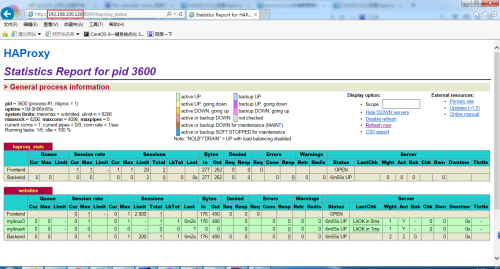
环境说明: 主机名 角色 IP地址 mylinux1.contoso.com heartbeat+haproxy eth0:192.168.100.121eth1:172.16.100.121 mylinux2.contoso.com heartbeat+haproxy eth0:192.168.100.122eth1:172.16.100.122 mylinux3.contoso.com web server 1 eth0:192.168.100.181 mylinux4.contoso.com web server 2 eth0:192.168.100.182 一、环境准备 在mylinux1和mylinux2上安装heartbeat,可以手动安装,当然也可以使用前面发布的一篇heartbeat脚本的博文,里面有heartbeat快速安装脚本。 然后在mylinux2上安装haproxy,并将mylinux1上的haproxy配置文件和启停脚本都拷贝到mylinux2上。 要保证mylinux1和mylinux2的heartbeat+haproxy环境一致。 [root@mylinux1~]#scp/etc/init.d/haproxymylinux2:/etc/init.d/ root@mylinux2'spassword: Permissiondenied,pleasetryagain. root@mylinux2'spassword: haproxy100%15671.5KB/s00:00 [root@mylinux1~]#scp/usr/local/haproxy/conf/haproxy.cfgmylinux2:/usr/local/haproxy/conf/haproxy.cfg root@mylinux2'spassword: haproxy.cfg100%11941.2KB/s00:00 [root@mylinux2haproxy]#ll/etc/init.d/haproxy -rwxr-xr-x1rootroot1567Oct102:11/etc/init.d/haproxy [root@mylinux2haproxy]#ll/usr/local/haproxy/conf/haproxy.cfg -rw-r--r--1rootroot1194Oct102:13/usr/local/haproxy/conf/haproxy.cfg 二、修改heartbeat的资源文件 [root@mylinux1~]#tail-1/etc/ha.d/haresources mylinux1.contoso.comIPaddr::192.168.100.120/24/eth0haproxy [root@mylinux2haproxy]#tail-1/etc/ha.d/haresources mylinux1.contoso.comIPaddr::192.168.100.120/24/eth0haproxy 这里还是贴出两个heartbeat节点的ha.cf配置,如下: [root@mylinux1~]#egrep-v"#|^$"/etc/ha.d/ha.cf debugfile/var/log/ha-debug logfile/var/log/ha-log logfacilitylocal1 keepalive2 deadtime30 warntime10 initdead120 udpport694 mcasteth1225.0.0.169410 auto_failbackon nodemylinux1.contoso.com nodemylinux2.contoso.com respawnhacluster/usr/lib64/heartbeat/ipfail [root@mylinux2haproxy]#egrep-v"#|^$"/etc/ha.d/ha.cf debugfile/var/log/ha-debug logfile/var/log/ha-log logfacilitylocal1 keepalive2 deadtime30 warntime10 initdead120 udpport694 mcasteth1225.0.0.169410 auto_failbackon nodemylinux1.contoso.com nodemylinux2.contoso.com respawnhacluster/usr/lib64/heartbeat/ipfail 三、启动heartbeat服务 1、首先在mylinux1和mylinux2上先关闭haproxy服务 [root@mylinux1~]#servicehaproxystop Stophaproxysuccessful. [root@mylinux2haproxy]#servicehaproxystop Haproxyisnotrunning.Stophaproxyfailed! 2、依次启动mylinux1和mylinux2上的heartbeat服务 [root@mylinux1~]#/etc/init.d/heartbeatstart StartingHigh-Availabilityservices:INFO:Resourceisstopped Done. [root@mylinux2haproxy]#/etc/init.d/heartbeatstart StartingHigh-Availabilityservices:INFO:Resourceisstopped Done. 四、测试haproxy的高可用 1、首先,检查mylinux1的状态 [root@mylinux1~]#ipa|grep192.168.100.120 inet192.168.100.120/24brd192.168.100.255scopeglobalsecondaryeth0 [root@mylinux1~]#servicehaproxystatus Haproxy(pid3600)isrunning... 2、其次,检查mylinux2的状态 [root@mylinux2haproxy]#ipa|grep192.168.100.120 [root@mylinux2haproxy]#servicehaproxystatus Haproxyisstopped. 3、查看监控界面 五、测试故障切换 1、停止mylinux1上的heartbeat服务 [root@mylinux1~]#/etc/init.d/heartbeatstop StoppingHigh-Availabilityservices:Done. 2、检查mylinux1和mylinux2的状态 [root@mylinux1~]#ipa|grep192.168.100.120 [root@mylinux1~]#servicehaproxystatus Haproxyisstopped. [root@mylinux2haproxy]#ipa|grep192.168.100.120 inet192.168.100.120/24brd192.168.100.255scopeglobalsecondaryeth0 [root@mylinux2haproxy]#servicehaproxystatus Haproxy(pid3997)isrunning... 3、查看监控页面 4、查看mylinux2上的heartbeat日志 [root@mylinux2 ~]# >/var/log/ha-log [root@mylinux2 ~]# tail -f /var/log/ha-log Oct 01 02:44:31 mylinux2.contoso.com heartbeat: [3534]: info: Received shutdown notice from 'mylinux1.contoso.com'. Oct 01 02:44:31 mylinux2.contoso.com heartbeat: [3534]: info: Resources being acquired from mylinux1.contoso.com. Oct 01 02:44:31 mylinux2.contoso.com heartbeat: [3655]: info: acquire local HA resources (standby). Oct 01 02:44:31 mylinux2.contoso.com heartbeat: [3656]: info: No local resources [/usr/share/heartbeat/ResourceManager listkeys mylinux2.contoso.com] to acquire. Oct 01 02:44:31 mylinux2.contoso.com heartbeat: [3655]: info: local HA resource acquisition completed (standby). Oct 01 02:44:31 mylinux2.contoso.com heartbeat: [3534]: info: Standby resource acquisition done [all]. harc(default)[3681]:2016/10/01_02:44:31 info: Running /etc/ha.d//rc.d/status status mach_down(default)[3698]:2016/10/01_02:44:31 info: Taking over resource group IPaddr::192.168.100.120/24/eth0 ResourceManager(default)[3725]:2016/10/01_02:44:31 info: Acquiring resource group: mylinux1.contoso.com IPaddr::192.168.100.120/24/eth0 haproxy /usr/lib/ocf/resource.d//heartbeat/IPaddr(IPaddr_192.168.100.120)[3753]: 2016/10/01_02:44:31 INFO: Resource is stopped ResourceManager(default)[3725]:2016/10/01_02:44:31 info: Running /etc/ha.d/resource.d/IPaddr 192.168.100.120/24/eth0 start IPaddr(IPaddr_192.168.100.120)[3878]:2016/10/01_02:44:32 INFO: Adding inet address 192.168.100.120/24 with broadcast address 192.168.100.255 to device eth0 IPaddr(IPaddr_192.168.100.120)[3878]:2016/10/01_02:44:32 INFO: Bringing device eth0 up IPaddr(IPaddr_192.168.100.120)[3878]:2016/10/01_02:44:32 INFO: /usr/libexec/heartbeat/send_arp -i 200 -r 5 -p /var/run/resource-agents/send_arp-192.168.100.120 eth0 192.168.100.120 auto not_used not_used /usr/lib/ocf/resource.d//heartbeat/IPaddr(IPaddr_192.168.100.120)[3852]: 2016/10/01_02:44:32 INFO: Success ResourceManager(default)[3725]:2016/10/01_02:44:32 info: Running /etc/init.d/haproxy start mach_down(default)[3698]:2016/10/01_02:44:32 info: /usr/share/heartbeat/mach_down: nice_failback: foreign resources acquired mach_down(default)[3698]:2016/10/01_02:44:32 info: mach_down takeover complete for node mylinux1.contoso.com. Oct 01 02:44:32 mylinux2.contoso.com heartbeat: [3534]: info: mach_down takeover complete. Oct 01 02:45:02 mylinux2.contoso.com heartbeat: [3534]: WARN: node mylinux1.contoso.com: is dead Oct 01 02:45:02 mylinux2.contoso.com heartbeat: [3534]: info: Dead node mylinux1.contoso.com gave up resources. Oct 01 02:45:02 mylinux2.contoso.com heartbeat: [3534]: info: Link mylinux1.contoso.com:eth1 dead. Oct 01 02:45:02 mylinux2.contoso.com ipfail: [3543]: info: Status update: Node mylinux1.contoso.com now has status dead Oct 01 02:45:03 mylinux2.contoso.com ipfail: [3543]: info: NS: We are dead. :< Oct 01 02:45:03 mylinux2.contoso.com ipfail: [3543]: info: Link Status update: Link mylinux1.contoso.com/eth1 now has status dead Oct 01 02:45:04 mylinux2.contoso.com ipfail: [3543]: info: We are dead. :< Oct 01 02:45:04 mylinux2.contoso.com ipfail: [3543]: info: Asking other side for ping node count.

资源下载

更多资源
Mario

Mario

马里奥是站在游戏界顶峰的超人气多面角色。马里奥靠吃蘑菇成长,特征是大鼻子、头戴帽子、身穿背带裤,还留着胡子。与他的双胞胎兄弟路易基一起,长年担任任天堂的招牌角色。

Nacos

Nacos

Nacos /nɑ:kəʊs/ 是 Dynamic Naming and Configuration Service 的首字母简称,一个易于构建 AI Agent 应用的动态服务发现、配置管理和AI智能体管理平台。Nacos 致力于帮助您发现、配置和管理微服务及AI智能体应用。Nacos 提供了一组简单易用的特性集,帮助您快速实现动态服务发现、服务配置、服务元数据、流量管理。Nacos 帮助您更敏捷和容易地构建、交付和管理微服务平台。

Spring

Spring

Spring框架(Spring Framework)是由Rod Johnson于2002年提出的开源Java企业级应用框架,旨在通过使用JavaBean替代传统EJB实现方式降低企业级编程开发的复杂性。该框架基于简单性、可测试性和松耦合性设计理念,提供核心容器、应用上下文、数据访问集成等模块,支持整合Hibernate、Struts等第三方框架,其适用范围不仅限于服务器端开发,绝大多数Java应用均可从中受益。

Sublime Text

Sublime Text

Sublime Text具有漂亮的用户界面和强大的功能,例如代码缩略图,Python的插件,代码段等。还可自定义键绑定,菜单和工具栏。Sublime Text 的主要功能包括:拼写检查,书签,完整的 Python API , Goto 功能,即时项目切换,多选择,多窗口等等。Sublime Text 是一个跨平台的编辑器,同时支持Windows、Linux、Mac OS X等操作系统。


用户登录
用户注册