BinSentry 启动调试反汇编与Python SDK使用入门
BinSentry 内置调试引擎,支持两种调试场景:调试 EXE 可执行程序、调试 DLL 动态链接库,两种模式均可通过 Python SDK 脚本进行远程调用控制。启动 BinSentry 服务端后,可以打开控制台窗口查看程序完整执行日志;控制台持续打印日志会带来性能损耗,生产环境建议关闭控制台输出,提升调试执行效率。 通过使用如下方式打开控制台窗口,观察程序的详细执行流程。控制台打开状态下由于持续输出会导致调试变慢,生产环境中建议关闭输出窗口屏蔽输出,提高执行效率。 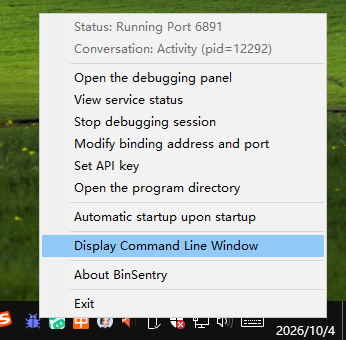 调试命令有两种,一种是debug主要用于附加一个exe可执行程序,另一个是debug_dll主要针对的是dll动态链接库,使用dll调试是通过加载BinLoader32.exe到进程空间内,并通过切入DLL模块实现的。 以EXE调试为例,使用如下代码打开一个调试功能。 ``` from BinSentry import * if __name__ == "__main__": config = Config( address="127.0.0.1", port=6891, api_key="45d3552b12b12cdf2c831344311cf81e" ) client = BinSentryClient(config=config) dbg = client.debug("c://win32.exe","","c://") print(dbg) ``` 执行后输出如下提示: ``` { "status": "success", "result": { "state": true, "message": "Debugging session started", "pid": 1204, "tid": 4372, "path": "c://win32.exe" }, "timestamp": 3185671 } ``` 同理,后台会看到页面加载执行流程: 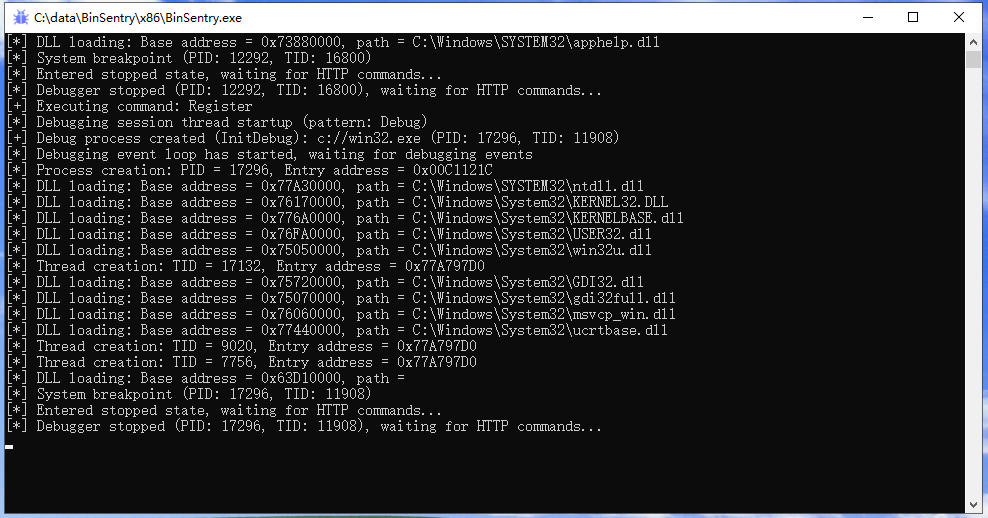 此时,可以通过这个句柄接口,完成其他功能的调用测试,例如读取寄存器的值,并输出EIP中的内容。 ``` from BinSentry import * import json if __name__ == "__main__": config = Config( address="127.0.0.1", port=6891, api_key="45d3552b12b12cdf2c831344311cf81e" ) client = BinSentryClient(config=config) try: client.detach() except Exception: pass raw_dbg_resp = client.debug("c://win32.exe", "", "c://") # SDK返回原始JSON字符串,务必loads转dict dbg = json.loads(raw_dbg_resp) print("Debug session:", dbg) if dbg["status"] != "success": print("Create debug session failed:", dbg["result"]["message"]) exit(-1) # 读取寄存器值 raw_reg_resp = client.register() resp = json.loads(raw_reg_resp) print("Register response: ", resp) # 读取EIP寄存器 if resp["status"] == "success": eip_val = resp["result"]["registers"]["eip"] eip_hex = resp["result"]["registers"]["eipHex"] print(f"EIP decimal = {eip_val}") print(f"EIP hex = {eip_hex}") # 后续恢复运行 client.run() ``` 输出内容如下所示: ``` Debug session: { 'status': 'success', 'result': { 'state': True, 'message': 'Debuggingsessionstarted', 'pid': 17136, 'tid': 9252, 'path': 'c: //win32.exe' }, 'timestamp': 3602921 } Register response: { 'status': 'success', 'result': { 'command': 'Register', 'registers': { 'eax': 0, 'eaxHex': '0x00000000', 'ebx': 16, 'ebxHex': '0x00000010', 'ecx': 12910592, 'ecxHex': '0x00C50000', 'edx': 0, 'edxHex': '0x00000000', 'esi': 24387496, 'esiHex': '0x01741FA8', 'edi': 18706432, 'ediHex': '0x011D7000', 'esp': 20312972, 'espHex': '0x0135F38C', 'ebp': 20313016, 'ebpHex': '0x0135F3B8', 'eip': 2007886279, 'eipHex': '0x77ADE9C7', 'eflags': 582, 'eflagsHex': '0x00000246', 'cs': 35, 'csHex': '0x00000023', 'ss': 43, 'ssHex': '0x0000002B', 'ds': 43, 'dsHex': '0x0000002B', 'es': 43, 'esHex': '0x0000002B', 'fs': 83, 'fsHex': '0x00000053', 'gs': 43, 'gsHex': '0x0000002B', 'dr0': 0, 'dr0Hex': '0x00000000', 'dr1': 0, 'dr1Hex': '0x00000000', 'dr2': 0, 'dr2Hex': '0x00000000', 'dr3': 0, 'dr3Hex': '0x00000000', 'dr6': 0, 'dr6Hex': '0x00000000', 'dr7': 0, 'dr7Hex': '0x00000000', 'fp_control': 639, 'fp_status': 0, 'fp_tag': 65535, 'mxcsr': 0, 'xmm': [ '0x00000000000000000000000000000000', '0x00000000000000000000000000000000', '0x00000000000000000000000000000000', '0x00000000000000000000000000000000', '0x00000000000000000000000000000000', '0x00000000000000000000000000000000', '0x00000000000000000000000000000000', '0x00000000000000000000000000000000', '0x00000000000000000000000000000000', '0x00000000000000000000000000000000', '0x00000000000000000000000000000000', '0x00000000000000000000000000000000', '0x00000000000000000000000000000000', '0x00000000000000000000000000000000', '0x00000000000000000000000000000000', '0x00000000000000000000000000000000' ] }, 'state': True }, 'timestamp': 3602937 } EIP decimal = 2007886279 EIP hex = 0x77ADE9C7 ``` 拿到EIP的值,就可以继续执行反汇编功能: ``` from BinSentry import * import json if __name__ == "__main__": config = Config( address="127.0.0.1", port=6891, api_key="45d3552b12b12cdf2c831344311cf81e" ) client = BinSentryClient(config=config) try: client.detach() except Exception: pass raw_dbg_resp = client.debug("c://win32.exe", "", "c://") # SDK返回原始JSON字符串,务必loads转dict dbg = json.loads(raw_dbg_resp) print("Debug session:", dbg) if dbg["status"] != "success": print("Create debug session failed:", dbg["result"]["message"]) exit(-1) # 读取寄存器值 raw_reg_resp = client.register() resp = json.loads(raw_reg_resp) eip_hex = resp["result"]["registers"]["eipHex"] print(f"EIP hex = {eip_hex}") # EIP反汇编 raw_disasm_resp = client.dissasembler(address=eip_hex,count=5) print("Disassemble response: ", raw_disasm_resp) # 后续恢复运行 client.run() ``` 执行反汇编并输出前5行。 ``` Debug session: { 'status': 'success', 'result': { 'state': True, 'message': 'Debuggingsessionstarted', 'pid': 15548, 'tid': 7616, 'path': 'c: //win32.exe' }, 'timestamp': 4107531 } EIP hex = 0x77ADE9C7 Disassemble response: { "status": "success", "result": { "command": "Dissasembler", "address": 2007886279, "addressHex": "0x77ADE9C7", "count": 5, "instructions": [ { "address": 2007886279, "ad\ndressHex": "0x77ADE9C7", "bytes": "EB 07", "mnemonic": "jmp", "op_str": "0x77ade9d0", "module": "ntdll.dll" }, { "address": 2007886281, "addressHex": "0x77ADE9C9", "bytes": "33 C0", "mnemonic": "\nxor", "op_str": "eax, eax", "module": "ntdll.dll" }, { "address": 2007886283, "addressHex": "0x77ADE9CB", "bytes": "40", "mnemonic": "inc", "op_str": "eax", "module": "ntdll.dll" }, { "address": 2007886284, "addressHex": "0x77ADE9CC", "bytes": "C3", "mnemonic": "ret", "op_str": "", "module": "ntdll.dll" }, { "address": 2007886285, "addressHex": "0x77ADE9CD", "bytes": "8B 65 E8", "mnemonic": "mov", "op_str": "esp, dword ptr [ebp - 0x18]", "module": "ntdll.dll" } ], "state": true }, "timestamp": 4107546 } ```