首页 文章 精选 留言 我的

精选列表

搜索[API调整],共10000篇文章
优秀的个人博客,低调大师

ArcGIS API for JavaScript 标注错位问题解决思路

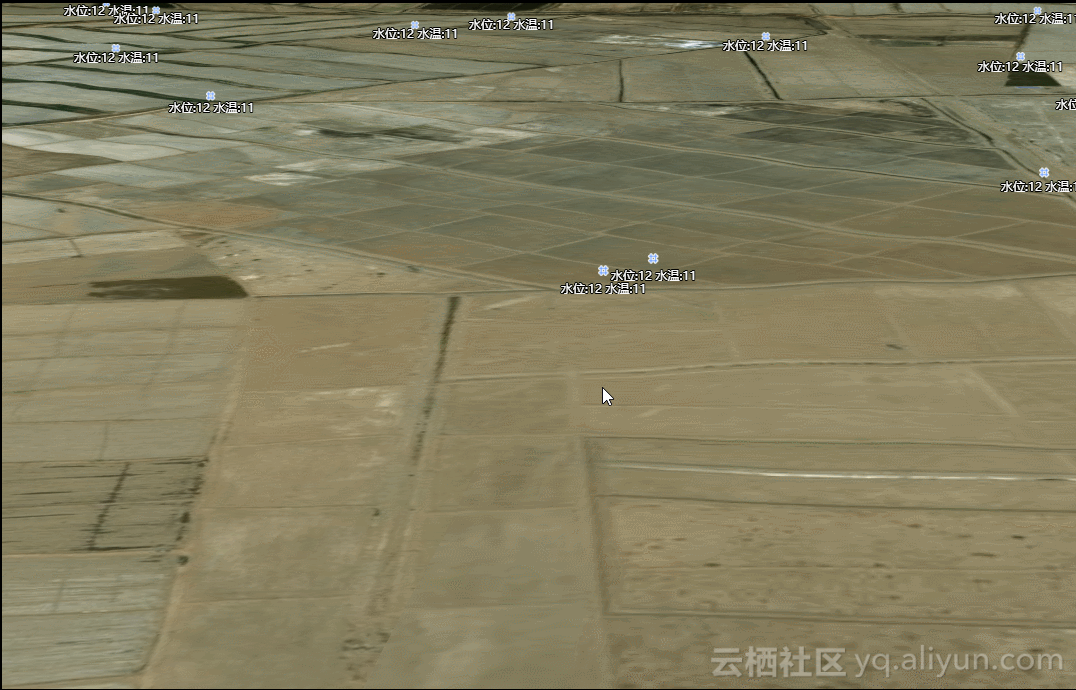
项目需求:完成对点的符号化显示,并将点的某些信息显示在点符号的旁边。 设计 调研开始,展示数据前端一般用GraphicsLayer,再结合Graphic,PictureMarkerSymbol与TextSymbol就可以完成此工作。直接上代码 jidianjing_graphicsLayer: null, jidianjing_text_featureLayer: null, ... this.graphicsLayer = new GraphicsLayer({ id: "graphicsLayer", elevationInfo: { mode: "relative-to-ground", offset: 3 } }); ... view.map.add(this.graphicsLayer); ... let jidianjing_graphics = []; // 处理Graphics $.each(result, function (i, item) { item.widgetModule = 'jidianjingWidgetModule_click'; var stcd = item.STCD; var stnm = item.STNM; let tempPoint = new Point({ type: "point", x: item.LGTD, y: item.LTTD }); let normalsymbol = { type: "picture-marker", url: 'img/menu/081.png', width: "18px", height: "18px" }; if (!StringUtil.isNull(item.WARN_NAME)) { normalsymbol = { type: "picture-marker", url: 'img/menu/083.png', width: "28px", height: "28px" }; } else if (!StringUtil.isNull(item.LL)) { normalsymbol = { type: "picture-marker", url: 'img/menu/082.png', width: "28px", height: "28px" }; } let tempPop = new PopupTemplate({ title: '机电井:' + stnm, content: _self.setjidianjingContentInfo }); let tempGraphic = new Graphic({ geometry: tempPoint, attributes: item, symbol: normalsymbol, popupTemplate: tempPop }); let textGraphic = new Graphic({ geometry: tempPoint, symbol: new TextSymbol({ color: "#FFF", backgroundColor: new Color('red'), borderLineColor: new Color("#fff"), borderLineSize: 2, haloColor: "black", haloSize: "1px", text: '水位:12 水温:11', font: { size: 8, family: "sans-serif" } }) }); _self.jidianjing_graphicsLayer.add(tempGraphic); _self.jidianjing_text_graphicsLayer.add(textGraphic); ... 效果 说明gif图太大,aliyun拒绝了我的上传,所以只能用文字描述;在小比例尺下,符号标注和文字标注之间的距离较小,看着效果还可以,但是有会出现标注覆盖文字或者文字覆盖标注;随着比例尺的放大,符号和标注之间的距离会增大,如第二张图所示。但是拿给项目经理看的时候,不要这种效果,距离和标注与符号之间的距离不能变。so...改改改 新思路-构造FeatureLayer 查看了官网好多例子,发现只有FeatureLayer的标注和符号之间的距离是边的,因为我们拿到的数据是点数据,所以我们可以构造组成FeatureLayer的source,其实就对应ags里的Graphics;还有一个标注LabelClass,这个类就是用来显示标注的。so...又开干了。 jidianjing_featureLayer: null, ... let tempGraphics = []; // 处理Graphics $.each(result, function (i, item) { item.widgetModule = 'jidianjingWidgetModule_click'; var stcd = item.STCD; var stnm = item.STNM; let tempPoint = new Point({ type: "point", x: item.LGTD, y: item.LTTD }); let normalsymbol = { type: "picture-marker", url: 'img/menu/081.png', width: "18px", height: "18px" }; if (!StringUtil.isNull(item.WARN_NAME)) { normalsymbol = { type: "picture-marker", url: 'img/menu/083.png', width: "28px", height: "28px" }; } else if (!StringUtil.isNull(item.LL)) { normalsymbol = { type: "picture-marker", url: 'img/menu/082.png', width: "28px", height: "28px" }; } let tempPop = new PopupTemplate({ title: '机电井:' + stnm, content: _self.setjidianjingContentInfo }); let tempGraphic = new Graphic({ geometry: tempPoint, attributes: item, symbol: normalsymbol, popupTemplate: tempPop }); let textGraphic = new Graphic({ geometry: tempPoint, symbol: new TextSymbol({ color: "#FFF", backgroundColor: new Color('red'), borderLineColor: new Color("#fff"), borderLineSize: 2, haloColor: "black", haloSize: "1px", text: '水位:12 水温:11', font: { size: 8, family: "sans-serif" } }) }); tempGraphics.push(tempGraphic); ... // popup let tempPop = new PopupTemplate({ title: '机电井:' + '{STNM}', content: _self.setjidianjingContentInfo }); // 标注 var labelClass = new LabelClass({ minScale: 20000, symbol: { type: "label-3d", symbolLayers: [{ type: "text", material: { color: "white" }, size: 10, halo: { color: [0, 0, 0, 0.8], size: 0.5 } }], verticalOffset:{ minWorldLength: 20, } }, labelPlacement: "above-center", labelExpression: "水位:[STTP], 水温:[STCD]" // labelExpressionInfo: { // expression: "$feature.STNM" // } }); // 构建feetureLayer并实现标注 this.jidianjing_text_featureLayer = new FeatureLayer({ id: 'jidianjing_featureLayer', fields: [{ name: "STCD", alias: "STCD", type: "oid" }, { name: "LGTD", alias: "LGTD", type: "string" }, { name: "LTTD", alias: "LTTD", type: "string" }, { name: "STCD", alias: "STCD", type: "string" }, { name: "STNM", alias: "STNM", type: "string" }, { name: "STTP", alias: "STTP", type: "string" }, { name: "widgetModule", alias: "widgetModule", type: "string" }], objectIdField: "STCD", geometryType: "point", spatialReference: { wkid: 4326 }, source: tempGraphics, // an array of graphics with geometry and attributes // popupTemplate and symbol are not required in each graphic // since those are handled with the popupTemplate and // renderer properties of the layer popupTemplate: tempPop, // renderer: iconSymbolRenderer, maxScale: 0, minScale: 0, labelsVisible: true, labelingInfo: [labelClass] }); view.map.add(this.jidianjing_text_featureLayer); 效果 说明 可以在上面两张图中看到,标注和符号的位置一直都是固定的,并没有随着距离的变化而变化;这时候拿给项目经理,就这个效果还算满意。 总结 符号和标注之间的距离在GraphicsLayer和FeatureLayer中的表现是不一样的,所以要根据合适的场景进行选择取舍。另外,GraphicsLayer和FeatureLayer标注换行不能实现,对GraphicsLayer可以采用加多个TextSymbol的GraphicsLayer,设置GraphicsLayer相对地面的高度就可以实现,但是距离永远是个问题,在此给一些朋友一些提醒。


优秀的个人博客,低调大师

使用 ES decorators 构建一致性 API

![pic] 重用和一致性是程序设计中经久不衰的两个课题。在最新的 ES Proposal 中,「decorators 语法」为此带来了一定的便利,并且,很适合应用于大型的类库中。 装饰模式 提到 decorator 大家都不会陌生,即「装饰模式」—— 我们可以在「不侵入原有代码」的情况下,为代码增加一些「额外的功能」。 所谓「额外的功能」一般都比较独立,不和原有逻辑耦合,只是做一层包装。你也可以把它看成「包装模式」。形如: // 旧方法 function func() {} // 包装后的新方法 function funcWrapped() { // 有的没的 doSomethingBefore(); // 旧方法的过程本身并不变化 func(); // 这啊那的 doSomethingAfter

优秀的个人博客,低调大师

Android2.2 API 中文文档系列(6) —— ImageView

正文 一、结构 java.lang.Object android.view.View android.widget.ImageView 已知直接子类: ImageButton, QuickContactBadge 已知间接子类: ZoomButton 二、类概述 显示任意图像,例如图标。ImageView类可以加载各种来源的图片(如资源或图片库),需要计算图像的尺寸,比便它可以在其他布局中使用,并提供例如缩放和着色(渲染)各种显示选项。 三、XML属性 属性名称 描述 android:adjustViewBounds 是否保持宽高比。需要与maxWidth、MaxHeight一起使用,否则单独使用没有效果。 android:cropToPadding 是否截取指定区域用空白代替。单独设置无效果,需要与scrollY一起使用,效果如下,实现代码见代码部分: android:maxHeight 设置View的最大高度,单独使用无效,需要与setAdjustViewBounds一起使用。如果想设置图片固定大小,又想保持图片宽高比,需要如下设置: 1)设置setAdjustViewBounds为true; 2)设置maxWidth、MaxHeight; 3)设置设置layout_width和layout_height为wrap_content。 android:maxWidth 设置View的最大宽度。同上。 android:scaleType 设置图片的填充方式。 matrix 0 用矩阵来绘图 fitXY 1 拉伸图片(不按比例)以填充View的宽高 layout_ height :30px layout_ width :120px fitStart 2 按比例拉伸图片,拉伸后图片的高度为View的高度,且显示在View的左边 fitCenter 3 按比例拉伸图片,拉伸后图片的高度为View的高度,且显示在View的中间 fitEnd 4 按比例拉伸图片,拉伸后图片的高度为View的高度,且显示在View的右边 center 5 按原图大小显示图片,但图片宽高大于View的宽高时,截图图片中间部分显示 layout_ height :60px layout_ width :80px padding :10px centerCrop 6 按比例放大原图直至等于某边View的宽高显示。 centerInside 7 当原图宽高或等于View的宽高时,按原图大小居中显示;反之将原图缩放至View的宽高居中显示。 android:src 设置View的drawable(如图片,也可以是颜色,但是需要指定View的大小) android:tint 将图片渲染成指定的颜色。见下图: 左边为原图,右边为设置后的效果,见后面代码。 四、代码 4.1 android:tint < ImageView android:background ="@android:color/white" android:src ="@drawable/btn_mode_switch_bg" android:layout_width ="wrap_content" android:layout_height ="wrap_content" ></ ImageView > < ImageView android:layout_marginLeft ="5dp" android:background ="@android:color/white" android:tint ="#ffff00" android:src ="@drawable/btn_mode_switch_bg" android:layout_width ="wrap_content" android:layout_height ="wrap_content" ></ ImageView > 4.2 android:cropToPadding < ImageView android:background ="@android:color/white" android:scrollY ="-10px" android:cropToPadding ="true" android:src ="@drawable/btn_mode_switch_bg" android:layout_width ="wrap_content" android:layout_height ="wrap_content" ></ ImageView > < ImageView android:background ="@android:color/white" android:scrollY ="10px" android:cropToPadding ="true" android:src ="@drawable/btn_mode_switch_bg" android:layout_width ="wrap_content" android:layout_height ="wrap_content" ></ ImageView > < ImageView android:paddingTop ="10px" android:background ="@android:color/white" android:scrollY ="10px" android:cropToPadding ="true" android:src ="@drawable/btn_mode_switch_bg" android:layout_width ="wrap_content" android:layout_height ="wrap_content" ></ ImageView > < ImageView android:paddingTop ="10px" android:background ="@android:color/white" android:scrollY ="10px" android:cropToPadding ="false" android:src ="@drawable/btn_mode_switch_bg" android:layout_width ="wrap_content" android:layout_height ="wrap_content" ></ ImageView > 本文转自over140 51CTO博客,原文链接:http://blog.51cto.com/over140/582712,如需转载请自行联系原作者

优秀的个人博客,低调大师

Hadoop MapReduce编程 API入门系列之FOF(Fund of Fund)

代码 package zhouls.bigdata.myMapReduce.friend; import org.apache.hadoop.io.Text; public class Fof extends Text{//自定义Fof,表示f1和f2关系 public Fof(){//无参构造 super(); } public Fof(String a,String b){//有参构造 super(getFof(a, b)); } public static String getFof(String a,String b){ int r =a.compareTo(b); if(r<0){ return a+"\t"+b; }else{ return b+"\t"+a; } } } package zhouls.bigdata.myMapReduce.friend; import java.io.DataInput; import java.io.DataOutput; import java.io.IOException; import org.apache.hadoop.io.WritableComparable; public class User implements WritableComparable<User>{ //WritableComparable,实现这个方法,要多很多 //readFields是读入,write是写出 private String uname; private int friendsCount; public String getUname() { return uname; } public void setUname(String uname) { this.uname = uname; } public int getFriendsCount() { return friendsCount; } public void setFriendsCount(int friendsCount) { this.friendsCount = friendsCount; }//这一大段的get和set,可以右键,source,产生get和set,自动生成。 public User() {//无参构造 } public User(String uname,int friendsCount){//有参构造 this.uname=uname; this.friendsCount=friendsCount; } public void write(DataOutput out) throws IOException { //序列化 out.writeUTF(uname); out.writeInt(friendsCount); } public void readFields(DataInput in) throws IOException {//反序列化 this.uname=in.readUTF(); this.friendsCount=in.readInt(); } public int compareTo(User o) {//核心 int result = this.uname.compareTo(o.getUname()); if(result==0){ return Integer.compare(this.friendsCount, o.getFriendsCount()); } return result; } } package zhouls.bigdata.myMapReduce.friend; import org.apache.hadoop.io.WritableComparable; import org.apache.hadoop.io.WritableComparator; public class FoFSort extends WritableComparator{ public FoFSort() {//把自定义的User,传进了 super(User.class,true); } public int compare(WritableComparable a, WritableComparable b) {//排序核心 User u1 =(User) a; User u2=(User) b; int result =u1.getUname().compareTo(u2.getUname()); if(result==0){ return -Integer.compare(u1.getFriendsCount(), u2.getFriendsCount()); } return result; } } package zhouls.bigdata.myMapReduce.friend; import org.apache.hadoop.io.WritableComparable; import org.apache.hadoop.io.WritableComparator; public class FoFGroup extends WritableComparator{ public FoFGroup() {//把自定义的User,传进了 super(User.class,true); } public int compare(WritableComparable a, WritableComparable b) {//分组核心 User u1 =(User) a; User u2=(User) b; return u1.getUname().compareTo(u2.getUname()); } } package zhouls.bigdata.myMapReduce.friend; import java.io.IOException; import java.text.SimpleDateFormat; import java.util.Calendar; import java.util.Date; import org.apache.hadoop.conf.Configuration; import org.apache.hadoop.fs.FileSystem; import org.apache.hadoop.fs.Path; import org.apache.hadoop.io.DoubleWritable; import org.apache.hadoop.io.IntWritable; import org.apache.hadoop.io.NullWritable; import org.apache.hadoop.io.Text; import org.apache.hadoop.mapreduce.Job; import org.apache.hadoop.mapreduce.Mapper; import org.apache.hadoop.mapreduce.Reducer; import org.apache.hadoop.mapreduce.lib.input.FileInputFormat; import org.apache.hadoop.mapreduce.lib.input.KeyValueTextInputFormat; import org.apache.hadoop.mapreduce.lib.output.FileOutputFormat; import org.apache.hadoop.util.StringUtils; public class RunJob { // 小明 老王 如花 林志玲 // 老王 小明 凤姐 排序在FoFSort.java // 如花 小明 李刚 凤姐 // 林志玲 小明 李刚 凤姐 郭美美 分组在FoFGroup.java // 李刚 如花 凤姐 林志玲 // 郭美美 凤姐 林志玲 // 凤姐 如花 老王 林志玲 郭美美 public static void main(String[] args) { Configuration config =new Configuration(); // config.set("fs.defaultFS", "hdfs://HadoopMaster:9000"); // config.set("yarn.resourcemanager.hostname", "HadoopMaster"); // config.set("mapred.jar", "C:\\Users\\Administrator\\Desktop\\wc.jar"); // config.set("mapreduce.input.keyvaluelinerecordreader.key.value.separator", ",");//默认分隔符是制表符"\t",这里自定义,如"," if(run1(config)){ run2(config);//设置两个run,即两个mr。 } } public static void run2(Configuration config) { try { FileSystem fs =FileSystem.get(config); Job job =Job.getInstance(config); job.setJarByClass(RunJob.class); job.setJobName("fof2"); job.setMapperClass(SortMapper.class); job.setReducerClass(SortReducer.class); job.setSortComparatorClass(FoFSort.class); job.setGroupingComparatorClass(FoFGroup.class); job.setMapOutputKeyClass(User.class); job.setMapOutputValueClass(User.class); job.setInputFormatClass(KeyValueTextInputFormat.class); // //设置MR执行的输入文件 // FileInputFormat.addInputPath(job, new Path("hdfs://HadoopMaster:9000/f1")); // // //该目录表示MR执行之后的结果数据所在目录,必须不能存在 // Path outputPath=new Path("hdfs://HadoopMaster:9000/out/f2"); //设置MR执行的输入文件 FileInputFormat.addInputPath(job, new Path("./out/f1")); //该目录表示MR执行之后的结果数据所在目录,必须不能存在 Path outputPath=new Path("./out/f2"); if(fs.exists(outputPath)){ fs.delete(outputPath, true); } FileOutputFormat.setOutputPath(job, outputPath); boolean f =job.waitForCompletion(true); if(f){ System.out.println("job 成功执行"); } } catch (Exception e) { e.printStackTrace(); } } public static boolean run1(Configuration config) { try { FileSystem fs =FileSystem.get(config); Job job =Job.getInstance(config); job.setJarByClass(RunJob.class); job.setJobName("friend"); job.setMapperClass(FofMapper.class); job.setReducerClass(FofReducer.class); job.setMapOutputKeyClass(Fof.class); job.setMapOutputValueClass(IntWritable.class); job.setInputFormatClass(KeyValueTextInputFormat.class); // FileInputFormat.addInputPath(job, new Path("hdfs://HadoopMaster:9000/friend/friend.txt"));//下有friend.txt // // Path outpath =new Path("hdfs://HadoopMaster:9000/out/f1"); FileInputFormat.addInputPath(job, new Path("./data/friend/friend.txt"));//下有friend.txt Path outpath =new Path("./out/f1"); if(fs.exists(outpath)){ fs.delete(outpath, true); } FileOutputFormat.setOutputPath(job, outpath); boolean f= job.waitForCompletion(true); return f; } catch (Exception e) { e.printStackTrace(); } return false; } static class FofMapper extends Mapper<Text, Text, Fof, IntWritable>{ protected void map(Text key, Text value, Context context) throws IOException, InterruptedException { String user =key.toString(); String[] friends =StringUtils.split(value.toString(), '\t'); for (int i = 0; i < friends.length; i++) { String f1 = friends[i]; Fof ofof =new Fof(user, f1); context.write(ofof, new IntWritable(0)); for (int j = i+1; j < friends.length; j++) { String f2 = friends[j]; Fof fof =new Fof(f1, f2); context.write(fof, new IntWritable(1)); } } } } static class FofReducer extends Reducer<Fof, IntWritable, Fof, IntWritable>{ protected void reduce(Fof arg0, Iterable<IntWritable> arg1, Context arg2) throws IOException, InterruptedException { int sum =0; boolean f =true; for(IntWritable i: arg1){ if(i.get()==0){ f=false; break; }else{ sum=sum+i.get(); } } if(f){ arg2.write(arg0, new IntWritable(sum)); } } } static class SortMapper extends Mapper<Text, Text, User, User>{ protected void map(Text key, Text value, Context context) throws IOException, InterruptedException { String[] args=StringUtils.split(value.toString(),'\t'); String other=args[0]; int friendsCount =Integer.parseInt(args[1]); context.write(new User(key.toString(),friendsCount), new User(other,friendsCount)); context.write(new User(other,friendsCount), new User(key.toString(),friendsCount)); } } static class SortReducer extends Reducer<User, User, Text, Text>{ protected void reduce(User arg0, Iterable<User> arg1, Context arg2) throws IOException, InterruptedException { String user =arg0.getUname(); StringBuffer sb =new StringBuffer(); for(User u: arg1 ){ sb.append(u.getUname()+":"+u.getFriendsCount()); sb.append(","); } arg2.write(new Text(user), new Text(sb.toString())); } } 本文转自大数据躺过的坑博客园博客,原文链接:http://www.cnblogs.com/zlslch/p/6166095.html,如需转载请自行联系原作者

优秀的个人博客,低调大师

Android 3.1 r1 中文API文档 (121) —— ResourceCursorTreeAdapter

结构 继承关系 public abstract classtResourceCursorTreeAdapterextendsCursorTreeAdapter java.lang.Object android.widget.BaseExpandableListAdapter android.widget.CursorTreeAdapter android.widget.ResourceCursorTreeAdapter 直接子类 SimpleCursorTreeAdapter 类概述 一个简单的可扩展的ExpandableListAdapter,通过在XML文件来创建views。你可以指定一个定义了views外观的XML文件。 构造函数 publicResourceCursorTreeAdapter(Context context, Cursor cursor, int collapsedGroupLayout, int expandedGroupLayout, int childLayout, int lastChildLayout) 构造函数。 参数 context和正在运行的SimpleListItemFactory关联的ListView的上下文 cursor数据库游标 collapsedGroupLayout定义了收缩组的视图布局文件的资源标识 expandedGroupLayout定义了展开组的视图布局文件的资源标识 childLayout定义了除了最后一个的所有子视图的布局文件的资源标识 lastChildLayout定义了一组中最后一个子视图的布局文件的资源标识 publicResourceCursorTreeAdapter(Context context, Cursor cursor, int collapsedGroupLayout, int expandedGroupLayout, int childLayout) 构造函数。 参数 context和正在运行的SimpleListItemFactory关联的ListView的上下文 cursor数据库游标 collapsedGroupLayout定义了收缩组的视图布局文件的资源标识 expandedGroupLayout定义了展开组的视图布局文件的资源标识 childLayout定义了除了最后一个的所有子视图的布局文件的资源标识 publicResourceCursorTreeAdapter(Context context, Cursor cursor, int groupLayout, int childLayout) 构造函数。 参数 context和正在运行的SimpleListItemFactory关联的ListView的上下文 cursor数据库游标 groupLayout为所有组定义了视图布局文件的资源标识 expandedGroupLayout 定义了展开组的视图布局文件的资源标识 childLayout定义了除了最后一个的所有子视图的布局文件的资源标识 公共方法 protected abstract ViewnewChildView(Context context, Cursor cursor, booleanisLastChild, ViewGroup parent) 创建一个新的子元素视图并持有指向数据的游标cursor。 参数 context应用程序上下文对象 cursor获取数据的游标对象,它已经移动到正确的位置 IsLastChild子元素是否处于组中的最后一个 parent新视图(View)所依附于的父对象。 返回值 新创建的视图 protected abstract ViewnewGroupView(Context context, Cursor cursor, booleanisExpanded, ViewGroup parent) 创建一个新的组视图并持有组中指向数据的游标cursor。 参数 context应用程序上下文对象 cursor获取数据的游标对象,它已经移动到正确的位置 isExpanded该组是否展开状态 parent新视图(View)所依附于的父对象。 返回值 新创建的视图 本文转自over140 51CTO博客,原文链接:http://blog.51cto.com/over140/582335,如需转载请自行联系原作者

优秀的个人博客,低调大师

Android 3.1 r1 中文API文档 (120) —— SearchView

结构 继承关系 public classSearchView extendsLinearLayout java.lang.Object android.view.View android.view.ViewGroup android.widget.LinearLayout android.widget.SearchView 类概述 一个为用户提供输入搜索查询和提交请求给搜索提供者的用户界面部件。显示查询建议或结果列表,如果有的话,运行用户选择一条查询建议或结果并启动与其相关的操作。 更多信息,参见Search文档。 内部类 interface SearchView.OnCloseListener (译者注:当用户关闭SearchView时触发的回调函数) interface SearchView.OnQueryTextListener 当查询文本改变时的回调函数。 interfaceSearchView.OnSuggestionListener 在建议上选择事件时的回调接口。 XML属性 属性名称 描述 android:iconifiedByDefault 设置SearchView的默认状态。 如果为true,在没有被使用和点击展开时它将被图形化。 android:maxWidth SearchView的可选择的最大宽度 android:queryHint 当查询条件为空时显示的一个提示字符串。 公共方法 public CharSequencegetQuery() 返回当前文本域中的查询字符串 返回值 查询字符串 public CursorAdaptergetSuggestionsAdapter() 如果有的话,返回用于搜索建议的适配器。 返回值 查询适配器 public booleanisIconfiedByDefault() 返回查询区域默认的图标状态。 public booleanisIconified() 返回SearchView当前的图标状态 返回值 如果SearchView目前是图标状态,返回true,如果查询区域是完全可见的返回false public booleanisQueryRefinementEnabled() 返回查询优化是否是对所有的条目都起作用或者只是对特别的几个起作用 返回值 如果是对所有的条目起作用,刚返回true,否则返回false。 public booleanisSubmitButtonEnabled() 返回当提交按钮在必须的时候是否可用或者从不显示 返回值 提交按钮在必须的时候是否自动启用 public booleanonKeyDown(int keyCode, KeyEvent event) 是否处理操作键按下事件 参数 keyCode键入的键盘值,同时和键盘事件中的参数相同 event输入键的完整事件记录 返回值 如果事件在这里被处理,返回true,不处理返回false public voidsetIconified(boolean iconify) 图标化或者展开SearchView。当图标化时任何查询条件都被清除。这是一个临时的状态,不会重写被setIconifiedByDefault(boolean)设置的默认图标状态。如果默认的是图标化状态,则在用户关闭这个区域前都是false。如果默认的是展开状态,这里就是true,同时清除文本区域,但不关闭它。 参数 iconify true值会把SearchView收缩成一个图标,false值会展开它 返回值 查询字符串 public voidsetIconifiedByDefault(boolean iconified) 设置搜索栏的默认状态或者静止状态。如果是true,当被按下时,一个单一的搜索图标就会被默认显示,同时显示文本字段和其他按钮。如果默认的状态是图标,在按下关闭按钮时它就会收缩成那个状态。这个属性的改变会立即生效。 参数 iconified搜索栏是否默认被图标化 public voidsetMaxWidth(int maxpixels) 以最宽的像素相看 相关的XML属性 android:maxWidth public voidsetOnCloseListener(SearchView.OnCloseListener listener) 当用户关闭SearchView时设置一个监听器通知用户 参数 listener设置用户关闭SearchView时的监听器 public voidsetOnQueryTextFocusChangeListener(View.OnFocusChangeListener listener) 设置当查询区域字段改变时通知用户的监听器 参数 listener设置焦点更改时的监听器 public voidsetOnQueryTextListener(SearchView.OnQueryTextListener listener) 为用户在SearchView内的操作设置监听器 参数 listener当用户在SearchView操作时比如说点击按钮或者输入查询内容时,设置接收回调的监听器对象 public voidsetOnSearchClickListener(View.OnClickListener listener) 设置按钮被按下时的监听器。在默认情况下当文本字段不可见时才起作用,调用setIconified(false)也可以通知这个监听器。 参数 listener当搜索按钮被点击或者文本字段编辑取消图形化时通知监听器 public voidsetOnSuggestionListener(SearchView.OnSuggestionListener listener) 设置当一条搜索建议被选中或者点击的时候的监听器 参数 listener选择搜索建议事件的监听器 public voidsetQuery(CharSequence query, boolean submit) 设置文本区域的一个查询字符串并选择提交和查询。 参数 query查询字符串。代替在文本区域已经存在的查询文本 submit是否立即提交查询或者只更新文本区域的内容 public voidsetQueryHint(CharSequence hint) 设置在查询文本区域的提示文本。将覆盖SearchableInfo中的任何提示。 相关XML属性 android:queryHint 参数 hint要显示的提示文本 public voidsetQueryRefinementEnabled(boolean enable) 指定如果精确查询按钮是否在每条建议的旁边显示或者是否根据运营商建议中的设置在个别项目的标志决定。点击精确查询的按钮会用建议中的文本替换查询文本区域中的字段。这个标志只是在一个SearchableInfo中指定setSearchableInfo(SearchableInfo)且不使用定制的适配器时起作用。 参数 enable如果所有的条目都有一个精确查询按钮刚为true,如果只有带精确查询标志的条目需要按钮,则为false。 参见 SUGGEST_COLUMN_FLAGS FLAG_QUERY_REFINEMENT public voidsetSearchableInfo(SearchableInfo searchable) 给SearchView设置SearchableInfo。SearchableInfo中的属性用来显示标签,提示(hints),搜索建议,创建打开查询结果和控制其他功能比如一个声音按钮的intents。 参数 searchable对于一个特殊的activiey或者,能从SearchManager中检索的SearchableInfo,全局的搜索提供者。 public voidsetSubmitButtonEnabled(boolean enabled) 当查询不为空时,显示一个提交按钮。如果SearchView被用来填充当前activity的内容,并且不会启动一个单独的activity,这里提交按钮会消失。 参数 enabled设置为True时显示一个提交请求的按钮,当不需要请求按钮时设置为false。 public voidsetSuggestionsAdapter(CursorAdapter adapter) 如果你愿意,你可以设置一个定制的适配器。否则使用默认的适配器来显示和SearchableInfo相关的建议提供者的建议。 参见 setSearchableInfo(SearchableInfo) 补充 文章精选 Android ApiDemo示例解析(36):App->Search->Invoke Search SearchView默认扩展 SearchViewを使用してListViewのアイテムにフィルターをかける SearchView.OnCloseListener 译者署名:xiaoQLu 译者链接:http://www.cnblogs.com/xiaoQLu 版本:Android 3.0 r1 结构 继承关系 public static interfaceSearchView.OnCloseListener android.widget.SearchView.OnCloseListener 公共方法 public abstract booleanonClose() 当用户尝试关闭SearchView的时候调用本方法。 返回值 如果用户想重写默认清除文本域的动作,返回true,否则返回false。 SearchView.OnQueryTextListener 译者署名:xiaoQLu 译者链接:http://www.cnblogs.com/xiaoQLu 版本:Android 3.0 r1 结构 继承关系 public static interfaceSearchView.OnQueryTextListener android.widget.SearchView.OnQueryTextListener 类概述 查询内容发生改变时调用 公共方法 public abstract booleanonQueryTextChange(String newText) 当用户改变查询内容的时候调用 参数 newText查询的文本字段的新内容 返回值 如果SearchView执行默认的动作,显示可能出现的建议,刚返回false。如果动作由监听器处理,刚返回true public abstract booleanonQueryTextSubmit(String query) 当用户提交请求时调用。这可能是因为在键盘上按下一个键或者点击一个提交按钮。这个监听器可以通过返回true来重写标准的动作,指明由它来处理提交请求。否则返回false让SearchView把这个请求转发到与之关联的intent去处理。 参数 query要提交的查询内容 返回值 如果查询请求被监听器处理,刚返回true,如果SearchView执行默认的动作则返回false SearchView.OnSuggestionListener 译者署名:xiaoQLu 译者链接:http://www.cnblogs.com/xiaoQLu 版本:Android 2.3 r1 结构 继承关系 Public static interfaceSearchView.OnSuggestionListener android.widget.SearchView.OnSuggestionListener 类概述 选中搜索建议时的回调接口。当SearchableInfo通过setSearchableInfo(SearchableInfo).特别指定时,才调用这些回调函数。 公共方法 public abstract booleanonSuggestionClick(int position) 当点击一条搜索建议时调用 参数 position在建议列表中的点击项的绝对位置。 返回值 如果监听器处理这个事件,并且重写默认的处理方法,处理发送的intent请求或者是在这条目中指定的查询请求,刚返回true。否则返回false。 public abstract booleanonSuggestionSelect(int position) 通过导航选中搜索建议时调用 参数 position在建议列表中绝对位置。 返回值 如果监听器处理这个事件,并且重写基于选中条目的处理方法,刚返回 true 。否则返回 false 。 本文转自over140 51CTO博客,原文链接:http://blog.51cto.com/over140/582339,如需转载请自行联系原作者

优秀的个人博客,低调大师

Android2.2 API 中文文档系列(7) —— ImageButton

正文 一、结构 java.lang.Objectandroid.view.Viewandroid.widget.ImageView android.widget.ImageButton 已知直接子类: ZoomButton 二、类摘要 显示一个可以被用户点击的图片按钮,默认情况下,ImageButton看起来像一个普通的按钮,在不同状态(如按下)下改变背景颜色。按钮的图片可用通过<ImageButton> XML元素的android:src属性或setImageResource(int)方法指定。 要删除按钮的背景,可以定义自己的背景图片或设置背景为透明。(注:请看 原图和图片按钮,默认图片周围有按钮的背景,选中之后为黄色) 为了表示不同的按钮状态(焦点,选择等),你可以为各种状态定义不同的图片。例如,定义蓝色图片为默认图片,黄色图片为获取时焦点时显示的图片,黄色图片为按钮被按下时显示的图片。一个简单的方法可以做到这点——通过XML的"selector."配置,如下: 保存上面的XML到res/drawable/文件夹下(注:注意文件名大小写!),将该文件名作为一个参数设置到ImageButton的android:src属性(注:如xml文件名为myselector.xml,那么这里设置为"@drawable/myselector",设置android:background也是可以的,但效果不太一样)。Android根据按钮的状态改变会自动的去XML中查找相应的图片以显示。 <item>元素的顺序很重要,因为是根据这个顺序判断是否适用于当前按钮状态,这也是为什么正常(默认)状态指定的图片放在最后,是因为它只会在pressed和focused都判断失败之后才会被采用。(注:例如按钮被按下时是同时获得焦点的,但是获得焦点并不一定按了按钮,所以这里会按顺序查找,找到合适的就不往下找了。这里按钮被点击了,那么第一个将被选中,且不再在后面查找其他状态。) 参见Form Stuff tutorial。 三、 继承自父类的方法 public void setAlpha (int alpha) 设置ImageButton图片的透明度(注意不是背景图片的)。效果如图: 参数 alpha 透明值0~255,0为完全透明,255为完全不透明 本文转自over140 51CTO博客,原文链接:http://blog.51cto.com/over140/582708,如需转载请自行联系原作者

优秀的个人博客,低调大师

Android2.2 API 中文文档系列(9) —— ZoomButton

正文 一、类结构 java.lang.Object android.view.View android.widget.ImageView android.widget.ImageButton android.widget.ZoomButton public class ZoomButton extends ImageButton implements View.OnLongClickListener 二、概述 缩放按钮,实际上是很普通的两个按钮,可以简单的理解为一个ImageButton加上一张缩放的图标。如下代码: 三、公共方法 public boolean dispatchUnhandledMove (View focused, int direction) 对于获得焦点的View,这个方法是捕获箭头事件最后的机会。这就是在获取焦点的View没有在内部处理、系统在要求的方向也不能找到一个新的View让其获得焦点时调用。 参数 focused 当前焦点View direction焦点移动的方向。其中之一:FOCUS_UP, FOCUS_DOWN, FOCUS_LEFT和FOCUS_RIGHT. 返回值 如果为true,将清除这个View未处理的事件。 (注:从源码中可看出ZoomButton覆盖了父类的该方法,在super之前调用了一下clearFocus,如下代码: public boolean onKeyUp (int keyCode, KeyEvent event) 默认实现至KeyEvent.Callback.onKeyMultiple():当点击执行时KEYCODE_DPAD_CENTER或KEYCODE_ENTER被释放。 参数 keyCode按下按钮代表的键值,属于KeyEvent (注:KeyEvent的静态属性)。 event 该KeyEvent对象,定义按钮动作 返回值 如果您处理这一事件中,返回true。如果你想允许事件被下一个接收器处理,返回false。 public boolean onLongClick (View v) 当一个View被长按时调用。 参数 v 被长按的View。 返回值 如果返回true,这个回调在长按时被执行了,反之返回false. public boolean onTouchEvent (MotionEvent event) 实现这个方法处理触摸屏移动事件。 参数 event 该移动事件. 返回值 如果是true,该事件是触摸,反之返回false。 public void setEnabled (boolean enabled) 设置这个View启用状态。 参数 enabled设置true表示启用,反之表示禁用。 public void setZoomSpeed (long speed) (注:单独使用无实际意义,可以用来存放临时数据) 本文转自over140 51CTO博客,原文链接:http://blog.51cto.com/over140/582701,如需转载请自行联系原作者

资源下载

更多资源
优质分享App

优质分享App

近一个月的开发和优化,本站点的第一个app全新上线。该app采用极致压缩,本体才4.36MB。系统里面做了大量数据访问、缓存优化。方便用户在手机上查看文章。后续会推出HarmonyOS的适配版本。

腾讯云软件源

腾讯云软件源

为解决软件依赖安装时官方源访问速度慢的问题,腾讯云为一些软件搭建了缓存服务。您可以通过使用腾讯云软件源站来提升依赖包的安装速度。为了方便用户自由搭建服务架构,目前腾讯云软件源站支持公网访问和内网访问。

Spring

Spring

Spring框架(Spring Framework)是由Rod Johnson于2002年提出的开源Java企业级应用框架,旨在通过使用JavaBean替代传统EJB实现方式降低企业级编程开发的复杂性。该框架基于简单性、可测试性和松耦合性设计理念,提供核心容器、应用上下文、数据访问集成等模块,支持整合Hibernate、Struts等第三方框架,其适用范围不仅限于服务器端开发,绝大多数Java应用均可从中受益。

Sublime Text

Sublime Text

Sublime Text具有漂亮的用户界面和强大的功能,例如代码缩略图,Python的插件,代码段等。还可自定义键绑定,菜单和工具栏。Sublime Text 的主要功能包括:拼写检查,书签,完整的 Python API , Goto 功能,即时项目切换,多选择,多窗口等等。Sublime Text 是一个跨平台的编辑器,同时支持Windows、Linux、Mac OS X等操作系统。

用户登录
用户注册
修改密码
忘记密码