HarmonyOS三方件开发指南(17)-BottomNavigationBar
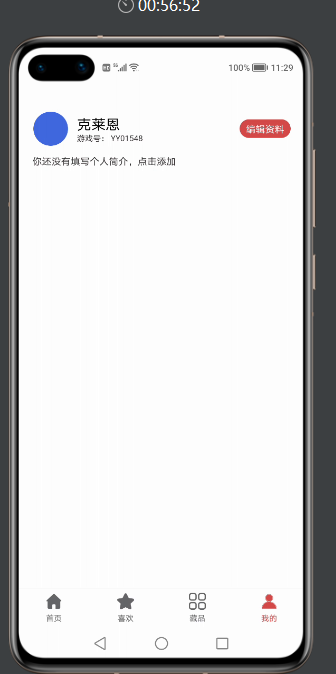
目录: 1、引言 2、功能介绍 3、BottomNavigationBar使用指南 4、BottomNavigationBar开发指南 5、《HarmonyOS三方件开发指南》文章合集 引言 BottomNavigationBar底部导航栏,可以说所有的app是这样的页面架构,原因很简单,操作简单,模块化清晰,页面切换流畅,而且每页都可以展示不同的风格。相信开发者已经很熟悉Android的底部导航栏的开发以及开发流程,那么接下来将对比Android来讲解鸿蒙的底部导航栏的实现步骤。 功能介绍 鸿蒙BottomNavigationBar底部导航栏,根据所需要底部button的数量,动态生成对应的底部button,并且可以设置默认字体颜色,选中字体颜色,默认icon,选中icon属性。模拟器效果图如下: 看了效果图,是不是都想知道在实际工作中,是如何使用的呢?接下来给大家详细介绍下BottomNavigationBar如何使用。 BottomNavigationBar使用指南 Ø 新建工程, 添加组件Har包依赖 在应用模块中添加HAR,只需要将mylibrarybottom-debug.har复制到entry\libs目录下即可。 Ø 修改相关文件 1. 修改主页面的布局文件ability_main.xml: 2. 修改MainAbilitySlice代码: 3. 修改BaseAbilitySlinct代码: 4. MainAbility的代码: 配置好1-4步,接下来就看如何给对应的底部导航栏添加Fraction 1. initBottom 方法如下: private void initBottom() { tabBottomLayout = (BottomNavigationBar) mAbilitySliceProvider.findComponentById(ResourceTable.Id_bottom_navigation_bar); bottomInfoList = new ArrayList<>(); // 获取string.json文件中定义的字符串 String home = mAbilitySliceProvider.getString(ResourceTable.String_home); String favorite = mAbilitySliceProvider.getString(ResourceTable.String_favorite); String category = mAbilitySliceProvider.getString(ResourceTable.String_category); String profile = mAbilitySliceProvider.getString(ResourceTable.String_mine); // 首页 BottomBarInfo<Integer> homeInfo = new BottomBarInfo<>(home, ResourceTable.Media_category_norma1, ResourceTable.Media_category_norma2, defaultColor, tintColor); homeInfo.fraction = HomeFraction.class; // 收藏 BottomBarInfo<Integer> favoriteInfo = new BottomBarInfo<>(favorite, ResourceTable.Media_category_norma1, ResourceTable.Media_category_norma2, defaultColor, tintColor); favoriteInfo.fraction = SecondFraction.class; // 分类 BottomBarInfo<Integer> categoryInfo = new BottomBarInfo<>(category, ResourceTable.Media_category_norma1, ResourceTable.Media_category_norma2, defaultColor, tintColor); categoryInfo.fraction = ThirdFraction.class; // 我的 BottomBarInfo<Integer> profileInfo = new BottomBarInfo<>(profile, ResourceTable.Media_category_norma1, ResourceTable.Media_category_norma2, defaultColor, tintColor); profileInfo.fraction = MineFraction.class; // 将每个条目的数据放入到集合 bottomInfoList.add(homeInfo); bottomInfoList.add(favoriteInfo); bottomInfoList.add(categoryInfo); bottomInfoList.add(profileInfo); // 设置底部导航栏的透明度 tabBottomLayout.setBarBottomAlpha(0.85f); // 初始化所有的条目 tabBottomLayout.initInfo(bottomInfoList); initFractionBarComponent(); tabBottomLayout.addBarSelectedChangeListener((index, prevInfo, nextInfo) -> // 显示fraction mFractionBarComponent.setCurrentItem(index)); // 设置默认选中的条目,该方法一定要在最后调用 tabBottomLayout.defaultSelected(homeInfo); 2. 创建fraction类,继承BaseFraction 1. 引入需要展示页面的布局文件 @Override public int getUIComponent() { return ResourceTable.Layout_layout_fraction_home; } 2. 操作布局文件中的控件 @Override public void initComponent(Component component) { text = (Text) component.findComponentById(ResourceTable.Id_text); } BottomNavigationBar开发指南 底部导航栏,在应用中真的非常常见,核心思想就是底部有几个选项,然后点击其中任意一个,切换至对应的页面。接下来主要介绍下核心实现步骤。 主要封装的原则是,动态的,通过外界传递,固定过的则封装起来。其中底部导航栏的图片、文字、文字的颜色是变的,其它的可以封装起来,外界只需要把每个条目的图片、文字以及文字的颜色传入进来即可,内部来实现底部导航栏。在封装的时候,需要面向接口编程,同时使用泛型。 定义接口IBarLayout 1、定义一个IBarLayout接口,第一个泛型就是底部导航栏中的每个条目,第二个泛型是每个条目的数据。在接口里面提供一些方法,可以根据数据查找条目,可以添加监听,可以设置默认选中的条目,可以初始化所有的条目,当某个条目被选中后需要通过回调方法。 代码如下: public interface IBarLayout<Bar extends ComponentContainer, D> { /** * 根据数据查找条目 * * @param info 数据 * @return 条目 */ Bar findBar(D info); /** * 添加监听 * * @param listener */ void addBarSelectedChangeListener(OnBarSelectedListener<D> listener); /** * 默认选中的条目 * * @param defaultInfo */ void defaultSelected(D defaultInfo); /** * 初始化所有的条目 * * @param infoList */ void initInfo(List<D> infoList); interface OnBarSelectedListener<D> { /** * 当某个条目被选中后的回调,该方法会被调用多次 * * @param index 点击后选中条目的下标 * @param preInfo 点击前选中的条目 * @param nextInfo 点击后选中的条目 */ void onBarSelectedChange(int index, D preInfo, D nextInfo); } } 2、再定义一个单个条目的接口IBar,泛型就是每个条目的数据,接口里面定义方法,可以设置条目的数据,可以动态修改某个条目的大小 代码如下: /** * 单个条目的接口 */ public interface IBar<D> extends IBarLayout.OnBarSelectedListener<D> { /** * 设置条目的数据 * * @param data */ void setBarInfo(D data); /** * 动态修改某个条目的大小 * * @param height */ void resetHeight(int height); } 每个条目所对应的实体类BottomBarInfo 每个条目都有自己的图片、文字、文字的颜色,我们把这些属性定义在一个实体类中。由于颜色可以是整型,也可以是字符串,这里定义泛型,泛型就是文字的颜色。具体是哪种类型的颜色,由调用者来决定。 注意下BarType这个枚举,我们的底部导航栏支持两种类型,IMAGE代表下图,某个条目只显示图片,也可以让某个条目凸出来,只需要将条目的高度变高即可。 public class BottomBarInfo<Color> extends TopBottomBarInfo { public enum BarType { /** * 显示图片和文案 */ IMAGE_TEXT, /** * 只显示图片 */ IMAGE } /** * 条目的名称 */ public String name; public BarType tabType; public Class<? extends Fraction> fraction; public BottomBarInfo(String name, int defaultImage, int selectedImage) { this.name = name; this.defaultImage = defaultImage; this.selectedImage = selectedImage; this.tabType = BarType.IMAGE; } public BottomBarInfo(String name, int defaultImage, int selectedImage, Color defaultColor, Color tintColor) { this.name = name; this.defaultImage = defaultImage; this.selectedImage = selectedImage; this.defaultColor = defaultColor; this.tintColor = tintColor; this.tabType = BarType.IMAGE_TEXT; } } 单个条目的封装 定义BottomBar,继承相对布局,实现之前定义的IBar接口,泛型就是每个条目所对应的实体类,由于目前并不知道泛型的具体类型,所以泛型直接使用问号来代替。BottomBar就是单个条目。 我们需要将component对象放入到BottomBar中,所以第二个参数传this,第三个参数为true。 public class BottomBar extends DependentLayout implements IBar<BottomBarInfo<?>> { /** * 当前条目所对应的数据 */ private BottomBarInfo<Color> tabInfo; private Text mTabName; private Image mTabImage; public BottomBar(Context context) { this(context, null); } public BottomBar(Context context, AttrSet attrSet) { this(context, attrSet, ""); } public BottomBar(Context context, AttrSet attrSet, String styleName) { super(context, attrSet, styleName); Component component = LayoutScatter.getInstance(context).parse(ResourceTable.Layout_layout_bar_bottom, this, true); mTabImage = (Image) component.findComponentById(ResourceTable.Id_image); mTabName = (Text) component.findComponentById(ResourceTable.Id_name); mTabImage.setScaleMode(Image.ScaleMode.INSIDE); } /** * 设置条目的数据 * * @param data */ @Override public void setBarInfo(BottomBarInfo<?> data) { tabInfo = (BottomBarInfo<Color>) data; inflateInfo(false, true); } /** * 初始化条目 * * @param selected true 选中 * @param init true 初始化 */ private void inflateInfo(boolean selected, boolean init) { if (tabInfo.tabType == BottomBarInfo.BarType.IMAGE_TEXT) { if (init) { // 图片和名称都可见 mTabName.setVisibility(VISIBLE); mTabImage.setVisibility(VISIBLE); if (!TextUtils.isEmpty(tabInfo.name)) { // 设置条目的名称 mTabName.setText(tabInfo.name); } } if (selected) { // 显示选中的图片 mTabImage.setPixelMap(tabInfo.selectedImage); mTabName.setTextColor(new Color(parseColor(tabInfo.tintColor))); } else { // 显示未选中的图片 mTabImage.setPixelMap(tabInfo.defaultImage); mTabName.setTextColor(new Color(parseColor(tabInfo.defaultColor))); } } else if (tabInfo.tabType == BottomBarInfo.BarType.IMAGE) { if (init) { // 仅仅显示图片,将名称隐藏 mTabName.setVisibility(HIDE); mTabImage.setVisibility(VISIBLE); } if (selected) { // 显示选中的图片 mTabImage.setPixelMap(tabInfo.selectedImage); } else { // 显示未选中的图片 mTabImage.setPixelMap(tabInfo.defaultImage); } } } private int parseColor(Object color) { if (color instanceof String) { return Color.getIntColor((String) color); } else { return (int) color; } } /** * 动态修改某个tab的高度 * * @param height tab的高度 */ @Override public void resetHeight(int height) { ComponentContainer.LayoutConfig config = getLayoutConfig(); config.height = height; setLayoutConfig(config); mTabName.setVisibility(HIDE); } /** * 当某个条目被选中后的回调,该方法会被调用多次 * * @param index 点击后选中条目的下标 * @param preInfo 点击前选中的条目 * @param nextInfo 点击后选中的条目 */ @Override public void onBarSelectedChange(int index, BottomBarInfo<?> preInfo, BottomBarInfo<?> nextInfo) { if (nextInfo.tabType == BottomBarInfo.BarType.IMAGE) { // 当前条目的类型是IMAGE类型,则不做任何处理 return; } if (preInfo == nextInfo) { // 假设当前选中的是条目1,同时点击的也是条目1,那就不需要做任何操作了 return; } if (preInfo != tabInfo && nextInfo != tabInfo) { /** * 假设有三个条目,条目1、条目2、条目3,preInfo是条目1,nextInfo是条目3,tabInfo是条目2, * 点击前选中的是条目1,点击后选中的条目3,此时条目2就不需要做任何操作了 */ return; } if (preInfo == tabInfo) { // 将点击前的条目反选 inflateInfo(false, false); } else { // 选中被点击的条目 inflateInfo(true, false); } } public BottomBarInfo<Color> getTabInfo() { return tabInfo; } public Text getTabName() { return mTabName; } public Image getImage() { return mTabImage; } } 底部导航栏的封装 定义BottomNavigationBar,继承栈布局。第一个泛型就是底部导航栏的条目,第二个泛型就是每个条目的数据。 public class BottomNavigationBar extends StackLayout implements IBarLayout<BottomBar, BottomBarInfo<?>> { private static final int ID_TAB_BOTTOM = 0XFF; /** * 事件监听的集合 */ private List<OnBarSelectedListener<BottomBarInfo<?>>> tabSelectedListeners = new ArrayList<>(); /** * 当前选中的条目 */ private BottomBarInfo<?> selectedInfo; /** * 底部导航栏的透明度 */ private float barBottomAlpha = 1; /** * 底部导航栏的高度 */ private float barBottomHeight = 50; /** * 底部导航栏线条的高度 */ private float barBottomLineHeight = 0.5f; /** * 底部导航栏线条的颜色 */ private RgbColor barBottomLineColor = new RgbColor(223, 224, 225); /** * 所有的tab */ private List<BottomBarInfo<?>> infoList; public BottomNavigationBar(Context context) { this(context, null); } public BottomNavigationBar(Context context, AttrSet attrSet) { this(context, attrSet, ""); } public BottomNavigationBar(Context context, AttrSet attrSet, String styleName) { super(context, attrSet, styleName); } /** * 根据数据查找条目 * * @param info 条目的数据 * @return 条目 */ @Override public BottomBar findBar(BottomBarInfo<?> info) { ComponentContainer componentContainer = (ComponentContainer) findComponentById(ID_TAB_BOTTOM); for (int i = 0; i < componentContainer.getChildCount(); i++) { Component component = componentContainer.getComponentAt(i); if (component instanceof BottomBar) { BottomBar bottomBar = (BottomBar) component; if (bottomBar.getTabInfo() == info) { return bottomBar; } } } return null; } /** * 添加监听 * * @param listener 监听 */ @Override public void addBarSelectedChangeListener(OnBarSelectedListener<BottomBarInfo<?>> listener) { tabSelectedListeners.add(listener); } /** * 默认选中的条目 * * @param defaultInfo 默认选中条目的信息 */ @Override public void defaultSelected(BottomBarInfo<?> defaultInfo) { onSelected(defaultInfo); } /** * 初始化所有的条目 * * @param infoList 所有条目的信息 */ @Override public void initInfo(List<BottomBarInfo<?>> infoList) { if (infoList == null || infoList.isEmpty()) { return; } this.infoList = infoList; // 移除之前已经添加的组件,防止重复添加 removeComponent(); selectedInfo = null; // 添加背景 addBackground(); // 添加条目 addBottomBar(); // 添加线条 addBottomLine(); } /** * 添加线条 */ private void addBottomLine() { Component line = new Component(getContext()); // 目前不支持直接设置背景颜色,只能通过Element来设置背景 ShapeElement element = new ShapeElement(); element.setShape(ShapeElement.RECTANGLE); element.setRgbColor(barBottomLineColor); line.setBackground(element); LayoutConfig config = new LayoutConfig(ComponentContainer.LayoutConfig.MATCH_PARENT, DisplayUtils.vp2px(getContext(), barBottomLineHeight)); // 位于底部 config.alignment = LayoutAlignment.BOTTOM; config.setMarginBottom(DisplayUtils.vp2px(getContext(), barBottomHeight - barBottomLineHeight)); line.setAlpha(barBottomAlpha); addComponent(line, config); } /** * 添加条目 */ private void addBottomBar() { // 每个条目的宽度就是屏幕宽度除以条目的总个数 int width = DisplayUtils.getDisplayWidthInPx(getContext()) / infoList.size(); // 高度是固定的值,这里需要做屏幕适配,将vp转换成像素 int height = DisplayUtils.vp2px(getContext(), barBottomHeight); StackLayout stackLayout = new StackLayout(getContext()); stackLayout.setId(ID_TAB_BOTTOM); for (int i = 0; i < infoList.size(); i++) { BottomBarInfo<?> info = infoList.get(i); // 创建布局配置对象 LayoutConfig config = new LayoutConfig(width, height); // 设置底部对齐 config.alignment = LayoutAlignment.BOTTOM; // 设置左边距 config.setMarginLeft(i * width); BottomBar bottomBar = new BottomBar(getContext()); tabSelectedListeners.add(bottomBar); // 初始化每个条目 bottomBar.setBarInfo(info); // 添加条目 stackLayout.addComponent(bottomBar, config); // 设置点击事件 bottomBar.setClickedListener(component -> onSelected(info)); } LayoutConfig layoutConfig = new LayoutConfig(ComponentContainer.LayoutConfig.MATCH_PARENT, ComponentContainer.LayoutConfig.MATCH_CONTENT); layoutConfig.alignment = LayoutAlignment.BOTTOM; addComponent(stackLayout, layoutConfig); } /** * 点击条目后给外界回调 * * @param nextInfo 点击后需要选中的条目 */ private void onSelected(BottomBarInfo<?> nextInfo) { for (OnBarSelectedListener<BottomBarInfo<?>> listener : tabSelectedListeners) { listener.onBarSelectedChange(infoList.indexOf(nextInfo), selectedInfo, nextInfo); } if (nextInfo.tabType == BottomBarInfo.BarType.IMAGE_TEXT) { selectedInfo = nextInfo; } } /** * 添加背景 */ private void addBackground() { Component component = new Component(getContext()); // 目前还不能直接设置背景颜色,只能通过Element来设置背景 ShapeElement element = new ShapeElement(); element.setShape(ShapeElement.RECTANGLE); RgbColor rgbColor = new RgbColor(255, 255, 255); element.setRgbColor(rgbColor); component.setBackground(element); component.setAlpha(barBottomAlpha); LayoutConfig config = new LayoutConfig(ComponentContainer.LayoutConfig.MATCH_PARENT, DisplayUtils.vp2px(getContext(), barBottomHeight)); config.alignment = LayoutAlignment.BOTTOM; addComponent(component, config); } /** * 移除之前已经添加的组件,防止重复添加 */ private void removeComponent() { for (int i = getChildCount() - 1; i > 0; i--) { removeComponentAt(i); } tabSelectedListeners.removeIf(listener -> listener instanceof BottomBar); } /** * 设置底部导航栏的透明度 * * @param barBottomAlpha 底部导航栏的透明度 */ public void setBarBottomAlpha(float barBottomAlpha) { this.barBottomAlpha = barBottomAlpha; } /** * 设置底部导航栏的高度 * * @param barBottomHeight 底部导航栏的高度 */ public void setBarBottomHeight(float barBottomHeight) { this.barBottomHeight = barBottomHeight; } /** * 设置底部导航栏线条的高度 * * @param barBottomLineHeight 底部导航栏线条的高度 */ public void setBarBottomLineHeight(float barBottomLineHeight) { this.barBottomLineHeight = barBottomLineHeight; } /** * 设置底部导航栏线条的颜色 * * @param barBottomLineColor 底部导航栏线条的颜色 */ public void setBarBottomLineColor(RgbColor barBottomLineColor) { this.barBottomLineColor = barBottomLineColor; } } initInfo(List<BottomBarInfo<?>> infoList)该方法由外界调用,外界将所有的条目信息传递过来,我们将条目添加到底部导航栏。首先移除之前已经添加的组件,防止重复添加,然后添加背景,添加条目,添加线条。 更多原创,请关注:软通动力HarmonyOS学院https://harmonyos.51cto.com/column/30 作者:软通田可辉 想了解更多内容,请访问51CTO和华为合作共建的鸿蒙社区:https://harmonyos.51cto.com/