首页 文章 精选 留言 我的

精选列表

搜索[个人博客],共10000篇文章
优秀的个人博客,低调大师

[雪峰磁针石博客]Python经典面试题: 用3种方法实现堆栈和队列并示例实际应用场景

介绍 数据结构在计算机中组织存储,以便我们可以有效地访问和更改数据。 堆栈和队列是计算机科学中定义的最早的数据结构。 堆栈 遵循后进先出 (Last-in-First-Out LIFO)原则。 push - 在堆栈顶部添加元素: pop - 删除堆栈顶部的元素: 队列 遵循先入先出(FIFO:First-in-First-Out)原则。 enqueue - 在队列的开头添加元素: dequeue - 删除队列开头的元素: 使用列表实现堆栈和队列 Python的内置List数据结构k堆栈和队列操作的方法。 堆栈 letters = [] # Let's push some letters into our list letters.append('c') letters.append('a') letters.append('t') letters.append('g') # Now let's pop letters, we should get 'g' last_item = letters.pop() print(last_item) # If we pop again we'll get 't' last_item = letters.pop() print(last_item) # 'c' and 'a' remain print(letters) # ['c', 'a'] 执行结果 g t ['c', 'a'] 队列 fruits = [] # Let's enqueue some fruits into our list fruits.append('banana') fruits.append('grapes') fruits.append('mango') fruits.append('orange') # Now let's dequeue our fruits, we should get 'banana' first_item = fruits.pop(0) print(first_item) # If we dequeue again we'll get 'grapes' first_item = fruits.pop(0) print(first_item) # 'mango' and 'orange' remain print(fruits) # ['c', 'a'] 执行结果 banana grapes ['mango', 'orange'] 使用Deque库的堆栈和队列 deque是Double Ended Queue的缩写 - 可以获取存储的第一个或最后一个元素的通用队列,下面我们使用Deque库的堆栈和队列: from collections import deque # you can initialize a deque with a list numbers = deque() # Use append like before to add elements numbers.append(99) numbers.append(15) numbers.append(82) numbers.append(50) numbers.append(47) # You can pop like a stack last_item = numbers.pop() print(last_item) # 47 print(numbers) # deque([99, 15, 82, 50]) # You can dequeue like a queue first_item = numbers.popleft() print(first_item) # 99 print(numbers) # deque([15, 82, 50]) 执行结果 47 deque([99, 15, 82, 50]) 99 deque([15, 82, 50]) 参考资料 本文最新版本地址 本文涉及的python测试开发库 谢谢点赞! 本文相关海量书籍下载 python工具书籍下载-持续更新 python GUI工具书籍下载-持续更新 更严格的实现 创建撤消功能 - 允许用户回溯他们的操作,直到会话开始。堆栈是这种情况的理想选择。 我们可以通过将其推送到堆栈来记录用户所采取的每个操作。 当用户想要撤消操作时,他们将从堆栈中弹出它。 游戏中,每次按下按钮,都会触发输入事件。 测试人员注意到,如果按钮按下得太快,游戏只处理第一个按钮,特殊动作将无效!可以使用队列修复它。 我们可以将所有输入事件排入队列。 #!/usr/bin/python3 # -*- coding: utf-8 -*- # 项目实战讨论QQ群630011153 144081101 # python测试开发库汇总: https://github.com/china-testing/python-api-tesing/ # 本文最佳板式地址: https://www.jianshu.com/p/c990427ca608 # A simple class stack that only allows pop and push operations class Stack: def __init__(self): self.stack = [] def pop(self): if len(self.stack) < 1: return None return self.stack.pop() def push(self, item): self.stack.append(item) def size(self): return len(self.stack) # And a queue that only has enqueue and dequeue operations class Queue: def __init__(self): self.queue = [] def enqueue(self, item): self.queue.append(item) def dequeue(self): if len(self.queue) < 1: return None return self.queue.pop(0) def size(self): return len(self.queue) document_actions = Stack() # The first enters the title of the document document_actions.push('action: enter; text_id: 1; text: This is my favourite document') # Next they center the text document_actions.push('action: format; text_id: 1; alignment: center') # As with most writers, the user is unhappy with the first draft and undoes the center alignment document_actions.pop() # The title is better on the left with bold font document_actions.push('action: format; text_id: 1; style: bold') input_queue = Queue() # The player wants to get the upper hand so pressing the right combination of buttons quickly input_queue.enqueue('DOWN') input_queue.enqueue('RIGHT') input_queue.enqueue('B') # Now we can process each item in the queue by dequeueing them key_pressed = input_queue.dequeue() # 'DOWN' # We'll probably change our player position key_pressed = input_queue.dequeue() # 'RIGHT' # We'll change the player's position again and keep track of a potential special move to perform key_pressed = input_queue.dequeue() # 'B' # This can do the act, but the game's logic will know to do the special move

优秀的个人博客,低调大师

[雪峰磁针石博客]python人工智能作业:Windows使用SAPI和tkinter用不到40行实现文本转语音工具

直接上代码: #!/usr/bin/env python3 # -*- coding: utf-8 -*- # 技术支持:https://www.jianshu.com/u/69f40328d4f0 # 技术支持 https://china-testing.github.io/ # https://github.com/china-testing/python-api-tesing/blob/master/practices/TTS.py # 讨论钉钉免费群21745728 qq群144081101 567351477 # CreateDate: 2018-11-22 import win32com.client as wincl from tkinter import * def text2Speech(): text = e.get() speak = wincl.Dispatch("SAPI.SpVoice") speak.Speak(text) #window configs tts = Tk() tts.wm_title("Text to Speech") tts.geometry("225x105") tts.config(background="#708090") f=Frame(tts,height=280,width=500,bg="#bebebe") f.grid(row=0,column=0,padx=10,pady=5) lbl=Label(f,text="Enter your Text here : ") lbl.grid(row=1,column=0,padx=10,pady=2) e=Entry(f,width=30) e.grid(row=2,column=0,padx=10,pady=2) btn=Button(f,text="Speak",command=text2Speech) btn.grid(row=3,column=0,padx=20,pady=10) tts.mainloop() 参考资料 本文最新版本地址 讨论 钉钉群21745728 qq群144081101 567351477 本文涉及的python测试开发库 谢谢点赞! 本文相关海量书籍下载 python 3.7极速入门教程9最佳python中文工具书籍下载 最新代码地址 执行

优秀的个人博客,低调大师

[雪峰磁针石博客]MD5值重复文件多进程检查工具check_md5.py - 性能测试工具开发

MD5简介 Message Digest Algorithm MD5(中文名为消息摘要算法第五版)为计算机安全领域广泛使用的一种散列函数,用以提供消息的完整性保护。该算法的文件号为RFC 1321(R.Rivest,MIT Laboratory for Computer Science and RSA Data Security Inc. April 1992)。 MD5即Message-Digest Algorithm 5(信息-摘要算法5),用于确保信息传输完整一致。是计算机广泛使用的杂凑算法之一(又译摘要算法、哈希算法),主流编程语言普遍已有MD5实现。将数据(如汉字)运算为另一固定长度值,是杂凑算法的基础原理,MD5的前身有MD2、MD3和MD4。 MD5算法具有以下特点: 1、压缩性:任意长度的数据,算出的MD5值长度都是固定的。 2、容易计算:从原数据计算出MD5值很容易。 3、抗修改性:对原数据进行任何改动,哪怕只修改1个字节,所得到的MD5值都有很大区别。 4、强抗碰撞:已知原数据和其MD5值,想找到一个具有相同MD5值的数据(即伪造数据)是非常困难的。 MD5的作用是让大容量信息在用数字签名软件签署私人密钥前被"压缩"成一种保密的格式(就是把一个任意长度的字节串变换成一定长的十六进制数字串)。除了MD5以外,其中比较有名的还有sha-1、RIPEMD以及Haval等。 举个实际应用的例子。比如你在百度云qq群文件等上传文件的时候,有时上传几百兆的文件可以几秒内完成,是真的网络有这么快么?不是,通常是服务器已经存在你所上传的文件。那么系统是如何确定服务器已经存在你要上传的文件的呢?多为计算你要上传文件的MD5,如果MD5和已有文件的MD5一致,就认为文件已经存在。 计算MD5 linux 下 shell命令行工具md5sum用于计算与校验RFC 1321所描述的128位MD5哈希值。 $ echo "hello" > hello $ md5sum hello b1946ac92492d2347c6235b4d2611184 hello 上述过程也可以用python3实现 >>> import hashlib >>> hashlib.md5(open('hello','rb').read()).hexdigest() 'b1946ac92492d2347c6235b4d2611184' 上述代码的函数封装,参见get_md5函数。 [Md5sum 英文维基百科参考](https://en.wikipedia.org/wiki/Md5sum) MD5值重复文件多进程检查工具 测试过程中经常发现MD5值相同的图片。之前没有用并发,检查过程经常需要一个小时,现在改成多进程。一般3分钟以内可以完成处理(48核)。 此模式也是自行开发性能测试工具的模型之一。 代码: #!/usr/bin/python3 # -*- coding: utf-8 -*- # Author: xurongzhong#126.com 技术支持qq群:144081101 # CreateDate: 2018-1-8 # check_md5.py import multiprocessing from pathlib import Path import argparse import os import data_common def consumer(queue, results, lock): while True: item = queue.get() if item is None: break name = os.path.basename(item) md5 = data_common.get_md5(item, is_file=True) with lock: if md5 in results: print("Same md5", results[md5], name) else: results[md5] =[] results[md5] = results[md5] + [name] if __name__ == '__main__': parser = argparse.ArgumentParser() parser.add_argument('directory', action="store", help=u'目录') parser.add_argument('-t', action="store", dest="typename", default="*", help=u'文件扩展名') parser.add_argument('--version', action='version', version='%(prog)s 1.1 Rongzhong xu 2018 03 22') options = parser.parse_args() process = [] queue = multiprocessing.Queue() results = multiprocessing.Manager().dict() lock = multiprocessing.Lock() if multiprocessing.cpu_count() < 3: number = multiprocessing.cpu_count() else: number = multiprocessing.cpu_count() - 1 # Launch the consumer process for i in range(number): t = multiprocessing.Process( target=consumer,args=(queue, results, lock)) t.daemon=True process.append(t) for i in range(number): process[i].start() p = Path(options.directory) for item in p.glob('**/*.{}'.format(options.typename)): queue.put(str(item)) for i in range(number): queue.put(None) for i in range(number): process[i].join() f = open("md5_files.txt",'w') f2 = open("files.txt",'w') for item in dict(results): f2.write("{},{}\n".format(item,results[item])) if len(results[item]) > 1: f.write("{},{}\n".format(item,results[item])) 演示 #!python $ python3 check_md5.py /home/andrew/code/paper Same md5 ['2018.01.07-19.38.15_0.9999967.jpg'] 2018.01.07-19.38.15_0.99999679.jpg $ cat md5_files.txt 43c5a6e1dcf79d095e97ce63885c5cd7,['2018.01.07-19.38.15_0.9999967.jpg', '2018.01.07-19.38.15_0.99999679.jpg'] andrew@andrew-PowerEdge-T630:~/code/mobile_data/tools$ 注意,求MD5值依赖data_common.py 上面使用的多进程属于python高性能的内容,如需想深入了解可以参考书籍 。 参考资料 讨论 钉钉免费群21745728 qq群144081101 567351477 本文涉及的python测试开发库,谢谢点赞! 本文相关书籍下载


优秀的个人博客,低调大师

[python作业AI毕业设计博客]Python 3 面向对象编程(第3版) 中英文Python 3 Object-Oriented Pro...

python测试开发项目实战-目录 python工具书籍下载-持续更新 python 3.7极速入门教程 - 目录 第2版 中文 介绍 本书主要介绍如何使用Python 3进行面向对象编程。1~4章介绍面向对象这一编程范式的基本准则,以及Python是如何运用这些准则实现面向对象编程的;第5~8章,介绍如何利用Python中的内置函数快速、简单地实现面向对象编程;第9~11章介绍了许多面向对象编程中常用的设计模式,以及如何使用符合 Python 语言习惯的方式来实现这些设计模式;最后第12、13章介绍了Python 3中并发编程相关的主题。本书中每一章都会包含一节案例学习的内容,通过一个实践相关的案例将本章介绍的主要内容以及前面章节中介绍。 第3版 英文 介绍 面向对象编程(OOP)是一种流行的设计范例,其中数据和行为以可以一起操作的方式封装。 第三版Python 3面向对象编程充分解释了类,数据封装和异常,并强调何时可以使用每个原则来开发设计良好的软件。 源码地址:https://github.com/PacktPublishing/Python-3-Object-Oriented-Programming-Third-Edition 英文版下载 https://itbooks.pipipan.com/fs/18113597-335796100中文1版下载 https://itbooks.pipipan.com/fs/18113597-335798676 参考资料 本文最新版本地址 本文涉及的python测试开发库 谢谢点赞! 本文相关海量书籍下载 2018最佳人工智能机器学习工具书及下载(持续更新)

优秀的个人博客,低调大师

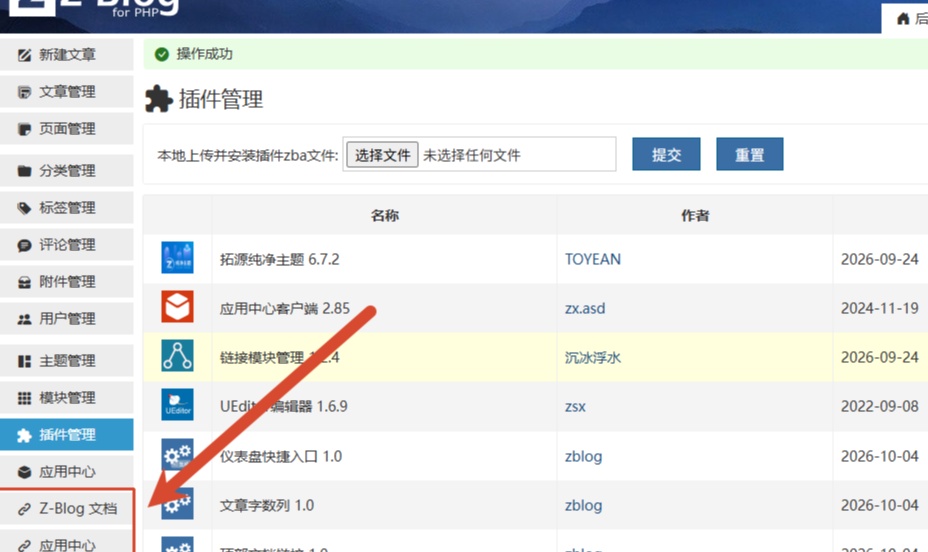
Z-Blog PHP后台侧栏变成个人导航站,把统计后台、图床、文档全部钉到眼皮底下

每个站长都有一堆"运维时必去"的网站:统计后台、图床、CDN 控制台、官方文档、备案查询……它们散落在浏览器书签栏的各个角落,每次找都要翻半天。zblogphp 后台侧栏明明是每天工作时长待的地方,却只有"文章管理""评论管理"这几个固定入口,一个自定义空间都不给。zb_SidebarBookmarks 这个插件把侧栏开放成了自定义书签栏——你在配置里写几行"名称|链接",侧栏就多几个和系统菜单长得一模一样的入口。

资源下载

更多资源
Mario

Mario

马里奥是站在游戏界顶峰的超人气多面角色。马里奥靠吃蘑菇成长,特征是大鼻子、头戴帽子、身穿背带裤,还留着胡子。与他的双胞胎兄弟路易基一起,长年担任任天堂的招牌角色。

Rocky Linux

Rocky Linux

Rocky Linux(中文名:洛基)是由Gregory Kurtzer于2020年12月发起的企业级Linux发行版,作为CentOS稳定版停止维护后与RHEL(Red Hat Enterprise Linux)完全兼容的开源替代方案,由社区拥有并管理,支持x86_64、aarch64等架构。其通过重新编译RHEL源代码提供长期稳定性,采用模块化包装和SELinux安全架构,默认包含GNOME桌面环境及XFS文件系统,支持十年生命周期更新。

Sublime Text

Sublime Text

Sublime Text具有漂亮的用户界面和强大的功能,例如代码缩略图,Python的插件,代码段等。还可自定义键绑定,菜单和工具栏。Sublime Text 的主要功能包括:拼写检查,书签,完整的 Python API , Goto 功能,即时项目切换,多选择,多窗口等等。Sublime Text 是一个跨平台的编辑器,同时支持Windows、Linux、Mac OS X等操作系统。

WebStorm

WebStorm

WebStorm 是jetbrains公司旗下一款JavaScript 开发工具。目前已经被广大中国JS开发者誉为“Web前端开发神器”、“最强大的HTML5编辑器”、“最智能的JavaScript IDE”等。与IntelliJ IDEA同源,继承了IntelliJ IDEA强大的JS部分的功能。

用户登录
用户注册