首页 文章 精选 留言 我的

精选列表

搜索[Python],共10000篇文章
优秀的个人博客,低调大师

Python字符串基础操作

找到我就是缘分,为技术一起努力! 格式符 # price_width = 10 item_width = width - price_width header_format = '%-*s%*s' format = '%-*s%*.2f' print '=' * width print header_format % (item_width, 'Item', price_width, 'Price') print '-' * width print format % (item_width,'Apples',price_width,0.4) print format %(item_width,'Pears', price_width,0.5) print format %(item_width,'Cantaloupes',price_width,1.92) find(str,start,end):从start开始end结束寻找与str相匹配的字符,找到返回匹配项index,找不到返回-1 a='With a moo-moo here. and a moo-moo there'.find('moo',7) >>> print(a) 7 >>> a='With a moo-moo here. and a moo-moo there'.find('moo',1,8) >>> print(a) -1 join():在字符序列之间加入分隔符 >>> seq = ['1','2','3','4','5'] >>> sep '+' >>> sep.join(seq) '1+2+3+4+5' lower():全部转为小写 >>> 'ZDF'.lower() 'zdf' title():首字母大写 >>> 'zdf'.title() 'Zdf' replace(oldstr , newstr):替换字符 >>> 'zdf is a clever boy!'.replace('clever','handsome') 'zdf is a handsome boy!' split(/PATTERN):以模式来分割,模式的意思就是REGEX >>> 'zdf+zdf+zdf'.split('+') ['zdf', 'zdf', 'zdf'] strip():去除两侧空格(不包括内部的) >>> ' zdf '.strip() 'zdf' strip('*'):也可指定去除两侧特定的字符 ,如* >>> '*********zdf****************'.strip('*') 'zdf'

优秀的个人博客,低调大师

Python中的魔法方法

想多么简单就多么简单 __ getattribute __(self,name):当特性name被访问时自动被调用 __ getattr __(self,name):当特性name被访问且对象没有相应的特性时被自动调用 __ setattr __(self,name,value):当试图给特性name赋值时会被自动调用 __ delattr __(self,name):当试图删除特性name时被自动调用 class Rectangle: def __init__(self): self.width=0; self.height=0; def __setattr__(self,name,value): if name == 'size': self.width,self.height = value else: self.__dict__[name] = value def __getattr__(self,name): if name == 'size': return self.width,self.height else: raise AttributeError __ init__()方法:初始化方法,对象被创建时调用 __ iter __()方法:当被用作迭代器使用时,必须包含此方法next()方法:每次被访问时都会调用这个方法一次 查找斐波那契数列中比1000大的数中的最小的数 class Fibs: def __init__(self): self.a = 0; self.b = 1; def __next__(self): self.a,self.b = self.b,self.a+self.b return self.a def __iter__(self): return self fibs = Fibs() for f in fibs: if f > 999: print(f) break 从上面的例子可以看出,每一次for循环,就自动调用一次 _ _ next_ _()方法

优秀的个人博客,低调大师

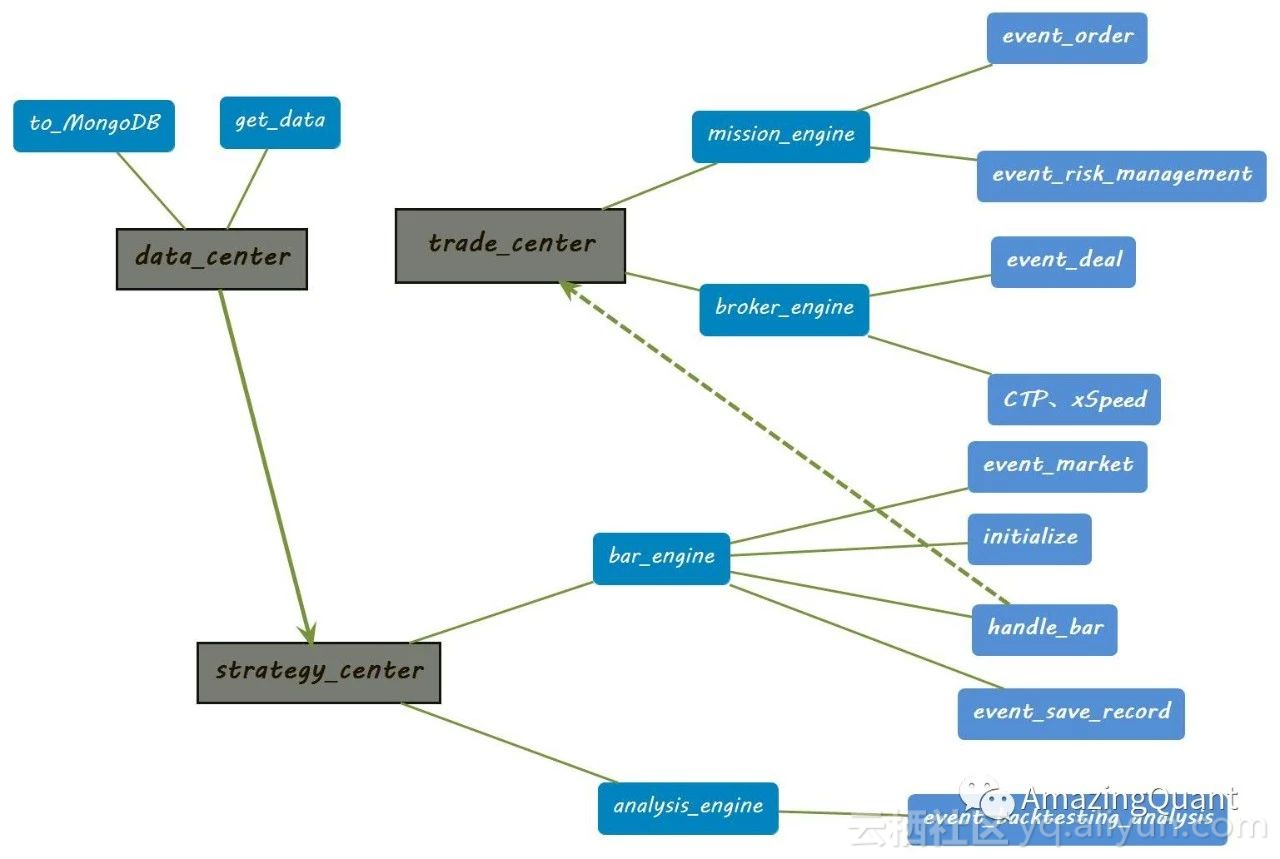
Python量化交易开源框架:AmazingQuant

1.简介开源地址: https://github.com/zhanggao2013/AmazingQuant AmazingQuant是一款基于event-driven的量化回测交易开源框架,下图是总体框架架构。 data_centerto_mongoDB 存放行情、财务等各种数据到MongoDB的存储模块get_data 策略中从数据库中取数据的接口模块trade_centermossion_engine 包含下单任务(event_order)和风控(event_risk_management)两部分的engine,分别完成下单前的检查和风控broker_engine 分为回测时的simulate的broker(主要是event_deal)撮合成交和连接实盘交易CTP、xSpeed等接口两部分strategy_cente

优秀的个人博客,低调大师

Python数据分析实例操作

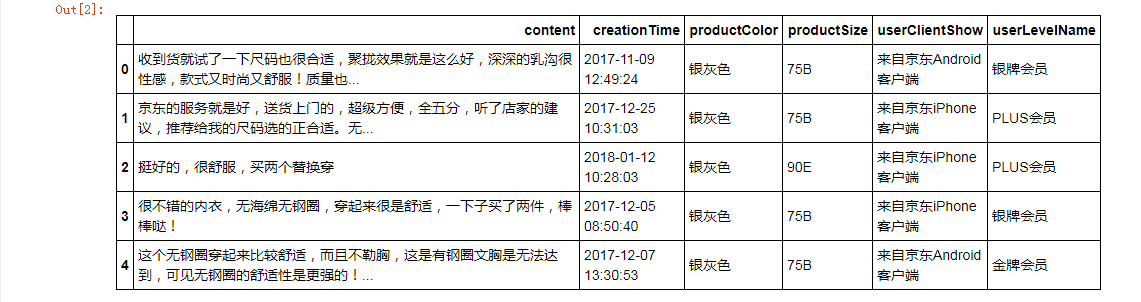
import pandas as pd #导入pandas import matplotlib.pyplot as plt #导入matplotlib from pylab import * mpl.rcParams['font.sans-serif'] = ['SimHei'] mpl.rcParams['axes.unicode_minus'] = False %matplotlib inline 数据读取与索引 bra = pd.read_csv('data/bra.csv') bra.head() 选取列 bra.content bra[['creationTime','productColor']].head() 选择行 bra[1:6] 选择行和列 bra.ix[[2,3],[1,3]] #使用ix bra.ix[1:5,['productColor']] bra.iloc[[2,3],[1,3]] #使用iloc bra.loc[1:5,['content','creationTime','productSize']] #使用loc bra.loc[1:5,'content':'userClientShow'] 数据预处理 缺失值 bra.describe() #查看数据的分布情况,可返回变量和观测的数量、缺失值和唯一值的数目、平均值、分位数等相关信息 bra['userClientShow'].unique() #userClientShow列有几种选项 bra['userClientShow'].isnull().sum() #初始缺失值数量 bra['userClientShow'].fillna('不详',inplace=True) #缺失值替换为“不详” bra['userClientShow'].isnull().sum() #赋值后的缺失值数量 新增列 bra.dtypes #查看属性 bra['creationTime'] = pd.to_datetime(bra['creationTime']) #更新类型 bra.dtypes bra['hour'] = [i.hour for i in bra['creationTime']] #新建hour列 bra 字符串操作 bra.productSize.unique() #查看productSize的唯一值 cup = bra.productSize.str.findall('[a-zA-Z]+').str[0] #新增列cup cup2 = cup.str.replace('M','B') cup3 = cup2.str.replace('L','C') cup4 = cup3.str.replace('XC','D') bra['cup'] = cup4 bra.head() bra['cup'].unique() #查看cup唯一值 数据转换 bra.productColor.unique() #查看productColor唯一值 def getColor(s): if '黑' in s: return '黑色' elif '肤' in s: return '肤色' elif '蓝' in s: return '蓝色' elif '红' in s: return '红色' elif '紫' in s: return '紫色' elif '白' in s: return '白色' elif '粉' in s: return '粉色' elif '灰' in s: return '灰色' elif '绿' in s: return '绿色' elif '青' in s: return '青色' else: return s bra['color'] = bra['productColor'].map(getColor) #从productColor列查询,赋值到定义的函数getColor,最终新增列color bra bra.color.unique() #查询color的唯一值 数据可视化 x = [1991,1992,1993,1994,1995,1996,1997] y = [23,56,38,29,34,56,92] plt.plot(x,y) #调用函数plot plt.figure(figsize=(8,6),dpi=80) #调用函数firgure plt.plot(x,y) hour = bra.groupby('hour')['hour'].count() #hour列排序 hour plt.xlim(0,25) #横轴0~25 plt.plot(hour,linestyle='solid',color='royalblue',marker='8') #颜色深蓝 cup_style = bra.groupby('cup')['cup'].count() #cup列唯一值得数量 cup_style plt.figure(figsize=(8,6),dpi=80) labels = list(cup_style.index) plt.xlabel('cup') #x轴为cup plt.ylabel('count') #y轴为count数量 plt.bar(range(len(labels)),cup_style,color='royalblue',alpha=0.7) #alpha为透明度 plt.xticks(range(len(labels)),labels,fontsize=12) plt.grid(color='#95a5a6',linestyle='--',linewidth=1,axis='y',alpha=0.6) plt.legend(['user-count']) for x,y in zip(range(len(labels)),cup_style): plt.text(x,y,y,ha='center',va='bottom') color_style = bra.groupby('color')['color'].count() #color列唯一值得数量 color_style plt.figure(figsize=(8,6),dpi=80) plt.subplot(facecolor='gainsboro',alpha=0.2) colors = ['brown','orange','gray','white','pink','purple','red','green','wheat','blue','gold','springgreen','black'] #颜色种类 labels = list(color_style.index) plt.xlabel('count') #x轴为count数量 plt.ylabel('color') #y轴为color plt.title('Color Distribution') #定义标题 plt.barh(range(len(labels)),color_style,color=colors,alpha=1) plt.yticks(range(len(labels)),labels,fontsize=12) plt.grid(color='#95a5a6',linestyle='--',linewidth=1,axis='x',alpha=0.4) bra.head(30) 知识在于点滴积累


优秀的个人博客,低调大师

Python函数式编程map()、reduce()

一、map() 格式:map(func, *iterables) map函数接受两个参数,第一个是要执行的函数,第二个是可迭代对象,可迭代对象可以传入多个参数。 map()函数是将func作用于iterables中的每一个元素,并用一个列表给出返回值。如果func为None,作用同zip()。 传入一个可迭对象 def func(x): return x*x lists = [1, 2, 3, 4] l = list(map(func, lists)) print(l) 结果:[1, 4, 9, 16] 传入两个可迭对象 def func(x, y): return x+y lists = [1, 2, 3, 4] lists2 = [1, 2, 3, 4] l = list(map(func, lists, lists2)) print(l) 结果:[2, 4, 6, 8] 二、reduce() 格式:reduce(function, sequence, initial=None) reduce函数接受三个参数,第一个是要执行的函数,第二个是序列,第三个是默认值。第一个函数必须有两个参数。 reduce函数即为化简,它是这样一个过程:每次迭代,将上一次的迭代结果(第一次时为init的元素,如没有init则为seq的第一个元素)与下一个元素一同执行一个二元的func函数。在reduce函数中,init是可选的,如果使用,则作为第一次迭代的第一个元素使用。 例子: 不传入默认值 from functools import reduce lists = ['a', 'b', 'c', 'd'] r = reduce(lambda x, y: x+y, lists) print(r) 结果:abcd 传入默认值 from functools import reduce lists = ['a', 'b', 'c', 'd'] r = reduce(lambda x, y: x+y, lists, '你好') print(r) 结果:你好abcd

资源下载

更多资源
Mario

Mario

马里奥是站在游戏界顶峰的超人气多面角色。马里奥靠吃蘑菇成长,特征是大鼻子、头戴帽子、身穿背带裤,还留着胡子。与他的双胞胎兄弟路易基一起,长年担任任天堂的招牌角色。

Nacos

Nacos

Nacos /nɑ:kəʊs/ 是 Dynamic Naming and Configuration Service 的首字母简称,一个易于构建 AI Agent 应用的动态服务发现、配置管理和AI智能体管理平台。Nacos 致力于帮助您发现、配置和管理微服务及AI智能体应用。Nacos 提供了一组简单易用的特性集,帮助您快速实现动态服务发现、服务配置、服务元数据、流量管理。Nacos 帮助您更敏捷和容易地构建、交付和管理微服务平台。

Rocky Linux

Rocky Linux

Rocky Linux(中文名:洛基)是由Gregory Kurtzer于2020年12月发起的企业级Linux发行版,作为CentOS稳定版停止维护后与RHEL(Red Hat Enterprise Linux)完全兼容的开源替代方案,由社区拥有并管理,支持x86_64、aarch64等架构。其通过重新编译RHEL源代码提供长期稳定性,采用模块化包装和SELinux安全架构,默认包含GNOME桌面环境及XFS文件系统,支持十年生命周期更新。

Sublime Text

Sublime Text

Sublime Text具有漂亮的用户界面和强大的功能,例如代码缩略图,Python的插件,代码段等。还可自定义键绑定,菜单和工具栏。Sublime Text 的主要功能包括:拼写检查,书签,完整的 Python API , Goto 功能,即时项目切换,多选择,多窗口等等。Sublime Text 是一个跨平台的编辑器,同时支持Windows、Linux、Mac OS X等操作系统。

用户登录
用户注册