首页 文章 精选 留言 我的

精选列表

搜索[学习],共10000篇文章
优秀的个人博客,低调大师

NLTK基础教程学习笔记(十三)

在信息摘要应用中还包含着另一种理论逻辑:重要的句子中通常包含着重要的词汇,而跨语料库的差异词(discriminatory word)绝大多数数是重要词汇。因此,句子中包含具有差异很大的词汇,它就很重要。这样就得到一个非常简单的测量方法,就是计算每一个词各种的TF-IDF(term frequency-inverse document )分值,然后根据词汇的重要性找出一种标准化的凭据评分。这个评分就可以用来充当在信息摘要中选取句子的标准。 TF-IDF(term frequency–inverse document frequency)是一种用于资讯检索与资讯探勘的常用加权技术。TF-IDF是一种统计方法,用以评估一字词对于一个文件集或一个语料库中的其中一份文件的重要程度。字词的重要性随着它在文件中出现的次数成正比增加,但同时会随着它在语料库中出现的频率成反比下降。TF-IDF加权的各种形式常被搜寻引擎应用,作为文件与用户查询之间相关程度的度量或评级。除了TF-IDF以外,因特网上的搜寻引擎还会使用基于连结分析的评级方法,以确定文件在搜寻结果中出现的顺序。按照其不拿整段介绍来做,只拿前三句来实践,我拿了前一段: import nltk from sklearn.feature_extraction.text import TfidfVectorizer f=open('news.txt') news_content=f.read() results=[] sentences=nltk.sent_tokenize(news_content) vectorizer=TfidfVectorizer(norm='l2',min_df=0,use_idf=True,smooth_idf=False,sublinear_tf=True) sklearn_binary=vectorizer.fit_transform(sentences) print(vectorizer.get_feature_names()) print(sklearn_binary.toarray()) 结果: ['accept', 'accepting', 'altria', 'and', 'announce', 'approaches', 'arthur', 'as', 'at', 'be', 'birth', 'britain', 'british', 'by', 'caliburn', 'ceremonial', 'character', 'decides', 'despite', 'destined', 'dies', 'draws', 'ector', 'eligible', 'embedded', 'enters', 'entrusted', 'explaining', 'fearing', 'fifteen', 'following', 'for', 'full', 'gender', 'growing', 'hardships', 'heir', 'her', 'hesitation', 'his', 'however', 'if', 'in', 'inspired', 'invasion', 'is', 'king', 'knight', 'known', 'large', 'leadership', 'leaving', 'legends', 'legitimate', 'loyal', 'mantle', 'merlin', 'monarch', 'name', 'nativity', 'never', 'no', 'not', 'of', 'or', 'pendragon', 'people', 'period', 'preserving', 'publicly', 'pulling', 'raises', 'recognize', 'responsible', 'ruler', 'saber', 'saxons', 'she', 'shoulders', 'sir', 'slab', 'son', 'soon', 'stone', 'subjects', 'surrogate', 'sword', 'symbolic', 'that', 'the', 'this', 'threat', 'throne', 'to', 'turmoil', 'uther', 'welfare', 'when', 'who', 'will', 'withdraws', 'without', 'woman'] [[ 0. 0. 0.15095332 0. 0. 0. 0.31622502 0. 0. 0. 0. 0. 0. 0.20340954 0. 0. 0.31622502 0. 0. 0. 0. 0. 0. 0. 0. 0. 0. 0. 0. 0. 0. 0. 0.31622502 0. 0. 0. 0. 0. 0. 0. 0. 0. 0. 0.31622502 0. 0.17386773 0.24504638 0. 0. 0. 0. 0. 0.31622502 0. 0. 0. 0. 0. 0.31622502 0. 0. 0. 0. 0.15095332 0. 0.31622502 0. 0. 0. 0. 0. 0. 0. 0. 0. 0.31622502 0. 0. 0. 0. 0. 0. 0. 0. 0. 0. 0. 0. 0. 0.15095332 0. 0. 0. 0. 0. 0. 0. 0. 0. 0. 0. 0. 0. ] [ 0.23250474 0. 0.11098857 0. 0.23250474 0. 0. 0.14955705 0.23250474 0. 0.23250474 0. 0. 0. 0. 0. 0. 0.23250474 0. 0. 0. 0. 0. 0. 0. 0. 0. 0. 0.23250474 0. 0. 0. 0. 0.18017058 0. 0. 0. 0.11098857 0. 0.23250474 0. 0. 0. 0. 0. 0. 0. 0. 0. 0. 0. 0. 0. 0.23250474 0. 0. 0. 0. 0. 0.23250474 0.23250474 0. 0.23250474 0. 0.23250474 0. 0. 0. 0. 0.23250474 0. 0. 0. 0. 0.18017058 0. 0. 0. 0. 0. 0. 0. 0. 0. 0.23250474 0. 0. 0. 0. 0. 0. 0. 0. 0.14955705 0. 0.18017058 0. 0. 0. 0.14955705 0. 0. 0.23250474] [ 0. 0. 0. 0. 0. 0. 0. 0.18736875 0. 0. 0. 0. 0. 0.18736875 0. 0. 0. 0. 0. 0. 0. 0. 0.29128766 0. 0. 0. 0.29128766 0. 0. 0. 0. 0. 0. 0. 0. 0. 0. 0.13904921 0. 0. 0. 0. 0. 0. 0. 0.1601566 0. 0.29128766 0. 0. 0. 0. 0. 0. 0.29128766 0. 0.22572213 0. 0. 0. 0. 0. 0. 0. 0. 0. 0. 0. 0. 0. 0. 0.29128766 0. 0. 0. 0. 0. 0.18736875 0. 0.29128766 0. 0.29128766 0. 0. 0. 0.29128766 0. 0. 0. 0. 0. 0. 0. 0.18736875 0. 0. 0. 0. 0.29128766 0. 0. 0. 0. ] [ 0. 0. 0.14155101 0. 0. 0. 0. 0. 0. 0. 0. 0. 0. 0. 0. 0. 0. 0. 0. 0. 0.29652856 0. 0. 0.29652856 0. 0. 0. 0. 0. 0.29652856 0. 0. 0. 0. 0. 0. 0.29652856 0. 0. 0. 0. 0. 0. 0. 0. 0.16303816 0.22978336 0. 0.29652856 0. 0. 0.29652856 0. 0. 0. 0. 0. 0. 0. 0. 0. 0.29652856 0. 0. 0. 0. 0. 0. 0. 0. 0. 0. 0. 0. 0. 0. 0. 0. 0. 0. 0. 0. 0. 0. 0. 0. 0. 0. 0. 0.14155101 0. 0. 0.29652856 0.19073992 0. 0.22978336 0. 0.29652856 0. 0. 0. 0. 0. ] [ 0. 0. 0. 0. 0. 0. 0. 0. 0. 0. 0. 0.24121053 0. 0.20022545 0. 0. 0. 0. 0. 0. 0. 0. 0. 0. 0. 0.31127497 0. 0. 0. 0. 0.31127497 0. 0. 0. 0.31127497 0. 0. 0. 0. 0. 0. 0. 0. 0. 0.31127497 0. 0. 0. 0. 0. 0. 0. 0. 0. 0. 0. 0. 0. 0. 0. 0. 0. 0. 0.25158536 0. 0. 0. 0.31127497 0. 0. 0. 0. 0. 0. 0. 0. 0.31127497 0. 0. 0. 0. 0. 0. 0. 0. 0. 0. 0. 0. 0.25158536 0. 0.31127497 0. 0. 0.31127497 0. 0. 0. 0. 0. 0. 0. 0. ] [ 0. 0. 0.10632924 0. 0. 0.22274414 0. 0.14327861 0. 0. 0. 0. 0.22274414 0. 0.17260697 0.22274414 0. 0. 0. 0.22274414 0. 0. 0. 0. 0.22274414 0. 0. 0.22274414 0. 0. 0. 0. 0. 0. 0. 0. 0. 0.10632924 0. 0. 0. 0.22274414 0.22274414 0. 0. 0. 0. 0. 0. 0.22274414 0. 0. 0. 0. 0. 0. 0.17260697 0. 0. 0. 0. 0. 0. 0.10632924 0. 0. 0.17260697 0. 0. 0. 0. 0. 0.22274414 0. 0.17260697 0. 0. 0.14327861 0. 0. 0.22274414 0. 0.22274414 0.22274414 0. 0. 0.17260697 0. 0.22274414 0.10632924 0. 0. 0. 0. 0. 0. 0. 0. 0. 0.14327861 0.22274414 0. 0. ] [ 0. 0.24521796 0.11705736 0.19002219 0. 0. 0. 0. 0. 0.24521796 0. 0. 0. 0. 0. 0. 0. 0. 0. 0. 0. 0. 0. 0. 0. 0. 0. 0. 0. 0. 0. 0.24521796 0. 0. 0. 0.24521796 0. 0.11705736 0. 0. 0.24521796 0. 0. 0. 0. 0.13482643 0. 0. 0. 0. 0. 0. 0. 0. 0. 0. 0. 0.24521796 0. 0. 0. 0. 0. 0.24565801 0. 0. 0.19002219 0. 0.24521796 0. 0.24521796 0. 0. 0.24521796 0. 0. 0. 0. 0. 0. 0. 0. 0. 0. 0. 0. 0.19002219 0.24521796 0. 0.19819534 0.24521796 0. 0. 0. 0. 0. 0.24521796 0. 0. 0.15773474 0. 0. 0. ] [ 0. 0. 0. 0.38872173 0. 0. 0. 0. 0. 0. 0. 0.22958532 0. 0. 0.22958532 0. 0. 0. 0.29627299 0. 0. 0.29627299 0. 0. 0. 0. 0. 0. 0. 0. 0. 0. 0. 0.22958532 0. 0. 0. 0.14142901 0.29627299 0. 0. 0. 0. 0. 0. 0. 0. 0. 0. 0. 0.29627299 0. 0. 0. 0. 0.29627299 0. 0. 0. 0. 0. 0. 0. 0.14142901 0. 0. 0. 0. 0. 0. 0. 0. 0. 0. 0. 0. 0. 0.19057553 0.29627299 0. 0. 0. 0. 0. 0. 0. 0. 0. 0. 0. 0. 0. 0. 0. 0. 0. 0. 0. 0. 0. 0. 0.29627299 0. ]]

优秀的个人博客,低调大师

NLTK基础教程学习笔记(十二)

构建第一个NLP应用:信息摘要:对所提供的文章短文故事生成需要针对其内容自动生成摘要。信息摘要需要理解的不只是句子的结构,而是整个文本结构,还要了解文本的体裁和主体主题内容。下面了一个介绍创建个人版的Google News通常用于较多实体和名词的句子的重要性往往会比较高,现在的任务是要用某种可能被标准化的统一逻辑来计算重要性成分(importance score),即如果想要获取前n个句子的信息情况,要去选择一个重要性评分阈值。由于找不到原文的新闻材料所以用wiki上的一段介绍吾王Saber材料代替; f=open('new.txt','r') new_content=f.read() print(new_content) 结果: Saber's full name is Altria Pendragon, a character inspired by the legends of King Arthur. At her nativity, Uther decides to not publicly announce Altria's birth or gender, fearing his subjects will never accept a woman as a legitimate ruler. She is entrusted by Merlin to a loyal knight, Sir Ector, who raises her as a surrogate son. When Altria is fifteen, King Uther dies leaving no known eligible heir to the throne. Britain enters a period of turmoil following the growing threat of invasion by the Saxons. Merlin soon approaches Altria, explaining that the British people will recognize her as a destined ruler if she withdraws Caliburn, a ceremonial sword embedded in a large slab of stone. However, pulling this sword is symbolic of accepting the hardships of a monarch, and Altria will be responsible for preserving the welfare of her people. Without hesitation and despite her gender, she draws Caliburn and shoulders Britain's mantle of leadership. Altria rules Britain from her stronghold in Camelot and earns the reputation of a just, yet distant king. Under the guidance of Merlin and with the aid of her Knights of the Round Table, she guides Britain into an era of prosperity and tranquillity. Caliburn is destroyed, but Altria soon acquires her holy sword, Excalibur, and Avalon, Excalibur's blessed sheath, from Vivian, the Lady of the Lake. While Avalon is in her possession, Altria never ages and is immortal in battle. Despite her immense strength and fighting abilities, Altria is plagued by feelings of guilt and inferiority throughout her reign; she sacrifices her emotions for the good of Britain, yet many of her subjects and knights become critical of her lack of humanity and cold calculation. Excalibur's scabbard is stolen while she repels an assault along her country's borders; when Altria returns inland, she discovers Britain is being torn asunder by civil unrest. Despite her valiant efforts to placate the dissent, Altria is mortally wounded by a traitorous knight, a homunculus born of her blood named Mordred, during the Battle of Camlann. Her dying body is escorted to a holy isle by Morgan le Fay and Sir Bedivere. Altria orders a grieving Bedivere to dispose of Excalibur by throwing it back to Vivian; in her absence, she reflects on her personal failures, regretting her life as king. Before her last breath, she appeals to the world; in exchange for services as a Heroic Spirit, she asks to be given an opportunity to relive her life, where someone more suitable and effective would lead Britain in her stead. 要对文字进行分析,先要将文章转换成一个句子列表。用句子标识器将内容分成若干个句子,这里提供一些句型的编号,便于识别这些句子并对其进行排名。一旦得到了这些段子,会让其在单词标识器中过一遍,最后再来过NER标注器和POS标注器。 import nltk f=open('new.txt','r') new_content=f.read() results=[] for sent_no,sentence in enumerate(nltk.sent_tokenize(new_content)): no_of_tokens=len(nltk.word_tokenize(sentence)) #print(no_of_tokens) tagged=nltk.pos_tag(nltk.word_tokenize(sentence)) no_of_nouns=len([word for word ,pos in tagged if pos in ["NN","NNP"]]) ners=nltk.ne_chunk(nltk.pos_tag(nltk.word_tokenize(sentence))) no_of_ners=len([chunk for chunk in ners if hasattr(chunk,'label')]) score=(no_of_ners+no_of_nouns)/float(no_of_tokens) results.append((sent_no,no_of_tokens,no_of_ners,no_of_nouns,score,sentence)) for sent in sorted(results,key=lambda x:x[4],reverse=True): print(sent[5]) 上面代码中我们对句子列表进行了迭代,并根据公式计算出了这些句子的评分,该公式只是个以被标识实体为分子,以普通标识词为分母的分子式,将这些结果创建成一个元组。降序排列后打印的结果: Caliburn is destroyed, but Altria soon acquires her holy sword, Excalibur, and Avalon, Excalibur's blessed sheath, from Vivian, the Lady of the Lake. Her dying body is escorted to a holy isle by Morgan le Fay and Sir Bedivere. Saber's full name is Altria Pendragon, a character inspired by the legends of King Arthur. Britain enters a period of turmoil following the growing threat of invasion by the Saxons. Altria rules Britain from her stronghold in Camelot and earns the reputation of a just, yet distant king. Without hesitation and despite her gender, she draws Caliburn and shoulders Britain's mantle of leadership. Under the guidance of Merlin and with the aid of her Knights of the Round Table, she guides Britain into an era of prosperity and tranquillity. While Avalon is in her possession, Altria never ages and is immortal in battle. Excalibur's scabbard is stolen while she repels an assault along her country's borders; when Altria returns inland, she discovers Britain is being torn asunder by civil unrest. Despite her valiant efforts to placate the dissent, Altria is mortally wounded by a traitorous knight, a homunculus born of her blood named Mordred, during the Battle of Camlann. When Altria is fifteen, King Uther dies leaving no known eligible heir to the throne. She is entrusted by Merlin to a loyal knight, Sir Ector, who raises her as a surrogate son. Merlin soon approaches Altria, explaining that the British people will recognize her as a destined ruler if she withdraws Caliburn, a ceremonial sword embedded in a large slab of stone. Altria orders a grieving Bedivere to dispose of Excalibur by throwing it back to Vivian; in her absence, she reflects on her personal failures, regretting her life as king. At her nativity, Uther decides to not publicly announce Altria's birth or gender, fearing his subjects will never accept a woman as a legitimate ruler. Before her last breath, she appeals to the world; in exchange for services as a Heroic Spirit, she asks to be given an opportunity to relive her life, where someone more suitable and effective would lead Britain in her stead. Despite her immense strength and fighting abilities, Altria is plagued by feelings of guilt and inferiority throughout her reign; she sacrifices her emotions for the good of Britain, yet many of her subjects and knights become critical of her lack of humanity and cold calculation. However, pulling this sword is symbolic of accepting the hardships of a monarch, and Altria will be responsible for preserving the welfare of her people. 完成了句子的排序,一旦有no_of_nouns和no_of_ners的评分列表,就可以围绕他们建议一些更加复杂的规则。

优秀的个人博客,低调大师

NLTK基础教程学习笔记(十)

依赖性文本解析:依赖性文本解析(dependency parsing 简称DP)是一种现代化的文本解析机制。DP的主要概念是将各个语法单元(单词)用丁香链路串联起来。这种链路称为依赖关系(dependencies)。在目前的文本解析社区中,有大量工作在进行。尽管短语结构式文本解析(phrase structure parsing)在异乡词序自由的语言(如捷克语和土耳其语)中被广泛使用,但依赖性文本解析别被证明是一种更为有效地方法。短语结构式文本解析与依赖性文本解析之间存在着一个明显的区别,从他们所产生的解析树上可以看出来。解析书上短语结构树试图捕捉的首先是单词与短语之间的关系,然后是短语与短语之间的关系,依存关系树只关心单词与单词之间的关系如big完全依赖于dog。NLTK库也提供了一些可用于执行依存性文本解析的方法。其中一个是使用基于概率的投射依存性解析器(probabilistic,projective dependency parser),但解析器得经由某个有限训练数据集来进行训练。依存性解析器的另一种形态就是Stanford解析器。下面是一个Stanford解析器的例子:语块分解:语块分解属于浅解析,目的是将句子分解成有意义的语块,将语块定义为文本解析中的最小单元,例如将“the President speaks about the health care reforms “句子分成两个语块。第一个语块“the President”该语块由名词主导,称为名词短语(NP),另一部分由动词主导称为动词短语。将句子划分成各个部分的过程就是语块分解。从形式上看语块分解操作也可以被看作是一种处理接口,作用是识别出文本中互相不重叠的部分。对于一些文本问题想只想提取其中的关键短语,命名实体或者先关项目的特定模式,在这种情况下要做浅解析非深解析,深解析回去处理所有违法语法规则的句子,也会产生不同的语法树,直到解析器在反复回溯的过程中找到最佳的解析树,整个过程非常耗时和繁琐,并且完成了所有的这些过程也未必会得到正确的解析树。而浅解析则可以用语块来保证其浅解析的结构,这种处理相对而言要较快一些。

优秀的个人博客,低调大师

NLTK基础教程学习笔记(六)

用NLYK库实现标注任务的方式有两种:1:使用NLTK库或其他库中的预置标注器,并将其运用到测试数据上。这两种标注器应该足以应对英语文本环境,以及非特殊领域语料库中的所有词性标注任务。2:基于测试数据来创建或训练出适合的标注器。深入了解标注器:一个典型的标注器通常要用到大量的训练数据,它主要被用于标注出句子中的各种单词,并为其贴上POS标签。标注是一个纯手工的工作,具体如下: Well/UH what/WP do/VBP you/PRP think/VB about/IN the/DT idea/NN of/IN... 以上是来自Penn Treebank的语义库。其中还有一个语言数据联盟(LDC)专门用来研究不同语言的标注,不同文本种类以及不同标注操作,如词性标注,句法分析标注,以及对话标注等。通常情况下,像词性标注这样的标注问题往往会被视为顺序标签化的问题或者某种分类问题,后者特指人们为特定token所生成的正确标签,并用先关判别模型对其进行判别的一类问题。下面是分析Brown语料库中各POS标签的分布频率: from nltk.corpus import brown import nltk tags=[tag for (word,tag)in brown.tagged_words(categories='news')] print(nltk.FreqDist(tags)) out=nltk.FreqDist(tags) 结果: <FreqDist with 218 samples and 100554 outcomes> 由于个数太多无法打印,可以通过debug进去看各个词的的频率。Debug进去看可以看到NN在这里出现频率最高,可以用来创建一个POS标注器,用来给所有的测试文本分配NN标签。DefaultTagger函数是顺序性标注器,标注器会去调用evaluate()函数,该函数主要用来评估相关单词POS的准确度,是对Brown语料库的标注器所用的基准: from nltk.corpus import brown import nltk brown_tagged_sents=brown.tagged_sents(categories='news') default_tagger=nltk.DefaultTagger('NN') print(default_tagger.evaluate(brown_tagged_sents)) 结果: 0.13089484257215028 准确率大概13%左右DefaultTagger的表现并不是很好,DefaultTagger本质上只是基类SequentialBackoffTagger的一部分,后者是一个顺序性标注服务。标注器会试着基于其所处的上下文环境来模型化先关的标签。而且如果它不能进行正确的标签预测,就会去咨询BackoffTagger。通常情况下,DefaultTagger参数都可以被当作一个BackoffTagger实体来使用。N-gram标注器 from nltk.tag import UnigramTagger from nltk.tag import DefaultTagger from nltk.tag import BigramTagger from nltk.tag import TrigramTagger from nltk.corpus import brown import nltk brown_tagged_sents=brown.tagged_sents(categories='news') default_tagger=nltk.DefaultTagger('NN') train_data=brown_tagged_sents[:int(len(brown_tagged_sents)*0.9)] test_data=brown_tagged_sents[int(len(brown_tagged_sents)*0.9):] unigram_tagger=UnigramTagger(train_data,backoff=default_tagger) print(unigram_tagger.evaluate(test_data)) bigram_tagger=BigramTagger(train_data,backoff=unigram_tagger) print(bigram_tagger.evaluate(test_data)) trigram_tagger=TrigramTagger(train_data,backoff=bigram_tagger) print(trigram_tagger.evaluate(test_data)) 结果: 0.8368384331705372 0.8460081730290043 0.8439150802352238 其中,基于元模型的标注只考虑相关标签的条件概率,以及针对每个给定token所能预测到的、频率最高的标签。而bigram-tagger参数将会考虑给定的单词和该单词的前一个单词,其标签将以元组的形式来关联被测试单词所得到的标签。类似的,TrigramTagger参数将让其查找过程兼顾到给定单词的前两个单词。TrigramTagger参数的覆盖范围比较小,而实例精度则高一些。从另一方面来说,UnigramTagger的覆盖范围则会大一些。为了让准确率和反馈率之间保持平衡,上述代码结合了这三种标注器。

优秀的个人博客,低调大师

NLTK基础教程学习笔记(四)

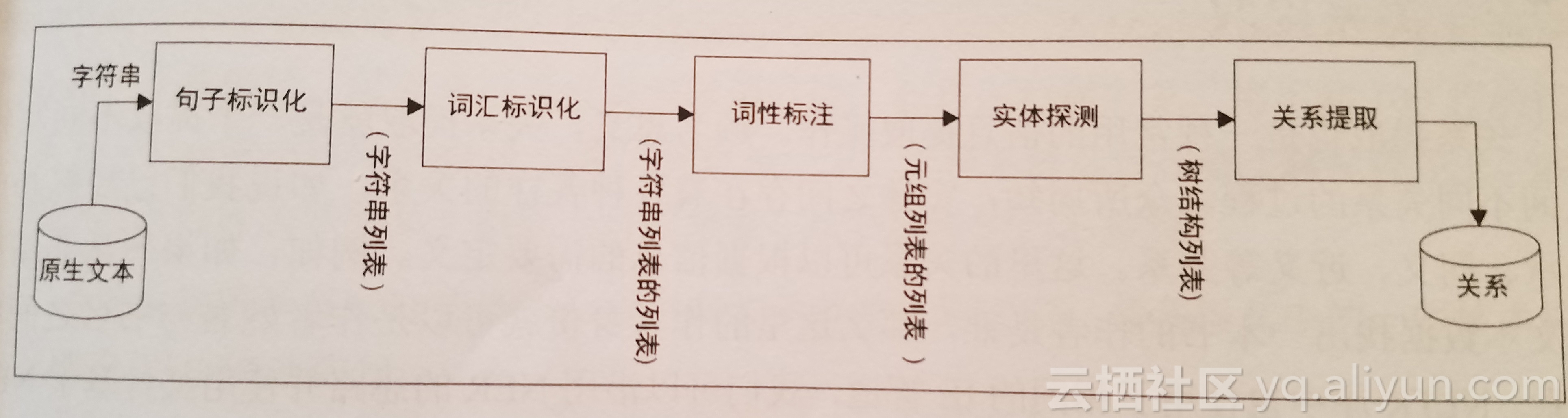
标识化处理:机器所要理解的最小处理单位是单词(分词)。标识化处理,是将原生字符创分割成一系列有意义的分词。标识化就是将原生字符串分割成一系列有意义的分词。标识化处理的复杂性因具体NLP应用而异,目标语言本身的复杂性本身也会带来相关的变化。在英语中,可以通过正则表达式简单的单词来选取纯单词和数字,但在中文中会成为一个复杂的任务 from nltk.tokenize import word_tokenize from nltk.tokenize import regexp_tokenize,wordpunct_tokenize,blankline_tokenize s="Hi Everyone! hola gr8" print(s.split()) print(word_tokenize(s)) print(regexp_tokenize(s,pattern='\w+')) print(regexp_tokenize(s,pattern='\d+')) print(wordpunct_tokenize(s)) print(blankline_tokenize(s)) 结果: ['Hi', 'Everyone!', 'hola', 'gr8'] ['Hi', 'Everyone', '!', 'hola', 'gr8'] ['Hi', 'Everyone', 'hola', 'gr8'] ['8'] ['Hi', 'Everyone', '!', 'hola', 'gr8'] ['Hi Everyone! hola gr8'] 上面用到了各种标识器(tokenizer)Python字符串类型方法split():是一个最基本的标识器,使用空白符来执行单词的分割,split()本身也可以被配置成为一些较为复杂的标识化处理。word_tokensize()方法是一个通用的,强大的,面向对象的可面向对象所有类型预料库的标识化处理方法。regex_tokensize()是一个位用户需求设计的,自定义程度更高的表示器,如用可以基于正则表达式的标识器分割出相同的字符串,用/w分割出单词和数字用/d对数字进行提取词干提取:词干提取(stemming)是一个修枝剪叶的过程,通过一些基本的规则,可以得到所有的分词。词干提取是一种较为粗糙的过程,希望用它来取得相关的分词的各种变化,如eat这个词会有像eating,eaten,eats等变化。在某些情况下不需要区别这些,通常会用词干提取的方法将这些变化归结为相同的词根。对于简单的方法我们可以用词干提取,对于较为复杂的NLP问题,我们必须改用词形还原(lemmatization):下面是一个词干提取的例子: from nltk.stem import PorterStemmer from nltk.stem.lancaster import LancasterStemmer from nltk.stem.snowball import SnowballStemmer pst=PorterStemmer() lst=LancasterStemmer() print(lst.stem("eating")) print(pst.stem("shopping")) 结果: eat shop 一个拥有基本规则的词干提取器,在像移除-s/es、-ing或-ed这里事情上都可以达到70%的精确度。Poster1和lancaStemmer有更多的规则,精确度会更加高。当多种词干提取算法介入时,精确度和性能上会有差异。Snowball能处理荷兰语,英语,法语,德语,意大利语,葡萄牙语,罗马尼亚语和俄语等语言。词形还原:词形还原(lemmatization)涵盖了词根所有的文法和变化形式,还会利用上下文语境和词性来确定相关单词的变化,并运用不同的标准化规则,根据词性来获取相关的词根。 from nltk.stem import WordNetLemmatizer wlem=WordNetLemmatizer() print(wlem.lemmatize("ate")) 结果 ate WordNetLemmatizer使用了wordnet,会针对某个单词去搜索wordnet这个语义字典,还用到了变形分析,以便直切词根并搜索到特殊词形。停用词移除:停用词移除(Stop word removal)简单的移除预料库中在所有文档中可能出现的单词,通常是冠词和代词。 from nltk.corpus import stopwords stoplist=stopwords.words('english') #print(stoplist) text="This is just a test" out=cleanwordlist=[word for word in text.split() if word not in stoplist] print(out) 结果: ['This', 'test']

优秀的个人博客,低调大师

NLTK基础教程学习笔记(五)

词性标注:词性(POS)常用的POS标记库Penn Treebank,PennTreeBank原本是一个NLP项目的名称,该项目主要是对相关语料进行标注,标注内容包括词性标注以及语法分析,其语料来自1989年的华尔街日报,包含2499篇文章。下面是Penn Treebank库编号 缩写 英文 中文1 CC Coordinating conjunction 并列连接词2 CD Cardinal number 基数3 DT Determiner 限定词4 EX Existential there 存在型there5 FW Foreign word 外文单词6 IN Preposition/subord, conjunction 介词/从属,连接词7 JJ Adjective 形容词8 JJR Adjective, comparative 形容词,比较级9 JJS Adjective, superlative 形容词,最高级10 LS List item marker 列表项标记11 MD Modal 情态动词12 NN Noun ,singular or mass 名词,可数或不可数13 NNS Noun, plural 名词,复数14 NNP Proper noun, singular 专有名词,单数15 NNPS Proper noun, plural 专有名词,复数16 PDT Predeterminer 前位限定词17 POS Possessive ending 所有格结束词18 PRP Personal pronoun 人称代名词19 PP$ Possessive pronoun 物主代词,所有格代名词20 RB Adverb 副词21 RBR Adverb, comparative 副词,比较级22 RBS Adverb, superlative 副词,最高级23 RP Particle 小品词24 SYM Symbol(mathematical or scientific) 符号(数学或科学)25 TO to To26 UH Interjection 感叹词27 VB Verb, base form 动词,基本形态28 VBD Verb, past tense 动词,过去式29 VBG Verb, gerund/present participle 动词,动名词/现在分词30 VBN Verb, past participle 动词,过去分词31 VBP Verb, non-3rd ps. sing. Present 动词,非第三人称单数现在式32 VBZ Verb, 3rd ps. sing. Present 动词,第三人称单数现在式33 WDT wh-determiner wh-限定词34 WP wh-pronoun wh-代词35 WP$ Possessive wh-pronoun 所有格wh-代词36 WRB wh-adverb wh-副词37 # Pound sign #符号38 $ Dollar sign 美元符号39 . Sentence-final punctuation 句点40 , Comma 逗号41 : Colon, semi-colon 冒号,分号42 ( Left bracket character 左括号43 ) Right bracket character 右括号44 “ Straight double quote 双引号45 ‘ Left open single quote 左单引号46 “ Left open double quote 左双引号47 ’ Right close single quote 右单引号48 ” Right close double quote 右双引号和中学时学的英语差不多。下面是一个简单的用POS语料库的例子: import nltk from nltk import word_tokenize s="I was watching TV" print(nltk.pos_tag(word_tokenize(s))) 结果: [('I', 'PRP'), ('was', 'VBD'), ('watching', 'VBG'), ('TV', 'NN')] 代码中先将文本进行表示化处理,再调用NLTK库中的pos_tag方法得到一组(词形,词性标签),可以看到很好地将一句话进行了标注。用POS语料库可以进行很多灵活的操作,如找出文本中所有的名词等: import nltk from nltk import word_tokenize s="I was watching TV" #print(nltk.pos_tag(word_tokenize(s))) tagged=nltk.pos_tag(word_tokenize(s)) allnoun=[word for word ,pos in tagged if pos in ['NN','NNP']] print (allnoun) 结果: ['TV'] 如果要找动词只需要改变pos的词性为 allnoun=[word for word ,pos in tagged if pos in ['VB','VBD','VBG ','VBN']]

优秀的个人博客,低调大师

NLTK基础教程学习笔记(二)

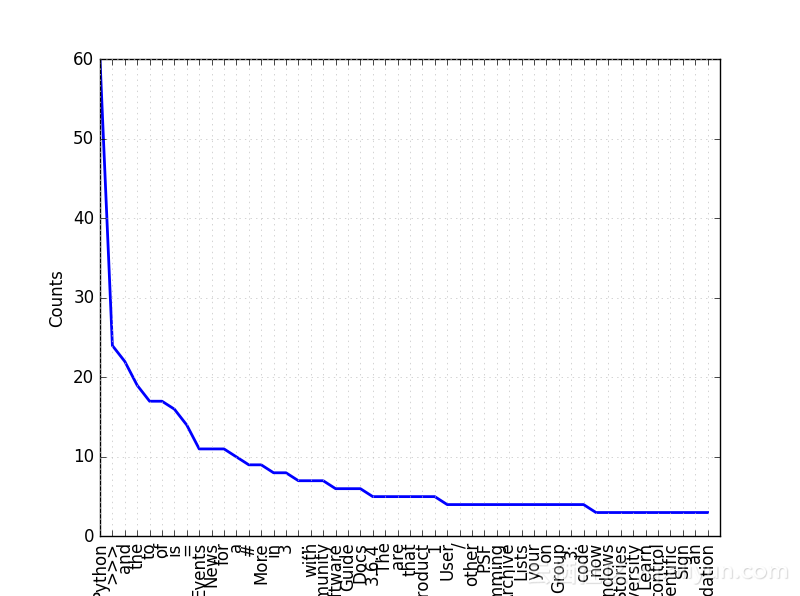
Python基础:字典(dictionary)也是最常用到的一种数据结构。在其他语言中被称为关联数组/存储。字典是一种键值索引型的数据结构,其索引键可以是一种不可变的类型,例如字符串和数字常被用来充当索引键。Python的字典结构是哈希表实现之一。哈希表是一种操作起来非常容易的字典结构,其优势在于通过简短的代码就能建立起非常复杂的数据结构。例子用字典来获取文本中各单词出现的频率: mystring="Monty Python! And the holy Grail !\n" word_frep={} for tok in mystring.split(): if tok in word_frep: word_frep[tok]+=1 else: word_frep[tok]=1 print(word_frep) 结果: {'holy': 1, 'the': 1, 'Python!': 1, '!': 1, 'Grail': 1, 'And': 1, 'Monty': 1} NLTK入门:先介绍了一个简单的爬虫例子,爬取了Python官网主页上的文本信息: import urllib.request response=urllib.request.urlopen('http://python.org/') html=response.read() print(len(html)) 这里和书上的不同对于我用的python3.5,urllib2包已经不能用了,用urllib.request代替。结果; 48907 接下来做一次探索性数据分析(EDA),对于一段文本域而言,EDA可能包含多重含义,这里只会涉及一个简单的例子,即该文档的主体术语类型。文字的主体和出现的频率等。对于之前从Python主页爬的文字域,我们先清除其中的html标签,做法是先用正则表达式选取其中的标记,包括数字和字符,转换为一个列表;版本1: import urllib.request response=urllib.request.urlopen('http://python.org/') html=response.read() #print(len(html)) tokens=[tok for tok in html.split()] print("Total no of tokens:" +str (len(tokens))) print(tokens[0:100]) 结果; Total no of tokens:2932 [b'<!doctype', b'html>', b'<!--[if', b'lt', b'IE', b'7]>', b'<html', b'class="no-js', b'ie6', b'lt-ie7', b'lt-ie8', b'lt-ie9">', b'<![endif]-->', b'<!--[if', b'IE', b'7]>', b'<html', b'class="no-js', b'ie7', b'lt-ie8', b'lt-ie9">', b'<![endif]-->', b'<!--[if', b'IE', b'8]>', b'<html', b'class="no-js', b'ie8', b'lt-ie9">', b'<![endif]-->', b'<!--[if', b'gt', b'IE', b'8]><!--><html', b'class="no-js"', b'lang="en"', b'dir="ltr">', b'<!--<![endif]-->', b'<head>', b'<meta', b'charset="utf-8">', b'<meta', b'http-equiv="X-UA-Compatible"', b'content="IE=edge">', b'<link', b'rel="prefetch"', b'href="//ajax.googleapis.com/ajax/libs/jquery/1.8.2/jquery.min.js">', b'<meta', b'name="application-name"', b'content="Python.org">', b'<meta', b'name="msapplication-tooltip"', b'content="The', b'official', b'home', b'of', b'the', b'Python', b'Programming', b'Language">', b'<meta', b'name="apple-mobile-web-app-title"', b'content="Python.org">', b'<meta', b'name="apple-mobile-web-app-capable"', b'content="yes">', b'<meta', b'name="apple-mobile-web-app-status-bar-style"', b'content="black">', b'<meta', b'name="viewport"', b'content="width=device-width,', b'initial-scale=1.0">', b'<meta', b'name="HandheldFriendly"', b'content="True">', b'<meta', b'name="format-detection"', b'content="telephone=no">', b'<meta', b'http-equiv="cleartype"', b'content="on">', b'<meta', b'http-equiv="imagetoolbar"', b'content="false">', b'<script', b'src="/static/js/libs/modernizr.js"></script>', b'<link', b'href="/static/stylesheets/style.css"', b'rel="stylesheet"', b'type="text/css"', b'title="default"', b'/>', b'<link', b'href="/static/stylesheets/mq.css"', b'rel="stylesheet"', b'type="text/css"', b'media="not', b'print,', b'braille,'] 版本2: import urllib.request import re response=urllib.request.urlopen('http://python.org/') html=response.read() html=html.decode('utf-8') tokens=re.split('\W+',html) print(len(tokens)) print(tokens[0:100]) 结果: 6221 ['', 'doctype', 'html', 'if', 'lt', 'IE', '7', 'html', 'class', 'no', 'js', 'ie6', 'lt', 'ie7', 'lt', 'ie8', 'lt', 'ie9', 'endif', 'if', 'IE', '7', 'html', 'class', 'no', 'js', 'ie7', 'lt', 'ie8', 'lt', 'ie9', 'endif', 'if', 'IE', '8', 'html', 'class', 'no', 'js', 'ie8', 'lt', 'ie9', 'endif', 'if', 'gt', 'IE', '8', 'html', 'class', 'no', 'js', 'lang', 'en', 'dir', 'ltr', 'endif', 'head', 'meta', 'charset', 'utf', '8', 'meta', 'http', 'equiv', 'X', 'UA', 'Compatible', 'content', 'IE', 'edge', 'link', 'rel', 'prefetch', 'href', 'ajax', 'googleapis', 'com', 'ajax', 'libs', 'jquery', '1', '8', '2', 'jquery', 'min', 'js', 'meta', 'name', 'application', 'name', 'content', 'Python', 'org', 'meta', 'name', 'msapplication', 'tooltip', 'content', 'The', 'official'] 注python3要用上 html=html.decode('utf-8') 否则会报错: cannot use a string pattern on a bytes-like object 接下来用NLTK的方式清理这些标签: import nltk import urllib from bs4 import BeautifulSoup response=urllib.request.urlopen('http://python.org/') html=response.read() html=html.decode('utf-8') soup=BeautifulSoup(html,'lxml') clean=soup.get_text() tokens=[tok for tok in clean.split()] print(tokens[:100]) 结果: ['Welcome', 'to', 'Python.org', '{', '"@context":', '"http://schema.org",', '"@type":', '"WebSite",', '"url":', '"https://www.python.org/",', '"potentialAction":', '{', '"@type":', '"SearchAction",', '"target":', '"https://www.python.org/search/?q={search_term_string}",', '"query-input":', '"required', 'name=search_term_string"', '}', '}', 'var', '_gaq', '=', '_gaq', '||', '[];', "_gaq.push(['_setAccount',", "'UA-39055973-1']);", "_gaq.push(['_trackPageview']);", '(function()', '{', 'var', 'ga', '=', "document.createElement('script');", 'ga.type', '=', "'text/javascript';", 'ga.async', '=', 'true;', 'ga.src', '=', "('https:'", '==', 'document.location.protocol', '?', "'https://ssl'", ':', "'http://www')", '+', "'.google-analytics.com/ga.js';", 'var', 's', '=', "document.getElementsByTagName('script')[0];", 's.parentNode.insertBefore(ga,', 's);', '})();', 'Notice:', 'While', 'Javascript', 'is', 'not', 'essential', 'for', 'this', 'website,', 'your', 'interaction', 'with', 'the', 'content', 'will', 'be', 'limited.', 'Please', 'turn', 'Javascript', 'on', 'for', 'the', 'full', 'experience.', 'Skip', 'to', 'content', '▼', 'Close', 'Python', 'PSF', 'Docs', 'PyPI', 'Jobs', 'Community', '▲', 'The', 'Python', 'Network'] 下面是用nltk进行词频的统计: import nltk import urllib from bs4 import BeautifulSoup response=urllib.request.urlopen('http://python.org/') html=response.read() html=html.decode('utf-8') soup=BeautifulSoup(html,'lxml') clean=soup.get_text() tokens=[tok for tok in clean.split()] #print(tokens[:100]) Freq_dist_nltk=nltk.FreqDist(tokens) print(Freq_dist_nltk) for k,v in Freq_dist_nltk.items(): print(str(k)+':'+str(v)) 结果: <FreqDist with 614 samples and 1117 outcomes> up:2 ==:1 now:3 document.getElementsByTagName('script')[0];:1 Best:1 "url"::1 -:1 core:1 [];:1 Statements:1 ga.src:1 s.parentNode.insertBefore(ga,:1 tkInter,:1 international:1 Trac,:1 Legal:1 Beginner’s:1 While:1 'Apple'),:1 here.:2 FOSDEM:2 Brochure:2 2018-01-09:1 Windows:3 programmers:1 Stories:3 Essays:2 _gaq.push(['_setAccount',:1 Interpretation:1 Up:1 Chat:1 discussed:1 Logo:2 window.jQuery:1 Search:1 List:2 comprehensions:1 processing:1 ?:1 b,:1 PyCon:2 'Banana'),:1 <:1 Easy:1 Diversity:3 1.:1 Contributing:1 Top:2 Learn:3 go.:1 User:4 even:1 Notice::1 for?:1 Arts:2 sure:1 programs:1 functions:2 it's:1 control:3 document.location.protocol:1 web2py:1 Government:2 Event:2 -,:1 tools:1 /:4 our:2 Industrial:1 A:2 Smaller:1 Scientific:3 compound:1 knows:1 About:2 Tru64,:1 rendering:1 Security:1 classic:1 Sign:3 have:1 Check:1 Solaris,:1 Copyright:1 quickly,:1 Javascript:2 =:14 Launch:1 Runs:1 987:1 Events:11 an:3 Whet:1 Getting:2 hire:1 Unicode):1 join:1 Mailing:2 Foundation:3 will:1 Roundup:1 Web:1 Hi,:1 learn.:1 Developer's:3 Submit:3 Django,:1 built-in:1 (PEPs)::1 GO:1 Types:1 I'm:2 lists.:1 Girls:1 alpha:1 used:2 Not:1 name):1 math:1 Started:3 Latest:1 Proposals:1 Python!"):1 21:1 to:17 55:1 expected;:1 syntax:2 Documentation:3 Latest::1 other:4 6,:1 }:2 programmers.:1 Engineering:2 limited.:1 Website:1 Talks:2 PSF:4 faster:1 can:3 lists:1 Numeric::1 3.6.4,:1 Implementations:2 377:1 Django:1 n::1 list:2 Data:1 pipeline.:1 —:2 Larger:1 relaunched:1 programming:4 PyGObject,:1 appetite:1 (1,:1 website,:1 Intuitive:1 structure:1 Python.:2 Linux,:1 ©2001-2018.:1 argument:1 IPython:1 Forums:2 What:1 a,:2 Kivy,:1 SciPy,:1 Pyramid,:1 for,:1 output:1 For:1 available.:2 own:1 one:1 **:1 "WebSite",:1 //:1 Meetup:1 You’d:1 Skip:1 (with:1 144:1 arithmetic:1 running:1 Conduct:2 turn:1 motion:1 Archive:4 allows:1 ['Banana',:1 is:',:1 Light:1 users:1 community-run:1 Contact:1 Compaq:1 speak:1 indentation:1 Issue:1 fruits:1 0:1 course.:1 operators:1 Upcoming:1 straightforward::1 re-code):1 Tracker:1 3.6.4:5 The:5 General:1 fruit:1 systems:1 Welcome:1 fib(n)::1 8:2 all:1 Become:1 versions!:1 release:1 job:1 you:1 '.google-analytics.com/ga.js';:1 daily.:1 languages:1 610:1 document.write('<script:1 manipulated:1 together:1 Quick:1 new:1 Powered:1 product):1 ≡:1 print(a,:1 of:17 Calculations:1 Tim:1 language,:1 ...:7 2018:2 Defined:1 input('What:1 essential:1 frames:1 2018-02-02:2 end=':1 Fibonacci:1 Flask,:1 use?:1 Lists:4 %s.':1 Please:1 functions.:2 'Lime']:1 development:1 Initiatives:1 standard:1 "potentialAction"::1 types:1 s:1 languages):1 [2,:1 enumerate:1 Donate:1 picture:1 Looking:1 "@type"::2 ():1 fib(1000):1 protect,:1 Enhancement:1 in:8 more:2 Jobs:2 +:1 Register:1 Menu:1 Code:2 Hello,:1 thousands:1 experienced:1 document.createElement('script');:1 2018-01-23:1 Practices:1 (and:1 future:1 grouping.:1 by:3 [(0,:1 News:11 0,:1 ['BANANA',:1 for…:1 true;:1 day.:1 library,:1 Flow:1 with:7 pick:1 number:2 Ansible,:1 4,:1 Software:6 (function():1 as:2 ga:1 testing.:1 OpenStack:1 easy:2 5.666666666666667:1 machines:1 last:1 find:1 Mac:2 environment:1 production:2 Source:2 print("Hello,:1 Special:2 3:8 'http://www'):1 '):1 fourth:2 keyword:1 docs.python.org:1 ▲:3 'LIME']:1 ga.type:1 per:1 System:1 3.:1 Fortenberry:1 Bug:1 Success:3 Awards:2 Input,:1 Development::3 Pandas,:1 3.7.0a4:1 print('Hi,:1 statements:1 arrays:1 name?:1 the:19 "http://schema.org",:1 twists,:1 parentheses:1 Platforms:2 "@context"::1 community:1 This:1 usual:1 growth:1 lets:1 are:5 Books:2 Alternative:2 ~800:1 Audio/Visual:2 effectively.:1 way:1 Back:2 89:1 Development:2 'Apple',:1 ILM:1 })();:1 arguments,:2 is::1 Our:1 some:1 Reset:1 "query-input"::1 *:2 Functions:1 four:1 "target"::1 Chelyabinsk:1 Rackspace:1 sliced:1 2:3 place:1 source:1 list(enumerate(fruits)):1 content:2 Privacy:1 def:1 License:2 key,:1 not:1 Simple:2 FAQ:2 very:1 PyPI:1 34:1 interaction:1 n:1 installers:1 Python:60 Conferences:2 float:1 numbers:1 Wiki:2 Guide:6 'Lime')]:1 Facebook:1 Buildbot,:1 ||:2 extensible:1 PyQt,:1 ::1 >>>:24 experience.:1 assignment:1 Community:7 Pythology:1 numbers::1 #:9 compositing:1 facilitate:1 quickly:1 series:1 IRC:3 advance:1 a+b:1 ga.async:1 arbitrary:1 Administration::1 var:3 2017-12-06:1 _gaq:2 for:11 Salt,:1 or:2 Core:1 PEP:2 Magic:1 Education:2 board:1 and:22 Legon:1 your:4 tens:1 language:2 mission:1 support:1 was:1 >_:1 Python,:1 while:2 Site:1 Applications:2 name?\n'):1 17:2 about:3 2017-12-19:2 that:5 version:1 Thousands:1 available:3 returns:1 jobs.python.org:1 position:1 'APPLE',:1 Interactive:1 _gaq.push(['_trackPageview']);:1 Groups:2 modeling,:1 promote,:1 X,:1 233:1 Merchandise:2 understands.:1 Non-English:2 Network:1 batch:1 3.5.5rc1:1 optional:1 Mentorship:1 product:5 floor:1 Expect:1 on:4 8]:1 Interest:2 %:1 which:1 'text/javascript';:1 print(loud_fruits):1 Socialize:1 0.5:1 Member:1 {:3 capable:1 One-Day:1 candidate:1 Whether:1 full:1 ('https:':1 Group:4 Close:1 "https://www.python.org/search/?q={search_term_string}",:1 In:2 developer,:1 fruits]:1 function:1 data:1 loud_fruits:1 Experienced:1 Downloads:2 Status:1 you're:2 expression:1 flow:2 python-dev:1 online.:1 indexed,:1 3::4 Google+:1 (known:1 is:16 src="/static/js/libs/jquery-1.8.2.min.js"><\/script>'):1 Python's:1 Use:1 its:1 3.4.8rc1:1 trying:1 clean:1 use:1 13:1 2018-02-03:3 Policy:1 3.6.4rc1:1 download:1 "SearchAction",:1 Beginner's:2 (2,:1 Conference::1 work:3 +,:1 planned:1 code:4 s);:1 range:1 this:2 overview.:1 loop:1 RSS:1 be:3 All:3 Bottle,:1 Business:2 tutorials:1 Twitter:1 runs:1 beginners:1 defining:2 GUI:1 Speed:1 OS:3 provide:1 learn:1 division:2 IRIX,:1 'https://ssl':1 [fruit.upper():1 if,:1 ▼:1 Start:1 diverse:1 Python.org:1 Shell:1 1:5 first:1 name:1 X:2 Download:1 releases:3 384:1 More:9 wxPython:1 Compound:1 Other:2 any:1 b:2 pipeline:1 along:1 related:1 integrate:1 PySide,:1 print('The:1 5:2 print():1 "required:1 Docs:6 &:3 Tornado,:1 Python!:1 name=search_term_string":1 "https://www.python.org/",:1 'UA-39055973-1']);:1 Get:1 simple:2 Help:3 guides,:1 Quotes:2 a:10 Index:2 mandatory:1 2.7.14:1 图表:

优秀的个人博客,低调大师

NLTK基础教程学习笔记(一)

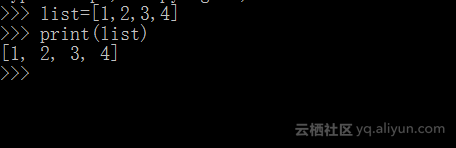
先来介绍一下相关的python基础:list:list是python中最基础的数据结构相对于其他语言中的数组:例子: >>>list=[1,2,3,4] >>>print (list) 结果:python是一种解释性语言,会在对其计算的同时检查其中的变量类型,我们在声明这些变量时无需对其进行初始化和类型声明,但在这里list中的包含一些整数对象,不能直接关联到print上,后者只能接受String类型的对象,所以要将列表元素转换为String类型。例子: >>>print('First element:'+str(list[0])) >>>print('Last element:'+str(list[-1])) >>>print('First three element:'+str(list[0:2])) >>>print(‘Last three element:’+str(list[-3:0])) 结果: First element:1 Last element:4 First element:1,2,3 Last element:2,3,4 常见的对字符串操作的函数:split():一个能基于默写分隔符来对于字符串进行切割的方法。如果你没有为其提供具体参数则默认空格为其分隔符。 >>>mystring="Monty Python! And the holy Grail !\n" >>>print (mystring.split()) 结果: ['Monty', 'Python!', 'And', 'the', 'holy', 'Grail', '!'] strip():一个可以从字符串中删除其尾随空白符(如‘n’,'nr')的方法例子: >>> print(mystring.strip()) Monty Python! And the holy Grail ! 通过rstrip()和lstrip()可以选择剥离字符串左边还是右边尾部的空白符upper()/lower():可以用来改变字符串中字母的大小写例子 >>> print(mystring.upper()) MONTY PYTHON! AND THE HOLY GRAIL ! replace()可以替换目标字符串中的某个子串例子: >>> print(mystring.replace('!',',')) Monty Python, And the holy Grail , 在NLP中正则表达式是另一个非常重要的技能。正则表达式(regular expression)能对字符串进行有效地匹配的模式,能从大量凌乱的文本数据中提取出有意义的信息。正则表达式一般有:(句号):用于匹配除换行字符外的任意单字符。w:用于匹配某一字符或者数字,相当于[a-z A-Z 0-9]W:用于匹配任意非单词性字符s:用于匹配任意单个空白字符,包括换行,返回制表等,相当于[nrt]S:用于匹配单个任意非空白字符。’t:用于匹配制表符。n:用于匹配换行符。r:用于匹配返回符。d:用于匹配十进制数字。^:用于匹配相关字符的开始位置。$:用于匹配先关字符串结尾位置。:用于低效特殊字符的特殊性。如要匹配$符号,则在前面加上.下面是一个使用字符串的子串搜索模块re来查找字符对象的例子。 import re mystring="Monty Python! And the holy Grail !\n" if re.search('Python' ,mystring): print("we found Python") else: print("No") 结果: We found Python findall()是一个用于对字符串进行全部模式查找的函数。他会按照给定模式对字符串进行查找,并列出其中所有匹配的对象: import re mystring="Monty Python! And the holy Grail !\n" print(re.findall("!",mystring)) 结果: ['!', '!'] findall()返回两个对象的列表。

优秀的个人博客,低调大师

jQuery学习(第一天)

js的回顾 遇到的问题 1.window.onload只能使用一个(事件覆盖问题) 2.代码的容错性不强 3.浏览器兼容性问题 4.代码量较多,书写很繁琐 5.代码很乱到处都是 6.动画效果我们很难实现 jQuery的基本使用 image.png min:它是压缩过的版本 区别:我们开发过程中,会用未压缩的版本,或者压缩的。 项目上线的时候,我们要用压缩过的版本。 版本问题: 1.1.xxx 版本 jQuery-1.11.1.js 2.2.xxx 版本 不再支持IE6、7、8 引包 1.要把我们的jQuery源文件拿到我们的项目里面来 2.在我们的页面中引用jQuery文件 image.png 问题: image.png 如果遇到这种问题,那肯定是没有引用我们的jQuery源文件。 用jQuery之前,先引入jQuery,然后,再去写我们的jQuery代码。 入口函数的书写方式(两种) $(document).ready(function(){ }); $(function(){ }); 2018-01-08 17-16-29 的屏幕截图.png 事件处理程序 事件源 js:document.getElementById("id"); jq:$("#id") 2.事件 js:document.getElementById("id").onclick = function(){//语句} jq:$("#id").click(function(){//语句}) 区别: jQuery事件不带on 简单的练习 使显示的div框隐藏起来 //引包 <script src="js/jquery.js"></script> //给定格式 <style type="text/css"> * { margin: 0; padding: 0; } div { height: 200px; background: #000000; margin-bottom: 10px; /*display: none;*/ } </style> //具体函数代码 <script> //入口函数 $(document).ready(function () { //语句 $("#click").click(function () { $("div").hide(); }); }); </script> . . . //页面主体(body) <input type="button" value="我是按钮" id="click" /> <div></div> JQuery详细介绍 $的问题 js命名规则: a)Js命名归法:下划线、字母、$、数字 b)但是不能以数字作为开头var $ = “我是$符号”; jQUery的两个变量:$ 和 jQuery jQuery占用了我们两个变量:$ 和 jQuery js入口函数与jQuery入口函数的区别 1.Js的window.onload事件是等到所有内容,以及我们的外部图片之类的文件加载完了之后,才回去执行 2.jQuery的入口函数 是在 html所有标签都加载之后,就回去执行。 js创建对象 三种方式 var obj = {} var obj1 = new Object(); var obj2 = Object.create(); 1跟2的区别: 推荐使用第一个方式 第二种方式存在效率问题,因为要new对象,会涉及到原型查找的问题。 jquery选择器 回顾css选择器 image.png image.png jquery选择器 image.png image.png 规律:$(selector).css(“background”,”red”); Console.log();在控制台(网页)打印 具体实现 image.png image.png image.png 设置多个样式为$("#...").css({...}); 根据自己的意愿设置的时候 函数内的参数为形参(可自定义) 设置某一个时需要进行相应的判断 jQuery是什么 jQuery就是javascript的一个库,把我们常用的一些功能进行了封装,方便我们来调用,提高我们的开发效率。 ####### Javascipt跟jQuery的区别 Javascript是一门编程语言,我们用它来编写客户端浏览器脚本。 jQuery是javascript的一个库,包含多个可重用的函数,用来辅助我们简化javascript开发 image.png 故:jQuery能做的javascipt都能做到,而javascript能做的事情,jQuery不一定能做到。 jQuery其他选择器 层级选择器 image.png * 层级选择器选择了选择符 后面那个元素,比如,div > p,是选择>后面的p元素。 过滤选择器 基本选择器 image.png image.png 属性选择器 image.png image.png mouseover/mouseout事件跟mouseenter/mouseleave事件的区别 mouseover/mouseout事件,鼠标经过的时候会触发多次,每遇到一个子元素就会触发一次。mouseenter/mouseleave事件,鼠标经过的时候只会触发一次 推荐使用mouseenter/mouseleave dom对象与jQuery对象之间的相互转换 jQuery对象转换成DOM对象: 方式一:$(“#btn”)[0] 方式二:$(“#btn”).get(0) DOM对象转换成jQuery对象: $(document) -> 把DOM对象转成了jQuery对象var btn = document.getElementById(“bt n”);btn -> $(btn); 鼠标事件的几种方法 <script> $(document).ready(function () { //第一种 // mouseenter事件 是 鼠标经过时触发的事件 /*$(".wrap li").mouseenter(function () { $(this).children("ul").show(); }); $(".wrap li").mouseleave(function () { $(this).children("ul").hide(); });*/ //第二种 hover 传两个参数 /*$(".wrap li").hover(function () { //alert("1"); $(this).children("ul").show(); }, function () { $(this).children("ul").hide(); });*/ //第三种 hover 传一个参数 进行必要的判断 /*$(".wrap li").hover(function () { /!*alert("1");*!/ var $this = $(this).children("ul"); var isShow = $this.css("display"); if(isShow === "block") { $this.hide(); } else { $this.show(); } });*/ //第四种 hover 传一个参数 (给一个‘slideToggle’ 切换 的效果) $(".wrap li").hover(function () { $(this).children("ul").slideToggle(); }); }); </script> 实例 image.png image.png

资源下载

更多资源
Mario

Mario

马里奥是站在游戏界顶峰的超人气多面角色。马里奥靠吃蘑菇成长,特征是大鼻子、头戴帽子、身穿背带裤,还留着胡子。与他的双胞胎兄弟路易基一起,长年担任任天堂的招牌角色。

Spring

Spring

Spring框架(Spring Framework)是由Rod Johnson于2002年提出的开源Java企业级应用框架,旨在通过使用JavaBean替代传统EJB实现方式降低企业级编程开发的复杂性。该框架基于简单性、可测试性和松耦合性设计理念,提供核心容器、应用上下文、数据访问集成等模块,支持整合Hibernate、Struts等第三方框架,其适用范围不仅限于服务器端开发,绝大多数Java应用均可从中受益。

Rocky Linux

Rocky Linux

Rocky Linux(中文名:洛基)是由Gregory Kurtzer于2020年12月发起的企业级Linux发行版,作为CentOS稳定版停止维护后与RHEL(Red Hat Enterprise Linux)完全兼容的开源替代方案,由社区拥有并管理,支持x86_64、aarch64等架构。其通过重新编译RHEL源代码提供长期稳定性,采用模块化包装和SELinux安全架构,默认包含GNOME桌面环境及XFS文件系统,支持十年生命周期更新。

WebStorm

WebStorm

WebStorm 是jetbrains公司旗下一款JavaScript 开发工具。目前已经被广大中国JS开发者誉为“Web前端开发神器”、“最强大的HTML5编辑器”、“最智能的JavaScript IDE”等。与IntelliJ IDEA同源,继承了IntelliJ IDEA强大的JS部分的功能。

用户登录
用户注册