网站前端_EasyUI.基础入门.0005.使用EasyUI Accordion组件的最佳姿势?
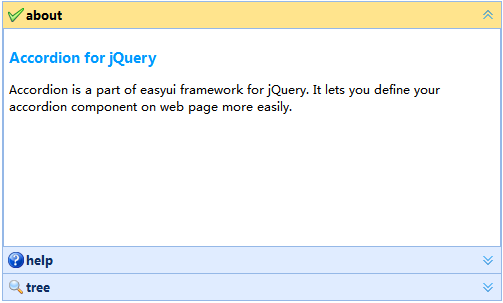
1. 基础的手风琴 <divid="a"class="easyui-accordion"data-options="width:500,height:300"> <divdata-options="iconCls:'icon-ok',title:'about',bodyCls:'accordion_padding'"> <h3style="color:#0099FF;">AccordionforjQuery</h3> <p>AccordionisapartofeasyuiframeworkforjQuery.Itletsyoudefineyouraccordioncomponentonwebpagemoreeasily.</p> </div> <divdata-options="iconCls:'icon-help',title:'help',bodyCls:'accordion_padding'"> <p>Theaccordionallowsyoutoprovidemultiplepanelsanddisplayoneormoreatatime.Eachpanelhasbuilt-insupportforexpandingandcollapsing.Clickingonapanelheadertoexpandorcollapsethatpanelbody.Thepanelcontentcanbeloadedviaajaxbyspecifyinga'href'property.Userscandefineapaneltobeselected.Ifitisnotspecified,thenthefirstpanelistakenbydefault.</p> </div> <divdata-options="iconCls:'icon-search',title:'tree',bodyCls:'accordion_padding'"> <ulclass="easyui-tree"> <li> <span>第一层</span> <ul> <li>第1层</li> <li>第2层</li> <li>第3层</li> </ul> </li> <li>第二层</li> <li>第三层</li> </ul> </div> </div> 2. 流式的手风琴 <divstyle="width:500px;height:300px;"> <divid="a"class="easyui-accordion"data-options="fit:true"> <divdata-options="iconCls:'icon-ok',title:'About',bodyCls:'accordion_padding'"> <p>width:100%</p> </div> <divdata-options="iconCls:'icon-help',title:'help',bodyCls:'accordion_padding',href:'_contents.html'"></div> </div> </div> 3. 异步加载数据 <divstyle="width:500px;height:300px;"> <divid="a"class="easyui-accordion"data-options="fit:true"> <divdata-options="iconCls:'icon-help',title:'help',bodyCls:'accordion_padding',href:'_contents.html',cache:false"></div> </div> </div> 4. 手风琴的控制 <div> <ahref="javascript:void(0);"class="easyui-linkbutton"onclick="javascript:select();">选中</a> <ahref="javascript:void(0);"class="easyui-linkbutton"onclick="javascript:add();">添加</a> <ahref="javascript:void(0);"class="easyui-linkbutton"onclick="javascript:remove();">删除</a> </div> <hr> <divid="a"class="easyui-accordion"data-options="width:500,height:300"> <divdata-options="iconCls:'icon-ok',title:'about',bodyCls:'accordion_padding'">about</div> <divdata-options="iconCls:'icon-help',title:'help',bodyCls:'accordion_padding'">help</div> </div> <!--说明:加载jquery-easyui脚本文件--> <scriptsrc="js/jquery-easyui/jquery.min.js"></script> <scriptsrc="js/jquery-easyui/jquery.easyui.min.js"></script> <scriptsrc="js/jquery-easyui/locale/easyui-lang-zh_CN.js"></script> <scripttype="text/javascript"> functionselect(){ $.messager.prompt('信息','请输入你要选中的面板标题或面板索引?',function(data){ varn=parseInt(data); console.log(data,typeof(data)); if(!isNaN(n)){ $('#a').accordion('select',n); }else{ $('#a').accordion('select',data); }; }); }; functionadd(){ varoptions={ iconCls:'icon-reload', title:'reload', content:'reload', bodyCls:'accordion_padding', }; $('#a').accordion('add',options); }; functionremove(){ varselectedItem=$('#a').accordion('getSelected'); varselectedIndex=$('#a').accordion('getPanelIndex',selectedItem); $('#a').accordion('remove',selectedIndex); }; </script> 5. 手风琴工具组 <divid="a"class="easyui-accordion"data-options="width:500,height:200"> <divdata-options="iconCls:'icon-ok',title:'datagrid',tools:[{ iconCls:'icon-reload', handler:function(){ $('#tb').datagrid('reload'); } }]"> <tableid="tb"class="easyui-datagrid"data-options="url:'/easyui/data.json',method:'get',fit:true,fitcolumns:true,singleSelect:true"> <thead> <tr> <thdata-options="field:'name',width:'20%'">姓名</th> <thdata-options="field:'age',width:'60%'">年龄</th> <thdata-options="field:'sex',width:'20%',align:'right'">性别</th> </tr> </thead> </table> </div> </div> 6. 打开的手风琴 <divid="a"class="easyui-accordion"data-options="width:500,height:200"> <divstyle="padding:5px;"data-options="iconCls:'icon-search',title:'搜索',collapsed:false,collapsible:false"> <inputclass="easyui-searchbox"data-options="fit:true,prompt:'searchsomething'"type="search"> </div> <divstyle="padding:5px;"data-options="iconCls:'icon-about',title:'about',selected:true"> <h3style="color:#0099FF;">AccordionforjQuery</h3> <p>AccordionisapartofeasyuiframeworkforjQuery.Itletsyoudefineyouraccordioncomponentonwebpagemoreeasily.</p> </div> </div> 7. 开多个手风琴 <divid="a"class="easyui-accordion"data-options="width:500,multiple:true"> <divdata-options="iconCls:'icon-ok',title:'PYTHON',bodyCls:'accordion_padding'">PYTHON</div> <divdata-options="iconCls:'icon-ok',title:'HTML',bodyCls:'accordion_padding'">HTML</div> </div> 注意: 配合容器multiple属性可支持同时展开多个,但是此模式下千万别设置容器的高度,不然由于上一个面板已经展开,下一个面板由于空间被占且高度被限制会导致显示不出来.