Kafka 消息队列 Java版
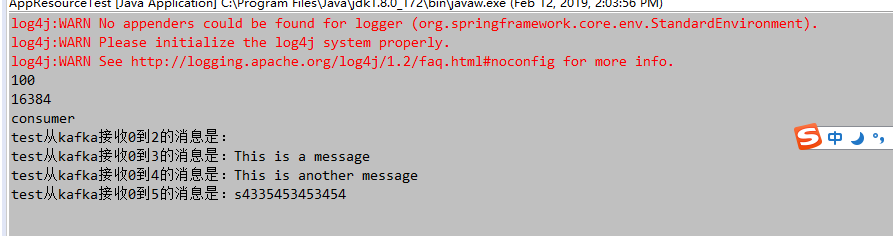
消费者 apache kafka工具类,消费者Consumer类 public class Consumer { private ConsumerHandler handler; private ConsumerConfig config; private KafkaConsumer<String, String> consumer; private boolean startFlag = false; /** * 创建消费者 * * @param handler * 消费者处理类 * @param config * 消费者处理配置 */ public Consumer(ConsumerHandler handler, ConsumerConfig config) { this.handler = handler; this.config = config; init(); } /** * 初始化接收器 */ private void init() { Properties props = new Properties(); props.put("bootstrap.servers", config.getBootstrapServers());// 服务器ip:端口号,集群用逗号分隔 props.put("group.id", config.getGroupID()); /* 是否自动确认offset */ props.put("enable.auto.commit", "true"); /* 自动确认offset的时间间隔 */ props.put("auto.commit.interval.ms", config.getAutoCommitInterVal()); props.put("session.timeout.ms", config.getSessionTimeOut()); /* key的序列化类 */ props.put("key.deserializer", "org.apache.kafka.common.serialization.StringDeserializer"); /* value的序列化类 */ props.put("value.deserializer", "org.apache.kafka.common.serialization.StringDeserializer"); consumer = new KafkaConsumer<>(props); if (config.isProcessBeforeData()) { /* 消费者订阅的topic, 可同时订阅多个 */ consumer.subscribe(config.getTopicList(), new ConsumerRebalanceListener() { @Override public void onPartitionsRevoked(Collection<TopicPartition> partitions) { } @Override public void onPartitionsAssigned(Collection<TopicPartition> partitions) { for (TopicPartition partition : partitions) { long offset = handler.getSeek(partition.topic(), partition.partition()); if (offset >= 0) { if (consumer != null) { consumer.seek(partition, offset + 1); } } else { consumer.seekToBeginning(partitions); } } } }); start(); } else { consumer.subscribe(config.getTopicList()); } } public void start() { startFlag = true; while (startFlag) { /* 读取数据,读取超时时间为XXms */ ConsumerRecords<String, String> records = consumer.poll(config.getPollTime()); if (records.count() > 0) { long offset = 0; int partition = 0; for (ConsumerRecord<String, String> record : records) { if (record != null) { offset = record.offset(); partition = record.partition(); try { handler.processObject(record.topic(), record.partition(), record.offset(), record.value()); } catch (Exception e) { e.printStackTrace(); } } } } try { Thread.currentThread(); Thread.sleep(1000); } catch (Exception e) { e.printStackTrace(); } } consumer.close(); } public void stop() { startFlag = false; } } 消费者配置ConsumerConfig类 public class ConsumerConfig { private String bootstrapServers; private String groupID; private int autoCommitInterVal =1000; private int sessionTimeOut = 30000; private List<String> topicList; private boolean processBeforeData; private long pollTime = 100; public ConsumerConfig() { super(); } /** * 创建消费者配置 * @param bootstrapServers 服务器配合 格式为服务器ip:端口号,集群用逗号分隔 例如 192.168.1.1:9092,192.168.1.2:9092 * @param groupID groupID * @param autoCommitInterVal 自动提交时间单位毫秒, 默认1000 * @param sessionTimeOut 超时时间单位毫秒 , 默认30000 * @param topicList topicList列表 * @param processBeforeData 是否处理启动之前的数据,该开关需要配置consumerHandler的跨步存储使用 * @param pollTime 每次获取数据等待时间单位毫秒,默认100毫秒 */ public ConsumerConfig(String bootstrapServers, String groupID, int autoCommitInterVal, int sessionTimeOut ,List<String> topicList,boolean processBeforeData,long pollTime) { this.bootstrapServers = bootstrapServers; this.groupID = groupID; this.autoCommitInterVal = autoCommitInterVal; this.sessionTimeOut = sessionTimeOut; this.topicList = topicList; this.processBeforeData = processBeforeData; this.pollTime = pollTime; } public String getBootstrapServers() { return bootstrapServers; } public void setBootstrapServers(String bootstrapServers) { this.bootstrapServers = bootstrapServers; } public String getGroupID() { return groupID; } public void setGroupID(String groupID) { this.groupID = groupID; } public int getAutoCommitInterVal() { return autoCommitInterVal; } public void setAutoCommitInterVal(int autoCommitInterVal) { this.autoCommitInterVal = autoCommitInterVal; } public int getSessionTimeOut() { return sessionTimeOut; } public void setSessionTimeOut(int sessionTimeOut) { this.sessionTimeOut = sessionTimeOut; } public List<String> getTopicList() { return topicList; } public void setTopicList(List<String> topicList) { this.topicList = topicList; } public boolean isProcessBeforeData() { return processBeforeData; } public void setProcessBeforeData(boolean processBeforeData) { this.processBeforeData = processBeforeData; } public long getPollTime() { return pollTime; } public void setPollTime(long pollTime) { this.pollTime = pollTime; } } 消费者处理ConsumerHandler类 public interface ConsumerHandler { /** * 处理收到的消息 * @param topic 收到消息的topic名称 * @param partition 收到消息的partition内容 * @param offset 收到消息在队列中的编号 * @param value 收到的消息 */ void processObject(String topic,int partition,long offset,String value); /** * 获取跨步 * @param topic 接受消息的topic * @param partition 接受消息的partition * @return 当前topic,partition下的seek */ long getSeek(String topic , int partition); } 生产者 kafka生产者,工具Producer类 public class Producer { private ProducerConfig config ; private org.apache.kafka.clients.producer.Producer<String,String> producer; public Producer(ProducerConfig config){ this.config = config; init(); } private void init(){ Properties props = new Properties(); props.put("bootstrap.servers",config.getBootstrapServers()); props.put("acks", "all"); props.put("retries", config.getRetries()); props.put("batch.size", config.getBatchSize()); props.put("linger.ms", config.getLingerMs()); props.put("buffer.memory", config.getBufferMemory()); props.put("key.serializer", "org.apache.kafka.common.serialization.StringSerializer"); props.put("value.serializer", "org.apache.kafka.common.serialization.StringSerializer"); producer = new KafkaProducer<>(props); } /** * 发送消息 * @param topic 要发送的topic * @param msg */ public void sendMessage(String topic,String msg){ try { producer.send(new ProducerRecord<String, String>(config.getTopic(), String.valueOf(new Date().getTime()), msg)).get(); } catch (InterruptedException e) { // TODO 自动生成的 catch 块 e.printStackTrace(); } catch (ExecutionException e) { // TODO 自动生成的 catch 块 e.printStackTrace(); } producer.flush(); } public void close(){ producer.close(); } } kafka生产者配置ProducerConfig类 public class ProducerConfig { private String bootstrapServers; private String topic; private int retries = 0; private int batchSize = 16384; private int lingerMs=1; private int bufferMemory=33554432; public ProducerConfig() { super(); } /** * 创建生产者配置文件 * @param bootstrapServers 服务器配合 格式为服务器ip:端口号,集群用逗号分隔 例如 192.168.1.1:9092,192.168.1.2:9092 * @param retries * @param batchSize * @param lingerMs * @param bufferMemory */ public ProducerConfig(String bootstrapServers,int retries, int batchSize, int lingerMs, int bufferMemory) { this.bootstrapServers = bootstrapServers; this.retries = retries; this.batchSize = batchSize; this.lingerMs = lingerMs; this.bufferMemory = bufferMemory; } public String getBootstrapServers() { return bootstrapServers; } public void setBootstrapServers(String bootstrapServers) { this.bootstrapServers = bootstrapServers; } public String getTopic() { return topic; } public void setTopic(String topic) { this.topic = topic; } public int getRetries() { return retries; } public void setRetries(int retries) { this.retries = retries; } public int getBatchSize() { return batchSize; } public void setBatchSize(int batchSize) { this.batchSize = batchSize; } public int getLingerMs() { return lingerMs; } public void setLingerMs(int lingerMs) { this.lingerMs = lingerMs; } public int getBufferMemory() { return bufferMemory; } public void setBufferMemory(int bufferMemory) { this.bufferMemory = bufferMemory; } } 测试 消费者处理实现ConsumerHandlerImpl类 public class ConsumerHandlerImpl implements ConsumerHandler{ /** * 处理收到的消息 * @param topic 收到消息的topic名称 * @param partition 收到消息的partition内容 * @param offset 收到消息在队列中的编号 * @param value 收到的消息 */ public void processObject(String topic,int partition,long offset,String value) { System.out.println(topic+"从kafka接收"+partition+"到"+offset+"的消息是:"+value); } /** * 获取跨步 * @param topic 接受消息的topic * @param partition 接受消息的partition * @return 当前topic,partition下的seek */ public long getSeek(String topic , int partition) { return 1; } } main方法类 public class AppResourceTest{ public static void main(String[] args){ BeanDefinitionRegistry reg=new DefaultListableBeanFactory(); PropertiesBeanDefinitionReader reader=new PropertiesBeanDefinitionReader(reg); reader.loadBeanDefinitions(new ClassPathResource("resources/kafka-consumer.properties")); reader.loadBeanDefinitions(new ClassPathResource("resources/kafka-producer.properties")); BeanFactory factory=(BeanFactory)reg; ConsumerConfig consumerConfig=(ConsumerConfig)factory.getBean("consumerConfig"); System.out.println(consumerConfig.getPollTime()); ProducerConfig producerConfig=(ProducerConfig)factory.getBean("producerConfig"); System.out.println(producerConfig.getBatchSize()); Producer producer = new Producer(producerConfig); producer.sendMessage(producerConfig.getTopic(),"s4335453453454"); producer.close(); System.out.println("consumer"); Consumer consumer = new Consumer(new ConsumerHandlerImpl(),consumerConfig); try{ Thread.currentThread(); Thread.sleep(10000); }catch(Exception e){ e.printStackTrace(); } } } 运行结果