SpringBoot中oauth2.0学习之服务端配置快速上手
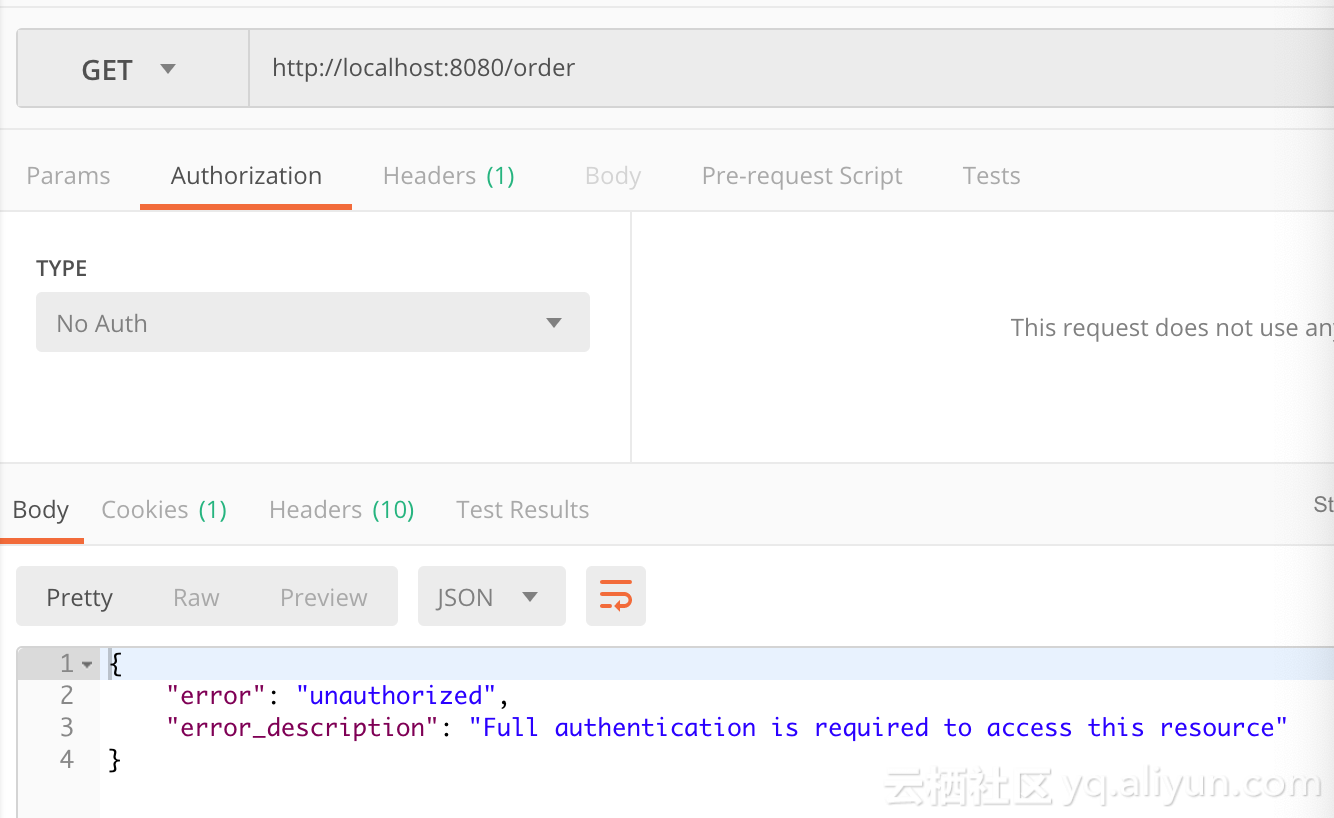
现在第三方登录的例子数见不鲜。其实在这种示例当中,oauth2.0是使用比较多的一种授权登录的标准。oauth2.0也是从oauth1.0升级过来的。那么关于oauth2.0相关的概念及其原理,大家可以参考这篇文章,这篇文章中会有更详细的解释,下来我们直接进入正题。 1.1、gradle依赖 compile('org.springframework.cloud:spring-cloud-starter-oauth2') compile('org.springframework.cloud:spring-cloud-starter-security') 在这里我直接引入的是spring-cloud的依赖项,这种依赖的jar包更全面一些,这里面的核心基础还是spring-security。这里SpringBoot的版本为2.0.6.REALEASE 1.2、@EnableAuthorizationServer 在这里我着重强调一下这个注解:@EnableAuthorizationServer,这个注解源代码如下: @Target(ElementType.TYPE) @Retention(RetentionPolicy.RUNTIME) @Documented @Import({AuthorizationServerEndpointsConfiguration.class, AuthorizationServerSecurityConfiguration.class}) public @interface EnableAuthorizationServer { } 这个注解主要是导入两个配置类,分别是: AuthorizationServerEndpointsConfiguration,这个配置类主要配置授权端点,获取token的端点。大家就把对应的端点想象成controller即可,在这个controller下开放了若干个@RequestMapping,比如常见的有:/oauth/authorize(授权路径),/oauth/token(获取token)等 AuthorizationServerSecurityConfiguration,主要是做spring-security的安全配置,我们可以看一下相关代码: public class AuthorizationServerSecurityConfiguration extends WebSecurityConfigurerAdapter { @Autowired private List<AuthorizationServerConfigurer> configurers = Collections.emptyList(); @Autowired private ClientDetailsService clientDetailsService; @Autowired private AuthorizationServerEndpointsConfiguration endpoints; @Autowired public void configure(ClientDetailsServiceConfigurer clientDetails) throws Exception { for (AuthorizationServerConfigurer configurer : configurers) { configurer.configure(clientDetails); } } @Override protected void configure(AuthenticationManagerBuilder auth) throws Exception { // Over-riding to make sure this.disableLocalConfigureAuthenticationBldr = false // This will ensure that when this configurer builds the AuthenticationManager it will not attempt // to find another 'Global' AuthenticationManager in the ApplicationContext (if available), // and set that as the parent of this 'Local' AuthenticationManager. // This AuthenticationManager should only be wired up with an AuthenticationProvider // composed of the ClientDetailsService (wired in this configuration) for authenticating 'clients' only. } @Override protected void configure(HttpSecurity http) throws Exception { //....省略部分代码 String tokenEndpointPath = handlerMapping.getServletPath("/oauth/token"); String tokenKeyPath = handlerMapping.getServletPath("/oauth/token_key"); String checkTokenPath = handlerMapping.getServletPath("/oauth/check_token"); if (!endpoints.getEndpointsConfigurer().isUserDetailsServiceOverride()) { UserDetailsService userDetailsService = http.getSharedObject(UserDetailsService.class); endpoints.getEndpointsConfigurer().userDetailsService(userDetailsService); } // @formatter:off //上述节点的请求需要授权验证 http .authorizeRequests() .antMatchers(tokenEndpointPath).fullyAuthenticated() .antMatchers(tokenKeyPath).access(configurer.getTokenKeyAccess()) .antMatchers(checkTokenPath).access(configurer.getCheckTokenAccess()) .and() .requestMatchers() .antMatchers(tokenEndpointPath, tokenKeyPath, checkTokenPath) .and() .sessionManagement().sessionCreationPolicy(SessionCreationPolicy.NEVER); // @formatter:on http.setSharedObject(ClientDetailsService.class, clientDetailsService); } protected void configure(AuthorizationServerSecurityConfigurer oauthServer) throws Exception { for (AuthorizationServerConfigurer configurer : configurers) { configurer.configure(oauthServer); } } } 1.2.1、AuthorizationServerConfigurer 这个接口是认证授权配置的核心接口,不过既然是SpringBoot我们就先来看看它怎么帮我们装配的,我们可以在org.springframework.boot.autoconfigure.security.oauth2.authserver这个包下面找到对应配置的Bean: @Configuration @ConditionalOnClass(EnableAuthorizationServer.class) @ConditionalOnMissingBean(AuthorizationServerConfigurer.class) @ConditionalOnBean(AuthorizationServerEndpointsConfiguration.class) @EnableConfigurationProperties(AuthorizationServerProperties.class) public class OAuth2AuthorizationServerConfiguration extends AuthorizationServerConfigurerAdapter { //.... @Override public void configure(ClientDetailsServiceConfigurer clients) throws Exception { //默认基于内存创建ClientDetails ClientDetailsServiceBuilder<InMemoryClientDetailsServiceBuilder>.ClientBuilder builder = clients .inMemory().withClient(this.details.getClientId()); builder.secret(this.details.getClientSecret()) .resourceIds(this.details.getResourceIds().toArray(new String[0])) .authorizedGrantTypes( this.details.getAuthorizedGrantTypes().toArray(new String[0])) .authorities( AuthorityUtils.authorityListToSet(this.details.getAuthorities()) .toArray(new String[0])) .scopes(this.details.getScope().toArray(new String[0])); if (this.details.getAutoApproveScopes() != null) { builder.autoApprove( this.details.getAutoApproveScopes().toArray(new String[0])); } if (this.details.getAccessTokenValiditySeconds() != null) { builder.accessTokenValiditySeconds( this.details.getAccessTokenValiditySeconds()); } if (this.details.getRefreshTokenValiditySeconds() != null) { builder.refreshTokenValiditySeconds( this.details.getRefreshTokenValiditySeconds()); } if (this.details.getRegisteredRedirectUri() != null) { builder.redirectUris( this.details.getRegisteredRedirectUri().toArray(new String[0])); } } @Override public void configure(AuthorizationServerEndpointsConfigurer endpoints) throws Exception { if (this.tokenConverter != null) { endpoints.accessTokenConverter(this.tokenConverter); } if (this.tokenStore != null) { endpoints.tokenStore(this.tokenStore); } if (this.details.getAuthorizedGrantTypes().contains("password")) { endpoints.authenticationManager(this.authenticationManager); } } @Override public void configure(AuthorizationServerSecurityConfigurer security) throws Exception { security.passwordEncoder(NoOpPasswordEncoder.getInstance()); if (this.properties.getCheckTokenAccess() != null) { security.checkTokenAccess(this.properties.getCheckTokenAccess()); } if (this.properties.getTokenKeyAccess() != null) { security.tokenKeyAccess(this.properties.getTokenKeyAccess()); } if (this.properties.getRealm() != null) { security.realm(this.properties.getRealm()); } } @Configuration @ConditionalOnMissingBean(BaseClientDetails.class) protected static class BaseClientDetailsConfiguration { private final OAuth2ClientProperties client; protected BaseClientDetailsConfiguration(OAuth2ClientProperties client) { this.client = client; } /** 由此可知它会寻找security.oauth2.client的配置 */ @Bean @ConfigurationProperties(prefix = "security.oauth2.client") public BaseClientDetails oauth2ClientDetails() { BaseClientDetails details = new BaseClientDetails(); if (this.client.getClientId() == null) { this.client.setClientId(UUID.randomUUID().toString()); } details.setClientId(this.client.getClientId()); details.setClientSecret(this.client.getClientSecret()); details.setAuthorizedGrantTypes(Arrays.asList("authorization_code", "password", "client_credentials", "implicit", "refresh_token")); details.setAuthorities( AuthorityUtils.commaSeparatedStringToAuthorityList("ROLE_USER")); details.setRegisteredRedirectUri(Collections.<String>emptySet()); return details; } } } 如果没有用spring-boot的用户,可以也可以参考上述的配置方法,自行配置 1.3、application.yml的配置 根据上述代码我们可以知道,springboot通过外部化配置的security.oauth2.client的前缀来配置客户端。那么因此我们不妨在外部化配置文件里做如下配置: server: port: 8080 security: oauth2: client: client-id: root client-secret: root scope: - email - username - face spring: security: user: name: root password: root roles: ADMIN 这里先做最基本的配置,配置client-id,client-secret,scope。特别注意oauth2.0一定要先经过springsecurity的auth认证,因此需要在这里配置一个内存用户名与密码为root与root 1.4、配置资源服务器 通过资源服务器来保护我们指定的资源,必须在获取授权认证的时候才能访问。在SpringBoot当中,我们可以通过@EnableResourceServer注解来开启此功能。该注解定义如下: @Target(ElementType.TYPE) @Retention(RetentionPolicy.RUNTIME) @Documented @Import(ResourceServerConfiguration.class) public @interface EnableResourceServer { } 我们可以看到这个注解导入了默认的资源配置信息:ResourceServerConfiguration,它的源代码如下: @Configuration public class ResourceServerConfiguration extends WebSecurityConfigurerAdapter implements Ordered { //.... @Override protected void configure(HttpSecurity http) throws Exception { ResourceServerSecurityConfigurer resources = new ResourceServerSecurityConfigurer(); ResourceServerTokenServices services = resolveTokenServices(); if (services != null) { resources.tokenServices(services); } else { if (tokenStore != null) { resources.tokenStore(tokenStore); } else if (endpoints != null) { resources.tokenStore(endpoints.getEndpointsConfigurer().getTokenStore()); } } if (eventPublisher != null) { resources.eventPublisher(eventPublisher); } //配置资源 for (ResourceServerConfigurer configurer : configurers) { configurer.configure(resources); } // @formatter:off http.authenticationProvider(new AnonymousAuthenticationProvider("default")) // N.B. exceptionHandling is duplicated in resources.configure() so that // it works .exceptionHandling() .accessDeniedHandler(resources.getAccessDeniedHandler()).and() .sessionManagement() .sessionCreationPolicy(SessionCreationPolicy.STATELESS).and() .csrf().disable(); // @formatter:on http.apply(resources); if (endpoints != null) { // Assume we are in an Authorization Server http.requestMatcher(new NotOAuthRequestMatcher(endpoints.oauth2EndpointHandlerMapping())); } for (ResourceServerConfigurer configurer : configurers) { // Delegates can add authorizeRequests() here configurer.configure(http); } //如果没有任何配置资源,则所有请求保护 if (configurers.isEmpty()) { // Add anyRequest() last as a fall back. Spring Security would // replace an existing anyRequest() matcher with this one, so to // avoid that we only add it if the user hasn't configured anything. http.authorizeRequests().anyRequest().authenticated(); } } //.... } 在这里主要是配置资源服务器的配置,我们可以得到如下几点信息: 资源配置的核心ResourceServerConfigurer,在这里如果没有任何配置,则所有请求都要进行token认证 TokenStore 主要定义了对token的增删改查操作,用于持久化token ResourceServerTokenServices 资源服务的service(服务层),这里主要还是根据token来拿到OAuth2Authentication与OAuth2AccessToken 1.5、完整示例 1.5.1、资源认证配置 @Configuration @EnableResourceServer public class ResourceConfigure extends ResourceServerConfigurerAdapter { @Override public void configure(HttpSecurity http) throws Exception { http.csrf().disable().sessionManagement().sessionCreationPolicy(SessionCreationPolicy.IF_REQUIRED) .and().authorizeRequests().antMatchers("/free/**").permitAll().and() .authorizeRequests().anyRequest().authenticated() .and().formLogin().permitAll();//必须认证过后才可以访问 } } 在这里如果以/free/**请求路径的,都允许直接访问。否则,都必须携带access_token才能访问。 1.5.2 、授权认证配置 @Configuration public class WebSecurityConfig extends WebSecurityConfigurerAdapter { @Override protected void configure(HttpSecurity http) throws Exception { http.csrf().disable().requestMatchers().anyRequest().and().authorizeRequests() .antMatchers("/oauth/*").authenticated().and().formLogin().permitAll(); } } 根据上文所述,AuthorizationServerEndpoint与TokenEndpoint会开放/oauth/authorize与/oauth/token端点,因此我们必须保证访问端点进行授权认证前,通过springsecurity的用户认证,因此在这里配置了/oauth/* 1.5.3、启动类 @SpringBootApplication @EnableAuthorizationServer @Controller public class AuthorizationServer { @GetMapping("/order") public ResponseEntity<String> order() { ResponseEntity<String> responseEntity = new ResponseEntity("order", HttpStatus.OK); return responseEntity; } @GetMapping("/free/test") public ResponseEntity<String> test() { ResponseEntity<String> responseEntity = new ResponseEntity("free", HttpStatus.OK); return responseEntity; } public static void main(String[] args) { SpringApplication.run(AuthorizationServer.class, args); } } 1.5.4、访问请求 首先我们通过postman 访问http://localhost:8080/order会得到如下界面: 此时我们明显可以看到对应的资源需要携带有效的token才可以访问,那么我们此时要在postman的Authorization进行oauth2.0配置认证。截图如下: 在这里点击Get New Access Token 来从认证服务器获取token,点击后配置如下: ` scope配置对应application.yml中的配置信息,这里面可以放置用户的属性信息,比如说昵称 头像 电话等等 State代表状态码,设置一个State标志 回调地址这里必须配置,通过这个地址当同意授权后会返回一个认证的code给我们,我们根据这个code请求token 认证地址与获取token的地址请填写,相关Endpoint生成的地址 当经过一连串认证后,我们即可拿到token: 当我们获取到最新的token以后,我们即可访问到对应的请求资源: