首页 文章 精选 留言 我的

精选列表

搜索[原生UI],共10004篇文章
优秀的个人博客,低调大师

Android UI开发第二十三篇——分享书架UI实现

android中有很多的电子书阅读应用,应用中都仿真了书架的实现,这里也分享一篇读书应用的书架实现: java: public class ShelvesView extends GridView { private Bitmap mShelfBackground; private int mShelfWidth; private int mShelfHeight; private Bitmap mWebLeft; private Bitmap mWebRight; private int mWebRightWidth; public ShelvesView(Context context) { super(context); init(context); } public ShelvesView(Context context, AttributeSet attrs) { super(context, attrs); load(context, attrs, 0); init(context); } public ShelvesView(Context context, AttributeSet attrs, int defStyle) { super(context, attrs, defStyle); load(context, attrs, defStyle); init(context); } private void load(Context context, AttributeSet attrs, int defStyle) { TypedArray a = context.obtainStyledAttributes(attrs, R.styleable.ShelvesView, defStyle, 0); final Resources resources = getResources(); final int background = a.getResourceId(R.styleable.ShelvesView_shelfBackground, 0); final Bitmap shelfBackground = BitmapFactory.decodeResource(resources, background); if (shelfBackground != null) { mShelfWidth = shelfBackground.getWidth(); mShelfHeight = shelfBackground.getHeight(); mShelfBackground = shelfBackground; } mWebLeft = BitmapFactory.decodeResource(resources, R.drawable.web_left); final Bitmap webRight = BitmapFactory.decodeResource(resources, R.drawable.web_right); mWebRightWidth = webRight.getWidth(); mWebRight = webRight; a.recycle(); } private void init(Context context) { StateListDrawable drawable = new StateListDrawable(); SpotlightDrawable start = new SpotlightDrawable(context, this); start.disableOffset(); SpotlightDrawable end = new SpotlightDrawable(context, this, R.drawable.spotlight_blue); end.disableOffset(); TransitionDrawable transition = new TransitionDrawable(start, end); drawable.addState(new int[] { android.R.attr.state_pressed }, transition); final SpotlightDrawable normal = new SpotlightDrawable(context, this); drawable.addState(new int[] { }, normal); normal.setParent(drawable); transition.setParent(drawable); setSelector(drawable); setDrawSelectorOnTop(false); } @Override protected void dispatchDraw(Canvas canvas) { final int count = getChildCount(); final int top = count > 0 ? getChildAt(0).getTop() : 0; final int shelfWidth = mShelfWidth; final int shelfHeight = mShelfHeight; final int width = getWidth(); final int height = getHeight(); final Bitmap background = mShelfBackground; for (int x = 0; x < width; x += shelfWidth) { for (int y = top; y < height; y += shelfHeight) { canvas.drawBitmap(background, x, y, null); } } if (count == 0) { canvas.drawBitmap(mWebLeft, 0.0f, top + 1, null); canvas.drawBitmap(mWebRight, width - mWebRightWidth, top + shelfHeight + 1, null); } super.dispatchDraw(canvas); } @Override public void setPressed(boolean pressed) { super.setPressed(pressed); final Drawable current = getSelector().getCurrent(); if (current instanceof TransitionDrawable) { if (pressed) { ((TransitionDrawable) current).startTransition( ViewConfiguration.getLongPressTimeout()); } else { ((TransitionDrawable) current).resetTransition(); } } } } 代码:http://download.csdn.net/detail/xyz_lmn/4698124 本文转自xyz_lmn51CTO博客,原文链接:http://blog.51cto.com/xyzlmn/1230767,如需转载请自行联系原作者

优秀的个人博客,低调大师

Java 原生网络编程.

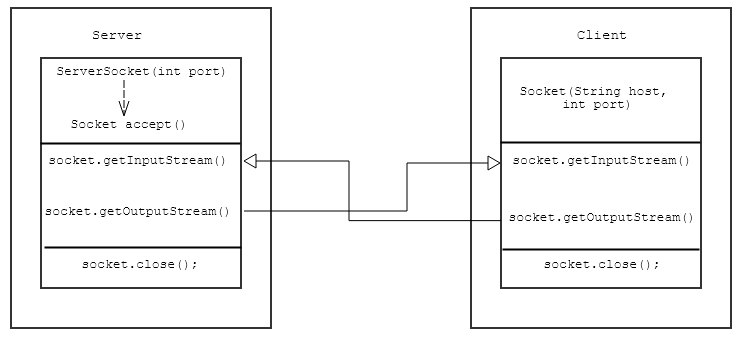
一、概念 Java 语言从其诞生开始,就和网络紧密联系在一起。在 1995 年的 Sun World 大会上,当时占浏览器市场份额绝对领先的网景公司宣布在浏览器中支持Java,从而引起一系列的公司产品对Java的支持,使得Java很快成为一种流行的语言。 Java 提供的网络功能的相关类主要有三个,它们分别是URL、Socket、Daragram。 二、URL 和URLConnection URL类代表一个统一资源定位符号,它是指向互联网资源的指针。是这三个类中层次级别最高或者说封装最多的类,通过URL可以直接发送或者读取网络上的数据。 public static void uRLTest(){ try { //URL:统一资源定位符(网址) URL url = new URL("http://www.baidu.com"); InputStream inputStream = url.openStream(); InputStreamReader inputStreamReader = new InputStreamReader(inputStream, "UTF-8"); BufferedReader bufferedReader = new BufferedReader(inputStreamReader); String line; while ((line = bufferedReader.readLine())!=null){ System.out.println(line); } } catch (UnknownHostException e) { e.printStackTrace(); } catch (MalformedURLException e) { e.printStackTrace(); } catch (IOException e) { e.printStackTrace(); } } 前面介绍的 URL 类代表的是一个网络资源的位置,而URLConnection 代表的是一个连接,此类的实例可用于读取或者写入对应URL引用的资源。 public static void uRLConnectionTest(){ try { URL url = new URL("http://restapi.amap.com/v3/config/district?key=2c95fdacd3f72bdbfec55bd7eac7b5c0"); //1、创建连接对象 URLConnection urlConnection = url.openConnection(); HttpURLConnection httpURLConnection = (HttpURLConnection) urlConnection; //2、设置参数和一般请求属性 //应用程序要将参数写入URL连接 httpURLConnection.setDoOutput(true); //应用程序要向URL连接读取数据 httpURLConnection.setDoInput(true); //不使用缓存 httpURLConnection.setUseCaches(false); //设置请求参数 httpURLConnection.setRequestProperty("Content-type","application/json"); //设置请求方法 httpURLConnection.setRequestMethod("POST"); //3、使用connect方法建立到远程对象的实际链接 httpURLConnection.connect(); //4、远程对象变为输入输出流,根据需求进一步操作 InputStream inputStream = httpURLConnection.getInputStream(); BufferedReader bufferedReader = new BufferedReader(new InputStreamReader(inputStream,"utf-8")); BufferedWriter bufferedWriter = new BufferedWriter(new FileWriter("E:\\data.json")); String line; while ((line = bufferedReader.readLine()) != null){ bufferedWriter.write(line); bufferedWriter.newLine(); bufferedWriter.flush(); } } catch (MalformedURLException e) { e.printStackTrace(); } catch (IOException e) { e.printStackTrace(); } } 三、基于TCP的Socket编程 Socket也称为套接字,应用程序通常通过套接字向网络发出请求或者应答网络的请求。.Java 语言中的 Socket 编程常用到 Socket 和 ServerSocket 这两个类。 ServerSocket 用于服务端,而 Socket 是建立网络连接时使用的,在连接成功时,应用程序两端都会产生一个 Socket 实例,操作这个实例完成所需的会话。对于一个网络连接来说,套接字是平等的,不因为在服务端或者客户端而产生不同级别,不管是Socket还是ServerSocket,它们的工作都是通过SocketImpl类及其子类完成的。 TCP 的 Socket 编程示意图: 服务端程序: public static void main(String[] args) { try { System.out.println("启动服务器......"); //创建一个新的ServerSocket,用来监听指定端口上的连接请求 ServerSocket serverSocket = new ServerSocket(8989); Socket socket = null; while (true) { try { //对accept()方法的调用将被阻塞,直到一个连接创建 //该socket用于客户端和服务器之间的通信 //流对象都派生于该套接字的流对象 socket = serverSocket.accept(); InputStream inputStream = socket.getInputStream(); BufferedReader in = new BufferedReader(new InputStreamReader(inputStream)); PrintWriter out = new PrintWriter(socket.getOutputStream(), true); String request, response; while ((request = in.readLine()) != null) { //如果客户端发送了exit,则退出循环 if ("exit".equals(request)) { break; } System.out.println("接收到客户端请求:" + request); //服务端处理方法 response ="客户端:" + socket.getInetAddress().getHostAddress() + " 请求," + processRequest(request); //响应给客户端 out.println(response); } } catch (Exception e) { System.out.println("Error"); } finally { socket.close(); } } } catch (IOException e) { e.printStackTrace(); } } 客户端程序: public static void main(String[] args) { Socket socket = null; try { socket = new Socket("192.168.1.22", 8989); //向服务器发送数据 //printWriter(字符流)/printStream(字节流) PrintWriter printWriter = new PrintWriter(socket.getOutputStream(), true); //接收服务器的反馈 InputStream inputStream = socket.getInputStream(); BufferedReader in = new BufferedReader(new InputStreamReader(inputStream)); //模拟交互 BufferedReader bf = new BufferedReader(new InputStreamReader(System.in)); String request, responese; while ((request = bf.readLine()) != null) { printWriter.println(request); responese = in.readLine(); System.out.println(responese); } } catch (IOException e) { e.printStackTrace(); } finally { try { socket.close(); } catch (IOException e) { e.printStackTrace(); } } } 四、基于UDP的Socket编程 UDP 是用户数据报协议,它提供的是无连接、不可靠信息传送服务。Java 主要提供两个类来实现基于 UDP 的 Socket 编程: DatagramSocket:此类表示用来发送和接收数据报包的套接字,数据报套接字是包投递服务的发送或接收点,每个在数据报套接字上发送或接收的包都是单独编址和路由的。在DatagramSocket上总是启用UDP广播发送。 DatagramPacket:此类表示数据报包。数据报包用来实现无连接包投递服务,每条报文仅根据该包中的信息从一台机器路由到另一台机器。 UDP 的 Socket 编程示例图: 服务端(接收端)程序: public static void main(String[] args) { DatagramSocket server = null; try { server = new DatagramSocket(8088); byte[] datas = new byte[1024]; //用一个字节数组接收UDP包,字节数组在传递给构造函数时是空的 DatagramPacket datagramPacket = new DatagramPacket(datas, datas.length); server.receive(datagramPacket); System.out.println(new String(datas)); } catch (SocketException e) { e.printStackTrace(); } catch (IOException e) { e.printStackTrace(); }finally { server.close(); } } 客户端(发送端)程序: public static void main(String[] args) { DatagramSocket client = null; try { client = new DatagramSocket(); //创建数据报 byte[] buffer = "hello,world".getBytes(); InetAddress byName = InetAddress.getByName("192.168.1.22"); //建立将要传输的UDP包,并指定ip地址和端口号 DatagramPacket datagramPacket = new DatagramPacket(buffer, buffer.length, byName, 8088); client.send(datagramPacket); } catch (SocketException e) { e.printStackTrace(); } catch (UnknownHostException e) { e.printStackTrace(); } catch (IOException e) { e.printStackTrace(); } finally { client.close(); } }

资源下载

更多资源
Mario

Mario

马里奥是站在游戏界顶峰的超人气多面角色。马里奥靠吃蘑菇成长,特征是大鼻子、头戴帽子、身穿背带裤,还留着胡子。与他的双胞胎兄弟路易基一起,长年担任任天堂的招牌角色。

Nacos

Nacos

Nacos /nɑ:kəʊs/ 是 Dynamic Naming and Configuration Service 的首字母简称,一个易于构建 AI Agent 应用的动态服务发现、配置管理和AI智能体管理平台。Nacos 致力于帮助您发现、配置和管理微服务及AI智能体应用。Nacos 提供了一组简单易用的特性集,帮助您快速实现动态服务发现、服务配置、服务元数据、流量管理。Nacos 帮助您更敏捷和容易地构建、交付和管理微服务平台。

Spring

Spring

Spring框架(Spring Framework)是由Rod Johnson于2002年提出的开源Java企业级应用框架,旨在通过使用JavaBean替代传统EJB实现方式降低企业级编程开发的复杂性。该框架基于简单性、可测试性和松耦合性设计理念,提供核心容器、应用上下文、数据访问集成等模块,支持整合Hibernate、Struts等第三方框架,其适用范围不仅限于服务器端开发,绝大多数Java应用均可从中受益。

WebStorm

WebStorm

WebStorm 是jetbrains公司旗下一款JavaScript 开发工具。目前已经被广大中国JS开发者誉为“Web前端开发神器”、“最强大的HTML5编辑器”、“最智能的JavaScript IDE”等。与IntelliJ IDEA同源,继承了IntelliJ IDEA强大的JS部分的功能。

用户登录
用户注册