首页 文章 精选 留言 我的

精选列表

搜索[python解释器],共10000篇文章
优秀的个人博客,低调大师

【机器学习工具榜单】Tensorflow最多使用,Python 取代 R 成最受欢迎编程语言

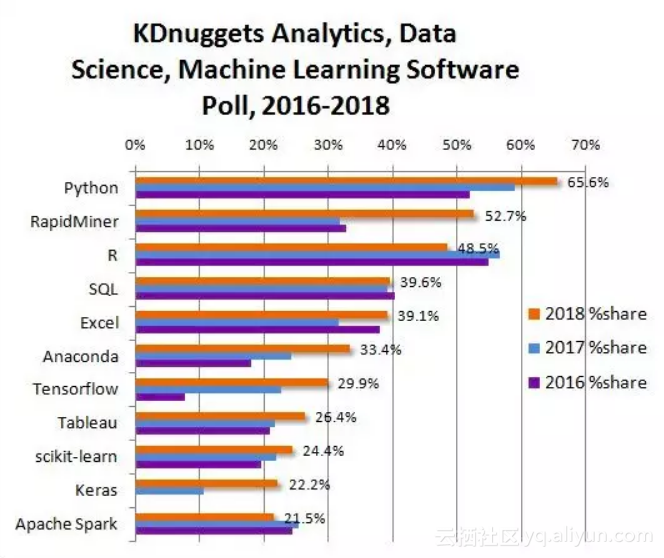
近日,KDnuggets网站公布了2018年度的数据科学和机器学习工具调查结果。2300多名参与者对自己“过去 12 个月内在项目开发中使用过的数据挖掘 / 机器学习工具和编程语言”进行了投票。 最受欢迎的分析、数据科学、机器学习工具 图1:2018年最受欢迎的分析/数据科学/机器学习工具,以及与2016~2017年调查结果的对比 下表列举了最受欢迎的前11个工具,其中每个的占比都达到20%以上。 表1:2018年最受欢迎的分析/数据科学/ 机器学习软件Top 10 上表中,2018 % share 是指使用这个工具的人占所有投票者的百分比,% change是指2018年相较2017年的投票变化。 每个受访者平均使用的工具数量为7.0个,略高于2017年的6.75个(排除了只选择1个工具的投票)。 与2017年的软件调查相比,今年新进入Top

优秀的个人博客,低调大师

Python-OpenCV学习(七)边界框、最小矩形区域和最小闭圆的轮廓:

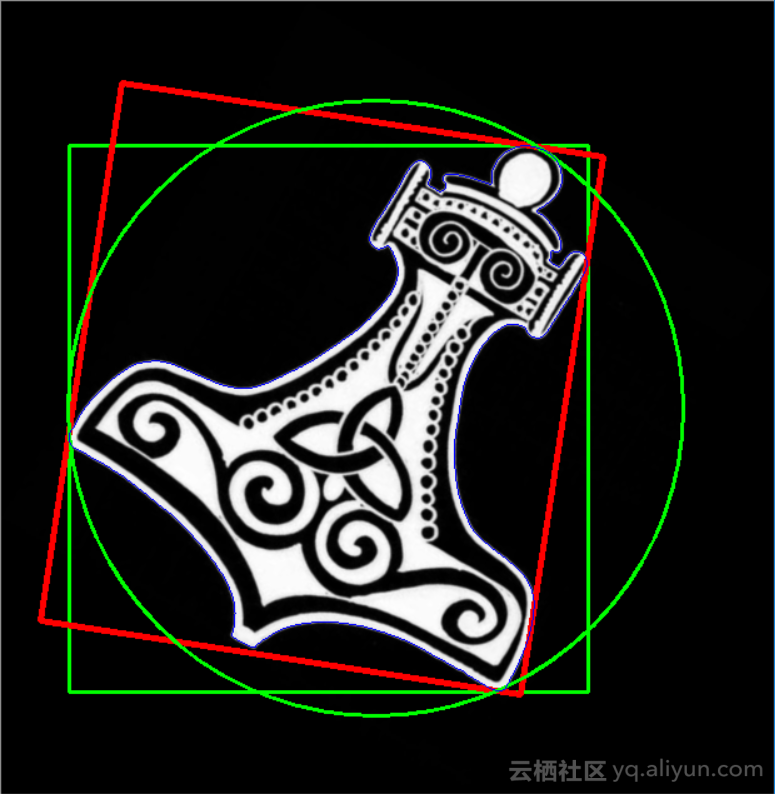
边界框、最小矩形区域和最小闭圆的轮廓:找到一个正方形轮廓很简单 找不规则的、歪斜的以及旋转的形状可用OpencV的cv2.findContours函数。 import cv2 import numpy as np img = cv2.pyrDown(cv2.imread("hammer.jpg", cv2.IMREAD_UNCHANGED)) ret, thresh = cv2.threshold(cv2.cvtColor(img.copy(), cv2.COLOR_BGR2GRAY) , 127, 255, cv2.THRESH_BINARY) image, contours, hier = cv2.findContours(thresh, cv2.RETR_EXTERNAL, cv2.CHAIN_APPROX_SIMPLE) for c in contours: # find bounding box coordinates x,y,w,h = cv2.boundingRect(c) cv2.rectangle(img, (x,y), (x+w, y+h), (0, 255, 0), 2) # find minimum area rect = cv2.minAreaRect(c) # calculate coordinates of the minimum area rectangle box = cv2.boxPoints(rect) # normalize coordinates to integers box = np.int0(box) # draw contours cv2.drawContours(img, [box], 0, (0,0, 255), 3) # calculate center and radius of minimum enclosing circle (x,y),radius = cv2.minEnclosingCircle(c) # cast to integers center = (int(x),int(y)) radius = int(radius) # draw the circle img = cv2.circle(img,center,radius,(0,255,0),2) cv2.drawContours(img, contours, -1, (255, 0, 0), 1) cv2.imshow("contours", img) cv2.waitKey() cv2.destroyAllWindows() 结果:加载图片后先进行阈值处理,由于原图为黑白图片所以阈值较为简单计算简单的边界框: x,y,w,h=cv2.boundingRect(c) 转化为框的坐标及宽度,再画出框: cv.rectangle(img,(x,y),(x+w,y+h),(0,255,0),2) 第二步计算出包围最小的矩形区域 rect = cv2.minAreaRect(c) # calculate coordinates of the minimum area rectangle box = cv2.boxPoints(rect) # normalize coordinates to integers box = np.int0(box) 注意计算所得的顶点坐标为浮点型的,像素坐标必须为整数,所以必须做一个转换,然后画出这个矩形,可以用cv2.drawContours函数来: cv2.drawContours(img,[box],0,(0,0,255),3) 该函数的第二个参数接收一个保存着轮廓的数组,从而可以在一次操作中绘制一系列轮廓。第三个参数为所要绘制的轮廓的索引,-1为绘制所有的轮廓,否则只会绘制轮廓组中指定的轮廓最后检查的边界轮廓为最小闭圆: (x,y),radius = cv2.minEnclosingCircle(c) # cast to integers center = (int(x),int(y)) radius = int(radius) cv2.minEnclosingCircle函数会返回一个二元组,第一个元素为圆心坐标组成的元组,第二个元素为圆的半径值。


优秀的个人博客,低调大师

python3.6抓取出现TypeError: cannot use a string pattern on a bytes-like ob...

import reimport requestsfrom requests.exceptions import RequestExceptionimport jsondef get_one_page(url):try: response = requests.get(url)if response.status_code == 200:return response.contentreturn None except RequestException:return Nonedef parse_page_html(html): pattern = re.compile('<dd>.*?board-index.*?>(\d+)</i>.*?data-src="(.*?)".*?name"><a'+ '.*?>(.*?)</a>.*?star">(.*?)</p>.*?releasetime">(.*?)</p>'+ '.*?integer">(.*?)</i>.*?fraction">(.*?)</i>.*?</dd>', re.S) items = re.findall(pattern, html)for item in items:yield {'index':item[0],'image':item[1],'title':item[2],'actor':item[3].strip()[3:],'time':item[4].strip()[5:],'score':item[5]+item[6] }def write_to_file(content):with open('result.txt','a',encoding='utf-8') as f: f.write(json.dumps(content,ensure_ascii=False)+'\n') f.close()def main(): url = 'http://maoyan.com/board/4?' html = get_one_page(url)for item in parse_page_html(html): write_to_file(item)if __name__ == '__main__': main() 如果没有以上红色代码,会出现TypeError: cannot use a string pattern on a bytes-like object,只需要加上html = html.decode('utf-8')即可

优秀的个人博客,低调大师

学习了《python网络爬虫实战》第一个爬虫,爬取新浪新闻

请安装anaconda,其中附带的spyder方便运行完查看变量 1.进入cmd控制台, 输入 pip install BeautifulSoup4 pip install requests 2.编写代码,代码已经很清晰了,直接运行不会报错并有成功的结果 def getNewsDetail(newsUrl): import requests from bs4 import BeautifulSoup from datetime import datetime newsWeb = requests.get(newsUrl) newsWeb.encoding = 'utf-8' soup = BeautifulSoup(newsWeb.text,'lxml') result = {} result['title'] = soup.select('.main-title')[0].text result['newsSource'] = soup.select('.source')[0].text timeSource = soup.select('.date')[0].text result['datetime'] = datetime.strptime(timeSource,'%Y年%m月%d日 %H:%M') result['article'] = soup.select('.article')[0].text result['editor'] = soup.select('.show_author')[0].text.strip('责任编辑:') result['comment'] = soup.select('.num')[0].text return result def parseListLinks(url): import requests import json newsDetails = [] request = requests.get(url) jsonLoad = json.loads(request.text.lstrip(' newsloadercallback(').rstrip(');')) newsUrls = [] for item in jsonLoad['result']['data']: newsUrls.append(item['url']) for url in newsUrls: newsDetails.append(getNewsDetail(url)) return newsDetails if __name__ == '__main__': #获取单个新闻页面的信息 newsUrl = 'http://news.sina.com.cn/s/wh/2018-01-08/doc-ifyqkarr7830426.shtml' newsDetail = getNewsDetail(newsUrl) #获取整个列表各个新闻页面的信息 rollUrl='http://api.roll.news.sina.com.cn/zt_list?channel=news&cat_1=gnxw\ &cat_2==gdxw1||=gatxw||=zs-pl||=mtjj&level==1||=2&show_ext=1&show_all=1&\ show_num=22&tag=1&format=json&page=23&callback=newsloadercallback&_=1515911333929' newsDetails = parseListLinks(rollUrl)

资源下载

更多资源
优质分享App

优质分享App

近一个月的开发和优化,本站点的第一个app全新上线。该app采用极致压缩,本体才4.36MB。系统里面做了大量数据访问、缓存优化。方便用户在手机上查看文章。后续会推出HarmonyOS的适配版本。

Mario

Mario

马里奥是站在游戏界顶峰的超人气多面角色。马里奥靠吃蘑菇成长,特征是大鼻子、头戴帽子、身穿背带裤,还留着胡子。与他的双胞胎兄弟路易基一起,长年担任任天堂的招牌角色。

Nacos

Nacos

Nacos /nɑ:kəʊs/ 是 Dynamic Naming and Configuration Service 的首字母简称,一个易于构建 AI Agent 应用的动态服务发现、配置管理和AI智能体管理平台。Nacos 致力于帮助您发现、配置和管理微服务及AI智能体应用。Nacos 提供了一组简单易用的特性集,帮助您快速实现动态服务发现、服务配置、服务元数据、流量管理。Nacos 帮助您更敏捷和容易地构建、交付和管理微服务平台。

Rocky Linux

Rocky Linux

Rocky Linux(中文名:洛基)是由Gregory Kurtzer于2020年12月发起的企业级Linux发行版,作为CentOS稳定版停止维护后与RHEL(Red Hat Enterprise Linux)完全兼容的开源替代方案,由社区拥有并管理,支持x86_64、aarch64等架构。其通过重新编译RHEL源代码提供长期稳定性,采用模块化包装和SELinux安全架构,默认包含GNOME桌面环境及XFS文件系统,支持十年生命周期更新。

用户登录
用户注册
修改密码
忘记密码