首页 文章 精选 留言 我的

精选列表

搜索[技术极客],共10000篇文章
优秀的个人博客,低调大师

springboot如何用jar包启动,同时为不同机房设置不同的配置文件 | 京东云技术团队

1、首先先把配置文件从jar中抽离 示例代码: <plugin> <groupId>org.apache.maven.plugins</groupId> <artifactId>maven-jar-plugin</artifactId> <version>3.2.0</version> <configuration> <excludes> <exclude>**/spring-xxx.xml</exclude> </excludes> </configuration> </plugin> 2、把抽离的配置文件,放到conf目录下 利用maven-assembly-plugin,抽取配置文件到conf目录下, 示例代码: <plugin> <groupId>org.apache.maven.plugins</groupId> <artifactId>maven-assembly-plugin</artifactId> <version>3.3.0</version> <configuration> <descriptors> <descriptor>src/main/assembly/assembly.xml</descriptor> </descriptors> </configuration> <executions> <execution> <id>make-assembly</id> <phase>package</phase> <goals> <goal>single</goal> </goals> </execution> </executions> </plugin>  assembly.xml内容如下: <assembly> <id>assembly</id> <formats> <format>zip</format> <format>dir</format> </formats> <includeBaseDirectory>false</includeBaseDirectory> <fileSets> <fileSet> <directory>${basedir}/src/bin</directory> <outputDirectory>bin</outputDirectory> <fileMode>0755</fileMode> </fileSet> </fileSets> <files> <file> <source>${project.build.directory}/${project.build.finalName}.jar</source> <outputDirectory>lib</outputDirectory> </file> <file> <source>${basedir}/../xxx/target/classes/spring/spring-xxx.xml</source> <outputDirectory>conf</outputDirectory> </file> <file> <source>${basedir}/../xxx/target/classes/spring/spring-xxx.xml</source> <outputDirectory>conf</outputDirectory> </file> </files> </assembly> 最终效果如下:  3、修改maven打包配置将conf加入到classpath中 示例代码如下: <plugin> <groupId>org.apache.maven.plugins</groupId> <artifactId>maven-jar-plugin</artifactId> <version>3.2.0</version> <configuration> <archive> <manifestEntries> <Class-Path>../conf/</Class-Path> </manifestEntries> </archive> </configuration> </plugin> 最终达到的效果是: 将springboot的jar包解压后,可以看到.MF文件中加了一个类路径 ../conf  特别注意: java -jar XX 使用-jar启动java进程的,-classpath不会生效了,如果要加类路径,只能通过改maven的打包参数,从而使得.MF文件加了Class-Path属性后,才可以!!!! 4、到部署平台上新建conf文件夹,将要覆盖的配置文件加入进去 这样,部署平台的配置就会覆盖maven打包出来的配置文件 5、测试是否生效 在部署平台上,将部署平台上的配置文件里的,rpc框架的服务别名设置为:xxx 代码里的服务别名是yyy,然后通过测试发现生效的别名是xxx。 因为,springboot启动后,使用的是conf下配置文件,然后conf下的配置文件会被部署平台上新建的配置文件覆盖, 这样为不同的机房新建不同的配置文件,这样也就实现了springboot的项目如何既要用jar包启动,同时还可以为不同的机房设置不同的配置文件 作者:京东科技李意文 来源:京东云开发者社区 转载请注明来源

优秀的个人博客,低调大师

Spring配置文件的魔法炼金术:如何制造容器化时代的完美配方 | 京东物流技术团队

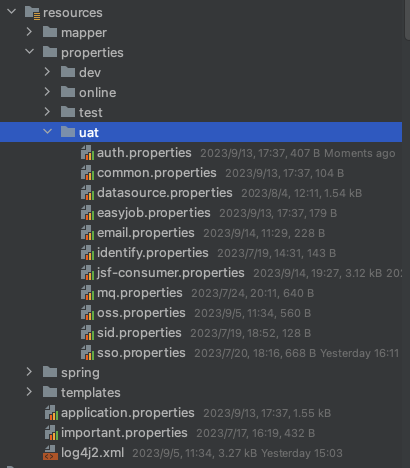
前言 基于现代服务的云原生十二要素理论,我们在采用容器化部署时,要保证同一个镜像可以满足不同环境的部署要求,而不是不同环境打包不同的景象。本文档主要介绍一种基于spring框架的满足不同环境配置的编译打包方案,满足同一个镜像可以在环境分组下通过启动项配置实现不同环境的部署。 现有方案及问题 我们见过最常见的配置文件管理方案,是基于Maven的profile配置来实现多环境切换的,它的弊端在于,我们将profile配置在pom.xml中,每次编译打包时,需要通过编译指令-P来标识当前环境配置。这样导致的问题是,我们打包的镜像具有了环境属性,不符合一个镜像多环境部署的要求。 还有一种配置方案,就是基于Spring profile进行配置文件管理。针对这两种方案,我接下来会进行一些分析和对比。 两种profiles配置的不同和优劣对比 a. 两种profiles方案对比 1. Maven 的 profiles: ◦ Maven 的 profiles 是在构建时根据环境或其他条件激活不同的配置集合。可以在项目的pom.xml文件中定义多个 profile,并使用 Maven 命令行参数或其他配置来激活特定的 profile。 ◦ 优势: ▪ 灵活性高,可以根据不同的构建环境或条件激活不同的 profile。 ▪ 可以在构建过程中使用不同的依赖、插件配置等。 ◦ 劣势: ▪ 配置相对分散,需要在 Maven 的pom.xml文件中定义和管理多个 profile。 ▪ 配置与代码分离,不够直观。 2. Spring 的application.properties的 profile 配置: ◦ Spring 的application.properties文件可以根据激活的 profile 来加载不同的配置。可以在application.properties文件中定义多个 profile 下的配置,并使用配置文件或环境变量来激活特定的 profile。 ◦ 优势: ▪ 配置集中,可以在一个文件中定义多个 profile 下的配置,更易于管理和维护。 ▪ 配置与代码相近,更直观易读。 ◦ 劣势: ▪ 激活 profile 的方式相对有限,通常需要通过配置文件或环境变量来指定。 ▪ 不适用于构建过程中的配置,主要用于应用程序的运行配置。 总的来说,Maven profiles 更适用于构建过程中的配置,可以根据构建环境或条件激活不同的 profile,而 Spring 的application.properties的 profile 配置更适用于应用程序的运行配置,可以根据不同的 profile 加载不同的配置。具体选择哪种方式取决于你的需求和偏好。 b. 在云原生和容器化的部署场景分析 在云原生和容器化的部署场景下,我更倾向使用 Spring 的application.properties的 profile 配置方式。 以下是在云原生和容器化部署场景下,使用application.properties的 profile 配置方式的优势: 环境无关性:application.properties可以根据激活的 profile 加载不同的配置,使得应用程序在不同的环境中运行时具有一致的行为。这对于云原生和容器化的部署非常重要,因为应用程序可能需要在不同的环境(例如开发、测试、生产)中运行。 配置集中化:使用application.properties的 profile 配置方式,可以在一个文件中定义多个 profile 下的配置,使得配置管理更加集中和方便。这对于云原生和容器化的部署场景非常有帮助,因为可以根据不同的 profile 加载适当的配置,而无需分散地管理多个 Maven profiles。 容器友好性:在容器化的部署场景中,通常使用容器编排工具(如 Kubernetes)来管理应用程序的配置和部署。使用application.properties的 profile 配置方式,可以通过环境变量或配置文件中的属性来指定激活的 profile,从而实现与容器编排工具的集成。 综上所述,使用 Spring 的 application.properties 的 profile 配置方式更适合云原生和容器化的部署场景,因为它提供了环境无关性、配置集中化和容器友好性的优势。 基于properties的多环境配置方案实践 以下方案以springboot为例,当然springMVC方案也是可以适配,只是需要额外配置一下,介于我们新项目基本都是基于springboot搭建,此处不展开springMVC的实线方案,如有需要,我再额外提供mvc的配置方案。 a. 配置文件树  如上图所示 properties文件夹:我们在properties文件夹下,基于不同的环境,简历单独文件夹,比如dev,online, test, uat等,每个文件夹下存放当前环境的配置信息。 spring文件夹: 下存放xml配置信息,比如常见的JSF配置(jsf.xml),以及其他需要通过xml配置注入的业务场景。当然基于springboot官网建议,大家尽量用注解代码方式实现bean注入,尽量减少xml的方式。 application.properties文件: 该文件里通过核心的配置spring.profiles.active=**来标识当前是哪个profile环境。当然一些其他全局类配置也可以放在此处。需要注意application.properties文件需要配置在行云部署中分组配置里,因为此文件需要基于不同的部署分组进行文件覆盖,以改变spring.profiles.active的值,如下图所示。当然,也可以通过运行时启动指令,进行不同的profile选择。 important.properties文件: 该文件为京东行云部署规约,把秘钥等安全性高的文件以加密存储的方式存放在该文件中,并部署到行云部署分组的远程配置里。 具体行云部署里的配置如下:  b. properties文件加载 正常情况下,properties/**/*.properties下的配置文件是不会自动加载到启动项里的。所以需要通过额外的方式动态加载,具体方法是通过spring框架下的PropertySourcesPlaceholderConfigurer的类属性,结合环境变量,动态批量加载配置文件。(额外说明,如果是springMVC框架,也可以通过xml配置context:property-placeholder属性来实现。) 具体代码如下: /** * 配置文件环境配置 * * @Author zhaoyongping * @date 2023/7/10 15:13 * @ClassName EnvPropertiesConfig * @Descripiton 配置文件环境配置 **/ @Configuration public class EnvPropertiesConfig { /** * 加载属性配置 * * @param environment 环境属性 * @return PropertySourcesPlaceholderConfigurer * @author zhaoyongping * @date 2023/7/10 15:13 * @description 加载属性配置 */ @Bean public static PropertySourcesPlaceholderConfigurer propertySourcesPlaceholderConfig(Environment environment) throws IOException { PropertySourcesPlaceholderConfigurer config = new PropertySourcesPlaceholderConfigurer(); String[] activeProfiles = environment.getActiveProfiles(); if (activeProfiles.length > 0) { String resourceUrl = "classpath:properties/" + environment.getActiveProfiles()[0] + "/*.properties"; config.setLocations( new PathMatchingResourcePatternResolver().getResources(resourceUrl)); } else { //兜底策略 config.setLocations( new PathMatchingResourcePatternResolver() .getResources("classpath:properties/dev/*.properties")); } return config; } } 总结 通过以上步骤,我们可以实现编译打包镜像不需要跟环境变量绑定,而只需要在启动运行时基于不同的分组动态配置的applicaiton.properties文件,来实现不同环境的适配。这种可以在运行时变更配置文件的机制,更适合在云原生时代下的容器化部署方案,也利于我们的服务的可移植性。当然,以上只是笔者个人的一个实践经验,并不能代表它是最优实践方案。 作者:京东物流 赵勇萍 来源:京东云开发者社区 自猿其说Tech 转载请注明来源

优秀的个人博客,低调大师

ASM字节码操作类库(打开java语言世界通往字节码世界的大门) | 京东云技术团队

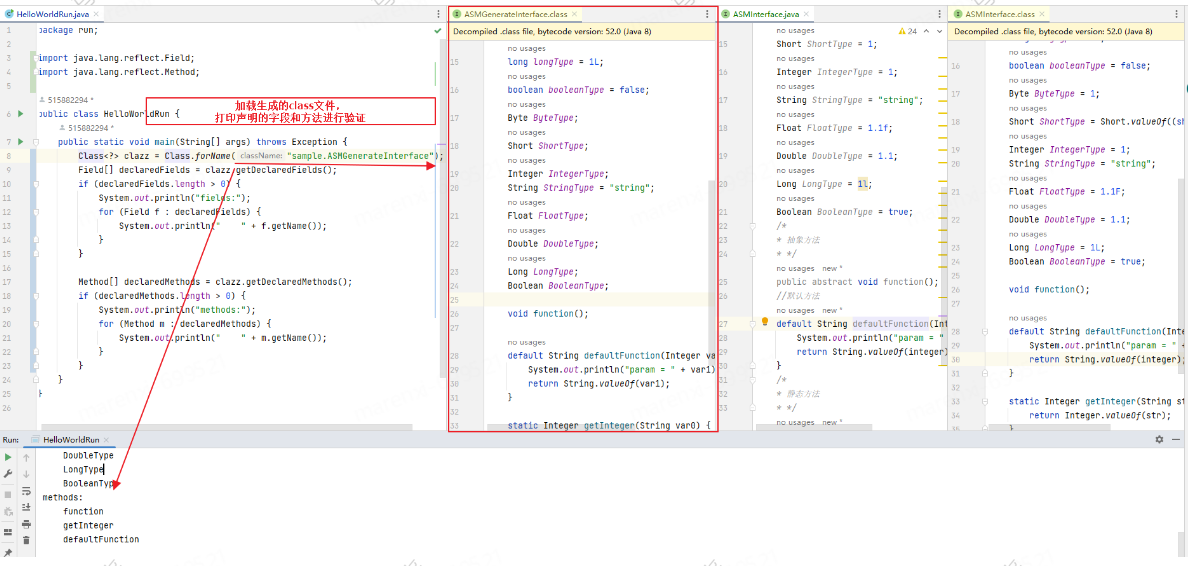
前言:授人以鱼不如授人以渔,应用asm的文章有很多,简单demo的也很多,那么ASM都具备哪些能力呢?如何去学习编写ASM代码呢?什么样的情景需要用到ASM呢?让我们带着这些问题阅读这篇文章吧。 这里由于篇幅限制做了删减(第六部分TreeApi和CoreApi的比较、核心API类的介绍等),如果有兴趣可以联系作者进行交流, 个人认为核心在于第五部分如何查看一个想写的类的ASM代码如何写,以及全面了解ASM都有哪些能力,这样在后面的特定场景下我们才会知道可以通过它来实现想做的功能 一、ASM介绍 1、ASM 是什么 ASM是一个通用的Java字节码操作和分析框架。它可以用于修改现有类或直接以二进制形式动态生成类。ASM提供了一些常见的字节码转换和分析算法,可以从中构建定制的复杂转换和代码分析工具。ASM提供了与其他Java字节码框架类似的功能,但侧重于性能。由于它的设计和实现尽可能小和快,因此非常适合在动态系统中使用(但当然也可以以静态方式使用,例如在编译器中)。 一个.java文件经过Java编译器(javac)编译之后会生成一个.class文件。在.class文件中,存储的是字节码(ByteCode)数据。ASM所操作的对象是字节码(ByteCode),而在许多情况下,字节码(ByteCode)的具体表现形式是.class文件。 ASM处理字节码(ByteCode)的方式是“拆分-修改-合并”。 字节码工具 类创建 实现接口 方法调用 类扩展 父类方法调用 优点 缺点 常见使用 学习成本 java-proxy 支持 支持 支持 不支持 不支持 简单动态代理首选 功能有限,不支持扩展 spring-aop,MyBatis 1星 asm 支持 支持 支持 支持 支持 任意字节码插入,几乎不受限制 学习难度大,编写代码多 cglib 5星 javaassit 支持 支持 支持 支持 支持 java原始语法,字符串形式插入,写入直观 不支持jdk1.5以上的语法,如泛型,增强for Fastjson,MyBatis 2星 cglib 支持 支持 支持 支持 支持 与bytebuddy看起来差不多 正在被bytebuddy淘汰 EasyMock,jackson-databind 3星 bytebuddy 支持 支持 支持 支持 支持 支持任意维度的拦截,可以获取原始类、方法,以及代理类和全部参数 不太直观,学习理解有些成本,API非常多 SkyWalking,Mockito,Hibernate,powermock 3星 比较表格参考: http://xingyun.jd.com/shendeng/article/detail/7826 ASM官网:https://asm.ow2.io/ ASM源码:https://gitlab.ow2.org/asm/asm 开发者指南:https://asm.ow2.io/developer-guide.html 2、ASM能做什么 生成、修改、删除(接口、类、字段、方法...)ASM能够对字节码数据进行analyze、generate、transformation,ASM可以形象的理解为“Java语言世界”边缘上一扇大门,通过这扇大门,可以帮助我们进入到“字节码的世界”。 3、ASM实际的使用场景 3.1、Spring当中的ASM 第一个应用场景,是Spring框架当中的AOP。 在很多Java项目中,都会使用到Spring框架,而Spring框架当中的AOP(Aspect Oriented Programming)是依赖于ASM的。具体来说,Spring的AOP,可以通过JDK的动态代理来实现,也可以通过CGLIB实现。其中,CGLib (Code Generation Library)是在ASM的基础上构建起来的,所以,Spring AOP是间接的使用了ASM。(参考自 Spring Framework Reference Documentation的 8.6 Proxying mechanisms)。 3.2、JDK当中的ASM 第二个应用场景,是JDK当中的Lambda表达式。 在Java 8中引入了一个非常重要的特性,就是支持Lambda表达式。Lambda表达式,允许把方法作为参数进行传递,它能够使代码变的更加简洁紧凑。但是,我们可能没有注意到,其实,在现阶段(Java 8版本),Lambda表达式的调用是通过ASM来实现的。 在rt.jar文件的jdk.internal.org.objectweb.asm包当中,就包含了JDK内置的ASM代码。在JDK 8版本当中,它所使用的ASM 5.0版本。 如果我们跟踪Lambda表达式的编码实现,就会找到InnerClassLambdaMetafactory.spinInnerClass()方法。在这个方法当中,我们就会看到:JDK会使用jdk.internal.org.objectweb.asm.ClassWriter来生成一个类,将lambda表达式的代码包装起来。 LambdaMetafactory.metafactory() 第一步,找到这个方法​ InnerClassLambdaMetafactory.buildCallSite() 第二步,找到这个方法 ​ InnerClassLambdaMetafactory.spinInnerClass() 第三步,找到这个方法 4、 ASM的两个组成部分 从组成结构上来说,ASM分成两部分,一部分为Core API,另一部分为Tree API。 其中,Core API包括asm.jar、asm-util.jar和asm-commons.jar;其中,Tree API包括asm-tree.jar和asm-analysis.jar。 asm.jar内核心类:ClassReader、ClassVisitor、ClassWriter、FieldVisitor、FieldWriter、MethodVisitor、MethodWriter、Label、Opcodes、Type ClassReader类,负责读取.class文件里的内容,然后拆分成各个不同的部分。ClassVisitor类,负责对.class文件中某一部分里的信息进行修改。ClassWriter类,负责将各个不同的部分重新组合成一个完整的.class文件。 asm-util.jar内核心类 以Check开头的类,主要负责检查(Check)生成的.class文件内容是否正确。以Trace开头的类,主要负责将.class文件的内容打印成文字输出。根据输出的文字信息,可以探索或追踪(Trace).class文件的内部信息。 5、ClassFile 我们都知道,在.class文件中,存储的是ByteCode数据。但是,这些ByteCode数据并不是杂乱无章的,而是遵循一定的数据结构。 这个.class文件遵循的数据结构就是由 Java Virtual Machine Specification中定义的 The class File Format 6、常见的字节码类库 Apache Commons BCEL:其中BCEL为Byte Code Engineering Library首字母的缩写。 Javassist:Javassist表示Java programming assistant ObjectWeb ASM:本课程的研究对象。 Byte Buddy:在ASM基础上实现的一个类库。 二、无中生有 1、生成新的接口 预期目标: 生成一个正常接口结构定义的.class文件 public interface ASMInterface { byte byteType = 1; short shortType = 1; int intType = 1; char charType = 's'; float floatType = 1.1F; double doubleType = 1.2; long longType = 1L; boolean booleanType = false; Byte ByteType = 1; Short ShortType = Short.valueOf((short)1); Integer IntegerType = 1; String StringType = "s"; Float FloatType = 1.1F; Double DoubleType = 1.1; Long LongType = 1L; Boolean BooleanType = true; void function(); default String defaultFunction(Integer integer) { System.out.println("param = " + integer); return String.valueOf(integer); } static Integer getInteger(String str) { return Integer.valueOf(str); } } 编码实现: public class InterfaceGenerateCore { public static void main(String[] args) throws Exception { String relative_path = "sample/ASMGenerateInterface.class"; String filepath = FileUtils.getFilePath(relative_path); // (1) 生成byte[]内容 byte[] bytes = dump(); // (2) 保存byte[]到文件 FileUtils.writeBytes(filepath, bytes); } public static byte[] dump() throws Exception { // (1) 创建ClassWriter对象 ClassWriter cw = new ClassWriter(ClassWriter.COMPUTE_FRAMES); // (2) 调用visitXxx()方法,调用顺序和说明如下 /* * visit * [visitSource][visitModule][visitNestHost][visitPermittedSubclass][visitOuterClass] * (visitAnnotation | * visitTypeAnnotation | * visitAttribute)* * (visitNestMember | * visitInnerClass | * visitRecordComponent | * visitField | * visitMethod)* * visitEnd * []: 表示最多调用一次,可以不调用,但最多调用一次。 * ()和|: 表示在多个方法之间,可以选择任意一个,并且多个方法之间不分前后顺序。 * *: 表示方法可以调用0次或多次。 * */ //定义接口 /* *visit(version, access, name, signature, superName, interfaces) *version: 表示当前类的版本信息。在下述示例代码中,其取值为Opcodes.V1_8,表示使用Java 8版本。 *access: 表示当前类的访问标识(access flag)信息。在下面的示例中,access的取值是ACC_PUBLIC + ACC_ABSTRACT + ACC_INTERFACE,也可以写成ACC_PUBLIC | ACC_ABSTRACT | ACC_INTERFACE。如果想进一步了解这些标识的含义,可以参考Java Virtual Machine Specification的Chapter 4. The class File Format部分。 *name: 表示当前类的名字,它采用的格式是Internal Name的形式。在.java文件中,我们使用Java语言来编写代码,使用类名的形式是Fully Qualified Class Name,例如java.lang.String;将.java文件编译之后,就会生成.class文件;在.class文件中,类名的形式会发生变化,称之为Internal Name,例如java/lang/String。因此,将Fully Qualified Class Name转换成Internal Name的方式就是,将.字符转换成/字符。 *signature: 表示当前类的泛型信息。因为在这个接口当中不包含任何的泛型信息,因此它的值为null。 *superName: 表示当前类的父类信息,它采用的格式是Internal Name的形式。 *interfaces: 表示当前类实现了哪些接口信息。 **/ cw.visit( V1_8, // version ACC_PUBLIC + ACC_ABSTRACT + ACC_INTERFACE, // access "sample/ASMGenerateInterface", // name null, // signature "java/lang/Object", // superName null // interfaces ); //定义字段-基本类型 /* * visitField(access, name, descriptor, signature, value) *access参数:表示当前字段或方法带有的访问标识(access flag)信息,例如ACC_PUBLIC、ACC_STATIC和ACC_FINAL等。 *name参数:表示当前字段或方法的名字。 *descriptor参数:表示当前字段或方法的描述符。这些描述符,与我们平时使用的Java类型是有区别的。byte-B、short-S、int-I、char-C、具体可以参考如下示例代码 *signature参数:表示当前字段或方法是否带有泛型信息。换句话说,如果不带有泛型信息,提供一个null就可以了;如果带有泛型信息,就需要给它提供某一个具体的值。 *value参数:是visitField()方法的第5个参数。这个参数的取值,与当前字段是否为常量有关系。如果当前字段是一个常量,就需要给value参数提供某一个具体的值;如果当前字段不是常量,那么使用null就可以了。 * */ { FieldVisitor fv1 = cw.visitField(ACC_PUBLIC + ACC_STATIC + ACC_FINAL, "byteType", "B", null, new Integer(1)); fv1.visitEnd(); } { FieldVisitor fv2 = cw.visitField(ACC_PUBLIC + ACC_STATIC + ACC_FINAL, "shortType", "S", null, new Integer(1)); fv2.visitEnd(); } { FieldVisitor fv3 = cw.visitField(ACC_PUBLIC + ACC_STATIC + ACC_FINAL, "intType", "I", null, new Integer(1)); fv3.visitEnd(); } { FieldVisitor fv4 = cw.visitField(ACC_PUBLIC + ACC_STATIC + ACC_FINAL, "charType", "C", null, 's'); fv4.visitEnd(); } { FieldVisitor fv5 = cw.visitField(ACC_PUBLIC + ACC_STATIC + ACC_FINAL, "floatType", "F", null, new Float("1.1")); fv5.visitEnd(); } { FieldVisitor fv6 = cw.visitField(ACC_PUBLIC + ACC_STATIC + ACC_FINAL, "doubleType", "D", null, new Double("1.2")); fv6.visitEnd(); } { FieldVisitor fv7 = cw.visitField(ACC_PUBLIC + ACC_STATIC + ACC_FINAL, "longType", "J", null, new Long(1L)); fv7.visitEnd(); } { FieldVisitor fv8 = cw.visitField(ACC_PUBLIC + ACC_STATIC + ACC_FINAL, "booleanType", "Z", null, new Integer(0)); fv8.visitEnd(); } //定义变量-包装类型 { FieldVisitor fv11 = cw.visitField(ACC_PUBLIC + ACC_STATIC + ACC_FINAL, "ByteType", "Ljava/lang/Byte;", null, null); fv11.visitEnd(); } { FieldVisitor fv12 = cw.visitField(ACC_PUBLIC + ACC_STATIC + ACC_FINAL, "ShortType", "Ljava/lang/Short;", null,null); fv12.visitEnd(); } { FieldVisitor fv13 = cw.visitField(ACC_PUBLIC + ACC_STATIC + ACC_FINAL, "IntegerType", "Ljava/lang/Integer;", null,null); fv13.visitEnd(); } { FieldVisitor fv14 = cw.visitField(ACC_PUBLIC + ACC_STATIC + ACC_FINAL, "StringType", "Ljava/lang/String;", null, "s"); fv14.visitEnd(); } { FieldVisitor fv15 = cw.visitField(ACC_PUBLIC + ACC_STATIC + ACC_FINAL, "FloatType", "Ljava/lang/Float;", null,null); fv15.visitEnd(); } { FieldVisitor fv16 = cw.visitField(ACC_PUBLIC + ACC_STATIC + ACC_FINAL, "DoubleType", "Ljava/lang/Double;", null,null); fv16.visitEnd(); } { FieldVisitor fv17 = cw.visitField(ACC_PUBLIC + ACC_STATIC + ACC_FINAL, "LongType", "Ljava/lang/Long;", null, null); fv17.visitEnd(); } { FieldVisitor fv18 = cw.visitField(ACC_PUBLIC + ACC_STATIC + ACC_FINAL, "BooleanType", "Ljava/lang/Boolean;", null, null); fv18.visitEnd(); } //定义方法-抽象方法 /* * visitMethod(access, name, descriptor, signature, exceptions) *access参数:表示当前字段或方法带有的访问标识(access flag)信息,例如ACC_PUBLIC、ACC_STATIC和ACC_FINAL等。 *name参数:表示当前字段或方法的名字。 *descriptor参数:表示当前字段或方法的描述符。这些描述符,与我们平时使用的Java类型是有区别的。()内为入参,后面为反参 *signature参数:表示当前字段或方法是否带有泛型信息。换句话说,如果不带有泛型信息,提供一个null就可以了;如果带有泛型信息,就需要给它提供某一个具体的值。 *exceptions参数:是visitMethod()方法的第5个参数。这个参数的取值,与当前方法声明中是否具有throws XxxException相关。 * */ { MethodVisitor mv1 = cw.visitMethod(ACC_PUBLIC + ACC_ABSTRACT, "function", "()V", null, null); mv1.visitEnd(); } //定义方法-默认方法 { MethodVisitor mv2 = cw.visitMethod(ACC_PUBLIC, "defaultFunction", "(Ljava/lang/Integer;)Ljava/lang/String;", null, null); mv2.visitCode(); mv2.visitFieldInsn(GETSTATIC, "java/lang/System", "out", "Ljava/io/PrintStream;"); mv2.visitTypeInsn(NEW, "java/lang/StringBuilder"); mv2.visitInsn(DUP); mv2.visitMethodInsn(INVOKESPECIAL, "java/lang/StringBuilder", "<init>", "()V", false); mv2.visitLdcInsn("param = "); mv2.visitMethodInsn(INVOKEVIRTUAL, "java/lang/StringBuilder", "append", "(Ljava/lang/String;)Ljava/lang/StringBuilder;", false); mv2.visitVarInsn(ALOAD, 1); mv2.visitMethodInsn(INVOKEVIRTUAL, "java/lang/StringBuilder", "append", "(Ljava/lang/Object;)Ljava/lang/StringBuilder;", false); mv2.visitMethodInsn(INVOKEVIRTUAL, "java/lang/StringBuilder", "toString", "()Ljava/lang/String;", false); mv2.visitMethodInsn(INVOKEVIRTUAL, "java/io/PrintStream", "println", "(Ljava/lang/String;)V", false); mv2.visitVarInsn(ALOAD, 1); mv2.visitMethodInsn(INVOKESTATIC, "java/lang/String", "valueOf", "(Ljava/lang/Object;)Ljava/lang/String;", false); mv2.visitInsn(ARETURN); mv2.visitMaxs(3, 2); mv2.visitEnd(); } //定义方法-静态方法 { MethodVisitor mv3 = cw.visitMethod(ACC_PUBLIC | ACC_STATIC, "getInteger", "(Ljava/lang/String;)Ljava/lang/Integer;", null, null); mv3.visitCode(); mv3.visitVarInsn(ALOAD, 0); mv3.visitMethodInsn(INVOKESTATIC, "java/lang/Integer", "valueOf", "(Ljava/lang/String;)Ljava/lang/Integer;", false); mv3.visitInsn(ARETURN); mv3.visitMaxs(1, 1); mv3.visitEnd(); } { MethodVisitor mv4 = cw.visitMethod(ACC_STATIC, "<clinit>", "()V", null, null); mv4.visitCode(); mv4.visitInsn(ICONST_1); mv4.visitMethodInsn(INVOKESTATIC, "java/lang/Byte", "valueOf", "(B)Ljava/lang/Byte;", false); mv4.visitFieldInsn(PUTSTATIC, "sample/ASMInterface", "ByteType", "Ljava/lang/Byte;"); mv4.visitInsn(ICONST_1); mv4.visitMethodInsn(INVOKESTATIC, "java/lang/Short", "valueOf", "(S)Ljava/lang/Short;", false); mv4.visitFieldInsn(PUTSTATIC, "sample/ASMInterface", "ShortType", "Ljava/lang/Short;"); mv4.visitInsn(ICONST_1); mv4.visitMethodInsn(INVOKESTATIC, "java/lang/Integer", "valueOf", "(I)Ljava/lang/Integer;", false); mv4.visitFieldInsn(PUTSTATIC, "sample/ASMInterface", "IntegerType", "Ljava/lang/Integer;"); mv4.visitLdcInsn(new Float("1.1")); mv4.visitMethodInsn(INVOKESTATIC, "java/lang/Float", "valueOf", "(F)Ljava/lang/Float;", false); mv4.visitFieldInsn(PUTSTATIC, "sample/ASMInterface", "FloatType", "Ljava/lang/Float;"); mv4.visitLdcInsn(new Double("1.1")); mv4.visitMethodInsn(INVOKESTATIC, "java/lang/Double", "valueOf", "(D)Ljava/lang/Double;", false); mv4.visitFieldInsn(PUTSTATIC, "sample/ASMInterface", "DoubleType", "Ljava/lang/Double;"); mv4.visitInsn(LCONST_1); mv4.visitMethodInsn(INVOKESTATIC, "java/lang/Long", "valueOf", "(J)Ljava/lang/Long;", false); mv4.visitFieldInsn(PUTSTATIC, "sample/ASMInterface", "LongType", "Ljava/lang/Long;"); mv4.visitInsn(ICONST_1); mv4.visitMethodInsn(INVOKESTATIC, "java/lang/Boolean", "valueOf", "(Z)Ljava/lang/Boolean;", false); mv4.visitFieldInsn(PUTSTATIC, "sample/ASMInterface", "BooleanType", "Ljava/lang/Boolean;"); mv4.visitInsn(RETURN); mv4.visitMaxs(2, 0); mv4.visitEnd(); } cw.visitEnd(); // 注意,最后要调用visitEnd()方法 // (3) 调用toByteArray()方法 return cw.toByteArray(); } } 验证结果: 生成的接口是否正确 public class HelloWorldRun { public static void main(String[] args) throws Exception { ClassLoader classLoader = Thread.currentThread().getContextClassLoader(); Class<?> clazz = classLoader.loadClass("sample.ASMGenerateInterface"); Field[] declaredFields = clazz.getDeclaredFields(); if (declaredFields.length > 0) { System.out.println("fields:"); for (Field f : declaredFields) { Object value = f.get(null); System.out.println(" " + f.getName() + ": " + value); } } Method[] declaredMethods = clazz.getDeclaredMethods(); if (declaredMethods.length > 0) { System.out.println("methods:"); for (Method m : declaredMethods) { System.out.println(" " + m.getName()); } } } } 效果图如下:  2、生成新的类 预期目标: 生成一个正常类结构定义的.class文件 public class ASMClass { //定义变量-基本类型 byte byteType = 1; short shortType = 1; int intType = 1; char charType = 's'; float floatType = 1.1f; double doubleType = 1.2; long longType = 1; boolean booleanType = false; //定义变量-包装类型 Byte ByteType = 1; Short ShortType = 1; Integer IntegerType = 1; String StringType = "string"; Float FloatType = 1.1f; Double DoubleType = 1.1; Long LongType = 1l; @Deprecated Boolean BooleanType = true; /* * 静态方法 * */ public static Integer getInteger(String str) { return Integer.valueOf(str); } /* * 实例方法 * */ public String instanceMethod(Integer integer) { return String.valueOf(integer); } } 编码实现: public class ClassGenerateCore { public static void main(String[] args) throws Exception { String relative_path = "sample/ASMGenerateClass.class"; String filepath = FileUtils.getFilePath(relative_path); // (1) 生成byte[]内容 byte[] bytes = dump(); // (2) 保存byte[]到文件 FileUtils.writeBytes(filepath, bytes); } public static byte[] dump() throws Exception { // (1) 创建ClassWriter对象 ClassWriter cw = new ClassWriter(ClassWriter.COMPUTE_FRAMES); // (2) 调用visitXxx()方法,调用顺序和说明如下 /* * visit * [visitSource][visitModule][visitNestHost][visitPermittedSubclass][visitOuterClass] * (visitAnnotation | * visitTypeAnnotation | * visitAttribute)* * (visitNestMember | * visitInnerClass | * visitRecordComponent | * visitField | * visitMethod)* * visitEnd * []: 表示最多调用一次,可以不调用,但最多调用一次。 * ()和|: 表示在多个方法之间,可以选择任意一个,并且多个方法之间不分前后顺序。 * *: 表示方法可以调用0次或多次。 * */ //定义接口 /* *visit(version, access, name, signature, superName, interfaces) *version: 表示当前类的版本信息。在下述示例代码中,其取值为Opcodes.V1_8,表示使用Java 8版本。 *access: 表示当前类的访问标识(access flag)信息。在下面的示例中,access的取值是ACC_PUBLIC + ACC_ABSTRACT + ACC_INTERFACE,也可以写成ACC_PUBLIC | ACC_ABSTRACT | ACC_INTERFACE。如果想进一步了解这些标识的含义,可以参考Java Virtual Machine Specification的Chapter 4. The class File Format部分。 *name: 表示当前类的名字,它采用的格式是Internal Name的形式。在.java文件中,我们使用Java语言来编写代码,使用类名的形式是Fully Qualified Class Name,例如java.lang.String;将.java文件编译之后,就会生成.class文件;在.class文件中,类名的形式会发生变化,称之为Internal Name,例如java/lang/String。因此,将Fully Qualified Class Name转换成Internal Name的方式就是,将.字符转换成/字符。 *signature: 表示当前类的泛型信息。因为在这个接口当中不包含任何的泛型信息,因此它的值为null。 *superName: 表示当前类的父类信息,它采用的格式是Internal Name的形式。 *interfaces: 表示当前类实现了哪些接口信息。 **/ cw.visit( V1_8, // version ACC_PUBLIC + ACC_SUPER, // access "sample/ASMGenerateClass", // name null, // signature "java/lang/Object", // superName null // interfaces ); //定义字段-基本类型 /* * visitField(access, name, descriptor, signature, value) *access参数:表示当前字段或方法带有的访问标识(access flag)信息,例如ACC_PUBLIC、ACC_STATIC和ACC_FINAL等。 *name参数:表示当前字段或方法的名字。 *descriptor参数:表示当前字段或方法的描述符。这些描述符,与我们平时使用的Java类型是有区别的。byte-B、short-S、int-I、char-C、具体可以参考如下示例代码 *signature参数:表示当前字段或方法是否带有泛型信息。换句话说,如果不带有泛型信息,提供一个null就可以了;如果带有泛型信息,就需要给它提供某一个具体的值。 *value参数:是visitField()方法的第5个参数。这个参数的取值,与当前字段是否为常量有关系。如果当前字段是一个常量,就需要给value参数提供某一个具体的值;如果当前字段不是常量,那么使用null就可以了。 * */ { FieldVisitor fv1 = cw.visitField(0, "byteType", "B", null, new Byte("1")); fv1.visitEnd(); } { FieldVisitor fv2 = cw.visitField(0, "shortType", "S", null, new Short("1")); fv2.visitEnd(); } { FieldVisitor fv3 = cw.visitField(0, "intType", "I", null, new Integer(1)); fv3.visitEnd(); } { FieldVisitor fv4 = cw.visitField(0, "charType", "C", null, "s"); fv4.visitEnd(); } { FieldVisitor fv5 = cw.visitField(0, "floatType", "F", null, new Float("1.1")); fv5.visitEnd(); } { FieldVisitor fv6 = cw.visitField(0, "doubleType", "D", null, new Double("1.2")); fv6.visitEnd(); } { FieldVisitor fv7 = cw.visitField(0, "longType", "J", null, new Long(1)); fv7.visitEnd(); } { FieldVisitor fv8 = cw.visitField(0, "booleanType", "Z", null, false); fv8.visitEnd(); } //定义变量-包装类型 { FieldVisitor fv11 = cw.visitField(0, "ByteType", "Ljava/lang/Byte;", null, 1); fv11.visitEnd(); } { FieldVisitor fv12 = cw.visitField(0, "ShortType", "Ljava/lang/Short;", null, 1); fv12.visitEnd(); } { FieldVisitor fv13 = cw.visitField(0, "IntegerType", "Ljava/lang/Integer;", null, 1); fv13.visitEnd(); } { FieldVisitor fv14 = cw.visitField(0, "StringType", "Ljava/lang/String;", null, "s"); fv14.visitEnd(); } { FieldVisitor fv15 = cw.visitField(0, "FloatType", "Ljava/lang/Float;", null, 1.1f); fv15.visitEnd(); } { FieldVisitor fv16 = cw.visitField(ACC_PUBLIC, "DoubleType", "Ljava/lang/Double;", null, 1.1); fv16.visitEnd(); } { FieldVisitor fv17 = cw.visitField(0, "LongType", "Ljava/lang/Long;", null, 1l); fv17.visitEnd(); } { FieldVisitor fv18 = cw.visitField(ACC_DEPRECATED, "BooleanType", "Ljava/lang/Boolean;", null, true); { AnnotationVisitor annotationVisitor0 = fv18.visitAnnotation("Ljava/lang/Deprecated;", true); annotationVisitor0.visitEnd(); } fv18.visitEnd(); } /* * visitMethod(access, name, descriptor, signature, exceptions) *access参数:表示当前字段或方法带有的访问标识(access flag)信息,例如ACC_PUBLIC、ACC_STATIC和ACC_FINAL等。 *name参数:表示当前字段或方法的名字。 *descriptor参数:表示当前字段或方法的描述符。这些描述符,与我们平时使用的Java类型是有区别的。()内为入参,后面为反参 *signature参数:表示当前字段或方法是否带有泛型信息。换句话说,如果不带有泛型信息,提供一个null就可以了;如果带有泛型信息,就需要给它提供某一个具体的值。 *exceptions参数:是visitMethod()方法的第5个参数。这个参数的取值,与当前方法声明中是否具有throws XxxException相关。 * */ //定义方法-静态代码块 { MethodVisitor mv2 = cw.visitMethod(ACC_STATIC, "<clinit>", "()V", null, null); mv2.visitCode(); mv2.visitFieldInsn(GETSTATIC, "java/lang/System", "out", "Ljava/io/PrintStream;"); mv2.visitLdcInsn("class initialization method"); mv2.visitMethodInsn(INVOKEVIRTUAL, "java/io/PrintStream", "println", "(Ljava/lang/String;)V", false); mv2.visitInsn(RETURN); mv2.visitMaxs(2, 0); mv2.visitEnd(); } //定义方法-无参构造器 { MethodVisitor methodVisitor = cw.visitMethod(ACC_PUBLIC, "<init>", "()V", null, null); methodVisitor.visitCode(); methodVisitor.visitVarInsn(ALOAD, 0); methodVisitor.visitMethodInsn(INVOKESPECIAL, "java/lang/Object", "<init>", "()V", false); methodVisitor.visitVarInsn(ALOAD, 0); methodVisitor.visitInsn(ICONST_1); methodVisitor.visitFieldInsn(PUTFIELD, "sample/ASMGenerateClass", "byteType", "B"); methodVisitor.visitVarInsn(ALOAD, 0); methodVisitor.visitInsn(ICONST_1); methodVisitor.visitFieldInsn(PUTFIELD, "sample/ASMGenerateClass", "shortType", "S"); methodVisitor.visitVarInsn(ALOAD, 0); methodVisitor.visitInsn(ICONST_1); methodVisitor.visitFieldInsn(PUTFIELD, "sample/ASMGenerateClass", "intType", "I"); methodVisitor.visitVarInsn(ALOAD, 0); methodVisitor.visitIntInsn(BIPUSH, 115); methodVisitor.visitFieldInsn(PUTFIELD, "sample/ASMGenerateClass", "charType", "C"); methodVisitor.visitVarInsn(ALOAD, 0); methodVisitor.visitLdcInsn(new Float("1.1")); methodVisitor.visitFieldInsn(PUTFIELD, "sample/ASMGenerateClass", "floatType", "F"); methodVisitor.visitVarInsn(ALOAD, 0); methodVisitor.visitLdcInsn(new Double("1.2")); methodVisitor.visitFieldInsn(PUTFIELD, "sample/ASMGenerateClass", "doubleType", "D"); methodVisitor.visitVarInsn(ALOAD, 0); methodVisitor.visitInsn(LCONST_1); methodVisitor.visitFieldInsn(PUTFIELD, "sample/ASMGenerateClass", "longType", "J"); methodVisitor.visitVarInsn(ALOAD, 0); methodVisitor.visitInsn(ICONST_0); methodVisitor.visitFieldInsn(PUTFIELD, "sample/ASMGenerateClass", "booleanType", "Z"); methodVisitor.visitVarInsn(ALOAD, 0); methodVisitor.visitInsn(ICONST_1); methodVisitor.visitMethodInsn(INVOKESTATIC, "java/lang/Byte", "valueOf", "(B)Ljava/lang/Byte;", false); methodVisitor.visitFieldInsn(PUTFIELD, "sample/ASMGenerateClass", "ByteType", "Ljava/lang/Byte;"); methodVisitor.visitVarInsn(ALOAD, 0); methodVisitor.visitInsn(ICONST_1); methodVisitor.visitMethodInsn(INVOKESTATIC, "java/lang/Short", "valueOf", "(S)Ljava/lang/Short;", false); methodVisitor.visitFieldInsn(PUTFIELD, "sample/ASMGenerateClass", "ShortType", "Ljava/lang/Short;"); methodVisitor.visitVarInsn(ALOAD, 0); methodVisitor.visitInsn(ICONST_1); methodVisitor.visitMethodInsn(INVOKESTATIC, "java/lang/Integer", "valueOf", "(I)Ljava/lang/Integer;", false); methodVisitor.visitFieldInsn(PUTFIELD, "sample/ASMGenerateClass", "IntegerType", "Ljava/lang/Integer;"); methodVisitor.visitVarInsn(ALOAD, 0); methodVisitor.visitLdcInsn("string"); methodVisitor.visitFieldInsn(PUTFIELD, "sample/ASMGenerateClass", "StringType", "Ljava/lang/String;"); methodVisitor.visitVarInsn(ALOAD, 0); methodVisitor.visitLdcInsn(new Float("1.1")); methodVisitor.visitMethodInsn(INVOKESTATIC, "java/lang/Float", "valueOf", "(F)Ljava/lang/Float;", false); methodVisitor.visitFieldInsn(PUTFIELD, "sample/ASMGenerateClass", "FloatType", "Ljava/lang/Float;"); methodVisitor.visitVarInsn(ALOAD, 0); methodVisitor.visitLdcInsn(new Double("1.1")); methodVisitor.visitMethodInsn(INVOKESTATIC, "java/lang/Double", "valueOf", "(D)Ljava/lang/Double;", false); methodVisitor.visitFieldInsn(PUTFIELD, "sample/ASMGenerateClass", "DoubleType", "Ljava/lang/Double;"); methodVisitor.visitVarInsn(ALOAD, 0); methodVisitor.visitInsn(LCONST_1); methodVisitor.visitMethodInsn(INVOKESTATIC, "java/lang/Long", "valueOf", "(J)Ljava/lang/Long;", false); methodVisitor.visitFieldInsn(PUTFIELD, "sample/ASMGenerateClass", "LongType", "Ljava/lang/Long;"); methodVisitor.visitVarInsn(ALOAD, 0); methodVisitor.visitInsn(ICONST_1); methodVisitor.visitMethodInsn(INVOKESTATIC, "java/lang/Boolean", "valueOf", "(Z)Ljava/lang/Boolean;", false); methodVisitor.visitFieldInsn(PUTFIELD, "sample/ASMGenerateClass", "BooleanType", "Ljava/lang/Boolean;"); methodVisitor.visitInsn(RETURN); methodVisitor.visitMaxs(3, 1); methodVisitor.visitEnd(); } //定义方法-静态方法 { MethodVisitor mv1 = cw.visitMethod(ACC_PUBLIC | ACC_STATIC, "getInteger", "(Ljava/lang/String;)Ljava/lang/Integer;", null, null); mv1.visitCode(); mv1.visitVarInsn(ALOAD, 0); mv1.visitMethodInsn(INVOKESTATIC, "java/lang/Integer", "valueOf", "(Ljava/lang/String;)Ljava/lang/Integer;", false); mv1.visitInsn(ARETURN); mv1.visitMaxs(1, 1); mv1.visitEnd(); } //定义方法-实例方法 { MethodVisitor mv2 = cw.visitMethod(ACC_PUBLIC, "instanceMethod", "(Ljava/lang/Integer;)Ljava/lang/String;", null, null); mv2.visitCode(); mv2.visitVarInsn(ALOAD, 1); mv2.visitMethodInsn(INVOKESTATIC, "java/lang/String", "valueOf", "(Ljava/lang/Object;)Ljava/lang/String;", false); mv2.visitInsn(ARETURN); mv2.visitMaxs(1, 2); mv2.visitEnd(); } cw.visitEnd(); // 注意,最后要调用visitEnd()方法 // (3) 调用toByteArray()方法 return cw.toByteArray(); } } 验证结果: public class HelloWorldRun { public static void main(String[] args) throws Exception { Class<?> clazz = Class.forName("sample.ASMGenerateClass"); Method method = clazz.getDeclaredMethod("instanceMethod",Integer.class); Object instance = clazz.newInstance(); Object invoke = method.invoke(instance, new Integer(12)); Class<?> aClass = invoke.getClass(); System.out.println("aClass = " + aClass); } } 或者 public class HelloWorldRun { public static void main(String[] args) throws Exception { ClassLoader classLoader = Thread.currentThread().getContextClassLoader(); Class<?> clazz = classLoader.loadClass("sample.ASMGenerateClass"); Field[] declaredFields = clazz.getDeclaredFields(); if (declaredFields.length > 0) { for (Field f : declaredFields) { Object value = f.get(null); System.out.println(" " + f.getName() + ": " + value); } } Method[] declaredMethods = clazz.getDeclaredMethods(); if (declaredMethods.length > 0) { for (Method m : declaredMethods) { System.out.println(" " + m.getName()); } } } } 效果图如下: ClassVisitor中visitXxx()的调用顺序 visit [visitSource][visitModule][visitNestHost][visitPermittedSubclass][visitOuterClass] ( visitAnnotation | visitTypeAnnotation | visitAttribute )* ( visitNestMember | visitInnerClass | visitRecordComponent | visitField | visitMethod )* visitEnd 其中,涉及到一些符号,它们的含义如下: []: 表示最多调用一次,可以不调用,但最多调用一次。 ()和|: 表示在多个方法之间,可以选择任意一个,并且多个方法之间不分前后顺序。 *: 表示方法可以调用0次或多次。 FieldVisitor中visitXxx()的调用顺序 ( visitAnnotation | visitTypeAnnotation | visitAttribute )* visitEnd MethodVisitor中visitXxx()的调用顺序 (visitParameter)* [visitAnnotationDefault] (visitAnnotation | visitAnnotableParameterCount | visitParameterAnnotation | visitTypeAnnotation | visitAttribute)* [ visitCode ( visitFrame | visitXxxInsn | visitLabel | visitInsnAnnotation | visitTryCatchBlock | visitTryCatchAnnotation | visitLocalVariable | visitLocalVariableAnnotation | visitLineNumber )* visitMaxs ] visitEnd 第一组,在visitCode()方法之前的方法。这一组的方法,主要负责parameter、annotation和attributes等内容 第二组,在visitCode()方法和visitMaxs()方法之间的方法。这一组的方法,主要负责当前方法的“方法体”内的opcode内容。其中,visitCode()方法,标志着方法体的开始,而visitMaxs()方法,标志着方法体的结束。 第三组,是visitEnd()方法。这个visitEnd()方法,是最后一个进行调用的方法。 不同的MethodVisitor对象,它们的visitXxx()方法是彼此独立的,只要各自遵循方法的调用顺序,就能够得到正确的结果。 三、狸猫换太子 1、修改类的版本 ClassVisitor子类实现 public class ClassChangeVersionVisitor extends ClassVisitor { public ClassChangeVersionVisitor(int api, ClassVisitor classVisitor) { super(api, classVisitor); } @Override public void visit(int version, int access, String name, String signature, String superName, String[] interfaces) { super.visit(Opcodes.V1_7, access, name, signature, superName, interfaces); } } 使用ClassVisitor的子类ClassChangeVersionVisitor进行类的版本修改 public class ASMModifyClass { public static void main(String[] args) throws Exception { String relative_path = "sample/HelloWorld.class"; String filepath = FileUtils.getFilePath(relative_path); byte[] bytes = FileUtils.readBytes(filepath); //(1)构建ClassReader ClassReader cr = new ClassReader(bytes); //(2)构建ClassWriter ClassWriter cw = new ClassWriter(ClassWriter.COMPUTE_FRAMES); //(3)串连ClassVisitor int api = Opcodes.ASM9; ClassVisitor cv = new ClassChangeVersionVisitor(api, cw); //(4)结合ClassReader和ClassVisitor int parsingOptions = ClassReader.SKIP_DEBUG | ClassReader.SKIP_FRAMES; cr.accept(cv, parsingOptions); //(5)生成byte[] byte[] bytes2 = cw.toByteArray(); FileUtils.writeBytes(filepath, bytes2); } } 验证&效果 通过javap -p -v HelloWorld命令可以看到版本号信息已从52调整位51  2.给每个方法添加计算调用时间 对目标类进行方法改造调换---为每个方法添加用时计算 public class HelloWorld { public int add(int a, int b) throws InterruptedException { int c = a + b; Random rand = new Random(System.currentTimeMillis()); int num = rand.nextInt(300); Thread.sleep(100 + num); return c; } public int sub(int a, int b) throws InterruptedException { int c = a - b; Random rand = new Random(System.currentTimeMillis()); int num = rand.nextInt(400); Thread.sleep(100 + num); return c; } } ASM编码实现 public class MethodTimerVisitor2 extends ClassVisitor { private String owner; private boolean isInterface; public MethodTimerVisitor2(int api, ClassVisitor classVisitor) { super(api, classVisitor); } @Override public void visit(int version, int access, String name, String signature, String superName, String[] interfaces) { super.visit(version, access, name, signature, superName, interfaces); owner = name; isInterface = (access & ACC_INTERFACE) != 0; } @Override public MethodVisitor visitMethod(int access, String name, String descriptor, String signature, String[] exceptions) { MethodVisitor mv = super.visitMethod(access, name, descriptor, signature, exceptions); if (!isInterface && mv != null && !"<init>".equals(name) && !"<clinit>".equals(name)) { boolean isAbstractMethod = (access & ACC_ABSTRACT) != 0; boolean isNativeMethod = (access & ACC_NATIVE) != 0; if (!isAbstractMethod && !isNativeMethod) { // 每遇到一个合适的方法,就添加一个相应的字段 FieldVisitor fv = super.visitField(ACC_PUBLIC | ACC_STATIC, getFieldName(name), "J", null, null); if (fv != null) { fv.visitEnd(); } mv = new MethodTimerAdapter2(api, mv, owner, name); } } return mv; } private String getFieldName(String methodName) { return "timer_" + methodName; } private class MethodTimerAdapter2 extends MethodVisitor { private final String owner; private final String methodName; public MethodTimerAdapter2(int api, MethodVisitor mv, String owner, String methodName) { super(api, mv); this.owner = owner; this.methodName = methodName; } @Override public void visitCode() { // 首先,处理自己的代码逻辑 super.visitFieldInsn(GETSTATIC, owner, getFieldName(methodName), "J"); // 注意,字段名字要对应 super.visitMethodInsn(INVOKESTATIC, "java/lang/System", "currentTimeMillis", "()J", false); super.visitInsn(LSUB); super.visitFieldInsn(PUTSTATIC, owner, getFieldName(methodName), "J"); // 注意,字段名字要对应 // 其次,调用父类的方法实现 super.visitCode(); } @Override public void visitInsn(int opcode) { // 首先,处理自己的代码逻辑 if ((opcode >= IRETURN && opcode <= RETURN) || opcode == ATHROW) { super.visitFieldInsn(GETSTATIC, owner, getFieldName(methodName), "J"); // 注意,字段名字要对应 super.visitMethodInsn(INVOKESTATIC, "java/lang/System", "currentTimeMillis", "()J", false); super.visitInsn(LADD); super.visitFieldInsn(PUTSTATIC, owner, getFieldName(methodName), "J"); // 注意,字段名字要对应 } // 其次,调用父类的方法实现 super.visitInsn(opcode); } } } 对方法进行转换 public class HelloWorldTransformCore { private static final int DEFAULT_BUFFER_SIZE = 1024 * 4; public static void main(String[] args) { String relative_path = "sample/HelloWorld.class"; String dir = HelloWorldTransformCore.class.getResource("/").getPath(); String filepath = dir + relative_path; File file = new File(filepath); try { InputStream in = new FileInputStream(file); in = new BufferedInputStream(in); ByteArrayOutputStream bao = new ByteArrayOutputStream(); copyLarge(in, bao, new byte[DEFAULT_BUFFER_SIZE]); byte[] bytes1 = bao.toByteArray(); //(1)构建ClassReader ClassReader cr = new ClassReader(bytes1); //(2)构建ClassWriter ClassWriter cw = new ClassWriter(ClassWriter.COMPUTE_FRAMES); //(3)串连ClassVisitor int api = Opcodes.ASM9; ClassVisitor cv = new MethodTimerVisitor2(api, cw); //(4)结合ClassReader和ClassVisitor int parsingOptions = ClassReader.SKIP_DEBUG | ClassReader.SKIP_FRAMES; cr.accept(cv, parsingOptions); //(5)生成byte[] byte[] bytes2 = cw.toByteArray(); OutputStream out = new FileOutputStream(filepath); BufferedOutputStream buff = new BufferedOutputStream(out); buff.write(bytes2); buff.flush(); buff.close(); System.out.println("file://" + filepath); } catch (IOException e) { e.printStackTrace(); } } public static long copyLarge(final InputStream input, final OutputStream output, final byte[] buffer) throws IOException { long count = 0; int n; while (-1 != (n = input.read(buffer))) { output.write(buffer, 0, n); count += n; } return count; } } 验证结果 public class HelloWorldRun { public static void main(String[] args) throws Exception { // 第一部分,先让“子弹飞一会儿”,让程序运行一段时间 HelloWorld instance = new HelloWorld(); Random rand = new Random(System.currentTimeMillis()); for (int i = 0; i < 10; i++) { boolean flag = rand.nextBoolean(); int a = rand.nextInt(50); int b = rand.nextInt(50); if (flag) { int c = instance.add(a, b); String line = String.format("%d + %d = %d", a, b, c); System.out.println(line); } else { int c = instance.sub(a, b); String line = String.format("%d - %d = %d", a, b, c); System.out.println(line); } } // 第二部分,来查看方法运行的时间 Class<?> clazz = HelloWorld.class; Field[] declaredFields = clazz.getDeclaredFields(); for (Field f : declaredFields) { String fieldName = f.getName(); f.setAccessible(true); if (fieldName.startsWith("timer")) { Object FieldValue = f.get(null); System.out.println(fieldName + " = " + FieldValue); } } } } 3、打印方法参数和返回值 对目标类进行方法改造---为每个方法添加打印入参和出参 public class HelloWorld { public int test(String name, int age, long idCard, Object obj) { int hashCode = 0; hashCode += name.hashCode(); hashCode += age; hashCode += (int) (idCard % Integer.MAX_VALUE); hashCode += obj.hashCode(); return hashCode; } } 我们想实现的预期目标:打印出“方法接收的参数值”和“方法的返回值”。 public class HelloWorld { public int test(String name, int age, long idCard, Object obj) { int hashCode = 0; hashCode += name.hashCode(); hashCode += age; hashCode += (int) (idCard % Integer.MAX_VALUE); hashCode += obj.hashCode(); System.out.println(hashCode); return hashCode; } } 实现这个功能的思路:在“方法进入”的时候,打印出“方法接收的参数值”;在“方法退出”的时候,打印出“方法的返回值”。 首先,我们添加一个ParameterUtils类,在这个类定义了许多print方法,这些print方法可以打印不同类型的数据。 public class ParameterUtils { private static final DateFormat fm = new SimpleDateFormat("yyyy-MM-dd HH:mm:ss"); public static void printValueOnStack(boolean value) { System.out.println(" " + value); } public static void printValueOnStack(byte value) { System.out.println(" " + value); } public static void printValueOnStack(char value) { System.out.println(" " + value); } public static void printValueOnStack(short value) { System.out.println(" " + value); } public static void printValueOnStack(int value) { System.out.println(" " + value); } public static void printValueOnStack(float value) { System.out.println(" " + value); } public static void printValueOnStack(long value) { System.out.println(" " + value); } public static void printValueOnStack(double value) { System.out.println(" " + value); } public static void printValueOnStack(Object value) { if (value == null) { System.out.println(" " + value); } else if (value instanceof String) { System.out.println(" " + value); } else if (value instanceof Date) { System.out.println(" " + fm.format(value)); } else if (value instanceof char[]) { System.out.println(" " + Arrays.toString((char[])value)); } else { System.out.println(" " + value.getClass() + ": " + value.toString()); } } public static void printText(String str) { System.out.println(str); } } 在下面的MethodParameterVisitor2类当中,我们将使用ParameterUtils类帮助我们打印信息。 ASM编码实现 public class MethodParameterVisitor2 extends ClassVisitor { public MethodParameterVisitor2(int api, ClassVisitor classVisitor) { super(api, classVisitor); } @Override public MethodVisitor visitMethod(int access, String name, String descriptor, String signature, String[] exceptions) { MethodVisitor mv = super.visitMethod(access, name, descriptor, signature, exceptions); if (mv != null && !name.equals("<init>")) { boolean isAbstractMethod = (access & ACC_ABSTRACT) != 0; boolean isNativeMethod = (access & ACC_NATIVE) != 0; if (!isAbstractMethod && !isNativeMethod) { mv = new MethodParameterAdapter2(api, mv, access, name, descriptor); } } return mv; } private static class MethodParameterAdapter2 extends MethodVisitor { private final int methodAccess; private final String methodName; private final String methodDesc; public MethodParameterAdapter2(int api, MethodVisitor mv, int methodAccess, String methodName, String methodDesc) { super(api, mv); this.methodAccess = methodAccess; this.methodName = methodName; this.methodDesc = methodDesc; } @Override public void visitCode() { // 首先,处理自己的代码逻辑 boolean isStatic = ((methodAccess & ACC_STATIC) != 0); int slotIndex = isStatic ? 0 : 1; printMessage("Method Enter: " + methodName + methodDesc); Type methodType = Type.getMethodType(methodDesc); Type[] argumentTypes = methodType.getArgumentTypes(); for (Type t : argumentTypes) { int sort = t.getSort(); int size = t.getSize(); String descriptor = t.getDescriptor(); int opcode = t.getOpcode(ILOAD); super.visitVarInsn(opcode, slotIndex); if (sort >= Type.BOOLEAN && sort <= Type.DOUBLE) { String methodDesc = String.format("(%s)V", descriptor); printValueOnStack(methodDesc); } else { printValueOnStack("(Ljava/lang/Object;)V"); } slotIndex += size; } // 其次,调用父类的方法实现 super.visitCode(); } @Override public void visitInsn(int opcode) { // 首先,处理自己的代码逻辑 if ((opcode >= IRETURN && opcode <= RETURN) || opcode == ATHROW) { printMessage("Method Exit: " + methodName + methodDesc); if (opcode >= IRETURN && opcode <= DRETURN) { Type methodType = Type.getMethodType(methodDesc); Type returnType = methodType.getReturnType(); int size = returnType.getSize(); String descriptor = returnType.getDescriptor(); if (size == 1) { super.visitInsn(DUP); } else { super.visitInsn(DUP2); } String methodDesc = String.format("(%s)V", descriptor); printValueOnStack(methodDesc); } else if (opcode == ARETURN) { super.visitInsn(DUP); printValueOnStack("(Ljava/lang/Object;)V"); } else if (opcode == RETURN) { printMessage(" return void"); } else { printMessage(" abnormal return"); } } // 其次,调用父类的方法实现 super.visitInsn(opcode); } private void printMessage(String str) { super.visitLdcInsn(str); super.visitMethodInsn(INVOKESTATIC, "sample/ParameterUtils", "printText", "(Ljava/lang/String;)V", false); } private void printValueOnStack(String descriptor) { super.visitMethodInsn(INVOKESTATIC, "sample/ParameterUtils", "printValueOnStack", descriptor, false); } } } 进行转换 public class HelloWorldTransformCore { public static void main(String[] args) { String relative_path = "sample/HelloWorld.class"; String filepath = FileUtils.getFilePath(relative_path); byte[] bytes1 = FileUtils.readBytes(filepath); //(1)构建ClassReader ClassReader cr = new ClassReader(bytes1); //(2)构建ClassWriter ClassWriter cw = new ClassWriter(ClassWriter.COMPUTE_FRAMES); //(3)串连ClassVisitor int api = Opcodes.ASM9; ClassVisitor cv = new MethodParameterVisitor2(api, cw); //(4)结合ClassReader和ClassVisitor int parsingOptions = ClassReader.SKIP_DEBUG | ClassReader.SKIP_FRAMES; cr.accept(cv, parsingOptions); //(5)生成byte[] byte[] bytes2 = cw.toByteArray(); FileUtils.writeBytes(filepath, bytes2); } } 验证结果 public class HelloWorldRun { public static void main(String[] args) throws Exception { HelloWorld instance = new HelloWorld(); int hashCode = instance.test("Tomcat", 10, System.currentTimeMillis(), new Object()); int remainder = hashCode % 2; if (remainder == 0) { System.out.println("hashCode is even number."); } else { System.out.println("hashCode is odd number."); } } } 四、非顺序结构 1、if语句 public class HelloWorld { public void test(int value) { if (value == 0) { System.out.println("value is 0"); } else { System.out.println("value is not 0"); } } } ASM编码实现 public class HelloWorldGenerateCore { public static void main(String[] args) throws Exception { String relative_path = "sample/HelloWorld.class"; String filepath = FileUtils.getFilePath(relative_path); // (1) 生成byte[]内容 byte[] bytes = dump(); // (2) 保存byte[]到文件 FileUtils.writeBytes(filepath, bytes); } public static byte[] dump() throws Exception { // (1) 创建ClassWriter对象 ClassWriter cw = new ClassWriter(ClassWriter.COMPUTE_FRAMES); // (2) 调用visitXxx()方法 cw.visit(V1_8, ACC_PUBLIC + ACC_SUPER, "sample/HelloWorld", null, "java/lang/Object", null); { MethodVisitor mv1 = cw.visitMethod(ACC_PUBLIC, "<init>", "()V", null, null); mv1.visitCode(); mv1.visitVarInsn(ALOAD, 0); mv1.visitMethodInsn(INVOKESPECIAL, "java/lang/Object", "<init>", "()V", false); mv1.visitInsn(RETURN); mv1.visitMaxs(0, 0); mv1.visitEnd(); } { MethodVisitor mv2 = cw.visitMethod(ACC_PUBLIC, "test", "(I)V", null, null); Label elseLabel = new Label(); Label returnLabel = new Label(); // 第1段 mv2.visitCode(); mv2.visitVarInsn(ILOAD, 1); mv2.visitJumpInsn(IFNE, elseLabel); mv2.visitFieldInsn(GETSTATIC, "java/lang/System", "out", "Ljava/io/PrintStream;"); mv2.visitLdcInsn("value is 0"); mv2.visitMethodInsn(INVOKEVIRTUAL, "java/io/PrintStream", "println", "(Ljava/lang/String;)V", false); mv2.visitJumpInsn(GOTO, returnLabel); // 第2段 mv2.visitLabel(elseLabel); mv2.visitFieldInsn(GETSTATIC, "java/lang/System", "out", "Ljava/io/PrintStream;"); mv2.visitLdcInsn("value is not 0"); mv2.visitMethodInsn(INVOKEVIRTUAL, "java/io/PrintStream", "println", "(Ljava/lang/String;)V", false); // 第3段 mv2.visitLabel(returnLabel); mv2.visitInsn(RETURN); mv2.visitMaxs(0, 0); mv2.visitEnd(); } cw.visitEnd(); // (3) 调用toByteArray()方法 return cw.toByteArray(); } } 验证结果 public class HelloWorldRun { public static void main(String[] args) throws Exception { Class<?> clazz = Class.forName("sample.HelloWorld"); Object obj = clazz.newInstance(); Method method = clazz.getDeclaredMethod("test", int.class); method.invoke(obj, 0); method.invoke(obj, 1); } } 2、switch语句 public class HelloWorld { public void test(int val) { switch (val) { case 1: System.out.println("val = 1"); break; case 2: System.out.println("val = 2"); break; case 3: System.out.println("val = 3"); break; case 4: System.out.println("val = 4"); break; default: System.out.println("val is unknown"); } } } ASM编码实现 public class HelloWorldGenerateCore { public static void main(String[] args) throws Exception { String relative_path = "sample/HelloWorld.class"; String filepath = FileUtils.getFilePath(relative_path); // (1) 生成byte[]内容 byte[] bytes = dump(); // (2) 保存byte[]到文件 FileUtils.writeBytes(filepath, bytes); } public static byte[] dump() throws Exception { // (1) 创建ClassWriter对象 ClassWriter cw = new ClassWriter(ClassWriter.COMPUTE_FRAMES); // (2) 调用visitXxx()方法 cw.visit(V1_8, ACC_PUBLIC + ACC_SUPER, "sample/HelloWorld", null, "java/lang/Object", null); { MethodVisitor mv1 = cw.visitMethod(ACC_PUBLIC, "<init>", "()V", null, null); mv1.visitCode(); mv1.visitVarInsn(ALOAD, 0); mv1.visitMethodInsn(INVOKESPECIAL, "java/lang/Object", "<init>", "()V", false); mv1.visitInsn(RETURN); mv1.visitMaxs(0, 0); mv1.visitEnd(); } { MethodVisitor mv2 = cw.visitMethod(ACC_PUBLIC, "test", "(I)V", null, null); Label caseLabel1 = new Label(); Label caseLabel2 = new Label(); Label caseLabel3 = new Label(); Label caseLabel4 = new Label(); Label defaultLabel = new Label(); Label returnLabel = new Label(); // 第1段 mv2.visitCode(); mv2.visitVarInsn(ILOAD, 1); mv2.visitTableSwitchInsn(1, 4, defaultLabel, new Label[]{caseLabel1, caseLabel2, caseLabel3, caseLabel4}); // 第2段 mv2.visitLabel(caseLabel1); mv2.visitFieldInsn(GETSTATIC, "java/lang/System", "out", "Ljava/io/PrintStream;"); mv2.visitLdcInsn("val = 1"); mv2.visitMethodInsn(INVOKEVIRTUAL, "java/io/PrintStream", "println", "(Ljava/lang/String;)V", false); mv2.visitJumpInsn(GOTO, returnLabel); // 第3段 mv2.visitLabel(caseLabel2); mv2.visitFieldInsn(GETSTATIC, "java/lang/System", "out", "Ljava/io/PrintStream;"); mv2.visitLdcInsn("val = 2"); mv2.visitMethodInsn(INVOKEVIRTUAL, "java/io/PrintStream", "println", "(Ljava/lang/String;)V", false); mv2.visitJumpInsn(GOTO, returnLabel); // 第4段 mv2.visitLabel(caseLabel3); mv2.visitFieldInsn(GETSTATIC, "java/lang/System", "out", "Ljava/io/PrintStream;"); mv2.visitLdcInsn("val = 3"); mv2.visitMethodInsn(INVOKEVIRTUAL, "java/io/PrintStream", "println", "(Ljava/lang/String;)V", false); mv2.visitJumpInsn(GOTO, returnLabel); // 第5段 mv2.visitLabel(caseLabel4); mv2.visitFieldInsn(GETSTATIC, "java/lang/System", "out", "Ljava/io/PrintStream;"); mv2.visitLdcInsn("val = 4"); mv2.visitMethodInsn(INVOKEVIRTUAL, "java/io/PrintStream", "println", "(Ljava/lang/String;)V", false); mv2.visitJumpInsn(GOTO, returnLabel); // 第6段 mv2.visitLabel(defaultLabel); mv2.visitFieldInsn(GETSTATIC, "java/lang/System", "out", "Ljava/io/PrintStream;"); mv2.visitLdcInsn("val is unknown"); mv2.visitMethodInsn(INVOKEVIRTUAL, "java/io/PrintStream", "println", "(Ljava/lang/String;)V", false); // 第7段 mv2.visitLabel(returnLabel); mv2.visitInsn(RETURN); mv2.visitMaxs(0, 0); mv2.visitEnd(); } cw.visitEnd(); // (3) 调用toByteArray()方法 return cw.toByteArray(); } } 验证结果 import java.lang.reflect.Method; public class HelloWorldRun { public static void main(String[] args) throws Exception { Class<?> clazz = Class.forName("sample.HelloWorld"); Object obj = clazz.newInstance(); Method method = clazz.getDeclaredMethod("test", int.class); for (int i = 1; i < 6; i++) { method.invoke(obj, i); } } } 3、for语句 public class HelloWorld { public void test() { for (int i = 0; i < 10; i++) { System.out.println(i); } } } ASM编码实现 import org.objectweb.asm.*; import static org.objectweb.asm.Opcodes.*; public class HelloWorldGenerateCore { public static void main(String[] args) throws Exception { String relative_path = "sample/HelloWorld.class"; String filepath = FileUtils.getFilePath(relative_path); // (1) 生成byte[]内容 byte[] bytes = dump(); // (2) 保存byte[]到文件 FileUtils.writeBytes(filepath, bytes); } public static byte[] dump() throws Exception { // (1) 创建ClassWriter对象 ClassWriter cw = new ClassWriter(ClassWriter.COMPUTE_FRAMES); // (2) 调用visitXxx()方法 cw.visit(V1_8, ACC_PUBLIC + ACC_SUPER, "sample/HelloWorld", null, "java/lang/Object", null); { MethodVisitor mv1 = cw.visitMethod(ACC_PUBLIC, "<init>", "()V", null, null); mv1.visitCode(); mv1.visitVarInsn(ALOAD, 0); mv1.visitMethodInsn(INVOKESPECIAL, "java/lang/Object", "<init>", "()V", false); mv1.visitInsn(RETURN); mv1.visitMaxs(0, 0); mv1.visitEnd(); } { MethodVisitor methodVisitor = cw.visitMethod(ACC_PUBLIC, "test", "()V", null, null); Label conditionLabel = new Label(); Label returnLabel = new Label(); // 第1段 methodVisitor.visitCode(); methodVisitor.visitInsn(ICONST_0); methodVisitor.visitVarInsn(ISTORE, 1); // 第2段 methodVisitor.visitLabel(conditionLabel); methodVisitor.visitVarInsn(ILOAD, 1); methodVisitor.visitIntInsn(BIPUSH, 10); methodVisitor.visitJumpInsn(IF_ICMPGE, returnLabel); methodVisitor.visitFieldInsn(GETSTATIC, "java/lang/System", "out", "Ljava/io/PrintStream;"); methodVisitor.visitVarInsn(ILOAD, 1); methodVisitor.visitMethodInsn(INVOKEVIRTUAL, "java/io/PrintStream", "println", "(I)V", false); methodVisitor.visitIincInsn(1, 1); methodVisitor.visitJumpInsn(GOTO, conditionLabel); // 第3段 methodVisitor.visitLabel(returnLabel); methodVisitor.visitInsn(RETURN); methodVisitor.visitMaxs(0, 0); methodVisitor.visitEnd(); } cw.visitEnd(); // (3) 调用toByteArray()方法 return cw.toByteArray(); } } 验证结果 public class HelloWorldRun { public static void main(String[] args) throws Exception { Class<?> clazz = Class.forName("sample.HelloWorld"); Object obj = clazz.newInstance(); Method method = clazz.getDeclaredMethod("test"); method.invoke(obj); } } 4、try-catch语句 public class HelloWorld { public void test() { try { System.out.println("Before Sleep"); Thread.sleep(1000); System.out.println("After Sleep"); } catch (InterruptedException e) { e.printStackTrace(); } } } ASM编码实现 public class HelloWorldGenerateCore { public static void main(String[] args) throws Exception { String relative_path = "sample/HelloWorld.class"; String filepath = FileUtils.getFilePath(relative_path); // (1) 生成byte[]内容 byte[] bytes = dump(); // (2) 保存byte[]到文件 FileUtils.writeBytes(filepath, bytes); } public static byte[] dump() throws Exception { // (1) 创建ClassWriter对象 ClassWriter cw = new ClassWriter(ClassWriter.COMPUTE_FRAMES); // (2) 调用visitXxx()方法 cw.visit(V1_8, ACC_PUBLIC + ACC_SUPER, "sample/HelloWorld", null, "java/lang/Object", null); { MethodVisitor mv1 = cw.visitMethod(ACC_PUBLIC, "<init>", "()V", null, null); mv1.visitCode(); mv1.visitVarInsn(ALOAD, 0); mv1.visitMethodInsn(INVOKESPECIAL, "java/lang/Object", "<init>", "()V", false); mv1.visitInsn(RETURN); mv1.visitMaxs(0, 0); mv1.visitEnd(); } { MethodVisitor mv2 = cw.visitMethod(ACC_PUBLIC, "test", "()V", null, null); Label startLabel = new Label(); Label endLabel = new Label(); Label exceptionHandlerLabel = new Label(); Label returnLabel = new Label(); // 第1段 mv2.visitCode(); // visitTryCatchBlock可以在这里访问 mv2.visitTryCatchBlock(startLabel, endLabel, exceptionHandlerLabel, "java/lang/InterruptedException"); // 第2段 mv2.visitLabel(startLabel); mv2.visitFieldInsn(GETSTATIC, "java/lang/System", "out", "Ljava/io/PrintStream;"); mv2.visitLdcInsn("Before Sleep"); mv2.visitMethodInsn(INVOKEVIRTUAL, "java/io/PrintStream", "println", "(Ljava/lang/String;)V", false); mv2.visitLdcInsn(new Long(1000L)); mv2.visitMethodInsn(INVOKESTATIC, "java/lang/Thread", "sleep", "(J)V", false); mv2.visitFieldInsn(GETSTATIC, "java/lang/System", "out", "Ljava/io/PrintStream;"); mv2.visitLdcInsn("After Sleep"); mv2.visitMethodInsn(INVOKEVIRTUAL, "java/io/PrintStream", "println", "(Ljava/lang/String;)V", false); // 第3段 mv2.visitLabel(endLabel); mv2.visitJumpInsn(GOTO, returnLabel); // 第4段 mv2.visitLabel(exceptionHandlerLabel); mv2.visitVarInsn(ASTORE, 1); mv2.visitVarInsn(ALOAD, 1); mv2.visitMethodInsn(INVOKEVIRTUAL, "java/lang/InterruptedException", "printStackTrace", "()V", false); // 第5段 mv2.visitLabel(returnLabel); mv2.visitInsn(RETURN); // 第6段 // visitTryCatchBlock也可以在这里访问 // mv2.visitTryCatchBlock(startLabel, endLabel, exceptionHandlerLabel, "java/lang/InterruptedException"); mv2.visitMaxs(0, 0); mv2.visitEnd(); } cw.visitEnd(); // (3) 调用toByteArray()方法 return cw.toByteArray(); } } 验证结果 public class HelloWorldRun { public static void main(String[] args) throws Exception { Class<?> clazz = Class.forName("sample.HelloWorld"); Object obj = clazz.newInstance(); Method method = clazz.getDeclaredMethod("test"); method.invoke(obj); } } 五、查看class文件的ASM代码 1.打印 当我们想对某一类进行ASM学习或者对想要实现的功能不知道如何实现时可以使用如下类进行ASM代码输出并查看 public class ASMPrint { public static void main(String[] args) throws IOException { // (1) 设置参数 String className = "sample.HelloWorld"; int parsingOptions = ClassReader.SKIP_FRAMES | ClassReader.SKIP_DEBUG; boolean asmCode = true; // (2) 打印结果 Printer printer = asmCode ? new ASMifier() : new Textifier(); PrintWriter printWriter = new PrintWriter(System.out, true); TraceClassVisitor traceClassVisitor = new TraceClassVisitor(null, printer, printWriter); new ClassReader(className).accept(traceClassVisitor, parsingOptions); } } className值设置为类的全限定名,可以是我们自己写的类,例如sample.HelloWorld,也可以是JDK自带的类,例如java.lang.Comparable。 asmCode值设置为true或false。如果是true,可以打印出对应的ASM代码;如果是false,可以打印出方法对应的Instruction。 parsingOptions值设置为ClassReader.SKIP_CODE、ClassReader.SKIP_DEBUG、ClassReader.SKIP_FRAMES、ClassReader.EXPAND_FRAMES的组合值,也可以设置为0,可以打印出详细程度不同的信息。 2.插件 如果你是IDEA可以安装ASM ByteCode Viewer,然后选择要查看得java文件右键选择后可以在右侧看到ASPPlugin上看到对应得ByteCode、ASMified、Groovified。或者是插件ASM Bytecode Outline(本人用得社区版IDEA未达到效果) 六、TreeApi Core API和Tree API的区别 Tree API的优势:易用性:如果一个人在之前并没有接触过Core API和Tree API,那么Tree API更容易入手。功能性:在实现比较复杂的功能时,Tree API比Core API更容易实现。 Core API的优势:执行效率:在实现相同功能的前提下,Core API要比Tree API执行效率高,花费时间少。内存使用:Core API比Tree API占用的内存空间少。 第一点,在ASM当中,不管是Core API,还是Tree API,都能够进行Class Generation、Class Transformation和Class Analysis操作。 第二点,Core API和Tree API是两者有各自的优势。Tree API易于使用、更容易实现复杂的操作;Core API执行速度更快、占用内存空间更少。 这里由于篇幅限制做了删减,如果有兴趣可以联系作者进行交流 七、文中用到的工具类 1、FileUtils public class FileUtils { public static String getFilePath(String relativePath) { String dir = FileUtils.class.getResource("/").getPath(); return dir + relativePath; } } 八、思考对于ASM我们以后能用于做些什么? 1、生成类----根据模版生成类(结合脚手架快速搭建项目以及项目初期模块快速搭建) 2、修改类----根据模版修改类(结合特定结构在java源代码编译生成.class字节码文件时对类进行修改以达到提升系统效率和释放开发人力的目的,可以结合IDEA插件开发开发类似于lombok或更为强大的插件) 作者:京东健康马仁喜 来源:京东云开发者社区 转载请注明来源


优秀的个人博客,低调大师

用强数据类型保护你的表单数据-基于antd表单的类型约束 | 京东云技术团队

概述 接口数据类型与表单提交数据类型,在大多数情况下,大部分属性的类型是相同的,但很少能做到完全统一。 我在之前的工作中经常为了方便,直接将接口数据类型复用为表单内数据类型,在遇到属性类型不一致的情况时会使用any强制忽略类型错误。 后来经过自省与思考,这种工作模式会引起各种隐藏bug,一定有更好的工程解决方案。 我的答案就是:为表单提交数据单独定义类型! 类型解说 接口定义的请求体类型 请求数据类型 type RequestBody = { name?: string count?: number groupIds?: number[] startDate?: string // YYYY-MM-DD } 表单提交数据类型定义 type FormValue = { name?: string count?: number groupIds?: string startDate?: Moment } 有了该类型,我们可以方便的将该类型使用在表单实例上 const [form] = Form.useForm< FormValue >() 类型复用优化 如果表单的数据类型和接口提交的数据类型完全一致,当然可以共用一个,但现实世界这种情况几乎没有。 大多数情况是可以复用一些接口的属性到表单的数据类型中,例如上面的两个数据结构,其中 name、id 属性是相同的,则FormValue 可以优化为 type FormValue = Pick< RequestBody, 'name' | 'count' > { groupIds?: string startDate?: Moment } Form.Item 限定 name 优化 应用此时表单组件的name约束就应为我们自定义的表单数据类型FormValue,定义约束组件 const FormItem = Form.Item as React.FC< Omit< FormItemProps, 'name' > & { name: keyof FormValue } > 应用该约束组件 < FormItem label="名称" name="name" > ... 数据转换 在表单的onFinish提交过程中,需要一个将FormValue(表单数据)转换为RequestBody(提交数据)的函数,类型定义如下: const formValueToRquestBody = (values: FormValue): RequestBody => { return { name: values.name, id: values.id, groupIds: values.groupIds.split(',').map(n => Number(n)), startDate: values.startDate?.format('YYYY-MM-DD'), } } 复杂表单类型 复杂表单有些表单数据并非一层的key => value,而是多层树状或数组结构。 例如:提交数据结构 type FormValue = { name: string rule: { min: number max: number } } 表单中关于rule 的写法为: < Form.Item name={['rule', 'min']}> 这种情况下,name不再是简单的字符串,应该如何用类型约束? 如果可以我希望使用类型工具,兼容多层表单数据结构,但一直没成功。 我目前的方法是,为该表单层级安排一个专用类型,该方法会有些写的麻烦,但胜在能准确的定义好类型。 我在采用该方法校验表单name数据时发现了几个很难发现的拼写错误,提前制止了测试同学提bug过来。 例如为rule属性定义单独的RuleFormItem: import type { FormItemProps } from 'antd' const RuleFormItem = Form.Item as React.FC< Omit< FormItemProps, 'name'> & { name: ['rule', keyof FormValue['rule']] } > 调用时 < RuleFormItem label="min" name={['rule', 'min']}> ... 此时数组中的 rule 与 min 都能收到类型的保护。 泛型抽象 export type TypedFormItem< T > = React.FC< Omit< FormItemProps, 'name' > & { name: T } > 应用泛型 const RuleFormItem = Form.Item as TypedFormItem< keyof FormValue > 🎉🎊 恭喜,现在你的表单已经被类型完整的保护了。 作者:京东零售 王凡 来源:京东有开发者社区 转载请注明来源

优秀的个人博客,低调大师

一种基于闭包函数实现自动化框架断言组件的设计实践 | 京东物流技术团队

1 背景 目前测试组同学基本具备自动化脚本编写能力,为了提高效率,如何灵活运用这些维护的脚本去替代部分手工的重复工作?为了达到测试过程中更多的去使用自动化方式,如何能够保证通过脚本覆盖更多的校验点,提高自动化测试的精度和力度?那么一定是不断的丰富断言,符合预期场景。紧接着棘手的问题就是,在前人维护的脚本不清楚如果在方法内部修改?担心修改原来逻辑影响正向流程运行?一个断言方法希望应用到更多的用例中?本文意在介绍通过闭包函数,实现自动化框架中断言组件的设计实践。 2设计方法 2.1 设计思路 随着脚本维护量不断增大,维护的人越来越多,即要增加断言场景又要保证每天持续集成运行原有用例的成功率。我们理想的断言组件,一定是在不改变原来用例结构和调用方式基础之上,对前人写的代码零侵入,通过装饰器增加更多场景断言,并且做到复用断言组件到更多的测试用例上。 2.2 原理解读 2.2.1 闭包函数解读 名词解释: 闭包函数是函数的嵌套,函数内还有函数,即外层函数嵌套一个内层函数,在外层函数定义局部变量,在内层函数通过nonlocal引用,并实现指定功能,比如计数,最后外层函数return内层函数。 主要作用: 可以变相实现私有变量的功能,即用内层函数访问外层函数内的变量,并让外层函数内的变量常驻内存。 实现原理: 闭包函数之所以可以实现让外层函数内的变量常驻内存,关键就是其定义了个内层函数,并通过内层函数访问外层函数的变量,并最后由外层函数将内层函数返回出去并赋值给另外一个变量。此时因为内层函数被赋值给一个变量,其内存空间不会被释放,而内层函数又在其函数体内引用了外层函数的变量,导致该变量的内存也不会被回收。一般情况下,当一个函数运行完毕后,其内存空间即被回收释放,下次再调用该函数的时候,会重新完整运行一次被调用函数,但闭包函数主要是利用Python的内存回收机制,实现了闭包的效果。 2.2.2 装饰器解读 名词解释: 装饰器自身是一个返回可调用对象的可调用对象,本质是一个闭包函数。 结构特点: 装饰器也是函数的嵌套结构,可能还会存在三层嵌套,外层函数就是装饰器函数,接受的参数是一个函数,一般是传入被装饰函数;内层函数实现具体的装饰器功能,比如日志记录、登录鉴权、逻辑校验等,内层函数return一次传入的函数调用,外层函数return内层函数;如果是多层嵌套,最内层是实现具体装饰器功能的函数,并负责调用一次传入的函数,最外一层函数return第二层函数,依次类推,不过一般最多就是三层函数嵌套。 3 解决方案 3.1 现有用例 def test_enquiry_bill_for_two_driver_quote_price(params): """ 终端来源两个司机同时报价再修改其一报价 Args: params:测试用例数据 Returns:测试用例实际返回结果 """ # 询价接单 enquiry_code = jsf_receive_enquiry_bill(**params['expect'][0]).get("data") params['actual'].append({"enquiryCode": enquiry_code}) # 获取单趟任务 transit_job_code = get_transit_job_code(enquiry_code=enquiry_code).get('transit_job_code') # 司机报名,报价 params['expect'][1].update({"transitJobCode": transit_job_code}) jsf_apply_transit_job_by_param(**params['expect'][1]) # 第二位司机报名,报价 params['expect'][2].update({"transitJobCode": transit_job_code}) jsf_apply_transit_job_by_param(**params['expect'][2]) # 第二位司机修改报价 params['expect'][2].update({"quotePrice": 100}) actual = jsf_apply_transit_job_by_param(**params['expect'][2]) params['actual'].append(actual) assert actual.get('code') == 1 assert actual.get('message') == '重新报价成功' log.info(f'验证预期结果为 {actual.get("data")} 通过') return params 3.2 断言组件设计 单一业务节点校验组件: 如上对询价单报价场景,现有测试用例完全可以单独运行,目前只有简单的返回值断言,缺少很多关键节点校验。比如,步骤一询价接单是否落库成功,步骤二单趟任务是否创建成功;步骤三司机报价后的单趟价格,步骤四司机再次提交报价,调用接口后的价格是否修改成功,我们为了不影响原来用例执行,对原代码做到零侵入,且自动实现断言异常捕获,可以通过增加一个断言组件完成。 def validation(func): @wraps(func) def wrapper(*args, **kwargs): try: # 执行函数 data=func(*args, **kwargs) actual_enquiry=hash_db.query_enquiry_bill(data['actual']['enquiryCode']) actual_transit=hash_db.query_transit_job_bill(data['expect'][1]['transitJobCode']) assert data.get("expect")[2]['quotePrice'] == actual_transit['quote_price'] except Exception as ex: log.exception(ex) return wrapper 公共校验组件: 如上实现了通过一个装饰器去完成断言,但有些同学认为,以上断言方法又不能适用于其他用例,为什么还要额外重写一个函数呢?其实这种方式,更多的会应用到公共组件,比如以下通过装饰器完成用例返回值与对应数据库的断言场景。 def validation_db(sql,**kwargs): def validation(func): @wraps(func) def wrapper(*args, **kwargs): try: counts, results = tms_mysql.execute_query(sql) if counts: # 根据获取数据开始断言 for key_res, value_res in results[0].items(): for key_arg, value_arg in kwargs.items(): if field_change(key_res, change_type='to_arg') == key_arg: log.info(f'断言{key_arg}字段,预期值是{value_res},实际值是{value_arg}') assert value_res == value_arg else: return counts except Exception as ex: log.exception(ex) return wrapper return validation 3.3 改造用例 单一装饰器组件 如下所示,用例test_enquiry_bill_for_two_driver_quote_price内部代码依旧不变,仅是在方法上,加上 @validation,目前在执行原有用例时,增加校验过程数据,比如第一次提交报价的值,更改后提交数据的变化,增加现有自动化测试用例的可靠性。 @validation def test_enquiry_bill_for_two_driver_quote_price(params): """ 终端来源两个司机同时报价再修改其一报价 Args: params:测试用例数据 Returns:测试用例实际返回结果 """ # 询价接单 enquiry_code = jsf_receive_enquiry_bill(**params['expect'][0]).get("data") params['actual'].append({"enquiryCode": enquiry_code}) # 获取单趟任务 transit_job_code = get_transit_job_code(enquiry_code=enquiry_code).get('transit_job_code') # 司机报名,报价 params['expect'][1].update({"transitJobCode": transit_job_code}) jsf_apply_transit_job_by_param(**params['expect'][1]) # 第二位司机报名,报价 params['expect'][2].update({"transitJobCode": transit_job_code}) jsf_apply_transit_job_by_param(**params['expect'][2]) # 第二位司机修改报价 params['expect'][2].update({"quotePrice": 100}) actual = jsf_apply_transit_job_by_param(**params['expect'][2]) params['actual'].append(actual) assert actual.get('code') == 1 assert actual.get('message') == '重新报价成功' log.info(f'验证预期结果为 {actual.get("data")} 通过') return params 多个装饰器嵌套 如下是多个组件嵌套使用方式,及执行顺序解读 @dec1 @dec2 @dec3 def func(): pass 此时:可以对某个被装饰函数,增加多个功能 装饰器生效顺序,从上到下,即dec1>dec2>dec3 在第一步改造后,仅是增加了对核心字段的过程数据校验,有的同学希望用例更加准确,不用再切换去看数据库,直接将所有返回值字段,与库里进行预期比较。 如下所示,同样在原有用例上增加多个装饰器,即多个断言组件,按顺序依次断言。下面是,增加定义的单个用例的私有断言@validation和数据库公共断言@validation_db 增加后不会影响原来测试流程执行,大家也可以按照需求,在断言组件内声明,断言异常是否中断。 @validation @validation_db(enquiry_sql) def test_enquiry_bill_for_two_driver_quote_price(params): """ 终端来源两个司机同时报价再修改其一报价 Args: params:测试用例数据 Returns:测试用例实际返回结果 """ # 询价接单 enquiry_code = jsf_receive_enquiry_bill(**params['expect'][0]).get("data") params['actual'].append({"enquiryCode": enquiry_code}) # 获取单趟任务 transit_job_code = get_transit_job_code(enquiry_code=enquiry_code).get('transit_job_code') # 司机报名,报价 params['expect'][1].update({"transitJobCode": transit_job_code}) jsf_apply_transit_job_by_param(**params['expect'][1]) # 第二位司机报名,报价 params['expect'][2].update({"transitJobCode": transit_job_code}) jsf_apply_transit_job_by_param(**params['expect'][2]) # 第二位司机修改报价 params['expect'][2].update({"quotePrice": 100}) actual = jsf_apply_transit_job_by_param(**params['expect'][2]) params['actual'].append(actual) assert actual.get('code') == 1 assert actual.get('message') == '重新报价成功' log.info(f'验证预期结果为 {actual.get("data")} 通过') return params 4 总结 以上实践案例,是基于运力测试团队现有的自动化维护情况,前期脚本已大量堆砌但缺少断言,现阶段测试流程没有变化,但为了增加自动化脚本的测试力度需要批量增加断言。是否利用装饰器来实现断言,一定要取决于团队中维护用例的情况,如果当前用例从头到尾都是你一个人维护,里面的场景也没办法给其他人公用,那么大可不必!不过学习好装饰器后,在代码编写过程中希望一处实现多处复用,也可以通过装饰器方式去提升代码可读性和可维护性。 作者:京东物流 刘红妍 来源:京东云开发者社区自猿其说Tech 转载请注明来源

优秀的个人博客,低调大师

利用ChatGPT提升测试工作效率——测试工程师的新利器(一) | 京东云技术团队

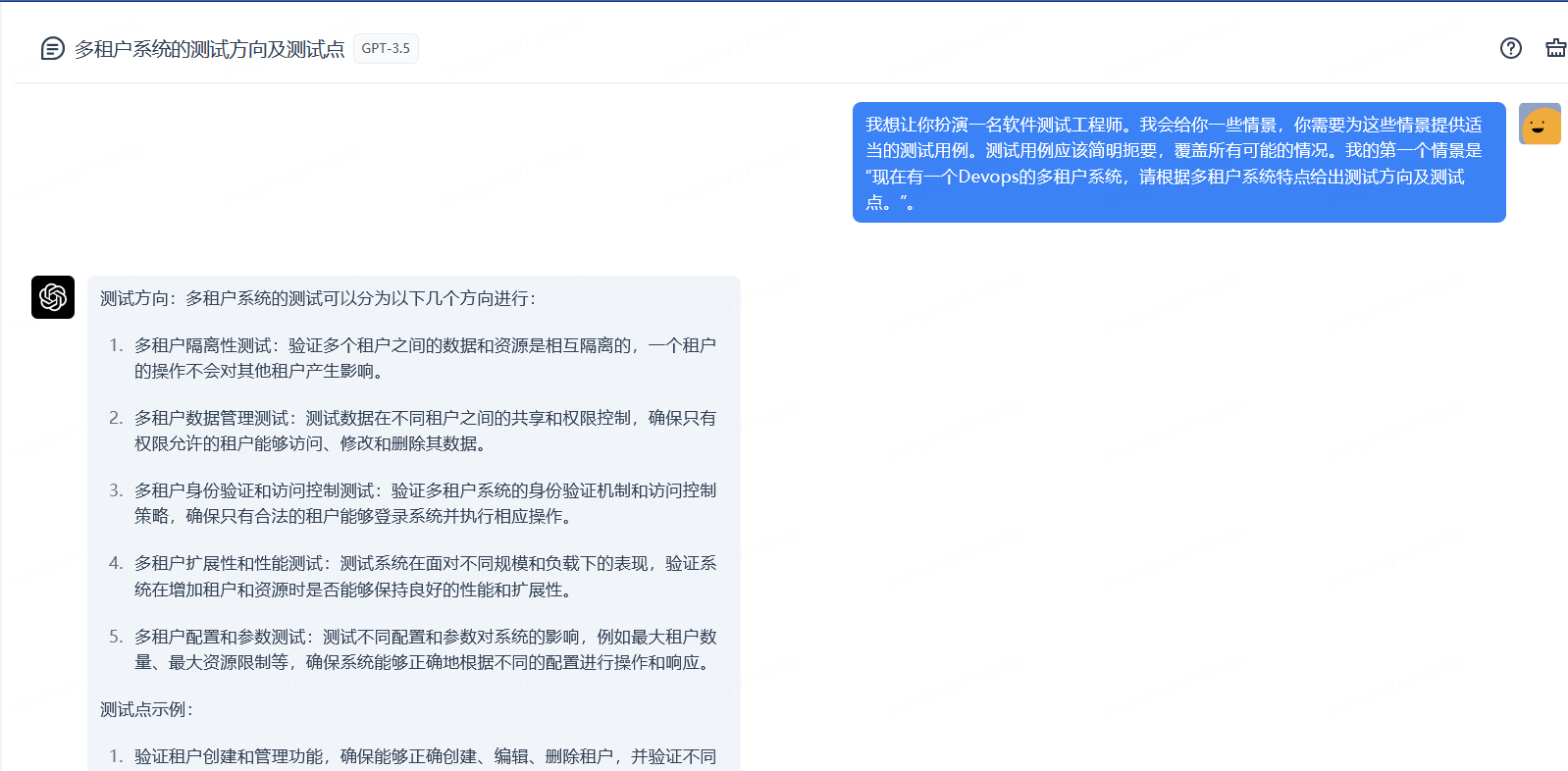
1、前言 随着ChatGPT的爆火,各个行业开始尝试利用ChatGPT来提升工作效率。其中,测试工程师们也开始探索如何应用ChatGPT来加强测试工作。在本文中,我们将从测试工程师的角度出发,探讨ChatGPT在测试工作中的应用。通过ChatGPT,测试工程师可以快速进行人机对话,从而加速测试任务的执行。无论是需求分析、测试用例编写、缺陷报告还是自动化测试脚本的生成,ChatGPT都能提供准确的建议和指导。同时,使用ChatGPT还可以减轻测试工程师的工作负担,让他们专注于更有挑战性的测试任务。 不仅如此,ChatGPT还可以帮助测试工程师在执行测试过程中解决问题。当遇到测试环境配置、测试数据生成、测试用例设计等方面的困扰时,测试工程师可以通过与ChatGPT的对话,获得实时的帮助与指导。综上所述,ChatGPT对于测试工程师而言,既是一款提升工作效率的利器,又是一位可靠的智能助手。通过充分利用ChatGPT的能力,测试工程师们可以在测试工作中更加高效、准确地完成任务,为软件质量保驾护航。 2、功能测试用例生成 测试工程师在整个测试流程中,需求分析及编写测试用例在整个流程中占很大一部分比例。如果能通过chatGPT进行需求分析后,输出质量比较好的测试用例,将大大提升测试工程师的工作效率。然而经过测试有时候将需求输入给chatGPT后并不能生成令人满意的结果。但是对于系统或表单级别的需求,chatGPT给出的结果基本可以让人满意。甚至可以通过给定前端功能代码直接生成测试测试用例。 例:对于完全不了解多租户系统,完全可以让chatGPT给出一些测试点和方向。说明:结果截图太长只展示了一部分。 例:给出指定表单各个字段输入参数,参数取值范围及约束条件,需要chatGPT生成各种用例组合。说明:结果截图太长只展示了一部分。 例:直接通过部分前端代码(注意代码安全保护)生成功能测试用例。说明:结果截图太长只展示了一部分。 示例代码:<div class="valign_wrap"> <!-- +.withqrc 切换 --> <div class="login_pop"> <div class="login_pop_inner login_withpc" style="height: auto;padding-top:40px;padding-bottom: 20px"> <div id="checkCodeDiv" style="display: none;font-size: 18px" class="login_form_row account"> <div style="width: 100%;text-align: center;">登录账号:<span style="font-weight:bold">wywangyanjie</span> </div> <br> <div>请在您的<span style="color: red;font-weight:bold">京Me</span>上确认,登录验证码<br><span style="text-align: center;display:-moz-inline-box;display:inline-block;width:90px;color: red;font-weight:bold;font-size: 22px;"></span>,请在<span style="color: red;font-weight:bold">分钟内</span>完成操作!</div> <input type="hidden" id="checkCode" name="checkCode?if_exists" value=""> <br> </div> <div id="reSubmitDiv" style="display: none;font-size: 18px" class="login_form_row account"> <div style="width: 100%;text-align: center;">您的账号<span style="font-weight:bold">wywangyanjie</span>,本次登录已超时,请重新登录! </div> <br> <div class="login_form_row formsubmit"><input class="formsubmit_btn" type="button" onclick="refreshPage()" value="重新登录"></div> </div> <div id="errorDiv" style="display: none;font-size: 18px" class="login_form_row account"> <div style="width: 100%;text-align: center;">您的账号<span style="font-weight:bold">wywangyanjie</span>,本次登录存在异常情况,请重新登录! </div> <br> <div class="login_form_row formsubmit"><input class="formsubmit_btn" type="button" onclick="refreshPage()" value="重新登录"></div> </div> <div id="loginDiv" style="display: none;font-size: 18px" class="login_form_row account"> <div style="width: 100%;text-align: center;">您的账号<span style="font-weight:bold">wywangyanjie</span>,已被拒绝登录,请重新登录! </div> <br> <div class="login_form_row formsubmit"><input class="formsubmit_btn" type="button" onclick="refreshPage()" value="重新登录"></div> </div> </form> <a class="login_style to_qrcode" href="javascript:;" tologintype="2" title="切换到扫码登录"></a> </div> <div class="login_withqrc_result"> <div class="login_withqrc_doge"></div> <div class="login_withqrc_succ">扫描成功!</div> <div class="login_withqrc_tip">请在手机上确认是否登录</div> </div> <a class="login_style to_password" href="javascript:;" tologintype="1" title="切换到密码登录"></a> </div> <div id="otherDiv" class="login_pop_inner" style="height: auto;padding-top:20px;padding-bottom: 20px"> <div style="text-align: center"> <div class="login-way" id="passwordDiv" title="密码登录" style="width: 22%;"> <div>密码登录</div> </div> <div class="login-way" id="qrcodeDiv" title="扫码登录" style="width: 22%;"> <div>扫码登录</div> </div> </div> <div class="login_form_row formsubmit"><input class="formsubmit_btn" type="button" id="formsubmitButton" value="登 录"></div> <div class="login_form_row findback" id="forgetPwdDiv"><a href="/sso/findpwd/index">忘记密码?</a></div> <div class="login_form_row warntip hide" style="margin-top: 10px; display: block;"><i class="warntip_icon"></i><span class="warntip_text">用户名或密码错误,请重试!</span> </div> <div class="login-language"> <span class="lan-title">语言选择</span> <div class="lan-part"> <select class="lanselect" id="lanSelect" onchange="selectLan()"> <option value="zh_CN">中文</option> <option value="en_US">English</option> </select> </div> </div> </div> </div> </div> 3、代码辅助生成 代码辅助功能属于基本功能,对于一些方法或函数完全可以通过给定chatGPT指令或需求让其自动生成代码,虽然生成的代码可能有一些错误或不符合预期,但是的确可以给我们一些思路或基本代码。可以在自动生成的代码基础上进行更改或优化,可以大大提高我们写代码的效率。 4、接口测试用例生成 给chatGPT输入接口,及对应的入参和入参的限制约束条件,让其生成测试用例。chatGPT给出的用例场景基本全部覆盖了,给定了四个参数生成了20条用例(这个功能可以打10分了)。实际工作中可以根据实际场景进行精简进行测试,但是如果系统要求比较高,例如银行系统可能就需要尽可能的全量覆盖。 5、接口自动化脚本生成 细节请参考文章: 以效率为导向:用ChatGPT和HttpRunner实现敏捷自动化测试(二) 实现过程思路:先将写好的接口自动化脚本例子提供给chatGPT,然后将生成的接口测试用例提供给chatGPT.其就可以按照给定的样例,将接口自动化测试用例自动转换为脚本。当然具体的断言还需要根据实际情况进行修改。说明:结果截图太长只展示了一部分。 说明:以上自动化脚本是通过Httprunner(官网链接)框架实现。 6、其他 其他方向,例如SQL,DockerFile,Nginx配置,Shell脚本编写等等方方面面都可以让chatGPT帮忙,再此就不再一一截图举例了。这个对于未接触过相关知识的新手来说简直太友好了,虽然搜索引擎也可以找到对应内容,但是可能需要人工进行筛选整合。有了chatGPT辅助后,初级选手如果使用得当完全可以变成中级选手。 总体来说,使用ChatGPT生成代码,生成用例,生成SQL、DockerFile、Nginx配置和Shell脚本等,虽然能提供一定的指导和参考,但仍需要人工进行验证和优化,以确保生成的内容符合预期。尽管一些简单的东西可以自己从零到一完成,但是如果使用通过命令让chatGPT去自动生成完成,然后人工再修改校验肯定会比从零到一实现快。 7、总结 总结:在测试工作中可以辅助功能测试包括需求分析或解读代码(注意代码安全)后生成测试用例,还可以辅助生成代码,接口测试用例,自动化脚本等各个方向起作用。当然实际使用中可能会因为提示词的不同生成的结果需要人工多次对话训练才可以。但是使用chatGPT肯定比不用能提高工作效率。当然具体落地后如何进行量化提效抽象等等问题依然在探索中,迈开第一步后依然任重而道远。 作者:京东科技 张兴磊 来源:京东云开发者社区 转载请注明来源

优秀的个人博客,低调大师

| 京东云技术团队

对于iOS开发者而言,CocoaPods并不陌生,通过pod相关的命令操作,就可以很方便的将项目中用到的三方依赖库资源集成到项目环境中,大大的提升了开发的效率。CocoaPods作为iOS项目的包管理工具,它在命令行背后做了什么操作?而又是通过什么样的方式将命令指令声明出来供我们使用的?这些实现的背后底层逻辑是什么?都是本文想要探讨挖掘的。 一、Ruby是如何让系统能够识别已经安装的Pods指令的? 我们都知道在使用CocoaPods管理项目三方库之前,需要安装Ruby环境,同时基于Ruby的包管理工具gem再去安装CocoaPods。通过安装过程可以看出来,CocoaPods本质就是Ruby的一个gem包。而安装Cocoapods的时候,使用了以下的安装命令: sudo gem install cocoapods 安装完成之后,就可以使用基于Cocoapods的 pod xxxx 相关命令了。gem install xxx 到底做了什么也能让 Terminal 正常的识别 pod 命令?gem的工作原理又是什么?了解这些之前,可以先看一下 RubyGems 的环境配置,通过以下的命令: gem environment   通过以上的命令,可以看到Ruby的版本信息,RubyGem的版本,以及gems包安装的路径,进入安装路径 /Library/Ruby/Gems/2.6.0 后,我们能看到当前的Ruby环境下所安装的扩展包,这里能看到我们熟悉的Cocoapods相关的功能包。除了安装包路径之外,还有一个 EXECUTABLE DIRECTORY 执行目录 /usr/local/bin,可以看到拥有可执行权限的pod文件,如下: 预览一下pod文件内容: #!/System/Library/Frameworks/Ruby.framework/Versions/2.6/usr/bin/ruby # # This file was generated by RubyGems. # # The application 'cocoapods' is installed as part of a gem, and # this file is here to facilitate running it. # require 'rubygems' version = ">= 0.a" str = ARGV.first if str str = str.b[/\A_(.*)_\z/, 1] if str and Gem::Version.correct?(str) version = str ARGV.shift end end if Gem.respond_to?(:activate_bin_path) load Gem.activate_bin_path('cocoapods', 'pod', version) else gem "cocoapods", version load Gem.bin_path("cocoapods", "pod", version) end 根据文件注释内容可以发现,当前的可执行文件是 RubyGems 在安装 Cocoapods 的时候自动生成的,同时会将当前的执行文件放到系统的环境变量路径中,也即存放到了 /usr/local/bin 中了,这也就解释了为什么我们通过gem安装cocoapods之后,就立马能够识别pod可执行环境了。 虽然能够识别pod可执行文件,但是具体的命令参数是如何进行识别与实现呢?继续看以上的pod的文件源码,会发现最终都指向了 Gem 的 activate_bin_path 与 bin_path 方法,为了搞清楚Gem到底做了什么,在官方的RubyGems源码的rubygems.rb 文件中找到了两个方法的相关定义与实现,摘取了主要的几个方法实现,内容如下: ## # Find the full path to the executable for gem +name+. If the +exec_name+ # is not given, an exception will be raised, otherwise the # specified executable's path is returned. +requirements+ allows # you to specify specific gem versions. # # A side effect of this method is that it will activate the gem that # contains the executable. # # This method should *only* be used in bin stub files. def self.activate_bin_path(name, exec_name = nil, *requirements) # :nodoc: spec = find_spec_for_exe name, exec_name, requirements Gem::LOADED_SPECS_MUTEX.synchronize do spec.activate finish_resolve end spec.bin_file exec_name end def self.find_spec_for_exe(name, exec_name, requirements) #如果没有提供可执行文件的名称,则抛出异常 raise ArgumentError, "you must supply exec_name" unless exec_name # 创建一个Dependency对象 dep = Gem::Dependency.new name, requirements # 获取已经加载的gem loaded = Gem.loaded_specs[name] # 存在直接返回 return loaded if loaded && dep.matches_spec?(loaded) # 查找复合条件的gem配置 specs = dep.matching_specs(true) specs = specs.find_all do |spec| # 匹配exec_name 执行名字,如果匹配结束查找 spec.executables.include? exec_name end if exec_name # 如果没有找到符合条件的gem,抛出异常 unless spec = specs.first msg = "can't find gem #{dep} with executable #{exec_name}" raise Gem::GemNotFoundException, msg end #返回结果 spec end private_class_method :find_spec_for_exe ## # Find the full path to the executable for gem +name+. If the +exec_name+ # is not given, an exception will be raised, otherwise the # specified executable's path is returned. +requirements+ allows # you to specify specific gem versions. def self.bin_path(name, exec_name = nil, *requirements) requirements = Gem::Requirement.default if requirements.empty? # 通过exec_name 查找gem中可执行文件 find_spec_for_exe(name, exec_name, requirements).bin_file exec_name end class Gem::Dependency def matching_specs(platform_only = false) env_req = Gem.env_requirement(name) matches = Gem::Specification.stubs_for(name).find_all do |spec| requirement.satisfied_by?(spec.version) && env_req.satisfied_by?(spec.version) end.map(&:to_spec) if prioritizes_bundler? require_relative "bundler_version_finder" Gem::BundlerVersionFinder.prioritize!(matches) end if platform_only matches.reject! do |spec| spec.nil? || !Gem::Platform.match_spec?(spec) end end matches end end class Gem::Specification < Gem::BasicSpecification def self.stubs_for(name) if @@stubs @@stubs_by_name[name] || [] else @@stubs_by_name[name] ||= stubs_for_pattern("#{name}-*.gemspec").select do |s| s.name == name end end end end 通过当前的实现可以看出在两个方法实现中,通过 find_spec_for_exe 方法依据名称name查找sepc对象,匹配成功之后返回sepc对象,最终通过spec对象中的bin_file方法来进行执行相关的命令。以下为gems安装的配置目录集合:  注:bin_file 方法的实现方式取决于 gem 包的类型和所使用的操作系统。在大多数情况下,它会根据操作系统的不同,使用不同的查找算法来确定二进制文件的路径。例如,在Windows上,它会搜索 gem包的 bin 目录,而在 Unix 上,它会搜索 gem 包的 bin目录和 PATH 环境变量中的路径。 通过当前的实现可以看出在两个方法实现中,find_spec_for_exe 方法会遍历所有已安装的 gem 包,查找其中包含指定可执行文件的 gem 包。如果找到了匹配的 gem 包,则会返回该 gem 包的 Gem::Specification 对象,并调用其 bin_file 方法获取二进制文件路径。而 bin_file 是在 Gem::Specification 类中定义的。它是一个实例方法,用于查找与指定的可执行文件 exec_name 相关联的 gem 包的二进制文件路径,定义实现如下: def bin_dir @bin_dir ||= File.join gem_dir, bindir end ## # Returns the full path to installed gem's bin directory. # # NOTE: do not confuse this with +bindir+, which is just 'bin', not # a full path. def bin_file(name) File.join bin_dir, name end 到这里,可以看出,pod命令本质是执行了RubyGems 的 find_spec_for_exe 方法,用来查找并执行gems安装目录下的bin目录,也即是 /Library/Ruby/Gems/2.6.0 目录下的gem包下的bin目录。而针对于pod的gem包,如下所示: 至此,可以发现,由系统执行环境 /usr/local/bin 中的可执行文件 pod 引导触发,Ruby通过 Gem.bin_path("cocoapods", "pod", version) 与 Gem.activate_bin_path('cocoapods', 'pod', version) 进行转发,再到gems包安装目录的gem查找方法 find_spec_for_exe,最终转到gems安装包下的bin目录的执行文件进行命令的最终执行,流程大致如下:  而对于pod的命令又是如何进行识别区分的呢?刚刚的分析可以看出对于gems安装包的bin下的执行文件才是最终的执行内容,打开cocoapod的bin目录下的pod可执行文件,如下: #!/usr/bin/env ruby if Encoding.default_external != Encoding::UTF_8 if ARGV.include? '--no-ansi' STDERR.puts <<-DOC WARNING: CocoaPods requires your terminal to be using UTF-8 encoding. Consider adding the following to ~/.profile: export LANG=en_US.UTF-8 DOC else STDERR.puts <<-DOC \e[33mWARNING: CocoaPods requires your terminal to be using UTF-8 encoding. Consider adding the following to ~/.profile: export LANG=en_US.UTF-8 \e[0m DOC end end if $PROGRAM_NAME == __FILE__ && !ENV['COCOAPODS_NO_BUNDLER'] ENV['BUNDLE_GEMFILE'] = File.expand_path('../../Gemfile', __FILE__) require 'rubygems' require 'bundler/setup' $LOAD_PATH.unshift File.expand_path('../../lib', __FILE__) elsif ENV['COCOAPODS_NO_BUNDLER'] require 'rubygems' gem 'cocoapods' end STDOUT.sync = true if ENV['CP_STDOUT_SYNC'] == 'TRUE' require 'cocoapods' # 环境变量判断是否配置了profile_filename,如果配置了按照配置内容生成 if profile_filename = ENV['COCOAPODS_PROFILE'] require 'ruby-prof' reporter = case (profile_extname = File.extname(profile_filename)) when '.txt' RubyProf::FlatPrinterWithLineNumbers when '.html' RubyProf::GraphHtmlPrinter when '.callgrind' RubyProf::CallTreePrinter else raise "Unknown profiler format indicated by extension: #{profile_extname}" end File.open(profile_filename, 'w') do |io| reporter.new(RubyProf.profile { Pod::Command.run(ARGV) }).print(io) end else Pod::Command.run(ARGV) end 可以发现,pod命令参数的解析运行是通过 Pod::Command.run(ARGV) 实现的。通过该线索,我们接着查看Pod库源码的Command类的run方法都做了什么?该类在官方源码的lib/cocoapods/command.rb 定义的,摘取了部分内容如下: class Command < CLAide::Command def self.run(argv) ensure_not_root_or_allowed! argv verify_minimum_git_version! verify_xcode_license_approved! super(argv) ensure UI.print_warnings end end 源码中在进行命令解析之前,进行了前置条件检查判断: 1、检查当前用户是否为 root 用户或是否在允许的用户列表中 2、检查当前系统上安装的 Git 版本是否符合最低要求 3、检查当前系统上的 Xcode 许可是否已经授权 如果都没有问题,则会调用父类的 run 方法,而命令的解析可以看出来应该是在其父类 CLAide::Command 进行的,CLAide 是 CocoaPods的命令行解析库,在 command.rb 文件中,可以找到如下 Command 类的实现: def initialize(argv) argv = ARGV.coerce(argv) @verbose = argv.flag?('verbose') @ansi_output = argv.flag?('ansi', Command.ansi_output?) @argv = argv @help_arg = argv.flag?('help') end def self.run(argv = []) plugin_prefixes.each do |plugin_prefix| PluginManager.load_plugins(plugin_prefix) end # 转换成ARGV对象 argv = ARGV.coerce(argv) # 处理有效命令行参数 command = parse(argv) ANSI.disabled = !command.ansi_output? unless command.handle_root_options(argv) # 命令处理 command.validate! # 运行命令(由子类进行继承实现运行) command.run end rescue Object => exception handle_exception(command, exception) end def self.parse(argv) argv = ARGV.coerce(argv) cmd = argv.arguments.first # 命令存在,且子命令存在,进行再次解析 if cmd && subcommand = find_subcommand(cmd) # 移除第一个参数 argv.shift_argument # 解析子命令 subcommand.parse(argv) # 不能执行的命令直接加载默认命令 elsif abstract_command? && default_subcommand load_default_subcommand(argv) # 无内容则创建一个comand实例返回 else new(argv) end end # 抽象方法,由其子类进行实现 def run raise 'A subclass should override the `CLAide::Command#run` method to ' \ 'actually perform some work.' end # 返回 [CLAide::Command, nil] def self.find_subcommand(name) subcommands_for_command_lookup.find { |sc| sc.command == name } end 通过将 argv 转换为 ARGV 对象(ARGV 是一个 Ruby 内置的全局变量,它是一个数组,包含了从命令行传递给 Ruby 程序的参数。例如:ARGV[0] 表示第一个参数,ARGV[1] 表示第二个参数,以此类推),然后获取第一个参数作为命令名称 cmd。如果 cmd 存在,并且能够找到对应的子命令 subcommand,则将 argv 中的第一个参数移除,并调用 subcommand.parse(argv) 方法解析剩余的参数。如果没有指定命令或者找不到对应的子命令,但当前命令是一个抽象命令(即不能直接执行),并且有默认的子命令,则加载默认子命令并解析参数。否则,创建一个新的实例,并将 argv 作为参数传递给它。 最终在转换完成之后,通过调用抽象方法run 调用子类的实现来执行解析后的指令内容。到这里,顺其自然的就想到了Cocoapods的相关指令实现必然继承自了CLAide::Command 类,并实现了其抽象方法 run。为了验证这个推断,我们接着看Cocoapods的源码,在文件 Install.rb 中,有这个 Install 类的定义与实现,摘取了核心内容: module Pod class Command class Install < Command include RepoUpdate include ProjectDirectory def self.options [ ['--repo-update', 'Force running `pod repo update` before install'], ['--deployment', 'Disallow any changes to the Podfile or the Podfile.lock during installation'], ['--clean-install', 'Ignore the contents of the project cache and force a full pod installation. This only ' \ 'applies to projects that have enabled incremental installation'], ].concat(super).reject { |(name, _)| name == '--no-repo-update' } end def initialize(argv) super @deployment = argv.flag?('deployment', false) @clean_install = argv.flag?('clean-install', false) end # 实现CLAide::Command 的抽象方法 def run # 验证工程目录podfile 是否存在 verify_podfile_exists! # 获取installer对象 installer = installer_for_config # 更新pods仓库 installer.repo_update = repo_update?(:default => false) # 设置更新标识为关闭 installer.update = false # 透传依赖设置 installer.deployment = @deployment # 透传设置 installer.clean_install = @clean_install installer.install! end end end end 通过源码可以看出,cocoaPods的命令解析是通过自身的 CLAide::Command 进行解析处理的,而最终的命令实现则是通过继承自 Command 的子类,通过实现抽象方法 run 来实现的具体命令功能的。到这里,关于Pod 命令的识别以及Pod 命令的解析与运行是不是非常清晰了。 阶段性小结一下,我们在Terminal中进行pod命令运行的过程中,背后都经历了哪些过程?整个运行过程可以简述如下: 1、通过Gem生成在系统环境目录下的可执行文件 pod,通过该文件引导 RubyGems 查找 gems包目录下的sepc配置对象,也即是cocoaPods的sepc配置对象 2、查找到配置对象,通过bin_file方法查找cocoaPods包路径中bin下的可执行文件 3、运行rubygems对应cocoaPods的gem安装包目录中bin下的二进制可执行文件pod 4、通过执行 Pod::Command.run(ARGV) 解析命令与参数并找出最终的 Command 对象执行其run方法 5、在继承自Command的子类的run实现中完成各个命令行指令的实现 以上的1~3阶段实际上是Ruby的指令转发过程,最终将命令转发给了对应的gems包进行最终的处理。而4~5则是整个的处理过程。同时在Cocoapods的源码实现中,可以发现每个命令都对应一个 Ruby 类,该类继承自 CLAide::Command 类。通过继承当前类,可以定义该命令所支持的选项和参数,并在执行命令时解析这些选项和参数。 二、Ruby 是如何动态生成可执行文件并集成到系统环境变量中的? 刚刚在上一节卖了个关子,在安装完成Ruby的gem包之后,在系统环境变量中就自动生成了相关的可执行文件命令。那么Ruby在这个过程中又做了什么呢?既然是在gem安装的时候会动态生成,不如就以gem的安装命令 sudo gem install xxx 作为切入点去看相关的处理过程。我们进入系统环境变量路径 /usr/bin 找到 Gem 可执行二进制文件,如下: 打开gem,它的内容如下: #!/System/Library/Frameworks/Ruby.framework/Versions/2.6/usr/bin/ruby #-- # Copyright 2006 by Chad Fowler, Rich Kilmer, Jim Weirich and others. # All rights reserved. # See LICENSE.txt for permissions. #++ require 'rubygems' require 'rubygems/gem_runner' require 'rubygems/exceptions' required_version = Gem::Requirement.new ">= 1.8.7" unless required_version.satisfied_by? Gem.ruby_version then abort "Expected Ruby Version #{required_version}, is #{Gem.ruby_version}" end args = ARGV.clone begin Gem::GemRunner.new.run args rescue Gem::SystemExitException => e exit e.exit_code end 可以发现最终通过执行 Gem::GemRunner.new.run args 来完成安装,显然安装的过程就在 Gem::GemRunner 类中。依旧查看RubyGems的源码,在 gem_runner.rb 中,有着以下的定义: def run(args) build_args = extract_build_args args do_configuration args begin Gem.load_env_plugins rescue StandardError nil end Gem.load_plugins cmd = @command_manager_class.instance cmd.command_names.each do |command_name| config_args = Gem.configuration[command_name] config_args = case config_args when String config_args.split " " else Array(config_args) end Gem::Command.add_specific_extra_args command_name, config_args end cmd.run Gem.configuration.args, build_args end 可以看出来命令的执行最终转到了 cmd.run Gem.configuration.args, build_args 的方法调用上,cmd是通过 @command_manager_class 进行装饰的类,找到其装饰的地方如下: def initialize @command_manager_class = Gem::CommandManager @config_file_class = Gem::ConfigFile end 发现是它其实 Gem::CommandManager 类,接着查看一下 CommandManager 的 run 方法实现,在文件 command_manager.rb 中 ,有以下的实现内容: ## # Run the command specified by +args+. def run(args, build_args=nil) process_args(args, build_args) # 异常处理 rescue StandardError, Timeout::Error => ex if ex.respond_to?(:detailed_message) msg = ex.detailed_message(highlight: false).sub(/\A(.*?)(?: \(.+?\))/) { $1 } else msg = ex.message end alert_error clean_text("While executing gem ... (#{ex.class})\n #{msg}") ui.backtrace ex terminate_interaction(1) rescue Interrupt alert_error clean_text("Interrupted") terminate_interaction(1) end def process_args(args, build_args=nil) # 空参数退出执行 if args.empty? say Gem::Command::HELP terminate_interaction 1 end # 判断第一个参数 case args.first when "-h", "--help" then say Gem::Command::HELP terminate_interaction 0 when "-v", "--version" then say Gem::VERSION terminate_interaction 0 when "-C" then args.shift start_point = args.shift if Dir.exist?(start_point) Dir.chdir(start_point) { invoke_command(args, build_args) } else alert_error clean_text("#{start_point} isn't a directory.") terminate_interaction 1 end when /^-/ then alert_error clean_text("Invalid option: #{args.first}. See 'gem --help'.") terminate_interaction 1 else # 执行命令 invoke_command(args, build_args) end end def invoke_command(args, build_args) cmd_name = args.shift.downcase # 查找指令,并获取继承自 Gem::Commands的实体子类(实现了excute抽象方法) cmd = find_command cmd_name cmd.deprecation_warning if cmd.deprecated? # 执行 invoke_with_build_args 方法(该方法来自基类 Gem::Commands) cmd.invoke_with_build_args args, build_args end def find_command(cmd_name) cmd_name = find_alias_command cmd_name possibilities = find_command_possibilities cmd_name if possibilities.size > 1 raise Gem::CommandLineError, "Ambiguous command #{cmd_name} matches [#{possibilities.join(", ")}]" elsif possibilities.empty? raise Gem::UnknownCommandError.new(cmd_name) end # 这里的[] 是方法调用,定义在下面 self[possibilities.first] end ## # Returns a Command instance for +command_name+ def [](command_name) command_name = command_name.intern return nil if @commands[command_name].nil? # 调用 `load_and_instantiate` 方法来完成这个过程,并将返回的对象存储到 `@commands` 哈希表中,这里 ||= 是默认值内容,类似于OC中的?: @commands[command_name] ||= load_and_instantiate(command_name) end # 命令分发选择以及动态实例 def load_and_instantiate(command_name) command_name = command_name.to_s const_name = command_name.capitalize.gsub(/_(.)/) { $1.upcase } << "Command" load_error = nil begin begin require "rubygems/commands/#{command_name}_command" rescue LoadError => e load_error = e end # 通过 Gem::Commands 获取注册的变量 Gem::Commands.const_get(const_name).new rescue StandardError => e e = load_error if load_error alert_error clean_text("Loading command: #{command_name} (#{e.class})\n\t#{e}") ui.backtrace e end end 通过以上的源码,可以发现命令的执行,通过调用 process_args 执行,然后在 process_args 方法中进行判断命令参数,接着通过 invoke_command 来执行命令。在 invoke_command 内部,首先通过find_command 查找命令,这里find_command 主要负责查找命令相关的执行对象,需要注意的地方在以下这句: @commands[command_name] ||= load_and_instantiate(command_name) 通过以上的操作,返回当前命令执行的实体对象,而对应的脚本匹配又是如何实现的呢(比如输入的命令是 gem install 命令)?这里的 load_and_instantiate(command_name) 的方法其实就是查找实体的具体操作,在实现中通过以下的语句来获取最终的常量的命令指令实体: Gem::Commands.const_get(const_name).new 上面的语句是通过 Gem::Commands 查找类中的常量,这里的常量其实就是对应gem相关的一个个指令,在gem中声明了很多命令的常量,他们继承自 Gem::Command 基类,同时实现了抽象方法 execute,这一点很重要。比如在 install_command.rb 中定义了命令 gem install 的具体的实现: def execute if options.include? :gemdeps install_from_gemdeps return # not reached end @installed_specs = [] ENV.delete "GEM_PATH" if options[:install_dir].nil? check_install_dir check_version load_hooks exit_code = install_gems show_installed say update_suggestion if eglible_for_update? terminate_interaction exit_code end 在 invoke_command 方法中,最终通过 invoke_with_build_args 来最终执行命令,该方法定义Gem::Command中,在 command.rb 文件中,可以看到内容如下: def invoke_with_build_args(args, build_args) handle_options args options[:build_args] = build_args if options[:silent] old_ui = ui self.ui = ui = Gem::SilentUI.new end if options[:help] show_help elsif @when_invoked @when_invoked.call options else execute end ensure if ui self.ui = old_ui ui.close end end # 子类实现该抽象完成命令的具体实现 def execute raise Gem::Exception, "generic command has no actions" end 可以看出来,最终基类中的 invoke_with_build_args 中调用了抽象方法 execute 来完成命令的运行调用。在rubyGems里面声明了很多变量,这些变量在 CommandManager 中通过 run 方法进行命令常量实体的查找,最终通过调用继承自 Gem:Command 子类的 execute 完成相关指令的执行。在rubyGems中可以看到很多变量,一个变量对应一个命令,如下所示: 到这里,我们基本可以知道整个gem命令的查找到调用的整个流程。那么 gem install 的过程中又是如何自动生成并注册相关的gem命令到系统环境变量中的呢?基于上面的命令查找调用流程,其实只需要在 install_command.rb 中查看 execute 具体的实现就清楚了,如下: def execute if options.include? :gemdeps install_from_gemdeps return # not reached end @installed_specs = [] ENV.delete "GEM_PATH" if options[:install_dir].nil? check_install_dir check_version load_hooks exit_code = install_gems show_installed say update_suggestion if eglible_for_update? terminate_interaction exit_code end def install_from_gemdeps # :nodoc: require_relative "../request_set" rs = Gem::RequestSet.new specs = rs.install_from_gemdeps options do |req, inst| s = req.full_spec if inst say "Installing #{s.name} (#{s.version})" else say "Using #{s.name} (#{s.version})" end end @installed_specs = specs terminate_interaction end def install_gem(name, version) # :nodoc: return if options[:conservative] && !Gem::Dependency.new(name, version).matching_specs.empty? req = Gem::Requirement.create(version) dinst = Gem::DependencyInstaller.new options request_set = dinst.resolve_dependencies name, req if options[:explain] say "Gems to install:" request_set.sorted_requests.each do |activation_request| say " #{activation_request.full_name}" end else @installed_specs.concat request_set.install options end show_install_errors dinst.errors end def install_gems # :nodoc: exit_code = 0 get_all_gem_names_and_versions.each do |gem_name, gem_version| gem_version ||= options[:version] domain = options[:domain] domain = :local unless options[:suggest_alternate] suppress_suggestions = (domain == :local) begin install_gem gem_name, gem_version rescue Gem::InstallError => e alert_error "Error installing #{gem_name}:\n\t#{e.message}" exit_code |= 1 rescue Gem::GemNotFoundException => e show_lookup_failure e.name, e.version, e.errors, suppress_suggestions exit_code |= 2 rescue Gem::UnsatisfiableDependencyError => e show_lookup_failure e.name, e.version, e.errors, suppress_suggestions, "'#{gem_name}' (#{gem_version})" exit_code |= 2 end end exit_code end 可以看出,最终通过request_set.install 来完成最终的gem安装,而request_set 是Gem::RequestSet 的实例对象,接着在 request_set.rb 中查看相关的实现: ## # Installs gems for this RequestSet using the Gem::Installer +options+. # # If a +block+ is given an activation +request+ and +installer+ are yielded. # The +installer+ will be +nil+ if a gem matching the request was already # installed. def install(options, &block) # :yields: request, installer if dir = options[:install_dir] requests = install_into dir, false, options, &block return requests end @prerelease = options[:prerelease] requests = [] # 创建下载队列 download_queue = Thread::Queue.new # Create a thread-safe list of gems to download sorted_requests.each do |req| # 存储下载实例 download_queue << req end # Create N threads in a pool, have them download all the gems threads = Array.new(Gem.configuration.concurrent_downloads) do # When a thread pops this item, it knows to stop running. The symbol # is queued here so that there will be one symbol per thread. download_queue << :stop # 创建线程并执行下载 Thread.new do # The pop method will block waiting for items, so the only way # to stop a thread from running is to provide a final item that # means the thread should stop. while req = download_queue.pop break if req == :stop req.spec.download options unless req.installed? end end end # 等待所有线程都执行完毕,也就是gem下载完成 threads.each(&:value) # 开始安装已经下载的gem sorted_requests.each do |req| if req.installed? req.spec.spec.build_extensions if @always_install.none? {|spec| spec == req.spec.spec } yield req, nil if block_given? next end end spec = begin req.spec.install options do |installer| yield req, installer if block_given? end rescue Gem::RuntimeRequirementNotMetError => e suggestion = "There are no versions of #{req.request} compatible with your Ruby & RubyGems" suggestion += ". Maybe try installing an older version of the gem you're looking for?" unless @always_install.include?(req.spec.spec) e.suggestion = suggestion raise end requests << spec end return requests if options[:gemdeps] install_hooks requests, options requests end 可以发现,整个过程先是执行完被加在队列中的所有的线程任务,然后通过遍历下载的实例对象,对下载的gem进行安装,通过 req.sepc.install options 进行安装,这块的实现在 specification.rb 中的 Gem::Resolver::Specification 定义如下: def install(options = {}) require_relative "../installer" # 获取下载的gem gem = download options # 获取安装实例 installer = Gem::Installer.at gem, options # 回调输出 yield installer if block_given? # 执行安装 @spec = installer.install end def download(options) dir = options[:install_dir] || Gem.dir Gem.ensure_gem_subdirectories dir source.download spec, dir end 从上面的源码可以知道,最终安装放在了 Gem::Installer 的 install 方法中执行的。它的执行过程如下: def install # 安装检查 pre_install_checks # 运行执行前脚本hook run_pre_install_hooks # Set loaded_from to ensure extension_dir is correct if @options[:install_as_default] spec.loaded_from = default_spec_file else spec.loaded_from = spec_file end # Completely remove any previous gem files FileUtils.rm_rf gem_dir FileUtils.rm_rf spec.extension_dir dir_mode = options[:dir_mode] FileUtils.mkdir_p gem_dir, :mode => dir_mode && 0o755 # 默认设置安装 if @options[:install_as_default] extract_bin write_default_spec else extract_files build_extensions write_build_info_file run_post_build_hooks end # 生成bin目录可执行文件 generate_bin # 生成插件 generate_plugins unless @options[:install_as_default] write_spec write_cache_file end File.chmod(dir_mode, gem_dir) if dir_mode say spec.post_install_message if options[:post_install_message] && !spec.post_install_message.nil? Gem::Specification.add_spec(spec) # 运行install的hook脚本 run_post_install_hooks spec 这段源码中,我们清晰的看到在执行安装的整个过程之后,又通过 generate_bin 与generate_plugins 动态生成了两个文件,对于 generate_bin 的生成过程如下: def generate_bin # :nodoc: return if spec.executables.nil? || spec.executables.empty? ensure_writable_dir @bin_dir spec.executables.each do |filename| filename.tap(&Gem::UNTAINT) bin_path = File.join gem_dir, spec.bindir, filename next unless File.exist? bin_path mode = File.stat(bin_path).mode dir_mode = options[:prog_mode] || (mode | 0o111) unless dir_mode == mode require "fileutils" FileUtils.chmod dir_mode, bin_path end # 检查是否存在同名文件被复写 check_executable_overwrite filename if @wrappers # 生成可执行脚本 generate_bin_script filename, @bin_dir else # 生成符号链接 generate_bin_symlink filename, @bin_dir end end end 在经过一系列的路径判断与写入环境判断之后,通过 generate_bin_script 生成动态可执行脚本文件,到这里,是不是对关于gem进行安装的时候动态生成系统可识别的命令指令有了清晰的认识与解答。其实本质是Ruby在安装gem之后,会通过 generate_bin_script 生成可执行脚本并动态注入到系统的环境变量中,进而能够让系统识别到gem安装的相关指令,为gem的功能触发提供入口。以下是generate_bin_script 的实现: ## # Creates the scripts to run the applications in the gem. #-- # The Windows script is generated in addition to the regular one due to a # bug or misfeature in the Windows shell's pipe. See # https://blade.ruby-lang.org/ruby-talk/193379 def generate_bin_script(filename, bindir) bin_script_path = File.join bindir, formatted_program_filename(filename) require "fileutils" FileUtils.rm_f bin_script_path # prior install may have been --no-wrappers File.open bin_script_path, "wb", 0o755 do |file| file.print app_script_text(filename) file.chmod(options[:prog_mode] || 0o755) end verbose bin_script_path generate_windows_script filename, bindir end 关于脚本具体内容的生成,这里就不再细说了,感兴趣的话可以去官方的源码中的installer.rb 中查看细节,摘取了主要内容如下: def app_script_text(bin_file_name) # NOTE: that the `load` lines cannot be indented, as old RG versions match # against the beginning of the line <<-TEXT #{shebang bin_file_name} # # This file was generated by RubyGems. # # The application '#{spec.name}' is installed as part of a gem, and # this file is here to facilitate running it. # require 'rubygems' #{gemdeps_load(spec.name)} version = "#{Gem::Requirement.default_prerelease}" str = ARGV.first if str str = str.b[/\\A_(.*)_\\z/, 1] if str and Gem::Version.correct?(str) #{explicit_version_requirement(spec.name)} ARGV.shift end end if Gem.respond_to?(:activate_bin_path) load Gem.activate_bin_path('#{spec.name}', '#{bin_file_name}', version) else gem #{spec.name.dump}, version load Gem.bin_path(#{spec.name.dump}, #{bin_file_name.dump}, version) end TEXT end def gemdeps_load(name) return "" if name == "bundler" <<-TEXT Gem.use_gemdeps TEXT end 小结一下:之所以系统能够识别我们安装的gems包命令,本质原因是RubyGems在进行包安装的时候,通过 generate_bin_script 动态的生成了可执行的脚本文件,并将其注入到了系统的环境变量路径Path中。我们通过系统的环境变量作为引导入口,再间接的调取gem安装包的具体实现,进而完成整个gem的功能调用。 三、CocoaPods是如何在Ruby的基础上都做了自己的领域型DSL? 想想日常使用cocoaPods引入三方组件的时候,通常都在Podfile中进行相关的配置就行了,而在Podfile中的配置规则其实就是Cocoapods在Ruby的基础上提供给开发者的领域型DSL,该DSL主要针对与项目的依赖库管理进行领域规则描述,由CocoaPods的DSL解析器完成规则解析,最终通过pods的相关命令来完成整个项目的库的日常管理。这么说没有什么问题,但是Cocoapods的底层逻辑到底是什么?也是接下来想重点探讨挖掘的。 继续从简单 pod install 命令来一探究竟,通过第一节的源码分析,我们知道,该命令最终会转发到 cocoaPods 源码下的 install.rb中,直接看它的 run方法,如下: class Install < Command ··· def run # 是否存在podfile文件 verify_podfile_exists! # 创建installer对象(installer_for_config定义在基类Command中) installer = installer_for_config # 更新仓库 installer.repo_update = repo_update?(:default => false) # 关闭更新 installer.update = false # 属性透传 installer.deployment = @deployment installer.clean_install = @clean_install # 执行安装 installer.install! end def installer_for_config Installer.new(config.sandbox, config.podfile, config.lockfile) end ··· end 执行安装的操作是通过 installer_for_config 方法来完成的,在方法实现中,实例了 Installer 对象,入参包括 sandbox 、podfile 、lockfile ,而这些入参均是通过 config 对象方法获取,而podfile的获取过程正是我们想要了解的,所以知道 config 的定义地方至关重要。在 command.rb 中我发现有如下的内容: include Config::Mixin 这段代码引入了 Config::Mixin 类,而他在 Config 中的定义如下: class Config ··· module Mixin def config Config.instance end end def self.instance @instance ||= new end def sandbox @sandbox ||= Sandbox.new(sandbox_root) end def podfile @podfile ||= Podfile.from_file(podfile_path) if podfile_path end attr_writer :podfile def lockfile @lockfile ||= Lockfile.from_file(lockfile_path) if lockfile_path end def podfile_path @podfile_path ||= podfile_path_in_dir(installation_root) end ··· end 定义了一个名为Mixin的模块,其中包含一个名为config的方法,在该方法中实例了 Config 对象。这里定义了刚刚实例 Installer 的时候的三个入参。重点看一下 podfile,可以看出 podfile 的实现中通过 Podfile.from_file(podfile_path) 来拿到最终的配置内容,那么关于Podfile 的读取谜底也就在这个 from_file 方法实现中了,通过搜索发现在Cocoapods中的源码中并没有该方法的定义,只有以下的内容: require 'cocoapods-core/podfile' module Pod class Podfile autoload :InstallationOptions, 'cocoapods/installer/installation_options' # @return [Pod::Installer::InstallationOptions] the installation options specified in the Podfile # def installation_options @installation_options ||= Pod::Installer::InstallationOptions.from_podfile(self) end end end 可以看到这里的class Podfile 定义的Podfile 的原始类,同时发现源码中引用了 cocoapods-core/podfile 文件,这里应该能猜想到,关于 from_file 的实现应该是在cocoapods-core/podfile 中完成的。这个资源引入是 Cocoapods的一个核心库的组件,通过对核心库 cocoapods-core,进行检索,发现在文件 podfile.rb 中有如下的内容: module Pod class Podfile # @!group DSL support include Pod::Podfile::DSL ··· def self.from_file(path) path = Pathname.new(path) # 路径是否有效 unless path.exist? raise Informative, "No Podfile exists at path `#{path}`." end # 判断扩展名文件 case path.extname when '', '.podfile', '.rb' # 按照Ruby格式解析 Podfile.from_ruby(path) when '.yaml' # 按照yaml格式进行解析 Podfile.from_yaml(path) else # 格式异常抛出 raise Informative, "Unsupported Podfile format `#{path}`." end end def self.from_ruby(path, contents = nil) # 以utf-8格式打开文件内容 contents ||= File.open(path, 'r:utf-8', &:read) # Work around for Rubinius incomplete encoding in 1.9 mode if contents.respond_to?(:encoding) && contents.encoding.name != 'UTF-8' contents.encode!('UTF-8') end if contents.tr!('“”‘’‛', %(""''')) # Changes have been made CoreUI.warn "Smart quotes were detected and ignored in your #{path.basename}. " \ 'To avoid issues in the future, you should not use ' \ 'TextEdit for editing it. If you are not using TextEdit, ' \ 'you should turn off smart quotes in your editor of choice.' end # 实例podfile对象 podfile = Podfile.new(path) do # rubocop:disable Lint/RescueException begin # 执行podFile内容(执行之前会先执行Podfile初始化Block回调前的内容) eval(contents, nil, path.to_s) # DSL的异常抛出 rescue Exception => e message = "Invalid `#{path.basename}` file: #{e.message}" raise DSLError.new(message, path, e, contents) end # rubocop:enable Lint/RescueException end podfile end def self.from_yaml(path) string = File.open(path, 'r:utf-8', &:read) # Work around for Rubinius incomplete encoding in 1.9 mode if string.respond_to?(:encoding) && string.encoding.name != 'UTF-8' string.encode!('UTF-8') end hash = YAMLHelper.load_string(string) from_hash(hash, path) end def initialize(defined_in_file = nil, internal_hash = {}, &block) self.defined_in_file = defined_in_file @internal_hash = internal_hash if block default_target_def = TargetDefinition.new('Pods', self) default_target_def.abstract = true @root_target_definitions = [default_target_def] @current_target_definition = default_target_def instance_eval(&block) else @root_target_definitions = [] end end 从上面的源码可以知道,整个的 Podfile 的读取流程如下: 1. 判断路径是否合法,不合法抛出异常 2. 判断扩展名类型,如果是 '', '.podfile', '.rb' 扩展按照 ruby 语法规则解析,如果是yaml则按照 yaml 文件格式解析,以上两者如果都不是,则抛出格式解析异常 3. 如果解析按照 Ruby 格式解析的话过程如下: • 按照utf-8格式读取 Podfile 文件内容,并存储到 contents 中 • 内容符号容错处理,主要涉及" “”‘’‛" 等 符号,同时输出警告信息 • 实例 Podfile 对象,同时在实例过程中初始化 TargetDefinition 对象并配置默认的Target 信息 • 最终通过 eval(contents, nil, path.to_s) 方法执行 Podfile 文件内容完成配置记录 这里或许有一个疑问:Podfile里面定义了 Cocoapods 自己的一套DSL语法,那么执行过程中是如何解析DSL语法的呢?上面的源码文件中,如果仔细查看的话,会发现有下面这一行内容: include Pod::Podfile::DSL 不错,这就是DSL解析的本体,其实你可以将DSL语法理解为基于Ruby定义的一系列的领域型方法,DSL的解析的过程本质是定义的方法执行的过程。在Cocoapods中定义了很多DSL语法,定义与实现均放在了 cocoapods-core 这个核心组件中,比如在dsl.rb 文件中的以下关于Podfile的 DSL定义(摘取部分): module Pod class Podfile module DSL def install!(installation_method, options = {}) unless current_target_definition.root? raise Informative, 'The installation method can only be set at the root level of the Podfile.' end set_hash_value('installation_method', 'name' => installation_method, 'options' => options) end def pod(name = nil, *requirements) unless name raise StandardError, 'A dependency requires a name.' end current_target_definition.store_pod(name, *requirements) end def podspec(options = nil) current_target_definition.store_podspec(options) end def target(name, options = nil) if options raise Informative, "Unsupported options `#{options}` for " \ "target `#{name}`." end parent = current_target_definition definition = TargetDefinition.new(name, parent) self.current_target_definition = definition yield if block_given? ensure self.current_target_definition = parent end def inherit!(inheritance) current_target_definition.inheritance = inheritance end def platform(name, target = nil) # Support for deprecated options parameter target = target[:deployment_target] if target.is_a?(Hash) current_target_definition.set_platform!(name, target) end def project(path, build_configurations = {}) current_target_definition.user_project_path = path current_target_definition.build_configurations = build_configurations end def xcodeproj(*args) CoreUI.warn '`xcodeproj` was renamed to `project`. Please update your Podfile accordingly.' project(*args) end ....... end end 看完 DSL的定义实现是不是有种熟悉的味道,对于使用Cocoapods的使用者而言,在没有接触Ruby的情况下,依旧能够通过对Podfile的简单配置来实现三方库的管理依赖,不仅使用的学习成本低,而且能够很容易的上手,之所以能够这么便捷,就体现出了DSL的魅力所在。 对于领域型语言的方案选用在很多不同的业务领域中都有了相关的应用,它对特定的业务领域场景能够提供高效简洁的实现方案,对使用者友好的同时,也能提供高质量的领域能力。cocoapods就是借助Ruby强大的面向对象的脚本能力完成Cocoa库管理的实现,有种偷梁换柱的感觉,为使用者提供了领域性语言,让其更简单更高效,尤其是使用者并没有感知到其本质是Ruby。记得一开始使用Cocoapods的时候,曾经一度以为它是一种新的语言,现在看来都是Cocoapods的DSL所给我们的错觉,毕竟使用起来实在是太香了。 作者:京东零售 李臣臣 来源:京东云开发者社区 转载请注明来源

资源下载

更多资源
Mario

Mario

马里奥是站在游戏界顶峰的超人气多面角色。马里奥靠吃蘑菇成长,特征是大鼻子、头戴帽子、身穿背带裤,还留着胡子。与他的双胞胎兄弟路易基一起,长年担任任天堂的招牌角色。

Nacos

Nacos

Nacos /nɑ:kəʊs/ 是 Dynamic Naming and Configuration Service 的首字母简称,一个易于构建 AI Agent 应用的动态服务发现、配置管理和AI智能体管理平台。Nacos 致力于帮助您发现、配置和管理微服务及AI智能体应用。Nacos 提供了一组简单易用的特性集,帮助您快速实现动态服务发现、服务配置、服务元数据、流量管理。Nacos 帮助您更敏捷和容易地构建、交付和管理微服务平台。

Sublime Text

Sublime Text

Sublime Text具有漂亮的用户界面和强大的功能,例如代码缩略图,Python的插件,代码段等。还可自定义键绑定,菜单和工具栏。Sublime Text 的主要功能包括:拼写检查,书签,完整的 Python API , Goto 功能,即时项目切换,多选择,多窗口等等。Sublime Text 是一个跨平台的编辑器,同时支持Windows、Linux、Mac OS X等操作系统。

WebStorm

WebStorm

WebStorm 是jetbrains公司旗下一款JavaScript 开发工具。目前已经被广大中国JS开发者誉为“Web前端开发神器”、“最强大的HTML5编辑器”、“最智能的JavaScript IDE”等。与IntelliJ IDEA同源,继承了IntelliJ IDEA强大的JS部分的功能。

用户登录
用户注册