首页 文章 精选 留言 我的

精选列表

搜索[内存优化],共10000篇文章
优秀的个人博客,低调大师

HBase写入优化--write buff

write buff操作 前两天在观察kafka消费数据的时候,发现HBase偶尔会报一个org.apache.hadoop.hbase.RegionTooBusyException: org.apache.hadoop.hbase.RegionTooBusyException这种错误出来,从描述上看,是HBase写入太过频繁导致的。 首先来看我的写入操作代码: /** * 单条更新hbase数据 * * @param tableName * 表名 * @param put * put对象 * @return 成功与否 * @throws IOException */ public synchronized boolean insert(String tableName, Put put) throws IOException { Table table = getTable(tableName); table.put(put); table.close(); return true; } 这种方式写入单条数据,写入情况就是,没过来一条数据,就向HBase的region里面写入一条,操作太频繁。 解决方式:批量写入 首先,在hbase-site.xml配置文件中加入(也可以使用其他配置方式,如代码方式,但是不建议使用代码方式,发布时候还要重新编译,太麻烦): <property> <name>hbase.client.write.buffer</name> <value>5242880</value> </property> 设置达到多少时候就行写入。 接着,修改单条写入时候的代码: public synchronized boolean insert(String tableName, Put put) throws IOException { HTable table = (HTable) getTable(tableName); table.setAutoFlushTo(false); put.setDurability(Durability.SKIP_WAL);//禁用hbase的预写日志功能 table.put(put); return true; } 这样,如果调用这个insert方法,插入数据,虽然成功返回也不报错,但是只是在客户端做一个数据累计,等达到了我设置的5M之后,才进行一次性写入。虽然这样做减少了IO次数和网络传输次数,但是,一旦客户端出错或者HBase有问题,那么这些数据就丢失掉了,对于保证数据绝对不能丢失的这种情况,建议谨慎使用。 write buff分析 Put操作 public void put(Put put) throws IOException { this.getBufferedMutator().mutate(put); if(this.autoFlush) { this.flushCommits(); } } 观察HBase client的api,会发现,这里,如果是autoFlash,会立马执行一个操作,叫做flushCommits,在这个操作里面,会立即将数据写入数据库。 另外,在table进行关闭的时候,也会隐性的将数据写入数据库: public void close() throws IOException { if(!this.closed) { this.flushCommits(); if(this.cleanupPoolOnClose) { this.pool.shutdown(); try { boolean e = false; do { e = this.pool.awaitTermination(60L, TimeUnit.SECONDS); } while(!e); } catch (InterruptedException var2) { this.pool.shutdownNow(); LOG.warn("waitForTermination interrupted"); } } if(this.cleanupConnectionOnClose && this.connection != null) { this.connection.close(); } this.closed = true; } } 真正的写入操作,其实是发生在: public void mutate(List<? extends Mutation> ms) throws InterruptedIOException, RetriesExhaustedWithDetailsException { if(this.closed) { throw new IllegalStateException("Cannot put when the BufferedMutator is closed."); } else { long toAddSize = 0L; Mutation m; for(Iterator i$ = ms.iterator(); i$.hasNext(); toAddSize += m.heapSize()) { m = (Mutation)i$.next(); if(m instanceof Put) { this.validatePut((Put)m); } } if(this.ap.hasError()) { this.currentWriteBufferSize.addAndGet(toAddSize); this.writeAsyncBuffer.addAll(ms); this.backgroundFlushCommits(true); } else { this.currentWriteBufferSize.addAndGet(toAddSize); this.writeAsyncBuffer.addAll(ms); } while(this.currentWriteBufferSize.get() > this.writeBufferSize) { this.backgroundFlushCommits(false); } } } 当当前的数据达到我们设置的buff size的时候,才会进行一个真正的写入操作。 PS:如果想让数据立即写入,可以显示调用flushCommits或者调用close方法。

优秀的个人博客,低调大师

Hive Tunning(二)优化存储

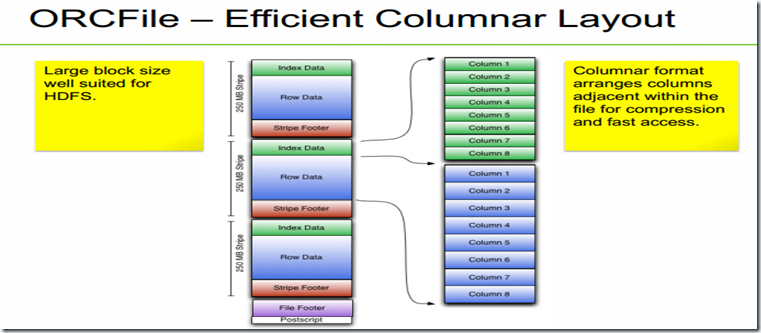
接着上一章我们讲的hive的连接策略,现在我们讲一下hive的数据存储。 下面是hive支持的数据存储格式,有我们常见的文本,JSON,XML,这里我们主要讲一下ORCFile。 Built-in Formats: – ORCFile – RCFile – Avro – Delimited Text – Regular Expression – S3 Logfile – Typed Bytes • 3 rd -Party Addons: – JSON – XML 这种格式非常适合HDFS,它有以下的 优点: •高压缩 – 高压缩比. – 字典编码. •高性能 – 自带索引. – 高效的精确查询. • 灵活的数据模型 – 支持所有的hive类型,包括maps. 从图中可以看出,orc格式的文件存储大小仅为文本的30%左右,比gz格式的都小,采用zlib压缩的话,更小,仅有22%左右。 使用orc格式存储的方式很简单,在建表的时候STORED AS orc即可 CREATE TABLE sale( id int, timestamp timestamp, productsk int, storesk int, amount decimal, state string )STORED AS orc; 相关参数,自己看,不解释了。 不适用zlib压缩的话,查询速度更快,但是也大一些。 CREATE TABLE sale( id int, timestamp timestamp, productsk int, storesk int, amount decimal, state string )STORED AS orc tblproperties ("orc.compress"="NONE"); 下面是加快hive查询的一些可以参考的方式: (1)跳跃读取:采用分区Partition或者使用Skew,才用ORCFile二次排序。 (2)在连接字段上排序并且bucket,在连接小表的时候采用Broadcast joins。 (3)对经常使用的数据,增加备份因子,激活Short-Circuit Read,采用Tez。 当某个表很大的时候,我们往往要对其进行分区,比如按照时间来分区。 CREATE TABLE sale( id int, amount decimal, ... )partitioned by (xdate string, state string); 其中的xdate和state是不存在的列,你可以认为它们是虚拟列,虚拟列会在HDFS当中建立子目录,属于分区的记录会存在那个子文件夹中。 使用分区之后,在查询和插入的时候,就必须带有至少一个分区字段,否则查询将会失败。 INSERT INTO sale (xdate=‘2013-03-01’, state=‘CA’) SELECT * FROM staging_table WHERE xdate = ‘2013-03-01’ AND state = ‘CA’; 如果你想一次查出所有数据,不想受这个限制的话,你可以 hive.exec.dynamic.partition.mode参数置为nonstrict。 set hive.exec.dynamic.partition.mode=nonstrict; INSERT INTO sale (xdate, state) SELECT * FROM staging_table; 有时候插入数据的时候,我们需要重新排序,在select 语句里面把虚拟列也加上,这样会有排序的效果。 INSERT INTO sale (xdate, state=‘CA’) SELECT id, amount, other_stuff, xdate, state FROM staging_table WHERE state = ‘CA’; 下面我们讲一下常用的hive查询调优 mapred.max.split.size和mapred.min.split.size min 太大-> 太少mapper. max 太小-> mapper太多. Example: – set mapred.max.split.size=100000000; – set mapred.min.split.size=1000000; 当然也有个原则,当mappers出现抢占资源的时候,才调整这些参数。 – set io.sort.mb=100; • All the time: – set hive.optmize.mapjoin.mapreduce=true; – set hive.optmize.bucketmapjoin=true; – set hive.optmize.bucketmapjoin.sortedmerge=true; – set hive.auto.convert.join=true; – set hive.auto.convert.sortmerge.join=true; – set hive.auto.convert.sortmerge.join.nocondi1onaltask=true; • When bucketing data: – set hive.enforce.bucketing=true; – set hive.enforce.sortng=true; • These and more are set by default in HDP 1.3(明显的广告词,说明HDP比较强大,已经给我们设置好了). 这些参数我们可以在hive-site.xml中查询到,我们也可以在shell中查询。 (1)查询所有的参数 (2)查询某一个参数 (3)修改参数


资源下载

更多资源
Mario

Mario

马里奥是站在游戏界顶峰的超人气多面角色。马里奥靠吃蘑菇成长,特征是大鼻子、头戴帽子、身穿背带裤,还留着胡子。与他的双胞胎兄弟路易基一起,长年担任任天堂的招牌角色。

腾讯云软件源

腾讯云软件源

为解决软件依赖安装时官方源访问速度慢的问题,腾讯云为一些软件搭建了缓存服务。您可以通过使用腾讯云软件源站来提升依赖包的安装速度。为了方便用户自由搭建服务架构,目前腾讯云软件源站支持公网访问和内网访问。

Nacos

Nacos

Nacos /nɑ:kəʊs/ 是 Dynamic Naming and Configuration Service 的首字母简称,一个易于构建 AI Agent 应用的动态服务发现、配置管理和AI智能体管理平台。Nacos 致力于帮助您发现、配置和管理微服务及AI智能体应用。Nacos 提供了一组简单易用的特性集,帮助您快速实现动态服务发现、服务配置、服务元数据、流量管理。Nacos 帮助您更敏捷和容易地构建、交付和管理微服务平台。

Sublime Text

Sublime Text

Sublime Text具有漂亮的用户界面和强大的功能,例如代码缩略图,Python的插件,代码段等。还可自定义键绑定,菜单和工具栏。Sublime Text 的主要功能包括:拼写检查,书签,完整的 Python API , Goto 功能,即时项目切换,多选择,多窗口等等。Sublime Text 是一个跨平台的编辑器,同时支持Windows、Linux、Mac OS X等操作系统。

用户登录
用户注册