打造属于自己的博客 - Asp.net三层架构
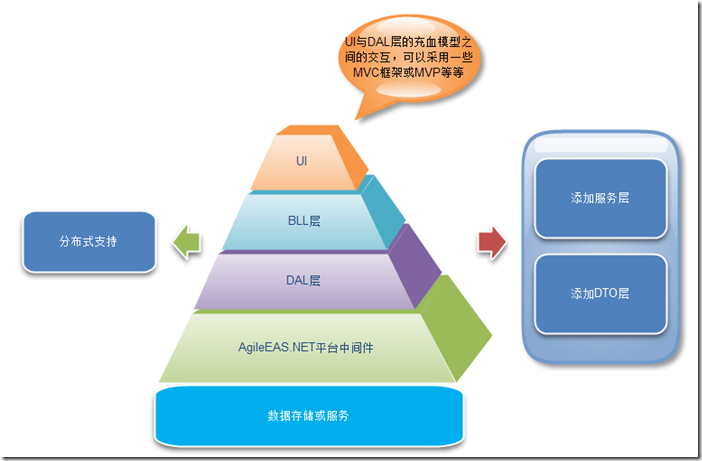
大家好,暑假过大半,不知道现在的你在做些什么,也许在苦力,也许在加班,也许在打dota,也许...在写代码。体会着属于自己的生活和理想,而我也在忙碌中迅速的往社会的方向迈进,马上毕业了,压力山大啊,找工作的话还是坚持自己心中的理想,不达目标绝不妥协!虽然有些偏激但更为自己的态度所决定,我就是这么一个人。 可能有想要表白的意愿吧,所以就在暑假工作期间萌发了写网站的想法,技术有限的我,在工作期间大量的学习和问项目总监(挺不错的一个牛x的人),花了大概一个星期就艰难的完成了博客,其实是为她而做,希望在开学的时候告诉她自己的内心的想法,并且期望自己想要的结果,所以很是努力。天在看..... 喜欢开源的东西,所以这次也就准备试一试,在前几期的博文中已经介绍了几个博客建站的必备功能的代码学习过程。这里就不多陈述了,接下来就直接进入三层的编写,表现层,业务逻辑层,数据层大家应该很熟悉了吧,如果不清楚这个过程的,百度一下,这里就不做陈述了。 下面是三层的代码和逻辑引用。举一例,用户信息的三层代码: Model: 1 2 3 4 5 6 7 8 9 10 11 12 13 14 15 16 17 18 using System; using System.Collections.Generic; using System.Linq; using System.Text; namespace Model { public class L_User { #region 实例化用户&管理员的主要字段 public int UID { get ; set ; } public string Author { get ; set ; } public string UUserPwd { get ; set ; } public string UEmail { get ; set ; } public DateTime UCreateTime { get ; set ; } public string UUserRole { get ; set ; } #endregion } } DAL: 1 2 3 4 5 6 7 8 9 10 11 12 13 14 15 16 17 18 19 20 21 22 23 24 25 26 27 28 29 30 31 32 33 34 35 36 37 38 39 40 41 42 43 44 45 46 47 48 49 50 51 52 53 54 55 56 57 58 59 60 61 62 63 64 65 66 67 68 69 70 71 72 73 74 75 76 77 78 79 80 81 82 83 84 85 86 87 88 89 90 91 92 93 94 95 96 97 98 99 100 101 102 103 104 105 106 107 108 109 110 111 112 113 114 115 116 117 118 119 120 121 122 123 124 125 126 127 128 129 130 131 132 133 134 135 136 137 138 139 140 141 142 143 144 145 146 147 148 149 150 151 152 using System; using System.Collections.Generic; using System.Linq; using System.Text; using Model; using System.Data.SqlClient; using System.Data; namespace DAL { public class UserDAL { //添加用户 public int AddUser(L_User user) { try { int i = DBHelper.executeSql( "insert into L_User(Author,UUserPwd,UEmail,UCreateTime,UUserRole) values(@Author,@UUserPwd,@UEmail,@UCreateTime,@UUserRole)" , new SqlParameter( "@Author" , user.Author), new SqlParameter( "@UUserPwd" , user.UUserPwd), new SqlParameter( "@UEmail" , user.UEmail), new SqlParameter( "@UCreateTime" , user.UCreateTime), new SqlParameter( "@UUserRole" , user.UUserRole)); return i; } catch (Exception ee) { throw new Exception(ee.Message); } } //修改user public int UpdateUser( int UID, string Author, string UUserPwd, string UEmail, DateTime UCreateTime, string UUserRole) { int i = DBHelper.executeSql( "update L_User set Author=@Author,UUserPwd=@UUserPwd,UEmail=@UEmail, UCreateTime=@UCreateTime,UUserRole=@UUserRole where UID=@UID" , new SqlParameter( "@UID" , UID), new SqlParameter( "@Author" , Author), new SqlParameter( "@UUserPwd" , UUserPwd), new SqlParameter( "@UEmail" , UEmail), new SqlParameter( "@UCreateTime" , UCreateTime), new SqlParameter( "@UUserRole" , UUserRole)); return i; } //删除user public int DeleteUser( int UID) { int i = DBHelper.executeSql( "delete from L_User where UID=@UID " , new SqlParameter( "@UID" , UID)); return i; } //单独的一条user信息 public L_User get_singleUser( int UID) { DataSet ds = DBHelper.dataset( "select * from L_User where UID=@UID " , new SqlParameter( "@UID" , UID)); L_User lu = new L_User(); if (ds != null ) { lu.UID = Convert.ToInt32(ds.Tables[0].Rows[0][ "UID" ].ToString()); lu.Author = ds.Tables[0].Rows[0][ "Author" ].ToString(); lu.UUserPwd = ds.Tables[0].Rows[0][ "UUserPwd" ].ToString(); lu.UEmail = ds.Tables[0].Rows[0][ "UEmail" ].ToString(); lu.UCreateTime = Convert.ToDateTime(ds.Tables[0].Rows[0][ "UCreateTime" ].ToString()); lu.UUserRole = ds.Tables[0].Rows[0][ "UUserRole" ].ToString(); return lu; } else { return null ; } } //单独的一条user信息2 public L_User get_singleUser( string name) { DataSet ds = DBHelper.dataset( "select * from L_User where Author=@Author " , new SqlParameter( "@Author" , name)); L_User lu = new L_User(); if (ds != null && ds.Tables[0].Rows.Count > 0) { lu.UID = Convert.ToInt32(ds.Tables[0].Rows[0][ "UID" ].ToString()); lu.Author = ds.Tables[0].Rows[0][ "Author" ].ToString(); lu.UUserPwd = ds.Tables[0].Rows[0][ "UUserPwd" ].ToString(); lu.UEmail = ds.Tables[0].Rows[0][ "UEmail" ].ToString(); lu.UCreateTime = Convert.ToDateTime(ds.Tables[0].Rows[0][ "UCreateTime" ].ToString()); lu.UUserRole = ds.Tables[0].Rows[0][ "UUserRole" ].ToString(); return lu; } else { return null ; } } // 获取所有用户的列表信息 public DataSet GetUserGroupList2( string sqlstr) { string cmdText = "select * from L_User where 1=1 " ; if (sqlstr != "" ) { cmdText += sqlstr; } return DBHelper.getDataSet(cmdText); } //修改密码 public int UpdateUS( string UUserPwd) { int i = DBHelper.executeSql( @" update L_User set UUserPwd=@UUserPwd ;" , new SqlParameter( "@UUserPwd" , UUserPwd)); return i; } //检查登录(此方法有误) public int CheckLogin( string Author, string UUserPwd) { try { int i = Convert.ToInt32(DBHelper.executeScalar( "select count(*) from L_User where Author=@Author and UUserPwd=@UUserPwd " , new SqlParameter( "@Author" , Author), new SqlParameter( "@UUserPwd" , UUserPwd))); return i; } catch (Exception ee) { throw new Exception(ee.Message); } } //验证用户的角色 public L_User checkAuthor( string Author) { DataSet ds = DBHelper.dataset( "select * from L_User where Author=@Author " , new SqlParameter( "@Author" , Author)); if (ds != null ) { L_User LU = new L_User(); LU.UUserRole = ds.Tables[0].Rows[0][ "UUserRole" ].ToString(); return LU; } else { return null ; } } //验证用户是否相同 public int CheckUser( string Author) { try { int i = Convert.ToInt32(DBHelper.executeScalar( "select count(*) from L_User where Author=@Author" , new SqlParameter( "@Author" , Author))); return i; } catch (Exception ee) { throw new Exception(ee.Message); } } //验证旧密码是否相同 public L_User Checkjiu( string Author) { DataSet ds = DBHelper.dataset( "select * from L_User where Author=@Author " , new SqlParameter( "@Author" , Author)); L_User LU = new L_User(); LU.UUserPwd = ds.Tables[0].Rows[0][ "UUserPwd" ].ToString(); return LU; } } } BLL: 1 2 3 4 5 6 7 8 9 10 11 12 13 14 15 16 17 18 19 20 21 22 23 24 25 26 27 28 29 30 31 32 33 34 35 36 37 38 39 40 41 42 43 44 45 46 47 48 49 50 51 52 53 54 55 56 57 58 59 60 61 62 63 64 65 66 67 68 69 70 71 72 73 74 75 76 77 78 79 80 81 82 83 84 85 86 87 88 89 90 91 92 93 94 95 96 97 98 99 100 101 102 103 104 105 106 107 108 109 110 111 112 113 114 115 116 117 118 119 120 121 122 123 124 125 126 127 128 using System; using System.Collections.Generic; using System.Linq; using System.Text; using Model; using DAL; using System.Data; namespace BLL { public class UserService { /// <summary> /// 添加用户 /// </summary> /// <param name="user"></param> /// <returns></returns> public int AddUser(L_User user) { UserDAL userDal = new UserDAL(); return userDal.AddUser(user); } /// <summary> /// 修改user /// </summary> /// <param name="UID"></param> /// <param name="BlogTiltle"></param> /// <param name="BlogContent"></param> /// <param name="CreateTime"></param> /// <param name="Recommand"></param> /// <returns></returns> public int UpdateUser( int UID, string Author, string UUserPwd, string UEmail, DateTime UCreateTime, string UUserRole) { UserDAL uDAL = new UserDAL(); return uDAL.UpdateUser(UID, Author, UUserPwd, UEmail, UCreateTime, UUserRole); } /// <summary> /// 删除user /// </summary> /// <param name="ID"></param> /// <returns></returns> public int DeleteUser( int UID) { UserDAL uDAL = new UserDAL(); return uDAL.DeleteUser(UID); } /// <summary> /// 获取所有用户的信息列表 /// </summary> /// <returns></returns> public DataSet GetUserGroupList2( string sqlstr) { UserDAL ugDAL = new UserDAL(); return ugDAL.GetUserGroupList2(sqlstr); } /// <summary> /// 单独的一条用户信息 /// </summary> /// <param name="UID"></param> /// <returns></returns> public L_User get_singleUser( int UID) { UserDAL uDAL = new UserDAL(); return uDAL.get_singleUser(UID); } /// <summary> /// 查找login用户名,实现登录的安全验证 /// </summary> /// <param name="name"></param> /// <returns></returns> public L_User get_singleUser( string name) { UserDAL uDAL = new UserDAL(); return uDAL.get_singleUser(name); } /// <summary> /// 修改密码 /// </summary> /// <param name="AUserPwd"></param> /// <returns></returns> public int UpdateUS( string UUserPwd) { UserDAL uDAL = new UserDAL(); return uDAL.UpdateUS(UUserPwd); } /// <summary> /// 检查登录(此方法有误) /// </summary> /// <param name="Author"></param> /// <param name="UUserPwd"></param> /// <param name="UUserRole"></param> /// <returns></returns> public int CheckLogin( string Author, string UUserPwd) { UserDAL userDal = new UserDAL(); return userDal.CheckLogin(Author, UUserPwd); } /// <summary> /// 检查用户权限 /// </summary> /// <param name="Author"></param> /// <returns></returns> public L_User checkAuthor( string Author) { UserDAL userDal = new UserDAL(); return userDal.checkAuthor(Author); } /// <summary> /// 检查用户名 /// </summary> /// <param name="LoginName"></param> /// <returns></returns> public int CheckUser( string Author) { UserDAL userDal = new UserDAL(); return userDal.CheckUser(Author); } /// <summary> /// 验证旧密码是否相同 /// </summary> /// <param name="Author"></param> /// <returns></returns> public L_User Checkjiu( string Author) { UserDAL uDAL = new UserDAL(); return uDAL.Checkjiu(Author); } } } 接下来我们就可以开始在web页面cs中开始我们的功能调用了,实现编辑功能的一部分代码如下,PS:验证input的 话建议大家多写一些,JS在前台,本页面的验证,以及服务器端的验证,保证信息的安全性,养成好习惯。 1 2 3 4 5 6 7 8 9 10 11 12 13 14 15 16 17 18 19 20 21 22 23 24 25 26 27 28 29 30 31 32 33 34 35 36 37 38 39 40 41 42 43 44 45 46 47 48 49 50 51 52 53 54 55 56 57 58 59 60 61 62 63 64 65 66 67 68 69 70 71 72 protected void ImageButton1_Click( object sender, ImageClickEventArgs e) { if (TextBox1.Text.Trim().ToString() == "" ) { lblMessage.Text = "<font color=\"red\" size=\"2\">请输入用户名</font>" ; NormalMethod.Show( this , "请完整填写用户的信息" ); return ; } if (pwd.Text.Trim().ToString() == "" ) { lblMessage.Text = "<font color=\"red\" size=\"2\">请输入用户密码</font>" ; NormalMethod.Show( this , "请完整填写用户的信息" ); return ; } if (TextBox3.Text.Trim().ToString() == "" ) { lblMessage.Text = "<font color=\"red\" size=\"2\">请输入用户邮箱</font>" ; NormalMethod.Show( this , "请完整填写用户的信息" ); return ; } if (ddlGroup.SelectedIndex == 0) { lblMessage.Text = "<font color=\"red\" size=\"2\">请输入用户组</font>" ; NormalMethod.Show( this , "请完整填写用户的信息" ); return ; } if (my97.Value.ToString() == "" ) { lblMessage.Text = "<font color=\"red\" size=\"2\">请输入正确的日期格式</font>" ; NormalMethod.Show( this , "请完整填写用户的信息" ); return ; } UserService uService = new UserService(); if (editor == "edit" ) { int i = uService.UpdateUser(Convert.ToInt32(Session[ "UID" ].ToString()), TextBox1.Text.ToString(), pwd.Text.ToString(), TextBox3.Text.ToString(), DateTime.Now, ddlGroup.Text.ToString()); if (i > 0) { NormalMethod.ShowAndRedirect( this , "修改成功!(*^__^*)" , "UserGuan.aspx" ); editor = null ; } else { NormalMethod.ShowAndRedirect( this , "修改失败!#(┬_┬)我的错,我改还不行吗?" , "UserGuan.aspx" ); } } else { TextBox1.ReadOnly = false ; TextBox3.ReadOnly = false ; my97.Visible = true ; L_User lu = new L_User(); lu.Author = TextBox1.Text.ToString(); lu.UUserPwd = pwd.Text.ToString(); lu.UEmail = TextBox3.Text.ToString(); lu.UUserRole = ddlGroup.SelectedValue.ToString(); lu.UCreateTime =Convert.ToDateTime(my97.Value.ToString()); int j = uService.AddUser(lu); if (j > 0) { NormalMethod.ShowAndRedirect( this , "添加成功!(*^__^*)" , "UserGuan.aspx" ); TextBox1.Text = "" ; TextBox3.Text = "" ; my97.Value = "" ; pwd.Text = "" ; } else { NormalMethod.ShowAndRedirect( this , "添加失败!#(┬_┬)我的错,我改还不行吗?" , "UserGuan.aspx" ); } } } 上面的代码配上bootstrap就会达到一种很棒的效果,这里我就不截图了,最后会给大家看一个遍。 紧接着就是设计其他的网页所需的业务逻辑功能,如图, 后台的四操作把类库的功能都写好后就可以很容易的处理前台的问题了。这里的前台我是用了XML和Repeater的绑定方式。 Repeater的绑定: 代码如下: 1 2 3 4 5 6 7 8 9 10 11 12 13 14 15 16 17 18 19 20 21 22 23 24 <asp:Repeater ID= "BlogList" runat= "server" > <ItemTemplate> <div class = "title" > <a href= 'BlogShow.aspx?ID=<%# Eval("ID") %>' title= '<%# Eval("BlogTiltle") %>' > <%# Eval( "BlogTiltle" )%></a> </div> <div> <p style= "color:Gray" > <%#BLL.SystemTools.FixLengthString (BLL.SystemTools.NoHTML(Eval( "BlogContent" ).ToString()),300)%>... <a href= 'BlogShow.aspx?ID=<%# Eval("ID") %>' >[查看全文]</a> </p> </div> <span style= "font-size: small; color: Gray" > 浏览(<%# Eval( "Click" ) %>) | 发布时间: <%# Eval( "CreateTime" )%></span><br /><hr style= "border: 0.5px Dotted gray" /> </ItemTemplate> </asp:Repeater> <a href= "bowenList.aspx" >查看全部博文>></a> cs: 1 2 3 4 5 6 7 8 9 10 11 12 13 14 protected void Page_Load( object sender, EventArgs e) { if (!IsPostBack) { bindRepeater(); } } //绑定Repeater的内容 protected void bindRepeater() { BlogService blogService = new BlogService(); BlogList.DataSource = blogService.getData(); BlogList.DataBind(); } 接着就是显示博文的界面了: 这就基本实现了博客的主要功能,下面来看看一些jQuery的知识,比如Ajax的验证,大家可以参考W3上的介绍学习,全面的了解后就可以去做一些图片的轮播和天气,text的显示效果,这里举一例,图片的轮播,下面是效果图,大家可以按照说明自己做做,如图, 3D gallery: 童话轮播: 还有最简单的轮播: 讲到这里基本上前台要做的就差不多了,对了忘说了,最后我想了想,由于是博客,所以就加了一个播放器,和XML很好的结合,实现了四操作和播放歌曲的功能,效果图和代码如下, 1 2 3 4 5 6 7 8 9 10 11 12 13 < object type= "application/x-shockwave-flash" data="http: //service.weibo.com/staticjs/weiboshow.swf?verifier=b92d5ce3&uid=1624424711& width=230&height=500&fansRow=2&isTitle=1& isWeibo=1&isFans=1&noborder=0&ptype=1& colors=cfe1f3,fafcff,444444,5093d5" width= "230" height= "500" id= "pre_flash" style= "visibility: visible;" > <param name= "wmode" value= "transparent" /> <param name= "quality" value= "high" /> <param name= "bgcolor" value= "#FFFFFF" /> <param name= "align" value= "L" /> <param name= "scale" value= "noborder" /> <param name= "allowScriptAccess" value= "sameDomain" /> </ object > 到这里前台的大体功能基本上就差不多了,下面的一些技术我分三期讲吧,有点多,已经三点了,大家明天先看着,我会继续更新,有时间的话。谢谢大家的支持!谢谢莉子姐,米米姐,蘑菇姐,和5CTO一起成长!加油! 本文转自 吴雨声 51CTO博客,原文链接:http://blog.51cto.com/liangxiao/1270595,如需转载请自行联系原作者