
hadoop怎么读?怎么发音
hadoop不是一个英文单词,是作者发明的词,hadoop名称来源作者小孩的一个}h毛填充黄色大象玩具。 它的发音是:[hædu:p] 本文转自94cool博客园博客,原文链接:http://www.cnblogs.com/94cool/p/5630216.html,如需转载请自行联系原作者
This article shows how to document your ASP.NET Core 1.0 MVC API using Swagger with Swashbuckle. Per default, it does not use your xml comments in the code and this needs to be configured if required.
Code: https://github.com/damienbod/AspNet5GeoElasticsearch
2016.07.03 Updated to ASP.NET Core RTM
2016.06.04 Updated to ASP.NET Core RC2 dotnet
Step 1: Add the required NuGet packages to the dependencies in the project.json file.
|
1
2
3
4
5
6
|
"dependencies"
: {
"Swashbuckle.SwaggerGen"
:
"6.0.0-beta901"
,
"Swashbuckle.SwaggerUi"
:
"6.0.0-beta901"
},
|
Step 2: Produce the .xml file which contains the xml comments when building. Click the produce outputs on build checkbox in your project file.
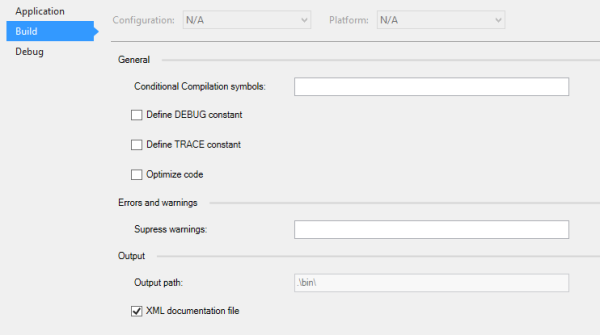
Or set the ProduceOutputsOnBuild property in the project xproj file.
|
1
|
<ProduceOutputsOnBuild>True</ProduceOutputsOnBuild>
|
Step 3: Configure Swashbuckle.SwaggerGen in the Startup class ConfigureServices method.
You need to define your path to the comments xml file, which can be found in the artifacts folder. This should be saved in a config file.
The ConfigureSwaggerDocument with OperationFilter method is required so that the xml comments are added to the documentation, and also ConfigureSwaggerSchema with ModelFilter
|
1
2
3
4
5
6
7
8
9
10
11
12
13
14
15
16
17
18
19
20
21
22
|
public
void
ConfigureServices(IServiceCollection services)
{
var
pathToDoc = Configuration[
"Swagger:Path"
];
services.AddMvc();
services.AddSwaggerGen();
services.ConfigureSwaggerGen(options =>
{
options.SingleApiVersion(
new
Info
{
Version =
"v1"
,
Title =
"Geo Search API"
,
Description =
"A simple api to search using geo location in Elasticsearch"
,
TermsOfService =
"None"
});
options.IncludeXmlComments(pathToDoc);
options.DescribeAllEnumsAsStrings();
});
services.AddScoped<ISearchProvider, SearchProvider>();
}
|
Step 4: Use swagger in the Startup class Configure method.
UseSwaggerGen and UseSwaggerUi
|
1
2
3
4
5
6
7
8
9
10
11
12
13
14
15
16
17
18
19
20
21
22
23
24
25
26
27
|
public
void
Configure(IApplicationBuilder app, IHostingEnvironment env, ILoggerFactory loggerFactory)
{
loggerFactory.AddConsole(Configuration.GetSection(
"Logging"
));
loggerFactory.AddDebug();
if
(env.IsDevelopment())
{
app.UseDeveloperExceptionPage();
app.UseBrowserLink();
}
else
{
app.UseExceptionHandler(
"/Home/Error"
);
}
app.UseStaticFiles();
app.UseMvc(routes =>
{
routes.MapRoute(
name:
"default"
,
template:
"{controller=Home}/{action=Index}/{id?}"
);
});
app.UseSwagger();
app.UseSwaggerUi();
}
|
Step 5: Create a Controller API with your documentation:
|
1
2
3
4
5
6
7
8
9
10
11
12
13
14
15
16
17
18
19
20
21
22
23
24
25
26
27
28
29
30
31
32
33
34
35
36
37
38
39
40
41
42
43
44
45
46
47
48
49
50
51
52
53
54
55
56
57
58
59
60
61
62
63
64
65
66
67
68
69
|
using
Microsoft.AspNet.Mvc;
using
AspNet5GeoElasticsearch.ElasticsearchApi;
using
AspNet5GeoElasticsearch.Models;
using
Newtonsoft.Json;
using
Swashbuckle.SwaggerGen.Annotations;
namespace
AspNet5GeoElasticsearch.Controllers
{
/// <summary>
/// This class is used as an api for the search requests.
/// </summary>
[Route(
"api/[controller]"
)]
[Produces(
"application/json"
)]
public
class
SearchController : Controller
{
private
readonly
ISearchProvider _searchProvider;
public
SearchController(ISearchProvider searchProvider)
{
_searchProvider = searchProvider;
}
/// <summary>
/// This method returns the found documents from Elasticsearch
/// </summary>
/// <param name="maxDistanceInMeter">Distance in meters from your location</param>
/// <param name="centerLongitude">center Longitude </param>
/// <param name="centerLatitude">center Latitude </param>
/// <returns>All the documents which were found</returns>
[HttpGet]
[Produces(
typeof
(MapModel))]
[SwaggerResponse(System.Net.HttpStatusCode.OK, Type =
typeof
(MapModel))]
[Route(
"GeoSearch"
)]
public
ActionResult Search(
uint
maxDistanceInMeter,
double
centerLongitude,
double
centerLatitude)
{
var
searchResult = _searchProvider.SearchForClosest(maxDistanceInMeter, centerLongitude, centerLatitude);
var
mapModel =
new
MapModel
{
MapData = JsonConvert.SerializeObject(searchResult),
CenterLongitude = centerLongitude,
CenterLatitude = centerLatitude,
MaxDistanceInMeter = maxDistanceInMeter
};
return
Ok(mapModel);
}
/// <summary>
/// Inits the Elasticsearch documents
/// </summary>
[HttpPost]
[Route(
"InitData"
)]
public
ActionResult InitData()
{
initSearchEngine();
return
Ok();
}
private
void
initSearchEngine()
{
if
(!_searchProvider.MapDetailsIndexExists())
{
_searchProvider.InitMapDetailMapping();
_searchProvider.AddMapDetailData();
}
}
}
}
|
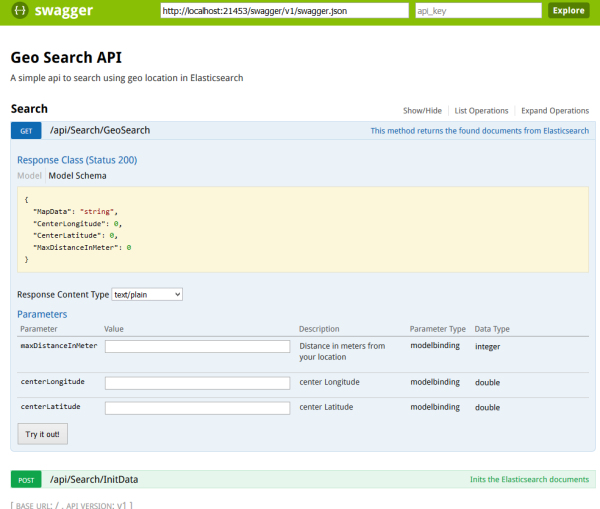
This can then be viewed using ./swagger/ui
http://localhost:21453/swagger/ui/index.html
Links:
https://github.com/domaindrivendev/Swashbuckle
https://github.com/domaindrivendev/Ahoy
http://blog.sluijsveld.com/28/01/2016/CustomSwaggerUIField/
修改文档名称及路径:
}
本文转自94cool博客园博客,原文链接:http://www.cnblogs.com/94cool/p/5694881.html,如需转载请自行联系原作者

微信关注我们
转载内容版权归作者及来源网站所有!
低调大师中文资讯倾力打造互联网数据资讯、行业资源、电子商务、移动互联网、网络营销平台。持续更新报道IT业界、互联网、市场资讯、驱动更新,是最及时权威的产业资讯及硬件资讯报道平台。
马里奥是站在游戏界顶峰的超人气多面角色。马里奥靠吃蘑菇成长,特征是大鼻子、头戴帽子、身穿背带裤,还留着胡子。与他的双胞胎兄弟路易基一起,长年担任任天堂的招牌角色。
Spring框架(Spring Framework)是由Rod Johnson于2002年提出的开源Java企业级应用框架,旨在通过使用JavaBean替代传统EJB实现方式降低企业级编程开发的复杂性。该框架基于简单性、可测试性和松耦合性设计理念,提供核心容器、应用上下文、数据访问集成等模块,支持整合Hibernate、Struts等第三方框架,其适用范围不仅限于服务器端开发,绝大多数Java应用均可从中受益。
Rocky Linux(中文名:洛基)是由Gregory Kurtzer于2020年12月发起的企业级Linux发行版,作为CentOS稳定版停止维护后与RHEL(Red Hat Enterprise Linux)完全兼容的开源替代方案,由社区拥有并管理,支持x86_64、aarch64等架构。其通过重新编译RHEL源代码提供长期稳定性,采用模块化包装和SELinux安全架构,默认包含GNOME桌面环境及XFS文件系统,支持十年生命周期更新。
Sublime Text具有漂亮的用户界面和强大的功能,例如代码缩略图,Python的插件,代码段等。还可自定义键绑定,菜单和工具栏。Sublime Text 的主要功能包括:拼写检查,书签,完整的 Python API , Goto 功能,即时项目切换,多选择,多窗口等等。Sublime Text 是一个跨平台的编辑器,同时支持Windows、Linux、Mac OS X等操作系统。
扫码在手机上查看文章
扫描二维码,手机阅读更方便




有任何问题或合作意向欢迎联系我们
Email: 99873273@qq.com
QQ: 99873273