首页 文章 精选 留言 我的

精选列表

搜索[源码学习],共10000篇文章
优秀的个人博客,低调大师

Spark Netty与Jetty (源码阅读十一)

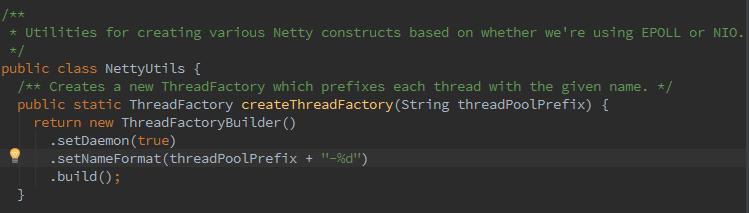
spark呢,对Netty API又做了一层封装,那么Netty是什么呢~是个鬼。它基于NIO的服务端客户端框架,具体不再说了,下面开始。 创建了一个线程工厂,生成的线程都给定一个前缀名。 像一般的netty框架一样,创建Netty的EventLoopGroup: 在常用的netty框架中呢,会创建客户端辅助类,设置SocketChannel: Bootstrap b = new Bootstrap(); b.group(group).channel(NioSocketChannel.class) spark中呢 根据参数IOMode,返回正确的客户端SocketChannel: 返回正确的服务端socketChannel: 返回远端的Channel地址: 创建一个ByteBuf对本地线程缓存禁用的分配器。ByteBuf是由事件循环线程分配,所以线程本地缓存对于TransportClient是禁用的,ByteBuf释放是由Executor线程,不是事件循环线程完成。本地线程缓存经常会延迟ByteBuf的回收,导致巨大的内存消耗。 Spark这个禽兽,对Jetty也进行了封装,什么是Jetty呢,它是以java作为开发语言的servlet容器,它的API以一组jar包的形式发布,提供网络和web服务.在我理解,Netty是用socket~Jetty呢 就是Http~那么下来,我们看一下JettyUtils: createServlet,生成HttpServlet匿名内部类,此Responder类型发生隐式转换,转换为用户传入的函数参数。 要为Jetty创建servlet,就涉及ServletContextHandler的API的使用,生成ServletContextHandler: 创建给定路径为前缀的请求的响应处理,将SparkUI中的全部handler加入ContextHandlerCollection.,如果使用配置spark.ui.filters指定了filter,则给所有handler添加filter.然后调用startServiceOnPort,最终回调函数connect:

优秀的个人博客,低调大师

openstack之horizon源码分析之二

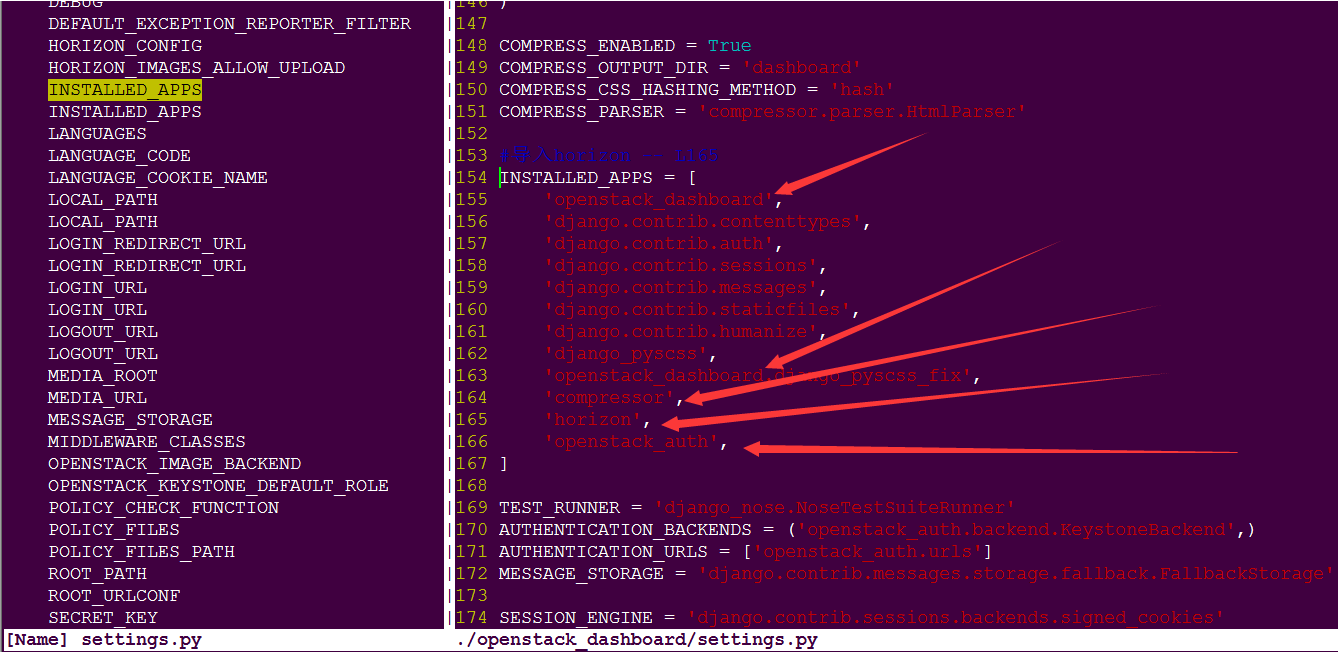
一、概述: django基础入手: django新建project:#django-admin startproject mysite 1 生成如下目录: 2 mysite 3 ├── manage.py 4 └── mysite 5 ├── __init__.py 6 ├── settings.py 7 ├── urls.py 8 └── wsgi.py 创建一个app,名叫demo:#cd mysite; pythone manage.py startapp demo 1 则生成如下目录: 2 demo/ 3 ├── __init__.py 4 ├── admin.py 5 ├── models.py 6 ├── tests.py 7 └── views.py 把我们新定义的app加到settings.py中的INSTALL_APPS中 修改 mysite/mysite/settings.py ROOT_URLCONF = 'openstack_dashboard.urls' -- 查看绑定的urls (openstack_dashboard/urls.py) INSTALLED_APPS = ( 'django.contrib.admin', 'django.contrib.auth', 'django.contrib.contenttypes', 'django.contrib.sessions', 'django.contrib.messages', 'django.contrib.staticfiles', 'demo', --here ) 备注,这一步是干什么呢? 新建的 app 如果不加到 INSTALL_APPS 中的话, django就不能自动找到app中的模板文件(app-name/templates/下的文件)和静态文件(app-name/static/中的文件) 类比一下: my_horizon(应该叫horizon)目录下的openstack_dashboard 相当于第二层的mysite;而horizon/horizon相当于demo 第二层的horizon被导入到my_horizone/openstack_dashboard/settings.py中,则根据py特性,Python中在导入一个包时,实际上导入了它的__init__.py文件,当我们导入Horizon这个包的时候,__init__.py文件自动运行,在__init__.py 文件中再导入其他的包,或者模块。其中在horizon包的__init__.py文件中,此时应该看my_horizon/horizon/__init__.py的这个文件; 跳转到horizon.base.py horizon/base.py,不足 1000 行,整体架构的核心,从这里出发去探索。一个进程只有一个 Site,一个 Site 有多个 Dashboard,一个 Dashboard 有多个 PanelGroup,一个 PanelGroup 有多个 Panel。 而 PanelGroup 的功能很弱,只是把下面的 Panel 组合了一下,Dashboard 的 _registerable_class 是 Panel。url 是 lazy 加载的方式,只有在第一次访问时才加载;

优秀的个人博客,低调大师

hbase源码系列(九)StoreFile存储格式

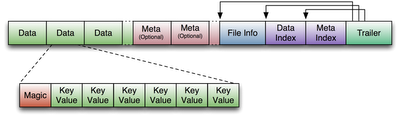
从这一章开始要讲Region Server这块的了,但是在讲Region Server这块之前得讲一下StoreFile,否则后面的不好讲下去,这块是基础,Region Sever上面的操作,大部分都是基于它来进行的。 HFile概述 HFile是HBase中实际存数据的文件,为HBase提供高效快速的数据访问。它是基于Hadoop的TFile,模仿Google Bigtable 架构中的SSTable格式。文件格式如下: 文件是变长的,唯一固定的块是File Info和Trailer,如图所示,Trailer有指向其它块的指针,这些指针也写在了文件里,Index块记录了data和meta块的偏移量,meta块是可选的。 下面我们从原来上来一个一个的看它们到底是啥样的,先从入口看起,那就是StoreFile.Writer的append方法,先看怎么写入的,然后它就怎么读了,不知道怎么使用这个类的,可以看看我写的这篇文章《非mapreduce生成Hfile,然后导入hbase当中》。 往HFile追加KeyValue 不扯这些了,看一下StoreFile里面的append方法。 public void append(final KeyValue kv) throws IOException { //如果是新的rowkey的value,就追加到Bloomfilter里面去 appendGeneralBloomfilter(kv); //如果是DeleteFamily、DeleteFamilyVersion类型的kv appendDeleteFamilyBloomFilter(kv); writer.append(kv); //记录最新的put的时间戳,更新时间戳范围 trackTimestamps(kv); } 在用writer进行append之前先把kv写到generalBloomFilterWriter里面,但是我们发现generalBloomFilterWriter是HFile.Writer里面的InlineBlockWriter。 generalBloomFilterWriter = BloomFilterFactory.createGeneralBloomAtWrite( conf, cacheConf, bloomType, (int) Math.min(maxKeys, Integer.MAX_VALUE), writer); //在createGeneralBloomAtWriter方法发现了以下代码 ...... CompoundBloomFilterWriter bloomWriter = new CompoundBloomFilterWriter(getBloomBlockSize(conf), err, Hash.getHashType(conf), maxFold, cacheConf.shouldCacheBloomsOnWrite(), bloomType == BloomType.ROWCOL ? KeyValue.COMPARATOR : KeyValue.RAW_COMPARATOR); writer.addInlineBlockWriter(bloomWriter); 我们接下来看HFileWriterV2的append方法吧。 public void append(final KeyValue kv) throws IOException { append(kv.getMvccVersion(), kv.getBuffer(), kv.getKeyOffset(), kv.getKeyLength(), kv.getBuffer(), kv.getValueOffset(), kv.getValueLength()); this.maxMemstoreTS = Math.max(this.maxMemstoreTS, kv.getMvccVersion()); } 为什么贴这段代码,注意这个参数maxMemstoreTS,它取kv的mvcc来比较,mvcc是用来实现MemStore的原子性操作的,在MemStore flush的时候同一批次的mvcc都是一样的,失败的时候,把mvcc相同的全部干掉,这里提一下,以后应该还会说到,继续追杀append方法。方法比较长,大家展开看看。 private void append(final long memstoreTS, final byte[] key, final int koffset, final int klength, final byte[] value, final int voffset, final int vlength) throws IOException { boolean dupKey = checkKey(key, koffset, klength); checkValue(value, voffset, vlength); if (!dupKey) { //在写每一个新的KeyValue之间,都要检查,到了BlockSize就重新写一个HFileBlock checkBlockBoundary(); } //如果当前的fsBlockWriter的状态不对,就重新写一个新块 if (!fsBlockWriter.isWriting()) newBlock(); // 把值写入到ouputStream当中,怎么写入的自己看啊 { DataOutputStream out = fsBlockWriter.getUserDataStream(); out.writeInt(klength); totalKeyLength += klength; out.writeInt(vlength); totalValueLength += vlength; out.write(key, koffset, klength); out.write(value, voffset, vlength); if (this.includeMemstoreTS) { WritableUtils.writeVLong(out, memstoreTS); } } // 记录每个块的第一个key 和 上次写的key if (firstKeyInBlock == null) { firstKeyInBlock = new byte[klength]; System.arraycopy(key, koffset, firstKeyInBlock, 0, klength); } lastKeyBuffer = key; lastKeyOffset = koffset; lastKeyLength = klength; entryCount++; }从上面我们可以看到来,HFile写入的时候,是分一个块一个块的写入的,每个Block块64KB左右,这样有利于数据的随机访问,不利于连续访问,连续访问需求大的,可以把Block块的大小设置得大一点。好,我们继续看checkBlockBoundary方法。 private void checkBlockBoundary() throws IOException { if (fsBlockWriter.blockSizeWritten() < blockSize) return; finishBlock(); writeInlineBlocks(false); newBlock(); } 简单交代一下 1、结束一个block的时候,把block的所有数据写入到hdfs的流当中,记录一些信息到DataBlockIndex(块的第一个key和上一个块的key的中间值,块的大小,块的起始位置)。 2、writeInlineBlocks(false)给了一个false,是否要关闭,所以现在什么都没干,它要等到最后才会输出的。 3、newBlock方法就是重置输出流,做好准备,读写下一个块。 Close的时候 close的时候就有得忙咯,从之前的图上面来看,它在最后的时候是最忙的,因为它要写入一大堆索引信息、附属信息啥的。 public void close() throws IOException { boolean hasGeneralBloom = this.closeGeneralBloomFilter(); boolean hasDeleteFamilyBloom = this.closeDeleteFamilyBloomFilter(); writer.close(); } 在调用writer的close方法之前,close了两个BloomFilter,把BloomFilter的类型写进FileInfo里面去,把BloomWriter添加到Writer里面。下面进入正题吧,放大招了,我折叠吧。。。 public void close() throws IOException { if (outputStream == null) { return; } // 经过编码压缩的,把编码压缩方式写进FileInfo里面 blockEncoder.saveMetadata(this); //结束块 finishBlock(); //输出DataBlockIndex索引的非root层信息 writeInlineBlocks(true); FixedFileTrailer trailer = new FixedFileTrailer(2,HFileReaderV2.MAX_MINOR_VERSION); // 如果有meta块的存在的话 if (!metaNames.isEmpty()) { for (int i = 0; i < metaNames.size(); ++i) { long offset = outputStream.getPos(); // 输出meta的内容,它是meta的名字的集合,按照名字排序 DataOutputStream dos = fsBlockWriter.startWriting(BlockType.META); metaData.get(i).write(dos); fsBlockWriter.writeHeaderAndData(outputStream); totalUncompressedBytes += fsBlockWriter.getUncompressedSizeWithHeader(); // 把meta块的信息加到meta块的索引里 metaBlockIndexWriter.addEntry(metaNames.get(i), offset, fsBlockWriter.getOnDiskSizeWithHeader()); } } //下面这部分是打开文件的时候就加载的部分,是前面部分的索引 //HFileBlockIndex的根层次的索引 long rootIndexOffset = dataBlockIndexWriter.writeIndexBlocks(outputStream); trailer.setLoadOnOpenOffset(rootIndexOffset); //Meta块的索引 metaBlockIndexWriter.writeSingleLevelIndex(fsBlockWriter.startWriting( BlockType.ROOT_INDEX), "meta"); fsBlockWriter.writeHeaderAndData(outputStream); totalUncompressedBytes += fsBlockWriter.getUncompressedSizeWithHeader(); //如果需要写入Memstore的最大时间戳到FileInfo里面 if (this.includeMemstoreTS) { appendFileInfo(MAX_MEMSTORE_TS_KEY, Bytes.toBytes(maxMemstoreTS)); appendFileInfo(KEY_VALUE_VERSION, Bytes.toBytes(KEY_VALUE_VER_WITH_MEMSTORE)); } //把FileInfo的起始位置写入trailer,然后输出 writeFileInfo(trailer, fsBlockWriter.startWriting(BlockType.FILE_INFO)); fsBlockWriter.writeHeaderAndData(outputStream); totalUncompressedBytes += fsBlockWriter.getUncompressedSizeWithHeader(); // 输出GENERAL_BLOOM_META、DELETE_FAMILY_BLOOM_META类型的BloomFilter的信息 for (BlockWritable w : additionalLoadOnOpenData){ fsBlockWriter.writeBlock(w, outputStream); totalUncompressedBytes += fsBlockWriter.getUncompressedSizeWithHeader(); } //HFileBlockIndex的二级实体的层次 trailer.setNumDataIndexLevels(dataBlockIndexWriter.getNumLevels()); //压缩前的HFileBlockIndex的大小 trailer.setUncompressedDataIndexSize( dataBlockIndexWriter.getTotalUncompressedSize()); //第一个HFileBlock的起始位置 trailer.setFirstDataBlockOffset(firstDataBlockOffset); //最后一个HFileBlock的起始位置 trailer.setLastDataBlockOffset(lastDataBlockOffset); //比较器的类型 trailer.setComparatorClass(comparator.getClass()); //HFileBlockIndex的根实体的数量,应该是和HFileBlock的数量是一样的 //它每次都把HFileBlock的第一个key加进去 trailer.setDataIndexCount(dataBlockIndexWriter.getNumRootEntries()); //把Trailer的信息写入硬盘,关闭输出流 finishClose(trailer); fsBlockWriter.release(); } 和图片上写的有些出入。 1、输出HFileBlocks 2、输出HFileBlockIndex的二级索引(我叫它二级索引,我也不知道对不对,HFileBlockIndex那块我有点儿忘了,等我再重新调试的时候再看看吧) 3、如果有的话,输出MetaBlock 下面的部分是打开文件的时候就加载的 4、输出HFileBlockIndex的根索引 5、如果有的话,输出MetaBlockIndex的根索引(它比较小,所以只有一层) 6、输出文件信息(FileInfo) 7、输出文件尾巴(Trailer) Open的时候 这部分打算讲一下实例化Reader的时候,根据不同类型的文件是怎么实例化Reader的,在StoreFile里面搜索open方法。 this.reader = fileInfo.open(this.fs, this.cacheConf, dataBlockEncoder.getEncodingInCache()); // 加载文件信息到map里面去,后面部分就不展开讲了 metadataMap = Collections.unmodifiableMap(this.reader.loadFileInfo()); 我们进入F3进入fileInfo.open这个方法里面去。 FSDataInputStreamWrapper in; FileStatus status; if (this.link != null) { // HFileLink in = new FSDataInputStreamWrapper(fs, this.link); status = this.link.getFileStatus(fs); } else if (this.reference != null) { // HFile Reference 反向计算出来引用所指向的位置的HFile位置 Path referencePath = getReferredToFile(this.getPath()); in = new FSDataInputStreamWrapper(fs, referencePath); status = fs.getFileStatus(referencePath); } else { in = new FSDataInputStreamWrapper(fs, this.getPath()); status = fileStatus; } long length = status.getLen(); if (this.reference != null) { hdfsBlocksDistribution = computeRefFileHDFSBlockDistribution(fs, reference, status); //如果是引用的话,创建一个一半的reader return new HalfStoreFileReader( fs, this.getPath(), in, length, cacheConf, reference, dataBlockEncoding); } else { hdfsBlocksDistribution = FSUtils.computeHDFSBlocksDistribution(fs, status, 0, length); return new StoreFile.Reader(fs, this.getPath(), in, length, cacheConf, dataBlockEncoding); } 它一上来就判断它是不是HFileLink是否为空了,这是啥情况?找了一下,原来在StoreFile的构造函数的时候,就开始判断了。 this.fileStatus = fileStatus; Path p = fileStatus.getPath(); if (HFileLink.isHFileLink(p)) { // HFileLink 被判断出来它是HFile this.reference = null; this.link = new HFileLink(conf, p); } else if (isReference(p)) { this.reference = Reference.read(fs, p); //关联的地址也可能是一个HFileLink,snapshot的时候介绍了 Path referencePath = getReferredToFile(p); if (HFileLink.isHFileLink(referencePath)) { // HFileLink Reference 如果它是一个HFileLink型的 this.link = new HFileLink(conf, referencePath); } else { // 只是引用 this.link = null; } } else if (isHFile(p)) { // HFile this.reference = null; this.link = null; } else { throw new IOException("path=" + p + " doesn't look like a valid StoreFile"); } 它有4种情况: 1、HFileLink 2、既是HFileLink又是Reference文件 3、只是Reference文件 4、HFile 说HFileLink吧,我们看看它的构造函数。 public HFileLink(final Path rootDir, final Path archiveDir, final Path path) { Path hfilePath = getRelativeTablePath(path); this.tempPath = new Path(new Path(rootDir, HConstants.HBASE_TEMP_DIRECTORY), hfilePath); this.originPath = new Path(rootDir, hfilePath); this.archivePath = new Path(archiveDir, hfilePath); setLocations(originPath, tempPath, archivePath); } 尼玛,它计算了三个地址,原始位置,archive中的位置,临时目录的位置,按照顺序添加到一个locations数组里面。。接着看FSDataInputStreamWrapper吧,下面是三段代码。 this.stream = (link != null) ? link.open(hfs) : hfs.open(path); //走的link.open(hfs) new FSDataInputStream(new FileLinkInputStream(fs, this)); //注意tryOpen方法 public FileLinkInputStream(final FileSystem fs, final FileLink fileLink, int bufferSize) throws IOException { this.bufferSize = bufferSize; this.fileLink = fileLink; this.fs = fs; this.in = tryOpen(); } tryOpen的方法,会按顺序打开多个locations列表。。 for (Path path: fileLink.getLocations()) { if (path.equals(currentPath)) continue; try { in = fs.open(path, bufferSize); in.seek(pos); assert(in.getPos() == pos) : "Link unable to seek to the right position=" + pos; if (LOG.isTraceEnabled()) { if (currentPath != null) { LOG.debug("link open path=" + path); } else { LOG.trace("link switch from path=" + currentPath + " to path=" + path); } } currentPath = path; return(in); } catch (FileNotFoundException e) { // Try another file location } } 恩,这回终于知道它是怎么出来的了,原来是尝试打开了三次,直到找到正确的位置。 StoreFile的文件格式到这里就结束了,有点儿遗憾的是HFileBlockIndex没给大家讲清楚。 补充:经网友"东岸往事"的提醒,有一个地方写错了,在结束一个块之后,会把它所有的BloomFilter全部输出,HFileBlockIndex的话,如果满了默认的128*1024个就输出二级索引。 具体的的内容在后面说查询的时候会说,下面先交代一下: 通过看继承InlineBlockWriter的类,发现了以下信息 1、BlockIndexWriter 不是关闭的情况下,没有超过默认值128*1024是不会输出的,每128*1024个HFileBlock 1个二级索引。 HFileBlockIndex包括2层,如果是MetaBlock的HFileBlock是1层。 二级索引 curInlineChunk 在结束了一个块之后添加一个索引的key(上一个块的firstKey和这个块的firstKey的中间值)。 byte[] indexKey = comparator.calcIndexKey(lastKeyOfPreviousBlock, firstKeyInBlock); curInlineChunk.add(firstKey, blockOffset, blockDataSize); 一级索引 rootChunk 输出一次二级索引之后添加每个HFileBlock的第一个key,这样子其实二级索引里面是包括是一级索引的所有key的。 firstKey = curInlineChunk.getBlockKey(0); rootChunk.add(firstKey, offset, onDiskSize, totalNumEntries); 2、CompoundBloomFilterWriter也就是Bloom Filter,在数据不为空的时候,就会输出。 对于HFileV2的正确的图,应该是下面这个,但是上面的那个图看起来好看一点,就保留了。
优秀的个人博客,低调大师

hbase源码系列(七)Snapshot的过程

在看这一章之前,建议大家先去看一下 snapshot的使用。可能有人会有疑问为什么要做Snapshot,hdfs不是自带了3个备份吗,这是个很大的误区,要知道hdfs的3个备份是用于防止网络传输中的失败或者别的异常情况导致数据块丢失或者不正确,它不能避免人为的删除数据导致的后果。它就想是给数据库做备份,尤其是做删除动作之前,不管是hbase还是hdfs,请经常做Snapshot,否则哪天手贱了。。。 直接进入主题吧,上代码。 public void takeSnapshot(SnapshotDescription snapshot) throws IOException { // 清空之前完成的备份和恢复的任务 cleanupSentinels(); // 设置snapshot的版本 snapshot = snapshot.toBuilder().setVersion(SnapshotDescriptionUtils.SNAPSHOT_LAYOUT_VERSION) .build(); // if the table is enabled, then have the RS run actually the snapshot work TableName snapshotTable = TableName.valueOf(snapshot.getTable()); AssignmentManager assignmentMgr = master.getAssignmentManager(); //根据表的状态选择snapshot的类型 if (assignmentMgr.getZKTable().isEnabledTable(snapshotTable)) { snapshotEnabledTable(snapshot); } // 被禁用的表走这个方法 else if (assignmentMgr.getZKTable().isDisabledTable(snapshotTable)) { snapshotDisabledTable(snapshot); } else { throw new SnapshotCreationException("Table is not entirely open or closed", tpoe, snapshot); } }从代码上看得出来,启用的表和被禁用的表走的是两个不同的方法。 Snapshot启用的表 先看snapshotEnabledTable方法吧,看看在线的表是怎么备份的。 private synchronized void snapshotEnabledTable(SnapshotDescription snapshot) throws HBaseSnapshotException { // snapshot准备工作 prepareToTakeSnapshot(snapshot); // new一个handler EnabledTableSnapshotHandler handler = new EnabledTableSnapshotHandler(snapshot, master, this); //通过handler线程来备份 snapshotTable(snapshot, handler); }这里就两步,先去看看snapshot前的准备工作吧,F3进入prepareToTakeSnapshot方法。这个方法里面也没干啥,就是检查一下是否可以对这个表做备份或者恢复的操作,然后就会重建这个工作目录,这个工作目录在.hbase-snapshot/.tmps下面,每个snapshot都有自己的目录。 在snapshotTable里面把就线程提交一下,让handler来处理了。 handler.prepare(); this.executorService.submit(handler); this.snapshotHandlers.put(TableName.valueOf(snapshot.getTable()), handler);这些都不是重点,咱到handler那边去看看吧,EnabledTableSnapshotHandler是继承TakeSnapshotHandler的,prepare方法和process方法都一样,区别在于snapshotRegions方法被重写了。 看prepare方法还是检查表的定义文件在不在,我们直接进入process方法吧。 // 把snapshot的信息写入到工作目录 SnapshotDescriptionUtils.writeSnapshotInfo(snapshot, workingDir, this.fs); // 开一个线程去复制表信息文件 new TableInfoCopyTask(monitor, snapshot, fs, rootDir).call(); monitor.rethrowException(); //查找该表相关的region和位置 List<Pair<HRegionInfo, ServerName>> regionsAndLocations = MetaReader.getTableRegionsAndLocations(this.server.getCatalogTracker(), snapshotTable, false); // 开始snapshot snapshotRegions(regionsAndLocations); // 获取serverNames列表,后面的校验snapshot用到 Set<String> serverNames = new HashSet<String>(); for (Pair<HRegionInfo, ServerName> p : regionsAndLocations) { if (p != null && p.getFirst() != null && p.getSecond() != null) { HRegionInfo hri = p.getFirst(); if (hri.isOffline() && (hri.isSplit() || hri.isSplitParent())) continue; serverNames.add(p.getSecond().toString()); } } // 检查snapshot是否合格 status.setStatus("Verifying snapshot: " + snapshot.getName()); verifier.verifySnapshot(this.workingDir, serverNames); // 备份完毕之后,把临时目录转移到正式的目录 completeSnapshot(this.snapshotDir, this.workingDir, this.fs);1、写一个.snapshotinfo文件到工作目录下 2、把表的定义信息写一份到工作目录下,即.tabledesc文件 3、查找和表相关的Region Server和机器 4、开始备份 5、检验snapshot的结果 6、确认没问题了,就把临时目录rename到正式目录 我们直接到备份这一步去看吧,方法在EnabledTableSnapshotHandler里面,重写了。 // 用分布式事务来备份在线的,太强悍了 Procedure proc = coordinator.startProcedure(this.monitor, this.snapshot.getName(), this.snapshot.toByteArray(), Lists.newArrayList(regionServers)); try { // 等待完成 proc.waitForCompleted(); // 备份split过的region Path snapshotDir = SnapshotDescriptionUtils.getWorkingSnapshotDir(snapshot, rootDir); for (Pair<HRegionInfo, ServerName> region : regions) { HRegionInfo regionInfo = region.getFirst(); if (regionInfo.isOffline() && (regionInfo.isSplit() || regionInfo.isSplitParent())) { if (!fs.exists(new Path(snapshotDir, regionInfo.getEncodedName()))) { LOG.info("Take disabled snapshot of offline region=" + regionInfo); snapshotDisabledRegion(regionInfo); } } }这里用到一个分布式事务,这里被我叫做分布式事务,我也不知道它是不是事务,但是Procedure这个词我真的不好翻译,叫过程也不合适。 分布式事务 我们进入ProcedureCoordinator的startProcedure看看吧。 Procedure proc = createProcedure(fed, procName, procArgs,expectedMembers); if (!this.submitProcedure(proc)) { LOG.error("Failed to submit procedure '" + procName + "'"); return null; } 先创建Procedure,然后提交它,这块没什么特别的,继续深入进去submitProcedure方法也找不到什么有用的信息,我们得回到Procedure类里面去,它是一个Callable的类,奥秘就在call方法里面。 final public Void call() { try { //在acquired节点下面建立实例节点 sendGlobalBarrierStart(); // 等待所有的rs回复 waitForLatch(acquiredBarrierLatch, monitor, wakeFrequency, "acquired"); //在reached节点下面建立实例节点 sendGlobalBarrierReached(); //等待所有的rs回复 waitForLatch(releasedBarrierLatch, monitor, wakeFrequency, "released"); } finally { sendGlobalBarrierComplete(); completedLatch.countDown(); } } 从sendGlobalBarrierStart开始看吧,里面就一句话。 coord.getRpcs().sendGlobalBarrierAcquire(this, args, Lists.newArrayList(this.acquiringMembers)); 再追杀下去。 final public void sendGlobalBarrierAcquire(Procedure proc, byte[] info, List<String> nodeNames) throws IOException, IllegalArgumentException { String procName = proc.getName(); // 获取abort节点的名称 String abortNode = zkProc.getAbortZNode(procName); try { // 如果存在abort节点,就广播错误,中断该过程 if (ZKUtil.watchAndCheckExists(zkProc.getWatcher(), abortNode)) { abort(abortNode); } } catch (KeeperException e) {throw new IOException("Failed while watching abort node:" + abortNode, e); } // 获得acquire节点名称 String acquire = zkProc.getAcquiredBarrierNode(procName); try { // 创建acquire节点,info信息是Snapshot的信息,包括表名 byte[] data = ProtobufUtil.prependPBMagic(info); ZKUtil.createWithParents(zkProc.getWatcher(), acquire, data); // 监控acquire下面的节点,发现指定的节点,就报告给coordinator for (String node : nodeNames) { String znode = ZKUtil.joinZNode(acquire, node);if (ZKUtil.watchAndCheckExists(zkProc.getWatcher(), znode)) { coordinator.memberAcquiredBarrier(procName, node); } } } catch (KeeperException e) { throw new IOException("Failed while creating acquire node:" + acquire, e); } }1、首先是检查abortNode,什么是abortNode?每个procName在zk下面都有一个对应的节点,比如snapshot,然后在procName下面又分了acquired、reached、abort三个节点。检查abort节点下面有没有当前的实例。 2、在acquired节点为该实例创建节点,创建实例节点的时候,把SnapshotDescription的信息(在EnabledTableSnapshotHandler类里面通过this.snapshot.toByteArray()传进去的)放了进去,创建完成之后,在该实例节点下面监控各个Region Server的节点。如果发现已经有了,就更新Procedure中的acquiringMembers列表和inBarrierMembers,把节点从 acquiringMembers中删除,然后添加到inBarrierMembers列表当中。 3、到这一步服务端的工作就停下来了,等到所有RS接收到指令之后通过实例节点当中保存的表信息找到相应的region创建子过程,子过程在acquired节点下创建节点。 4、收到所有RS的回复之后,它才会开始在reached节点创建实例节点,然后继续等待。 5、RS完成任务之后,在reached的实例节点下面创建相应的节点,然后回复。 6、在确定所有的RS都完成工作之后,清理zk当中的相应proName节点。 注意:在这个过程当中,有任务的错误,都会在abort节点下面建立该实例的节点,RS上面的子过程一旦发现abort存在该节点的实例,就会取消该过程。 Snapshot这块在Region Server是由RegionServerSnapshotManager类里面的ProcedureMemberRpcs负责监测snapshot下面的节点变化,当发现acquired下面有实例之后,启动新任务。 public ZKProcedureMemberRpcs(final ZooKeeperWatcher watcher, final String procType) throws KeeperException { this.zkController = new ZKProcedureUtil(watcher, procType) { @Override public void nodeCreated(String path) { if (!isInProcedurePath(path)) { return; } String parent = ZKUtil.getParent(path); // if its the end barrier, the procedure can be completed if (isReachedNode(parent)) { receivedReachedGlobalBarrier(path); return; } else if (isAbortNode(parent)) { abort(path); return; } else if (isAcquiredNode(parent)) { startNewSubprocedure(path); } else { LOG.debug("Ignoring created notification for node:" + path); } } }; } 这块折叠起来,不是咱们的重点,让大家看看而已。我们直接进入Subprocedure这个类里面看看吧。 final public Void call() { try { // 目前是什么也没干 acquireBarrier(); // 在acquired的实例节点下面建立rs的节点 rpcs.sendMemberAcquired(this); // 等待reached的实例节点的建立 waitForReachedGlobalBarrier(); // 干活 insideBarrier(); // 活干完了 rpcs.sendMemberCompleted(this); } catch (Exception e) { } finally { releasedLocalBarrier.countDown(); } }insideBarrier的实现在FlushSnapshotSubprocedure这个类里面,调用了flushSnapshot(),这个方法给每个region都开一个线程去提交。 for (HRegion region : regions) { taskManager.submitTask(new RegionSnapshotTask(region)); } Snapshot在线的region 我们接下来看看RegionSnapshotTask的call方法。 public Void call() throws Exception { // 上锁,暂时不让读了 region.startRegionOperation(); try { region.flushcache(); region.addRegionToSnapshot(snapshot, monitor); } finally { LOG.debug("Closing region operation on " + region); region.closeRegionOperation(); } return null; } }在对region操作之前,先上锁,不让读了。然后就flushCache,这个方法很大,也好难懂哦,不过我们还是要迎接困难上,我折叠起来吧,想看的就看,不想看的就看我下面的写的步骤吧。 MultiVersionConsistencyControl.WriteEntry w = null; this.updatesLock.writeLock().lock(); long flushsize = this.memstoreSize.get(); List<StoreFlushContext> storeFlushCtxs = new ArrayList<StoreFlushContext>(stores.size()); long flushSeqId = -1L; //先flush日志,再flush memstore到文件 try { // Record the mvcc for all transactions in progress. w = mvcc.beginMemstoreInsert(); mvcc.advanceMemstore(w); if (wal != null) { //准备flush日志,进入等待flush的队列,这个startSeqId很重要,在恢复的时候就靠它了,它之前的日志就是已经flush过了,不用恢复 Long startSeqId = wal.startCacheFlush(this.getRegionInfo().getEncodedNameAsBytes()); if (startSeqId == null) { return false; } flushSeqId = startSeqId.longValue(); } else { flushSeqId = myseqid; } for (Store s : stores.values()) { storeFlushCtxs.add(s.createFlushContext(flushSeqId)); } // 给MemStore做个snapshot,它的内部是两个队列,实际是从一个经常访问的队列放到另外一个不常访问的队列,那个队列名叫snapshot for (StoreFlushContext flush : storeFlushCtxs) { flush.prepare(); } } finally { this.updatesLock.writeLock().unlock(); } // 同步未flush的日志到硬盘上 if (wal != null && !shouldSyncLog()) { wal.sync(); } // 等待日志同步完毕 mvcc.waitForRead(w); boolean compactionRequested = false; try {//把memstore中的keyvalues全部flush到storefile保存在临时目录当中,把flushSeqId追加到storefile里 for (StoreFlushContext flush : storeFlushCtxs) { flush.flushCache(status); } // 把之前生成在临时目录的文件转移到正式目录 for (StoreFlushContext flush : storeFlushCtxs) { boolean needsCompaction = flush.commit(status); if (needsCompaction) { compactionRequested = true; } } storeFlushCtxs.clear(); // flush之后,就要减掉相应的memstore的大小 this.addAndGetGlobalMemstoreSize(-flushsize);1、获取WAL日志的flushId(要写入到hfile当中,以后恢复的时候,要拿日志的flushId和hfile的flushId对比,小于hfile的flushId的就不用恢复了) 2、给MemStore的做snapshot,从kvset集合转移到snapshot集合 3、同步日志,写入到硬盘 4、把MemStore的的snapshot集合当中的内容写入到hfile当中,MemStore当中保存的是KeyValue的集合,写入其实就是一个循环,调用StoreFile.Writer的append方法追加,具体的可以看我的那篇博客《非mapreduce生成Hfile,然后导入hbase当中》 5、上一步的生成的文件是保存在临时目录中的,转移到正式的目录当中 6、更新MemStore当中的大小 好,我们继续看addRegionToSnapshot方法,好累啊,尼玛,这么多步骤。 public void addRegionToSnapshot(SnapshotDescription desc, ForeignExceptionSnare exnSnare) throws IOException {// 获取工作目录 Path rootDir = FSUtils.getRootDir(this.rsServices.getConfiguration()); Path snapshotDir = SnapshotDescriptionUtils.getWorkingSnapshotDir(desc, rootDir); // 1. 在工作目录创建region目录和写入region的信息 HRegionFileSystem snapshotRegionFs = HRegionFileSystem.createRegionOnFileSystem(conf, this.fs.getFileSystem(), snapshotDir, getRegionInfo()); // 2. 为hfile创建引用 for (Store store : stores.values()) { // 2.1. 分列族为store创建引用目录,每个store属于不同的列族 Path dstStoreDir = snapshotRegionFs.getStoreDir(store.getFamily().getNameAsString()); List<StoreFile> storeFiles = new ArrayList<StoreFile>(store.getStorefiles());// 2.2. 遍历hfile,然后创建引用 int sz = storeFiles.size(); for (int i = 0; i < sz; i++) { StoreFile storeFile = storeFiles.get(i); Path file = storeFile.getPath(); Path referenceFile = new Path(dstStoreDir, file.getName()); boolean success = true; if (storeFile.isReference()) { // 把旧的引用文件的内容写入到新的引用文件当中 storeFile.getFileInfo().getReference().write(fs.getFileSystem(), referenceFile); } else { // 创建一个空的引用文件 success = fs.getFileSystem().createNewFile(referenceFile); } if (!success) { throw new IOException("Failed to create reference file:" + referenceFile); } } } }在工作目录在.hbase-snapshot/.tmps/snapshotName/region/familyName/下面给hfile创建引用文件。在创建引用文件的时候,还要先判断一下这个所谓的hfile是不是真的hfile,还是它本身就是一个引用文件了。 如果已经是引用文件的话,把旧的引用文件里面的内容写入到新的引用文件当中。 如果是一个正常的hfile的话,就创建一个空的引用文件即可,以后我们可以通过它的名字找到它在snapshot下面相应的文件。 okay,到这里,每个RS的工作都完成了。 备份split过的region 完成执行分布式事务,就是备份split过的region了,把之前的代码再贴一次吧,折叠起来,需要的自己看。 if (regionInfo.isOffline() && (regionInfo.isSplit() || regionInfo.isSplitParent())) { if (!fs.exists(new Path(snapshotDir, regionInfo.getEncodedName()))) { LOG.info("Take disabled snapshot of offline region=" + regionInfo); snapshotDisabledRegion(regionInfo); } } protected void snapshotDisabledRegion(final HRegionInfo regionInfo) throws IOException { // 创建新的region目录和region信息 HRegionFileSystem regionFs = HRegionFileSystem.createRegionOnFileSystem(conf, fs, workingDir, regionInfo); // 把region下的recovered.edits目录的文件复制snapshot的对应region下面 Path regionDir = HRegion.getRegionDir(rootDir, regionInfo); Path snapshotRegionDir = regionFs.getRegionDir(); new CopyRecoveredEditsTask(snapshot, monitor, fs, regionDir, snapshotRegionDir).call(); // 给每个列族的下面的文件创建引用,所谓引用就是一个同名的空文件 new ReferenceRegionHFilesTask(snapshot, monitor, regionDir, fs, snapshotRegionDir).call(); }备份启用的表,现在已经结束了,但是备份禁用的表吧,前面说了区别是snapshotRegions方法,但是方法除了做一些准备工作之外,就是snapshotDisabledRegion。。。。所以snapshot到这里就完了,下面我们 再回顾一遍吧。 1、进行snapshot之前的准备,创建目录,复制一些必要的信息文件等。 2、对于启用的表,启动分布式事务,RS接到任务,flush掉WAL日志和MemStore的数据,写入文件。 3、为hfile创建引用文件,这里的引用文件居然是空的文件,而且名字一样,它不是真的备份hfile,这是什么回事呢?这个要到下一章,从snapshot中恢复,才能弄明白了,这个和hbase的归档文件机制有关系,hbase删除文件的时候,不是直接删除,而是把它先放入archive文件夹内。

优秀的个人博客,低调大师

Hadoop Yarn事件处理框架源码分析

由于想在项目中使用类似yarn的事件处理机制,就看了实现。主要是由Dispatcher.java,EventHandler.java,Service.java这3个类撑起来的。 在事件处理之前,先注册相应的事件处理handler,收到事件event后,由派发事件的Dispatcher进行派发,默认采用异步事件处理方式将事件放到事件队列(LinkedBlockingQueue)中,消费者会循环从队列中取出事件进行处理。 要使用事件处理,首先需要创建Dispatcher,示例代码如下: dispatcher = new AsyncDispatcher();//创建 addIfService(dispatcher);// 由于继承AbstractService,可以方便完成服务统一管理,比如初始化和资源释放等操作 dispatcher.register(EventType.class,new EventHandler());//注册对应的事件处理方法 然后通过AsyncDispatcher调用getEventHandler()返回的EventHandler的处理对应事件,AsyncDispatcher类的getEventHandler()方法如下: @Override public EventHandler getEventHandler() { if (handlerInstance == null) { handlerInstance = new GenericEventHandler();//如果没有注册生产事件处理,就走通用事件处理 } return handlerInstance; } class GenericEventHandler implements EventHandler<Event> { public void handle(Event event) { if (blockNewEvents) { return; } /* all this method does is enqueue all the events onto the queue */ int qSize = eventQueue.size(); if (qSize !=0 && qSize %1000 == 0) { LOG.info("Size of event-queue is " + qSize); } int remCapacity = eventQueue.remainingCapacity(); if (remCapacity < 1000) { LOG.warn("Very low remaining capacity in the event-queue: " + remCapacity); } try { eventQueue.put(event);//放进队列 drained = false; } catch (InterruptedException e) { if (!stopped) { LOG.warn("AsyncDispatcher thread interrupted", e); } throw new RuntimeException(e); } }; } 上述完成生产,再看消费如下实现的: @Override protected void serviceStart() throws Exception { //start all the components super.serviceStart(); eventHandlingThread = new Thread(createThread()); // 调用创建消费eventQueue队列中事件的线程 eventHandlingThread.setName("AsyncDispatcher event handler"); eventHandlingThread.start(); } 查看createThread()方法,如下所示: Runnable createThread() { return new Runnable() { @Override public void run() { while (!stopped && !Thread.currentThread().isInterrupted()) { drained = eventQueue.isEmpty(); // blockNewEvents is only set when dispatcher is draining to stop, // adding this check is to avoid the overhead of acquiring the lock // and calling notify every time in the normal run of the loop. if (blockNewEvents) { synchronized (waitForDrained) { if (drained) { waitForDrained.notify(); } } } Event event; try { event = eventQueue.take(); } catch(InterruptedException ie) { if (!stopped) { LOG.warn("AsyncDispatcher thread interrupted", ie); } return; } if (event != null) { dispatch(event);//分发事件 } } } }; } 从eventQueue队列中取出Event,然后调用dispatch(event);来处理事件,看dispatch(event)方法,如下所示: protected void dispatch(Event event) { //all events go thru this loop if (LOG.isDebugEnabled()) { LOG.debug("Dispatching the event " + event.getClass().getName() + "." + event.toString()); } Class<? extends Enum> type = event.getType().getDeclaringClass(); try{ EventHandler handler = eventDispatchers.get(type); //通过event获取事件类型,根据事件类型得到注册的EventHandler if(handler != null) { handler.handle(event); //EventHandler处理事件event } else { throw new Exception("No handler for registered for " + type); } } catch (Throwable t) { //TODO Maybe log the state of the queue LOG.fatal("Error in dispatcher thread", t); // If serviceStop is called, we should exit this thread gracefully. if (exitOnDispatchException && (ShutdownHookManager.get().isShutdownInProgress()) == false && stopped == false) { LOG.info("Exiting, bbye.."); System.exit(-1); } } }整个过程使用生产--消费者模型,异步事件处理,整体实现起来还是很简单的!

优秀的个人博客,低调大师

Hadoop Common源码分析之SerializationFactory、Serialization

SerializationFactory是Hadoop中的一个序列化器工厂,它除了用来存储序列化器种类、更新序列化器相关配置信息,还提供了根据指定待序列化类获取相匹配的序列化器和反序列化器的功能。 SerializationFactory中的关键成员变量只有一个,如下: private List<Serialization<?>> serializations = new ArrayList<Serialization<?>>(); serializations是一个存储实现Serialization接口对象的列表,而Serialization代表了序列化器或反序列化器的公共行为,它实际上是对序列化器/反序列化器对的压缩,列表中的对象其实是(序列化器/反序列化器对)的结合体,提供了以下三个方法: /** * <p> * Encapsulates a {@link Serializer}/{@link Deserializer} pair. * </p> * @param <T> */ @InterfaceAudience.LimitedPrivate({"HDFS", "MapReduce"}) @InterfaceStability.Evolving public interface Serialization<T> { /** * Allows clients to test whether this {@link Serialization} * supports the given class. * 允许客户端去检测这个Serialization是否支持给定Class */ boolean accept(Class<?> c); /** * 为给定Class获取一个序列化器Serializer * @return a {@link Serializer} for the given class. */ Serializer<T> getSerializer(Class<T> c); /** * 为给定Class获取一个反序列化器Deserializer * @return a {@link Deserializer} for the given class. */ Deserializer<T> getDeserializer(Class<T> c); } 很明显,accept(Class<?> c)方法允许客户端去检测这个Serialization是否支持给定Class,getSerializer(Class<T> c)方法为给定Class获取一个序列化器Serializer,而getDeserializer(Class<T> c)方法为给定Class获取一个反序列化器Deserializer。 我们再看SerializationFactory的构造函数,它通过读取配置信息conf中的io.serializations参数来确定Serializations,这个参数是一个逗号隔开的类名列表,代码如下: /** * <p> * Serializations are found by reading the <code>io.serializations</code> * property from <code>conf</code>, which is a comma-delimited list of * classnames. * 通过读取配置信息conf中的io.serializations参数来确定Serializations,这个参数是一个逗号隔开的类名列表 * </p> */ public SerializationFactory(Configuration conf) { // 调用父类构造函数 super(conf); // 遍历参数io.serializations配置的序列器名称serializerName, // 参数未配置默认为WritableSerialization、AvroSpecificSerialization、AvroReflectSerialization三个 for (String serializerName : conf.getStrings( CommonConfigurationKeys.IO_SERIALIZATIONS_KEY, new String[]{WritableSerialization.class.getName(), AvroSpecificSerialization.class.getName(), AvroReflectSerialization.class.getName()})) { // 调用add(conf, serializerName)方法添加序列化器 add(conf, serializerName); } } 构造函数先调用父类构造函数,然后遍历参数io.serializations配置的序列器名称serializerName,参数未配置默认为WritableSerialization、AvroSpecificSerialization、AvroReflectSerialization三个,然后调用add(conf, serializerName)方法添加每个序列化器名称。继续追踪add()方法,代码如下: @SuppressWarnings("unchecked") private void add(Configuration conf, String serializationName) { try { // 通过类名serializationName获取Class,即serializionClass Class<? extends Serialization> serializionClass = (Class<? extends Serialization>) conf.getClassByName(serializationName); // 通过反射生成类serializionClass的对象,并将其加入到serializations列表 serializations.add((Serialization) ReflectionUtils.newInstance(serializionClass, getConf())); } catch (ClassNotFoundException e) { LOG.warn("Serialization class not found: ", e); } } add()方法很简单,就做了两件事: 1、通过类名serializationName获取Class,即serializionClass; 2、通过反射生成类serializionClass的对象,这个对象其实是(序列化器/反序列化器对)的结合体,并将其加入到serializations列表。 SerializationFactory还提供了为指定类获取序列化器、反序列化器的getSerializer(Class<T> c)和getDeserializer(Class<T> c)方法,代码如下: // 为指定类c获取序列化器Serializer public <T> Serializer<T> getSerializer(Class<T> c) { // 根据指定类c,调用getSerialization()方法,获取对应序列化器serializer,实际上是确定(序列化器/反序列化器对)对象serializer Serialization<T> serializer = getSerialization(c); if (serializer != null) { // 通过serializer的getSerializer()方法为指定类c获取序列化器的实例 return serializer.getSerializer(c); } // 找不到则返回null return null; } // 为指定类c获取反序列化器Deserializer public <T> Deserializer<T> getDeserializer(Class<T> c) { // 根据指定类c,调用getSerialization()方法,获取对应序列化器serializer,实际上是确定(序列化器/反序列化器对)对象serializer Serialization<T> serializer = getSerialization(c); if (serializer != null) { // 通过serializer的getSerializer()方法为指定类c获取反序列化器的实例 return serializer.getDeserializer(c); } // 找不到则返回null return null; } // 为指定类c获取(序列化器/反序列化器对)对象 @SuppressWarnings("unchecked") public <T> Serialization<T> getSerialization(Class<T> c) { // 遍历serializations列表,获取其中每个Serialization对象serialization for (Serialization serialization : serializations) { // 调用serialization的accept()方法,如果其与c相匹配,则返回该serialization if (serialization.accept(c)) { return (Serialization<T>) serialization; } } // 找不到则返回null return null; } 两个方法的处理逻辑一致,大体如下: 1、根据指定类c,调用getSerialization()方法,获取对应序列化器serializer,实际上是确定(序列化器/反序列化器对)对象serializer; 2、通过serializer的getSerializer()方法或getDeserializer()方法为指定类c获取序列化器或发序列化器的实例,并返回; 3、找不到则返回null。 而两者共用的getSerialization()方法则是为指定类c获取(序列化器/反序列化器对)对象,处理逻辑大致为:遍历serializations列表,获取其中每个Serialization对象serialization,调用serialization的accept()方法,如果其与c相匹配,则返回该serialization,找不到则返回null。

优秀的个人博客,低调大师

HBase源码分析之事件处理模型

HBase是一个复杂的分布式非结构化数据库,它将表中的数据按照行的方向切分成一个个的Region,并在若干RegionServer上上线,依靠所在RegionServer对外提供数据读写IO服务。一开始,表中数据由于很少,只有一个Region。随着数据越来越多,一个Region已难以满足频繁的数据读写请求,所以,Region开始分裂。分裂后的两个Region又会按照一定策略选择RegionServer上线,继续对外提供数据读写服务。并且,HBase作为一个分布式数据库,肯定需要考虑负载均衡,它会按照某些策略选择若干Region,在比较繁忙的RegionServer上下线,转移到较为空闲的RegionSever上线继续提供高质量的数据读写服务。所有涉及到的这些Region的上线、下线、分裂,以及我们还没提到的合并等等流程,在HBase内部都是通过不同组件之间发送事件,然后按照一定策略调度执行的。这就是HBase的事件处理模型。 那么,HBase的事件处理模型是如何实现的呢?本文,我们就将研究下HBase内部事件处理模型的实现。 在HBase中有一个抽象类EventHandler,定义如下: @InterfaceAudience.Private public abstract class EventHandler implements Runnable, Comparable<Runnable> { 它实现了Runnable接口,说明其子类是一个线程,而且,在它内部定义了以下成员变量: // type of event this object represents // 该对象代表的事件类型 protected EventType eventType; // 服务器 protected Server server; // sequence id generator for default FIFO ordering of events // 默认的FIFO调度的事件的序列化ID生成器 protected static final AtomicLong seqids = new AtomicLong(0); // sequence id for this event // 该事件的序列化ID private final long seqid; // Listener to call pre- and post- processing. May be null. // 监听器,可能为空 private EventHandlerListener listener; // Time to wait for events to happen, should be kept short // 等待事件发生的时间 protected int waitingTimeForEvents; // 祖先 private final Span parent; 监听器listener是实现了EventHandlerListener接口的实例,接口定义如下: /** * This interface provides pre- and post-process hooks for events. * 为事件提供事前和事后处理钩子的接口 */ public interface EventHandlerListener { /** * Called before any event is processed * 任何事件执行前被调用 * @param event The event handler whose process method is about to be called. */ void beforeProcess(EventHandler event); /** * Called after any event is processed * 任何事件执行后被调用 * @param event The event handler whose process method is about to be called. */ void afterProcess(EventHandler event); } 接口就定义了两个方法,一个是任何事件执行前被调用的beforeProcess()方法和任何事件执行后被调用的afterProcess()方法。 抽象类EventHandler既然实现了Runnable接口,那么其子类肯定是一个线程,而且其功能的实现,必然在核心方法run()方法内。下面,我们就看下这个run()方法,代码如下: /** * 线程实现功能的主方法,run()方法,是不是很像一个模板方法啊 */ public void run() { <span style="white-space:pre"> </span> <span style="white-space:pre"> </span>// 开启一个TraceScope TraceScope chunk = Trace.startSpan(this.getClass().getSimpleName(), parent); try { // 先执行监听器的beforeProcess()方法 if (getListener() != null) getListener().beforeProcess(this); // 接着执行process()方法 process(); // 最后执行监听器的afterProcess()方法 if (getListener() != null) getListener().afterProcess(this); } catch(Throwable t) { <span style="white-space:pre"> </span> // 处理事件异常t handleException(t); } finally { // 关闭TraceScope chunk.close(); } } 第一感觉是不是个模板方法呢?它的主要流程就是: 1、开启一个TraceScope; 2、先执行监听器的beforeProcess()方法; 3、接着执行process()方法; 4、最后执行监听器的afterProcess()方法; 5、关闭TraceScope。 如果中间出现Throwable异常,则调用handleException()方法处理事件异常。 关于监听器的beforeProcess()方法和afterProcess()方法我们在上面已经提到过了,这里不再赘述。关键是看一下process()方法,其定义如下: /** * This method is the main processing loop to be implemented by the various * subclasses. * * 核心方法process()方法是一个抽象方法,子类必须实现 * @throws IOException */ public abstract void process() throws IOException; 它是一个抽象方法,也就意味着子类必须要实现它。并且,它是子类完成事件处理核心逻辑所必须执行的方法。 另外,还实现了诸如获取监听器、设置监听器、获取优先级、获取事件序列ID等工具方法,十分简单,不再一一介绍,代码粘贴如下,读者可自行查看: /** * This method is the main processing loop to be implemented by the various * subclasses. * * 核心方法process()方法是一个抽象方法,子类必须实现 * @throws IOException */ public abstract void process() throws IOException; /** * Return the event type * 获取时事件类型 * @return The event type. */ public EventType getEventType() { return this.eventType; } /** * Get the priority level for this handler instance. This uses natural * ordering so lower numbers are higher priority. * 获取handler实例的优先级,数字越低级别越高 * * <p> * Lowest priority is Integer.MAX_VALUE. Highest priority is 0. * <p> * Subclasses should override this method to allow prioritizing handlers. * <p> * Handlers with the same priority are handled in FIFO order. * <p> * @return Integer.MAX_VALUE by default, override to set higher priorities */ public int getPriority() { return Integer.MAX_VALUE; } /** * 获取事件的序列号ID * @return This events' sequence id. */ public long getSeqid() { return this.seqid; } /** * Default prioritized runnable comparator which implements a FIFO ordering. * <p> * Subclasses should not override this. Instead, if they want to implement * priority beyond FIFO, they should override {@link #getPriority()}. * * 实现可比较接口的compareTo()方法,先比较优先级Priority,谁的优先级越小谁就越小。 * 优先级相同的话,再比较事件序列号ID,谁的事件序列号ID越小谁就越小 */ @Override public int compareTo(Runnable o) { EventHandler eh = (EventHandler)o; if(getPriority() != eh.getPriority()) { return (getPriority() < eh.getPriority()) ? -1 : 1; } return (this.seqid < eh.seqid) ? -1 : 1; } /** * 获取事件的监听器 * @return Current listener or null if none set. */ public synchronized EventHandlerListener getListener() { return listener; } /** * 设置事件的监听器 * @param listener Listener to call pre- and post- {@link #process()}. */ public synchronized void setListener(EventHandlerListener listener) { this.listener = listener; } @Override public String toString() { return "Event #" + getSeqid() + " of type " + eventType + " (" + getInformativeName() + ")"; } /** * Event implementations should override thie class to provide an * informative name about what event they are handling. For example, * event-specific information such as which region or server is * being processed should be included if possible. */ public String getInformativeName() { return this.getClass().toString(); } /** * 处理事件异常,可能被覆写 * Event exception handler, may be overridden * @param t Throwable object */ protected void handleException(Throwable t) { LOG.error("Caught throwable while processing event " + eventType, t); } 接下来就有一个问题,继承了抽象类EventHandler的各种事件是如何被提交的?它们被提交到哪里,又是如何被调度执行的呢?别慌,下面我一一为大家解答。 首先在HRegionServer上有一个叫做service的成员变量,定义如下: // Instance of the hbase executor service. // HBase执行服务的实例 protected ExecutorService service; 它是HRegionServer上执行各种事件的ExecutorService实例,而ExecutorService提供了通用的事件执行机制,它抽象了线程池、队列,EventType可以被提交,使用线程处理被添加到队列中的对象。如果要创建一个的服务, 创建该类的一个实例,并调用实例的startExecutorService()方法。当服务完成后,调用shutdown()方法。 那么事件是如何被提交的呢?我们以Region上线为例,在HRegionServer对外提供RPC服务的RSRpcServices类的openRegion()方法中,Region上线事件OpenRegionHandler是通过以下方式被提交的,代码如下: // If there is no action in progress, we can submit a specific handler. // Need to pass the expected version in the constructor. // 如果对应Region上没有相关的操作在进行,我们可以提交一个特定的处理者 if (region.isMetaRegion()) { regionServer.service.submit(new OpenMetaHandler( regionServer, regionServer, region, htd, masterSystemTime, coordination, ord)); } else { regionServer.updateRegionFavoredNodesMapping(region.getEncodedName(), regionOpenInfo.getFavoredNodesList()); regionServer.service.submit(new OpenRegionHandler( regionServer, regionServer, region, htd, masterSystemTime, coordination, ord)); } 它就是通过HRegionServer中成员变量service的submit()方法,来提交OpenRegionHandler事件的。

资源下载

更多资源
腾讯云软件源

腾讯云软件源

为解决软件依赖安装时官方源访问速度慢的问题,腾讯云为一些软件搭建了缓存服务。您可以通过使用腾讯云软件源站来提升依赖包的安装速度。为了方便用户自由搭建服务架构,目前腾讯云软件源站支持公网访问和内网访问。

Nacos

Nacos

Nacos /nɑ:kəʊs/ 是 Dynamic Naming and Configuration Service 的首字母简称,一个易于构建 AI Agent 应用的动态服务发现、配置管理和AI智能体管理平台。Nacos 致力于帮助您发现、配置和管理微服务及AI智能体应用。Nacos 提供了一组简单易用的特性集,帮助您快速实现动态服务发现、服务配置、服务元数据、流量管理。Nacos 帮助您更敏捷和容易地构建、交付和管理微服务平台。

Spring

Spring

Spring框架(Spring Framework)是由Rod Johnson于2002年提出的开源Java企业级应用框架,旨在通过使用JavaBean替代传统EJB实现方式降低企业级编程开发的复杂性。该框架基于简单性、可测试性和松耦合性设计理念,提供核心容器、应用上下文、数据访问集成等模块,支持整合Hibernate、Struts等第三方框架,其适用范围不仅限于服务器端开发,绝大多数Java应用均可从中受益。

Sublime Text

Sublime Text

Sublime Text具有漂亮的用户界面和强大的功能,例如代码缩略图,Python的插件,代码段等。还可自定义键绑定,菜单和工具栏。Sublime Text 的主要功能包括:拼写检查,书签,完整的 Python API , Goto 功能,即时项目切换,多选择,多窗口等等。Sublime Text 是一个跨平台的编辑器,同时支持Windows、Linux、Mac OS X等操作系统。

用户登录
用户注册