首页 文章 精选 留言 我的

精选列表

搜索[工具库],共10000篇文章
优秀的个人博客,低调大师

任务调度工具Quartz入门笔记

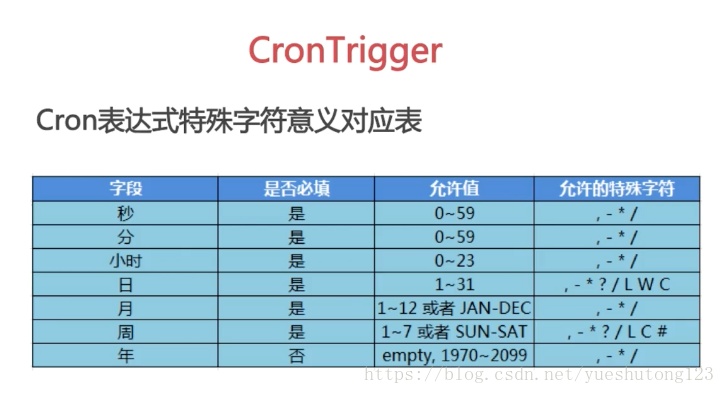
一,导包 1)官网下载:http://www.quartz-scheduler.org/downloads/ 2)Maven <dependency> <groupId>org.quartz-scheduler</groupId> <artifactId>quartz</artifactId> <version>2.2.1</version> </dependency> 二,实例 1.先定义一个作业任务类,写我们的执行代码 package cn.zyzpp.quartz.demo; import java.text.SimpleDateFormat; import java.util.Date; import org.quartz.Job; import org.quartz.JobDataMap; import org.quartz.JobDetail; import org.quartz.JobExecutionContext; import org.quartz.JobExecutionException; import org.quartz.JobKey; import org.quartz.Trigger; /** * Created by yster@foxmail.com * 2018年4月9日 下午11:00:52 */ public class HelloJob implements Job { //第(2)种获取传入的参数的方法:setter方法 属性对应key的值 private String setKey; public void execute(JobExecutionContext context) throws JobExecutionException { //获取JobDetail对象 String now = new SimpleDateFormat("yyyy-mm-dd hh:mm:ss").format(new Date()); JobDetail detail = context.getJobDetail(); String group = detail.getKey().getGroup(); String value = detail.getJobDataMap().getString("key"); //获取Trigger对象 Trigger trigger = context.getTrigger(); value= trigger.getJobDataMap().getString("key"); //获取JobDataMap对象 //第(1)种获取传入的参数的方法 JobDataMap data = context.getMergedJobDataMap(); value = data.getString("key");//相同key 调用trigger的value //System.out.println(group + ":" + value + " at " + now + setKey); //获取Jobkey对象 JobKey jobKey = trigger.getJobKey(); String name = jobKey.getName(); group = jobKey.getGroup(); try { Thread.sleep(5000l); } catch (InterruptedException e) { e.printStackTrace(); } System.out.println(now + ":" + name + " " +group); } public String getSetKey() { return setKey; } public void setSetKey(String setKey) { this.setKey = setKey; } } 2. package cn.zyzpp.quartz.demo; import java.text.SimpleDateFormat; import java.util.Date; import org.quartz.CronScheduleBuilder; import org.quartz.CronTrigger; import org.quartz.JobBuilder; import org.quartz.SimpleScheduleBuilder; import org.quartz.SimpleTrigger; import org.quartz.TriggerBuilder; import org.quartz.JobDetail; import org.quartz.Scheduler; import org.quartz.Trigger; import org.quartz.impl.StdSchedulerFactory; /** * Created by yster@foxmail.com 2018年4月9日 下午10:57:14 */ public class QuartzTest { public static void main(String[] args) { SimpleDateFormat sf =new SimpleDateFormat("yyyy-mm-dd hh:mm:ss"); try { // Quartz 作业:定义一个JobDetail:为Job类设置属性 JobDetail jobDetail = JobBuilder.newJob(HelloJob.class) // 定义Job类为HelloQuartz类,这是真正的执行逻辑所在 .withIdentity("job1", "group1") // 定义name/group .usingJobData("key", "job-value") // 自定义参数 .usingJobData("setKey", "setValue").build(); // System.out.println(jobDetail.getKey().getName()); // System.out.println(jobDetail.getKey().getGroup()); // System.out.println(jobDetail.getJobClass()); // 定义任务开始时间以及结束时间 Date startDate = new Date(); System.out.println("scheduler开始:" + sf.format(new Date())); startDate.setTime(new Date().getTime() + 2000); Date endDate = new Date(); endDate.setTime(startDate.getTime() + 4000); // Quartz触发器:定义一个Trigger Trigger trigger = TriggerBuilder.newTrigger() .withIdentity("trigger1", "group1") // 定义name/group // .startNow()//一旦加入scheduler,立即生效 .startAt(startDate) .endAt(endDate) .withSchedule(SimpleScheduleBuilder.simpleSchedule() .withIntervalInSeconds(1) // 每隔一秒执行一次 .repeatForever()) // 一直执行,奔腾到老不停歇 .usingJobData("key", "trigger-value") .build(); //SimpleTrigger 在一个指定时间段内执行一次作业任务 或者在指定时间间隔内多次执行作业任务 SimpleTrigger simpleTrigger = (SimpleTrigger) TriggerBuilder .newTrigger() .withIdentity("trigger1", "group1") // 定义name/group .startAt(startDate) .withSchedule(SimpleScheduleBuilder.simpleSchedule() .withIntervalInSeconds(2) .withRepeatCount(3)) //执行第1次后再执行3次(SimpleTrigger.REPEAT_INDEFINITELY) .build(); //CronTrigger 基于 cron 表达式,更常用 CronTrigger cronTrigger = (CronTrigger) TriggerBuilder .newTrigger() .withIdentity("trigger1", "group1") // 定义name/group .startAt(startDate) .withSchedule( //Cron表达式:[秒][分][时][日][月][周][年] (周日1-周六7,年可不写) *每 ?不关心 -至 #第 /递增 ,和 L最后 W最近工作日 CronScheduleBuilder.cronSchedule("0/2 * * * * ? * ") ) .build(); // 调度类链接“工作”和“触发器”到一起,并执行它 // 创建scheduler StdSchedulerFactory sfact = new StdSchedulerFactory(); Scheduler scheduler = sfact.getScheduler(); // 加入这个调度 返回第一次执行时间 scheduler.scheduleJob(jobDetail, cronTrigger); //System.out.println("调度器:" + sf.format(scheduler.scheduleJob(jobDetail, cronTrigger))); // 启动之 scheduler.start(); // 运行一段时间后暂停 可再次start 当前主线程不终止 Thread.sleep(10000l); // scheduler.standby(); // System.out.println("暂停:三秒后再次开启"); // Thread.sleep(3000l); // scheduler.start(); // Thread.sleep(5000l); scheduler.shutdown(true);//true等待执行的job完成后关闭scheduler,false直接关闭 System.out.println("scheduler终止" + sf.format(new Date())); } catch (Exception e) { e.printStackTrace(); } } } 三,干货 1)Cron表达式 2)/org/quartz/quartz.properties 3)集成Spring <!-- JobDetail --> <!-- (1)simpleJobDetail : 定义任务类和任务方法--> <bean id="simpleJobDetail" class="org.springframework.scheduling.quartz.MethodInvokingJobDetailFactoryBean"> <property name="targetObject" ref="myBean" /> <property name="targetMethod" value="printMessage" /> </bean> <!--(2)继承 QuartzJobBean 传参--> <bean id="firstComplexJobDetail" class="org.springframework.scheduling.quartz.JobDetailFactoryBean"> <property name="jobClass" value="com.imooc.springquartz.quartz.FirstScheduledJob" /> <property name="jobDataMap"> <map> <entry key="anotherBean" value-ref="anotherBean" /> </map> </property> <property name="durability" value="true"/> </bean> <!--Trigger--> <!-- (1)距离当前时间1秒之后执行,之后每隔两秒钟执行一次 --> <bean id="mySimpleTrigger" class="org.springframework.scheduling.quartz.SimpleTriggerFactoryBean"> <property name="jobDetail" ref="simpleJobDetail"/> <property name="startDelay" value="1000"/> <property name="repeatInterval" value="2000"/> </bean> <!-- (2)每隔5秒钟执行一次 --> <bean id="myCronTrigger" class="org.springframework.scheduling.quartz.CronTriggerFactoryBean"> <property name="jobDetail" ref="firstComplexJobDetail"/> <property name="cronExpression" value="0/5 * * ? * *"/> </bean> <!-- (3)Scheduler --> <bean class="org.springframework.scheduling.quartz.SchedulerFactoryBean"> <property name="jobDetails"> <list> <ref bean="simpleJobDetail"/> <ref bean="firstComplexJobDetail"/> </list> </property> <property name="triggers"> <list> <ref bean="mySimpleTrigger"/> <ref bean="myCronTrigger"/> </list> </property> </bean> 1.MyBean.java import java.text.SimpleDateFormat; import java.util.Date; import org.springframework.stereotype.Component; @Component("myBean") public class MyBean { public void printMessage() { // 打印当前的执行时间,格式为2017-01-01 00:00:00 Date date = new Date(); SimpleDateFormat sf = new SimpleDateFormat("yyyy-MM-dd HH:mm:ss"); System.out.println("MyBean Executes!" + sf.format(date)); } } 2.AnotherBean.java import org.springframework.stereotype.Component; @Component("anotherBean") public class AnotherBean { public void printAnotherMessage() { System.out.println("AnotherMessage"); } } 3.FirstScheduledJob.java import java.text.SimpleDateFormat; import java.util.Date; import org.quartz.JobExecutionContext; import org.quartz.JobExecutionException; import org.springframework.scheduling.quartz.QuartzJobBean; public class FirstScheduledJob extends QuartzJobBean{ private AnotherBean anotherBean; public void setAnotherBean(AnotherBean anotherBean){ this.anotherBean = anotherBean; } @Override protected void executeInternal(JobExecutionContext arg0) throws JobExecutionException { Date date = new Date(); SimpleDateFormat sf = new SimpleDateFormat("yyyy-MM-dd HH:mm:ss"); System.out.println("FirstScheduledJob Executes!" + sf.format(date)); this.anotherBean.printAnotherMessage(); } }


优秀的个人博客,低调大师

简介Valgrind工具包功能

我就不班门弄斧了。不过呢,有可能有些同学可能不知道Valgrind有哪些功能,那么我就从Valgrind的官方网站处,摘几段文字吧。 Memcheck Memcheck detects memory-management problems, and is aimed primarily at C and C++ programs. When a program is run under Memcheck's supervision, all reads and writes of memory are checked, and calls to malloc/new/free/delete are intercepted. As a result, Memcheck can detect if your program: Accesses memory it shouldn't (areas not yet allocated, areas that have been freed, areas past the end of heap blocks, inaccessible areas of the stack). Uses uninitialised values in dangerous ways. Leaks memory. Does bad frees of heap blocks (double frees, mismatched frees). Passes overlapping source and destination memory blocks to memcpy() and related functions. Memcheck reports these errors as soon as they occur, giving the source line number at which it occurred, and also a stack trace of the functions called to reach that line. Memcheck tracks addressability at the byte-level, and initialisation of values at the bit-level. As a result, it can detect the use of single uninitialised bits, and does not report spurious errors on bitfield operations. Memcheck runs programs about 10--30x slower than normal. Cachegrind Cachegrind is a cache profiler. It performs detailed simulation of the I1, D1 and L2 caches in your CPU and so can accurately pinpoint the sources of cache misses in your code. It identifies the number of cache misses, memory references and instructions executed for each line of source code, with per-function, per-module and whole-program summaries. It is useful with programs written in any language. Cachegrind runs programs about 20--100x slower than normal. Callgrind Callgrind, by Josef Weidendorfer, is an extension to Cachegrind . It provides all the information that Cachegrind does, plus extra information about callgraphs. It was folded into the main Valgrind distribution in version 3.2.0. Available separately is an amazing visualisation tool, KCachegrind , which gives a much better overview of the data that Callgrind collects; it can also be used to visualise Cachegrind's output. Massif Massif is a heap profiler. It performs detailed heap profiling by taking regular snapshots of a program's heap. It produces a graph showing heap usage over time, including information about which parts of the program are responsible for the most memory allocations. The graph is supplemented by a text or HTML file that includes more information for determining where the most memory is being allocated. Massif runs programs about 20x slower than normal. Helgrind Helgrind is a thread debugger which finds data races in multithreaded programs. It looks for memory locations which are accessed by more than one (POSIX p-)thread, but for which no consistently used (pthread_mutex_) lock can be found. Such locations are indicative of missing synchronisation between threads, and could cause hard-to-find timing-dependent problems. It is useful for any program that uses pthreads. It is a somewhat experimental tool, so your feedback is especially welcome here. DRD DRD is a tool for detecting errors in multithreaded C and C++ programs. The tool works for any program that uses the POSIX threading primitives or that uses threading concepts built on top of the POSIX threading primitives. While Helgrind can detect locking order violations, for most programs DRD needs less memory to perform its analysis. 原文:http://valgrind.org/info/tools.html

优秀的个人博客,低调大师

Facebook iOS UI 工具ComponentKit简介

在 iOS 上面开发界面,需要创建视图、配置界面、视图分层等等很多步骤,也就不可避免的需要书写 N 多的代码。这还仅仅是界面设计,除此之外,完成 controllers 的回调、控制内部事务在界面上的显示效果、界面的操控和内部事务的联系等等多方面的事情都需要手动解决。即便是界面很简单的 App,如果存在这种复杂的双向数据流的关系,那么代码也会变得很复杂很容易出错。Qt 的信号、槽和 iOS 的 Target-Action 机制其实也是很容易实现这种双向数据流的关系,但是没有办法解决界面和事务之间的联系,也有很多其他的问题:性能、测试等。 这些问题曾经困扰了我们多年。News Feed 是有着复杂的列表样式外观的 iOS 软件,由许多的 Row Type 组成,每一个 Row 都有各种各样不同的很烦的界面样式和交互方式,这个就很坑了。每次维护这个东西都像是在清理厕所,尤其是它的功能还在不断增加,它的代码在不断变多,版本迭代速度快到你都没办法直到每天都到底增添了什么新代码,上司还要拿着报告说“你这个软件太慢了,影响用户体验,给你三个小时把这个 App 的速度提高 80%”。 为了解决这一挑战性的问题,我们从自己的 ReactJS 得到启发,把很多具体的东西抽象出来,做出一个功能性的、响应式编程模型的 iOS 原生 UI 框架 ComponentKit,目前 News Feed 在应用这个框架。 ComponentKit 简介 ComponentKit 使用功能性和声明性(declarative)的方法来进行创建界面,和以往不同的是,ComponentKit 使用单向数据流的形式从 不可变的模型 映射到不可变的组件来确定视图的显示方式。ComponentKit 的 declarative 看上去和 declarative UI(QML) 差不多,其实差得远。QML 更偏向于 UI 设计的描述性,而 ComponentKit 则是做好基本 UI 和事件之间的联系,让事件设计和 UI 设计可以分开单独完成。 内在决定外在,组件的功能和内部的层次决定了用户界面该如何规划,界面的规划决定了 UI Kit 的元素层次结构的设计。 传统做法的结果是大部分时间都被浪费在 UI 该如何实现,ComponentKit 却可以让你把时间都用在在 UI 该怎么设计上面。 例如,传统的 iOS 开发中,为了开发一个带有 header、text 和 footer 的视图,需要以下步骤: 分别创建 header 视图、text 视、footer 视图的实例 将三个视图添加为 container 的子视图 添加约束条件,让每个视图和 container 的宽度相同 添加更多的约束条件,确保每个视图的摆放位置 但是 ComponentKit 不一样,ComponentKit 是一种描述性的开发包:你只需要提供你希望得到什么便能得到什么,而不和传统的 iOS 开发一样,再去一个一个地创建视图、修改视图样式、添加视图、添加约束条件。如图所示,想要得到这个布局,只需要使用描述性的语言描述“我想要一个 header 组件,一个 text 组件,一个 footer 组件,他们的宽度相同,从上到下排列在一起”。单单从这点来看,和 QML 相比,ComponentKit 更类似于 Bootstrap:提供已经完成的组件,你只需要决定组件如何摆放,便可轻松地开发出 UI 界面。 ComponentKit 已经完全把如何渲染 UI 的事情抽象出来,程序员完全可以不去考虑具体是如何实现渲染的,也不用去考虑界面渲染该如何优化。ComponentKit 使用后台线程进行界面布局,也实现了智能组件重用,你完全可以不去考虑界面导致的内存泄露问题。ComponentKit 不仅仅可以极大地提高开发效率,界面响应速度和软件的运行效率也会有极大地提升。 News Feed 移植到 ComponentKit ComponentKit 极大地提升了 News Feed 的 UI 响应速度和稳定性,也让整个软件的内部编码更容易理解。ComponentKit 达到了如下的目标: 减少了 70% 的界面渲染代码,麻麻再也不用担心我每次去维护之前都要看那本又臭又长的手册然后花一上午的时间去理解那个错综复杂的布局了。 显著地提高了滑屏的性能。ComponentKit 消除了许多的 container视图,尽力将所有的视图结构化简。更简洁的视图结构意味着界面的渲染性能和执行效率更高。 提高测试覆盖率。ComponentKit 对于 UI 模块化的设计保证了每一部分都可以被分离开来单独进行测试。再加上 snapshot tests,我们现在几乎已经可以对 News Feed 的所有部分都进行测试了。 引入了 ComponentKit 之后,我们能够维护更少的代码,有更少的 bug 需要修复,有更大的测试覆盖率:我们现在可以有更多的时间做羞羞的事情了 ComponentKit 已经在生产环境的 News Feed 上用了六个月,我们觉得可以一直用下去。现在将 ComponentKit 开源,让整个 iOS 开发者社区的人都有 Facebook 的生产效率,也都能和 Facebook 一样做出高性能的 App。很希望你也能在你的开发环境中使用 ComponentKit,然后给我们反馈。 我们重新定义了如何在 iOS 上开发界面,希望你也能用 ComponentKit 开发出更优雅的 App。 快速入门 ComponentKit 已经在 CocoaPods 中可用了,只需要在 Podfile 添加如下代码即可: pod 'ComponentKit', '~> 0.9' pod try ComponentKit 原文:Introducing ComponentKit: Functional and declarative UI on iOS

优秀的个人博客,低调大师

Filebeat轻量级日志采集工具

Beats 平台集合了多种单一用途数据采集器。这些采集器安装后可用作轻量型代理,从成百上千或成千上万台机器向 Logstash 或 Elasticsearch 发送数据。 一、架构图 此次试验基于前几篇文章,需要先基于前几篇文章搭建基础环境。 二、安装Filebeat 下载并安装Filebeat wget https://artifacts.elastic.co/downloads/beats/filebeat/filebeat-6.0.1-x86_64.rpm yum install ./filebeat-6.0.1-x86_64.rpm 修改Filebeat配置文件 vim /etc/filebeat/filebeat.yml # 主配置文件 \- type: log # 文档类型 paths: \- /var/log/httpd/access.log* # 从哪里读入数据 # 输出在elasticsearch与logstash二选一即可 output.elasticsearch: #将数据输出到Elasticsearch。与下面的logstash二者选一 hosts: ["localhost:9200"] output.logstash: # 将数据传送到logstash,要配置logstash使用beats接收 hosts: ["172.18.68.14:5044"] 启动Filebeat systemctl start filebeat 三、配置Filebeat 配置Logstash接收来自Filebeat采集的数据 vim /etc/logstash/conf.d/test.conf input { beats { port => 5044 # 监听5044用于接收Filebeat传来数据 } } filter { grok { match => { "message" => "%{COMBINEDAPACHELOG}" # 匹配HTTP的日志 } remove_field => "message" # 不显示原信息,仅显示匹配后 } } output { elasticsearch { hosts => ["http://172.18.68.11:9200","http://172.18.68.12:9200","http://172.18.68.13:9200"] # 集群IP index => "logstash-%{+YYYY.MM.dd}" action => "index" document_type => "apache_logs" } } 启动Logstash /usr/share/logstash/bin/logstash -f /etc/logstash/conf.d/test.conf 四、模拟日志访问 通过curl命令来模拟客户访问,生成访问日志 curl 127.0.0.1 curl 172.18.68.51 curl 172.18.68.52 curl 172.18.68.53 五、验证信息 清除之前实验的旧数据(删除时要在对话框中输入删除),然后可以看到filebeat采集数据经过Logtash过滤再送给Elasticsearch的数据。 扩展 随着ELK日志系统逐渐升级,现在已经能基于Filebeat采集各节点日志,Logstash过滤、修剪数据,最后到ELasticsearch中进行索引构建、分词、构建搜索引擎。现在可以基于Elasticsearch的Head查看在浏览器中查看,但是Head仅仅能简单查看并不能有效进行数据分析、有好展示。要想进行数据分析、有好展示那就需要用到Kibana,Kibana依然放在下一篇文章中讲解,这里先放上架构图。

资源下载

更多资源
腾讯云软件源

腾讯云软件源

为解决软件依赖安装时官方源访问速度慢的问题,腾讯云为一些软件搭建了缓存服务。您可以通过使用腾讯云软件源站来提升依赖包的安装速度。为了方便用户自由搭建服务架构,目前腾讯云软件源站支持公网访问和内网访问。

Rocky Linux

Rocky Linux

Rocky Linux(中文名:洛基)是由Gregory Kurtzer于2020年12月发起的企业级Linux发行版,作为CentOS稳定版停止维护后与RHEL(Red Hat Enterprise Linux)完全兼容的开源替代方案,由社区拥有并管理,支持x86_64、aarch64等架构。其通过重新编译RHEL源代码提供长期稳定性,采用模块化包装和SELinux安全架构,默认包含GNOME桌面环境及XFS文件系统,支持十年生命周期更新。

Sublime Text

Sublime Text

Sublime Text具有漂亮的用户界面和强大的功能,例如代码缩略图,Python的插件,代码段等。还可自定义键绑定,菜单和工具栏。Sublime Text 的主要功能包括:拼写检查,书签,完整的 Python API , Goto 功能,即时项目切换,多选择,多窗口等等。Sublime Text 是一个跨平台的编辑器,同时支持Windows、Linux、Mac OS X等操作系统。

WebStorm

WebStorm

WebStorm 是jetbrains公司旗下一款JavaScript 开发工具。目前已经被广大中国JS开发者誉为“Web前端开发神器”、“最强大的HTML5编辑器”、“最智能的JavaScript IDE”等。与IntelliJ IDEA同源,继承了IntelliJ IDEA强大的JS部分的功能。

用户登录
用户注册