前端打包工具Mako架构解析|得物技术
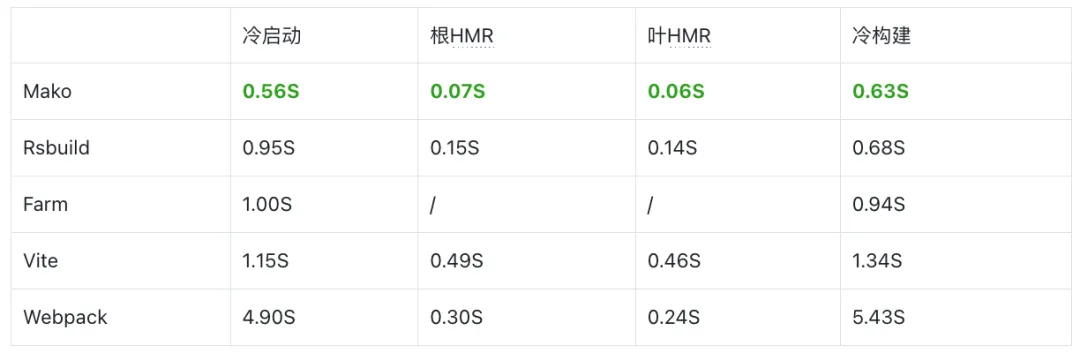
一、Mako是什么 Mako是一个新的Web打包工具,适用于Web应用、库和框架。它被设计得快速、可靠且易于使用。Mako已被数百个生产项目中使用。如果你正在寻找一个现代的Web打包工具,Mako是正确的选择。 二、特点 零配置 从一个JS/TS文件开始,Mako将处理其余部分。开箱即支持TypeScript、Less、CSS、CSS Modules、React、图像、字体、WASM、Node Polyfill等。不需要配置加载器、插件或其他任何东西。 生产级 Mako是可靠的。它被数百个项目使用,如Web应用、混合应用、小程序(部分)、低代码、Serverless、库开发、Ant Design等。还在数千个旧项目和数千个npm包以及不同版本中测试了Mako,以确保兼容性。 快如闪电 Mako被设计得快如闪电。在核心打包逻辑中使用Rust,并在Node.js中使用piscina来并行编译文件。在基准测试中,Mako比其他 Rust打包工具和Webpack更快。 热模块替换 当文件更改时,Mako将自动更新浏览器中的代码。无需手动刷新页面。Mako已集成React快速刷新,当你更改React组件时,它只会更新组件,而不是整个页面。 代码拆分 Mako内置代码拆分支持。你可以使用动态导入将代码拆分为单独的包,从而减小初始包大小并加快加载时间。Mako具有可配置的选项,你可以用来自定义代码拆分行为。 Module Concatenation Module Concatenation是一种优化功能,旨在减少包大小和运行时开销。Mako实现了与Webpack优化文档中的实现相当的Module Concatenation。 三、性能测试 通过冷启动、根HMR、叶HMR、冷构建等多个基准测试可以看到,Mako相较于其他构建工具,有着更好的性能。 benchmark基准测试 https://github.com/umijs/benchmark 四、项目架构 entry 现阶段,可以有三种途径来使用Mako构建,分别是: 通过引用Mako的Rust crate来发起,其核心模块均已导出(不过好像未发布到crates.io); 通过引用 Mako的npm包来在nodejs中发起; 通过Mako的cli来发起。 其中,这三种又都是递进关系 Rust实现Mako编译的核心逻辑并进行导出。 Mako crate中核心模块导出 通过napi将Mako核心逻辑的Rust代码,经过胶水层,在github workflows中进行交叉编译,编译出多平台的native模块,然后在npm模块中进行引用,再次进行一层封装供用户使用。 使用napi进行编译的胶水层代码 此代码经过编译后,可在nodejs中进行引用,有关napi的具体细节请参考https://napi.rs/cn 交叉编译任务的workflows js层引用编译好的native模块,封装后暴露给外部使用 经过js层的参数融合后,最终使用native模块进行构建 在前两步已经将功能、暴露均完成的情况,封装一层cli,根据命令,执行构建。 Mako cli中,匹配到build命令,执行封装好的build函数 Compiler 在经过cli端、js端、Rust端的配置融合之后,会得到最终的配置。 基于这些配置,Mako会生成一个Compiler,来执行整个编译流程。 Compiler中存在各种插件来执行任务,插件都拥有如下的生命周期,会在编译过程的各个阶段进行调用。 pub trait Plugin: Any + Send + Sync { fn name(&self) -> &str; fn modify_config(&self, _config: &mut Config, _root: &Path, _args: &Args) -> Result<()> { Ok(()) } fn load(&self, _param: &PluginLoadParam, _context: &Arc<Context>) -> Result<Option<Content>> { Ok(None) } fn next_build(&self, _next_build_param: &NextBuildParam) -> bool { true } fn parse( &self, _param: &PluginParseParam, _context: &Arc<Context>, ) -> Result<Option<ModuleAst>> { Ok(None) } fn transform_js( &self, _param: &PluginTransformJsParam, _ast: &mut Module, _context: &Arc<Context>, ) -> Result<()> { Ok(()) } fn after_generate_transform_js( &self, _param: &PluginTransformJsParam, _ast: &mut Module, _context: &Arc<Context>, ) -> Result<()> { Ok(()) } fn before_resolve(&self, _deps: &mut Vec<Dependency>, _context: &Arc<Context>) -> Result<()> { Ok(()) } fn after_build(&self, _context: &Arc<Context>, _compiler: &Compiler) -> Result<()> { Ok(()) } fn generate(&self, _context: &Arc<Context>) -> Result<Option<()>> { Ok(None) } fn after_generate_chunk_files( &self, _chunk_files: &[ChunkFile], _context: &Arc<Context>, ) -> Result<()> { Ok(()) } fn build_success(&self, _stats: &StatsJsonMap, _context: &Arc<Context>) -> Result<Option<()>> { Ok(None) } fn build_start(&self, _context: &Arc<Context>) -> Result<Option<()>> { Ok(None) } fn generate_beg(&self, _context: &Arc<Context>) -> Result<()> { Ok(()) } fn generate_end( &self, _params: &PluginGenerateEndParams, _context: &Arc<Context>, ) -> Result<Option<()>> { Ok(None) } fn runtime_plugins(&self, _context: &Arc<Context>) -> Result<Vec<String>> { Ok(Vec::new()) } fn optimize_module_graph( &self, _module_graph: &mut ModuleGraph, _context: &Arc<Context>, ) -> Result<()> { Ok(()) } fn before_optimize_chunk(&self, _context: &Arc<Context>) -> Result<()> { Ok(()) } fn optimize_chunk( &self, _chunk_graph: &mut ChunkGraph, _module_graph: &mut ModuleGraph, _context: &Arc<Context>, ) -> Result<()> { Ok(()) } fn before_write_fs(&self, _path: &Path, _content: &[u8]) -> Result<()> { Ok(()) } } 所有的插件又分为如下几类: 内置的分为两类的插件11种; 外部js编写的插件(Less的编译就是使用这种); 其他条件型插件。 使用各种插件 在确定好本次编译要使用的插件后,会生成一个PluginDriver,来进行整体生命周期的调度,并执行modify_config生命周期,确定最终的config。 根据plugins创建PluginDriver调度所有插件的生命周期 PluginDriver的内部逻辑,即将执行所有插件对应的生命周期一一执行 下一步就是执行整个编译流程: build 编译流程的实现,代码简化如下: impl Compiler { pub fn build(&self, files: Vec<File>) -> Result<HashSet<ModuleId>> { let (rs, rr) = channel::<Result<Module>>(); let build_with_pool = |file: File, parent_resource: Option<ResolverResource>| { let rs = rs.clone(); let context = self.context.clone(); thread_pool::spawn(move || { let result = Self::build_module(&file, parent_resource, context.clone()); let result = Self::handle_build_result(result, &file, context); rs.send(result).unwrap(); }); }; let mut count = 0; for file in files { count += 1; build_with_pool(file, None); } let mut errors = vec![]; let mut module_ids = HashSet::new(); for build_result in rr { count -= 1; // handle build_module error if build_result.is_err() { errors.push(build_result.err().unwrap()); if count == 0 { break; } else { continue; } } let module = build_result.unwrap(); let module_id = module.id.clone(); // xxx } drop(rs); if !errors.is_empty() { return Err(anyhow::anyhow!(BuildError::BuildTasksError { errors })); } Ok(module_ids) } } Compiler会创建管道,然后使用rayon的线程池进行构建任务的执行,执行完成后将结果通过管道送回,再执行后续操作。 build_module实现如下: pub fn build_module( file: &File, parent_resource: Option<ResolverResource>, context: Arc<Context>, ) -> Result<Module> { // 1. load let mut file = file.clone(); let content = load::Load::load(&file, context.clone())?; file.set_content(content); // 2. parse let mut ast = parse::Parse::parse(&file, context.clone())?; // 3. transform transform::Transform::transform(&mut ast, &file, context.clone())?; // 4. analyze deps + resolve let deps = analyze_deps::AnalyzeDeps::analyze_deps(&ast, &file, context.clone())?; // 5. create module let path = file.path.to_string_lossy().to_string(); let module_id = ModuleId::new(path.clone()); let raw = file.get_content_raw(); let is_entry = file.is_entry; let source_map_chain = file.get_source_map_chain(context.clone()); let top_level_await = match &ast { ModuleAst::Script(ast) => ast.contains_top_level_await, _ => false, }; let is_async_module = file.extname == "wasm"; let is_async = is_async_module || top_level_await; // raw_hash is only used in watch mode // so we don't need to calculate when watch is off let raw_hash = if context.args.watch { file.get_raw_hash() .wrapping_add(hash_hashmap(&deps.missing_deps)) } else { 0 }; let info = ModuleInfo { file, deps, ast, resolved_resource: parent_resource, source_map_chain, top_level_await, is_async, raw_hash, raw, ..Default::default() }; let module = Module::new(module_id, is_entry, Some(info)); Ok(module) } build_module执行阶段解析: Load 根据路径加载文件,目前内置如下类型(支持通过插件的Load生命周期配置自定义文件) virtual:inline_css:runtime ?raw js css md & mdx svg toml wasm xml yaml json assets impl Load { pub fn load(file: &File, context: Arc<Context>) -> Result<Content> { crate::mako_profile_function!(file.path.to_string_lossy()); debug!("load: {:?}", file); // plugin first let content: Option<Content> = context .plugin_driver .load(&PluginLoadParam { file }, &context)?; if let Some(content) = content { return Ok(content); } // virtual:inline_css:runtime if file.path.to_str().unwrap() == "virtual:inline_css:runtime" { return Ok(Content::Js(JsContent { content: r#" export function moduleToDom(css) { var styleElement = document.createElement("style"); styleElement.type = "text/css"; styleElement.appendChild(document.createTextNode(css)) document.head.appendChild(styleElement); } "# .to_string(), ..Default::default() })); } // file exists check must after virtual modules handling if !file.pathname.exists() || !file.pathname.is_file() { return Err(anyhow!(LoadError::FileNotFound { path: file.path.to_string_lossy().to_string(), })); } // unsupported if UNSUPPORTED_EXTENSIONS.contains(&file.extname.as_str()) { return Err(anyhow!(LoadError::UnsupportedExtName { ext_name: file.extname.clone(), path: file.path.to_string_lossy().to_string(), })); } // ?raw if file.has_param("raw") { let content = FileSystem::read_file(&file.pathname)?; let content = serde_json::to_string(&content)?; return Ok(Content::Js(JsContent { content: format!("module.exports = {}", content), ..Default::default() })); } // js if JS_EXTENSIONS.contains(&file.extname.as_str()) { // entry with ?hmr let is_jsx = file.extname.as_str() == "jsx" || file.extname.as_str() == "tsx"; if file.is_entry && file.has_param("hmr") { let content = format!( "{}\nmodule.exports = require(\"{}\");\n", include_str!("../runtime/runtime_hmr_entry.js"), file.pathname.to_string_lossy(), ); return Ok(Content::Js(JsContent { content, is_jsx })); } let content = FileSystem::read_file(&file.pathname)?; return Ok(Content::Js(JsContent { content, is_jsx })); } // css if CSS_EXTENSIONS.contains(&file.extname.as_str()) { let content = FileSystem::read_file(&file.pathname)?; return Ok(Content::Css(content)); } // md & mdx if MD_EXTENSIONS.contains(&file.extname.as_str()) { let content = FileSystem::read_file(&file.pathname)?; let options = MdxOptions { development: matches!(context.config.mode, Mode::Development), ..Default::default() }; let content = match compile(&content, &options) { Ok(js_string) => js_string, Err(reason) => { return Err(anyhow!(LoadError::CompileMdError { path: file.path.to_string_lossy().to_string(), reason, })); } }; let is_jsx = file.extname.as_str() == "mdx"; return Ok(Content::Js(JsContent { content, is_jsx })); } // svg // TODO: Not all svg files need to be converted to React Component, unnecessary performance consumption here if SVG_EXTENSIONS.contains(&file.extname.as_str()) { let content = FileSystem::read_file(&file.pathname)?; let svgr_transformed = svgr_rs::transform( content, svgr_rs::Config { named_export: SVGR_NAMED_EXPORT.to_string(), export_type: Some(svgr_rs::ExportType::Named), ..Default::default() }, svgr_rs::State { ..Default::default() }, ) .map_err(|err| LoadError::ToSvgrError { path: file.path.to_string_lossy().to_string(), reason: err.to_string(), })?; let asset_path = Self::handle_asset(file, true, true, context.clone())?; return Ok(Content::Js(JsContent { content: format!("{}\nexport default {};", svgr_transformed, asset_path), is_jsx: true, })); } // toml if TOML_EXTENSIONS.contains(&file.extname.as_str()) { let content = FileSystem::read_file(&file.pathname)?; let content = from_toml_str::<TomlValue>(&content)?; let content = serde_json::to_string(&content)?; return Ok(Content::Js(JsContent { content: format!("module.exports = {}", content), ..Default::default() })); } // wasm if WASM_EXTENSIONS.contains(&file.extname.as_str()) { let final_file_name = format!( "{}.{}.{}", file.get_file_stem(), file.get_content_hash()?, file.extname ); context.emit_assets( file.pathname.to_string_lossy().to_string(), final_file_name.clone(), ); return Ok(Content::Js(JsContent { content: format!( "module.exports = require._interopreRequireWasm(exports, \"{}\")", final_file_name ), ..Default::default() })); } // xml if XML_EXTENSIONS.contains(&file.extname.as_str()) { let content = FileSystem::read_file(&file.pathname)?; let content = from_xml_str::<serde_json::Value>(&content)?; let content = serde_json::to_string(&content)?; return Ok(Content::Js(JsContent { content: format!("module.exports = {}", content), ..Default::default() })); } // yaml if YAML_EXTENSIONS.contains(&file.extname.as_str()) { let content = FileSystem::read_file(&file.pathname)?; let content = from_yaml_str::<YamlValue>(&content)?; let content = serde_json::to_string(&content)?; return Ok(Content::Js(JsContent { content: format!("module.exports = {}", content), ..Default::default() })); } // json if JSON_EXTENSIONS.contains(&file.extname.as_str()) { let content = FileSystem::read_file(&file.pathname)?; return Ok(Content::Js(JsContent { content: format!("module.exports = {}", content), ..Default::default() })); } // assets let asset_path = Self::handle_asset(file, true, true, context.clone())?; Ok(Content::Js(JsContent { content: format!("module.exports = {};", asset_path), ..Default::default() })) } } Parse 将源文件解析为ModuleAst类型 ,现阶段内置了Script 和Css两种swc ast的封装,在这个阶段会执行plugins中的parse生命周期,可以在这个生命周期中进行自定义语法的ast解析。 比如想支持鸿蒙的ets,编写插件的话就需要在这个阶段进行ast解析 impl Parse { pub fn parse(file: &File, context: Arc<Context>) -> Result<ModuleAst> { // plugin first let ast = context .plugin_driver .parse(&PluginParseParam { file }, &context)?; if let Some(ast) = ast { return Ok(ast); } // js if let Some(Content::Js(_)) = &file.content { debug!("parse js: {:?}", file.path); let ast = JsAst::new(file, context.clone())?; if let Some(ast) = Rsc::parse_js(file, &ast, context.clone())? { return Ok(ast); } return Ok(ModuleAst::Script(ast)); } // css if let Some(Content::Css(_)) = &file.content { // xxx } } } transform 使用swc,通过各种visitor进行ast的转换操作,生成最终的ast。 impl Transform { pub fn transform(ast: &mut ModuleAst, file: &File, context: Arc<Context>) -> Result<()> { crate::mako_profile_function!(); match ast { ModuleAst::Script(ast) => { GLOBALS.set(&context.meta.script.globals, || { let unresolved_mark = ast.unresolved_mark; let top_level_mark = ast.top_level_mark; let cm: Arc<swc_core::common::SourceMap> = context.meta.script.cm.clone(); let origin_comments = context.meta.script.origin_comments.read().unwrap(); let is_ts = file.extname == "ts"; let is_tsx = file.extname == "tsx"; let is_jsx = file.is_content_jsx() || file.extname == "jsx" || file.extname == "js" || file.extname == "ts" || file.extname == "tsx"; // visitors let mut visitors: Vec<Box<dyn VisitMut>> = vec![ Box::new(resolver(unresolved_mark, top_level_mark, is_ts || is_tsx)), Box::new(FixHelperInjectPosition::new()), Box::new(FixSymbolConflict::new(top_level_mark)), Box::new(NewUrlAssets { context: context.clone(), path: file.path.clone(), unresolved_mark, }), Box::new(WorkerModule::new(unresolved_mark)), ]; if is_tsx { visitors.push(Box::new(tsx_strip( cm.clone(), context.clone(), top_level_mark, ))) } if is_ts { visitors.push(Box::new(ts_strip(top_level_mark))) } // named default export if context.args.watch && !file.is_under_node_modules && is_jsx { visitors.push(Box::new(DefaultExportNamer::new())); } // react & react-refresh let is_dev = matches!(context.config.mode, Mode::Development); let is_browser = matches!(context.config.platform, crate::config::Platform::Browser); let use_refresh = is_dev && context.args.watch && context.config.hmr.is_some() && !file.is_under_node_modules && is_browser; if is_jsx { visitors.push(react( cm, context.clone(), use_refresh, &top_level_mark, &unresolved_mark, )); } { let mut define = context.config.define.clone(); let mode = context.config.mode.to_string(); define .entry("NODE_ENV".to_string()) .or_insert_with(|| format!("\"{}\"", mode).into()); let env_map = build_env_map(define, &context)?; visitors.push(Box::new(EnvReplacer::new( Lrc::new(env_map), unresolved_mark, ))); } visitors.push(Box::new(TryResolve { path: file.path.to_string_lossy().to_string(), context: context.clone(), unresolved_mark, })); visitors.push(Box::new(Provide::new( context.config.providers.clone(), unresolved_mark, top_level_mark, ))); visitors.push(Box::new(VirtualCSSModules { auto_css_modules: context.config.auto_css_modules, })); visitors.push(Box::new(ContextModuleVisitor { unresolved_mark })); if context.config.dynamic_import_to_require { visitors.push(Box::new(DynamicImportToRequire { unresolved_mark })); } if matches!(context.config.platform, crate::config::Platform::Node) { visitors.push(Box::new(features::node::MockFilenameAndDirname { unresolved_mark, current_path: file.path.clone(), context: context.clone(), })); } // folders let mut folders: Vec<Box<dyn Fold>> = vec![]; folders.push(Box::new(decorators(decorators::Config { legacy: true, emit_metadata: false, ..Default::default() }))); let comments = origin_comments.get_swc_comments().clone(); let assumptions = context.assumptions_for(file); folders.push(Box::new(swc_preset_env::preset_env( unresolved_mark, Some(comments), swc_preset_env::Config { mode: Some(swc_preset_env::Mode::Entry), targets: Some(swc_preset_env_targets_from_map( context.config.targets.clone(), )), ..Default::default() }, assumptions, &mut FeatureFlag::default(), ))); folders.push(Box::new(reserved_words::reserved_words())); folders.push(Box::new(paren_remover(Default::default()))); folders.push(Box::new(simplifier( unresolved_mark, SimpilifyConfig { dce: dce::Config { top_level: false, ..Default::default() }, ..Default::default() }, ))); ast.transform(&mut visitors, &mut folders, file, true, context.clone())?; Ok(()) }) } ModuleAst::Css(ast) => { // replace [@import](https://my.oschina.net/fzqlovehzl) url() to [@import](https://my.oschina.net/fzqlovehzl) before CSSUrlReplacer import_url_to_href(&mut ast.ast); let mut visitors: Vec<Box<dyn swc_css_visit::VisitMut>> = vec![]; visitors.push(Box::new(Compiler::new(compiler::Config { process: swc_css_compat::feature::Features::NESTING, }))); let path = file.path.to_string_lossy().to_string(); visitors.push(Box::new(CSSAssets { path, context: context.clone(), })); // same ability as postcss-flexbugs-fixes if context.config.flex_bugs { visitors.push(Box::new(CSSFlexbugs {})); } if context.config.px2rem.is_some() { let context = context.clone(); visitors.push(Box::new(Px2Rem::new( context.config.px2rem.as_ref().unwrap().clone(), ))); } // prefixer visitors.push(Box::new(prefixer::prefixer(prefixer::options::Options { env: Some(targets::swc_preset_env_targets_from_map( context.config.targets.clone(), )), }))); ast.transform(&mut visitors)?; // css modules let is_modules = file.has_param("modules"); if is_modules { CssAst::compile_css_modules(file.pathname.to_str().unwrap(), &mut ast.ast); } Ok(()) } ModuleAst::None => Ok(()), } } } analyze deps+resolve ast解析完成后,进行依赖的分析。 依赖分析阶段 有个很有意思的事情是我看到代码中有使用oxc_resolver,一开始有点好奇,以为是什么黑科技,因为oxc和swc是同类型的工具,一般不会出现在同一个项目中。 经过查找之后发现,是之前的resolver有点问题,作为替换才使用的oxc的resolver模块。 也就是解析还是使用的swc,oxc只用到了resolver。 具体可参考https://github.com/umijs/mako/pull/919。 create module ast处理完成、依赖分析完成后,将所有元数据进行合并,为一个Module,执行后续操作。 create Module阶段 至此,核心编译流程已经完成。 生成 编译完成后,来到了整个构建流程的最后一步:生成,整体架构如下: 生成阶段 五、尾声 最开始以为Mako会像Rspack一样,走的是Webpack的路子,看完后觉得Mako的设计思路是rollup一样的,通过各种的plugin来完成一个构建工具的功能。 正如其官网所说: Mako 不是为了与 Webpack 的社区加载器和插件兼容而设计的。如果你的项目严重依赖于 Webpack 的社区加载器和插件,你不应该使用 Mako,Rspack 是更好的选择。 一家之言,还请各位指正。 *文/ asarua 本文属得物技术原创,更多精彩文章请看:得物技术 未经得物技术许可严禁转载,否则依法追究法律责任!