首页 文章 精选 留言 我的

精选列表

搜索[零点击],共10003篇文章
优秀的个人博客,低调大师

CI 工具「Gitee Go」现已进入公测,点击领取免费时长

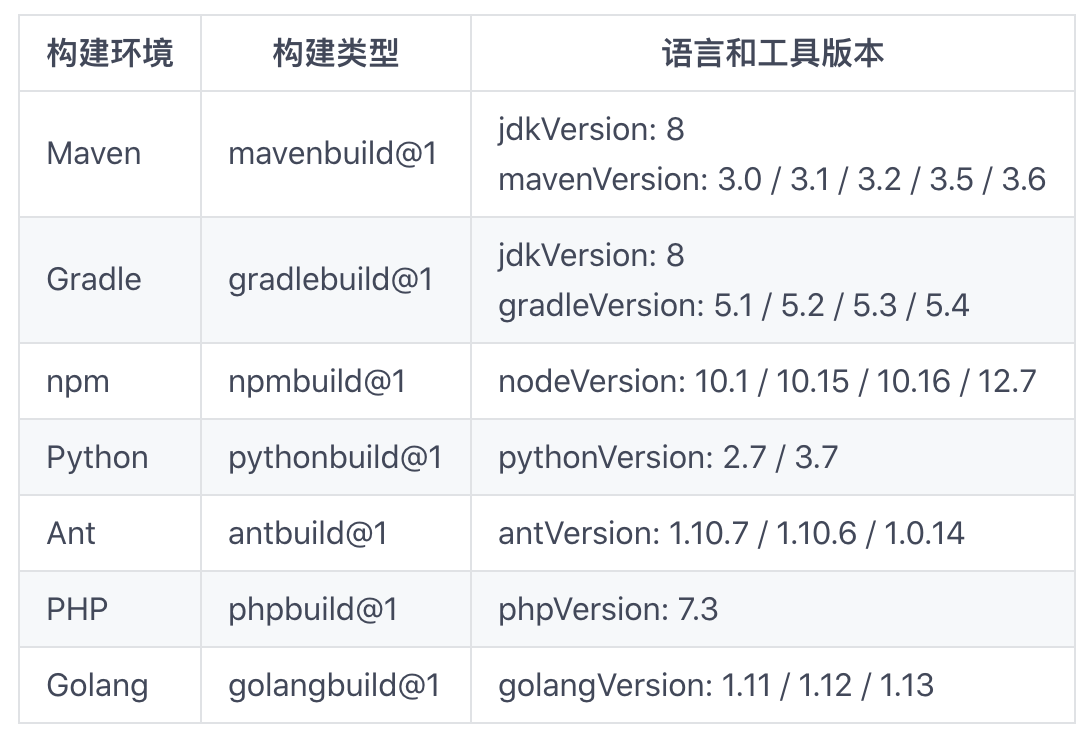
Gitee 在今年 4 月份推出了 CI 服务「Gitee Go」,为开发者们又增添了一个 CI 服务可选项,目前「Gitee Go」已支持 Maven、Gradle、npm、Python、Ant、PHP、Golang 等工具和语言的编译和构建工作。 用户可通过 YAML 语法编写流水线文件,如果对于 YAML 语法不太熟悉,我们也提供了多套示例文件,用户可根据示例文件进行修改,自定义构建脚本创建流水线,进行代码仓库的编译和构建。 在三个多月的内测期间,「Gitee Go」也收到了参与内测企业的众多反馈及建议。经过完善,「Gitee Go」现正式进入公测阶段,开放给所有企业版用户(免费版及以上版本),并为每个企业提供 200 分钟的免费构建时长。 用户只需登录自己的企业,依次选择「管理」-->「扩展应用」-->「Gitee Go」,选择页面上方的「构建时长免费领」,即可获取 200 分钟免费时长。(领取时间:即日起至 2020 年 9 月 30 日) 同时,「Gitee Go」也开启了购买通道,支持用户按需购买构建时长。 未来,「Gitee Go」除了更多开发语言和工具的支持外,持续部署以及制品(构建物)的管理也将会陆续上线。 欢迎各位 Gitee 企业版用户前来试用「Gitee Go」,如果您在使用过程遇到问题或者有任何的建议,可以加入「Gitee Go」QQ技术交流群:1078759826,和 Gitee 团队面对面交流。

优秀的个人博客,低调大师

Android5.0新特性之——按钮点击效果动画(涟漪效果)

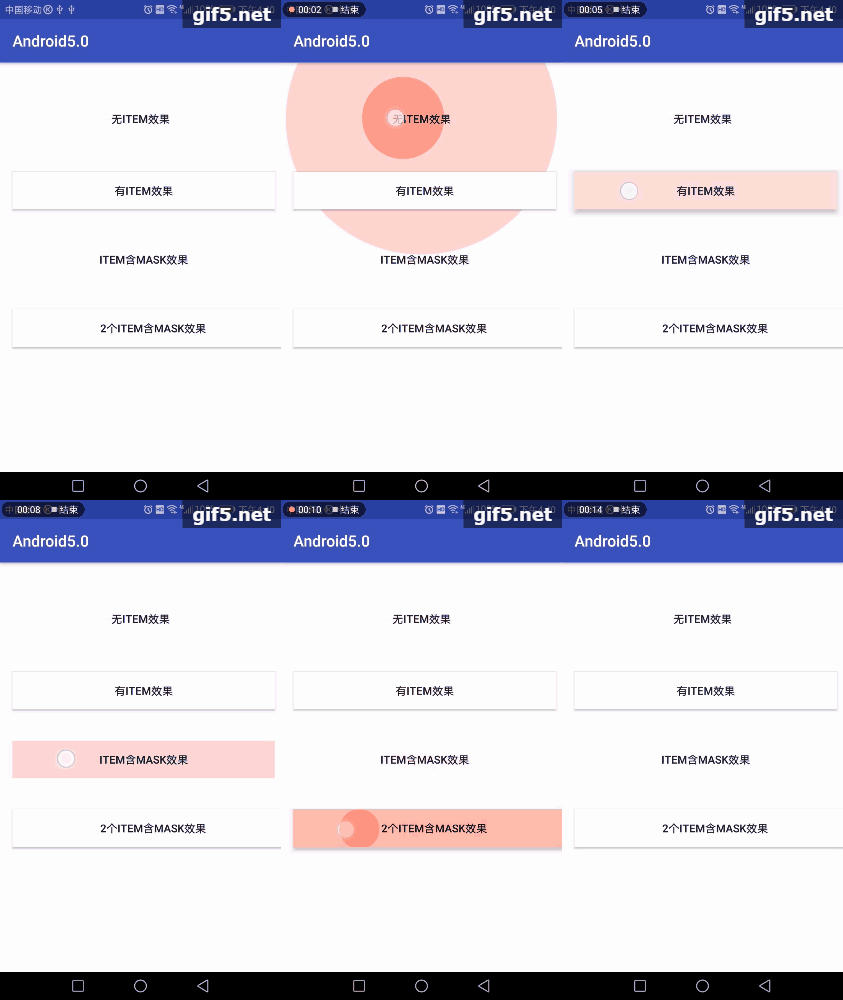
Android5.0 Material Design设计的动画效果 RippleDrawable涟漪效果 涟漪效果是Android5.0以后的新特性。为了兼容性,建议新建drawable-v21文件夹来存放RippleDrawable,drawable文件夹下也要放相应的适配图片。(这里可以安装一个AndroidSelector插件,具体的可以参考https://blog.csdn.net/oqihaogongyuan/article/details/53102615的第三部分) 涟漪动画主要是对于ripple标签的使用。,其中ripple节点的,必须要设置color属性。这里根节点的设置的color就是涟漪效果的波纹颜色。子节点的item设置的drawable是涟漪效果的背景(也可以认为是涟漪效果的展示范围)。 我这里根据场景分了4种不同的效果。话不多说先上图。 1、只有ripple节点,无item子节点。通过效果图可以看出,涟漪效果的扩散范围没有限制。已经扩散到了父控件。 1 <?xml version="1.0" encoding="utf-8"?> 2 <ripple xmlns:android="http://schemas.android.com/apk/res/android" 3 android:color="@color/colorBtn"> 4 </ripple> 2、含有一个item节点。通过效果图,可以看到,控件显示了设置的背景色。涟漪效果的范围得到了控制。 <?xml version="1.0" encoding="utf-8"?> <ripple xmlns:android="http://schemas.android.com/apk/res/android" android:color="@color/colorBtn"> <!--显示默认的 drawable--> <item android:drawable="@color/colorWhite" /> </ripple> 3、第二种情况已经符合大多数的场景了。但是随着现在的一些视觉效果的变更,可能存在只要涟漪效果,背景可能是透明色的。设置id为mask的item节点,只起到一个涟漪效果限制作用,并不显示设置的drawable <?xml version="1.0" encoding="utf-8"?> <ripple xmlns:android="http://schemas.android.com/apk/res/android" android:color="@color/colorBtn"> <item android:id="@android:id/mask" android:drawable="@color/colorPrimary"/> </ripple> 4、第四种其实和第二种效果上是一样的。个人感觉没有什么区别。希望了解的大牛进行指点 <?xml version="1.0" encoding="utf-8"?> <ripple xmlns:android="http://schemas.android.com/apk/res/android" android:color="@color/colorBtn"> <!--显示默认的 drawable--> <item android:drawable="@color/colorWhite" /> <item android:id="@android:id/mask" android:drawable="@color/colorAccent"/> </ripple> 我的布局文件: <?xml version="1.0" encoding="utf-8"?> <android.support.constraint.ConstraintLayout xmlns:android="http://schemas.android.com/apk/res/android" xmlns:app="http://schemas.android.com/apk/res-auto" xmlns:tools="http://schemas.android.com/tools" android:layout_width="match_parent" android:layout_height="match_parent" tools:context="com.gaosiedu.android50.MainActivity"> <Button android:id="@+id/btn_touch_no" android:layout_width="match_parent" android:layout_height="wrap_content" android:layout_marginEnd="8dp" android:layout_marginStart="8dp" android:layout_marginTop="48dp" android:background="@drawable/ripple_item_no" android:text="无item效果" app:layout_constraintEnd_toEndOf="parent" app:layout_constraintStart_toStartOf="parent" app:layout_constraintTop_toTopOf="parent" /> <Button android:id="@+id/btn_touch_single" android:layout_width="0dp" android:layout_height="wrap_content" android:layout_marginStart="8dp" android:layout_marginTop="44dp" android:background="@drawable/ripple_item_single" android:text="有item效果" app:layout_constraintEnd_toEndOf="@+id/btn_touch_no" app:layout_constraintStart_toStartOf="@+id/btn_touch_no" app:layout_constraintTop_toBottomOf="@+id/btn_touch_no" /> <Button android:id="@+id/btn_touch_mask" android:layout_width="0dp" android:layout_height="wrap_content" android:layout_marginTop="40dp" android:background="@drawable/ripple_item_mask" android:text="item含mask效果" app:layout_constraintEnd_toEndOf="@+id/btn_touch_single" app:layout_constraintStart_toStartOf="@+id/btn_touch_single" app:layout_constraintTop_toBottomOf="@+id/btn_touch_single" /> <Button android:id="@+id/btn_touch_double" android:layout_width="360dp" android:layout_height="wrap_content" android:layout_marginEnd="8dp" android:layout_marginTop="40dp" android:background="@drawable/ripple_item_double" android:text="2个item含mask效果" app:layout_constraintEnd_toEndOf="@+id/btn_touch_mask" app:layout_constraintHorizontal_bias="0.0" app:layout_constraintStart_toStartOf="@+id/btn_touch_mask" app:layout_constraintTop_toBottomOf="@+id/btn_touch_mask" /> </android.support.constraint.ConstraintLayout>

优秀的个人博客,低调大师

Android仿WIN8系统磁贴点击下沉倾斜效果

※效果 ※使用说明 Java代码 import android.app.Activity; import android.os.Bundle; import android.widget.Toast; public class TestRolateAnimActivity extends Activity { /** Called when the activity is first created. */ MyImageView joke; @Override public void onCreate(Bundle savedInstanceState) { super.onCreate(savedInstanceState); setContentView(R.layout.main); joke=(MyImageView) findViewById(R.id.c_joke); joke.setOnClickIntent(new MyImageView.OnViewClick() { @Override public void onClick() { // TODO Auto-generated method stub Toast.makeText(TestRolateAnimActivity.this, "事件触发", 1000).show(); System.out.println("1"); } }); } } XML代码 <?xml version="1.0" encoding="utf-8"?> <LinearLayout xmlns:android="http://schemas.android.com/apk/res/android" android:layout_width="fill_parent" android:layout_height="fill_parent" android:gravity="center" android:orientation="vertical" android:background="@drawable/bkg_img_default"> <LinearLayout android:layout_width="wrap_content" android:layout_height="wrap_content" android:orientation="vertical" > <LinearLayout android:layout_width="wrap_content" android:layout_height="wrap_content" android:orientation="horizontal" > <LinearLayout android:layout_width="wrap_content" android:layout_height="wrap_content" android:orientation="vertical" > <com.ljp.ani.MyImageView android:id="@+id/c_joke" android:layout_width="wrap_content" android:scaleType="matrix" android:layout_height="wrap_content" android:layout_margin="2dp" android:src="@drawable/left_top" /> <com.ljp.ani.MyImageView android:id="@+id/c_idea" android:layout_width="wrap_content" android:scaleType="matrix" android:layout_height="wrap_content" android:layout_margin="2dp" android:src="@drawable/left_bottom" /> </LinearLayout> <com.ljp.ani.MyImageView android:id="@+id/c_constellation" android:layout_width="wrap_content" android:scaleType="matrix" android:layout_height="wrap_content" android:layout_margin="2dp" android:src="@drawable/right" /> </LinearLayout> <com.ljp.ani.MyImageView android:id="@+id/c_recommend" android:layout_width="wrap_content" android:scaleType="matrix" android:layout_height="wrap_content" android:layout_margin="2dp" android:src="@drawable/bottom" /> </LinearLayout> </LinearLayout> Demo下载 http://download.csdn.net/detail/u010785585/7668229 本文转自mfrbuaa博客园博客,原文链接:http://www.cnblogs.com/mfrbuaa/p/5083520.html,如需转载请自行联系原作者

资源下载

更多资源
Spring

Spring

Spring框架(Spring Framework)是由Rod Johnson于2002年提出的开源Java企业级应用框架,旨在通过使用JavaBean替代传统EJB实现方式降低企业级编程开发的复杂性。该框架基于简单性、可测试性和松耦合性设计理念,提供核心容器、应用上下文、数据访问集成等模块,支持整合Hibernate、Struts等第三方框架,其适用范围不仅限于服务器端开发,绝大多数Java应用均可从中受益。

Rocky Linux

Rocky Linux

Rocky Linux(中文名:洛基)是由Gregory Kurtzer于2020年12月发起的企业级Linux发行版,作为CentOS稳定版停止维护后与RHEL(Red Hat Enterprise Linux)完全兼容的开源替代方案,由社区拥有并管理,支持x86_64、aarch64等架构。其通过重新编译RHEL源代码提供长期稳定性,采用模块化包装和SELinux安全架构,默认包含GNOME桌面环境及XFS文件系统,支持十年生命周期更新。

Sublime Text

Sublime Text

Sublime Text具有漂亮的用户界面和强大的功能,例如代码缩略图,Python的插件,代码段等。还可自定义键绑定,菜单和工具栏。Sublime Text 的主要功能包括:拼写检查,书签,完整的 Python API , Goto 功能,即时项目切换,多选择,多窗口等等。Sublime Text 是一个跨平台的编辑器,同时支持Windows、Linux、Mac OS X等操作系统。

WebStorm

WebStorm

WebStorm 是jetbrains公司旗下一款JavaScript 开发工具。目前已经被广大中国JS开发者誉为“Web前端开发神器”、“最强大的HTML5编辑器”、“最智能的JavaScript IDE”等。与IntelliJ IDEA同源,继承了IntelliJ IDEA强大的JS部分的功能。


用户登录
用户注册