首页 文章 精选 留言 我的

精选列表

搜索[笔记工具],共10000篇文章
优秀的个人博客,低调大师

Flask拾遗笔记之上下文

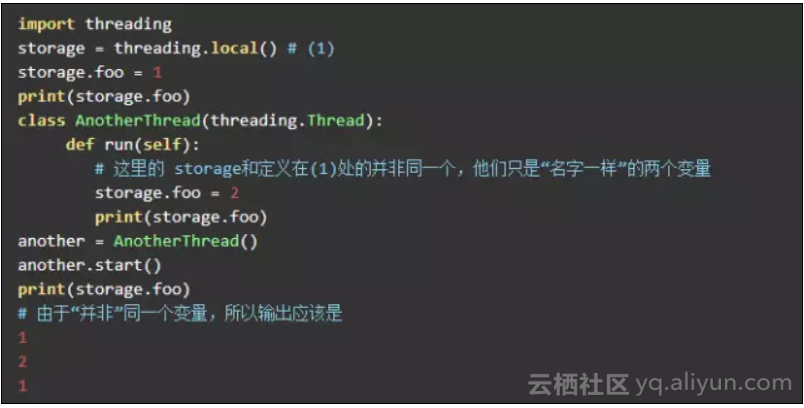
threading.local() 通过threading.local()可以创建一个线程安全的全局变量,即在一线程中的修改不会影响另一线程。结合代码说明: 通过修改代码验证“名同实不同”: 所以threading.local()是通过创建“名同实不同”的“全局变量”。 LocalProxy 和 LocalStack 这两个都是基于 werkzeug.local.Local实现。 werkzeug.local.Local和threading.local只有两个不同,一个是前者优先使用Greenlet的ID,其次是线程ID;二是前者实现了一个析构方法(__release_local__)来析构(删除)创建的werkzeug.local.Local对象。 总的来说,前者是web升级版的threading.local. 那么顾名思义,LocalPro

优秀的个人博客,低调大师

学习笔记CB004:提问、检索、回答、NLPIR

聊天机器人,提问、检索、回答。 提问,查询关键词生成、答案类型确定、句法和语义分析。查询关键词生成,提问提取关键词,中心词关联扩展词。答案类型确定,确定提问类型。句法和语义分析,问题深层含义剖析。检索,搜索,根据查询关键词信息检索,返回句子或段落。答案抽取,分析和推理检索句子或段落,抽取提问一致实体,根据概率最大对候选答案排序。 海量文本知识表示,网络文本资源获取、机器学习方法、大规模语义计算和推理、知识表示体系、知识库构建。问句解析,中文分词、词性标注、实体标注、概念类别标注、句法分析、语义分析、逻辑结构标注、指代消解、关联关系标注、问句分类、答案类别确定。答案生成过滤,候选答案抽取、关系推演、吻哈程度判断、噪声过滤。 聊天机器人技术类型。基于检索技术,信息检索,简单易实现,无法从句法关系和语义关系给出答案,无法推理问题。基于模式匹配技术,把问题往梳理好的模式匹配,推理简单,模式涵盖不全。基于自然语言理解技术,把浅层分析加句法分析、语义分析。基于统计翻译模型技术,把问句疑问词留出来,和候选答案资源匹配。 问句解析。哈工大LTP(语言技术平台)、博森科技、jieba分词、中科院张华平博士NLPIR汉语分词系统。 NLPIR,http://pynlpir.readthedocs.io/en/latest/。安装 pip install pynlpir 。下载授权文件 https://github.com/NLPIR-team/NLPIR/blob/master/License/license%20for%20a%20month/NLPIR-ICTCLAS分词系统授权/NLPIR.user,替换pynlpir/Data目录的已过期文件。 # coding:utf-8 import sys import importlib importlib.reload(sys) import pynlpir pynlpir.open() # s = '聊天机器人到底该怎么做呢?' s = '海洋是如何形成的' # 分词 分析功能全打开 不使用英文 segments = pynlpir.segment(s, pos_names='all', pos_english=False) for segment in segments: print(segment[0], 't', segment[1]) # 关键词提取 key_words = pynlpir.get_key_words(s, weighted=True) for key_word in key_words: print(key_word[0], 't', key_word[1]) pynlpir.close() segment 切词,返回tuple(token, pos),token切词,pos 语言属性。调用segment方法,指定pos_names参数'all' 、'child' 、'parent',默认parent 表示获取词性最顶级词性。child 表示获取词性最具体信息。all 表示获取词性相关所有词性信息,从顶级词性到该词性路径。 词性分类表。nlpir 源代码 /pynlpir/pos_map.py,全部词性分类及其子类别: POS_MAP = { 'n': ('名词', 'noun', { 'nr': ('人名', 'personal name', { 'nr1': ('汉语姓氏', 'Chinese surname'), 'nr2': ('汉语名字', 'Chinese given name'), 'nrj': ('日语人名', 'Japanese personal name'), 'nrf': ('音译人名', 'transcribed personal name') }), 'ns': ('地名', 'toponym', { 'nsf': ('音译地名', 'transcribed toponym'), }), 'nt': ('机构团体名', 'organization/group name'), 'nz': ('其它专名', 'other proper noun'), 'nl': ('名词性惯用语', 'noun phrase'), 'ng': ('名词性语素', 'noun morpheme'), }), 't': ('时间词', 'time word', { 'tg': ('时间词性语素', 'time morpheme'), }), 's': ('处所词', 'locative word'), 'f': ('方位词', 'noun of locality'), 'v': ('动词', 'verb', { 'vd': ('副动词', 'auxiliary verb'), 'vn': ('名动词', 'noun-verb'), 'vshi': ('动词"是"', 'verb 是'), 'vyou': ('动词"有"', 'verb 有'), 'vf': ('趋向动词', 'directional verb'), 'vx': ('行事动词', 'performative verb'), 'vi': ('不及物动词', 'intransitive verb'), 'vl': ('动词性惯用语', 'verb phrase'), 'vg': ('动词性语素', 'verb morpheme'), }), 'a': ('形容词', 'adjective', { 'ad': ('副形词', 'auxiliary adjective'), 'an': ('名形词', 'noun-adjective'), 'ag': ('形容词性语素', 'adjective morpheme'), 'al': ('形容词性惯用语', 'adjective phrase'), }), 'b': ('区别词', 'distinguishing word', { 'bl': ('区别词性惯用语', 'distinguishing phrase'), }), 'z': ('状态词', 'status word'), 'r': ('代词', 'pronoun', { 'rr': ('人称代词', 'personal pronoun'), 'rz': ('指示代词', 'demonstrative pronoun', { 'rzt': ('时间指示代词', 'temporal demonstrative pronoun'), 'rzs': ('处所指示代词', 'locative demonstrative pronoun'), 'rzv': ('谓词性指示代词', 'predicate demonstrative pronoun'), }), 'ry': ('疑问代词', 'interrogative pronoun', { 'ryt': ('时间疑问代词', 'temporal interrogative pronoun'), 'rys': ('处所疑问代词', 'locative interrogative pronoun'), 'ryv': ('谓词性疑问代词', 'predicate interrogative pronoun'), }), 'rg': ('代词性语素', 'pronoun morpheme'), }), 'm': ('数词', 'numeral', { 'mq': ('数量词', 'numeral-plus-classifier compound'), }), 'q': ('量词', 'classifier', { 'qv': ('动量词', 'verbal classifier'), 'qt': ('时量词', 'temporal classifier'), }), 'd': ('副词', 'adverb'), 'p': ('介词', 'preposition', { 'pba': ('介词“把”', 'preposition 把'), 'pbei': ('介词“被”', 'preposition 被'), }), 'c': ('连词', 'conjunction', { 'cc': ('并列连词', 'coordinating conjunction'), }), 'u': ('助词', 'particle', { 'uzhe': ('着', 'particle 着'), 'ule': ('了/喽', 'particle 了/喽'), 'uguo': ('过', 'particle 过'), 'ude1': ('的/底', 'particle 的/底'), 'ude2': ('地', 'particle 地'), 'ude3': ('得', 'particle 得'), 'usuo': ('所', 'particle 所'), 'udeng': ('等/等等/云云', 'particle 等/等等/云云'), 'uyy': ('一样/一般/似的/般', 'particle 一样/一般/似的/般'), 'udh': ('的话', 'particle 的话'), 'uls': ('来讲/来说/而言/说来', 'particle 来讲/来说/而言/说来'), 'uzhi': ('之', 'particle 之'), 'ulian': ('连', 'particle 连'), }), 'e': ('叹词', 'interjection'), 'y': ('语气词', 'modal particle'), 'o': ('拟声词', 'onomatopoeia'), 'h': ('前缀', 'prefix'), 'k': ('后缀', 'suffix'), 'x': ('字符串', 'string', { 'xe': ('Email字符串', 'email address'), 'xs': ('微博会话分隔符', 'hashtag'), 'xm': ('表情符合', 'emoticon'), 'xu': ('网址URL', 'URL'), 'xx': ('非语素字', 'non-morpheme character'), }), 'w': ('标点符号', 'punctuation mark', { 'wkz': ('左括号', 'left parenthesis/bracket'), 'wky': ('右括号', 'right parenthesis/bracket'), 'wyz': ('左引号', 'left quotation mark'), 'wyy': ('右引号', 'right quotation mark'), 'wj': ('句号', 'period'), 'ww': ('问号', 'question mark'), 'wt': ('叹号', 'exclamation mark'), 'wd': ('逗号', 'comma'), 'wf': ('分号', 'semicolon'), 'wn': ('顿号', 'enumeration comma'), 'wm': ('冒号', 'colon'), 'ws': ('省略号', 'ellipsis'), 'wp': ('破折号', 'dash'), 'wb': ('百分号千分号', 'percent/per mille sign'), 'wh': ('单位符号', 'unit of measure sign'), }), } 参考资料: 《Python 自然语言处理》 http://www.shareditor.com/blogshow?blogId=73 http://www.shareditor.com/blogshow?blogId=74 欢迎推荐上海机器学习工作机会,我的微信:qingxingfengzi


优秀的个人博客,低调大师

DC学院学习笔记(十七):分类及逻辑回归

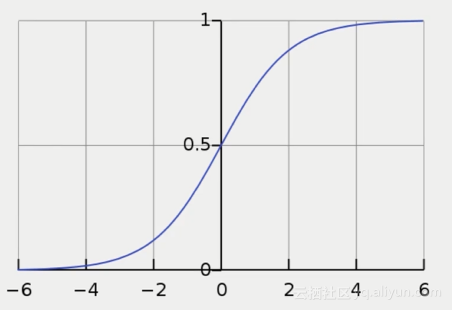
回归和分类的区别 分类:对离散型变量进行预测(二分类、多分类) 回归:对数值型变量进行预测 区别:回归的y为数值连续型变量;分类的y是类别离散型变量 分类问题 1. 分类问题示例:信用卡 从x1:职业,x2:收入等等信用卡申请人不同的信息维度,来判断y:是否发放信用卡,发放哪一类信用卡 2. 分类经典方法:logistic回归(二分类) 虽然名字里有回归二字,但logistic回归解决的是分类的问题 回归得到的数值y可以看做属于类别1的概率: 下图为logistic函数(也叫sigmoid函数)图像 二分类到多分类:通过One vs. Rest 使用logistic进行多分类,scikit-learn 会默认采用OvR方法: 为每个类别分别建立一个二分类器 训练中正例为该类别样本,负例为所有其他样本 在所有分类中,选择概率最高的那个类别 如iris数据集中有三个类别,选择使用logistic回归进行分类,则需要训练三个分类器,根据每个样本隶属不同类的概率大小来进行分类 3. scikit learn 实现logistic回归 载入iris数据集 import pandas iris = pandas.read_csv('http://archive.ics.uci.edu/ml/machine-learning-databases/iris/iris.data',header=None) iris.columns=['SepalLengthCm','SepalWidthCm','PetalLengthCm','PetalWidthCm','Species'] 实现logistic回归 import sklearn import numpy as np from sklearn import linear_model lm=linear_model.LogisticRegression() features=['PetalLengthCm'] X=iris[features] #需要讲Species这个字段由字符串类型转变为数值类型,以表示不同的类别 from sklearn.preprocessing import LabelEncoder #初始化label le=LabelEncoder() le.fit(iris['Species']) #用离散值转化标签值 y=le.transform(iris['Species']) print(y) [0 0 0 0 0 0 0 0 0 0 0 0 0 0 0 0 0 0 0 0 0 0 0 0 0 0 0 0 0 0 0 0 0 0 0 0 0 0 0 0 0 0 0 0 0 0 0 0 0 0 1 1 1 1 1 1 1 1 1 1 1 1 1 1 1 1 1 1 1 1 1 1 1 1 1 1 1 1 1 1 1 1 1 1 1 1 1 1 1 1 1 1 1 1 1 1 1 1 1 1 2 2 2 2 2 2 2 2 2 2 2 2 2 2 2 2 2 2 2 2 2 2 2 2 2 2 2 2 2 2 2 2 2 2 2 2 2 2 2 2 2 2 2 2 2 2 2 2 2 2] #通过交叉检验,得到分类准确率 from sklearn.model_selection import cross_val_score #logistic中的scoring参数指定为accuracy scores=cross_val_score(lm,X,y,cv=5,scoring='accuracy') print(np.mean(scores)) 0.786666666667 往Feature中添加特征,看看准确率的变化 features=['PetalLengthCm','SepalWidthCm','PetalLengthCm'] X=iris[features] #需要讲Species这个字段由字符串类型转变为数值类型,以表示不同的类别 from sklearn.preprocessing import LabelEncoder #初始化label le=LabelEncoder() le.fit(iris['Species']) #用离散值转化标签值 y=le.transform(iris['Species']) ##print(y) #通过交叉检验,得到分类准确率 from sklearn.model_selection import cross_val_score #logistic中的scoring参数指定为accuracy scores=cross_val_score(lm,X,y,cv=5,scoring='accuracy') print(np.mean(scores)) 0.906666666667 果然好了很多!

优秀的个人博客,低调大师

Android开发学习笔记:数据存取之File浅析

Android系统中提供了一种文件读写的方法,可以将一些数据以文件的形式保存在设备中。比如一些word文档,PDF文档,图片,音频,视频文件等。 使用文件读写方法的步骤: 1.调用Context.openFileInput()方法获得Java文件输入流(FileInputStream) 2.调用Context.openFileOutput()方法获得java文件输出流(FileOutputStream) 3.使用Resources.openRawResource(R.raw.DataFile)方法返回InputStream 下面的具体实例,在一个Activity里面创建两个EditText和两个Button,第一个EditText和Button将EditText的内容写到文件file.txt文件中。第二个EditText和Button将内容从文件file.txt中读取出来显示。文件被默认保存在/data/data/package/files下面。 MainActivity.java packagecom.android.file; importjava.io.FileInputStream; importjava.io.FileOutputStream; importandroid.app.Activity; importandroid.os.Bundle; importandroid.view.View; importandroid.view.View.OnClickListener; importandroid.widget.Button; importandroid.widget.EditText; publicclassMainActivityextendsActivity{ //声明文件名字符串常量 privatestaticfinalStringFILE_NAME="file.txt"; privateButtonwriteBtn,readBtn; privateEditTextwriteText,readText; @Override publicvoidonCreate(BundlesavedInstanceState){ super.onCreate(savedInstanceState); setContentView(R.layout.main); writeBtn=(Button)findViewById(R.id.Button1); readBtn=(Button)findViewById(R.id.Button2); writeText=(EditText)findViewById(R.id.EditText1); readText=(EditText)findViewById(R.id.EditText2); writeBtn.setOnClickListener(newOnClickListener(){ @Override publicvoidonClick(Viewv){ //写内容 write(writeText.getText().toString()); } }); readBtn.setOnClickListener(newOnClickListener(){ @Override publicvoidonClick(Viewv){ //读内容 readText.setText(read()); } }); } privateStringread(){ try{ //实例化文件输入流对象 FileInputStreamfis=openFileInput(FILE_NAME); //定义缓存数组 byte[]buffer=newbyte[fis.available()]; //读到缓冲区 fis.read(buffer); returnnewString(buffer); }catch(Exceptione){ e.printStackTrace(); } returnnull; } privatevoidwrite(Stringcontent){ try{ //实例化文件输出流 //openFileOutput(Stringname,intmode) //第一个参数文件名 //第二个是模式 //MODE_APPEND表示要创建的文件存在则新写入的数据不会覆盖以前的数据。 FileOutputStreamfos=openFileOutput(FILE_NAME,MODE_APPEND); //写内容 fos.write(content.getBytes()); //关闭文件流 fos.close(); }catch(Exceptione){ e.printStackTrace(); } } } main.java <?xmlversion="1.0"encoding="utf-8"?> <LinearLayoutxmlns:android="http://schemas.android.com/apk/res/android" android:orientation="vertical" android:layout_width="fill_parent" android:layout_height="fill_parent" > <TextView android:layout_width="fill_parent" android:layout_height="wrap_content" android:text="请被文本输入内容" /> <EditText android:text="" android:id="@+id/EditText1" android:layout_width="fill_parent" android:layout_height="wrap_content" android:height="100px" /> <Button android:id="@+id/Button1" android:layout_width="wrap_content" android:layout_height="wrap_content" android:text="写数据" /> <EditText android:text="" android:id="@+id/EditText2" android:layout_width="fill_parent" android:layout_height="wrap_content" android:height="100px" /> <Button android:id="@+id/Button2" android:layout_width="wrap_content" android:layout_height="wrap_content" android:text="读数据" /> </LinearLayout> 效果图: 在终端下输入“adb shell”命令进入Android系统查看一下我们的文件是否写入成功。 本文转自 lingdududu 51CTO博客,原文链接:http://blog.51cto.com/liangruijun/660540

优秀的个人博客,低调大师

《C++必知必会》读书笔记4

int *f(); //一个返回值为int* 的函数 int (*f)(); //一个函数指针,指向一个返回类型为int的并且无参数的函数 const int N=12; int *a[N]; //首先,提醒这段代码在c中不行。 这个是一个具有N个int * 元素的数组 int (*a)[N]; //一个指针,指向一个具有N个int元素的数组。 int(**p)[N]; //一个指针,指向一个指针,后者指向一个具有N哥int元素的数组 int *(*p)[N]; //一个指针,指向一个具有N个int * 元素的数组 int (**const p)()const =0; //一个常量指针,指向一个指向函数的指针。 int* (*p)(); //一个指针,指向一个返回类型为int* 的函数。 参数和返回值都会影响指针的类型: char *(*p1)(int ,int); char *(*p2)(short,short)=0; p1=p2; //Error 类型不匹配 智能指针通过重载->和* (也可能还有->*)操作符,来模仿指针的行为。 函数对象类型通过重载()操作符,来创造类似于函数指针的东西。 在c++中,一个对象可以哟多个有效的地址,因此指针的比较不是关于地址的问题,而是关于对象的“同一性”的问题。 ============================================================================== 本文转自被遗忘的博客园博客,原文链接:http://www.cnblogs.com/rollenholt/archive/2012/03/25/2416557.html,如需转载请自行联系原作者

优秀的个人博客,低调大师

《C++必知必会》读书笔记1

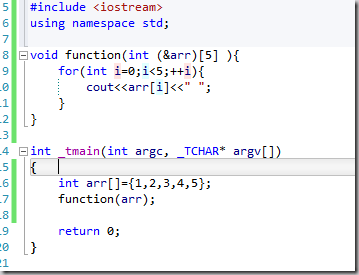
指针和引用的区别: 1)不存在空引用 2)所有的引用都需要初始化 3)一个引用始终指向对他初始化的那个对象 数组作为参数的时候,会退化为指针。同样的例子也发生在函数上。一个函数型参数会退化为一个函数指针。 由于数组形参中数组的边界被忽略了,所以在声明的时候最好将其忽略。然而如果函数期望接受一个指向一个元素序列的指针作为参数的时候,而不是接受单个的指针,那么最好采用如下的申明: void function(int array[]); 另外如果数组的边界的精确值非常的重要的话,那么可以限制函数只接受特定数量的元素的数组,我们在这种情况下可以考虑采用引用形参: void function(int (&array)[12] ); 现在函数就只能接受大小为12的整形数组了。 模板将有助于代码的泛化: template<int n> void function(int (&array)[n] ); //让编译器帮助我们推导n的值 当然你也可以采用传统的方法: void function(int array[], int size); 我们其实也可以将上面的结合起来: template<int n> inline void function(int (&array)[n] ){ function_1(array,n); } 比如: 对于多维数组作为形参而言,形参是一个指向数组的指针,比如我们可以采用: void function(int (*arr)[20]); //一个指针,指向具有20个元素的的数组 可能下面的方式更加的清晰: void function(int arr[][20]); 注意对于多维数组,下面的声明是错误的: int[3][3] arr1={0}; 而应该采用下面的方式: int arr2[3][3]; int arr[3][3]={1,2,3,4,5,6,7,8,9}; int arr[][3]={1,2,3,4,5,6,7,8,9}; //注意,第二个参数不能省略。 指向指针的指针 比如下面的代码: //将一个指针移动到指向字符串的下一个字符 void function(const char **pstr, char ch){ while(**pstr && (**pstr)!= ch){ ++(*pstr); } } 这个在c中是合理的,但是在c++中,我们更加习惯使用指向指针的引用。比如: //将一个指针移动到指向字符串的下一个字符 void function(const char *&pstr, char ch){ while(*pstr && (*pstr)!= ch){ ++(pstr); } } 一个常见的误解就是适用于指针的转换同样适用于指向指针的指针,但是事实并不是如此的,比下面的代码: class A{ }; class B : public A{ }; int _tmain(int argc, _TCHAR* argv[]) { B * b=new B; A * a=b; //OK. B** b1= &b; A **a1=b1; //Error return 0; } 涉及到const的时候,也有这方面的问题: 我们知道,将一个非常量的指针转换为指向常量的指针是合法的,但是,请看代码: int * p1=NULL; const int *p2=p1; //OK int * a[100]; //int ** const int **p3=a; //ERROR return 0; ============================================================================== 本文转自被遗忘的博客园博客,原文链接:http://www.cnblogs.com/rollenholt/archive/2012/03/24/2415979.html,如需转载请自行联系原作者

优秀的个人博客,低调大师

《C++必知必会》读书笔记2

在类X的非常量成员函数中,this指针的类型为 X *const .也就是说他是指向非常量X的常量指针。 但是在类X的常量成员函数中,this的类型为const X* const . 这就是常量成员函数和非常量成员函数的区别。 类的非静态数据成员可以被声明为mutable,这将容许她们的值可以被这个类的常量成员函数(也包括非常量成员函数)修改。 如果一个类声明了一个或者多个虚函数,那么编译器会为这个类的每一个对象插入一个指向虚函数表的指针。 如果使用了虚拟继承,对象将会通过嵌入的指针,偏移量或者其他非嵌入的信息来维持对其虚基类自对象位置的跟踪。因此,即使类没有声明虚函数,其中还是有坑被插入了一个虚函数表的指针。 对于一个类X来说,复制构造函数应该被声明为 X (const X &); 而复制赋值操作符应该被声明为X& operator=(const X&) 。 将一个函数的地址初始化或赋值给一个指向函数的指针的时候,无需显式的取得函数地址,编译器知道隐式的获取函数的地址,因此在这种情况下,&操作符是可选的。比如: void (*fp)(int ); extern void h(int); fp=h; //OK fp= &h; //OK 类似的,可以采用如下的方式调用函数: fp(12); 或者 (*fp)(12); 注意,和void * 指针可以指向任何类型的数据不同,不存在可以指向任何类型函数的通用指针。 还要注意,非静态成员函数的地址不是一个指针,因此不可以将一个函数指针指向一个非静态成员函数。 函数指针的一个传统用途是实现回调。 一个函数指针指向内联函数是合法的。但是如果通过函数指针调用内联函数将不会导致内联函数的调用,因为编译器通常无法在编译阶段确定将会调用什么函数。 ============================================================================== 本文转自被遗忘的博客园博客,原文链接:http://www.cnblogs.com/rollenholt/archive/2012/03/24/2416240.html,如需转载请自行联系原作者

优秀的个人博客,低调大师

《C++必知必会》读书笔记3

指向数据成员的“指针”并非指针。 #include <iostream> using namespace std; class A{ public: A(){ //do nothing here. } A(int num,double num2){ this->num=num; this->num2=num2; } int num; double num2; }; int _tmain(int argc, _TCHAR* argv[]) { A* pA=new A(5,6); int A::* p=&A::num; //p是一个指针,指向A的一个int成员 double A::*p1=&A::num2; cout<<p<<endl; //输出偏移量 而不是地址 cout<<p1<<endl; //通过偏移量访问数据成员 cout<<pA->*p<<endl; cout<<pA->*p1<<endl; delete pA; return 0; } 指向成员函数的指针并非指针: #include <iostream> using namespace std; class A{ public: void function( int num); bool function1()const; virtual bool function2() const=0; }; class B:public A{ public : bool function2()const; }; int _tmain(int argc, _TCHAR* argv[]) { void (A::* p)(int)= &A::function; //不是地址,而是一个指向成员函数的指针 bool (A::* p1)()const =&A::function1; // 指向成员函数的指针可以指向一个常量成员函数 // B b; // A *a=&b; // (a->*p1)(); // (b.*p1)(); return 0; } ============================================================================== 本文转自被遗忘的博客园博客,原文链接:http://www.cnblogs.com/rollenholt/archive/2012/03/25/2416495.html,如需转载请自行联系原作者

优秀的个人博客,低调大师

docker学习笔记001-docker 安装方法介绍

docker Setup docker推荐使用version 1.13或者更高版本 docker 包含社区版和企业版Community Edition (CE)andEnterprise Edition (EE). 支持多种平台 DeskTop:Mac、Windows Cloud:Amazon 、Microsoft Server:CentOs、OracleLinux、Ubuntu、Debian、Red Hat Enterprise Linux 安装docker CE 启动一个docker CE,需要确认前置要求,再执行安装操作。EE版本是收费版本不做介绍 前置要求 OS要求、老版本要求:docker docker-engine查看 安装 1.Docker’s repositories安装 Install required packages.yum-utilsprovides theyum-config-managerutility, anddevice-mapper-persistent-dataandlvm2are required by thedevicemapperstorage driver. $ sudo yum install -y yum-utils \ device-mapper-persistent-data \ lvm2 Use the following command to set up thestablerepository. You always need thestablerepository, even if you want to install builds from theedgeortestrepositories as well. $ sudo yum-config-manager \ --add-repo \ https://download.docker.com/linux/centos/docker-ce.repo Optional: Enable theedgeandtestrepositories. These repositories are included in thedocker.repofile above but are disabled by default. You can enable them alongside the stable repository. $ sudo yum-config-manager --enable docker-ce-edge $ sudo yum-config-manager --enable docker-ce-test You can disable theedgeortestrepository by running theyum-config-managercommand with the--disableflag. To re-enable it, use the--enableflag. The following command disables theedgerepository. $ sudo yum-config-manager --disable docker-ce-edge Install the latest version of Docker CE, or go to the next step to install a specific version. $ sudo yum install docker-ce Start Docker. $ sudo systemctl start docker Verify thatdockeris installed correctly by running thehello-worldimage. $ sudo docker run hello-world 2.下载rpm,手动安装 从这下载 https://download.docker.com/linux/centos/7/x86_64/stable/Packages/ Install Docker CE, changing the path below to the path where you downloaded the Docker package. $ sudo yum install /path/to/package.rpm 3.scripts脚本自动安装 4.卸载 Uninstall the Docker package: $ sudo yum remove docker-ce Images, containers, volumes, or customized configuration files on your host are not automatically removed. To delete all images, containers, and volumes: $ sudo rm -rf /var/lib/docker You must delete any edited configuration files manually.

资源下载

更多资源
Mario

Mario

马里奥是站在游戏界顶峰的超人气多面角色。马里奥靠吃蘑菇成长,特征是大鼻子、头戴帽子、身穿背带裤,还留着胡子。与他的双胞胎兄弟路易基一起,长年担任任天堂的招牌角色。

腾讯云软件源

腾讯云软件源

为解决软件依赖安装时官方源访问速度慢的问题,腾讯云为一些软件搭建了缓存服务。您可以通过使用腾讯云软件源站来提升依赖包的安装速度。为了方便用户自由搭建服务架构,目前腾讯云软件源站支持公网访问和内网访问。

Nacos

Nacos

Nacos /nɑ:kəʊs/ 是 Dynamic Naming and Configuration Service 的首字母简称,一个易于构建 AI Agent 应用的动态服务发现、配置管理和AI智能体管理平台。Nacos 致力于帮助您发现、配置和管理微服务及AI智能体应用。Nacos 提供了一组简单易用的特性集,帮助您快速实现动态服务发现、服务配置、服务元数据、流量管理。Nacos 帮助您更敏捷和容易地构建、交付和管理微服务平台。

WebStorm

WebStorm

WebStorm 是jetbrains公司旗下一款JavaScript 开发工具。目前已经被广大中国JS开发者誉为“Web前端开发神器”、“最强大的HTML5编辑器”、“最智能的JavaScript IDE”等。与IntelliJ IDEA同源,继承了IntelliJ IDEA强大的JS部分的功能。

用户登录
用户注册