文件系统(01):基于SpringBoot框架,管理Excel和PDF文件类型
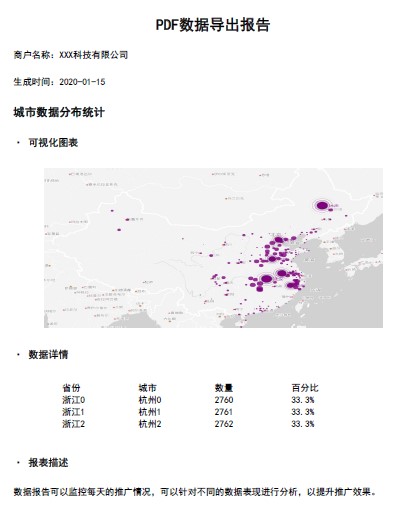
本文源码:GitHub·点这里 || GitEE·点这里 一、文档类型简介 1、Excel文档 Excel一款电子表格软件。直观的界面、出色的计算功能和图表工具,在系统开发中,经常用来把数据转存到Excel文件,或者Excel数据导入系统中,这就涉及数据转换问题。 2、PDF文档 PDF是可移植文档格式,是一种电子文件格式,具有许多其他电子文档格式无法相比的优点。PDF文件格式可以将文字、字型、格式、颜色及独立于设备和分辨率的图形图像等封装在一个文件中。该格式文件还可以包含超文本链接、声音和动态影像等电子信息,支持特长文件,集成度和安全可靠性都较高。 二、Excel文件管理 1、POI依赖 Apache POI是Apache软件基金会的开源类库,POI提供API给Java程序对Microsoft Office格式档案读和写的功能。 <!-- Excel 依赖 --> <dependency> <groupId>org.apache.poi</groupId> <artifactId>poi</artifactId> <version>3.9</version> </dependency> <!-- 2007及更高版本 --> <dependency> <groupId>org.apache.poi</groupId> <artifactId>poi-ooxml</artifactId> <version>3.9</version> </dependency> 2、文件读取 public static List<List<Object>> readExcel(String path) throws Exception { File file = new File(path) ; List<List<Object>> list = new LinkedList<>(); XSSFWorkbook xwb = new XSSFWorkbook(new FileInputStream(file)); // 读取 Sheet1 表格内容 XSSFSheet sheet = xwb.getSheetAt(0); // 读取行数:不读取Excel表头 for (int i = (sheet.getFirstRowNum()+1); i <= (sheet.getPhysicalNumberOfRows()-1); i++) { XSSFRow row = sheet.getRow(i); if (row == null) { continue; } List<Object> linked = new LinkedList<>(); for (int j = row.getFirstCellNum(); j <= row.getLastCellNum(); j++) { XSSFCell cell = row.getCell(j); if (cell == null) { continue; } Object value ; // 这里需根据实际业务情况处理 switch (cell.getCellType()) { case XSSFCell.CELL_TYPE_NUMERIC: //处理数值带{.0}问题 value = Double.valueOf(String.valueOf(cell)).longValue() ; break; default: value = cell.toString(); } linked.add(value); } if (linked.size()!= 0) { list.add(linked); } } return list; } 3、文件创建 public static void createExcel(String excelName, String[] headList,List<List<Object>> dataList) throws Exception { // 创建 Excel 工作簿 XSSFWorkbook workbook = new XSSFWorkbook(); XSSFSheet sheet = workbook.createSheet(); // 创建表头 XSSFRow row = sheet.createRow(0); for (int i = 0; i < headList.length; i++) { XSSFCell cell = row.createCell(i); cell.setCellType(XSSFCell.CELL_TYPE_STRING); cell.setCellValue(headList[i]); } //添加数据 for (int line = 0; line < dataList.size(); line++) { XSSFRow rowData = sheet.createRow(line+1); List<Object> data = dataList.get(line); for (int j = 0; j < headList.length; j++) { XSSFCell cell = rowData.createCell(j); cell.setCellType(XSSFCell.CELL_TYPE_STRING); cell.setCellValue((data.get(j)).toString()); } } FileOutputStream fos = new FileOutputStream(excelName); workbook.write(fos); fos.flush(); fos.close(); } 4、文件导出 public static void exportExcel(String[] headList, List<List<Object>> dataList, OutputStream outputStream) throws Exception { // 创建 Excel 工作簿 XSSFWorkbook workbook = new XSSFWorkbook(); XSSFSheet sheet = workbook.createSheet(); // 创建表头 XSSFRow row = sheet.createRow(0); for (int i = 0; i < headList.length; i++) { XSSFCell cell = row.createCell(i); cell.setCellType(XSSFCell.CELL_TYPE_STRING); cell.setCellValue(headList[i]); } //添加数据 for (int line = 0; line < dataList.size(); line++) { XSSFRow rowData = sheet.createRow(line+1); List<Object> data = dataList.get(line); for (int j = 0; j < headList.length; j++) { XSSFCell cell = rowData.createCell(j); cell.setCellType(XSSFCell.CELL_TYPE_STRING); cell.setCellValue((data.get(j)).toString()); } } workbook.write(outputStream); outputStream.flush(); outputStream.close(); } 5、文件导出接口 @RestController public class ExcelWeb { @RequestMapping("/web/outExcel") public void outExcel (HttpServletResponse response) throws Exception { String exportName = "2020-01-user-data" ; response.setContentType("application/vnd.ms-excel"); response.addHeader("Content-Disposition", "attachment;filename="+ URLEncoder.encode(exportName, "UTF-8") + ".xlsx"); List<List<Object>> dataList = ExcelUtil.readExcel("F:\\file-type\\user-excel.xlsx") ; String[] headList = new String[]{"用户ID", "用户名", "手机号"} ; ExcelUtil.exportExcel(headList,dataList,response.getOutputStream()) ; } } 三、PDF文件管理 1、IText依赖 iText是一种生成PDF报表的Java组件。通过在服务器端使用页面或API封装生成PDF报表,客户端可以通过超链接直接显示或下载到本地,在系统开发中通常用来生成比较正式的报告或者合同类的电子文档。 <dependency> <groupId>com.itextpdf</groupId> <artifactId>itextpdf</artifactId> <version>5.5.11</version> </dependency> <dependency> <groupId>com.itextpdf.tool</groupId> <artifactId>xmlworker</artifactId> <version>5.5.11</version> </dependency> 2、API二次封装 首先对于Itext提供的API做一下表格、段落、图片等基础样式的二次封装,可以更好的适配业务。 public class PdfFontUtil { private PdfFontUtil(){} /** * 段落样式获取 */ public static Paragraph getParagraph (String content, Font font,Integer alignment){ Paragraph paragraph = new Paragraph(content,font) ; if (alignment != null && alignment >= 0){ paragraph.setAlignment(alignment); } return paragraph ; } /** * 图片样式 */ public static Image getImage (String imgPath,float width,float height) throws Exception { Image image = Image.getInstance(imgPath); image.setAlignment(Image.MIDDLE); if (width > 0 && height > 0){ image.scaleAbsolute(width, height); } return image ; } /** * 表格生成 */ public static PdfPTable getPdfPTable01 (int numColumns,float totalWidth) throws Exception { // 表格处理 PdfPTable table = new PdfPTable(numColumns); // 设置表格宽度比例为%100 table.setWidthPercentage(100); // 设置宽度:宽度平均 table.setTotalWidth(totalWidth); // 锁住宽度 table.setLockedWidth(true); // 设置表格上面空白宽度 table.setSpacingBefore(10f); // 设置表格下面空白宽度 table.setSpacingAfter(10f); // 设置表格默认为无边框 table.getDefaultCell().setBorder(0); table.setPaddingTop(50); table.setSplitLate(false); return table ; } /** * 表格内容 */ public static PdfPCell getPdfPCell (Phrase phrase){ return new PdfPCell (phrase) ; } /** * 表格内容带样式 */ public static void addTableCell (PdfPTable dataTable,Font font,List<String> cellList){ for (String content:cellList) { dataTable.addCell(getParagraph(content,font,-1)); } } } 3、生成PDF文件 这里基于上面的工具类,画一个PDF页面作为参考。 public class PdfPage01 { // 基础配置 private static String PDF_SITE = "F:\\file-type\\PDF页面2020-01-15.pdf" ; private static String FONT = "C:/Windows/Fonts/simhei.ttf"; private static String PAGE_TITLE = "PDF数据导出报告" ; // 基础样式 private static Font TITLE_FONT = FontFactory.getFont(FONT, BaseFont.IDENTITY_H,20, Font.BOLD); private static Font NODE_FONT = FontFactory.getFont(FONT, BaseFont.IDENTITY_H,15, Font.BOLD); private static Font BLOCK_FONT = FontFactory.getFont(FONT, BaseFont.IDENTITY_H,13, Font.BOLD, BaseColor.BLACK); private static Font INFO_FONT = FontFactory.getFont(FONT, BaseFont.IDENTITY_H,12, Font.NORMAL,BaseColor.BLACK); private static Font CONTENT_FONT = FontFactory.getFont(FONT, BaseFont.IDENTITY_H, BaseFont.NOT_EMBEDDED); private static void createPdfPage () throws Exception { // 创建文档 Document document = new Document(); PdfWriter writer = PdfWriter.getInstance(document, new FileOutputStream(PDF_SITE)); document.open(); // 报告标题 document.add(PdfFontUtil.getParagraph(PAGE_TITLE,TITLE_FONT,1)) ; document.add(PdfFontUtil.getParagraph("\n商户名称:XXX科技有限公司",INFO_FONT,-1)) ; document.add(PdfFontUtil.getParagraph("\n生成时间:2020-01-15\n\n",INFO_FONT,-1)) ; // 报告内容 // 段落标题 + 报表图 document.add(PdfFontUtil.getParagraph("城市数据分布统计",NODE_FONT,-1)) ; document.add(PdfFontUtil.getParagraph("\n· 可视化图表\n\n",BLOCK_FONT,-1)) ; // 设置图片宽高 float documentWidth = document.getPageSize().getWidth() - document.leftMargin() - document.rightMargin(); float documentHeight = documentWidth / 580 * 320; document.add(PdfFontUtil.getImage("F:\\file-type\\myChart.jpg",documentWidth-80,documentHeight-80)) ; // 数据表格 document.add(PdfFontUtil.getParagraph("\n· 数据详情\n\n",BLOCK_FONT,-1)) ; PdfPTable dataTable = PdfFontUtil.getPdfPTable01(4,400) ; // 设置表格 List<String> tableHeadList = tableHead () ; List<List<String>> tableDataList = getTableData () ; PdfFontUtil.addTableCell(dataTable,CONTENT_FONT,tableHeadList); for (List<String> tableData : tableDataList) { PdfFontUtil.addTableCell(dataTable,CONTENT_FONT,tableData); } document.add(dataTable); document.add(PdfFontUtil.getParagraph("\n· 报表描述\n\n",BLOCK_FONT,-1)) ; document.add(PdfFontUtil.getParagraph("数据报告可以监控每天的推广情况," + "可以针对不同的数据表现进行分析,以提升推广效果。",CONTENT_FONT,-1)) ; document.newPage() ; document.close(); writer.close(); } private static List<List<String>> getTableData (){ List<List<String>> tableDataList = new ArrayList<>() ; for (int i = 0 ; i < 3 ; i++){ List<String> tableData = new ArrayList<>() ; tableData.add("浙江"+i) ; tableData.add("杭州"+i) ; tableData.add("276"+i) ; tableData.add("33.3%") ; tableDataList.add(tableData) ; } return tableDataList ; } private static List<String> tableHead (){ List<String> tableHeadList = new ArrayList<>() ; tableHeadList.add("省份") ; tableHeadList.add("城市") ; tableHeadList.add("数量") ; tableHeadList.add("百分比") ; return tableHeadList ; } public static void main(String[] args) throws Exception { createPdfPage () ; } } 4、页面效果 四、网页转PDF 1、页面Jar包依赖 <dependency> <groupId>org.springframework.boot</groupId> <artifactId>spring-boot-starter-thymeleaf</artifactId> </dependency> <dependency> <groupId>org.springframework.boot</groupId> <artifactId>spring-boot-starter-freemarker</artifactId> </dependency> 2、编写页面样式 <!DOCTYPE html> <html lang="en" xmlns:th="http://www.w3.org/1999/xhtml"> <head> <meta charset="UTF-8"/> <title>Title</title> <style> body{font-family:SimSun;} </style> </head> <body> 项目信息:<br/> 名称:${name}<br/> 作者:${author}<br/><br/> <img src="https://img2018.cnblogs.com/blog/1691717/201906/1691717-20190603213911854-1098366582.jpg"/> <br/> </body> </html> 3、核心配置类 public class PageConfig { private static final String DEST = "F:\\file-type\\HTML页面2020-01-15.pdf"; private static final String HTML = "/pdf_page_one.html"; private static final String FONT = "C:/Windows/Fonts/simsun.ttc"; private static Configuration freemarkerCfg = null ; static { freemarkerCfg = new Configuration(Configuration.DEFAULT_INCOMPATIBLE_IMPROVEMENTS); //freemarker的模板目录 try { String path = "TODO:模板路径{自定义}" ; freemarkerCfg.setDirectoryForTemplateLoading(new File(path)); } catch (IOException e) { e.printStackTrace(); } } /** * 创建文档 */ private static void createPdf(String content,String dest) throws Exception { Document document = new Document(); PdfWriter writer = PdfWriter.getInstance(document, new FileOutputStream(dest)); document.open(); XMLWorkerFontProvider fontImp = new XMLWorkerFontProvider(XMLWorkerFontProvider.DONTLOOKFORFONTS); fontImp.register(FONT); XMLWorkerHelper.getInstance().parseXHtml(writer, document, new ByteArrayInputStream(content.getBytes()), null, Charset.forName("UTF-8"), fontImp); document.close(); } /** * 页面渲染 */ private static String freeMarkerRender(Map<String, Object> data, String htmlTmp) throws Exception { Writer out = new StringWriter(); Template template = freemarkerCfg.getTemplate(htmlTmp,"UTF-8"); template.process(data, out); out.flush(); out.close(); return out.toString(); } /** * 方法入口 */ public static void main(String[] args) throws Exception { Map<String,Object> data = new HashMap<> (); data.put("name","smile"); data.put("author","知了") ; String content = PageConfig.freeMarkerRender(data,HTML); PageConfig.createPdf(content,DEST); } } 4、转换效果图 五、源代码地址 文中涉及文件类型,在该章节源码ware18-file-parent/case-file-type目录下。 GitHub·地址 https://github.com/cicadasmile/middle-ware-parent GitEE·地址 https://gitee.com/cicadasmile/middle-ware-parent 推荐往期阅读: 微服务架构专题 《1、项目技术选型简介,架构图解说明》 《2、业务架构设计,系统分层管理》 《3、数据库选型简介,业务数据规划设计》 《4、中间件集成,公共服务封装》 《5、SpringCloud 基础组件应用设计》 《6、通过业务、应用、技术、存储方面,聊聊架构》