首页 文章 精选 留言 我的

精选列表

搜索[beta],共3846篇文章
优秀的个人博客,低调大师

夜莺 V8.Beta11 发版,支持 CK 告警、事件 Pipeline 等

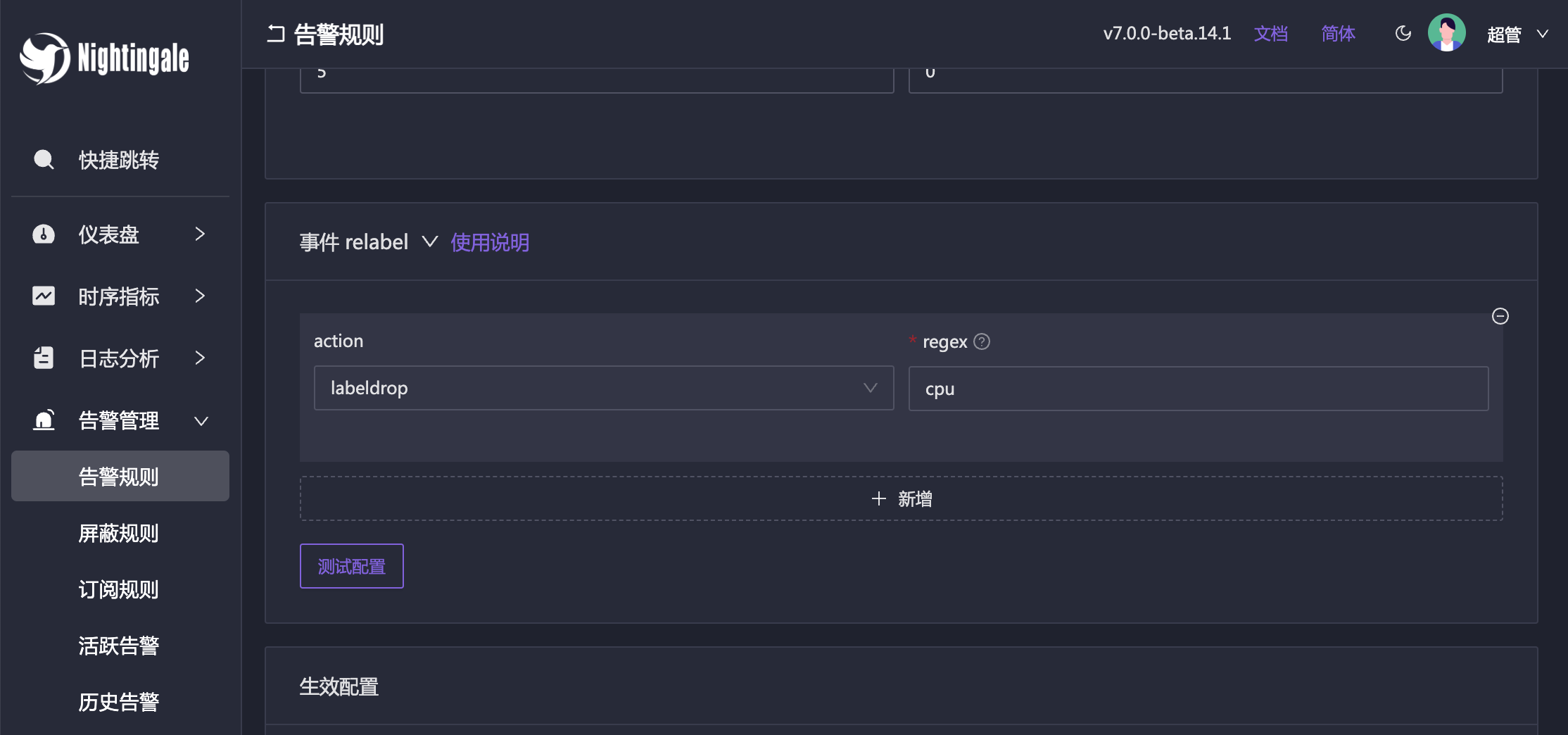
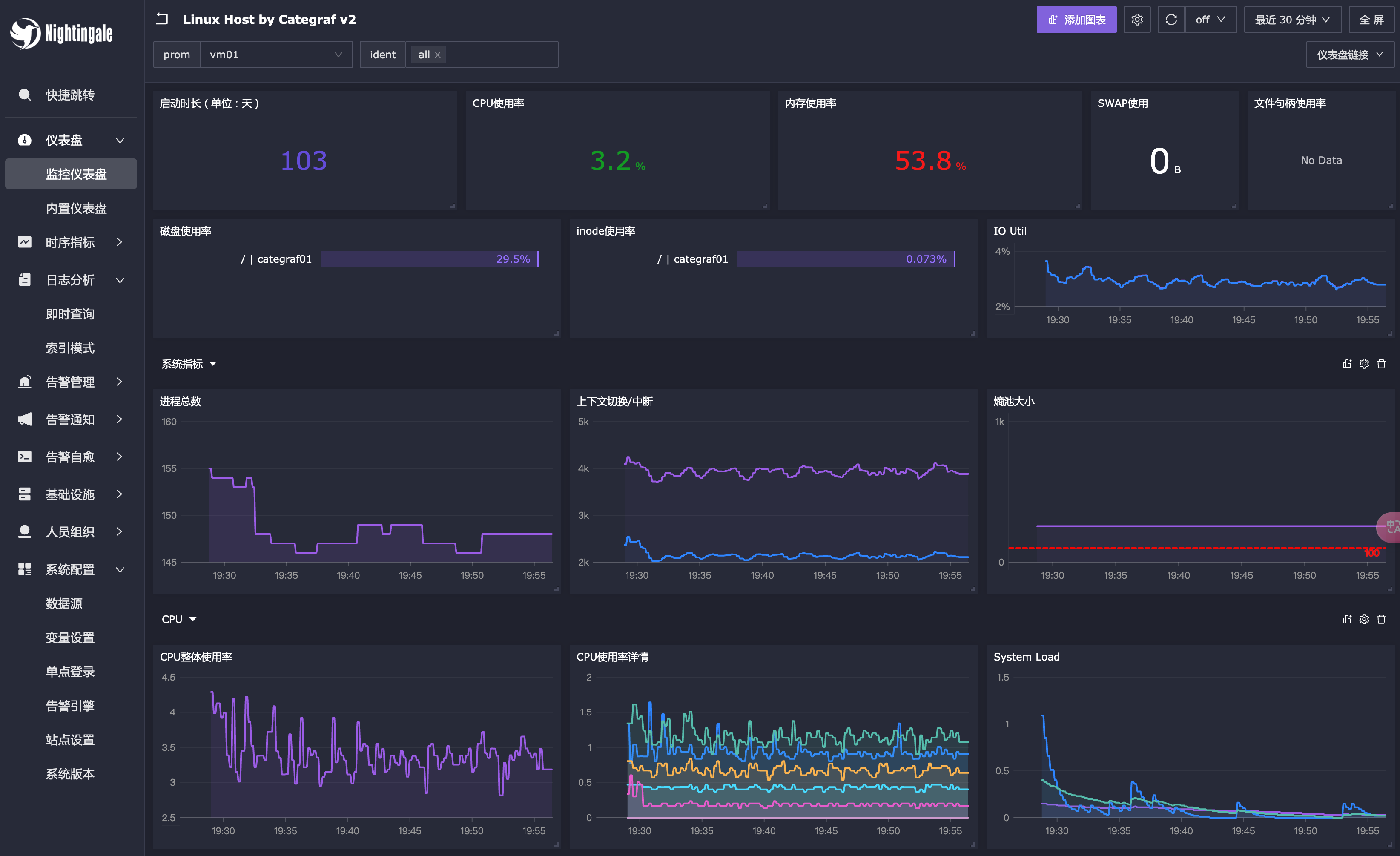
这个版本来得迟了一些,主要是新功能加的多,下面简单介绍一下新功能,下下周也计划做一次直播讲解。 支持 ClickHouse 告警 夜莺最重要的定位是告警引擎,所以会持续增加各类数据源的告警支持,ClickHouse 之后还有 Doris、MySQL、Postgres 等。 开源版主要是支持告警,不会支持看图可视化,实在是做不过来,答疑也答疑不过来。 引入事件 Pipeline 告警引擎根据告警规则产生告警事件之后,会有需求对事件做各种二次处理,比如: 有些事件要做 relabel 有些事件要做标签丰富 有些事件要 drop 掉 有些事件要和 AI 联动生成分析建议 于是,我们抽象了事件 Pipeline 的功能,并且在开源版里支持了常用的处理器。 新版菜单 重新整理了菜单,很多菜单收敛到了 Tab 里,有些甚至收敛到侧拉板里,整体功能排布更清晰,更容易找到相关入口。 另外推荐一下菜单快捷跳转功能,Ctrl + K(Mac 里是Command + K)很好用,很极客。 新版活跃告警 改进活跃告警的 UI,整合了聚合卡片视图和列表视图,平时可以把这个页面投到 On-call 大屏上。 其他一些变动 告警规则支持跨业务组克隆 修复临时分享图表白屏问题 夜莺自身增加对Redis操作的指标 优化了指标转发性能 更多改动请参考 github release 的 changelog。 升级须知 大家可以从夜莺的github releases页面下载到最新的发布包。 v6/v7版本都可以平滑升级: 建议先备份老版本的二进制、配置、integrations 目录等,留好后路然后就可以放心大胆升级了 如果夜莺所用的DB账号有建表、改表权限,会自动更新表结构,否则就要参考代码仓库里docker/migratesql手工改表结构了 integrations 目录可以直接替换成新版 配置文件 etc/config.toml 建议认真 diff 一下 容器启动的话,直接拉取 latest 镜像重启即可 夜莺产品特性介绍的PPT 有些人可能对夜莺的产品还不太了解,特准备了一份 PPT,请参考:PPT。

优秀的个人博客,低调大师

基于 Java 的 LLM 应用开发框架,Agents-Flex beta.5 发布

Agents-Flex: 一个基于 Java 的 LLM(大语言模型)应用开发框架。 基本能力 LLM 的访问能力 Prompt、Prompt Template 定义加载的能力 Function Calling 定义、调用和执行等能力 记忆的能力(Memory) Embedding Vector Store 文档处理 加载器(Loader) Http FileSystem 分割器(Splitter) 解析器(Parser) PoiParser PdfBoxParser Agent LLM Agent IOAgent Chain 执行链 SequentialChain 顺序执行链 ParallelChain 并发(并行)执行链 LoopChain 循环执行连 ChainNode AgentNode Agent 执行节点 EndNode 终点节点 RouterNode 路由节点 GroovyRouterNode Groovy 规则路由 QLExpressRouterNode QLExpress 规则路由 LLMRouterNode LLM 路由(由 AI 自行判断路由规则) 简单对话 使用 OpenAi 大语言模型: @Test public void testChat() { OpenAiLlmConfig config = new OpenAiLlmConfig(); config.setApiKey("sk-rts5NF6n*******"); Llm llm = new OpenAiLlm(config); String response = llm.chat("请问你叫什么名字"); System.out.println(response); } 使用 “通义千问” 大语言模型: @Test public void testChat() { QwenLlmConfig config = new QwenLlmConfig(); config.setApiKey("sk-28a6be3236****"); config.setModel("qwen-turbo"); Llm llm = new QwenLlm(config); String response = llm.chat("请问你叫什么名字"); System.out.println(response); } 使用 “讯飞星火” 大语言模型: @Test public void testChat() { SparkLlmConfig config = new SparkLlmConfig(); config.setAppId("****"); config.setApiKey("****"); config.setApiSecret("****"); Llm llm = new SparkLlm(config); String response = llm.chat("请问你叫什么名字"); System.out.println(response); } 历史对话示例 public static void main(String[] args) { SparkLlmConfig config = new SparkLlmConfig(); config.setAppId("****"); config.setApiKey("****"); config.setApiSecret("****"); Llm llm = new SparkLlm(config); HistoriesPrompt prompt = new HistoriesPrompt(); System.out.println("您想问什么?"); Scanner scanner = new Scanner(System.in); String userInput = scanner.nextLine(); while (userInput != null) { prompt.addMessage(new HumanMessage(userInput)); llm.chatStream(prompt, (context, response) -> { System.out.println(">>>> " + response.getMessage().getContent()); }); userInput = scanner.nextLine(); } } Function Calling 第一步:通过注解定义本地方法 public class WeatherUtil { @FunctionDef(name = "get_the_weather_info", description = "get the weather info") public static String getWeatherInfo( @FunctionParam(name = "city", description = "the city name") String name ) { //在这里,我们应该通过第三方接口调用 api 信息 return name + "的天气是阴转多云。 "; } } 第二步:通过 Prompt、Functions 传入给大模型,然后得到结果 public static void main(String[] args) { OpenAiLlmConfig config = new OpenAiLlmConfig(); config.setApiKey("sk-rts5NF6n*******"); OpenAiLlm llm = new OpenAiLlm(config); FunctionPrompt prompt = new FunctionPrompt("今天北京的天气怎么样", WeatherUtil.class); FunctionResultResponse response = llm.chat(prompt); Object result = response.invoke(); System.out.println(result); //"北京的天气是阴转多云。 " } 模块构成 开源地址​: Gitee:https://gitee.com/agents-flex/agents-flex Github:https://github.com/agents-flex/agents-flex 官方网站:https://agentsflex.com

优秀的个人博客,低调大师

基于 Java 的 LLM 应用开发框架,Agents-Flex beta.4 发布

Agents-Flex: 一个基于 Java 的 LLM(大语言模型)应用开发框架。 基本能力 LLM 的访问能力 Prompt、Prompt Template 定义加载的能力 Function Calling 定义、调用和执行等能力 记忆的能力(Memory) Embedding Vector Store 文档处理 加载器(Loader) Http FileSystem 分割器(Splitter) 解析器(Parser) PoiParser PdfBoxParser Agent LLM Agent IOAgent Chain 执行链 SequentialChain 顺序执行链 ParallelChain 并发(并行)执行链 LoopChain 循环执行连 ChainNode AgentNode Agent 执行节点 EndNode 终点节点 RouterNode 路由节点 GroovyRouterNode Groovy 规则路由 QLExpressRouterNode QLExpress 规则路由 LLMRouterNode LLM 路由(由 AI 自行判断路由规则) 简单对话 使用 OpenAi 大语言模型: @Test public void testChat() { OpenAiLlmConfig config = new OpenAiLlmConfig(); config.setApiKey("sk-rts5NF6n*******"); Llm llm = new OpenAiLlm(config); String response = llm.chat("请问你叫什么名字"); System.out.println(response); } 使用 “通义千问” 大语言模型: @Test public void testChat() { QwenLlmConfig config = new QwenLlmConfig(); config.setApiKey("sk-28a6be3236****"); config.setModel("qwen-turbo"); Llm llm = new QwenLlm(config); String response = llm.chat("请问你叫什么名字"); System.out.println(response); } 使用 “讯飞星火” 大语言模型: @Test public void testChat() { SparkLlmConfig config = new SparkLlmConfig(); config.setAppId("****"); config.setApiKey("****"); config.setApiSecret("****"); Llm llm = new SparkLlm(config); String response = llm.chat("请问你叫什么名字"); System.out.println(response); } 历史对话示例 public static void main(String[] args) { SparkLlmConfig config = new SparkLlmConfig(); config.setAppId("****"); config.setApiKey("****"); config.setApiSecret("****"); Llm llm = new SparkLlm(config); HistoriesPrompt prompt = new HistoriesPrompt(); System.out.println("您想问什么?"); Scanner scanner = new Scanner(System.in); String userInput = scanner.nextLine(); while (userInput != null) { prompt.addMessage(new HumanMessage(userInput)); llm.chatStream(prompt, (context, response) -> { System.out.println(">>>> " + response.getMessage().getContent()); }); userInput = scanner.nextLine(); } } Function Calling 第一步:通过注解定义本地方法 public class WeatherUtil { @FunctionDef(name = "get_the_weather_info", description = "get the weather info") public static String getWeatherInfo( @FunctionParam(name = "city", description = "the city name") String name ) { //在这里,我们应该通过第三方接口调用 api 信息 return name + "的天气是阴转多云。 "; } } 第二步:通过 Prompt、Functions 传入给大模型,然后得到结果 public static void main(String[] args) { OpenAiLlmConfig config = new OpenAiLlmConfig(); config.setApiKey("sk-rts5NF6n*******"); OpenAiLlm llm = new OpenAiLlm(config); FunctionPrompt prompt = new FunctionPrompt("今天北京的天气怎么样", WeatherUtil.class); FunctionResultResponse response = llm.chat(prompt); Object result = response.invoke(); System.out.println(result); //"北京的天气是阴转多云。 " } 模块构成 开源地址​: Gitee:https://gitee.com/agents-flex/agents-flex Github:https://github.com/agents-flex/agents-flex 官方网站:https://agentsflex.com

优秀的个人博客,低调大师

基于 Java 的 LLM 应用开发框架,Agents-Flex beta.3 发布

Agents-Flex: 一个基于 Java 的 LLM(大语言模型)应用开发框架。 基本能力 LLM 的访问能力 Prompt、Prompt Template 定义加载的能力 Function Calling 定义、调用和执行等能力 记忆的能力(Memory) Embedding Vector Store 文档处理 加载器(Loader) Http FileSystem 分割器(Splitter) 解析器(Parser) PoiParser PdfBoxParser Agent LLM Agent IOAgent Chain 执行链 SequentialChain 顺序执行链 ParallelChain 并发(并行)执行链 LoopChain 循环执行连 ChainNode AgentNode Agent 执行节点 EndNode 终点节点 RouterNode 路由节点 GroovyRouterNode Groovy 规则路由 QLExpressRouterNode QLExpress 规则路由 LLMRouterNode LLM 路由(由 AI 自行判断路由规则) 简单对话 使用 OpenAi 大语言模型: @Test public void testChat() { OpenAiLlmConfig config = new OpenAiLlmConfig(); config.setApiKey("sk-rts5NF6n*******"); Llm llm = new OpenAiLlm(config); String response = llm.chat("请问你叫什么名字"); System.out.println(response); } 使用 “通义千问” 大语言模型: @Test public void testChat() { QwenLlmConfig config = new QwenLlmConfig(); config.setApiKey("sk-28a6be3236****"); config.setModel("qwen-turbo"); Llm llm = new QwenLlm(config); String response = llm.chat("请问你叫什么名字"); System.out.println(response); } 使用 “讯飞星火” 大语言模型: @Test public void testChat() { SparkLlmConfig config = new SparkLlmConfig(); config.setAppId("****"); config.setApiKey("****"); config.setApiSecret("****"); Llm llm = new SparkLlm(config); String response = llm.chat("请问你叫什么名字"); System.out.println(response); } 历史对话示例 public static void main(String[] args) { SparkLlmConfig config = new SparkLlmConfig(); config.setAppId("****"); config.setApiKey("****"); config.setApiSecret("****"); Llm llm = new SparkLlm(config); HistoriesPrompt prompt = new HistoriesPrompt(); System.out.println("您想问什么?"); Scanner scanner = new Scanner(System.in); String userInput = scanner.nextLine(); while (userInput != null) { prompt.addMessage(new HumanMessage(userInput)); llm.chatStream(prompt, (context, response) -> { System.out.println(">>>> " + response.getMessage().getContent()); }); userInput = scanner.nextLine(); } } Function Calling 第一步:通过注解定义本地方法 public class WeatherUtil { @FunctionDef(name = "get_the_weather_info", description = "get the weather info") public static String getWeatherInfo( @FunctionParam(name = "city", description = "the city name") String name ) { //在这里,我们应该通过第三方接口调用 api 信息 return name + "的天气是阴转多云。 "; } } 第二步:通过 Prompt、Functions 传入给大模型,然后得到结果 public static void main(String[] args) { OpenAiLlmConfig config = new OpenAiLlmConfig(); config.setApiKey("sk-rts5NF6n*******"); OpenAiLlm llm = new OpenAiLlm(config); FunctionPrompt prompt = new FunctionPrompt("今天北京的天气怎么样", WeatherUtil.class); FunctionResultResponse response = llm.chat(prompt); Object result = response.invoke(); System.out.println(result); //"北京的天气是阴转多云。 " } 模块构成 开源地址​: Gitee:https://gitee.com/agents-flex/agents-flex Github:https://github.com/agents-flex/agents-flex 官方网站:https://agentsflex.com

优秀的个人博客,低调大师

基于 Java 的 LLM 应用开发框架,Agents-Flex beta.2 发布

Agents-Flex: 一个基于 Java 的 LLM(大语言模型)应用开发框架。 基本能力 LLM 的访问能力 Prompt、Prompt Template 定义加载的能力 Function Calling 定义、调用和执行等能力 记忆的能力(Memory) Embedding Vector Store 文档处理 加载器(Loader) Http FileSystem 分割器(Splitter) 解析器(Parser) PoiParser PdfBoxParser Agent LLM Agent IOAgent Chain 执行链 SequentialChain 顺序执行链 ParallelChain 并发(并行)执行链 LoopChain 循环执行连 ChainNode AgentNode Agent 执行节点 EndNode 终点节点 RouterNode 路由节点 GroovyRouterNode Groovy 规则路由 QLExpressRouterNode QLExpress 规则路由 LLMRouterNode LLM路由(由 AI 自行判断路由规则) 简单对话 使用 OpenAi 大语言模型: @Test public void testChat() { OpenAiLlmConfig config = new OpenAiLlmConfig(); config.setApiKey("sk-rts5NF6n*******"); Llm llm = new OpenAiLlm(config); String response = llm.chat("请问你叫什么名字"); System.out.println(response); } 使用 “通义千问” 大语言模型: @Test public void testChat() { QwenLlmConfig config = new QwenLlmConfig(); config.setApiKey("sk-28a6be3236****"); config.setModel("qwen-turbo"); Llm llm = new QwenLlm(config); String response = llm.chat("请问你叫什么名字"); System.out.println(response); } 使用 “讯飞星火” 大语言模型: @Test public void testChat() { SparkLlmConfig config = new SparkLlmConfig(); config.setAppId("****"); config.setApiKey("****"); config.setApiSecret("****"); Llm llm = new SparkLlm(config); String response = llm.chat("请问你叫什么名字"); System.out.println(response); } 历史对话示例 public static void main(String[] args) { SparkLlmConfig config = new SparkLlmConfig(); config.setAppId("****"); config.setApiKey("****"); config.setApiSecret("****"); Llm llm = new SparkLlm(config); HistoriesPrompt prompt = new HistoriesPrompt(); System.out.println("您想问什么?"); Scanner scanner = new Scanner(System.in); String userInput = scanner.nextLine(); while (userInput != null) { prompt.addMessage(new HumanMessage(userInput)); llm.chatStream(prompt, (context, response) -> { System.out.println(">>>> " + response.getMessage().getContent()); }); userInput = scanner.nextLine(); } } Function Calling 第一步: 通过注解定义本地方法 public class WeatherUtil { @FunctionDef(name = "get_the_weather_info", description = "get the weather info") public static String getWeatherInfo( @FunctionParam(name = "city", description = "the city name") String name ) { //在这里,我们应该通过第三方接口调用 api 信息 return name + "的天气是阴转多云。 "; } } 第二步: 通过 Prompt、Functions 传入给大模型,然后得到结果 public static void main(String[] args) { OpenAiLlmConfig config = new OpenAiLlmConfig(); config.setApiKey("sk-rts5NF6n*******"); OpenAiLlm llm = new OpenAiLlm(config); FunctionPrompt prompt = new FunctionPrompt("今天北京的天气怎么样", WeatherUtil.class); FunctionResultResponse response = llm.chat(prompt); Object result = response.invoke(); System.out.println(result); //"北京的天气是阴转多云。 " } 模块构成 开源地址​: Gitee:https://gitee.com/agents-flex/agents-flex Github:https://github.com/agents-flex/agents-flex 官方网站:https://agentsflex.com

优秀的个人博客,低调大师

OpenChat 1.0 beta,开源 IM 服务器搭配 SDK 以及 APP 软件平台!

龙年元旦,祝大家龙年快乐,技术更上一层!2024赚大钱! 在这里我也为大家准备了一个新年礼物 OpenChat 的源码,希望有自主 IM 研发需求的朋友可以尝试体验。 整个IM服务器我们分为 Gate / Msg / Logic 三个服务,下面是三个服务的解释: Gate:顾名思义是网关服务,可以启用多个网关,比如北京、上海、深圳我们都放一个网关,来提升用户访问的响应问题。 Msg:消息服务器,Msg服务可以根据需求无限扩展,来提服务的并发能力。 Logic:这个是逻辑服务器,所有用户关系、群、红包等功能都会在这个服务内完成,主要是操作消息队列和数据库。 值得一提的是 OpenChat 配套了完整的SDK封装,SDK 封装使用了 C++11 语法,兼容了 iOS / Android / Windows / macOS / Linux / FreeBSD 等主流平台。 因为这个开源软件目前没有 UI 设计人员参与,Demo 界面参照了微信的常规布局,演示在下方。 苹果 iPhone iOS 版本演示二维码: 安卓 Android 版本演示二维码: 开源项目希望大家能喜欢,有建议可以加D语言交流QQ群:184183224 开源作者QQ和微信:101011100

资源下载

更多资源
Nacos

Nacos

Nacos /nɑ:kəʊs/ 是 Dynamic Naming and Configuration Service 的首字母简称,一个易于构建 AI Agent 应用的动态服务发现、配置管理和AI智能体管理平台。Nacos 致力于帮助您发现、配置和管理微服务及AI智能体应用。Nacos 提供了一组简单易用的特性集,帮助您快速实现动态服务发现、服务配置、服务元数据、流量管理。Nacos 帮助您更敏捷和容易地构建、交付和管理微服务平台。

Spring

Spring

Spring框架(Spring Framework)是由Rod Johnson于2002年提出的开源Java企业级应用框架,旨在通过使用JavaBean替代传统EJB实现方式降低企业级编程开发的复杂性。该框架基于简单性、可测试性和松耦合性设计理念,提供核心容器、应用上下文、数据访问集成等模块,支持整合Hibernate、Struts等第三方框架,其适用范围不仅限于服务器端开发,绝大多数Java应用均可从中受益。

Rocky Linux

Rocky Linux

Rocky Linux(中文名:洛基)是由Gregory Kurtzer于2020年12月发起的企业级Linux发行版,作为CentOS稳定版停止维护后与RHEL(Red Hat Enterprise Linux)完全兼容的开源替代方案,由社区拥有并管理,支持x86_64、aarch64等架构。其通过重新编译RHEL源代码提供长期稳定性,采用模块化包装和SELinux安全架构,默认包含GNOME桌面环境及XFS文件系统,支持十年生命周期更新。

WebStorm

WebStorm

WebStorm 是jetbrains公司旗下一款JavaScript 开发工具。目前已经被广大中国JS开发者誉为“Web前端开发神器”、“最强大的HTML5编辑器”、“最智能的JavaScript IDE”等。与IntelliJ IDEA同源,继承了IntelliJ IDEA强大的JS部分的功能。


用户登录
用户注册