高性能缓存服务器Varnish架构配置
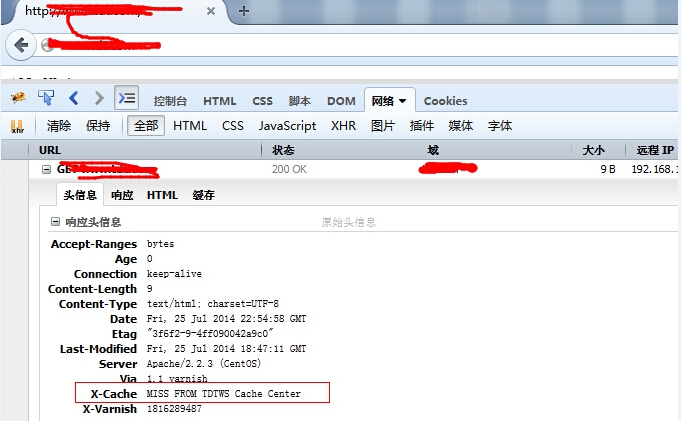
Varnish跟Squid都是一款内容加速缓存服务器,我们可以使用它们来对我们的网页内容进行缓存,以此来从某个方面提高用户体验度,提升网站整体的抗压能力。 目前自建的CDN中,有很多都是基于Squid、Varnish等相关缓存软件,经过内部的二次开发实现了更好的内容加速及管理。 那今天我们一起来学习一下Varnish简单的搭建及日常的维护,深入的东西后期分享,跟大家一起来交流。这里直接上Shell脚本自动初始化并安装: 1 2 3 4 5 6 7 8 9 10 11 12 13 14 15 16 17 18 19 20 21 22 23 24 25 26 27 28 29 30 31 32 33 34 35 36 37 38 39 40 41 42 43 44 45 46 47 48 49 50 51 52 53 54 55 56 57 58 59 60 61 62 63 64 65 66 67 68 69 70 71 72 73 74 75 76 77 78 79 80 81 82 83 84 85 86 87 88 89 90 91 92 93 94 95 96 97 98 99 100 101 102 103 104 105 106 107 108 109 110 111 112 113 114 115 116 117 118 119 120 121 122 123 124 125 126 127 128 129 130 131 132 133 134 135 136 137 138 139 140 141 142 143 144 145 146 147 148 149 150 151 152 153 154 155 156 157 158 159 160 161 162 163 164 165 166 167 168 169 170 171 172 173 174 175 176 177 178 179 180 181 182 183 184 185 186 187 188 189 190 191 192 193 194 195 196 197 198 199 200 201 202 203 204 205 206 207 208 209 210 211 212 213 214 215 216 217 218 219 220 221 222 223 224 225 226 227 228 229 230 231 232 233 234 235 236 237 238 239 240 241 242 243 244 245 246 247 248 249 250 251 252 253 254 255 256 257 258 259 260 261 262 263 264 265 266 267 268 269 270 271 #!/bin/sh #autoinstallvarnish #2014-07-28bywugk DIR= /usr/src CODE=$? VER=$1 if [-z$1]; then echo "Usage:{$0'Version'install|config|start|help},Example$02.1.5install}" exit fi URL=https: //repo .varnish-cache.org /source/varnish- ${VER}. tar .gz function install () { if [!-d /usr/local/varnish -o!-f /etc/init .d /varnishd ]; then cd $DIR;wget-c$URL if [$CODE== '0' ]; then echo "ThisvarnishFilesisDownloadSuccessed!" else echo "ThisvarnishFilesisDownloadFailed!" fi useradd -s /sbin/noin varnish mkdir -p /data/varnish/ {cache,} chown -Rvarnish.varnish /data/varnish/ tar xzfvarnish-${VER}. tar .gz; cd varnish-${VER}; /bin/sh autogen.sh;. /configure --prefix= /usr/local/varnish -- enable -dependency-tracking-- enable -debugging-symbols-- enable -developer-warnings- enable -extra-warnings&& make && make install else echo "ThisVarnishisexists,Pleaseexit..." sleep 1 exit 0 fi } function config() { if [!-d /usr/local/varnish/ -o-f /etc/init .d /varnishd ]; then echo "Youcan'tconfigvarnish,Pleaseensureyouvarnishdirisornotexist..." exit 0 else echo "VarnishAlreadySuccessInstall,PleaseConfigvarnish......" fi mv /usr/local/varnish/etc/varnish/default .vcl /usr/local/varnish/etc/varnish/default .vcl.bak cat >> /usr/local/varnish/etc/varnish/default .vcl<<EOF backendserver_1 { .host= "192.168.149.128" ; .port= "8080" ; .probe={ .timeout=5s; .interval=2s; .window=8; .threshold=5; } } backendserver_2 { .host= "192.168.149.129" ; .port= "8080" ; .probe={ .timeout=5s; .interval=2s; .window=8; .threshold=5; } } directorrsverrandom{ { .backend=server_1; .weight=6; } { .backend=server_2; .weight=6; } } aclpurge{ "localhost" ; "127.0.0.1" ; } subvcl_recv { if (req.http.host~ "^(.*).tdt.com" ) { set req.backend=rsver; } else { error200 "Nocahceforthisdomain" ; } if (req.request== "PURGE" ) { if (!client.ip~purge) { error405 "Notallowed." ; } else { return (pipe); } } if (req.http.x-forwarded- for ) { set req.http.X-Forwarded-For= req.http.X-Forwarded-For "," client.ip; } else { set req.http.X-Forwarded-For=client.ip; } if (req.request!= "GET" &&req.request!= "HEAD" ) { return (pipe); } if (req.http.Expect) { return (pipe); } if (req.http.Authenticate||req.http.Cookie) { return (pass); } if (req.http.Cache-Control~ "no-cache" ) { return (pass); } if (req.url~ "\.jsp" ||req.url~ "\.php" ) { return (pass); } else { return (lookup); } }subvcl_pipe { return (pipe); }subvcl_pass { return (pass); }subvcl_hash { set req. hash +=req.url; if (req.http.host) { set req. hash +=req.http.host; } else { set req. hash +=server.ip; } return ( hash ); }subvcl_hit { if (req.request== "PURGE" ) { set obj.ttl=0s; error200 "Purged." ; } if (!obj.cacheable) { return (pass); } return (deliver); }subvcl_miss { if (req.request== "PURGE" ) { error404 "Notincache." ; } if (req.http.user-agent~ "spider" ) { error503 "Notpresentlyincache" ; } return (fetch); } subvcl_fetch { if (req.request== "GET" &&req.url~ "\.(txt|js)$" ) { set beresp.ttl=3600s; } else { set beresp.ttl=30d; } if (!beresp.cacheable) { return (pass); } if (beresp.http.Set-Cookie) { return (pass); } return (deliver); } subvcl_deliver{ if (obj.hits>0){ set resp.http.X-Cache= "HITFROMTDTWSCacheCenter" ; } else { set resp.http.X-Cache= "MISSFROMTDTWSCacheCenter" ; } return (deliver); } EOF if [$?==0]; then echo '----------------------------------' sleep 2 echo "ThisVarinshConfigSuccess!!!" else echo "ThisVarinshConfigFailed,PleaseCheckConf!" fi } function start() { if [!-d /usr/local/varnish -o-f /etc/init .d /varnishd ]; then echo "Youcan'tconfigvarnish,Pleaseensureyouvarnishdirisornotexist..." exit 0 else count=` ps -ef| grep varnishd| grep - v grep | wc -l` if [$count- eq 0]; then echo "VarnishAlreadySuccessInstall,Nowstartvarnish...." cat <<EOF ------------------------------------------------------ StartVarnishtolisten0.0.0.0:80. TheVarnishloadbalancerserver1(192.168.149.1288080). TheVarnishloadbalancerserver1(192.168.149.1298080). TheVarnishMgraddresstolisten0.0.0.0:8001. TheVarnishCacheDIR /data/varnish/cache . EOF /usr/local/varnish/sbin/varnishd -n /data/varnish/cache -f /usr/local/varnish/etc/varnish/default .vcl-a0.0.0.0:80-s file , /data/varnish/varnish_cache .data,16G-puser=varnish-pgroup=varnish-pdefault_ttl=14400-pthread_pool_max=8000-psend_timeout=20-w5,51200,30-T0.0.0.0:8001-P /usr/local/varnish/var/varnish .pid if [$?==0]; then echo "Startvarnish...OK" fi else echo "Warning,ThisVarnishServiceisexist." fi fi } case $2 in install ) install ;; config) config ;; start) start ;; *) echo "Usage:{Usage$0versioninstall|config|start|help}" ;; esac Varnish简单测试如下图: 1.第一张图,第一次访问没有命中,去后端服务器取数据,同时在本地缓存一份:(MISS) 2.第二张图,第二次访问,缓存服务器存在,则直接从缓存中返回:(HIT) 实际线上环境中,如果用户访问我们的网站,使用Ctrl+F5刷新,我们的缓存就会失效,因为我们配置文件里面是这么配置的,匹配浏览器头信息: Pragma no-cache Cache-Control no-cache 1 2 3 4 if (req.http.Cache-Control~ "no-cache" ) { return (pass); } 只有注释掉这段代码或者设置只允许某个特定的IP,用户通过浏览器按Crtl+F5才不会把缓存给清除。 下面是针对某个特定的IP地址允许刷新: 1 2 3 4 5 6 7 8 9 10 11 12 13 14 acl local { "192.168.149.128" } subvcl_hit{ if (!obj.cacheable){ return (pass); } if (client.ip~ local &&req.http.Pragma~ "no-cache" ){ set obj.ttl=0s; return (pass); } return (deliver); } 由于时间的原因,文章就暂时写到这里,更多深入的东西继续分享,文章引用煮酒哥的配置,非常感谢。欢迎大家一起讨论。 http://yuhongchun.blog.51cto.com/1604432/1293169 http://zyan.cc/post/313/ 本文转自 wgkgood 51CTO博客,原文链接:http://blog.51cto.com/wgkgood/1531694