首页 文章 精选 留言 我的

精选列表

搜索[部署],共10000篇文章
优秀的个人博客,低调大师

Linux下RAID磁盘阵列部署详解

磁盘阵列 RAID RAID:廉价磁盘冗余阵列(Redundant Array of Independent Disks) 作 用:容错、提升读写速率 RAID类型 个数 利用率 优缺点 ------------------------------------- RAID0 条带集 2+ 100% 读写速率最快,不容错 RAID1 镜像集 2 50% 读写速率一般,容错 RAID5 带奇偶校验条带集 3+ (n-1)/n 读写速率快,容错,允许坏一块 RAID6 带奇偶校验条带集双校验dp 4+ (n-2)/n 读写快,容错,允许坏两块 RAID01 RAID10 RAID1的安全+RAID0的高速 4 50% 读写速率快,容错 RAID50 RAID5的安全+RAID0的高速 6 (n-2)/n 读写速率快,容错 RAID60 RAID6的安全+RAID0的高速 8 (n-4)/n 读写速率快,容错 ------------------------------------- 一、不同场景RAID的使用 RAID 实现方式 硬RAID: 需要RAID卡,有自己的CPU,处理速度快,有电池和无电池 软RAID: 通过操作系统实现,比如Windows、Linux 二、RAID5 (3块硬盘) + 热备(1块硬盘) 1. 准备4块硬盘 [root@maiya ~]# ll /dev/sd* brw-rw---- 1 root disk 8, 48 Jan 13 16:07 /dev/sdd brw-rw---- 1 root disk 8, 64 Jan 13 16:07 /dev/sde brw-rw---- 1 root disk 8, 80 Jan 13 16:07 /dev/sdf brw-rw---- 1 root disk 8, 80 Jan 13 16:07 /dev/sdg 2. 创建RAID [root@maiya ~]# yum -y install mdadm //确保mdadm命令可用 [root@maiya ~]# mdadm -C /dev/md0 -l5 -n3 -x1 /dev/sd{d,e,f,g} mdadm: array /dev/md0 started. -C 创建RAID /dev/md0 第一个RAID设备 -l5 RAID5 -n RAID成员的数量 -x 热备磁盘的数量 3. 格式化,挂载 [root@maiya ~]# mkfs.xfs /dev/md0 [root@maiya ~]# mkdir /mnt/raid5 [root@maiya ~]# mount /dev/md0 /mnt/raid5 [root@maiya ~]# cp -rf /etc /mnt/raid5/etc1 4. 查看RAID信息 [root@maiya ~]# mdadm -D /dev/md0 //-D 查看详细信息 /dev/md0: Version : 1.2 Creation Time : Mon Jan 13 16:28:47 2014 Raid Level : raid5 Array Size : 2095104 (2046.34 MiB 2145.39 MB) Used Dev Size : 1047552 (1023.17 MiB 1072.69 MB) Raid Devices : 3 Total Devices : 4 Persistence : Superblock is persistent Update Time : Mon Jan 13 16:34:51 2014 State : clean Active Devices : 3 Working Devices : 4 Failed Devices : 0 Spare Devices : 1 Layout : left-symmetric Chunk Size : 512K Number Major Minor RaidDevice State 0 8 48 0 active sync /dev/sdd 1 8 64 1 active sync /dev/sde 4 8 80 2 active sync /dev/sdf 3 8 96 - spare /dev/sdg 5. 模拟一块硬盘损坏,并移除 终端一: [root@maiya ~]# watch -n 0.5 'mdadm -D /dev/md0 | tail' //watch持续查看 终端二: [root@maiya ~]# mdadm /dev/md0 -f /dev/sde -r /dev/sde //模拟坏了并移除 -f --fail -r --remove 6. 设置RAID开机生效 [root@maiya ~]# mdadm -D -s ARRAY /dev/md0 metadata=1.2 name=sxl1.com:0 UUID=c6761621:8878498f:f5be209e [root@maiya ~]# mdadm -D -s > /etc/mdadm.conf mdadm选项: -s --scan -S --stop -D --detail -C --create -f --fail -r --remove -n --raid-devices=3 -x --spare-devices=1 -l --level=5 参考: Update Time : Mon Aug 4 22:47:47 2014 State : clean, degraded, recovering Active Devices : 2 Working Devices : 3 Failed Devices : 0 Spare Devices : 1 Layout : left-symmetric Chunk Size : 512K Rebuild Status : 3% complete Name : localhost.localdomain:0 (local to host localhost.localdomain) UUID : 3df9624c:138a5b3e:2f557132:59a43d04 Events : 41 Number Major Minor RaidDevice State 0 252 16 0 active sync /dev/vdb 3 252 64 1 spare rebuilding /dev/vde 4 252 48 2 active sync /dev/vdd

优秀的个人博客,低调大师

(二)Hyperledger Fabric 1.1安装部署-Fabric Samples

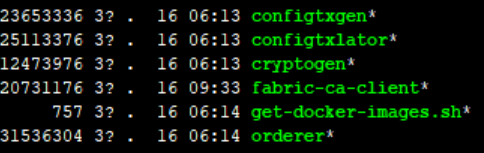
Hyperledger Fabric Samples是官方推荐的First Network,对于熟悉fabric和测试基础环境很有好处。 Fabric Samples源码下载: 使用git下载源码,进入到go安装目录(可以使用命令echo $GOPATH查看go安装目录)。 git clone -b master https://github.com/hyperledger/fabric-samples.git 下载完成后进入到fabric-samples目录 cd fabric-samples 使用git tag命令查看版本列表,根据个人需要将源码切换到对应的版本,本次使用的是1.1版。 git checkout -b v1.1.0 下载二进制文件: 二进制文件官方给出两种方式 curl -sSL https://goo.gl/6wtTN5 | bash -s 1.1.0(这个方式需要FQ) 或者直接访问下面的网址,访问二进制文件 https://github.com/hyperledger/fabric/blob/master/scripts/bootstrap.sh 也可以新建bootstrap.sh文件,拷贝下面的脚本并执行。 #!/bin/bash # # Copyright IBM Corp. All Rights Reserved. # # SPDX-License-Identifier: Apache-2.0 # # if version not passed in, default to latest released version export VERSION=${1:-1.1.0} # if ca version not passed in, default to latest released version export CA_VERSION=${2:-$VERSION} # current version of thirdparty images (couchdb, kafka and zookeeper) released export THIRDPARTY_IMAGE_VERSION=0.4.6 export ARCH=$(echo "$(uname -s|tr '[:upper:]' '[:lower:]'|sed 's/mingw64_nt.*/windows/')-$(uname -m | sed 's/x86_64/amd64/g')" | awk '{print tolower($0)}') #Set MARCH variable i.e ppc64le,s390x,x86_64,i386 MARCH=`uname -m` dockerFabricPull() { local FABRIC_TAG=$1 for IMAGES in peer orderer ccenv javaenv tools; do echo "==> FABRIC IMAGE: $IMAGES" echo docker pull hyperledger/fabric-$IMAGES:$FABRIC_TAG docker tag hyperledger/fabric-$IMAGES:$FABRIC_TAG hyperledger/fabric-$IMAGES done } dockerThirdPartyImagesPull() { local THIRDPARTY_TAG=$1 for IMAGES in couchdb kafka zookeeper; do echo "==> THIRDPARTY DOCKER IMAGE: $IMAGES" echo docker pull hyperledger/fabric-$IMAGES:$THIRDPARTY_TAG docker tag hyperledger/fabric-$IMAGES:$THIRDPARTY_TAG hyperledger/fabric-$IMAGES done } dockerCaPull() { local CA_TAG=$1 echo "==> FABRIC CA IMAGE" echo docker pull hyperledger/fabric-ca:$CA_TAG docker tag hyperledger/fabric-ca:$CA_TAG hyperledger/fabric-ca } : ${CA_TAG:="$MARCH-$CA_VERSION"} : ${FABRIC_TAG:="$MARCH-$VERSION"} : ${THIRDPARTY_TAG:="$MARCH-$THIRDPARTY_IMAGE_VERSION"} echo "===> Downloading platform specific fabric binaries" curl https://nexus.hyperledger.org/content/repositories/releases/org/hyperledger/fabric/hyperledger-fabric/${ARCH}-${VERSION}/hyperledger-fabric-${ARCH}-${VERSION}.tar.gz | tar xz echo "===> Downloading platform specific fabric-ca-client binary" curl https://nexus.hyperledger.org/content/repositories/releases/org/hyperledger/fabric-ca/hyperledger-fabric-ca/${ARCH}-${VERSION}/hyperledger-fabric-ca-${ARCH}-${VERSION}.tar.gz | tar xz if [ $? != 0 ]; then echo echo "------> $VERSION fabric-ca-client binary is not available to download (Avaialble from 1.1.0-rc1) <----" echo fi which docker >& /dev/null NODOCKER=$? if [ "${NODOCKER}" == 0 ]; then echo "===> Pulling fabric Images" dockerFabricPull ${FABRIC_TAG} echo "===> Pulling fabric ca Image" dockerCaPull ${CA_TAG} echo "===> Pulling thirdparty docker images" dockerThirdPartyImagesPull ${THIRDPARTY_TAG} echo echo "===> List out hyperledger docker images" docker images | grep hyperledger* else echo "=========================================================" echo "Docker not installed, bypassing download of Fabric images" echo "=========================================================" fi 这个脚本将下载网络所需的特定二进制文件和镜像。执行成功后会生成bin和config。 bin文件: config文件: 拉取的镜像: 可以通过docker images命令查看 上述工作完成以后就可以进行Fabric Samples测试了。

优秀的个人博客,低调大师

kylin_学习_01_kylin安装部署

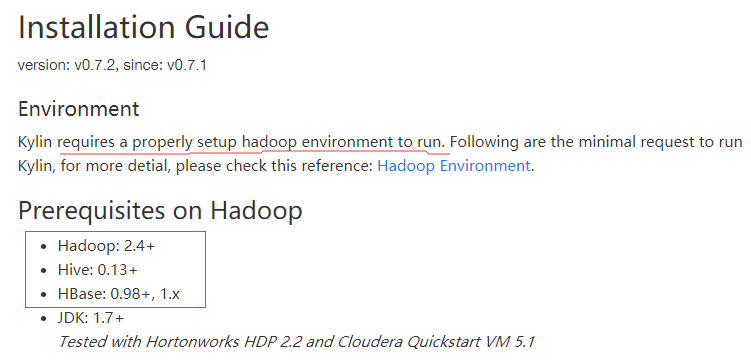
一、环境准备 根据官方文档,kylin是需要运行在hadoop环境下的,如下图: 1.hadoop环境搭建 参考:hadoop_学习_02_Hadoop环境搭建(单机) 2.hbase环境搭建 参考:hbase_学习_01_HBase环境搭建(单机) 3.hive环境搭建 参考:hive_学习_01_hive环境搭建(单机) 二、kylin下载与解压 1.下载地址 前往官方http://kylin.apache.org/download 可发现提供了一个镜像下载地址,如下: http://mirrors.shu.edu.cn/apache/kylin/apache-kylin-2.3.0/apache-kylin-2.3.0-hbase1x-bin.tar.gz 2.下载 使用命令进行下载 wget http://mirrors.shu.edu.cn/apache/kylin/apache-kylin-2.3.0/apache-kylin-2.3.0-hbase1x-bin.tar.gz 或者先在本地下载,然后上传服务器 3.解压 tar -zxvf apache-kylin-2.3.0-hbase1x-bin.tar.gz 三、kylin配置 1.配置环境变量 (1)编辑 profile 文件 vim /etc/profile (2)设置 KYLIN_HOME ,并将其添加到path中。并修改CATALINA_HOME 为 kylin 下的 tomcat # 1. java export JAVA_HOME=/usr/java/jdk1.7.0_80 export CLASSPATH=.:$JAVA_HOME/jre/lib/rt.jar:$JAVA_HOME/lib/dt.jar:$JAVA_HOME/lib/tools.jar # 2. Tomcat #export CATALINA_HOME=/developer/apache-tomcat-7.0.73 #export CATALINA_HOME=/developer/saiku-server/tomcat export CATALINA_HOME=/developer/apache-kylin-2.3.0-bin/tomcat # 3. Maven export MAVEN_HOME=/developer/apache-maven-3.0.5 # 4. hadoop export HADOOP_HOME=/developer/hadoop-2.6.0 # 5. hbase export HBASE_HOME=/developer/hbase-1.2.0 # 6. hive export HIVE_HOME=/developer/apache-hive-1.1.0-bin export HIVE_CONF_DIR=${HIVE_HOME}/conf export HCAT_HOME=$HIVE_HOME/hcatalog # 7. kylin export KYLIN_HOME=/developer/apache-kylin-2.3.0-bin export hive_dependency=$HIVE_HOME/conf:$HIVE_HOME/lib/*:$HCAT_HOME/share/hcatalog/hive-hcatalog-core-1.1.0.jar #Path # 1. big data export PATH=$KYLIN_HOME/bin:$PATH export PATH=$HIVE_HOME/bin:$HBASE_HOME/bin:$HADOOP_HOME/bin:$PATH export PATH=$MAVEN_HOME/bin:$CATALINA_HOME/bin:$JAVA_HOME/bin:$PATH export LC_ALL=en_US.UTF-8 2.配置kylin.sh 在文件开始的地方,添加如下配置: export KYLIN_HOME=/developer/apache-kylin-2.3.0-bin export HBASE_CLASSPATH_PREFIX=$CATALINA_HOME/bin/bootstrap.jar:$CATALINA_HOME/bin/tomcat-juli.jar:$CATALINA_HOME/lib/*:$hive_dependency:$HBASE_CLASSPATH_PREFIX 四、启动kylin 1.确保 hadoop、hbase已经启动 (1)启动hadoop 进入hadoop 的 sbin 目录,执行 ./start-all.sh (2) 启动 hbase 进入hbase的 bin 目录,执行 ./start-hbase.sh 2.启动 kylin 进入 kylin 的 bin 目录,执行 ./kylin.sh start 即可启动kylin 3.访问kylin管理界面 启动kylin之后,浏览器访问:http://your_hostname:7070/kylin。输入用户名 ADMIN 、密码 KYLIN ,即可登录 例如: 192.168.1.102:7070/kylin 五、配置hive数据源 1.配置数据源 (1)依次选择 Model -> Data Source -> Load Hive Table (2)输入 hive 中数据库的表名格式为: 数据库名.数据表名 如:db_hiveTest.student ,然后点击Sync即可。 添加成功后,效果如下图: 五、参考资料 1.官方安装向导 : Installation Guide(http://kylin.apache.org/cn/docs23/install/index.html) 2.HDP下载地址: https://zh.hortonworks.com/downloads/

优秀的个人博客,低调大师

Redis 集群部署及踩过的坑

本文目标 要在单台机器上搭建Redis集群,方式是通过不同的TCP端口启动多个实例,然后组成集群,同时记录在搭建过程中踩过的坑。 安装准备 centos版本:6.7 redis版本:3.2.3 安装方式:源码安装 服务器:1台 操作步骤 此处默认已安装好单台redis 1、启动Redis多个实例 我们在Redis安装目录下创建目录cluster,并编写7000.conf~7005.conf 6个配置文件,这6个配置文件用来启动6个实例,后面将使用这6个实例组成集群。 以7000.conf为例,配置文件需要填写如下几项: port7000//端口7000,7001,7002,7003,7004,7005 bind192.168.186.91//默认ip为127.0.0.1 需要改为其他节点机器可访问的ip 否则创建集群时无法访问对应的端口,无法创建集群 daemonizeyes//redis后台运行 pidfile./redis_7000.pid//pidfile文件对应7000,7001,7002,7003,7004,7005 cluster-enabledyes//开启集群把注释#去掉 cluster-config-filenodes_7000.conf//集群的配置配置文件首次启动自动生成 7000,7001,7002,7003,7004,7005 cluster-node-timeout15000//请求超时默认15秒,可自行设置 appendonlyyes//aof日志开启有需要就开启,它会每次写操作都记录一条日志 分别启动6个实例 redis-serverredis_cluster/7000/redis.conf redis-serverredis_cluster/7001/redis.conf redis-serverredis_cluster/7002/redis.conf redis-serverredis_cluster/7003/redis.conf redis-serverredis_cluster/7004/redis.conf redis-serverredis_cluster/7005/redis.conf 启动成功后,看一下进程 # ps -ef | grep redis | grep cluster idata1571122329018:40pts/1000:00:00./bin/redis-server192.168.186.91:7000[cluster] idata1574022329018:40pts/1000:00:00./bin/redis-server192.168.186.91:7001[cluster] idata1581022329018:40pts/1000:00:00./bin/redis-server192.168.186.91:7002[cluster] idata1702322329018:42pts/1000:00:00./bin/redis-server192.168.186.91:7003[cluster] idata1703022329018:42pts/1000:00:00./bin/redis-server192.168.186.91:7004[cluster] idata1703522329018:42pts/1000:00:00./bin/redis-server192.168.186.91:7005[cluster] 至此,ip=192.168.186.91机器上创建了6个实例,端口号为port=7000~7005。 2、安装ruby 1)yum安装ruby和依赖的包。 [root@itfirstredis_cluster]# yum -y install ruby ruby-devel rubygems rpm-build 2)使用gem这个命令来安装redis接口 [root@itfirstredis_cluster]# gem install redis ERROR:Error installingredis: redis requires Rubyversion>=2.2.2. 这一步骤中出现了bug,度娘告诉我是Ruby版本太低,需要升级版本。 3)升级Ruby的版本 安装rvm,我不知道这是个什么东西,但是感觉像是Ruby的一个包管理器。 [root@itfirstredis_cluster]# curl -L get.rvm.io | bash -s stable %Total%Received%XferdAverage Speed TimeTime TimeCurrent DloadUpload Total SpentLeftSpeed 1002409010024090001091900:00:020:00:02--:--:--91242 Downloadinghttps://github.com/rvm/rvm/archive/1.29.3.tar.gz Downloadinghttps://github.com/rvm/rvm/releases/download/1.29.3/1.29.3.tar.gz.asc gpg:于2017年09月11日星期一04时59分21秒CST创建的签名,使用RSA,钥匙号BF04FF17 gpg:无法检查签名:Nopublickey Warning,RVM1.26.0introducessignedreleasesandautomated check of signatures when GPG softwarefound.Assuming you trust Michal Papis import the mpapispublickey(downloading thesignatures). GPG signature verification failedfor'/usr/local/rvm/archives/rvm-1.29.3.tgz'-'https://github.com/rvm/rvm/releases/download/1.29.3/1.29.3.tar.gz.asc'!Trytoinstall GPG v2andthenfetch thepublickey: gpg2--recv-keys409B6B1796C275462A1703113804BB82D39DC0E3 orifitfails: commandcurl-sSLhttps://rvm.io/mpapis.asc | gpg2 --import - the key can be comparedwith: https://rvm.io/mpapis.asc https://keybase.io/mpapis NOTE:GPGversion2.1.17haveabug which cause failures during fetching keys from remoteserver.Please downgradeorupgradetonewer version(ifavailable)orusethe second method describedabove. 这一操作得到了: gpg2 –recv-keys 409B6B1796C275462A1703113804BB82D39DC0E3 然后利用该密钥下载Ruby并升级。 [root@itfirstredis_cluster]# gpg --keyserver hkp://keys.gnupg.net --recv-keys 409B6B1796C275462A1703113804BB82D39DC0E3 gpg:下载密钥‘D39DC0E3’,从hkp服务器keys.gnupg.net gpg: /root/.gnupg/trustdb.gpg:建立了信任度数据库 gpg:密钥D39DC0E3:公钥“Michal Papis(RVMsigning)<mpapis@gmail.com>”已导入 gpg:没有找到任何绝对信任的密钥 gpg:合计被处理的数量:1 gpg:已导入:1(RSA:1) [root@itfirstredis_cluster]# curl -sSL https://get.rvm.io | bash -s stable Downloadinghttps://github.com/rvm/rvm/archive/1.29.3.tar.gz Downloadinghttps://github.com/rvm/rvm/releases/download/1.29.3/1.29.3.tar.gz.asc gpg:于2017年09月11日星期一04时59分21秒CST创建的签名,使用RSA,钥匙号BF04FF17 gpg:完好的签名,来自于“Michal Papis(RVMsigning)<mpapis@gmail.com>” gpg:亦即“MichalPapis<mpapis@gmail.com>” gpg:亦即“[jpeg image ofsize5015]” gpg:警告:这把密钥未经受信任的签名认证! gpg:没有证据表明这个签名属于它所声称的持有者。 主钥指纹:409B6B1796C275462A1703113804BB82 D39DC0E3 子钥指纹:62C9E5F4DA300D94AC36166BE206 C29F BF04 FF17 GPGverified'/usr/local/rvm/archives/rvm-1.29.3.tgz' Creatinggroup'rvm' Installing RVMto/usr/local/rvm/ Installation of RVMin/usr/local/rvm/isalmostcomplete: *First you needtoadd all users that will be using rvmto'rvm'group, andlogout-loginagain,anyone using rvm will be operatingwith`umasku=rwx,g=rwx,o=rx`. *Tostart using RVM you needtorun`source/etc/profile.d/rvm.sh` inall your open shellwindows,inrare cases you needtoreopen all shellwindows. 接着,source环境,让rvm可用。 [root@itfirst ~]# source /usr/local/rvm/scripts/rvm 查看Ruby可用版本 [root@itfirst~]# rvm list known # MRI Rubies [ruby-]1.8.6[-p420] [ruby-]1.8.7[-head]# security released on head [ruby-]1.9.1[-p431] [ruby-]1.9.2[-p330] [ruby-]1.9.3[-p551] [ruby-]2.0.0[-p648] [ruby-]2.1[.10] [ruby-]2.2[.7] [ruby-]2.3[.4] [ruby-]2.4[.1] ruby-head # for forks use: rvm install ruby-head-<name> --url https://github.com/github/ruby.git --branch 2.2 # JRuby jruby-1.6[.8] jruby-1.7[.27] jruby[-9.1.13.0] jruby-head # Rubinius rbx-1[.4.3] rbx-2.3[.0] rbx-2.4[.1] rbx-2[.5.8] rbx-3[.84] rbx-head # Opal opal # Minimalistic ruby implementation - ISO 30170:2012 mruby-1.0.0 mruby-1.1.0 mruby-1.2.0 mruby-1[.3.0] mruby[-head] # Ruby Enterprise Edition ree-1.8.6 ree[-1.8.7][-2012.02] # Topaz topaz # MagLev maglev[-head] maglev-1.0.0 # Mac OS X Snow Leopard Or Newer macruby-0.10 macruby-0.11 macruby[-0.12] macruby-nightly macruby-head # IronRuby ironruby[-1.1.3] ironruby-head 可以看到最新的版本是2.4.1,本文安装2.3.0 至此,我们升级了Ruby的版本。 [root@itfirst~]# rvm install 2.3.0 Searchingforbinaryrubies,thismight take sometime. Found remote filehttps://rvm_io.global.ssl.fastly.net/binaries/centos/6/x86_64/ruby-2.3.0.tar.bz2 Checking requirementsforcentos. Installing requirementsforcentos. Installing requiredpackages:autoconf,automake,bison,libffi-devel,libtool,readline-devel,sqlite-devel,libyaml-devel.......... Requirements installationsuccessful. ruby-2.3.0-#configure ruby-2.3.0-#download %Total%Received%XferdAverage Speed TimeTime TimeCurrent DloadUpload Total SpentLeftSpeed 10021.9M10021.9M00266k00:01:240:01:24--:--:--278k No checksumfordownloadedarchive,recording checksuminuserconfiguration. ruby-2.3.0-#validate archive ruby-2.3.0-#extract ruby-2.3.0-#validate binary ruby-2.3.0-#setup ruby-2.3.0-#gemset created /usr/local/rvm/gems/ruby-2.3.0@global ruby-2.3.0-#importing gemset /usr/local/rvm/gemsets/global.gems.............................. ruby-2.3.0-#generating global wrappers........ ruby-2.3.0-#gemset created /usr/local/rvm/gems/ruby-2.3.0 ruby-2.3.0-#importing gemsetfile /usr/local/rvm/gemsets/default.gems evaluated to empty gem list ruby-2.3.0-#generating default wrappers........ 4)安装gem redis接口 [root@itfirst~]# rvm use 2.3.0 Using/usr/local/rvm/gems/ruby-2.3.0 [root@itfirst~]# rvm remove 1.8.7 ruby-1.8.7-head-#already gone Using/usr/local/rvm/gems/ruby-2.3.0 [root@itfirst~]#ruby --version ruby2.3.0p0(2015-12-25revision53290)[x86_64-linux] [root@itfirst~]# gem install redis Fetching:redis-4.0.1.gem(100%) Successfully installedredis-4.0.1 Parsing documentationforredis-4.0.1 Installing ri documentationforredis-4.0.1 Done installing documentationforredisafter0seconds 1geminstalled 5)安装rubygems # yum install -y rubygems 到目前为止,我们的Ruby和运行redis-trib.rb需要的环境安装完成了。 3、Redis集群搭建 有了Ruby执行环境,可以开始将之前的6个实例组建成集群了。 redis-trib.rb create --replicas 1 192.168.186.91:7000 192.168.186.91:7001 192.168.186.91:7002 192.168.186.91:7003 192.168.186.91:7004 192.168.186.91:7005 有三个master,有三个是slave。 后面跟上6个实例就好了,形式就是ip:port 【此处有坑】 第一坑 [root@itfirstsrc]# redis-trib.rbcreate--replicas1 192.168.186.91:7000 192.168.186.91:7001 192.168.186.91:7002 192.168.186.91:7003 192.168.186.91:7004 192.168.186.91:7005 -bash:redis-trib.rb:commandnotfound [root@itfirstsrc]# cp redis-trib.rb /usr/local/bin 需要将redis-trib.rb复制到/usr/local/bin目录下。 第二坑 [root@itfirstbin]# redis-trib.rbcreate--replicas1 192.168.186.91:7000 192.168.186.91:7001 192.168.186.91:7002 192.168.186.91:7003 192.168.186.91:7004 192.168.186.91:7005 >>>Creatingcluster [ERR]Node192.168.186.91:7000isnotempty.Either the node already knows other nodes(check with CLUSTERNODES)orcontains some keyindatabase0. 踩完第一坑后,继续执行,发现了第二坑,还好有度娘,但是网上各种说法都有(主要参照了《极客on之路》的博客),发现错误的原因是redis数据库没有清除。 [root@itfirstsrc]# redis-cli -h 192.168.186.91 -p 7001 192.168.186.91:7001>flushdb OK 192.168.186.91:7001>quit [root@itfirstsrc]# redis-cli -h 192.168.186.91 -p 7002 192.168.186.91:7002>flushdb OK 192.168.186.91:7002>quit [root@itfirstsrc]# redis-cli -h 192.168.186.91 -p 7003 192.168.186.91:7003>flushdb OK 192.168.186.91:7003>quit [root@itfirstsrc]# redis-cli -h 192.168.186.91 -p 7004 192.168.186.91:7004>flushdb OK 192.168.186.91:7004>quit [root@itfirstsrc]# redis-cli -h 192.168.186.91 -p 7005 192.168.186.91:7005>flushdb OK 192.168.186.91:7005>quit [root@itfirstsrc]# redis-trib.rbcreate--replicas1 192.168.186.91:7000 192.168.186.91:7001 192.168.186.91:7002 192.168.186.91:7003 192.168.186.91:7004 192.168.186.91:7005 >>>Creatingcluster >>>Performing hash slots allocationon6nodes... Using3masters: 192.168.186.91:7000 192.168.186.91:7001 192.168.186.91:7002 Addingreplica192.168.186.91:7003to192.168.186.91:7000 Addingreplica192.168.186.91:7004to192.168.186.91:7001 Addingreplica192.168.186.91:7005to192.168.186.91:7002 M:61b2b608177374fd0382c872f996a2c25f62daac192.168.186.91:7000 slots:0-5460,9189(5462slots)master M:50e678c98c31baa4ece1cba096cc34b4545456f3192.168.186.91:7001 slots:5461-10922(5462slots)master M:b8dc855a92d1c9a6e358380286a757011c40601d192.168.186.91:7002 slots:9189,10923-16383(5462slots)master S:42392d8b4665500b3229b5c5b9dcebed311c9cdf192.168.186.91:7003 replicates61b2b608177374fd0382c872f996a2c25f62daac S:4e8cd9bae1dc0ffa63a3b8315e3f92b0490e65f8192.168.186.91:7004 replicates50e678c98c31baa4ece1cba096cc34b4545456f3 S:3344981c3290c39b0d9f427842398c17de835293192.168.186.91:7005 replicates b8dc855a92d1c9a6e358380286a757011c40601d CanIset the aboveconfiguration?(type'yes'toaccept):yes /usr/local/rvm/gems/ruby-2.3.0/gems/redis-4.0.1/lib/redis/client.rb:119:in`call': ERR Slot 9189 is already busy (Redis::CommandError) from /usr/local/rvm/gems/ruby-2.3.0/gems/redis-4.0.1/lib/redis.rb:2764:in `block in method_missing' from/usr/local/rvm/gems/ruby-2.3.0/gems/redis-4.0.1/lib/redis.rb:45:in`blockinsynchronize' from /usr/local/rvm/rubies/ruby-2.3.0/lib/ruby/2.3.0/monitor.rb:214:in `mon_synchronize' from/usr/local/rvm/gems/ruby-2.3.0/gems/redis-4.0.1/lib/redis.rb:45:in`synchronize' from /usr/local/rvm/gems/ruby-2.3.0/gems/redis-4.0.1/lib/redis.rb:2763:in `method_missing' from/usr/local/bin/redis-trib.rb:212:in`flush_node_config' from /usr/local/bin/redis-trib.rb:776:in `block in flush_nodes_config' from/usr/local/bin/redis-trib.rb:775:in`each' from /usr/local/bin/redis-trib.rb:775:in `flush_nodes_config' from/usr/local/bin/redis-trib.rb:1296:in`create_cluster_cmd' from /usr/local/bin/redis-trib.rb:1696:in `<main>' 第三坑 [root@itfirstsrc]# redis-trib.rbcreate--replicas1 192.168.186.91:7000 192.168.186.91:7001 192.168.186.91:7002 192.168.186.91:7003 192.168.186.91:7004 192.168.186.91:7005 >>>Creatingcluster >>>Performing hash slots allocationon6nodes... Using3masters: 192.168.186.91:7000 192.168.186.91:7001 192.168.186.91:7002 Addingreplica192.168.186.91:7003to192.168.186.91:7000 Addingreplica192.168.186.91:7004to192.168.186.91:7001 Addingreplica192.168.186.91:7005to192.168.186.91:7002 M:61b2b608177374fd0382c872f996a2c25f62daac192.168.186.91:7000 slots:0-5460,9189(5462slots)master M:50e678c98c31baa4ece1cba096cc34b4545456f3192.168.186.91:7001 slots:5461-10922(5462slots)master M:b8dc855a92d1c9a6e358380286a757011c40601d192.168.186.91:7002 slots:9189,10923-16383(5462slots)master S:42392d8b4665500b3229b5c5b9dcebed311c9cdf192.168.186.91:7003 replicates61b2b608177374fd0382c872f996a2c25f62daac S:4e8cd9bae1dc0ffa63a3b8315e3f92b0490e65f8192.168.186.91:7004 replicates50e678c98c31baa4ece1cba096cc34b4545456f3 S:3344981c3290c39b0d9f427842398c17de835293192.168.186.91:7005 replicates b8dc855a92d1c9a6e358380286a757011c40601d CanIset the aboveconfiguration?(type'yes'toaccept):yes /usr/local/rvm/gems/ruby-2.3.0/gems/redis-4.0.1/lib/redis/client.rb:119:in`call': ERR Slot 9189 is already busy (Redis::CommandError) from /usr/local/rvm/gems/ruby-2.3.0/gems/redis-4.0.1/lib/redis.rb:2764:in `block in method_missing' from/usr/local/rvm/gems/ruby-2.3.0/gems/redis-4.0.1/lib/redis.rb:45:in`blockinsynchronize' from /usr/local/rvm/rubies/ruby-2.3.0/lib/ruby/2.3.0/monitor.rb:214:in `mon_synchronize' from/usr/local/rvm/gems/ruby-2.3.0/gems/redis-4.0.1/lib/redis.rb:45:in`synchronize' from /usr/local/rvm/gems/ruby-2.3.0/gems/redis-4.0.1/lib/redis.rb:2763:in `method_missing' from/usr/local/bin/redis-trib.rb:212:in`flush_node_config' from /usr/local/bin/redis-trib.rb:776:in `block in flush_nodes_config' from/usr/local/bin/redis-trib.rb:775:in`each' from /usr/local/bin/redis-trib.rb:775:in `flush_nodes_config' from/usr/local/bin/redis-trib.rb:1296:in`create_cluster_cmd' from /usr/local/bin/redis-trib.rb:1696:in `<main>' 还是度娘靠谱,在《redis 跨机器集群启动出错》博客中找到了答案。 这是由于之间创建集群没有成功,需要将nodes.conf和dir里面的文件全部删除。 [root@itfirst7000]# find / -name "nodes-7000.conf" /usr/local/redis-3.2.3/src/nodes-7000.conf [root@itfirst7000]# cd ../../ [root@itfirstsrc]# rm -rf nodes-700* 然后重启redis服务。 [root@itfirstsrc]# redis-trib.rbcreate--replicas1 192.168.186.91:7000 192.168.186.91:7001 192.168.186.91:7002 192.168.186.91:7003 192.168.186.91:7004 192.168.186.91:7005 >>>Creatingcluster >>>Performing hash slots allocationon6nodes... Using3masters: 192.168.186.91:7000 192.168.186.91:7001 192.168.186.91:7002 Addingreplica192.168.186.91:7003to192.168.186.91:7000 Addingreplica192.168.186.91:7004to192.168.186.91:7001 Addingreplica192.168.186.91:7005to192.168.186.91:7002 M:319da27d8668a15d2d2d02afe433247694343459192.168.186.91:7000 slots:0-5460(5461slots)master M:3da756265e301ac0210760f13e990473f87a3017192.168.186.91:7001 slots:5461-10922(5462slots)master M:6f336da48c892d8e0c541a864765978ebfbca6d5192.168.186.91:7002 slots:10923-16383(5461slots)master S:ff4cf9d8a141d85c478b9af0358c93bca342c236192.168.186.91:7003 replicates319da27d8668a15d2d2d02afe433247694343459 S:43c2e0d7799e84b449803a68d557c3431e9e047e192.168.186.91:7004 replicates3da756265e301ac0210760f13e990473f87a3017 S:3f174fae106cb6cf7e7f21ed844895ed7c18f793192.168.186.91:7005 replicates6f336da48c892d8e0c541a864765978ebfbca6d5 CanIset the aboveconfiguration?(type'yes'toaccept):yes >>>Nodes configurationupdated >>>Assignadifferent config epochtoeachnode >>>Sending CLUSTER MEET messagestojoin the cluster Waitingforthe clustertojoin.... >>>Performing Cluster Check(usingnode192.168.186.91:7000) M:319da27d8668a15d2d2d02afe433247694343459192.168.186.91:7000 slots:0-5460(5461slots)master M:3da756265e301ac0210760f13e990473f87a3017192.168.186.91:7001 slots:5461-10922(5462slots)master M:6f336da48c892d8e0c541a864765978ebfbca6d5192.168.186.91:7002 slots:10923-16383(5461slots)master M:ff4cf9d8a141d85c478b9af0358c93bca342c236192.168.186.91:7003 slots:(0slots)master replicates319da27d8668a15d2d2d02afe433247694343459 M:43c2e0d7799e84b449803a68d557c3431e9e047e192.168.186.91:7004 slots:(0slots)master replicates3da756265e301ac0210760f13e990473f87a3017 M:3f174fae106cb6cf7e7f21ed844895ed7c18f793192.168.186.91:7005 slots:(0slots)master replicates6f336da48c892d8e0c541a864765978ebfbca6d5 [OK]All nodes agree about slotsconfiguration. >>>Checkforopenslots... >>>Check slotscoverage... [OK]All16384slotscovered. 4、验证集群状态 登录集群客户端,-c标识以集群方式登录 [root@itfirst src]# redis-cli -h 192.168.186.91 -c -p 7002 查看集群状态 192.168.186.91:7002>cluster info cluster_state:ok cluster_slots_assigned:16384 cluster_slots_ok:16384 cluster_slots_pfail:0 cluster_slots_fail:0 cluster_known_nodes:6 cluster_size:3 cluster_current_epoch:6 cluster_my_epoch:3 cluster_stats_messages_sent:124174 cluster_stats_messages_received:124174 192.168.186.91:7002>clusternodes 319da27d8668a15d2d2d02afe433247694343459192.168.186.91:7000master-015194659743071connected0-5460 3f174fae106cb6cf7e7f21ed844895ed7c18f793192.168.186.91:7005slave6f336da48c892d8e0c541a864765978ebfbca6d5015194659712786connected 6f336da48c892d8e0c541a864765978ebfbca6d5192.168.186.91:7002myself,master-003connected10923-16383 3da756265e301ac0210760f13e990473f87a3017192.168.186.91:7001master-015194659722882connected5461-10922 43c2e0d7799e84b449803a68d557c3431e9e047e192.168.186.91:7004slave3da756265e301ac0210760f13e990473f87a3017015194659732985connected ff4cf9d8a141d85c478b9af0358c93bca342c236192.168.186.91:7003slave319da27d8668a15d2d2d02afe433247694343459015194659692584connected www.codexueyuan.com

优秀的个人博客,低调大师

Elastic Stack学习--elasticsearch部署常见问题

linux内核版本低于3.5,不支持seccomp; [2018-03-12T11:56:52,328][WARN ][o.e.b.JNANatives ] unable to install syscall filter: java.lang.UnsupportedOperationException: seccomp unavailable: requires kernel 3.5+ with CONFIG_SECCOMP and CONFIG_SECCOMP_FILTER compiled in at org.elasticsearch.bootstrap.SystemCallFilter.linuxImpl(SystemCallFilter.java:328) ~[elasticsearch-6.2.2.jar:6.2.2] at org.elasticsearch.bootstrap.SystemCallFilter.init(SystemCallFilter.java:616) ~[elasticsearch-6.2.2.jar:6.2.2] at org.elasticsearch.bootstrap.JNANatives.tryInstallSystemCallFilter(JNANatives.java:258) [elasticsearch-6.2.2.jar:6.2.2] at org.elasticsearch.bootstrap.Natives.tryInstallSystemCallFilter(Natives.java:113) [elasticsearch-6.2.2.jar:6.2.2] at org.elasticsearch.bootstrap.Bootstrap.initializeNatives(Bootstrap.java:110) [elasticsearch-6.2.2.jar:6.2.2] at org.elasticsearch.bootstrap.Bootstrap.setup(Bootstrap.java:172) [elasticsearch-6.2.2.jar:6.2.2] at org.elasticsearch.bootstrap.Bootstrap.init(Bootstrap.java:323) [elasticsearch-6.2.2.jar:6.2.2] at org.elasticsearch.bootstrap.Elasticsearch.init(Elasticsearch.java:121) [elasticsearch-6.2.2.jar:6.2.2] at org.elasticsearch.bootstrap.Elasticsearch.execute(Elasticsearch.java:112) [elasticsearch-6.2.2.jar:6.2.2] at org.elasticsearch.cli.EnvironmentAwareCommand.execute(EnvironmentAwareCommand.java:86) [elasticsearch-6.2.2.jar:6.2.2] at org.elasticsearch.cli.Command.mainWithoutErrorHandling(Command.java:124) [elasticsearch-cli-6.2.2.jar:6.2.2] at org.elasticsearch.cli.Command.main(Command.java:90) [elasticsearch-cli-6.2.2.jar:6.2.2] at org.elasticsearch.bootstrap.Elasticsearch.main(Elasticsearch.java:92) [elasticsearch-6.2.2.jar:6.2.2] at org.elasticsearch.bootstrap.Elasticsearch.main(Elasticsearch.java:85) [elasticsearch-6.2.2.jar:6.2.2] 解决办法:修改elasticsearch.yaml文件,设置禁用seccomp; bootstrap.system_call_filter: false 官方文档参考 用户没有权限使用mlockall; [2018-03-12T11:56:52,328][WARN ][o.e.b.JNANatives ] unable to install syscall filter: java.lang.UnsupportedOperationException: seccomp unavailable: requires kernel 3.5+ with CONFIG_SECCOMP and CONFIG_SECCOMP_FILTER compiled in at org.elasticsearch.bootstrap.SystemCallFilter.linuxImpl(SystemCallFilter.java:328) ~[elasticsearch-6.2.2.jar:6.2.2] at org.elasticsearch.bootstrap.SystemCallFilter.init(SystemCallFilter.java:616) ~[elasticsearch-6.2.2.jar:6.2.2] at org.elasticsearch.bootstrap.JNANatives.tryInstallSystemCallFilter(JNANatives.java:258) [elasticsearch-6.2.2.jar:6.2.2] at org.elasticsearch.bootstrap.Natives.tryInstallSystemCallFilter(Natives.java:113) [elasticsearch-6.2.2.jar:6.2.2] at org.elasticsearch.bootstrap.Bootstrap.initializeNatives(Bootstrap.java:110) [elasticsearch-6.2.2.jar:6.2.2] at org.elasticsearch.bootstrap.Bootstrap.setup(Bootstrap.java:172) [elasticsearch-6.2.2.jar:6.2.2] at org.elasticsearch.bootstrap.Bootstrap.init(Bootstrap.java:323) [elasticsearch-6.2.2.jar:6.2.2] at org.elasticsearch.bootstrap.Elasticsearch.init(Elasticsearch.java:121) [elasticsearch-6.2.2.jar:6.2.2] at org.elasticsearch.bootstrap.Elasticsearch.execute(Elasticsearch.java:112) [elasticsearch-6.2.2.jar:6.2.2] at org.elasticsearch.cli.EnvironmentAwareCommand.execute(EnvironmentAwareCommand.java:86) [elasticsearch-6.2.2.jar:6.2.2] at org.elasticsearch.cli.Command.mainWithoutErrorHandling(Command.java:124) [elasticsearch-cli-6.2.2.jar:6.2.2] at org.elasticsearch.cli.Command.main(Command.java:90) [elasticsearch-cli-6.2.2.jar:6.2.2] at org.elasticsearch.bootstrap.Elasticsearch.main(Elasticsearch.java:92) [elasticsearch-6.2.2.jar:6.2.2] at org.elasticsearch.bootstrap.Elasticsearch.main(Elasticsearch.java:85) [elasticsearch-6.2.2.jar:6.2.2] [2018-03-12T11:56:52,359][WARN ][o.e.b.JNANatives ] Unable to lock JVM Memory: error=12, reason=Cannot allocate memory [2018-03-12T11:56:52,359][WARN ][o.e.b.JNANatives ] This can result in part of the JVM being swapped out. [2018-03-12T11:56:52,359][WARN ][o.e.b.JNANatives ] Increase RLIMIT_MEMLOCK, soft limit: 65536, hard limit: 65536 [2018-03-12T11:56:52,359][WARN ][o.e.b.JNANatives ] These can be adjusted by modifying /etc/security/limits.conf, for example: # allow user 'work' mlockall work soft memlock unlimited work hard memlock unlimited [2018-03-12T11:56:52,359][WARN ][o.e.b.JNANatives ] If you are logged in interactively, you will have to re-login for the new limits to take effect. 解决办法:使用root用户修改/etc/security/limits.conf文件: work soft memlock unlimited work hard memlock unlimited 官方文档参考 最大文件句柄数设置过低; 解决办法:使用root用户修改/etc/security/limits.conf文件: work soft nofile 65536 work hard nofile 65536 官方文档参考 最大线程数设置过低; 解决办法:使用root用户修改/etc/security/limits.conf文件: work soft nproc 4096 work hard nproc 4096 官方文档参考 vm.max_map_count设置过低 [2018-03-12T14:25:44,413][WARN ][o.e.b.BootstrapChecks ] [yf-beidou-dmp00.yf01.baidu.com] max virtual memory areas vm.max_map_count [65530] is too low, increase to at least [262144] 解决办法:1)执行如下命令,实时生效: sysctl -w vm.max_map_count=262144 2)修改/etc/sysctl.conf,重启后生效: vm.max_map_count = 262144 官方文档参考 注:要使 limits.conf 文件配置生效,必须要确保 pam_limits.so 文件被加入到启动文件中。查看 /etc/pam.d/login 文件中有:session required /lib/security/pam_limits.so这一行配置; 安装x-pack重启后报错:Failed to create native process factories for Machine Learning org.elasticsearch.ElasticsearchException: Failed to create native process factories for Machine Learning at org.elasticsearch.xpack.ml.MachineLearning.createComponents(MachineLearning.java:422) ~[?:?] at org.elasticsearch.xpack.ml.MachineLearning.createComponents(MachineLearning.java:373) ~[?:?] at org.elasticsearch.node.Node.lambda$new$7(Node.java:397) ~[elasticsearch-6.2.2.jar:6.2.2] at org.elasticsearch.node.Node$$Lambda$1374/1560391896.apply(Unknown Source) ~[?:?] at java.util.stream.ReferencePipeline$7$1.accept(ReferencePipeline.java:267) ~[?:1.8.0_45] at java.util.ArrayList$ArrayListSpliterator.forEachRemaining(ArrayList.java:1374) ~[?:1.8.0_45] at java.util.stream.AbstractPipeline.copyInto(AbstractPipeline.java:512) ~[?:1.8.0_45] at java.util.stream.AbstractPipeline.wrapAndCopyInto(AbstractPipeline.java:502) ~[?:1.8.0_45] at java.util.stream.ReduceOps$ReduceOp.evaluateSequential(ReduceOps.java:708) ~[?:1.8.0_45] at java.util.stream.AbstractPipeline.evaluate(AbstractPipeline.java:234) ~[?:1.8.0_45] at java.util.stream.ReferencePipeline.collect(ReferencePipeline.java:499) ~[?:1.8.0_45] at org.elasticsearch.node.Node.<init>(Node.java:400) ~[elasticsearch-6.2.2.jar:6.2.2] at org.elasticsearch.node.Node.<init>(Node.java:246) ~[elasticsearch-6.2.2.jar:6.2.2] at org.elasticsearch.bootstrap.Bootstrap$5.<init>(Bootstrap.java:213) ~[elasticsearch-6.2.2.jar:6.2.2] at org.elasticsearch.bootstrap.Bootstrap.setup(Bootstrap.java:213) ~[elasticsearch-6.2.2.jar:6.2.2] at org.elasticsearch.bootstrap.Bootstrap.init(Bootstrap.java:323) [elasticsearch-6.2.2.jar:6.2.2] at org.elasticsearch.bootstrap.Elasticsearch.init(Elasticsearch.java:121) [elasticsearch-6.2.2.jar:6.2.2] at org.elasticsearch.bootstrap.Elasticsearch.execute(Elasticsearch.java:112) [elasticsearch-6.2.2.jar:6.2.2] at org.elasticsearch.cli.EnvironmentAwareCommand.execute(EnvironmentAwareCommand.java:86) [elasticsearch-6.2.2.jar:6.2.2] at org.elasticsearch.cli.Command.mainWithoutErrorHandling(Command.java:124) [elasticsearch-cli-6.2.2.jar:6.2.2] at org.elasticsearch.cli.Command.main(Command.java:90) [elasticsearch-cli-6.2.2.jar:6.2.2] at org.elasticsearch.bootstrap.Elasticsearch.main(Elasticsearch.java:92) [elasticsearch-6.2.2.jar:6.2.2] at org.elasticsearch.bootstrap.Elasticsearch.main(Elasticsearch.java:85) [elasticsearch-6.2.2.jar:6.2.2] 这是由于x-pack中的machine learning功能依赖于2.9以上版本GLIBC,环境中缺乏glibc库所致。可通过如下命令定位问题: ${ES_HOME}/plugins/x-pack/x-pack-ml/platform/linux-x86_64/bin/controller --version 输出缺少依赖的日志如下: ./controller: /lib64/tls/libc.so.6: version `GLIBC_2.4' not found (required by ./controller) ./controller: /lib64/tls/libc.so.6: version `GLIBC_2.4' not found (required by /home/work/elasticsearch-6.2.2/plugins/x-pack/x-pack-ml/platform/linux-x86_64/bin/../lib/libMlCore.so) ./controller: /lib64/tls/libc.so.6: version `GLIBC_2.7' not found (required by /home/work/elasticsearch-6.2.2/plugins/x-pack/x-pack-ml/platform/linux-x86_64/bin/../lib/libMlCore.so) ./controller: /lib64/tls/libpthread.so.0: version `GLIBC_2.4' not found (required by /home/work/elasticsearch-6.2.2/plugins/x-pack/x-pack-ml/platform/linux-x86_64/bin/../lib/./libapr-1.so.0) ./controller: /lib64/tls/libc.so.6: version `GLIBC_2.9' not found (required by /home/work/elasticsearch-6.2.2/plugins/x-pack/x-pack-ml/platform/linux-x86_64/bin/../lib/./libapr-1.so.0) ./controller: /lib64/tls/libc.so.6: version `GLIBC_2.7' not found (required by /home/work/elasticsearch-6.2.2/plugins/x-pack/x-pack-ml/platform/linux-x86_64/bin/../lib/./libxml2.so.2) 或者通过ldd命令查看controller的依赖: ldd ${ES_HOME}/plugins/x-pack/x-pack-ml/platform/linux-x86_64/bin/controller 输出日志如下: ./controller: /lib64/tls/libc.so.6: version `GLIBC_2.4' not found (required by ./controller) ./controller: /lib64/tls/libc.so.6: version `GLIBC_2.4' not found (required by /home/work/elasticsearch-6.2.2/plugins/x-pack/x-pack-ml/platform/linux-x86_64/bin/../lib/libMlCore.so) ./controller: /lib64/tls/libc.so.6: version `GLIBC_2.7' not found (required by /home/work/elasticsearch-6.2.2/plugins/x-pack/x-pack-ml/platform/linux-x86_64/bin/../lib/libMlCore.so) ./controller: /lib64/tls/libpthread.so.0: version `GLIBC_2.4' not found (required by /home/work/elasticsearch-6.2.2/plugins/x-pack/x-pack-ml/platform/linux-x86_64/bin/../lib/./libapr-1.so.0) ./controller: /lib64/tls/libc.so.6: version `GLIBC_2.9' not found (required by /home/work/elasticsearch-6.2.2/plugins/x-pack/x-pack-ml/platform/linux-x86_64/bin/../lib/./libapr-1.so.0) ./controller: /lib64/tls/libc.so.6: version `GLIBC_2.7' not found (required by /home/work/elasticsearch-6.2.2/plugins/x-pack/x-pack-ml/platform/linux-x86_64/bin/../lib/./libxml2.so.2) libpthread.so.0 => /lib64/tls/libpthread.so.0 (0x00007fb285c82000) libdl.so.2 => /lib64/libdl.so.2 (0x00007fb285b7f000) librt.so.1 => /lib64/tls/librt.so.1 (0x00007fb285a65000) liblog4cxx.so.10 => /home/work/elasticsearch-6.2.2/plugins/x-pack/x-pack-ml/platform/linux-x86_64/bin/../lib/liblog4cxx.so.10 (0x00007fb28567e000) libboost_program_options-gcc62-mt-1_65_1.so.1.65.1 => /home/work/elasticsearch-6.2.2/plugins/x-pack/x-pack-ml/platform/linux-x86_64/bin/../lib/libboost_program_options-gcc62-mt-1_65_1.so.1.65.1 (0x00007fb2853fd000) libMlCore.so => /home/work/elasticsearch-6.2.2/plugins/x-pack/x-pack-ml/platform/linux-x86_64/bin/../lib/libMlCore.so (0x00007fb2850d1000) libstdc++.so.6 => /home/work/elasticsearch-6.2.2/plugins/x-pack/x-pack-ml/platform/linux-x86_64/bin/../lib/libstdc++.so.6 (0x00007fb284d27000) libm.so.6 => /lib64/tls/libm.so.6 (0x00007fb284ba1000) libgcc_s.so.1 => /home/work/elasticsearch-6.2.2/plugins/x-pack/x-pack-ml/platform/linux-x86_64/bin/../lib/libgcc_s.so.1 (0x00007fb28498a000) libc.so.6 => /lib64/tls/libc.so.6 (0x00007fb284756000) /lib64/ld-linux-x86-64.so.2 (0x00007fb285d97000) libaprutil-1.so.0 => /home/work/elasticsearch-6.2.2/plugins/x-pack/x-pack-ml/platform/linux-x86_64/bin/../lib/./libaprutil-1.so.0 (0x00007fb28452f000) libexpat.so.0 => /home/work/elasticsearch-6.2.2/plugins/x-pack/x-pack-ml/platform/linux-x86_64/bin/../lib/./libexpat.so.0 (0x00007fb284304000) libapr-1.so.0 => /home/work/elasticsearch-6.2.2/plugins/x-pack/x-pack-ml/platform/linux-x86_64/bin/../lib/./libapr-1.so.0 (0x00007fb2840ce000) libcrypt.so.1 => /lib64/libcrypt.so.1 (0x00007fb283f9a000) libxml2.so.2 => /home/work/elasticsearch-6.2.2/plugins/x-pack/x-pack-ml/platform/linux-x86_64/bin/../lib/./libxml2.so.2 (0x00007fb283c20000) libz.so.1 => /usr/lib64/libz.so.1 (0x00007fb283b0d000) libboost_regex-gcc62-mt-1_65_1.so.1.65.1 => /home/work/elasticsearch-6.2.2/plugins/x-pack/x-pack-ml/platform/linux-x86_64/bin/../lib/./libboost_regex-gcc62-mt-1_65_1.so.1.65.1 (0x00007fb283815000) libboost_iostreams-gcc62-mt-1_65_1.so.1.65.1 => /home/work/elasticsearch-6.2.2/plugins/x-pack/x-pack-ml/platform/linux-x86_64/bin/../lib/./libboost_iostreams-gcc62-mt-1_65_1.so.1.65.1 (0x00007fb283600000) libboost_filesystem-gcc62-mt-1_65_1.so.1.65.1 => /home/work/elasticsearch-6.2.2/plugins/x-pack/x-pack-ml/platform/linux-x86_64/bin/../lib/./libboost_filesystem-gcc62-mt-1_65_1.so.1.65.1 (0x00007fb2833e5000) libboost_system-gcc62-mt-1_65_1.so.1.65.1 => /home/work/elasticsearch-6.2.2/plugins/x-pack/x-pack-ml/platform/linux-x86_64/bin/../lib/./libboost_system-gcc62-mt-1_65_1.so.1.65.1 (0x00007fb2831e1000) 解决办法1:如果不需要使用machine learning功能,则可以在elasticsearch.yml中设置禁用: xpack.ml.enabled: false 解决办法2:安装或者升级glibc;如果使用centos4.3版本,则果断升级操作系统; 参考官方论坛 如何修改临时文件目录 elasticsearch以及x-pack插件的运行,依赖于ES_TMPDIR环境变量的值作为临时文件目录;如果未设置,则默认为/tmp/elasticsearch;可通过在.bashrc或者.bash_profile文件中添加环境变量显式设置临时文件目录: export ES_HOME=/home/work/elasticsearch-6.2.2 export ES_TMPDIR="${ES_HOME}/tmp"

优秀的个人博客,低调大师

kali下快捷部署go语言环境笔记

版权声明:转载请注明出处:http://blog.csdn.net/dajitui2024 https://blog.csdn.net/dajitui2024/article/details/79396656 参考:http://www.linuxidc.com/Linux/2015-02/113159.htm 1、本机kali,2、操作步骤 sudo apt-get update sud apt-get dist-upgrade -y #升级更新,并且自动解决包的替换问题 wget https://storage.googleapis.com/golang/go1.4.1.linux-amd64.tar.gz tar -xzf go1.4.1.linux-amd64.tar.gz -C /usr/local echo 'export PATH=$PATH:/usr/local/go/bin' >> /etc/profile go version #验证 操作记录截图

优秀的个人博客,低调大师

Windows下Redis Sentinel部署(包含Redis Replication)

1. 准备知识准备:http://www.redis.cn/ http://www.redis.io/ 介质:https://github.com/MSOpenTech/redis (redis官方没有windows版本,微软的某小组搞了个,目前版本3.0x) 命令行工具:PowerCMD (windows自带的命令行工具不友好,另外,无法在PowerCMD上使用redis自带的客户端工具···知道解决办法的网友留个言) 架构: 1个主库(master) 端口:6379 1个从库(slave) 端口:6380 1个sentinel端 端口:26379 本文作者:HarLock 本文来自云栖社区合作伙伴rediscn,了解相关信息可以关注redis.cn网站。

优秀的个人博客,低调大师

tfs服务器docker化部署方案

1. 建立centos 2. 登陆,切换到root,或用root登陆 3. 关闭所有防火墙。 chkconfig iptables off sed -i 's/SELINUX=enforcing/SELINUX=disabled/g' /etc/selinux/config systemctl stop firewalld.service yum remove firewalld 然后重启server 4. yum install libtool zlib-devel autoconf readline-devel readline libuuid-devel zlib-devel mysql-devel automake libuuid readline-devel readline ncurses-devel.x86_64 ncurses.x86_64 gcc-c++ vim wget net-tools svn libstdc++.so.6 glibc.i686 unzip make lrzsz libtool zlib-devel autoconf readline-devel readline libuuid-devel zlib-devel mysql-devel automake libuuid readline-devel readline ncurses-devel.x86_64 ncurses.x86_64 gcc-c++ vim wget net-tools svn libstdc++.so.6 glibc.i686 unzip docker 5. mkdir /root/czq_tfs_data 创建tfs存储的目录 6. mkdir /usr/local/docker 7. cd /usr/local/docker 8. rz 选择打包好的tfs.tar上传 9. docker load < tfs.tar 10. docker images查看会有一个image出来了 11. docker run --privileged=true -d --net=host --restart=always --name=tfsnameserver -e NS_IP=172.20.10.9 -e UNUSED_IP=192.168.0.166 -e DEV_NAME=eth0 10.213.42.254:10500/caozhiqiang1/tfs:v2.2 ns 运行nameserver。 12. docker run --privileged=true -d --net=host --restart=always --name=tfsdataserver -e NS_IP=172.20.10.9 -e UNUSED_IP=192.168.0.166 -e MOUNT_MAXSIZE=1000000 -e DEV_NAME=bond0 -v /root/czq_tfs_data:/data 10.213.42.254:10500/caozhiqiang1/tfs:v2.2 ds 运行dataserver 13. docker ps查看一下2个服务起来了没有 14. systemctl enable docker 让docker自启动。 15. 然后用别的机器telnet一下,看看端口通了没。

优秀的个人博客,低调大师

docker一键部署hadoop心得(二)

今天在运行MapReduce程序时,虽然wordcount实例运行成功了,但后面出现了重新使用历史服务器失败的错误 17/12/22 13:33:19 INFO ipc.Client: Retrying connect to server: hadoop-slave1/172.18.0.11:45463. Already tried 0 time(s); retry policy is RetryUpToMaximumCountWithFixedSleep(maxRetries=3, sleepTime=1000 MILLISECONDS)17/12/22 13:33:20 INFO ipc.Client: Retrying connect to server: hadoop-slave1/172.18.0.11:45463. Already tried 1 time(s); retry policy is RetryUpToMaximumCountWithFixedSleep(maxRetries=3, sleepTime=1000 MILLISECONDS)17/12/22 13:33:21 INFO ipc.Client: Retrying connect to server: hadoop-slave1/172.18.0.11:45463. Already tried 2 time(s); retry policy is RetryUpToMaximumCountWithFixedSleep(maxRetries=3, sleepTime=1000 MILLISECONDS)17/12/22 13:33:28 INFO mapred.ClientServiceDelegate: Application state is completed. FinalApplicationStatus=SUCCEEDED. Redirecting to job history server17/12/22 13:33:30 INFO ipc.Client: Retrying connect to server: 0.0.0.0/0.0.0.0:10020. Already tried 0 time(s); retry policy is RetryUpToMaximumCountWithFixedSleep(maxRetries=10, sleepTime=1000 MILLISECONDS)17/12/22 13:33:31 INFO ipc.Client: Retrying connect to server: 0.0.0.0/0.0.0.0:10020. Already tried 1 time(s); retry policy is RetryUpToMaximumCountWithFixedSleep(maxRetries=10, sleepTime=1000 MILLISECONDS)17/12/22 13:33:32 INFO ipc.Client: Retrying connect to server: 0.0.0.0/0.0.0.0:10020. Already tried 2 time(s); retry policy is RetryUpToMaximumCountWithFixedSleep(maxRetries=10, sleepTime=1000 MILLISECONDS)17/12/22 13:33:33 INFO ipc.Client: Retrying connect to server: 0.0.0.0/0.0.0.0:10020. Already tried 3 time(s); retry policy is RetryUpToMaximumCountWithFixedSleep(maxRetries=10, sleepTime=1000 MILLISECONDS)17/12/22 13:33:34 INFO ipc.Client: Retrying connect to server: 0.0.0.0/0.0.0.0:10020. Already tried 4 time(s); retry policy is RetryUpToMaximumCountWithFixedSleep(maxRetries=10, sleepTime=1000 MILLISECONDS)17/12/22 13:33:35 INFO ipc.Client: Retrying connect to server: 0.0.0.0/0.0.0.0:10020. Already tried 5 time(s); retry policy is RetryUpToMaximumCountWithFixedSleep(maxRetries=10, sleepTime=1000 MILLISECONDS)17/12/22 13:33:36 INFO ipc.Client: Retrying connect to server: 0.0.0.0/0.0.0.0:10020. Already tried 6 time(s); retry policy is RetryUpToMaximumCountWithFixedSleep(maxRetries=10, sleepTime=1000 MILLISECONDS)17/12/22 13:33:37 INFO ipc.Client: Retrying connect to server: 0.0.0.0/0.0.0.0:10020. Already tried 7 time(s); retry policy is RetryUpToMaximumCountWithFixedSleep(maxRetries=10, sleepTime=1000 MILLISECONDS)17/12/22 13:33:38 INFO ipc.Client: Retrying connect to server: 0.0.0.0/0.0.0.0:10020. Already tried 8 time(s); retry policy is RetryUpToMaximumCountWithFixedSleep(maxRetries=10, sleepTime=1000 MILLISECONDS)17/12/22 13:33:39 INFO ipc.Client: Retrying connect to server: 0.0.0.0/0.0.0.0:10020. Already tried 9 time(s); retry policy is RetryUpToMaximumCountWithFixedSleep(maxRetries=10, sleepTime=1000 MILLISECONDS)17/12/22 13:33:40 INFO mapred.ClientServiceDelegate: Application state is completed. FinalApplicationStatus=SUCCEEDED. Redirecting to job history server17/12/22 13:33:41 INFO ipc.Client: Retrying connect to server: 0.0.0.0/0.0.0.0:10020. Already tried 0 time(s); retry policy is RetryUpToMaximumCountWithFixedSleep(maxRetries=10, sleepTime=1000 MILLISECONDS)17/12/22 13:33:42 INFO ipc.Client: Retrying connect to server: 0.0.0.0/0.0.0.0:10020. Already tried 1 time(s); retry policy is RetryUpToMaximumCountWithFixedSleep(maxRetries=10, sleepTime=1000 MILLISECONDS)17/12/22 13:33:43 INFO ipc.Client: Retrying connect to server: 0.0.0.0/0.0.0.0:10020. Already tried 2 time(s); retry policy is RetryUpToMaximumCountWithFixedSleep(maxRetries=10, sleepTime=1000 MILLISECONDS)17/12/22 13:33:44 INFO ipc.Client: Retrying connect to server: 0.0.0.0/0.0.0.0:10020. Already tried 3 time(s); retry policy is RetryUpToMaximumCountWithFixedSleep(maxRetries=10, sleepTime=1000 MILLISECONDS)17/12/22 13:33:45 INFO ipc.Client: Retrying connect to server: 0.0.0.0/0.0.0.0:10020. Already tried 4 time(s); retry policy is RetryUpToMaximumCountWithFixedSleep(maxRetries=10, sleepTime=1000 MILLISECONDS)17/12/22 13:33:46 INFO ipc.Client: Retrying connect to server: 0.0.0.0/0.0.0.0:10020. Already tried 5 time(s); retry policy is RetryUpToMaximumCountWithFixedSleep(maxRetries=10, sleepTime=1000 MILLISECONDS)17/12/22 13:33:47 INFO ipc.Client: Retrying connect to server: 0.0.0.0/0.0.0.0:10020. Already tried 6 time(s); retry policy is RetryUpToMaximumCountWithFixedSleep(maxRetries=10, sleepTime=1000 MILLISECONDS)17/12/22 13:33:48 INFO ipc.Client: Retrying connect to server: 0.0.0.0/0.0.0.0:10020. Already tried 7 time(s); retry policy is RetryUpToMaximumCountWithFixedSleep(maxRetries=10, sleepTime=1000 MILLISECONDS)17/12/22 13:33:49 INFO ipc.Client: Retrying connect to server: 0.0.0.0/0.0.0.0:10020. Already tried 8 time(s); retry policy is RetryUpToMaximumCountWithFixedSleep(maxRetries=10, sleepTime=1000 MILLISECONDS)17/12/22 13:33:50 INFO ipc.Client: Retrying connect to server: 0.0.0.0/0.0.0.0:10020. Already tried 9 time(s); retry policy is RetryUpToMaximumCountWithFixedSleep(maxRetries=10, sleepTime=1000 MILLISECONDS)17/12/22 13:33:50 INFO mapred.ClientServiceDelegate: Application state is completed. FinalApplicationStatus=SUCCEEDED. Redirecting to job history server17/12/22 13:33:51 INFO ipc.Client: Retrying connect to server: 0.0.0.0/0.0.0.0:10020. Already tried 0 time(s); retry policy is RetryUpToMaximumCountWithFixedSleep(maxRetries=10, sleepTime=1000 MILLISECONDS)17/12/22 13:33:52 INFO ipc.Client: Retrying connect to server: 0.0.0.0/0.0.0.0:10020. Already tried 1 time(s); retry policy is RetryUpToMaximumCountWithFixedSleep(maxRetries=10, sleepTime=1000 MILLISECONDS)17/12/22 13:33:53 INFO ipc.Client: Retrying connect to server: 0.0.0.0/0.0.0.0:10020. Already tried 2 time(s); retry policy is RetryUpToMaximumCountWithFixedSleep(maxRetries=10, sleepTime=1000 MILLISECONDS)17/12/22 13:33:54 INFO ipc.Client: Retrying connect to server: 0.0.0.0/0.0.0.0:10020. Already tried 3 time(s); retry policy is RetryUpToMaximumCountWithFixedSleep(maxRetries=10, sleepTime=1000 MILLISECONDS)17/12/22 13:33:55 INFO ipc.Client: Retrying connect to server: 0.0.0.0/0.0.0.0:10020. Already tried 4 time(s); retry policy is RetryUpToMaximumCountWithFixedSleep(maxRetries=10, sleepTime=1000 MILLISECONDS)17/12/22 13:33:56 INFO ipc.Client: Retrying connect to server: 0.0.0.0/0.0.0.0:10020. Already tried 5 time(s); retry policy is RetryUpToMaximumCountWithFixedSleep(maxRetries=10, sleepTime=1000 MILLISECONDS)17/12/22 13:33:57 INFO ipc.Client: Retrying connect to server: 0.0.0.0/0.0.0.0:10020. Already tried 6 time(s); retry policy is RetryUpToMaximumCountWithFixedSleep(maxRetries=10, sleepTime=1000 MILLISECONDS)17/12/22 13:33:58 INFO ipc.Client: Retrying connect to server: 0.0.0.0/0.0.0.0:10020. Already tried 7 time(s); retry policy is RetryUpToMaximumCountWithFixedSleep(maxRetries=10, sleepTime=1000 MILLISECONDS)17/12/22 13:33:59 INFO ipc.Client: Retrying connect to server: 0.0.0.0/0.0.0.0:10020. Already tried 8 time(s); retry policy is RetryUpToMaximumCountWithFixedSleep(maxRetries=10, sleepTime=1000 MILLISECONDS)17/12/22 13:34:00 INFO ipc.Client: Retrying connect to server: 0.0.0.0/0.0.0.0:10020. Already tried 9 time(s); retry policy is RetryUpToMaximumCountWithFixedSleep(maxRetries=10, sleepTime=1000 MILLISECONDS)java.io.IOException: java.net.ConnectException: Call From hadoop-master/172.18.0.10 to 0.0.0.0:10020 failed on connection exception: java.net.ConnectException: Connection refused; For more details see: http://wiki.apache.org/hadoop/ConnectionRefused at org.apache.hadoop.mapred.ClientServiceDelegate.invoke(ClientServiceDelegate.java:344) at org.apache.hadoop.mapred.ClientServiceDelegate.getJobStatus(ClientServiceDelegate.java:429) at org.apache.hadoop.mapred.YARNRunner.getJobStatus(YARNRunner.java:601) at org.apache.hadoop.mapreduce.Job$1.run(Job.java:323) at org.apache.hadoop.mapreduce.Job$1.run(Job.java:320) at java.security.AccessController.doPrivileged(Native Method) at javax.security.auth.Subject.doAs(Subject.java:422) at org.apache.hadoop.security.UserGroupInformation.doAs(UserGroupInformation.java:1746) at org.apache.hadoop.mapreduce.Job.updateStatus(Job.java:320) at org.apache.hadoop.mapreduce.Job.isSuccessful(Job.java:616) at org.apache.hadoop.mapreduce.Job.waitForCompletion(Job.java:1323) at org.apache.hadoop.examples.WordCount.main(WordCount.java:87) at sun.reflect.NativeMethodAccessorImpl.invoke0(Native Method) at sun.reflect.NativeMethodAccessorImpl.invoke(NativeMethodAccessorImpl.java:62) at sun.reflect.DelegatingMethodAccessorImpl.invoke(DelegatingMethodAccessorImpl.java:43) at java.lang.reflect.Method.invoke(Method.java:498) at org.apache.hadoop.util.ProgramDriver$ProgramDescription.invoke(ProgramDriver.java:71) at org.apache.hadoop.util.ProgramDriver.run(ProgramDriver.java:144) at org.apache.hadoop.examples.ExampleDriver.main(ExampleDriver.java:74) at sun.reflect.NativeMethodAccessorImpl.invoke0(Native Method) at sun.reflect.NativeMethodAccessorImpl.invoke(NativeMethodAccessorImpl.java:62) at sun.reflect.DelegatingMethodAccessorImpl.invoke(DelegatingMethodAccessorImpl.java:43) at java.lang.reflect.Method.invoke(Method.java:498) at org.apache.hadoop.util.RunJar.run(RunJar.java:221) at org.apache.hadoop.util.RunJar.main(RunJar.java:136)Caused by: java.net.ConnectException: Call From hadoop-master/172.18.0.10 to 0.0.0.0:10020 failed on connection exception: java.net.ConnectException: Connection refused; For more details see: http://wiki.apache.org/hadoop/ConnectionRefused at sun.reflect.NativeConstructorAccessorImpl.newInstance0(Native Method) at sun.reflect.NativeConstructorAccessorImpl.newInstance(NativeConstructorAccessorImpl.java:62) at sun.reflect.DelegatingConstructorAccessorImpl.newInstance(DelegatingConstructorAccessorImpl.java:45) at java.lang.reflect.Constructor.newInstance(Constructor.java:423) at org.apache.hadoop.net.NetUtils.wrapWithMessage(NetUtils.java:792) at org.apache.hadoop.net.NetUtils.wrapException(NetUtils.java:732) at org.apache.hadoop.ipc.Client.call(Client.java:1480) at org.apache.hadoop.ipc.Client.call(Client.java:1413) at org.apache.hadoop.ipc.ProtobufRpcEngine$Invoker.invoke(ProtobufRpcEngine.java:229) at com.sun.proxy.$Proxy15.getJobReport(Unknown Source) at org.apache.hadoop.mapreduce.v2.api.impl.pb.client.MRClientProtocolPBClientImpl.getJobReport(MRClientProtocolPBClientImpl.java:133) at sun.reflect.GeneratedMethodAccessor3.invoke(Unknown Source) at sun.reflect.DelegatingMethodAccessorImpl.invoke(DelegatingMethodAccessorImpl.java:43) at java.lang.reflect.Method.invoke(Method.java:498) at org.apache.hadoop.mapred.ClientServiceDelegate.invoke(ClientServiceDelegate.java:325) ... 24 moreCaused by: java.net.ConnectException: Connection refused at sun.nio.ch.SocketChannelImpl.checkConnect(Native Method) at sun.nio.ch.SocketChannelImpl.finishConnect(SocketChannelImpl.java:717) at org.apache.hadoop.net.SocketIOWithTimeout.connect(SocketIOWithTimeout.java:206) at org.apache.hadoop.net.NetUtils.connect(NetUtils.java:531) at org.apache.hadoop.net.NetUtils.connect(NetUtils.java:495) at org.apache.hadoop.ipc.Client$Connection.setupConnection(Client.java:615) at org.apache.hadoop.ipc.Client$Connection.setupIOstreams(Client.java:713) at org.apache.hadoop.ipc.Client$Connection.access$2900(Client.java:376) at org.apache.hadoop.ipc.Client.getConnection(Client.java:1529) at org.apache.hadoop.ipc.Client.call(Client.java:1452) ... 32 more​

优秀的个人博客,低调大师

linux安装elasticsearch部署配置详细说明

版权声明:本文为博主原创文章,如需转载,请标明出处。 https://blog.csdn.net/alan_liuyue/article/details/78787103 ElasticSearch是一个基于Lucene的搜索服务器。它提供了一个分布式多用户能力的全文搜索引擎,基于RESTful web接口。Elasticsearch是用Java开发的,并作为Apache许可条款下的开放源码发布,是当前流行的企业级搜索引擎。设计用于云计算中,能够达到实时搜索,稳定,可靠,快速的效果。 ElasticSearch作为一个主流的搜索引擎,其完整的使用流程包括: (1)elasticsearch安装,配置ik分词器和pinyin插件; (2)安装kibana管理es工具; (3)安装logstash数据导入工具(导入工具可自行选择,该实例选择logstash导入工具)。 那么,本篇博客先介绍elasticsearch5.6.1在linux系统上的具体安装步骤。 1. 网上下载elasticsearch5.6.1的安装工具包,下载路径:elasticsearch5.6.1; 2.在linux上选择一个安装目录解压,然后进行文件的配置; 3.首先进行elasticsearch.yml的配置,该文件位于config目录下,具体配置如下: 以下是配置集群,各属性配置说明,更多属性配置可自行添加 # ======================== Elasticsearch Configuration ========================= # # NOTE: Elasticsearch comes with reasonable defaults for most settings. # Before you set out to tweak and tune the configuration, make sure you # understand what are you trying to accomplish and the consequences. # # The primary way of configuring a node is via this file. This template lists # the most important settings you may want to configure for a production cluster. # # Please consult the documentation for further information on configuration options: # https://www.elastic.co/guide/en/elasticsearch/reference/index.html # # ---------------------------------- Cluster ----------------------------------- # #集群名称 cluster.name: elastic_cluster # # ------------------------------------ Node ------------------------------------ # #节点名称 node.name: node1 # # Add custom attributes to the node: # #node.attr.rack: r1 # # ----------------------------------- Paths ------------------------------------ # #节点数据存放目录地址;默认是在ELASTICSEARCH _HOME/data下面,可自定义 #path.data: /path/to/data # #logs日志存放目录地址,可自定义 #path.logs: /path/to/logs # # ----------------------------------- Memory ----------------------------------- #是否锁定内存,以下两个一般设置为false bootstrap.memory_lock: false bootstrap.system_call_filter: false # # Make sure that the heap size is set to about half the memory available # on the system and that the owner of the process is allowed to use this # limit. # # Elasticsearch performs poorly when the system is swapping the memory. # # ---------------------------------- Network ----------------------------------- # # Set the bind address to a specific IP (IPv4 or IPv6): #指定本机IP地址,自行修改为本机ip network.host: 192.168.0.1 #指定本机http访问端口 http.port: 9200 #指定节点是否有资格被选举为主节点;默认true node.master: true #指定节点是否存储索引数据;默认true node.data: true # # For more information, consult the network module documentation. # # --------------------------------- Discovery ---------------------------------- # # Pass an initial list of hosts to perform discovery when new node is started: # The default list of hosts is ["127.0.0.1", "[::1]"] #设置集群各节点的初始列表,默认第一个为主节点,如果不是配置集群,而是单机,以下参数可不进行配置 discovery.zen.ping.unicast.hosts: ["192.168.1.1", "192.168.1.2"] # # Prevent the "split brain" by configuring the majority of nodes (total number of master-eligible nodes / 2 + 1): #设置集群最大主节点数量;默认1,范围值为1-4 discovery.zen.minimum_master_nodes: 1 # # For more information, consult the zen discovery module documentation. # # ---------------------------------- Gateway ----------------------------------- # # Block initial recovery after a full cluster restart until N nodes are started: # #gateway.recover_after_nodes: 3 # # For more information, consult the gateway module documentation. # # ---------------------------------- Various ----------------------------------- # # Require explicit names when deleting indices: # #action.destructive_requires_name: true #设置9200端口可以对外访问;比如head插件连es http.cors.enabled: true http.cors.allow-origin: "*" 4.配置文件配置好之后,很多时候我们都希望添加自定义的比较优秀分词器,比如ik分词器,以下是安装分词器等插件的 具体流程: (1)网上下载已经编译好的ik分词器和pinyin插件(未编译好的,可自行编译),如果没找到资源,可选择该路径下载已经 编译好的分词器:elasticsearch-analysis-ik-5.6.1和elasticsearch-analysis-pinyin-5.6.1 (2)下载好分词器插件之后,在前面已经解压的elasticsearch文件夹里面有一个plugin文件夹,在这个文件夹下新建两个 文件夹,一个是ik,另一个是pinyin,然后分别将解压之后的elasticsearch-analysis-ik-5.6.1里面的所有文件复制到ik文件夹里面, 将解压之后的elasticsearch-analysis-pinyin-5.6.1里面的所有文件复制到pinyin文件夹里面,插件安装完成,当es启动的时候, 就会自动加载里面的插件; 5.那么基本配置就完成了,接下来就是怎样去启动es了,启动方式也很简单,进入es的bin目录下,执行./elasticsearch -d 的后台 启动命令即可,然后执行命令ps aux|grep elasticsearch 查看是否有es进程,有则启动成功,没有则去logs目录下查看日志信息, 看看是什么原因导致启动失败; 6.初次安装和配置启动es,当然会少不了报错,很正常不过的事,那么接下来这里会总结几个常见的错误以及解决方法,具体如下: (1)root用户不允许启动es(官方说明是出于安全考虑)。首先在服务器创建一个新用户,授权。然后使用这个新用户启动es; (2)JDK版本不兼容,或者太低。安装es的JDK必须1.8或以上,在不改变当前JDK环境变量的情况下,可以在bin目录下的elasticsearch 启动文件里面的头部新增如下命令(jdk1.8的linux版本如果没有需要自行下载,放到指定的路径下,然后java_home指定相应路径): export JAVA_HOME=/usr/local/jdk1.8.0_121 export PATH=$JAVA_HOME/bin:$PATH jdk1.8.0_121是自行下载的一个jdk版本,如果没有可自行下载; (3)出现问题:max file descriptors [4096] for elasticsearch process is too low, increase to at least [65536] 解决办法:切换root用户,进入到/etc/security/limits.conf 底部添加: * hard nofile 65536 * soft nofile 65536 (4) 出现问题:max number of threads [1024] for user [es] is too low, increase to at least [4096] 解决办法:切换root用户,进入到/etc/security/limits.d/90-nproc.conf 将soft nproc 1024 修改成soft nproc 4096 (5)出现问题:max virtual memory areas vm.max_map_count [65530] is too low, increase to at least [262144] 解决办法:切换root用户, 进入/etc/sysctl.conf 添加vm.max_map_count=655360 执行命令:sysctl -p (6)如果以上的修改完成之后,重新连接打开服务器,如果系统还不生效,则重启linux服务器,切换root账户, 执行:shutdown -r now命令,重启服务器(该命令需要慎重,会重启服务器); 7. 总结: 以上就是elasticsearch5.6.1版本在linux系统上的安装,各个版本的安装方法基本是一样的,具体问题具体分析,不过按照上面的 解决方法一般都是可以启动es的,希望能对安装es还有疑问的程序猿有所帮助,接下来的博客会讲述kibana管理工具的安装和配置。

优秀的个人博客,低调大师

docker部署shipyard容器管理工具

应用场景 如果服务器上有很多镜像和容器,每次查看通过URL,命令行十分不方便,可以通过安装配置shipyard容器管理工具来统一监控管理。 操作步骤 1. 安装docker 按如下步骤操作: # wget http://mirrors.hustunique.com/epel/6/i386/epel-release-6-8.noarch.rpm # rpm -ivh epel-release-6-8.noarch.rpm # yum install docker-io # service docker start # chkconfig docker on 查看docker状态: # service docker status 2. 安装shipyard # curl -sSL https://shipyard-project.com/deploy | bash -s 由于网络原因,可能会失败,多尝试几次。 安装完成后,即可按照此,进行访问: http://ip:8080 admin/shipyard 如下图所示: 但是发现问题了,页面中容器,镜像,节点,什么都没有。造成的原因可能是:1.容器启动顺序不对,2.端口2375未映射到 3. 解决第一个问题,编辑start_shipyard.sh文件,加入如下命令,然后执行: # sh start_shipyard.sh restart #!/bin/bash PREFIX=shipyardrestart_rethinkdb() { docker $1$PREFIX-rethinkdb }restart_discovery() { docker $1$PREFIX-discovery }restart_certs() { docker $1$PREFIX-certs }restart_proxy() { docker $1$PREFIX-proxy }restart_swarm_manager() { docker $1$PREFIX-swarm-manager }restart_swarm_agent() { docker $1$PREFIX-swarm-agent }restart_controller() { docker $1$PREFIX-controller }if [ $#-ne1 ];thenecho"Usage:sh shipyard_restart.sh {start|stop|restart}"exit1fiecho"Restarting Shipyard Begin."echo"-> ${1}ing Database" restart_rethinkdb $1echo"-> ${1}ing Discovery" restart_discovery $1echo"-> ${1}ing Cert Volume" restart_certs $1echo"-> ${1}ing Proxy" restart_proxy $1echo"-> ${1}ing Swarm Manager" restart_swarm_manager $1echo"-> ${1}ing Swarm Agent" restart_swarm_agent $1echo"-> ${1}ing Controller" restart_controller $1echo"${1}ing Shipyard Done." 启动: # sh shipyard.sh start 停止: # sh shipyard.sh stop 重启 # sh shipyard.sh restart 4. 解决第二个问题,编辑/etc/sysconfig/docker文件,加入如下红色语句。最后重启docker。 # /etc/sysconfig/docker # # Other arguments to pass to the docker daemon process # These will be parsed by the sysv initscript and appended # to the arguments list passed to docker -d other_args='-H tcp://0.0.0.0:2375 -H unix:///var/run/docker.sock' DOCKER_CERT_PATH=/etc/docker # Resolves: rhbz#1176302 (docker issue #407) DOCKER_NOWARN_KERNEL_VERSION=1 # Location used for temporary files, such as those created by # # docker load and build operations. Default is /var/lib/docker/tmp # # Can be overriden by setting the following environment variable. # # DOCKER_TMPDIR=/var/tmp # service docker restart 访问连接发现,容器,镜像,nodes都有了!

资源下载

更多资源
优质分享App

优质分享App

近一个月的开发和优化,本站点的第一个app全新上线。该app采用极致压缩,本体才4.36MB。系统里面做了大量数据访问、缓存优化。方便用户在手机上查看文章。后续会推出HarmonyOS的适配版本。

腾讯云软件源

腾讯云软件源

为解决软件依赖安装时官方源访问速度慢的问题,腾讯云为一些软件搭建了缓存服务。您可以通过使用腾讯云软件源站来提升依赖包的安装速度。为了方便用户自由搭建服务架构,目前腾讯云软件源站支持公网访问和内网访问。

Nacos

Nacos

Nacos /nɑ:kəʊs/ 是 Dynamic Naming and Configuration Service 的首字母简称,一个易于构建 AI Agent 应用的动态服务发现、配置管理和AI智能体管理平台。Nacos 致力于帮助您发现、配置和管理微服务及AI智能体应用。Nacos 提供了一组简单易用的特性集,帮助您快速实现动态服务发现、服务配置、服务元数据、流量管理。Nacos 帮助您更敏捷和容易地构建、交付和管理微服务平台。

Rocky Linux

Rocky Linux

Rocky Linux(中文名:洛基)是由Gregory Kurtzer于2020年12月发起的企业级Linux发行版,作为CentOS稳定版停止维护后与RHEL(Red Hat Enterprise Linux)完全兼容的开源替代方案,由社区拥有并管理,支持x86_64、aarch64等架构。其通过重新编译RHEL源代码提供长期稳定性,采用模块化包装和SELinux安全架构,默认包含GNOME桌面环境及XFS文件系统,支持十年生命周期更新。

用户登录
用户注册