Netty之前篇——NIO基础
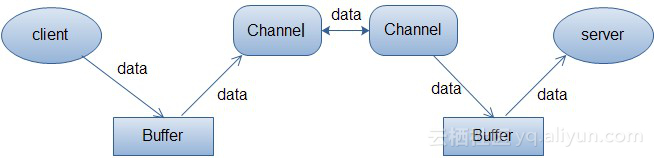
以下内容由动脑five老师的笔记整理而来。 一、几个概念 1、阻塞与非阻塞 阻塞与非阻塞是描述进程在访问某个资源时,数据是否准备就绪的的一种处理方式。当数据没有准备就绪时: 阻塞:线程持续等待资源中数据准备完成,直到返回响应结果。非阻塞:线程直接返回结果,不会持续等待资源准备数据结束后才响应结果。 2、同步与异步 同步与异步是指访问数据的机制,同步一般指主动请求并等待IO操作完成的方式。 异步则指主动请求数据后便可以继续处理其它任务,随后等待IO操作完毕的通知。 举一个很形象的例子就很容易明白了:老王烧开水:1、普通水壶煮水,站在旁边,主动的看水开了没有?同步的阻塞2、普通水壶煮水,去干点别的事,每过一段时间去看看水开了没有,水没开就走人。 同步非阻塞3、响水壶煮水,站在旁边,不会每过一段时间主动看水开了没有。如果水开了,水壶自动通知他。 异步阻塞4、响水壶煮水,去干点别的事,如果水开了,水壶自动通知他。异步非阻塞 二、NIO基础 1、传统BIO模型 传统BIO是一种同步的阻塞IO,IO在进行读写时,该线程将被阻塞,线程无法进行其它操作。 IO流在读取时,会阻塞。直到发生以下情况:1、有数据可以读取。2、数据读取完成。3、发生异常。 服务端TimeServer : public class TimeServer { public static void main(String[] args) { int port=8080; //服务端默认端口 ServerSocket server = null; try { server = new ServerSocket(port); System.out.println("The time server is start in port:"+port); Socket socket = null; while(true){ socket = server.accept(); new Thread(new TimeServerHandler(socket)).start(); } } catch (Exception e) { e.printStackTrace(); } finally { if(server!=null){ System.out.println("The time server is close."); try { server.close(); server = null; } catch (IOException e) { e.printStackTrace(); } } } } } Handler: public class TimeServerHandler implements Runnable { private Socket socket; public TimeServerHandler(Socket socket){ this.socket = socket; } @Override public void run() { BufferedReader in = null; PrintWriter out = null; try { //获取Socket中客户端传过来的输入流 in = new BufferedReader(new InputStreamReader(this.socket.getInputStream())); out = new PrintWriter(this.socket.getOutputStream(), true); String currentTime = null; String body = null; while(true){ body = in.readLine(); //阻塞等待数据可以被读取 if(body == null){ break; } System.out.println("The time server(Thread:"+Thread.currentThread()+") receive order:"+body); currentTime = "QUERY TIME ORDER".equalsIgnoreCase(body) ? new Date(System.currentTimeMillis()).toString() : "BAD ORDER"; //把服务端的结果响应给客户端 out.println(currentTime); } } catch (Exception e) { if(in != null){ try { in.close(); in = null;// } catch (IOException e1) { e1.printStackTrace(); } } if(out != null){ try { out.close(); out = null; } catch (Exception e1) { e1.printStackTrace(); } } if(socket != null){ try { socket.close(); } catch (IOException e1) { e1.printStackTrace(); } this.socket = null; } } } } 客户端TimeServerClient : public class TimeServerClient { public static void main(String[] args) { int port=8080; //服务端默认端口 Socket socket = null; BufferedReader in = null; PrintWriter out = null; try { socket = new Socket("127.0.0.1", port); in = new BufferedReader(new InputStreamReader(socket.getInputStream())); out = new PrintWriter(socket.getOutputStream(), true); //传给服务端的指令 out.println("QUERY TIME ORDER"); System.out.println("Send order to server succeed."); String resp = in.readLine(); System.out.println("Now is : "+resp); } catch (Exception e) { e.printStackTrace(); } finally { if(out !=null){ out.close(); out = null; } if(in != null){ try { in.close(); } catch (IOException e) { e.printStackTrace(); } } if(socket != null){ try { socket.close(); } catch (IOException e) { e.printStackTrace(); } socket = null; } } } } 2、伪异步IO模型 以传统BIO模型为基础,通过线程池的方式维护所有的IO线程,实现相对高效的线程开销及管理。 其实相比传统BIO就是多了线程池的处理而已,改变并不是很大:服务端: public class TimeServer { public static void main(String[] args) { int port=8080; //服务端默认端口 ServerSocket server = null; try { server = new ServerSocket(port); System.out.println("The time server is start in port:"+port); Socket socket = null; TimeServerHandlerExecutePool singleExecutor = new TimeServerHandlerExecutePool(50, 10000); while(true){ socket = server.accept(); // new Thread(new TimeServerHandler(socket)).start(); singleExecutor.execute(new TimeServerHandler(socket)); } } catch (Exception e) { e.printStackTrace(); } finally { if(server!=null){ System.out.println("The time server is close."); try { server.close(); server = null; } catch (IOException e) { e.printStackTrace(); } } } } } Handler: public class TimeServerHandler implements Runnable { private Socket socket; public TimeServerHandler(Socket socket){ this.socket = socket; } @Override public void run() { BufferedReader in = null; PrintWriter out = null; try { in = new BufferedReader(new InputStreamReader(this.socket.getInputStream())); out = new PrintWriter(this.socket.getOutputStream(), true); String currentTime = null; String body = null; while(true){ body = in.readLine(); if(body == null){ break; } System.out.println("The time server(Thread:"+Thread.currentThread()+") receive order:"+body); currentTime = "QUERY TIME ORDER".equalsIgnoreCase(body) ? new Date(System.currentTimeMillis()).toString() : "BAD ORDER"; out.println(currentTime); } } catch (Exception e) { if(in != null){ try { in.close(); in = null;// } catch (IOException e1) { e1.printStackTrace(); } } if(out != null){ try { out.close(); out = null; } catch (Exception e1) { e1.printStackTrace(); } } if(socket != null){ try { socket.close(); } catch (IOException e1) { e1.printStackTrace(); } this.socket = null; } } } } public class TimeServerHandlerExecutePool { private ExecutorService executor; public TimeServerHandlerExecutePool(int maxPoolSize, int queueSize) { executor = new ThreadPoolExecutor(Runtime.getRuntime().availableProcessors(), maxPoolSize, 120l, TimeUnit.SECONDS, new ArrayBlockingQueue<Runnable>(queueSize)); } public void execute(Runnable task) { executor.execute(task); } } 客户端: public class TimeServerClient { public static void main(String[] args) { int port=8080; //服务端默认端口 Socket socket = null; BufferedReader in = null; PrintWriter out = null; try { socket = new Socket("127.0.0.1", port); in = new BufferedReader(new InputStreamReader(socket.getInputStream())); out = new PrintWriter(socket.getOutputStream(), true); out.println("QUERY TIME ORDER"); System.out.println("Send order to server succeed."); String resp = in.readLine(); System.out.println("Now is : "+resp); } catch (Exception e) { e.printStackTrace(); } finally { if(out !=null){ out.close(); out = null; } if(in != null){ try { in.close(); } catch (IOException e) { e.printStackTrace(); } } if(socket != null){ try { socket.close(); } catch (IOException e) { e.printStackTrace(); } socket = null; } } } } 3、NIO模型 NIO(JDK1.4)模型是一种同步非阻塞IO,主要有三大核心部分:Channel(通道),Buffer(缓冲区), Selector(多路复用器)。传统IO基于字节流和字符流进行操作,而NIO基于Channel和Buffer(缓冲区)进行操作,数据总是从通道读取到缓冲区中,或者从缓冲区写入到通道中。Selector(多路复用器)用于监听多个通道的事件(比如:连接打开,数据到达)。因此,单个线程可以监听多个数据通道。 NIO和传统IO(一下简称IO)之间第一个最大的区别是,IO是面向流的,NIO是面向缓冲区的。 Java IO面向流意味着每次从流中读一个或多个字节,直至读取所有字节,它们没有被缓存在任何地方。此外,它不能前后移动流中的数据。如果需要前后移动从流中读取的数据,需要先将它缓存到一个缓冲区。NIO的缓冲导向方法略有不同。数据读取到一个它稍后处理的缓冲区,需要时可在缓冲区中前后移动。这就增加了处理过程中的灵活性。但是,还需要检查是否该缓冲区中包含所有您需要处理的数据。而且,需确保当更多的数据读入缓冲区时,不要覆盖缓冲区里尚未处理的数据。IO的各种流是阻塞的。这意味着,当一个线程调用read() 或 write()时,该线程被阻塞,直到有一些数据被读取,或数据完全写入。该线程在此期间不能再干任何事情了。 NIO的非阻塞模式,非阻塞写读时,使一个线程从某通道发送请求读取数据,但是它仅能得到目前可用的数据,如果目前没有数据可用时,就什么都不会获取。而不是保持线程阻塞,所以直至数据变的可以读取之前,该线程可以继续做其他的事情。 非阻塞写也是如此。一个线程请求写入一些数据到某通道,但不需要等待它完全写入,这个线程同时可以去做别的事情。 线程通常将非阻塞IO的空闲时间用于在其它通道上执行IO操作,所以一个单独的线程现在可以管理多个输入和输出通道(channel)。 NIO优点: 1、客户端发起的连接操作是异步的,可以通过在多路复用器注册OP_CONNECT等待后续结果,不需要像之前的客户端那样被同步阻塞;2、SocketChannel的读写操作都是异步的,如果没有可读写的数据它不会同步等待,直接返回,这样IO通信线程就可以处理其他的链路,不需要同步等待这个链路可用;3、线程模型的优化:由于JDK的Selector在Linux等主流操作系统上通过epoll实现,它没有连接句柄数的限制(只受限于操作系统的最大句柄数或者对单个进程的句柄限制),这意味着一个Selector线程可以同时处理成千上万个客户端连接,而且性能不会随着客户端的增加而线性下降。 NIO缺点: API使用复杂。需要具备一些多线程编码能力断线重连问题比较严重NIO还有一些BUG Selector(多路复用器) Selector与Channel是相互配合使用的,将Channel注册在Selector上之后,才可以正确的使用Selector,但此时Channel必须为非阻塞模式。Selector可以监听Channel的四种状态(Connect、Accept、Read、Write),当监听到某一Channel的某个状态时,才允许对Channel进行相应的操作。Connect:某一个客户端连接成功后Accept:准备好进行连接Read:可读Write:可写 Selector的创建 通过调用Selector.open()方法创建一个Selector,如下: Selector selector = Selector.open(); 向Selector注册通道 为了将Channel和Selector配合使用,必须将channel注册到selector上。通过SelectableChannel.register()方法来实现,如下: channel.configureBlocking(false); SelectionKey key = channel.register(selector,Selectionkey.OP_READ); 注意register()方法的第二个参数。这是一个“interest集合”,意思是在通过Selector监听Channel时对什么事件感兴趣。可以监听四种不同类型的事件: Connect Accept Read Write通道触发了一个事件意思是该事件已经就绪。所以,某个channel成功连接到另一个服务器称为“连接就绪”。一个server socket channel准备好接收新进入的连接称为“接收就绪”。一个有数据可读的通道可以说是“读就绪”。等待写数据的通道可以说是“写就绪”。 这四种事件用SelectionKey的四个常量来表示:1.SelectionKey.OP_CONNECT2.SelectionKey.OP_ACCEPT3.SelectionKey.OP_READ4.SelectionKey.OP_WRITE如果你对不止一种事件感兴趣,那么可以用“位或”操作符将常量连接起来,如下: int interestSet = SelectionKey.OP_READ | SelectionKey.OP_WRITE; 通过Selector选择通道 一旦向Selector注册了一或多个通道,就可以调用几个重载的select()方法。这些方法返回你所感兴趣的事件(如连接、接受、读或写)已经准备就绪的那些通道。换句话说,如果你对“读就绪”的通道感兴趣,select()方法会返回读事件已经就绪的那些通道。 下面是select()方法: int select() int select(long timeout) int selectNow() select()阻塞到至少有一个通道在你注册的事件上就绪了。select(long timeout)和select()一样,除了最长会阻塞timeout毫秒(参数)。selectNow()不会阻塞,不管什么通道就绪都立刻返回(译者注:此方法执行非阻塞的选择操作。如果自从前一次选择操作后,没有通道变成可选择的,则此方法直接返回零。)。select()方法返回的int值表示有多少通道已经就绪。亦即,自上次调用select()方法后有多少通道变成就绪状态。如果调用select()方法,因为有一个通道变成就绪状态,返回了1,若再次调用select()方法,如果另一个通道就绪了,它会再次返回1。如果对第一个就绪的channel没有做任何操作,现在就有两个就绪的通道,但在每次select()方法调用之间,只有一个通道就绪了。 selectedKeys() 一旦调用了select()方法,并且返回值表明有一个或更多个通道就绪了,然后可以通过调用selector的selectedKeys()方法,访问“已选择键集(selected key set)”中的就绪通道。如下所示: Set selectedKeys = selector.selectedKeys(); 当像Selector注册Channel时,Channel.register()方法会返回一个SelectionKey 对象。这个对象代表了注册到该Selector的通道。可以通过SelectionKey的selectedKeySet()方法访问这些对象。 可以遍历这个已选择的键集合来访问就绪的通道。如下: Set selectedKeys = selector.selectedKeys(); Iterator keyIterator = selectedKeys.iterator(); while(keyIterator.hasNext()) { SelectionKey key = keyIterator.next(); if(key.isAcceptable()) { // a connection was accepted by a ServerSocketChannel. } else if (key.isConnectable()) { // a connection was established with a remote server. } else if (key.isReadable()) { // a channel is ready for reading } else if (key.isWritable()) { // a channel is ready for writing } keyIterator.remove(); } 这个循环遍历已选择键集中的每个键,并检测各个键所对应的通道的就绪事件。 注意每次迭代末尾的keyIterator.remove()调用。Selector不会自己从已选择键集中移除SelectionKey实例。必须在处理完通道时自己移除。下次该通道变成就绪时,Selector会再次将其放入已选择键集中。 SelectionKey.channel()方法返回的通道需要转型成你要处理的类型,如ServerSocketChannel或SocketChannel等。 注意: channel调用register方法时第二个参数意思是在通过Selector监听Channel时对什么事件感兴趣,这里传了什么参数,在Selector获取就绪的Key时就只会获取感兴趣的状态。例如: channel1.register(selector,Selectionkey.OP_READ); channel2.register(selector,Selectionkey.OP_WRITE); 那么当channel1处于OP_READ之外的其他就绪状态时,下面的selectionKeys也不会获取到channel1对应的key,只有channel1处于OP_READ时才会被获取到,当channel1处于OP_READ,而channel2处于OP_WRITE那么channel1和channel2对应的key都会包含在selectionKeys中。 //通过Selector循环准备就绪的Key selector.select(); Set<SelectionKey> selectionKeys = selector.selectedKeys(); Channel(通道) 传统IO操作对read()或write()方法的调用,可能会因为没有数据可读/可写而阻塞,直到有数据响应。也就是说读写数据的IO调用,可能会无限期的阻塞等待,效率依赖网络传输的速度。最重要的是在调用一个方法前,无法知道是否会被阻塞。 NIO的Channel抽象了一个重要特征就是可以通过配置它的阻塞行为,来实现非阻塞式的通道。 Channel是一个双向通道,与传统IO操作只允许单向的读写不同的是,NIO的Channel允许在一个通道上进行读和写的操作。FileChannel:文件SocketChannel:ServerSocketChannel:DatagramChannel: UDP Buffer(缓冲区) Bufer顾名思义,它是一个缓冲区,实际上是一个容器,一个连续数组。Channel提供从文件、网络读取数据的渠道,但是读写的数据都必须经过Buffer。 Buffer缓冲区本质上是一块可以写入数据,然后可以从中读取数据的内存。这块内存被包装成NIO Buffer对象,并提供了一组方法,用来方便的访问该模块内存。为了理解Buffer的工作原理,需要熟悉它的三个属性:capacity、position和limit。position和limit的含义取决于Buffer处在读模式还是写模式。不管Buffer处在什么模式,capacity的含义总是一样的。见下图: capacity:作为一个内存块,Buffer有固定的大小值,也叫作“capacity”,只能往其中写入capacity个byte、long、char等类型。一旦Buffer满了,需要将其清空(通过读数据或者清除数据)才能继续写数据。position:当你写数据到Buffer中时,position表示当前的位置。初始的position值为0,当写入一个字节数据到Buffer中后,position会向前移动到下一个可插入数据的Buffer单元。position最大可为capacity-1。当读取数据时,也是从某个特定位置读,讲Buffer从写模式切换到读模式,position会被重置为0。当从Buffer的position处读取一个字节数据后,position向前移动到下一个可读的位置。limit:在写模式下,Buffer的limit表示你最多能往Buffer里写多少数据。 写模式下,limit等于Buffer的capacity。当切换Buffer到读模式时, limit表示你最多能读到多少数据。因此,当切换Buffer到读模式时,limit会被设置成写模式下的position值。换句话说,你能读到之前写入的所有数据(limit被设置成已写数据的数量,这个值在写模式下就是position) Buffer的分配:对Buffer对象的操作必须首先进行分配,Buffer提供一个allocate(int capacity)方法分配一个指定字节大小的对象。向Buffer中写数据:写数据到Buffer中有两种方式:1、从channel写到Buffer int bytes = channel.read(buf); //将channel中的数据读取到buf中 2、通过Buffer的put()方法写到Buffer buf.put(byte); //将数据通过put()方法写入到buf中 flip()方法:将Buffer从写模式切换到读模式,调用flip()方法会将position设置为0,并将limit设置为之前的position的值。从Buffer中读数据:从Buffer中读数据有两种方式:1、从Buffer读取数据到Channel int bytes = channel.write(buf); //将buf中的数据读取到channel中 2、通过Buffer的get()方法读取数据 byte bt = buf.get(); //从buf中读取一个byte rewind()方法:Buffer.rewind()方法将position设置为0,使得可以重读Buffer中的所有数据,limit保持不变。 Buffer中的数据,读取完成后,依然保存在Buffer中,可以重复读取。 clear()与compact()方法:一旦读完Buffer中的数据,需要让Buffer准备好再次被写入,可以通过clear()或compact()方法完成。如果调用的是clear()方法,position将被设置为0,limit设置为capacity的值。但是Buffer并未被清空,只是通过这些标记告诉我们可以从哪里开始往Buffer中写入多少数据。如果Buffer中还有一些未读的数据,调用clear()方法将被"遗忘 "。compact()方法将所有未读的数据拷贝到Buffer起始处,然后将position设置到最后一个未读元素的后面,limit属性依然设置为capacity。可以使得Buffer中的未读数据还可以在后续中被使用。mark()与reset()方法:通过调用Buffer.mark()方法可以标记一个特定的position,之后可以通过调用Buffer.reset()恢复到这个position上。下面贴上一个NIO的demo代码服务端: public class TimeServer { public static void main(String[] args) { int port=8000; //服务端默认端口 MultiplexerTimeServer timeServer=new MultiplexerTimeServer(port); new Thread(timeServer, "NIO-MultiplexerTimeServer-001").start(); } } public class MultiplexerTimeServer implements Runnable { private Selector selector; private ServerSocketChannel serverChannel; private volatile boolean stop; public MultiplexerTimeServer(int port) { try { //打开ServerSocketChannel serverChannel = ServerSocketChannel.open(); //设置为非阻塞模式 serverChannel.configureBlocking(false); //绑定监听的端口地址 serverChannel.socket().bind(new InetSocketAddress(port), 1024); //创建Selector线程 selector = Selector.open(); //将ServerSocketChannel注册到Selector,交给Selector监听 serverChannel.register(selector, SelectionKey.OP_ACCEPT); System.out.println("The time server is start in port:"+port); } catch (Exception e) { e.printStackTrace(); System.exit(1); } } public void stop(){ this.stop = true; } @Override public void run() { while(!stop){ try { //通过Selector循环准备就绪的Key selector.select(); Set<SelectionKey> selectionKeys = selector.selectedKeys(); Iterator<SelectionKey> iterator = selectionKeys.iterator(); SelectionKey selectionKey = null; while(iterator.hasNext()){ selectionKey = iterator.next(); iterator.remove(); try { handleInput(selectionKey); } catch (Exception e) { if(selectionKey!=null){ selectionKey.cancel(); if(selectionKey.channel()!=null){ selectionKey.channel().close(); } } } } } catch (Exception e) { e.printStackTrace(); } } if(selector !=null){ try { selector.close(); } catch (IOException e) { e.printStackTrace(); } } } private void handleInput(SelectionKey selectionKey) throws IOException { if(selectionKey.isValid()){ if (selectionKey.isAcceptable()) { ServerSocketChannel server = (ServerSocketChannel) selectionKey.channel(); //多路复用器监听到新的客户端连接,处理连接请求,完成TCP三次握手。 SocketChannel client = server.accept(); //设置为非阻塞模式 client.configureBlocking(false); // 将新连接注册到多路复用器上,监听其读操作,读取客户端发送的消息。 client.register(selector, SelectionKey.OP_READ); } if(selectionKey.isReadable()){ SocketChannel client = (SocketChannel) selectionKey.channel(); ByteBuffer receivebuffer = ByteBuffer.allocate(1024); //读取客户端请求消息到缓冲区 int count = client.read(receivebuffer); //非阻塞 if (count > 0) { receivebuffer.flip(); byte[] bytes = new byte[receivebuffer.remaining()]; //remaining()方法 //从缓冲区读取消息 receivebuffer.get(bytes); String body = new String(bytes, "UTF-8"); System.out.println("The time server(Thread:"+Thread.currentThread()+") receive order : "+body); //将currentTime响应给客户端(客户端Channel) String currentTime = "QUERY TIME ORDER".equalsIgnoreCase(body) ? new Date(System.currentTimeMillis()).toString() : "BAD ORDER"; doWrite(client, currentTime); }else if(count < 0){ selectionKey.channel(); client.close(); }else{ } } } } private void doWrite(SocketChannel client, String currentTime) throws IOException { if(currentTime != null && currentTime.trim().length()>0){ ByteBuffer sendbuffer = ByteBuffer.allocate(1024); sendbuffer.put(currentTime.getBytes()); sendbuffer.flip(); //将客户端响应消息写入到客户端Channel中。 client.write(sendbuffer); System.out.println("服务器端向客户端发送数据--:" + currentTime); }else{ System.out.println("没有数据"); } } } 客户端: public class TimeServerClient { public static void main(String[] args) { int port=8000; //服务端默认端口 new Thread(new TimeClientHandler("127.0.0.1", port), "NIO-TimeServerClient-001").start(); } } public class TimeClientHandler implements Runnable { private String host; private int port; private SocketChannel socketChannel; private Selector selector; private volatile boolean stop; public TimeClientHandler(String host, int port) { this.host = host; this.port = port; try { //打开SocketChannel socketChannel = SocketChannel.open(); //创建Selector线程 selector = Selector.open(); //设置为非阻塞模式 socketChannel.configureBlocking(false); } catch (Exception e) { e.printStackTrace(); System.exit(1); } } @Override public void run() { try { doConnect(); } catch (Exception e) { e.printStackTrace(); System.exit(1); } while(!stop){ //轮训通道的状态 try { selector.select(1000); Set<SelectionKey> selectionKeys = selector.selectedKeys(); Iterator<SelectionKey> iterator = selectionKeys.iterator(); SelectionKey selectionKey = null; while(iterator.hasNext()){ selectionKey = iterator.next(); iterator.remove(); try { handleInput(selectionKey); } catch (Exception e) { if(selectionKey!=null){ selectionKey.cancel(); if(selectionKey.channel()!=null){ selectionKey.channel().close(); } } } } } catch (Exception e) { e.printStackTrace(); System.exit(1); } } if(selector !=null){ try { selector.close(); } catch (IOException e) { e.printStackTrace(); } } } private void handleInput(SelectionKey selectionKey) throws Exception { if(selectionKey.isValid()){ SocketChannel client = (SocketChannel) selectionKey.channel(); if (selectionKey.isConnectable()){ if(client.finishConnect()){ client.register(selector, SelectionKey.OP_READ); doWrite(client); }else{ System.exit(1); } } if (selectionKey.isReadable()) { ByteBuffer receivebuffer = ByteBuffer.allocate(1024); int count = client.read(receivebuffer); if (count > 0) { receivebuffer.flip(); byte[] bytes = new byte[receivebuffer.remaining()]; //remaining()方法 receivebuffer.get(bytes); String body = new String(bytes, "UTF-8"); System.out.println("Now is "+body); this.stop = true; }else if(count < 0){ selectionKey.channel(); client.close(); }else{ } } } } private void doConnect() throws Exception { //连接服务端 boolean connect = socketChannel.connect(new InetSocketAddress(host, port)); //判断是否连接成功,如果连接成功,则监听Channel的读状态。 if(connect){ socketChannel.register(selector, SelectionKey.OP_READ); //写数据 写给服务端 doWrite(socketChannel); }else{ //如果没有连接成功,则向多路复用器注册Connect状态 socketChannel.register(selector, SelectionKey.OP_CONNECT); } } private void doWrite(SocketChannel channel) throws IOException { ByteBuffer sendbuffer = ByteBuffer.allocate(1024); sendbuffer.put("QUERY TIME ORDER".getBytes()); sendbuffer.flip(); //向Channel中写入客户端的请求指令 写到服务端 channel.write(sendbuffer); if(!sendbuffer.hasRemaining()){ System.out.println("Send order to server succeed."); } } }