JPress的ehcache缓存方案、以及踩过ehcache的坑
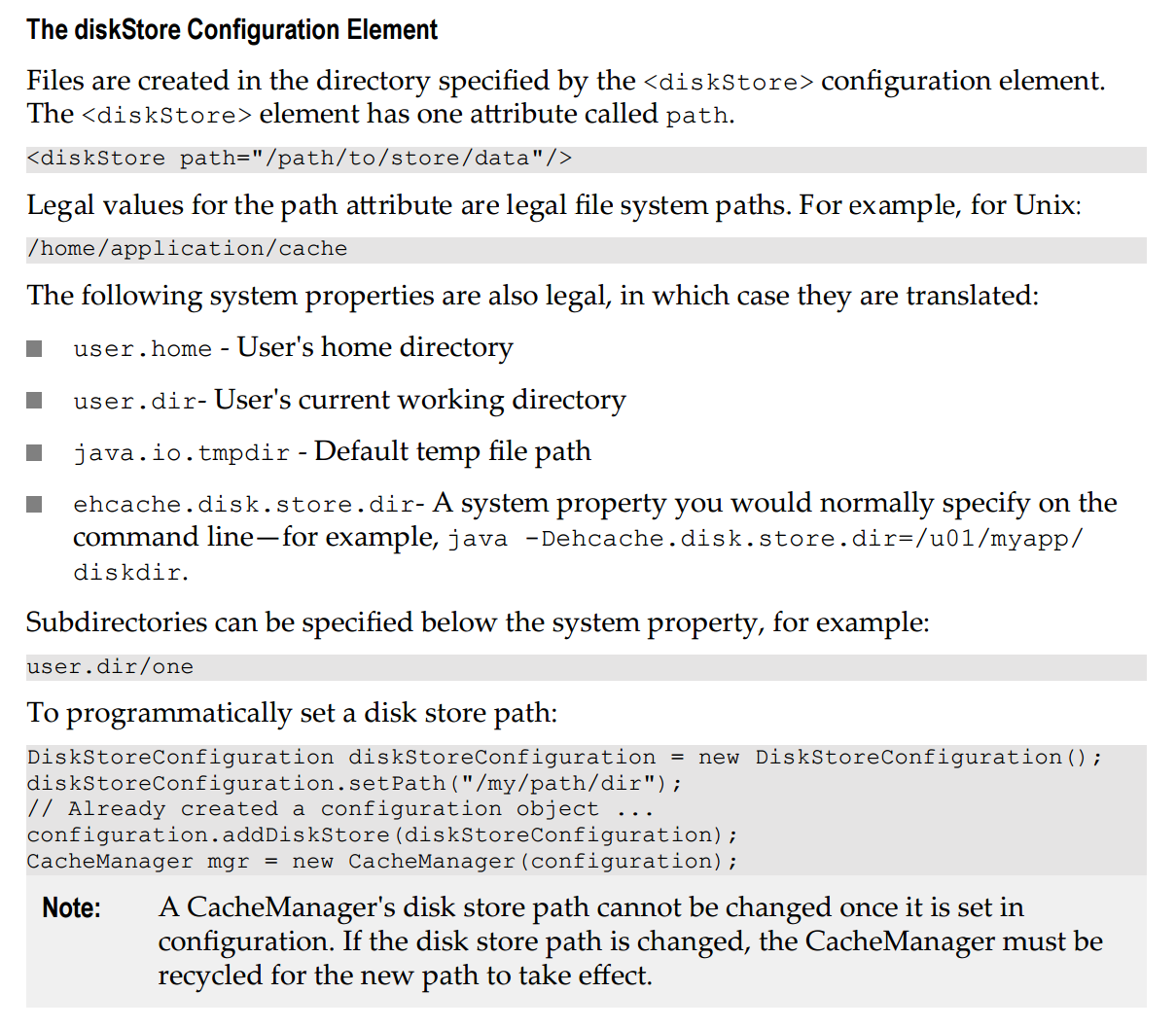
精通JFinal视频教程:http://www.roncoo.com/course/view/a033a4dff3a2473f9f9f6667cf069ffd 最近为了提高JPress的性能,减少数据查询的次数,JPress大量使用了ehcache缓存作为起内置缓存,同时session也是基于ehcache重新实现的支持分部署的session解决方案。 因为JPress是基于JFinal快速开发框架,而JFinal又内置了ehcache的插件,使用起来及其简单。 1、JFinal里配置ehcachePlugin插件。 publicvoidconfigPlugin(Pluginsme){me.add(newEhCachePlugin());//添加其他插件} 2、在classPath下添加ehcache的配置文件ehcache.xml <?xmlversion="1.0"encoding="UTF-8"?> <ehcachexmlns:xsi="http://www.w3.org/2001/XMLSchema-instance" xsi:noNamespaceSchemaLocation="ehcache.xsd" updateCheck="false"monitoring="autodetect" dynamicConfig="true"> <diskStorepath="java.io.tmpdir"/> <defaultCache maxEntriesLocalHeap="10000" eternal="false" overflowToDisk="true" timeToIdleSeconds="20" timeToLiveSeconds="60"> </defaultCache> <!-- SamplecachenamedsampleCache1 Thiscachecontainsamaximuminmemoryof10000elements,andwillexpire anelementifitisidleformorethan5minutesandlivesformorethan10minutes. Iftherearemorethan10000elementsitwilloverflowtothe diskcache,whichinthisconfigurationwillgotowhereverjava.io.tmpis definedonyoursystem.OnastandardLinuxsystemthiswillbe/tmp"--> <cachename="sampleCache1" maxEntriesLocalHeap="10000" maxEntriesLocalDisk="1000" eternal="false" overflowToDisk="true" diskSpoolBufferSizeMB="20" timeToIdleSeconds="300" timeToLiveSeconds="600" memoryStoreEvictionPolicy="LFU" transactionalMode="off" /> <!-- SamplecachenamedsampleCache2 Thiscachehasamaximumof1000elementsinmemory.Thereisnooverflowtodisk,so1000 isalsothemaximumcachesize.Notethatwhenacacheiseternal,timeToLiveand timeToIdlearenotusedanddonotneedtobespecified.--> <cachename="sampleCache2" maxEntriesLocalHeap="1000" eternal="true" overflowToDisk="false" memoryStoreEvictionPolicy="FIFO" /> <!-- SamplecachenamedsampleCache3.Thiscacheoverflowstodisk.Thediskstoreis persistentbetweencacheandVMrestarts.Thediskexpirythreadintervalissetto10 minutes,overridingthedefaultof2minutes.--> <cachename="sampleCache3" maxEntriesLocalHeap="500" eternal="false" overflowToDisk="true" timeToIdleSeconds="300" timeToLiveSeconds="600" diskPersistent="true" diskExpiryThreadIntervalSeconds="1" memoryStoreEvictionPolicy="LFU" /> </ehcache> 3、直接使用EhcacheKit操作缓存。 publicvoidyourMethod(){ Cachekit.put("cacheName","key","value") } 到此,一切很顺利的进行着,但随着JPress在大量的使用ehcache,ehcache的缓存数据操作与更新就变成了一个棘手的问题,更新数据库数据了,缓存若得不到及时更新,就会导致程序在运行的过程中有大量的bug、各种莫名其妙的问题。此时、缓存数据的更新,就需要一个良好更新的计划和方案。 首先,是数据颗粒度的问题,我们在缓存数据的时候,可能是根据数据库的ID,对单个model(单条数据)进行缓存,这种缓存以model的ID作为key进行缓存,这种缓存的颗粒度极细。 因此,我们在做数据的更新的时候非常简单,只需在model的更新和删除的时候从ehcache删除该ID即可。针对这一的问题,我们只需要重写Model的update和delete方法,删除其缓存。 代码如下: @Table(tableName="content",primaryKey="id")publicclassContentextendsBaseContent{privatestaticfinallongserialVersionUID=1L; @Overridepublicbooleanupdate(){ removeCache(getId());//移除ehcache缓存 returnsuper.update(); } @Overridepublicbooleandelete(){ removeCache(getId());//移除ehcache缓存 returnsuper.delete(); } } 通过这种方式,我们在通过ID来查询该数据的时候,不用担心缓存于数据库不同步的问题,因为我们在更新、删除的时候就已经把ehcache的缓存数据给清除掉了,当查询的时候发现ehcache里没有数据,自动会去数据库会获取,从而保证了ehcache的数据与数据库保持一致。 但是,我们在缓存数据的时候,不只是对单个model进行缓存,在程序的各种业务场景中,大量会使用到列表的查询,因此我们在存储的时候,肯定也会多列表进行缓存。例如: publicListfindByModule(finalStringmodule,finalBigIntegerparentId,Stringorderby){ finalStringBuildersqlBuilder=newStringBuilder("select*fromcontentc"); sqlBuilder.append("sql....");returnDAO.getFromListCache("cacheName","key",newIDataLoader(){ @OverridepublicObjectload(){returnDAO.find(sqlBuilder.toString(),module,parentId); } }); } 但是,一旦缓存了列表,问题就来了?这个列表的数据什么时候会被更新呢?这个缓存到ehcache的某条数据可能会被随时更新或删除了,怎么来同步? 一种粗糙的方案是:把所有缓存都缓存到同一个cacheName中,然后在model的update或delete的时候,对这个cacheName不管三七二十一直接全部清除,如下代码: @Table(tableName="content",primaryKey="id")publicclassContentextendsBaseContent{privatestaticfinallongserialVersionUID=1L; @Overridepublicbooleanupdate(){ removeCache(getId());//移除ehcache缓存 removeAllListCache();//移除所有保存列表数据的缓存 returnsuper.update(); } @Overridepublicbooleandelete(){ removeCache(getId());//移除ehcache缓存 removeAllListCache();//移除所有保存列表数据的缓存 returnsuper.delete(); } } 虽然这是一种粗糙的方案,但是也是有效解决了列表数据不同步的问题;其粗糙的原因是,当我们清除数据的时候,把所有的列表都删除了,这样会导致很多没有没有该列表的数据也被清楚了... 所以,更有效的解决方案应该是保留和该ID没有关系的数据,而只清除有关的数据。 那问题来了,什么数据才是该ID有关的数据呢? 1、列表有该ID的数据。 2、列表的排序等会受到该ID影响的数据,比如谋条数据的orderby_number更新了,可能某个缓存的列表数据虽然没有该ID,但是该ID更新后,可能是orderby_number,由于缓存的列表数据是根据orderby_number来排序的,此时该数据应该出现在列表里。 3、分页数据,比如某条数据被删除或更新了,可能分页的页码数据就会被改变。 那如何才能找到该ID关联的数据呢? 这是一个困难的问题,每个业务系统不一样,关联的数据肯定也不一样。在JPress里,每个content都有一个module字段,表示该数据所属的模型。 因此,在JPress的内容分类里,JPress针对某种类型的数据,都按照一定的规则来建立这个存储的key,比如文章模型的列表在存储的时候,存储的key值大概为:module:article-xxx-xxx这样的key。 当文章模型的数据被更新的时候,会去便利所有列表数据的key,如果发现key是以module:article开头,表示该数据是文章列表的缓存数据,应该清除。 于是,就有了如下的代码: publicvoidremoveAllListCache(){ Listlist=CacheKit.getKeys(CACHE_NAME);if(list!=null&&list.size()>0){for(ObjectkeyObj:list){ StringkeyStr=(String)keyObj;if(!keyStr.startsWith("module:")){ CacheKit.remove(CACHE_NAME,keyStr);continue; }//不清除其他模型的内容 if(keyStr.startsWith("module:"+getModule())){ CacheKit.remove(CACHE_NAME,keyStr); } } } } 大功告成,测试、运行。 然而,踩坑才刚刚开始。 ehcache的坑1:getKeys("cacheName")为空数据。 本以为理想的解决了我的方案,兴高采烈的查看测试结果,然而发现了一个致命的问题,更新或删除单条数据后,缓存的列表数据没有被更新,debug后才发现,通过CacheKit.getKeys("cacheName")得到的数据总是不正确,绝大多数的情况下返回了空列表,开始以为是JFinal的问题,然后跟进源代码后,JFinal根本没有对getKeys进行任何的操作,而直接返回了。 在查询资料的过程中,也曾发现在oschina上有人提供类型的问题:http://www.oschina.net/question/2298963_2141262,然后没有一个较好的答复。在spring的网站上(https://jira.spring.io/browse/SPR-8878)找到了这么一句话。 Consider a cache with 100k items - if you ask for the keys, most likely you'll end up with an OOM. 大概意思是,如果保存了很多数据,当去获取所有数据的keys的时候,可能会造成内存溢出。但无论如何,我始终觉得这是ehcache的一个大坑,如果ehcache的作者始终这么考虑的话,完全不用提供这个getKeys这个方法好了,为毛还要提供出来呢? 那getKeys这条路行不通,那我们就必须自己去维护这个keys。也就是自己来就来我记录我存了哪些key。 于是,在保存到cache的时候,有了如下的代码: publicListfindByModule(finalStringmodule,finalBigIntegerparentId,Stringorderby){ finalStringBuildersqlBuilder=newStringBuilder("select*fromcontentc"); sqlBuilder.append("sql....");returnDAO.getFromListCache("cacheName","key",newIDataLoader(){ @OverridepublicObjectload(){returnDAO.find(sqlBuilder.toString(),module,parentId); } }); }publicTgetFromListCache(Objectkey,IDataLoaderdataloader){ ListinCacheKeys=CacheKit.get(CACHE_NAME,"cachekeys"); ListcacheKeyList=newArrayList();if(inCacheKeys!=null){ cacheKeyList.addAll(inCacheKeys); } cacheKeyList.add(key.toString()); CacheKit.put(CACHE_NAME,"cachekeys",cacheKeyList);returnCacheKit.get("content_list",key,dataloader); } 在保存的时候,把keys全部保存到一个单独的缓存里面; 在删除缓存的时候,不通过getKeys了,而是去这个缓存里面查看有哪些key。代码如下: publicvoidremoveAllListCache(){ Listlist=CacheKit.get(CACHE_NAME,"cachekeys");if(list!=null&&list.size()>0){for(ObjectkeyObj:list){ StringkeyStr=(String)keyObj;if(!keyStr.startsWith("module:")){ CacheKit.remove("taxonomy_list",keyStr);continue; }//不清除其他模型的内容 if(keyStr.startsWith("module:"+getModule())){ CacheKit.remove("taxonomy_list",keyStr); } } } } 到此,ehcache的getKeys坑总算是告了一个段落。 ehcache的坑2:存储的list列表数据小心复用(或不能复用)。 大喜之余,Ehcache的坑又接踵而来。在使用的过程中,莫名其妙的不定时的出了一个错误.... net.sf.ehcache.CacheException:FailedtoserializeelementduetoConcurrentModificationException.Thisisfrequentlytheresultofinappropriatelysharingthreadunsafeobject(eg.ArrayList,HashMap,etc)betweenthreads atnet.sf.ehcache.store.disk.DiskStorageFactory.serializeElement(DiskStorageFactory.java:405) atnet.sf.ehcache.store.disk.DiskStorageFactory.write(DiskStorageFactory.java:385) atnet.sf.ehcache.store.disk.DiskStorageFactory$DiskWriteTask.call(DiskStorageFactory.java:477) atnet.sf.ehcache.store.disk.DiskStorageFactory$PersistentDiskWriteTask.call(DiskStorageFactory.java:1071) atnet.sf.ehcache.store.disk.DiskStorageFactory$PersistentDiskWriteTask.call(DiskStorageFactory.java:1055) 一看,麻蛋!!多线程的问题啊...错误log没有具体到我自己项目中的哪一行代码,此项想到在JPress的设计中,由于为了解耦,JPress自行开发了一套消息机制,默认情况下全是开辟新的线程去执行的...... 此时,想哭。 抽了根烟后,脑子中灵光乍现,不对啊,在tomcat对servlet的处理模型中,每个请求其实都是开辟了新的线程去处理单独的请求,每个请求也都有可能对ehcache进行操作....不可能是多线程的问题。 此时,已经是深夜2点。 赶紧打开电脑,看看stackoverflow(一个国外知名的编程问答网站)上是否有有人遇到过类似的问题。经过半小时的检索阅读后,终于在http://stackoverflow.com/questions/35816456/error-serializing-element-in-ehcache找到了蛛丝马迹。 由于我们存储到ehcache的数据列表可能是一个list数据,此时的list数据可能还保存在内存里,读取的代码如下: publicListfindByModule(finalStringmodule,finalBigIntegerparentId,Stringorderby){ finalStringBuildersqlBuilder=newStringBuilder("select*fromcontentc"); sqlBuilder.append("sql....");returnDAO.getFromListCache("cacheName","key",newIDataLoader(){ @OverridepublicObjectload(){returnDAO.find(sqlBuilder.toString(),module,parentId); } }); } 在如上的代码中,DAO.getFromListCache可能得到的是内存里的数据,然而调用这个方法的controller很多,每个controller都有自己的业务逻辑,也就是说每个controller都有可能对保存在ehcache内存里的list进行操作(修改、删除、添加),因而出现了 "net.sf.ehcache.CacheException: Failed to serialize element due to ConcurrentModificationException. This is frequently the result of inappropriately sharing thread unsafe object (eg. ArrayList, HashMap, etc) between threads" 这个错误。 如果真的是这样,就好办了....赶紧修改代码测试。 publicListfindByModule(finalStringmodule,finalBigIntegerparentId,Stringorderby){ finalStringBuildersqlBuilder=newStringBuilder("select*fromcontentc"); sqlBuilder.append("sql...");//略... Listdata=DAO.getFromListCache(buildKey(module,parentId,orderby),newIDataLoader(){ @OverridepublicObjectload(){returnDAO.find(sqlBuilder.toString(),params.toArray()); } });if(data==null)returnnull; returnnewArrayList(data); } 如果能够从缓存中得到数据,重新new一个新的list返回。 经过两个小时的测试后,这个问题再也没有出现。 在使用ehcache中,记得一个小伙伴又给我反馈了一个问题,就是在他的一台服务器里,部署了多个JPress,导致后来出现了ehcache数据重合的情况,JPress应用A读到了JPress应用B的缓存数据。 不开源、不知道,开源吓一跳。 虽然是一个"小"问题,但是也很棘手,两个应用同时使用了一份ehcache的数据,原因就是ehcache把数据存储到磁盘的时候,存储到了同一个地方了,在ehcache的配置文件ehcache.xml中,如下代码: 在ehcache的配置中,diskStore都是指向了同一个地方,如果这个同学在部署的时候自己修改了diskStore,指定到具体的位置就可以。但是有没有什么办法让每个JPress应用的ehcache缓存保存在自己应用的webRoot目录下呢?这样,就无需用户自己去配置了。 赶紧去ehcache官网看看,怎么配置diskStore,才能让缓存保存在自己的webRoot目录.... 在ehcache的官方文档:http://www.ehcache.org/generated/2.10.2/pdf/Ehcache_Configuration_Guide.pdf的第15页中,找到了如下的内容: 可以配置user.home(用户的家目录)、user.dir(用户当前的工作目录)、java.io.tmpdir(默认的临时目录)、ehcache.disk.store.dir(ehcache的配置目录)和具体的目录,却不能配置成webRoot的目录.... 于是,我想到了自己去加载这个配置文件,然后自由指定diskStore的目录; 于是,在JFinal的配置文件中,就有了如下的代码: publicvoidconfigPlugin(Pluginsplugins){ plugins.add(createEhCachePlugin());//其他插件略...}publicEhCachePlugincreateEhCachePlugin(){ StringehcacheDiskStorePath=PathKit.getWebRootPath(); FilepathFile=newFile(ehcacheDiskStorePath,".ehcache"); Configurationcfg=ConfigurationFactory.parseConfiguration(); cfg.addDiskStore(newDiskStoreConfiguration().path(pathFile.getAbsolutePath()));returnnewEhCachePlugin(cfg); } 成功的把ehcache的存储目录保存在了webRoot的.ehcache目录下.... 此时,也感叹JFinal的ehcachePlugin插件的足够灵活。 到此,JPress在遇到的ehcache坑中解决完毕,终于松了一口气