Android开发实践:为什么要继承onMeasure()
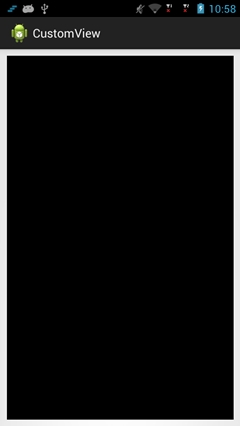
首先,我们写一个自定义View,直接调用系统默认的onMeasure函数,看看会是怎样的现象: 1 2 3 4 5 6 7 8 9 10 11 12 13 14 15 16 17 18 19 20 21 22 package com.titcktick.customview; import android.content.Context; import android.util.AttributeSet; import android.view.View; public class CustomView extends View{ public CustomView(Contextcontext){ super (context); } public CustomView(Contextcontext,AttributeSetattrs){ super (context,attrs); } @Override protected void onMeasure( int widthMeasureSpec, int heightMeasureSpec){ super .onMeasure(widthMeasureSpec,heightMeasureSpec); } } 1. 父控件使用match_parent,CustomView使用match_parent 1 2 3 4 5 6 7 8 9 10 11 12 13 <LinearLayoutxmlns:android= "http://schemas.android.com/apk/res/android" xmlns:tools= "http://schemas.android.com/tools" android:layout_width= "match_parent" android:layout_height= "match_parent" android:orientation= "vertical" > <com.titcktick.customview.CustomView android:layout_width= "match_parent" android:layout_height= "match_parent" android:layout_margin= "10dp" android:background= "@android:color/black" /> </LinearLayout> 这里加了10dp的margin并且把View的背景设置为了黑色,是为了方便辨别我们的CustomView,效果如下: 我们可以看到,默认情况下,如果父控件和CustomView都使用match_parent,则CustomView会充满父控件。 2. 父控件使用match_parent,CustomView使用wrap_content 把layout文件中,CustomView的layout_width/layout_height替换为wrap_content,你会发现,结果依然是充满父控件。 3. 父控件使用match_parent,CustomView使用固定的值 把layout文件中,CustomView的layout_width/layout_height替换为50dp,你会发现,CustomView的显示结果为50dpx50dp,如图所示: 4. 父控件使用固定的值,CustomView使用match_parent或者wrap_content 那么,如果把父控件的layout_width/layout_height替换为50dp,CustomView设置为match_parent或者wrap_content,你会发现,CustomView的显示结果也是为50dpx50 dp。 5 结论 如果自定义的CustomView采用默认的onMeasure函数,行为如下: (1) CustomView设置为 match_parent 或者 wrap_content 没有任何区别,其显示大小由父控件决定,它会填充满整个父控件的空间。 (2) CustomView设置为固定的值,则其显示大小为该设定的值。 如果你的自定义控件的大小计算就是跟系统默认的行为一致的话,那么你就不需要重写onMeasure函数了。 6. 怎样编写onMeasure函数 系统默认的onMeasure函数的行为就讨论到这,下面也说说怎样重写onMeasure函数,以及onMeasure函数的基本原理,关键部分在代码中以注释的形式给出了,仅供参考: 1 2 3 4 5 6 7 8 9 10 11 12 13 14 15 16 17 18 19 20 21 22 23 24 25 26 27 28 29 30 31 32 33 34 35 36 37 38 39 40 41 42 43 44 45 46 47 48 49 50 51 52 53 54 package com.titcktick.customview; import android.content.Context; import android.util.AttributeSet; import android.view.View; public class CustomView extends View{ private static final int DEFAULT_VIEW_WIDTH= 100 ; private static final int DEFAULT_VIEW_HEIGHT= 100 ; public CustomView(Contextcontext){ super (context); } public CustomView(Contextcontext,AttributeSetattrs){ super (context,attrs); } @Override protected void onMeasure( int widthMeasureSpec, int heightMeasureSpec){ int width=measureDimension(DEFAULT_VIEW_WIDTH,widthMeasureSpec); int height=measureDimension(DEFAULT_VIEW_HEIGHT,heightMeasureSpec); setMeasuredDimension(width,height); } protected int measureDimension( int defaultSize, int measureSpec){ int result=defaultSize; int specMode=MeasureSpec.getMode(measureSpec); int specSize=MeasureSpec.getSize(measureSpec); //1.layout给出了确定的值,比如:100dp //2.layout使用的是match_parent,但父控件的size已经可以确定了,比如设置的是具体的值或者match_parent if (specMode==MeasureSpec.EXACTLY){ result=specSize; //建议:result直接使用确定值 } //1.layout使用的是wrap_content //2.layout使用的是match_parent,但父控件使用的是确定的值或者wrap_content else if (specMode==MeasureSpec.AT_MOST){ result=Math.min(defaultSize,specSize); //建议:result不能大于specSize } //UNSPECIFIED,没有任何限制,所以可以设置任何大小 //多半出现在自定义的父控件的情况下,期望由自控件自行决定大小 else { result=defaultSize; } return result; } } 这样重载了onMeasure函数之后,你会发现,当CustomView使用match_parent的时候,它会占满整个父控件,而当CustomView使用wrap_content的时候,它的大小则是代码中定义的默认大小100x100像素。当然,你也可以根据自己的需求改写measureDimension()的实现。 本文转自 Jhuster 51CTO博客,原文链接:http://blog.51cto.com/ticktick/1540134,如需转载请自行联系原作者