首页 文章 精选 留言 我的

精选列表

搜索[安装],共10023篇文章
优秀的个人博客,低调大师

jenkins安装

一、下载docker镜像 To use the latest LTS: docker pull jenkins/jenkins:lts To use the latest weekly: docker pull jenkins/jenkins 二、运行docker镜像 docker run -d -u 0 -p 8080:8080 -p 50000:50000 -v /data/jenkins_home:/var/jenkins_home jenkins/jenkins:lts 三、系统初始化密码文件 /data/jenkins_home/secrets/initialAdminPassword 四、python jenkins pip install python-jenkins 使用文档:http://python-jenkins.readthedocs.io/en/latest/examples.html#example-1-get-version-of-jenkins 创建任务 import jenkins server = jenkins.Jenkins('http://localhost:8080', username='admin', password='passwd') job_xml = """<?xml version='1.0' encoding='UTF-8'?> <flow-definition plugin='workflow-job@2.17'> <actions/> <description>pipeline测试</description> <keepDependencies>false</keepDependencies> <properties/> <definition class='org.jenkinsci.plugins.workflow.cps.CpsFlowDefinition' plugin='workflow-cps@2.45'> <script>node { stage('get clone'){ echo 'git clone ......' } stage('mvn test'){ echo 'mvn test ......' } stage('mvn build'){ echo 'mvn clean install ......' } stage('deploy'){ echo 'deploy ......' } }</script> <sandbox>true</sandbox> </definition> <triggers/> <disabled>false</disabled> </flow-definition>""" server.create_job('pipeline测试', job_xml) 五、xml转yaml pip install jenkins-job-wreckerhttps://github.com/ktdreyer/jenkins-job-wreckerjjwrecker -f path/to/my-job/config.xml -n 'my-job' 文件会生成到当前路径的:"output"文件夹中 本文转自 aaron428 51CTO博客,原文链接:http://blog.51cto.com/aaronsa/2082869

优秀的个人博客,低调大师

ELK安装

wget https://download.elastic.co/elasticsearch/release/org/elasticsearch/distribution/tar/elasticsearch/2.4.0/elasticsearch-2.4.0.tar.gz wget https://download.elastic.co/logstash/logstash/logstash-2.4.0.tar.gz wget https://download.elastic.co/kibana/kibana/kibana-4.6.0-linux-x86_64.tar.gz tar zxvf elasticsearch-2.4.0.tar.gz tar zxvf kibana-4.6.0-linux-x86_64.tar.gz tar zxvf logstash-2.4.0.tar.gz mv elasticsearch-2.4.0 elasticsearch mv kibana-4.6.0-linux-x86_64 kibana mv logstash-2.4.0 logstash groupadd elasticsearch useradd -g elasticsearch -d /usr/local/elasticsearch elasticsearch mv elasticsearch/* /usr/local/elasticsearch chown -R elasticsearch.elasticsearch /usr/local/elasticsearch chown -R elasticsearch.elasticsearch /data/elasticsearch ./bin/plugin install mobz/elasticsearch-head vi config/elasticsearch.yml cluster.name: niudingfeng node.name: node-1 path.data: /data/elasticsearch/data path.logs: /data/elasticsearch/logs network.host: 10.10.16.193 http.port: 9200 启动:./bin/elasticsearch & 查看地址:http://10.10.16.194:9200/_plugin/head/ http://10.10.16.194:9200/ vim config/kibana.yml server.port: 5601 server.host: "10.10.16.194" elasticsearch.url: "http://10.10.16.194:9200" kibana.index: ".kibana" 启动:./bin/kibana & 查看: http://10.10.16.194:5601/ nohup /root/logstash/bin/logstash agent -f /root/logstash_agent.conf & input { file { type => "logtest" path => ["/root/access_log"] } } output { elasticsearch { action => "index" hosts => "10.10.16.194:9200" index => "applog" } } 本文转自aaron428 51CTO博客,原文链接:http://blog.51cto.com/aaronsa/1846947,如需转载请自行联系原作者

优秀的个人博客,低调大师

安装Kylin

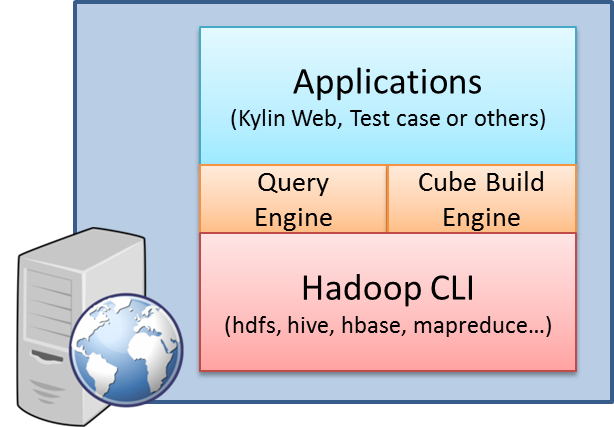
Environment Kylin requires a properly setup Hadoop environment to run. Following are the minimal request to run Kylin, for more detial, please check Hadoop Environment. It is most common to install Kylin on a Hadoop client machine, from which Kylin can talk with the Hadoop cluster via command lines including hive, hbase, hadoop, etc. The scenario is depicted as: For normal use cases, the application in the above picture means Kylin Web, which contains a web interface for cube building, querying and all sorts of management. Kylin Web launches a query engine for querying and a cube build engine for building cubes. These two engines interact with the Hadoop components, like hive and hbase. Except for some prerequisite software installations, the core of Kylin installation is accomplished by running a single script. After running the script, you will be able to build sample cube and query the tables behind the cubes via a unified web interface. Install Kylin Download latest Kylin binaries at http://kylin.apache.org/download Export KYLIN_HOME pointing to the extracted Kylin folder Make sure the user has the privilege to run hadoop, hive and hbase cmd in shell. If you are not so sure, you can run bin/check-env.sh, it will print out the detail information if you have some environment issues. To start Kylin, run bin/kylin.sh start, after the server starts, you can watch logs/kylin.log for runtime logs; To stop Kylin, run bin/kylin.sh stop

资源下载

更多资源
优质分享App

优质分享App

近一个月的开发和优化,本站点的第一个app全新上线。该app采用极致压缩,本体才4.36MB。系统里面做了大量数据访问、缓存优化。方便用户在手机上查看文章。后续会推出HarmonyOS的适配版本。

Nacos

Nacos

Nacos /nɑ:kəʊs/ 是 Dynamic Naming and Configuration Service 的首字母简称,一个易于构建 AI Agent 应用的动态服务发现、配置管理和AI智能体管理平台。Nacos 致力于帮助您发现、配置和管理微服务及AI智能体应用。Nacos 提供了一组简单易用的特性集,帮助您快速实现动态服务发现、服务配置、服务元数据、流量管理。Nacos 帮助您更敏捷和容易地构建、交付和管理微服务平台。

Spring

Spring

Spring框架(Spring Framework)是由Rod Johnson于2002年提出的开源Java企业级应用框架,旨在通过使用JavaBean替代传统EJB实现方式降低企业级编程开发的复杂性。该框架基于简单性、可测试性和松耦合性设计理念,提供核心容器、应用上下文、数据访问集成等模块,支持整合Hibernate、Struts等第三方框架,其适用范围不仅限于服务器端开发,绝大多数Java应用均可从中受益。

Sublime Text

Sublime Text

Sublime Text具有漂亮的用户界面和强大的功能,例如代码缩略图,Python的插件,代码段等。还可自定义键绑定,菜单和工具栏。Sublime Text 的主要功能包括:拼写检查,书签,完整的 Python API , Goto 功能,即时项目切换,多选择,多窗口等等。Sublime Text 是一个跨平台的编辑器,同时支持Windows、Linux、Mac OS X等操作系统。

用户登录
用户注册