首页 文章 精选 留言 我的

精选列表

搜索[文本预处理],共10000篇文章
优秀的个人博客,低调大师

在EMR中使用snappy压缩的时候快速查看压缩前文本的内容

在EMR的项目中,按理阿里云目前提供的解决方案,大多数的同学可能都是使用的logtail做的日志收集,然后通过logshipper投递到oss中存储。这么配置以后,存储在oss里面的文件都是snappy格式了,但是怎么使用估计大部分同学是一脸懵逼的。 有两个小的配置,可以方便的和使用gzip一样使用snappy文件。 1 hadoop fs -text的命令直接查看。如果是直接使用的话,你看到的都是二进制,直接把shell搞死。需要用下面的格式查看 hadoop fs -Dio.compression.codec.snappy.native=true -text oss://xxx/xx.snappy 2使用MR脚本的时候,需要配置下,这个可能大部分同学都会,因为之前使用gzip的时候,也需要添加类似的配置项才能跑起来 hadoop .......-jobconf io.compression.codec.snappy.native=true

优秀的个人博客,低调大师

总结】spark按文本格式和Lzo格式处理Lzo压缩文件的比较

1、描述spark中怎么加载lzo压缩格式的文件 2、比较lzo格式文件以textFile方式和LzoTextInputFormat方式计算数据,Running Tasks个数的影响 a.确保lzo文件所在文件夹中生成lzo.index索引文件 b.以LzoTextInputFormat处理,能够正常按分块数分配Tasks 查看文件块数量 1 2 3 4 5 6 7 8 9 10 11 12 13 14 15 16 17 18 19 20 [tech@dx2~]$hdfs fsck /wh/source/hotel .2017-08-07.txt_10.10.16.105_20170807.lzo Connectingtonamenodeviahttp: //nn1 .zdp.ol:50070 FSCKstartedbybwtech(auth:SIMPLE)from /10 .10.16.103 for path /wh/source/hotel .2017-08-07.txt_10.10.16.105_20170807.lzoatTueAug0815:27:52CST2017 .Status:HEALTHY Totalsize:2892666412B Total dirs :0 Totalfiles:1 Totalsymlinks:0 Totalblocks(validated):11(avg.blocksize262969673B) Minimallyreplicatedblocks:11(100.0%) Over-replicatedblocks:0(0.0%) Under-replicatedblocks:0(0.0%) Mis-replicatedblocks:0(0.0%) Defaultreplicationfactor:3 Averageblockreplication:3.0 Corruptblocks:0 Missingreplicas:0(0.0%) Numberofdata-nodes:21 Numberofracks:2 FSCKendedatTueAug0815:27:52CST2017 in 3milliseconds Spark源代码可以参考https://github.com/chocolateBlack/LearningSpark/blob/master/src/main/scala-2.11/SparkLzoFile.scala 1 2 3 4 5 6 7 8 9 10 11 12 13 14 15 16 17 18 19 20 import com.hadoop.mapreduce.LzoTextInputFormat import org.apache.hadoop.io.{Text,LongWritable} import org.apache.spark.{SparkContext,SparkConf} object SparkLzoFile{ def main(args : Array[String]){ val conf = new SparkConf().setAppName( "Spark_Lzo_File" ) val sc = new SparkContext(conf) //文件路径 val filePath = "/wh/source/hotel.2017-08-07.txt_10.10.16.105_20170807.lzo" //按textFile方式加载文件 val textFile = sc.textFile(filePath) //按lzoTextInputFormat加载数据文件 val lzoFile = sc.newAPIHadoopFile[LongWritable,Text,LzoTextInputFormat](filePath) println(textFile.partitions.length) //partitions个数输出1 println(lzoFile.partitions.length) //partitions个数输出11 //两种方式计算wordcount查看后台任务 lzoFile.map( _ . _ 2 .toString).flatMap(x = >x.split( "-" )).map(( _ , 1 )).reduceByKey( _ + _ ).collect textFile.flatMap(x = >x.split( "\t" )).map(( _ , 1 )).reduceByKey( _ + _ ).collect } } 本文转自巧克力黒 51CTO博客,原文链接:http://blog.51cto.com/10120275/1954601 ,如需转载请自行联系原作者

优秀的个人博客,低调大师

android文件的写入与读取---简单的文本读写context.openFileInput() context.openFileOutpu...

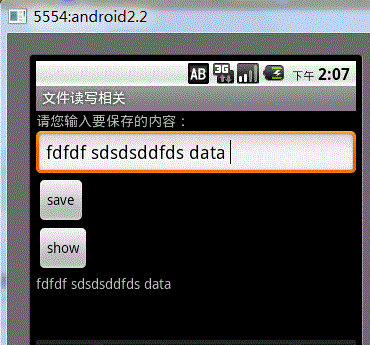
最终效果图,点击save会保存到文件中,点击show会从文件中读取出内容并显示。 main.xml [xhtml] view plain copy <?xmlversion="1.0"encoding="utf-8"?> <LinearLayoutxmlns:<ahref="http://lib.csdn.net/base/15"class='replace_word'title="Android知识库"target='_blank'style='color:#df3434;font-weight:bold;'>Android</a>="http://schemas.android.com/apk/res/android" android:orientation="vertical" android:layout_width="fill_parent" android:layout_height="fill_parent" > <TextView android:layout_width="fill_parent" android:layout_height="wrap_content" android:text="请您输入要保存的内容:" /> <EditText android:id="@+id/addText" android:layout_width="fill_parent" android:layout_height="wrap_content" android:hint="请您在此处输入文件内容!" /> <Button android:id="@+id/addButton" android:layout_width="wrap_content" android:layout_height="wrap_content" android:text="save" /> <Button android:id="@+id/showButton" android:layout_width="wrap_content" android:layout_height="wrap_content" android:text="show" /> <TextView android:id="@+id/showText" android:layout_width="fill_parent" android:layout_height="wrap_content" /> </LinearLayout> activity代码 1 package dome.file.com.filedome; 2 3 import android.content.Context; 4 import android.support.v7.app.AppCompatActivity; 5 import android.os.Bundle; 6 import android.util.Log; 7 import android.widget.EditText; 8 import android.widget.TextView; 9 10 import java.io.BufferedReader; 11 import java.io.BufferedWriter; 12 import java.io.ByteArrayOutputStream; 13 import java.io.FileInputStream; 14 import java.io.FileNotFoundException; 15 import java.io.FileOutputStream; 16 import java.io.IOException; 17 import java.io.InputStreamReader; 18 import java.io.OutputStreamWriter; 19 import java.io.FileInputStream; 20 import java.io.FileNotFoundException; 21 import java.io.FileOutputStream; 22 import java.io.IOException; 23 24 import android.app.Activity; 25 import android.os.Bundle; 26 import android.view.View; 27 import android.view.View.OnClickListener; 28 import android.widget.Button; 29 import android.widget.EditText; 30 import android.widget.TextView; 31 import android.widget.Toast; 32 33 public class MainActivity extends AppCompatActivity { 34 35 private EditText editText; 36 private TextView showTextView; 37 // 要保存的文件名 38 private String fileName = "chenzheng_java.txt"; 39 40 @Override 41 public void onCreate(Bundle savedInstanceState) { 42 super.onCreate(savedInstanceState); 43 setContentView(R.layout.activity_main); 44 // 获取页面中的组件 45 editText = (EditText) findViewById(R.id.addText); 46 showTextView = (TextView) findViewById(R.id.showText); 47 Button addButton = (Button) this.findViewById(R.id.addButton); 48 Button showButton = (Button) this.findViewById(R.id.showButton); 49 // 绑定单击事件 50 addButton.setOnClickListener(listener); 51 showButton.setOnClickListener(listener); 52 53 } 54 55 // 声明监听器 56 private View.OnClickListener listener = new OnClickListener() { 57 public void onClick(View v) { 58 Button view = (Button) v; 59 switch (view.getId()) { 60 case R.id.addButton: 61 save(); 62 break; 63 case R.id.showButton: 64 read(); 65 break; 66 67 } 68 69 } 70 71 }; 72 73 /** 74 * @author chenzheng_Java 75 * 保存用户输入的内容到文件 76 */ 77 private void save() { 78 BufferedWriter bufferdWriter = null; 79 String content = editText.getText().toString(); 80 try { 81 /* 根据用户提供的文件名,以及文件的应用模式,打开一个输出流.文件不存系统会为你创建一个的, 82 * 至于为什么这个地方还有FileNotFoundException抛出,我也比较纳闷。在Context中是这样定义的 83 * public abstract FileOutputStream openFileOutput(String name, int mode) 84 * throws FileNotFoundException; 85 * openFileOutput(String name, int mode); 86 * 第一个参数,代表文件名称,注意这里的文件名称不能包括任何的/或者/这种分隔符,只能是文件名 87 * 该文件会被保存在/data/data/应用名称/files/chenzheng_java.txt 88 * 第二个参数,代表文件的操作模式 89 * MODE_PRIVATE 私有(只能创建它的应用访问) 重复写入时会文件覆盖 90 * MODE_APPEND 私有 重复写入时会在文件的末尾进行追加,而不是覆盖掉原来的文件 91 * MODE_WORLD_READABLE 公用 可读 92 * MODE_WORLD_WRITEABLE 公用 可读写 93 * */ 94 FileOutputStream outputStream = openFileOutput(fileName, 95 Activity.MODE_PRIVATE); 96 bufferdWriter = new BufferedWriter(new OutputStreamWriter(outputStream)); 97 bufferdWriter.write(content); 98 Toast.makeText(MainActivity.this, "保存成功", Toast.LENGTH_LONG).show(); 99 } catch (Exception e) { 100 e.printStackTrace(); 101 } finally { 102 103 try { 104 if (bufferdWriter != null) { 105 bufferdWriter.close(); 106 } 107 } catch (IOException e) { 108 e.printStackTrace(); 109 } 110 111 112 } 113 114 } 115 116 /** 117 * @author chenzheng_java 118 * 读取刚才用户保存的内容 119 */ 120 private void read() { 121 122 BufferedReader bufferedReader = null; 123 try { 124 FileInputStream inputStream = this.openFileInput(fileName); 125 126 bufferedReader = new BufferedReader(new InputStreamReader(inputStream)); 127 StringBuilder stirngBuidler = new StringBuilder(); 128 String line = ""; 129 while ((line = bufferedReader.readLine()) != null) { 130 stirngBuidler.append(line); 131 } 132 133 showTextView.setText(stirngBuidler.toString()); 134 135 } catch (Exception e) { 136 e.printStackTrace(); 137 } finally { 138 139 try { 140 if (bufferedReader != null) { 141 bufferedReader.close(); 142 } 143 } catch (IOException e) { 144 e.printStackTrace(); 145 } 146 147 148 } 149 150 } 151 152 } 其他的都为默认。 关于文件保存的路径可以通过ADT携带的File Explorer工具进行查看。如何调出File Explorer工具呢;我们可以通过Windows--showView--others-android下面看到File Explorer。这里是我的一个截图。 对于这个程序,基本上没什么难点,就是纯粹的java流知识。唯一不同的就是context为我们提供了两个方法来获取输入输出流。简单、方便、快捷啊。 本文转自 一点点征服 博客园博客,原文链接:http://www.cnblogs.com/ldq2016/p/6252593.html,如需转载请自行联系原作者

资源下载

更多资源
Mario

Mario

马里奥是站在游戏界顶峰的超人气多面角色。马里奥靠吃蘑菇成长,特征是大鼻子、头戴帽子、身穿背带裤,还留着胡子。与他的双胞胎兄弟路易基一起,长年担任任天堂的招牌角色。

腾讯云软件源

腾讯云软件源

为解决软件依赖安装时官方源访问速度慢的问题,腾讯云为一些软件搭建了缓存服务。您可以通过使用腾讯云软件源站来提升依赖包的安装速度。为了方便用户自由搭建服务架构,目前腾讯云软件源站支持公网访问和内网访问。

Nacos

Nacos

Nacos /nɑ:kəʊs/ 是 Dynamic Naming and Configuration Service 的首字母简称,一个易于构建 AI Agent 应用的动态服务发现、配置管理和AI智能体管理平台。Nacos 致力于帮助您发现、配置和管理微服务及AI智能体应用。Nacos 提供了一组简单易用的特性集,帮助您快速实现动态服务发现、服务配置、服务元数据、流量管理。Nacos 帮助您更敏捷和容易地构建、交付和管理微服务平台。

Spring

Spring

Spring框架(Spring Framework)是由Rod Johnson于2002年提出的开源Java企业级应用框架,旨在通过使用JavaBean替代传统EJB实现方式降低企业级编程开发的复杂性。该框架基于简单性、可测试性和松耦合性设计理念,提供核心容器、应用上下文、数据访问集成等模块,支持整合Hibernate、Struts等第三方框架,其适用范围不仅限于服务器端开发,绝大多数Java应用均可从中受益。


用户登录
用户注册