那些有趣/用的Python库
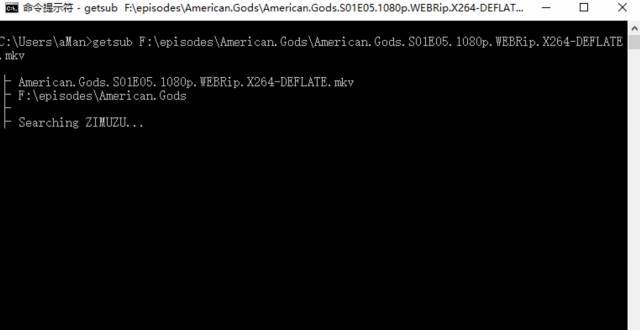
图片处理 pipinstallpillow fromPILimportImage importnumpyasnp a=np.array(Image.open('test.jpg')) b=[255,255,255]-a im=Image.fromarray(b.astype('uint8')) im.save('new.jpg') youtube-dl下载国外视频 pipinstallyoutube-dl#直接安装youtube-dl pipinstall-Uyoutube-dl#安装youtube-dl并更新 youtube-dl"http://www.youtube.com/watch?v=-wNyEUrxzFU" 查看对象的全部属性和方法 pipinstallpdir2 >>>importpdir,requests >>>pdir(requests) moduleattribute: __cached__,__file__,__loader__,__name__,__package__,__path__,__spec__ other: __author__,__build__,__builtins__,__copyright__,__license__,__title__, __version__,_internal_utils,adapters,api,auth,certs,codes,compat,cookies ,exceptions,hooks,logging,models,packages,pyopenssl,sessions,status_code s,structures,utils,warnings specialattribute: __doc__ class: NullHandler:Thishandlerdoesnothing.It'sintendedtobeusedtoavoidth e PreparedRequest:Thefullymutable:class:`PreparedRequest<PreparedRequest> `object, Request:Auser-created:class:`Request<Request>`object. Response:The:class:`Response<Response>`object,whichcontainsa Session:ARequestssession. exception: ConnectTimeout:Therequesttimedoutwhiletryingtoconnecttotheremote server. ConnectionError:AConnectionerroroccurred. DependencyWarning:Warnedwhenanattemptismadetoimportamodulewithmi ssingoptional FileModeWarning:Afilewasopenedintextmode,butRequestsdeterminedits binarylength. HTTPError:AnHTTPerroroccurred. ReadTimeout:Theserverdidnotsendanydataintheallottedamountoftime . RequestException:Therewasanambiguousexceptionthatoccurredwhilehandl ingyour Timeout:Therequesttimedout. TooManyRedirects:Toomanyredirects. URLRequired:AvalidURLisrequiredtomakearequest. function: delete:SendsaDELETErequest. get:SendsaGETrequest. head:SendsaHEADrequest. options:SendsaOPTIONSrequest. patch:SendsaPATCHrequest. post:SendsaPOSTrequest. put:SendsaPUTrequest. request:Constructsandsendsa:class:`Request<Request>`. session:Returnsa:class:`Session`forcontext-management. Python 玩转网易云音乐 pipinstallncmbot importncmbot #登录 bot=ncmbot.login(phone='xxx',password='yyy') bot.content#bot.json() #获取用户歌单 ncmbot.user_play_list(uid='36554272') 下载视频字幕 pipinstallgetsub Python 财经数据接口包 pipinstalltushare importtushareasts #一次性获取最近一个日交易日所有股票的交易数据 ts.get_today_all() 代码,名称,涨跌幅,现价,开盘价,最高价,最低价,最日收盘价,成交量,换手率 codenamechangepercenttradeopenhighlowsettlement\ 0002738中矿资源10.02319.3219.3219.3219.3217.56 1300410正业科技10.02225.0325.0325.0325.0322.75 2002736国信证券10.01316.3716.3716.3716.3714.88 3300412迦南科技10.01031.5431.5431.5431.5428.67 4300411金盾股份10.00729.6829.6829.6829.6826.98 5603636南威软件10.00638.1538.1538.1538.1534.68 6002664信质电机10.00430.6829.0030.6828.3027.89 7300367东方网力10.00486.7678.0086.7677.8778.87 8601299中国北车10.00011.4411.4411.4411.2910.40 9601880大连港10.0005.725.345.725.225.20 10000856冀东装备10.0008.918.188.918.188.10 开源漏洞靶场 #安装pip curl-shttps://bootstrap.pypa.io/get-pip.py|python3 #安装docker apt-getupdate&&apt-getinstalldocker.io #启动docker服务 servicedockerstart #安装compose pipinstalldocker-compose #拉取项目 gitclonegit@github.com:phith0n/vulhub.git cdvulhub #进入某一个漏洞/环境的目录 cdnginx_php5_mysql #自动化编译环境 docker-composebuild #启动整个环境 docker-composeup-d #测试完成后,删除整个环境 docker-composedown 北京实时公交 pipinstall-rrequirements.txt安装依赖 pythonmanage.pybuild_cache获取离线数据,建立本地缓存 #项目自带了一个终端中的查询工具作为例子,运行:pythonmanage.pycli >>>frombeijing_busimportBeijingBus >>>lines=BeijingBus.get_all_lines() >>>lines [<Line:运通122(农业展览馆-华纺易城公交场站)>,<Line:运通101(广顺南大街北口-蓝龙家园)>,...] >>>lines=BeijingBus.search_lines('847') >>>lines [<Line:847(马甸桥西-雷庄村)>,<Line:847(雷庄村-马甸桥西)>] >>>line=lines[0] >>>printline.id,line.name 541847(马甸桥西-雷庄村) >>>line.stations [<Station马甸桥西>,<Station马甸桥东>,<Station安华桥西>,...] >>>station=line.stations[0] >>>printstation.name,station.lat,station.lon 马甸桥西39.967721116.372921 >>>line.get_realtime_data(1)#参数为站点的序号,从1开始 [ { 'id':公交车id, 'lat':公交车的位置, 'lon':公交车位置, 'next_station_name':下一站的名字, 'next_station_num':下一站的序号, 'next_station_distance':离下一站的距离, 'next_station_arriving_time':预计到达下一站的时间, 'station_distance':离本站的距离, 'station_arriving_time':预计到达本站的时间, }, ... ] 文章提取器 gitclonehttps://github.com/grangier/python-goose.git cdpython-goose pipinstall-rrequirements.txt pythonsetup.pyinstall >>>fromgooseimportGoose >>>fromgoose.textimportStopWordsChinese >>>url='http://www.bbc.co.uk/zhongwen/simp/chinese_news/2012/12/121210_hongkong_politics.shtml' >>>g=Goose({'stopwords_class':StopWordsChinese}) >>>article=g.extract(url=url) >>>printarticle.cleaned_text[:150] 香港行政长官梁振英在各方压力下就其大宅的违章建筑(僭建)问题到立法会接受质询,并向香港民众道歉。 梁振英在星期二(12月10日)的答问大会开始之际在其演说中道歉,但强调他在违章建筑问题上没有隐瞒的意图和动机。 一些亲北京阵营议员欢迎梁振英道歉,且认为应能获得香港民众接受,但这些议员也质问梁振英有 Python 艺术二维码生成器 pipinstallMyQR myqrhttps://github.com myqrhttps://github.com-v10-lQ 伪装浏览器身份 pipinstallfake-useragent fromfake_useragentimportUserAgent ua=UserAgent() ua.ie #Mozilla/5.0(Windows;U;MSIE9.0;WindowsNT9.0;en-US); ua.msie #Mozilla/5.0(compatible;MSIE10.0;Macintosh;IntelMacOSX10_7_3;Trident/6.0)' ua['InternetExplorer'] #Mozilla/5.0(compatible;MSIE8.0;WindowsNT6.1;Trident/4.0;GTB7.4;InfoPath.2;SV1;.NETCLR3.3.69573;WOW64;en-US) ua.opera #Opera/9.80(X11;Linuxi686;U;ru)Presto/2.8.131Version/11.11 ua.chrome #Mozilla/5.0(WindowsNT6.1)AppleWebKit/537.2(KHTML,likeGecko)Chrome/22.0.1216.0Safari/537.2' 美化 curl pipinstallhttpstat httpstathttpbin.org/get pythonshell pipinstallsh fromshimportifconfig printifconfig("eth0") 处理中文文本内容 pipinstall-Utextblob#英文文本的情感分析 pipinstallsnownlp#中文文本的情感分析 fromsnownlpimportSnowNLP text="Iamhappytoday.Ifeelsadtoday." fromtextblobimportTextBlob blob=TextBlob(text) TextBlob("Iamhappytoday.Ifeelsadtoday.") blob.sentiment Sentiment(polarity=0.15000000000000002,subjectivity=1.0) s=SnowNLP(u'这个东西真心很赞') s.words#[u'这个',u'东西',u'真心', #u'很',u'赞'] s.tags#[(u'这个',u'r'),(u'东西',u'n'), #(u'真心',u'd'),(u'很',u'd'), #(u'赞',u'Vg')] s.sentiments#0.9769663402895832positive的概率 s.pinyin#[u'zhe',u'ge',u'dong',u'xi', #u'zhen',u'xin',u'hen',u'zan'] s=SnowNLP(u'「繁體字」「繁體中文」的叫法在臺灣亦很常見。') s.han#u'「繁体字」「繁体中文」的叫法 #在台湾亦很常见。 抓取发放代理 pipinstall-Ugetproxy ~getproxy--help Usage:getproxy[OPTIONS] Options: --in-proxyTEXTInputproxyfile --out-proxyTEXTOutputproxyfile --helpShowthismessageandexit. --in-proxy 可选参数,待验证的 proxies 列表文件 --out-proxy 可选参数,输出已验证的 proxies 列表文件,如果为空,则直接输出到终端 --in-proxy 文件格式和 --out-proxy 文件格式一致 zhihu api pipinstallgit+git://github.com/lzjun567/zhihu-api--upgrade fromzhihuimportZhihu zhihu=Zhihu() zhihu.user(user_slug="xiaoxiaodouzi") {'avatar_url_template':'https://pic1.zhimg.com/v2-ca13758626bd7367febde704c66249ec_{size}.jpg', 'badge':[], 'name':'我是小号', 'headline':'程序员', 'gender':-1, 'user_type':'people', 'is_advertiser':False, 'avatar_url':'https://pic1.zhimg.com/v2-ca13758626bd7367febde704c66249ec_is.jpg', 'url':'http://www.zhihu.com/api/v4/people/1da75b85900e00adb072e91c56fd9149','type':'people', 'url_token':'xiaoxiaodouzi', 'id':'1da75b85900e00adb072e91c56fd9149', 'is_org':False} 解析 nginx 访问日志并格式化输出 pipinstallngxtop $ngxtop runningfor411seconds,64332recordsprocessed:156.60req/sec Summary: |count|avg_bytes_sent|2xx|3xx|4xx|5xx| |---------+------------------+-------+-------+-------+-------| |64332|2775.251|61262|2994|71|5| Detailed: |request_path|count|avg_bytes_sent|2xx|3xx|4xx|5xx| |------------------------------------------+---------+------------------+-------+-------+-------+-------| |/abc/xyz/xxxx|20946|434.693|20935|0|11|0| |/xxxxx.json|5633|1483.723|5633|0|0|0| |/xxxxx/xxx/xxxxxxxxxxxxx|3629|6835.499|3626|0|3|0| |/xxxxx/xxx/xxxxxxxx|3627|15971.885|3623|0|4|0| |/xxxxx/xxx/xxxxxxx|3624|7830.236|3621|0|3|0| |/static/js/minified/utils.min.js|3031|1781.155|2104|927|0|0| |/static/js/minified/xxxxxxx.min.v1.js|2889|2210.235|2068|821|0|0| |/static/tracking/js/xxxxxxxx.js|2594|1325.681|1927|667|0|0| |/xxxxx/xxx.html|2521|573.597|2520|0|1|0| |/xxxxx/xxxx.json|1840|800.542|1839|0|1|0| 火车余票查询 pipinstalliquery Usage: iquery(-c|彩票) iquery(-m|电影) iquery-p<city> iquery-lsong[singer] iquery-p<city><hospital> iquery<city><show>[<days>] iquery[-dgktz]<from><to><date> Arguments: from出发站 to到达站 date查询日期 city查询城市 show演出的类型 days查询近(几)天内的演出,若省略,默认15 city城市名,加在-p后查询该城市所有莆田医院 hospital医院名,加在city后检查该医院是否是莆田系 Options: -h,--help显示该帮助菜单. -dgktz动车,高铁,快速,特快,直达 -m热映电影查询 -p莆田系医院查询 -l歌词查询 -c彩票查询 Show: 演唱会音乐会音乐剧歌舞剧儿童剧话剧 歌剧比赛舞蹈戏曲相声杂技马戏魔术 作者:佚名 来源:51CTO