使用Dockerfile构建镜像-Docker for Web Developers(5)
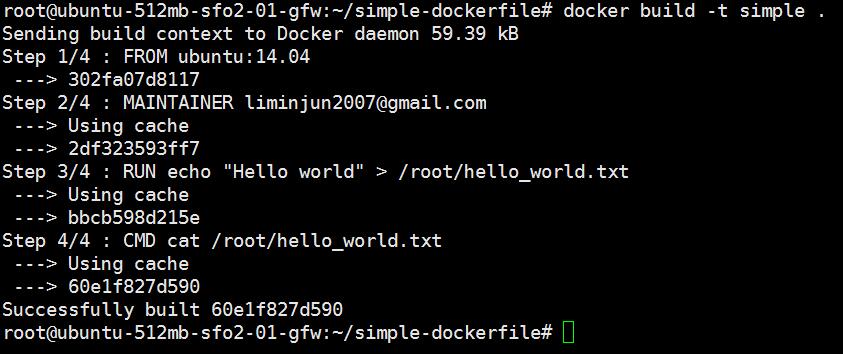
1.理解Dockerfile语法 语法命令 命令功能 举例 FROM 所有的dockerfile都必须以FROM命令指定镜像基于哪个基础镜像来制作 FROM ubuntu:14:04 MAINTAINER 该容器维护作者,一般是作者的电子邮件 MAINTAINERliminjun2007@gmail.com RUN 在shell或者exec的环境下执行的命令,run指令会在新创建的镜像添加新的层面,接下来提交的结果用在dockerfile的下一条指令中。 RUN echo "Hello World" > /root/hello_world.txt CMD 提供容器默认的执行命令,dockerfile只允许使用一次CMD命令,如果执行多次,最后一次自动替换之前的。 CMD ["cat", "/root/hello_world.txt"] 更多详细语法可以参考:Dockerfile语法 2.编写一个简单的Dockerfile #FROM - Image to start building on. FROM ubuntu:14.04 #MAINTAINER - Identifies the maintainer of the dockerfile. MAINTAINER liminjun2007@gmail.com #RUN - Runs a command in the container RUN echo "Hello World" > /root/hello_world.txt #CMD - Identifies the command that should be used by default when running the image as a container. CMD ["cat", "/root/hello_world.txt"] Dockerfile文件放到simple-dockerfile文件夹下面,切换到simple-dockerfile文件夹下,执行命令: docker build -t simple . 运行结果如下图所示: 运行simple容器,执行命令之后运行结果如下: root@ubuntu-512mb-sfo2-01-gfw:~/simple-dockerfile# docker run simple Hello world 3.参考链接 Dockerfile语法 Dockerfile 最佳实践 Dockerfile 构建镜像 - 每天5分钟玩转容器技术(13) 本文转自快乐八哥博客园博客,原文链接http://www.cnblogs.com/liminjun88/p/using-dockerfile-to-build-docker-image.html如需转载请自行联系原作者 快乐八哥