首页 文章 精选 留言 我的

精选列表

搜索[源码学习],共10000篇文章
优秀的个人博客,低调大师

KubeSphere Helm 应用仓库源码分析

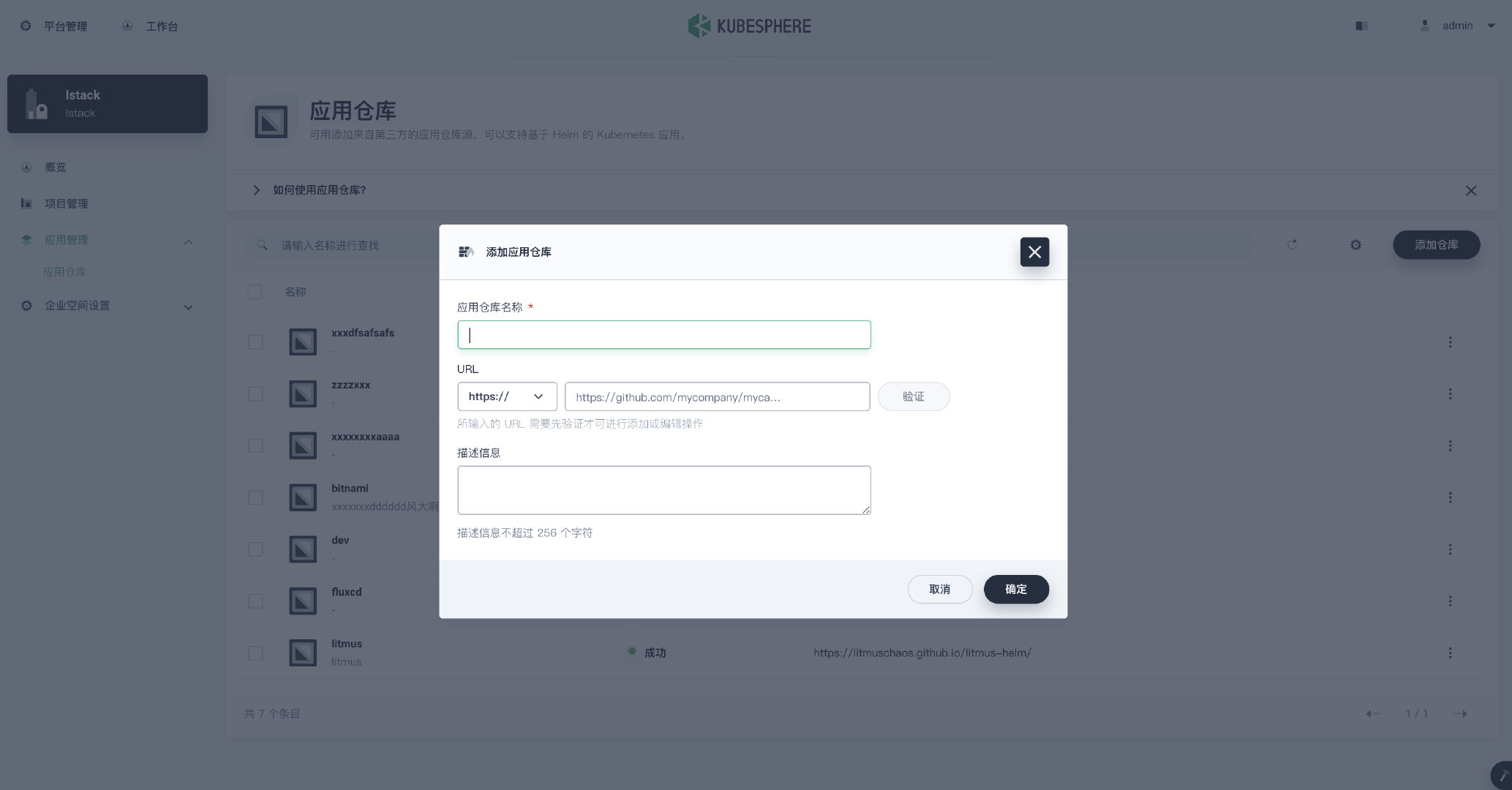
作者:蔡锡生,LStack 平台研发工程师,近期专注于基于 OAM 的应用托管平台落地。 背景介绍 KubeSphere 应用商店简介 作为一个开源的、以应用为中心的容器平台,KubeSphere 在 OpenPitrix 的基础上,为用户提供了一个基于 Helm 的应用商店,用于应用生命周期管理。OpenPitrix 是一个开源的 Web 平台,用于打包、部署和管理不同类型的应用。KubeSphere 应用商店让 ISV、开发者和用户能够在一站式服务中只需点击几下就可以上传、测试、部署和发布应用。 KubeSphere 中的 Helm 仓库功能 KubeSphere Helm 仓库添加 Helm repo list KubeSphere Helm 仓库中的应用模版查询 Helm 仓库简介 Helm charts 是存放 K8s 应用模版的仓库,该仓库由 index.yaml 文件和 .tgz 模版包组成。 [root@ningbo stable]# ls -al 总用量 400 drwxr-xr-x. 26 root root 4096 6月 22 17:01 . drwxr-xr-x. 4 root root 86 6月 22 16:37 .. -rw-r--r--. 1 root root 10114 6月 22 17:12 index.yaml -rw-r--r--. 1 root root 3803 6月 8 2020 lsh-cluster-csm-om-agent-0.1.0.tgz -rw-r--r--. 1 root root 4022 6月 8 2020 lsh-mcp-cc-alert-service-0.1.0.tgz -rw-r--r--. 1 root root 4340 6月 8 2020 lsh-mcp-cc-sms-service-0.1.0.tgz -rw-r--r--. 1 root root 4103 6月 8 2020 lsh-mcp-cpm-metrics-exchange-0.1.0.tgz -rw-r--r--. 1 root root 4263 6月 8 2020 lsh-mcp-cpm-om-service-0.1.0.tgz -rw-r--r--. 1 root root 4155 6月 8 2020 lsh-mcp-csm-om-service-0.1.0.tgz -rw-r--r--. 1 root root 3541 6月 8 2020 lsh-mcp-deploy-service-0.1.0.tgz -rw-r--r--. 1 root root 5549 6月 8 2020 lsh-mcp-iam-apigateway-service-0.1.0.tgz index.yaml 文件 apiVersion: v1 entries: aliyun-ccm: - apiVersion: v2 appVersion: addon created: "2021-06-21T08:59:58Z" description: A Helm chart for Kubernetes digest: 6bda563c86333475255e5edfedc200ae282544e2c6e22b519a59b3c7bdef9a32 name: aliyun-ccm type: application urls: - charts/aliyun-ccm-0.1.0.tgz version: 0.1.0 aliyun-csi-driver: - apiVersion: v2 appVersion: addon created: "2021-06-21T08:59:58Z" description: A Helm chart for Kubernetes digest: b49f128d7a49401d52173e6f58caedd3fabbe8e2827dc00e6a824ee38860fa51 name: aliyun-csi-driver type: application urls: - charts/aliyun-csi-driver-0.1.0.tgz version: 0.1.0 application-controller: - apiVersion: v1 appVersion: addon created: "2021-06-21T08:59:58Z" description: A Helm chart for application Controller digest: 546e72ce77f865683ce0ea75f6e0203537a40744f2eb34e36a5bd378f9452bc5 name: application-controller urls: - charts/application-controller-0.1.0.tgz version: 0.1.0 .tgz 解压缩后的文件目录 [root@ningbo stable]# cd mysql/ [root@ningbo mysql]# ls -al 总用量 20 drwxr-xr-x. 3 root root 97 5月 25 2020 . drwxr-xr-x. 26 root root 4096 6月 22 17:01 .. -rwxr-xr-x. 1 root root 106 5月 25 2020 Chart.yaml -rwxr-xr-x. 1 root root 364 5月 25 2020 .Helmignore -rwxr-xr-x. 1 root root 76 5月 25 2020 index.yaml drwxr-xr-x. 3 root root 146 5月 25 2020 templates -rwxr-xr-x. 1 root root 1735 5月 25 2020 values.yaml Chart.yaml [root@ningbo mysql]# cat Chart.yaml apiVersion: v1 appVersion: "1.0" description: A Helm chart for Kubernetes name: mysql version: 0.1.0 添加 Helm 仓库代码介绍 接口实现分析 路由注册 handler,参数解析,调用 models 方面 models ,调用 models 方法 crd client,调用 K8s api 存储 路由注册 webservice.Route(webservice.POST("/repos"). To(handler.CreateRepo). // 跟进 Doc("Create a global repository, which is used to store package of app"). Metadata(restfulspec.KeyOpenAPITags, []string{constants.OpenpitrixTag}). Param(webservice.QueryParameter("validate", "Validate repository")). Returns(http.StatusOK, api.StatusOK, openpitrix.CreateRepoResponse{}). Reads(openpitrix.CreateRepoRequest{})) 校验参数, 构建 models func (h *openpitrixHandler) CreateRepo(req *restful.Request, resp *restful.Response) { createRepoRequest := &openpitrix.CreateRepoRequest{} err := req.ReadEntity(createRepoRequest) if err != nil { klog.V(4).Infoln(err) api.HandleBadRequest(resp, nil, err) return } createRepoRequest.Workspace = new(string) *createRepoRequest.Workspace = req.PathParameter("workspace") user, _ := request.UserFrom(req.Request.Context()) creator := "" if user != nil { creator = user.GetName() } parsedUrl, err := url.Parse(createRepoRequest.URL) if err != nil { api.HandleBadRequest(resp, nil, err) return } userInfo := parsedUrl.User // trim credential from url parsedUrl.User = nil repo := v1alpha1.HelmRepo{ ObjectMeta: metav1.ObjectMeta{ Name: idutils.GetUuid36(v1alpha1.HelmRepoIdPrefix), Annotations: map[string]string{ constants.CreatorAnnotationKey: creator, }, Labels: map[string]string{ constants.WorkspaceLabelKey: *createRepoRequest.Workspace, }, }, Spec: v1alpha1.HelmRepoSpec{ Name: createRepoRequest.Name, Url: parsedUrl.String(), SyncPeriod: 0, Description: stringutils.ShortenString(createRepoRequest.Description, 512), }, } if strings.HasPrefix(createRepoRequest.URL, "https://") || strings.HasPrefix(createRepoRequest.URL, "http://") { if userInfo != nil { repo.Spec.Credential.Username = userInfo.Username() repo.Spec.Credential.Password, _ = userInfo.Password() } } else if strings.HasPrefix(createRepoRequest.URL, "s3://") { cfg := v1alpha1.S3Config{} err := json.Unmarshal([]byte(createRepoRequest.Credential), &cfg) if err != nil { api.HandleBadRequest(resp, nil, err) return } repo.Spec.Credential.S3Config = cfg } var result interface{} // 1. validate repo result, err = h.openpitrix.ValidateRepo(createRepoRequest.URL, &repo.Spec.Credential) if err != nil { klog.Errorf("validate repo failed, err: %s", err) api.HandleBadRequest(resp, nil, err) return } // 2. create repo validate, _ := strconv.ParseBool(req.QueryParameter("validate")) if !validate { if repo.GetTrueName() == "" { api.HandleBadRequest(resp, nil, fmt.Errorf("repo name is empty")) return } result, err = h.openpitrix.CreateRepo(&repo) //跟进 } if err != nil { klog.Errorln(err) handleOpenpitrixError(resp, err) return } resp.WriteEntity(result) } 调用 createRep 方法 func (c *repoOperator) CreateRepo(repo *v1alpha1.HelmRepo) (*CreateRepoResponse, error) { name := repo.GetTrueName() items, err := c.repoLister.List(labels.SelectorFromSet(map[string]string{constants.WorkspaceLabelKey: repo.GetWorkspace()})) if err != nil && !apierrors.IsNotFound(err) { klog.Errorf("list Helm repo failed: %s", err) return nil, err } for _, exists := range items { if exists.GetTrueName() == name { klog.Error(repoItemExists, "name: ", name) return nil, repoItemExists } } repo.Spec.Description = stringutils.ShortenString(repo.Spec.Description, DescriptionLen) _, err = c.repoClient.HelmRepos().Create(context.TODO(), repo, metav1.CreateOptions{}) // 跟进 if err != nil { klog.Errorf("create Helm repo failed, repo_id: %s, error: %s", repo.GetHelmRepoId(), err) return nil, err } else { klog.V(4).Infof("create Helm repo success, repo_id: %s", repo.GetHelmRepoId()) } return &CreateRepoResponse{repo.GetHelmRepoId()}, nil } 调用 K8s api, 创建 crd HelmRepo // Create takes the representation of a HelmRepo and creates it. Returns the server's representation of the HelmRepo, and an error, if there is any. func (c *HelmRepos) Create(ctx context.Context, HelmRepo *v1alpha1.HelmRepo, opts v1.CreateOptions) (result *v1alpha1.HelmRepo, err error) { result = &v1alpha1.HelmRepo{} err = c.client.Post(). Resource("Helmrepos"). VersionedParams(&opts, scheme.ParameterCodec). Body(HelmRepo). Do(ctx). Into(result) return } 查询Helm 仓库应用模版代码介绍 接口实现 路由注册 handler,参数解析,调用 models 方面 models ,调用 models 方法 crd client,调用 K8s api 存储 路由注册 webservice.Route(webservice.GET("/apps").LiHui, 6 months ago: • openpitrix crd Deprecate(). To(handler.ListApps). // 跟进 Doc("List app templates"). Param(webservice.QueryParameter(params.ConditionsParam, "query conditions,connect multiple conditions with commas, equal symbol for exact query, wave symbol for fuzzy query e.g. name~a"). Required(false). DataFormat("key=%s,key~%s")). Param(webservice.QueryParameter(params.PagingParam, "paging query, e.g. limit=100,page=1"). Required(false). DataFormat("limit=%d,page=%d"). DefaultValue("limit=10,page=1")). Param(webservice.QueryParameter(params.ReverseParam, "sort parameters, e.g. reverse=true")). Param(webservice.QueryParameter(params.OrderByParam, "sort parameters, e.g. orderBy=createTime")). Metadata(restfulspec.KeyOpenAPITags, []string{constants.OpenpitrixTag}). Returns(http.StatusOK, api.StatusOK, models.PageableResponse{})) 参数解析,调用 models 方面 func (h *openpitrixHandler) ListApps(req *restful.Request, resp *restful.Response) limit, offset := params.ParsePaging(req) orderBy := params.GetStringValueWithDefault(req, params.OrderByParam, openpitrix.CreateTime) reverse := params.GetBoolValueWithDefault(req, params.ReverseParam, false) conditions, err := params.ParseConditions(req) if err != nil { klog.V(4).Infoln(err) api.HandleBadRequest(resp, nil, err) return } if req.PathParameter("workspace") != "" { conditions.Match[openpitrix.WorkspaceLabel] = req.PathParameter("workspace") } result, err := h.openpitrix.ListApps(conditions, orderBy, reverse, limit, offset) // 跟进 if err != nil { klog.Errorln(err) handleOpenpitrixError(resp, err) return } resp.WriteEntity(result) } 从缓存中获取 applist func (c *applicationOperator) ListApps(conditions *params.Conditions, orderBy string, reverse bool, limit, offset int) (*models.PageableResponse, error) { apps, err := c.listApps(conditions) // 重点跟进 if err != nil { klog.Error(err) return nil, err } apps = filterApps(apps, conditions) if reverse { sort.Sort(sort.Reverse(HelmApplicationList(apps))) } else { sort.Sort(HelmApplicationList(apps)) } totalCount := len(apps) start, end := (&query.Pagination{Limit: limit, Offset: offset}).GetValidPagination(totalCount) apps = apps[start:end] items := make([]interface{}, 0, len(apps)) for i := range apps { versions, err := c.getAppVersionsByAppId(apps[i].GetHelmApplicationId()) if err != nil && !apierrors.IsNotFound(err) { return nil, err } ctg, _ := c.ctgLister.Get(apps[i].GetHelmCategoryId()) items = append(items, convertApp(apps[i], versions, ctg, 0)) } return &models.PageableResponse{Items: items, TotalCount: totalCount}, nil } // line 601 func (c *applicationOperator) listApps(conditions *params.Conditions) (ret []*v1alpha1.HelmApplication, err error) { repoId := conditions.Match[RepoId] if repoId != "" && repoId != v1alpha1.AppStoreRepoId { // get Helm application from Helm repo if ret, exists := c.cachedRepos.ListApplicationsByRepoId(repoId); !exists { klog.Warningf("load repo failed, repo id: %s", repoId) return nil, loadRepoInfoFailed } else { return ret, nil } } else { if c.backingStoreClient == nil { return []*v1alpha1.HelmApplication{}, nil } ret, err = c.appLister.List(labels.SelectorFromSet(buildLabelSelector(conditions))) } return } 缓存具体获取应用逻辑 func (c *cachedRepos) ListApplicationsByRepoId(repoId string) (ret []*v1alpha1.HelmApplication, exists bool) { c.RLock() defer c.RUnlock() if repo, exists := c.repos[repoId]; !exists { return nil, false } else { ret = make([]*v1alpha1.HelmApplication, 0, 10) for _, app := range c.apps { if app.GetHelmRepoId() == repo.Name { // 应用的仓库ID相同则追加 ret = append(ret, app) } } } return ret, true } 既然 app template 是从缓存中获取的,那么缓存中的数据又是什么时候录入的呢? 创建全局缓存变量 添加新 Helm 仓库,K8s 中已安装 crd 控制器 HelmRepoController 发现有新的 HelmRepo 创建,更新 .Status.Data 内容 informer 发现有更新,同时更新缓存 缓存更新的实现 创建全局变量,通过 init 函数初始化 通过 HelmRepo 的 informer 实现缓存同步更新 在每次调用接口的时候,hanlder 类中包换了缓存变量 创建接口类 openpitrix.Interface type openpitrixHandler struct { openpitrix openpitrix.Interface } func newOpenpitrixHandler(ksInformers informers.InformerFactory, ksClient versioned.Interface, option *openpitrixoptions.Options) *openpitrixHandler { var s3Client s3.Interface if option != nil && option.S3Options != nil && len(option.S3Options.Endpoint) != 0 { var err error s3Client, err = s3.NewS3Client(option.S3Options) if err != nil { klog.Errorf("failed to connect to storage, please check storage service status, error: %v", err) } } return &openpitrixHandler{ openpitrix.NewOpenpitrixOperator(ksInformers, ksClient, s3Client), } } NewOpenpitrixOperator 通过在 informer 中添加通知函数,执行缓存更新 once.Do 只执行一次 var cachedReposData reposcache.ReposCache var HelmReposInformer cache.SharedIndexInformer var once sync.Once func init() { cachedReposData = reposcache.NewReposCache() // 全局缓存 } func NewOpenpitrixOperator(ksInformers ks_informers.InformerFactory, ksClient versioned.Interface, s3Client s3.Interface) Interface { once.Do(func() { klog.Infof("start Helm repo informer") HelmReposInformer = ksInformers.KubeSphereSharedInformerFactory().Application().V1alpha1().HelmRepos().Informer() HelmReposInformer.AddEventHandler(cache.ResourceEventHandlerFuncs{ AddFunc: func(obj interface{}) { r := obj.(*v1alpha1.HelmRepo) cachedReposData.AddRepo(r) // 缓存更新, 点击跟进 }, UpdateFunc: func(oldObj, newObj interface{}) { oldR := oldObj.(*v1alpha1.HelmRepo) cachedReposData.DeleteRepo(oldR) r := newObj.(*v1alpha1.HelmRepo) cachedReposData.AddRepo(r) }, DeleteFunc: func(obj interface{}) { r := obj.(*v1alpha1.HelmRepo) cachedReposData.DeleteRepo(r) }, }) go HelmReposInformer.Run(wait.NeverStop) }) return &openpitrixOperator{ AttachmentInterface: newAttachmentOperator(s3Client), // cachedReposData used ApplicationInterface: newApplicationOperator(cachedReposData, ksInformers.KubeSphereSharedInformerFactory(), ksClient, s3Client), // cachedReposData used RepoInterface: newRepoOperator(cachedReposData, ksInformers.KubeSphereSharedInformerFactory(), ksClient), // cachedReposData used ReleaseInterface: newReleaseOperator(cachedReposData, ksInformers.KubernetesSharedInformerFactory(), ksInformers.KubeSphereSharedInformerFactory(), ksClient), CategoryInterface: newCategoryOperator(ksInformers.KubeSphereSharedInformerFactory(), ksClient), } } 缓存更新逻辑 // 缓存结构体 type cachedRepos struct { sync.RWMutex chartsInRepo map[workspace]map[string]int repoCtgCounts map[string]map[string]int repos map[string]*v1alpha1.HelmRepo apps map[string]*v1alpha1.HelmApplication versions map[string]*v1alpha1.HelmApplicationVersion } ByteArrayToSavedIndex:将 repo.Status.Data 转换为 SavedIndex 数组对象 遍历 SavedIndex.Applications 保存(app.ApplicationId:HelmApplication)到 cachedRepos.apps func (c *cachedRepos) AddRepo(repo *v1alpha1.HelmRepo) error { return c.addRepo(repo, false) } //Add new Repo to cachedRepos func (c *cachedRepos) addRepo(repo *v1alpha1.HelmRepo, builtin bool) error { if len(repo.Status.Data) == 0 { return nil } index, err := Helmrepoindex.ByteArrayToSavedIndex([]byte(repo.Status.Data)) if err != nil { klog.Errorf("json unmarshal repo %s failed, error: %s", repo.Name, err) return err } ... chartsCount := 0 for key, app := range index.Applications { if builtin { appName = v1alpha1.HelmApplicationIdPrefix + app.Name } else { appName = app.ApplicationId } HelmApp := v1alpha1.HelmApplication{ .... } c.apps[app.ApplicationId] = &HelmApp var ctg, appVerName string var chartData []byte for _, ver := range app.Charts { chartsCount += 1 if ver.Annotations != nil && ver.Annotations["category"] != "" { ctg = ver.Annotations["category"] } if builtin { appVerName = base64.StdEncoding.EncodeToString([]byte(ver.Name + ver.Version)) chartData, err = loadBuiltinChartData(ver.Name, ver.Version) if err != nil { return err } } else { appVerName = ver.ApplicationVersionId } version := &v1alpha1.HelmApplicationVersion{ .... } c.versions[ver.ApplicationVersionId] = version } .... } return nil } HelmRepo 协调器 HelmRepo.Status.Data 加载流程 LoadRepoIndex: convert index.yaml to IndexFile MergeRepoIndex: merge new and old IndexFile savedIndex.Bytes(): compress data with zlib.NewWriter 将 savedIndex 数据存入 CRD(HelmRepo.Status.Data) 关键结构体 // HelmRepo.Status.Data == SavedIndex 压缩后的数据 type SavedIndex struct { APIVersion string `json:"apiVersion"` Generated time.Time `json:"generated"` Applications map[string]*Application `json:"apps"` PublicKeys []string `json:"publicKeys,omitempty"` // Annotations are additional mappings uninterpreted by Helm. They are made available for // other applications to add information to the index file. Annotations map[string]string `json:"annotations,omitempty"` } // IndexFile represents the index file in a chart repository type IndexFile struct { APIVersion string `json:"apiVersion"` Generated time.Time `json:"generated"` Entries map[string]ChartVersions `json:"entries"` PublicKeys []string `json:"publicKeys,omitempty"` } 代码位置 func (r *ReconcileHelmRepo) syncRepo(instance *v1alpha1.HelmRepo) error { // 1. load index from Helm repo index, err := Helmrepoindex.LoadRepoIndex(context.TODO(), instance.Spec.Url, &instance.Spec.Credential) if err != nil { klog.Errorf("load index failed, repo: %s, url: %s, err: %s", instance.GetTrueName(), instance.Spec.Url, err) return err } existsSavedIndex := &Helmrepoindex.SavedIndex{} if len(instance.Status.Data) != 0 { existsSavedIndex, err = Helmrepoindex.ByteArrayToSavedIndex([]byte(instance.Status.Data)) if err != nil { klog.Errorf("json unmarshal failed, repo: %s, error: %s", instance.GetTrueName(), err) return err } } // 2. merge new index with old index which is stored in crd savedIndex := Helmrepoindex.MergeRepoIndex(index, existsSavedIndex) // 3. save index in crd data, err := savedIndex.Bytes() if err != nil { klog.Errorf("json marshal failed, error: %s", err) return err } instance.Status.Data = string(data) return nil } Question: Q1:Helm 仓库发包时如何进行 Helm release 版本控制 A:修改 Charts.yaml 中的字段 version,然后 Helm package, 等于新增一个 .tgz 包,老版本的不要删除,这时候执行 index 的时候会吧所有的 .tgz 包包含在内。 $ Helm repo index stable --url=xxx.xx.xx.xxx:8081/ $ cat index.yaml .... redis: - apiVersion: v1 appVersion: "1.0" created: "2021-06-22T16:34:58.286583012+08:00" description: A Helm chart for Kubernetes digest: fd7c0d962155330527c0a512a74bea33302fca940b810c43ee5f461b1013dbf5 name: redis urls: - xxx.xx.xx.xxx:8081/redis-0.1.1.tgz version: 0.1.1 - apiVersion: v1 appVersion: "1.0" created: "2021-06-22T16:34:58.286109049+08:00" description: A Helm chart for Kubernetes digest: 1a23bd6d5e45f9d323500bbe170011fb23bfccf2c1bd25814827eb8dc643d7f0 name: redis urls: - xxx.xx.xx.xxx:8081/redis-0.1.0.tgz version: 0.1.0 Q2:KuberSphere 版本同步功能有缺失?用户添加完 Helm 仓库后,如果有新的应用发布,查询不到 A:解决方案:使用 3 种同步策略 定时同步 Helm 仓库(HelmRepo 设置一个定时协调的事件) 企业仓库,用户可以设置 hook,发布新版本的时候主动触发更新 用户主动更新 charts Q3:index.yaml 缓存位置 A:某些仓库的index.yaml 比较大,如果1000个用户,1000个charts 会太吃内存。建议常用index.yaml的放在内存中,不常用的index.yaml存储在本地磁盘。 本文由博客一文多发平台 OpenWrite 发布!


优秀的个人博客,低调大师

Ant Design 源码仓库被删除

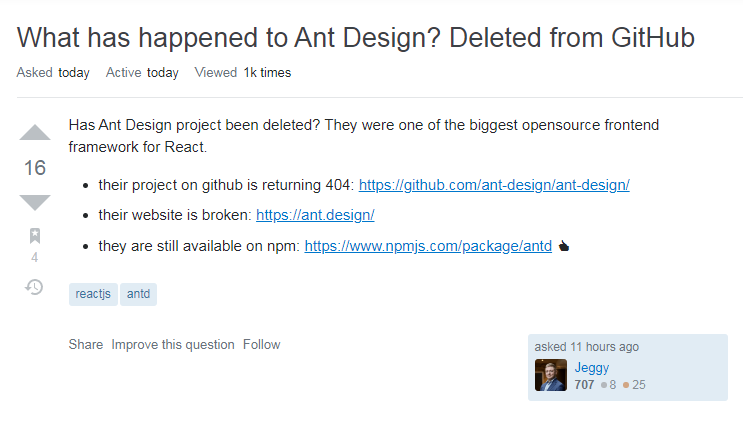
今天早些时候,stackoverflow 上有用户发现Ant Design 项目在 GitHub 上的仓库地址无法访问,疑似被官方删除。经过 Ant Design 官方的初步调查,认定此次事件是受到黑客攻击导致。 Ant Design 是一套企业级 UI 设计语言和 React 组件库,在社区中拥有庞大的用户群体。名为 Jeggy 的社区用户最早发现 Ant Design 的 GitHub 仓库地址返回 404,官网也暂时损坏,但使用 npm 时一切正常。 而 Ant Design 方面对于 GitHub 仓库被删表示未事先收到任何通知,团队与 GitHub 方面积极沟通以了解具体情况。 经调查,Ant Design 官方初步认定此次删库事件是由于项目官方的 GitHub 账号被黑客入侵导致。 目前Ant Design 官方正努力恢复项目的 GitHub 仓库。而 Ant Design 在Gitee 上的仓库仍可以正常访问。

优秀的个人博客,低调大师

HarmonyOS应用开发常见示例源码

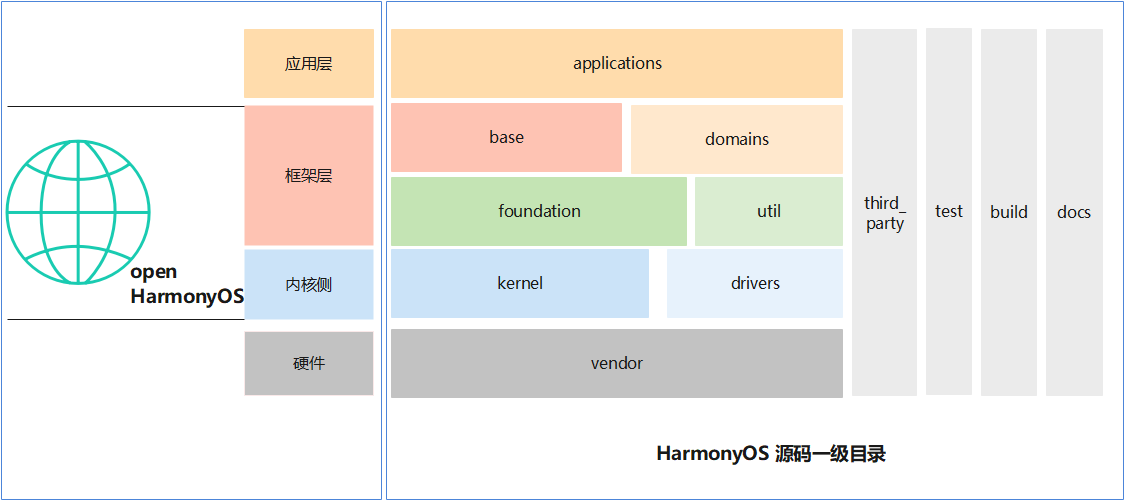
Http封装库:https://gitee.com/weimin20171202/HiHttp Json库:https://gitee.com/weimin20171202/hijson 常见组件使用的示例:https://gitee.com/weimin20171202/HarmonyComponent 简单天气app:https://gitee.com/weimin20171202/WeatherApp 一个简单的图片选择:https://gitee.com/weimin20171202/PictureSelect 简单画板:https://gitee.com/weimin20171202/DrawBoard 简单的页面跳转:https://gitee.com/weimin20171202/page-jump http请求和html文本处理:https://gitee.com/weimin20171202/jsoup 在线电子词典:https://gitee.com/weimin20171202/HiEdict (存在问题已经解决: java.io.IOException:cleartext Http traffic to www.iciba.com not permitted 在config.json中增加: "deviceConfig": { "default": { "network": { "usesCleartext":true } } }, https://developer.huawei.com/consumer/cn/forum/topic/0204422289062850612?fid=0101303901040230869)

优秀的个人博客,低调大师

Atomikos事务恢复流程源码解析

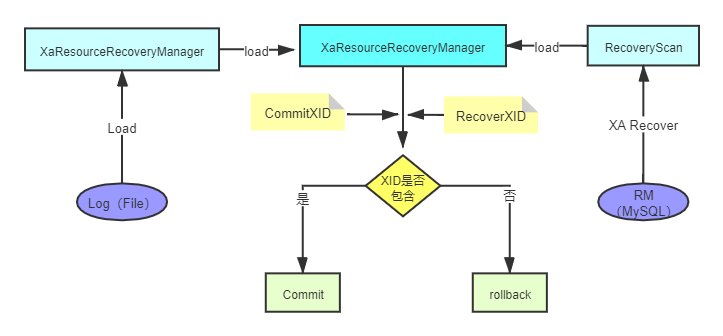
Atomikos-XA事务恢复 说事务恢复流程之前,我们来讨论下,会啥会出现事务恢复?XA二阶段提交协议不是强一致性的吗?要解答这个问题,我们就要来看看XA二阶段协议有什么问题? 问题一 :单点故障 由于协调者的重要性,一旦协调者TM发生故障。参与者RM会一直阻塞下去。尤其在第二阶段,协调者发生故障,那么所有的参与者还都处于锁定事务资源的状态中,而无法继续完成事务操作。(如果是协调者挂掉,可以重新选举一个协调者,但是无法解决因为协调者宕机导致的参与者处于阻塞状态的问题) 问题二 :数据不一致 数据不一致。在二阶段提交的阶段二中,当协调者向参与者发送commit请求之后,发生了局部网络异常或者在发送commit请求过程中协调者发生了故障,这回导致只有一部分参与者接受到了commit请求。而在这部分参与者接到commit请求之后就会执行commit操作。但是其他部分未接到commit请求的机器则无法执行事务提交。于是整个分布式系统便出现了数据不一致性的现象。 如何解决? 解决的方案简单,就是我们在事务的操作的每一步,我们都需要对事务状态的日志进行人为的记录,我们可以把日志记录存储在我们想存储的地方,可以是本地存储,也可以中心化的存储。atomikos的开源版本,我们之前也分析了,它是使用内存 + file的方式,存储在本地,这样的话,如果在一个集群系统里面,如果有节点宕机,日志又存储在本地,所以事务不能及时的恢复(需要重启服务)。 Atomikos 多场景下事务恢复。 Atomikos 提供了二种方式,来应对不同场景下的异常情况。 场景一: 服务节点不宕机,因为其他的原因,产生需要事务恢复的情况。 这个时候才要定时任务进行恢复。 具体的代码 com.atomikos.icatch.imp.TransactionServiceImp.init() 方法,会初始化一个定时任务,进行事务的恢复。 public synchronized void init ( Properties properties ) throws SysException { shutdownInProgress_ = false; control_ = new com.atomikos.icatch.admin.imp.LogControlImp ( (AdminLog) this.recoveryLog ); ConfigProperties configProperties = new ConfigProperties(properties); long recoveryDelay = configProperties.getRecoveryDelay(); recoveryTimer = new PooledAlarmTimer(recoveryDelay); recoveryTimer.addAlarmTimerListener(new AlarmTimerListener() { @Override public void alarm(AlarmTimer timer) { //进行事务恢复 performRecovery(); } }); TaskManager.SINGLETON.executeTask(recoveryTimer); initialized_ = true; } 最终会进入com.atomikos.datasource.xa.XATransactionalResource.recover() 方法。 public void recover() { XaResourceRecoveryManager xaResourceRecoveryManager = XaResourceRecoveryManager.getInstance(); if (xaResourceRecoveryManager != null) { //null for LogCloud recovery try { xaResourceRecoveryManager.recover(getXAResource()); } catch (Exception e) { refreshXAResource(); //cf case 156968 } } } 场景二: 当服务节点宕机重启动过程中进行事务的恢复。具体实现在com.atomikos.datasource.xa.XATransactionalResource.setRecoveryService()方法里面 @Override public void setRecoveryService ( RecoveryService recoveryService ) throws ResourceException { if ( recoveryService != null ) { if ( LOGGER.isTraceEnabled() ) LOGGER.logTrace ( "Installing recovery service on resource " + getName () ); this.branchIdentifier=recoveryService.getName(); //进行事务恢复 recover(); } } com.atomikos.datasource.xa.XATransactionalResource.recover() 流程详解。 主代码: public void recover(XAResource xaResource) throws XAException { // 根据XA recovery 协议获取 xid List<XID> xidsToRecover = retrievePreparedXidsFromXaResource(xaResource); Collection<XID> xidsToCommit; try { // xid 与日志记录的xid进行匹配 xidsToCommit = retrieveExpiredCommittingXidsFromLog(); for (XID xid : xidsToRecover) { if (xidsToCommit.contains(xid)) { //执行 XA commit xid 进行提交 replayCommit(xid, xaResource); } else { attemptPresumedAbort(xid, xaResource); } } } catch (LogException couldNotRetrieveCommittingXids) { LOGGER.logWarning("Transient error while recovering - will retry later...", couldNotRetrieveCommittingXids); } } 我们来看一下如何根据 XA recovery 协议获取RM端存储的xid。 进入方法 retrievePreparedXidsFromXaResource(xaResource), 最后进入 com.atomikos.datasource.xa.RecoveryScan.recoverXids()方法。 public static List<XID> recoverXids(XAResource xaResource, XidSelector selector) throws XAException { List<XID> ret = new ArrayList<XID>(); boolean done = false; int flags = XAResource.TMSTARTRSCAN; Xid[] xidsFromLastScan = null; List<XID> allRecoveredXidsSoFar = new ArrayList<XID>(); do { xidsFromLastScan = xaResource.recover(flags); flags = XAResource.TMNOFLAGS; done = (xidsFromLastScan == null || xidsFromLastScan.length == 0); if (!done) { // TEMPTATIVELY SET done TO TRUE // TO TOLERATE ORACLE 8.1.7 INFINITE // LOOP (ALWAYS RETURNS SAME RECOVER // SET). IF A NEW SET OF XIDS IS RETURNED // THEN done WILL BE RESET TO FALSE done = true; for ( int i = 0; i < xidsFromLastScan.length; i++ ) { XID xid = new XID ( xidsFromLastScan[i] ); // our own XID implements equals and hashCode properly if (!allRecoveredXidsSoFar.contains(xid)) { // a new xid is returned -> we can not be in a recovery loop -> go on allRecoveredXidsSoFar.add(xid); done = false; if (selector.selects(xid)) { ret.add(xid); } } } } } while (!done); return ret; } 我们重点关注xidsFromLastScan = xaResource.recover(flags); 这个方法,如果我们使用MySQL,那么久会进入 MysqlXAConnection.recover()方法。执行 XA recovery xid 语句来获取 xid。 protected static Xid[] recover(Connection c, int flag) throws XAException { /* * The XA RECOVER statement returns information for those XA transactions on the MySQL server that are in the PREPARED state. (See Section 13.4.7.2, ???XA * Transaction States???.) The output includes a row for each such XA transaction on the server, regardless of which client started it. * * XA RECOVER output rows look like this (for an example xid value consisting of the parts 'abc', 'def', and 7): * * mysql> XA RECOVER; * +----------+--------------+--------------+--------+ * | formatID | gtrid_length | bqual_length | data | * +----------+--------------+--------------+--------+ * | 7 | 3 | 3 | abcdef | * +----------+--------------+--------------+--------+ * * The output columns have the following meanings: * * formatID is the formatID part of the transaction xid * gtrid_length is the length in bytes of the gtrid part of the xid * bqual_length is the length in bytes of the bqual part of the xid * data is the concatenation of the gtrid and bqual parts of the xid */ boolean startRscan = ((flag & TMSTARTRSCAN) > 0); boolean endRscan = ((flag & TMENDRSCAN) > 0); if (!startRscan && !endRscan && flag != TMNOFLAGS) { throw new MysqlXAException(XAException.XAER_INVAL, Messages.getString("MysqlXAConnection.001"), null); } // // We return all recovered XIDs at once, so if not TMSTARTRSCAN, return no new XIDs // // We don't attempt to maintain state to check for TMNOFLAGS "outside" of a scan // if (!startRscan) { return new Xid[0]; } ResultSet rs = null; Statement stmt = null; List<MysqlXid> recoveredXidList = new ArrayList<MysqlXid>(); try { // TODO: Cache this for lifetime of XAConnection stmt = c.createStatement(); rs = stmt.executeQuery("XA RECOVER"); while (rs.next()) { final int formatId = rs.getInt(1); int gtridLength = rs.getInt(2); int bqualLength = rs.getInt(3); byte[] gtridAndBqual = rs.getBytes(4); final byte[] gtrid = new byte[gtridLength]; final byte[] bqual = new byte[bqualLength]; if (gtridAndBqual.length != (gtridLength + bqualLength)) { throw new MysqlXAException(XAException.XA_RBPROTO, Messages.getString("MysqlXAConnection.002"), null); } System.arraycopy(gtridAndBqual, 0, gtrid, 0, gtridLength); System.arraycopy(gtridAndBqual, gtridLength, bqual, 0, bqualLength); recoveredXidList.add(new MysqlXid(gtrid, bqual, formatId)); } } catch (SQLException sqlEx) { throw mapXAExceptionFromSQLException(sqlEx); } finally { if (rs != null) { try { rs.close(); } catch (SQLException sqlEx) { throw mapXAExceptionFromSQLException(sqlEx); } } if (stmt != null) { try { stmt.close(); } catch (SQLException sqlEx) { throw mapXAExceptionFromSQLException(sqlEx); } } } int numXids = recoveredXidList.size(); Xid[] asXids = new Xid[numXids]; Object[] asObjects = recoveredXidList.toArray(); for (int i = 0; i < numXids; i++) { asXids[i] = (Xid) asObjects[i]; } return asXids; } 这里要注意如果Mysql的版本 <5.7.7 ,则不会有任何数据,在以后的版本中Mysql进行了修复,因此如果我们想要使用MySQL充当RM,版本必须 >= 5.7.7 ,原因是: MySQL 5.6版本在客户端退出的时候,自动把已经prepare的事务回滚了,那么MySQL为什么要这样做?这主要取决于MySQL的内部实现,MySQL 5.7以前的版本,对于prepare的事务,MySQL是不会记录binlog的(官方说是减少fsync,起到了优化的作用)。只有当分布式事务提交的时候才会把前面的操作写入binlog信息,所以对于binlog来说,分布式事务与普通的事务没有区别,而prepare以前的操作信息都保存在连接的IO_CACHE中,如果这个时候客户端退出了,以前的binlog信息都会被丢失,再次重连后允许提交的话,会造成Binlog丢失,从而造成主从数据的不一致,所以官方在客户端退出的时候直接把已经prepare的事务都回滚了! 回到主线再从自己记录的事务日志里面获取XID Collection<XID> xidsToCommit = retrieveExpiredCommittingXidsFromLog(); 我们来看下获取事务日志里面的XID的retrieveExpiredCommittingXidsFromLog()方法。 然后进入com.atomikos.recovery.imp.RecoveryLogImp.getCommittingParticipants()方法。 public Collection<ParticipantLogEntry> getCommittingParticipants() throws LogReadException { Collection<ParticipantLogEntry> committingParticipants = new HashSet<ParticipantLogEntry>(); Collection<CoordinatorLogEntry> committingCoordinatorLogEntries = repository.findAllCommittingCoordinatorLogEntries(); for (CoordinatorLogEntry coordinatorLogEntry : committingCoordinatorLogEntries) { for (ParticipantLogEntry participantLogEntry : coordinatorLogEntry.participants) { committingParticipants.add(participantLogEntry); } } return committingParticipants; } 到这里我们来简单介绍一下,事务日志的存储结构。首先是 CoordinatorLogEntry,这是一次XA事务的所有信息实体类。 public class CoordinatorLogEntry implements Serializable { //全局事务id public final String id; //是否已经提交 public final boolean wasCommitted; /** * Only for subtransactions, null otherwise. */ public final String superiorCoordinatorId; //参与者集合 public final ParticipantLogEntry[] participants; } 再来看一下参与者实体类 ParticipantLogEntry : public class ParticipantLogEntry implements Serializable { private static final long serialVersionUID = 1728296701394899871L; /** * The ID of the global transaction as known by the transaction core. */ public final String coordinatorId; /** * Identifies the participant within the global transaction. */ public final String uri; /** * When does this participant expire (expressed in millis since Jan 1, 1970)? */ public final long expires; /** * Best-known state of the participant. */ public final TxState state; /** * For diagnostic purposes, null if not relevant. */ public final String resourceName; } 回到com.atomikos.recovery.xa.DefaultXaRecoveryLog.getExpiredCommittingXids() 方法,可以到获取了一次XA事务过程中,存储的事务日志中的xid。 public Set<XID> getExpiredCommittingXids() throws LogReadException { Set<XID> ret = new HashSet<XID>(); Collection<ParticipantLogEntry> entries = log.getCommittingParticipants(); for (ParticipantLogEntry entry : entries) { if (expired(entry) && !http(entry)) { XID xid = new XID(entry.coordinatorId, entry.uri); ret.add(xid); } } return ret; } 如果从RM中通过XA recovery取出的XID,包含在从事务日志中取出的XID,则进行commit,否则进行rollback. List<XID> xidsToRecover = retrievePreparedXidsFromXaResource(xaResource); Collection<XID> xidsToCommit; try { xidsToCommit = retrieveExpiredCommittingXidsFromLog(); for (XID xid : xidsToRecover) { if (xidsToCommit.contains(xid)) { replayCommit(xid, xaResource); } else { attemptPresumedAbort(xid, xaResource); } } } catch (LogException couldNotRetrieveCommittingXids) { LOGGER.logWarning("Transient error while recovering - will retry later...", couldNotRetrieveCommittingXids); } replayCommit 方法如下: private void replayCommit(XID xid, XAResource xaResource) { if (LOGGER.isDebugEnabled()) LOGGER.logDebug("Replaying commit of xid: " + xid); try { //进行事务提交 xaResource.commit(xid, false); //更新事务日志 log.terminated(xid); } catch (XAException e) { if (alreadyHeuristicallyTerminatedByResource(e)) { handleHeuristicTerminationByResource(xid, xaResource, e, true); } else if (xidTerminatedInResourceByConcurrentCommit(e)) { log.terminated(xid); } else { LOGGER.logWarning("Transient error while replaying commit - will retry later...", e); } } } attemptPresumedAbort(xid, xaResource); 方法如下: private void attemptPresumedAbort(XID xid, XAResource xaResource) { try { log.presumedAborting(xid); if (LOGGER.isDebugEnabled()) LOGGER.logDebug("Presumed abort of xid: " + xid); try { //进行回滚 xaResource.rollback(xid); //更新日志状态 log.terminated(xid); } catch (XAException e) { if (alreadyHeuristicallyTerminatedByResource(e)) { handleHeuristicTerminationByResource(xid, xaResource, e, false); } else if (xidTerminatedInResourceByConcurrentRollback(e)) { log.terminated(xid); } else { LOGGER.logWarning("Unexpected exception during recovery - ignoring to retry later...", e); } } } catch (IllegalStateException presumedAbortNotAllowedInCurrentLogState) { // ignore to retry later if necessary } catch (LogException logWriteException) { LOGGER.logWarning("log write failed for Xid: "+xid+", ignoring to retry later", logWriteException); } } 文章到此,已经写的很长很多了,我们分析了ShardingSphere对于XA方案,提供了一套SPI解决方案,对Atomikos进行了整合,也分析了Atomikos初始化流程,开始事务流程,获取连接流程,提交事务流程,回滚事务流程,事务恢复流程。 希望对大家理解XA的原理有所帮助。 作者介绍: 肖宇,Apache ShardingSphere Committer,开源hmily分布式事务框架作者, 开源soul网关作者,热爱开源,追求写优雅代码。目前就职入京东数科,参与ShardingSphere的开源建设,以及分布式数据库的研发工作。

优秀的个人博客,低调大师

Apache ShardingSphere整合Atomikos源码解析

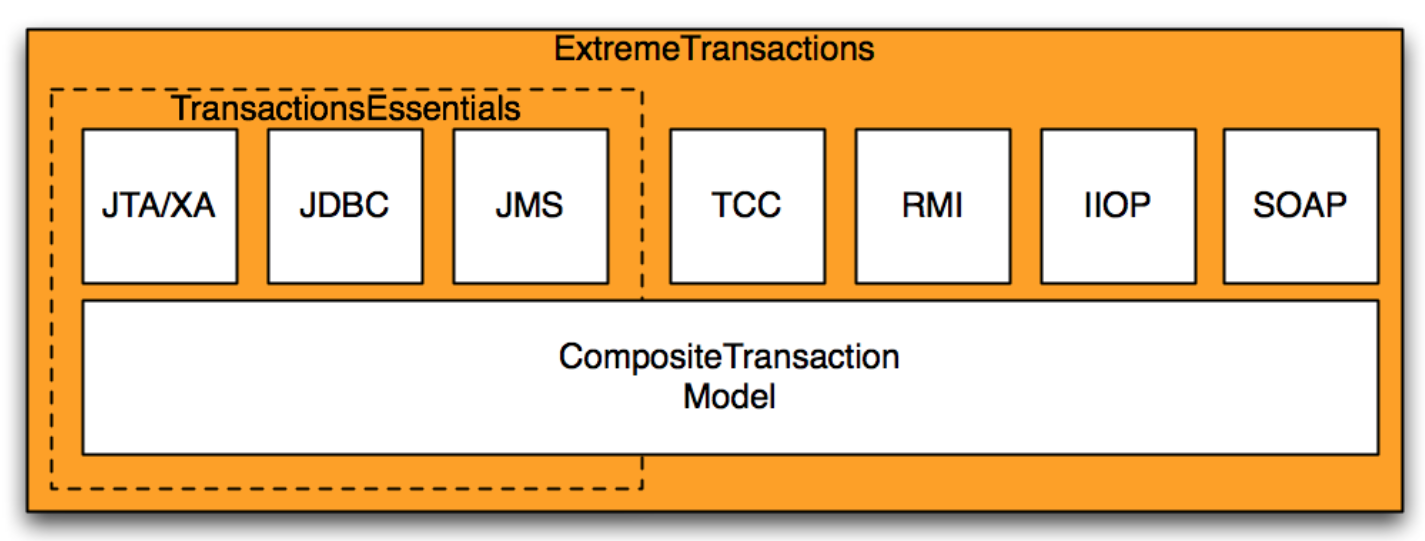
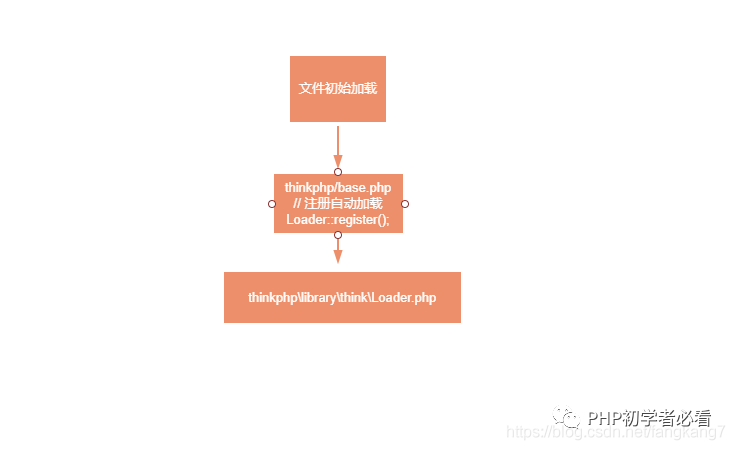
Shardingsphere整合Atomikos对XA分布式事务的支持 Apache ShardingSphere 是一套开源的分布式数据库中间件解决方案组成的生态圈,它由 JDBC、Proxy 和 Sidecar(规划中)这 3 款相互独立,却又能够混合部署配合使用的产品组成。 它们均提供标准化的数据分片、分布式事务和数据库治理功能,可适用于如 Java 同构、异构语言、云原生等各种多样化的应用场景。 ShardingSphere 已于2020年4月16日成为 Apache 软件基金会的顶级项目。 咋们话不多,接上篇,我们直接进入正题。 Atomikos简单介绍 Atomikos(https://www.atomikos.com/),其实是一家公司的名字,提供了基于JTA规范的XA分布式事务TM的实现。其旗下最著名的产品就是事务管理器。产品分两个版本: TransactionEssentials:开源的免费产品; ExtremeTransactions:上商业版,需要收费。 这两个产品的关系如下图所示: ExtremeTransactions在TransactionEssentials的基础上额外提供了以下功能(重要的): 支持TCC:这是一种柔性事务 支持通过RMI、IIOP、SOAP这些远程过程调用技术,进行事务传播。 事务日志云存储,云端对事务进行恢复,并且提供了完善的管理后台。 org.apache.shardingsphere.transaction.xa.XAShardingTransactionManager详解 我们简单的来回顾下org.apache.shardingsphere.transaction.spi.ShardingTransactionManager public interface ShardingTransactionManager extends AutoCloseable { /** * Initialize sharding transaction manager. * * @param databaseType database type * @param resourceDataSources resource data sources */ void init(DatabaseType databaseType, Collection<ResourceDataSource> resourceDataSources); /** * Get transaction type. * * @return transaction type */ TransactionType getTransactionType(); /** * Judge is in transaction or not. * * @return in transaction or not */ boolean isInTransaction(); /** * Get transactional connection. * * @param dataSourceName data source name * @return connection * @throws SQLException SQL exception */ Connection getConnection(String dataSourceName) throws SQLException; /** * Begin transaction. */ void begin(); /** * Commit transaction. */ void commit(); /** * Rollback transaction. */ void rollback(); } 我们重点县关注init方法,从它的命名,你就应该能够看出来,这是整个框架的初始化方法,让我们来看看它是如何进行初始化的。 private final Map<String, XATransactionDataSource> cachedDataSources = new HashMap<>(); private final XATransactionManager xaTransactionManager = XATransactionManagerLoader.getInstance().getTransactionManager(); @Override public void init(final DatabaseType databaseType, final Collection<ResourceDataSource> resourceDataSources) { for (ResourceDataSource each : resourceDataSources) { cachedDataSources.put(each.getOriginalName(), new XATransactionDataSource(databaseType, each.getUniqueResourceName(), each.getDataSource(), xaTransactionManager)); } xaTransactionManager.init(); } 首先SPI的方式加载XATransactionManager的具体实现类,这里返回的就是org.apache.shardingsphere.transaction.xa.atomikos.manager.AtomikosTransactionManager。 我们在关注下 new XATransactionDataSource() , 进入 org.apache.shardingsphere.transaction.xa.jta.datasource。XATransactionDataSource类的构造方法。 public XATransactionDataSource(final DatabaseType databaseType, final String resourceName, final DataSource dataSource, final XATransactionManager xaTransactionManager) { this.databaseType = databaseType; this.resourceName = resourceName; this.dataSource = dataSource; if (!CONTAINER_DATASOURCE_NAMES.contains(dataSource.getClass().getSimpleName())) { // 重点关注 1 ,返回了xaDatasource xaDataSource = XADataSourceFactory.build(databaseType, dataSource); this.xaTransactionManager = xaTransactionManager; // 重点关注2 注册资源 xaTransactionManager.registerRecoveryResource(resourceName, xaDataSource); } } 我们重点来关注 XADataSourceFactory.build(databaseType, dataSource),从名字我们就可以看出,这应该是返回JTA规范里面的XADataSource,在ShardingSphere里面很多的功能,可以从代码风格的命名上就能猜出来,这就是优雅代码(吹一波)。不多逼逼,我们进入该方法。 public final class XADataSourceFactory { public static XADataSource build(final DatabaseType databaseType, final DataSource dataSource) { return new DataSourceSwapper(XADataSourceDefinitionFactory.getXADataSourceDefinition(databaseType)).swap(dataSource); } } 首先又是一个SPI定义的 XADataSourceDefinitionFactory,它根据不同的数据库类型,来加载不同的方言。然后我们进入 swap方法。 public XADataSource swap(final DataSource dataSource) { XADataSource result = createXADataSource(); setProperties(result, getDatabaseAccessConfiguration(dataSource)); return result; } 很简明,第一步创建,XADataSource,第二步给它设置属性(包含数据的连接,用户名密码等),然后返回。 返回 XATransactionDataSource 类,关注 xaTransactionManager.registerRecoveryResource(resourceName, xaDataSource); 从名字可以看出,这是注册事务恢复资源。这个我们在事务恢复的时候详解。 返回 XAShardingTransactionManager.init() ,我们重点来关注: xaTransactionManager.init();,最后进入AtomikosTransactionManager.init()。流程图如下: 代码: public final class AtomikosTransactionManager implements XATransactionManager { private final UserTransactionManager transactionManager = new UserTransactionManager(); private final UserTransactionService userTransactionService = new UserTransactionServiceImp(); @Override public void init() { userTransactionService.init(); } } 进入UserTransactionServiceImp.init() private void initialize() { //添加恢复资源 不用关心 for (RecoverableResource resource : resources_) { Configuration.addResource ( resource ); } for (LogAdministrator logAdministrator : logAdministrators_) { Configuration.addLogAdministrator ( logAdministrator ); } //注册插件 不用关心 for (TransactionServicePlugin nxt : tsListeners_) { Configuration.registerTransactionServicePlugin ( nxt ); } //获取配置属性 重点关心 ConfigProperties configProps = Configuration.getConfigProperties(); configProps.applyUserSpecificProperties(properties_); //进行初始化 Configuration.init(); } 我们重点关注,获取配置属性。最后进入com.atomikos.icatch.provider.imp.AssemblerImp.initializeProperties()方法。 @Override public ConfigProperties initializeProperties() { //读取classpath下的默认配置transactions-defaults.properties Properties defaults = new Properties(); loadPropertiesFromClasspath(defaults, DEFAULT_PROPERTIES_FILE_NAME); //读取classpath下,transactions.properties配置,覆盖transactions-defaults.properties中相同key的值 Properties transactionsProperties = new Properties(defaults); loadPropertiesFromClasspath(transactionsProperties, TRANSACTIONS_PROPERTIES_FILE_NAME); //读取classpath下,jta.properties,覆盖transactions-defaults.properties、transactions.properties中相同key的值 Properties jtaProperties = new Properties(transactionsProperties); loadPropertiesFromClasspath(jtaProperties, JTA_PROPERTIES_FILE_NAME); //读取通过java -Dcom.atomikos.icatch.file方式指定的自定义配置文件路径,覆盖之前的同名配置 Properties customProperties = new Properties(jtaProperties); loadPropertiesFromCustomFilePath(customProperties); //最终构造一个ConfigProperties对象,来表示实际要使用的配置 Properties finalProperties = new Properties(customProperties); return new ConfigProperties(finalProperties); } 接下来重点关注, Configuration.init(), 进行初始化。 ublic static synchronized boolean init() { boolean startupInitiated = false; if (service_ == null) { startupInitiated = true; //SPI方式加载插件注册,无需过多关心 addAllTransactionServicePluginServicesFromClasspath(); ConfigProperties configProperties = getConfigProperties(); //调用插件的beforeInit方法进行初始化话,无需过多关心 notifyBeforeInit(configProperties); //进行事务日志恢复的初始化,很重要,接下来详解 assembleSystemComponents(configProperties); //进入系统注解的初始化,一般重要 initializeSystemComponents(configProperties); notifyAfterInit(); if (configProperties.getForceShutdownOnVmExit()) { addShutdownHook(new ForceShutdownHook()); } } return startupInitiated; } 我们先来关注 assembleSystemComponents(configProperties); 进入它,进入com.atomikos.icatch.provider.imp.AssemblerImp.assembleTransactionService()方法: @Override public TransactionServiceProvider assembleTransactionService( ConfigProperties configProperties) { RecoveryLog recoveryLog =null; //打印日志 logProperties(configProperties.getCompletedProperties()); //生成唯一名字 String tmUniqueName = configProperties.getTmUniqueName(); long maxTimeout = configProperties.getMaxTimeout(); int maxActives = configProperties.getMaxActives(); boolean threaded2pc = configProperties.getThreaded2pc(); //SPI方式加载OltpLog ,这是最重要的扩展地方,如果用户没有SPI的方式去扩展那么就为null OltpLog oltpLog = createOltpLogFromClasspath(); if (oltpLog == null) { LOGGER.logInfo("Using default (local) logging and recovery..."); //创建事务日志存储资源 Repository repository = createRepository(configProperties); oltpLog = createOltpLog(repository); //??? Assemble recoveryLog recoveryLog = createRecoveryLog(repository); } StateRecoveryManagerImp recoveryManager = new StateRecoveryManagerImp(); recoveryManager.setOltpLog(oltpLog); //生成唯一id生成器,以后生成XID会用的到 UniqueIdMgr idMgr = new UniqueIdMgr ( tmUniqueName ); int overflow = idMgr.getMaxIdLengthInBytes() - MAX_TID_LENGTH; if ( overflow > 0 ) { // see case 73086 String msg = "Value too long : " + tmUniqueName; LOGGER.logFatal ( msg ); throw new SysException(msg); } return new TransactionServiceImp(tmUniqueName, recoveryManager, idMgr, maxTimeout, maxActives, !threaded2pc, recoveryLog); } 我们重点来分析createOltpLogFromClasspath(), 采用SPI的加载方式来获取,默认这里会返回 null, 什么意思呢? 就是当没有扩展的时候,atomikos,会创建框架自定义的资源,来存储事务日志。 private OltpLog createOltpLogFromClasspath() { OltpLog ret = null; ServiceLoader<OltpLogFactory> loader = ServiceLoader.load(OltpLogFactory.class,Configuration.class.getClassLoader()); int i = 0; for (OltpLogFactory l : loader ) { ret = l.createOltpLog(); i++; } if (i > 1) { String msg = "More than one OltpLogFactory found in classpath - error in configuration!"; LOGGER.logFatal(msg); throw new SysException(msg); } return ret; } 我们跟着进入 Repository repository = createRepository(configProperties); private CachedRepository createCoordinatorLogEntryRepository( ConfigProperties configProperties) throws LogException { //创建内存资源存储 InMemoryRepository inMemoryCoordinatorLogEntryRepository = new InMemoryRepository(); //进行初始化 inMemoryCoordinatorLogEntryRepository.init(); //创建使用文件存储资源作为backup FileSystemRepository backupCoordinatorLogEntryRepository = new FileSystemRepository(); //进行初始化 backupCoordinatorLogEntryRepository.init(); //内存与file资源进行合并 CachedRepository repository = new CachedRepository(inMemoryCoordinatorLogEntryRepository, backupCoordinatorLogEntryRepository); repository.init(); return repository; } 这里就会创建出 CachedRepository,里面包含了 InMemoryRepository 与 FileSystemRepository 回到主线 com.atomikos.icatch.config.Configuration.init(), 最后来分析下notifyAfterInit(); private static void notifyAfterInit() { //进行插件的初始化 for (TransactionServicePlugin p : tsListenersList_) { p.afterInit(); } for (LogAdministrator a : logAdministrators_) { a.registerLogControl(service_.getLogControl()); } //设置事务恢复服务,进行事务的恢复 for (RecoverableResource r : resourceList_ ) { r.setRecoveryService(recoveryService_); } } 插件的初始化会进入com.atomikos.icatch.jta.JtaTransactionServicePlugin.afterInit() public void afterInit() { TransactionManagerImp.installTransactionManager(Configuration.getCompositeTransactionManager(), autoRegisterResources); //如果我们自定义扩展了 OltpLog ,这里就会返回null,如果是null,那么XaResourceRecoveryManager就是null RecoveryLog recoveryLog = Configuration.getRecoveryLog(); long maxTimeout = Configuration.getConfigProperties().getMaxTimeout(); if (recoveryLog != null) { XaResourceRecoveryManager.installXaResourceRecoveryManager(new DefaultXaRecoveryLog(recoveryLog, maxTimeout),Configuration.getConfigProperties().getTmUniqueName()); } } 重点注意 RecoveryLog recoveryLog = Configuration.getRecoveryLog(); ,如果用户采用SPI的方式,扩展了com.atomikos.recovery.OltpLog ,这里就会返回 null。 如果是null,则不会对 XaResourceRecoveryManager 进行初始化。 回到 notifyAfterInit(), 我们来分析 setRecoveryService。 public void setRecoveryService ( RecoveryService recoveryService ) throws ResourceException { if ( recoveryService != null ) { if ( LOGGER.isTraceEnabled() ) LOGGER.logTrace ( "Installing recovery service on resource " + getName () ); this.branchIdentifier=recoveryService.getName(); recover(); } } 我们进入 recover() 方法: public void recover() { XaResourceRecoveryManager xaResourceRecoveryManager = XaResourceRecoveryManager.getInstance(); //null for LogCloud recovery if (xaResourceRecoveryManager != null) { try { xaResourceRecoveryManager.recover(getXAResource()); } catch (Exception e) { refreshXAResource(); //cf case 156968 } } } 看到最关键的注释了吗,如果用户采用SPI的方式,扩展了com.atomikos.recovery.OltpLog,那么XaResourceRecoveryManager 为null,则就会进行云端恢复,反之则进行事务恢复。 事务恢复很复杂,我们会单独来讲。 到这里atomikos的基本的初始化已经完成。 atomikos事务begin流程 我们知道,本地的事务,都会有一个 trainsaction.begin, 对应XA分布式事务来说也不另外,我们再把思路切换回XAShardingTransactionManager.begin(), 会调用com.atomikos.icatch.jta.TransactionManagerImp.begin()。流程图如下: 代码: public void begin ( int timeout ) throws NotSupportedException, SystemException { CompositeTransaction ct = null; ResumePreviousTransactionSubTxAwareParticipant resumeParticipant = null; ct = compositeTransactionManager.getCompositeTransaction(); if ( ct != null && ct.getProperty ( JTA_PROPERTY_NAME ) == null ) { LOGGER.logWarning ( "JTA: temporarily suspending incompatible transaction: " + ct.getTid() + " (will be resumed after JTA transaction ends)" ); ct = compositeTransactionManager.suspend(); resumeParticipant = new ResumePreviousTransactionSubTxAwareParticipant ( ct ); } try { //创建事务补偿点 ct = compositeTransactionManager.createCompositeTransaction ( ( ( long ) timeout ) * 1000 ); if ( resumeParticipant != null ) ct.addSubTxAwareParticipant ( resumeParticipant ); if ( ct.isRoot () && getDefaultSerial () ) ct.setSerial (); ct.setProperty ( JTA_PROPERTY_NAME , "true" ); } catch ( SysException se ) { String msg = "Error in begin()"; LOGGER.logError( msg , se ); throw new ExtendedSystemException ( msg , se ); } recreateCompositeTransactionAsJtaTransaction(ct); } 这里我们主要关注 compositeTransactionManager.createCompositeTransaction(), public CompositeTransaction createCompositeTransaction ( long timeout ) throws SysException { CompositeTransaction ct = null , ret = null; ct = getCurrentTx (); if ( ct == null ) { ret = getTransactionService().createCompositeTransaction ( timeout ); if(LOGGER.isDebugEnabled()){ LOGGER.logDebug("createCompositeTransaction ( " + timeout + " ): " + "created new ROOT transaction with id " + ret.getTid ()); } } else { if(LOGGER.isDebugEnabled()) LOGGER.logDebug("createCompositeTransaction ( " + timeout + " )"); ret = ct.createSubTransaction (); } Thread thread = Thread.currentThread (); setThreadMappings ( ret, thread ); return ret; } 创建了事务补偿点,然后把他放到了用当前线程作为key的Map当中,这里思考,为啥它不用 threadLocal。 到这里atomikos的事务begin流程已经完成。 大家可能有些疑惑,begin好像什么都没有做,XA start 也没调用? 别慌,下一节继续来讲。 XATransactionDataSource getConnection() 流程 我们都知道想要执行SQL语句,必须要获取到数据库的connection。让我们再回到 XAShardingTransactionManager.getConnection() 最后会调用到org.apache.shardingsphere.transaction.xa.jta.datasourceXATransactionDataSource.getConnection()。流程图如下: 代码 : public Connection getConnection() throws SQLException, SystemException, RollbackException { //先检查是否已经有存在的connection,这一步很关心,也是XA的关键,因为XA事务,必须在同一个connection if (CONTAINER_DATASOURCE_NAMES.contains(dataSource.getClass().getSimpleName())) { return dataSource.getConnection(); } //获取数据库连接 Connection result = dataSource.getConnection(); //转成XAConnection,其实是同一个连接 XAConnection xaConnection = XAConnectionFactory.createXAConnection(databaseType, xaDataSource, result); //获取JTA事务定义接口 Transaction transaction = xaTransactionManager.getTransactionManager().getTransaction(); if (!enlistedTransactions.get().contains(transaction)) { //进行资源注册 transaction.enlistResource(new SingleXAResource(resourceName, xaConnection.getXAResource())); transaction.registerSynchronization(new Synchronization() { @Override public void beforeCompletion() { enlistedTransactions.get().remove(transaction); } @Override public void afterCompletion(final int status) { enlistedTransactions.get().clear(); } }); enlistedTransactions.get().add(transaction); } return result; } 首先第一步很关心,尤其是对shardingsphere来说,因为在一个事务里面,会有多个SQL语句,打到相同的数据库,所以对相同的数据库,必须获取同一个XAConnection,这样才能进行XA事务的提交与回滚。 我们接下来关心 transaction.enlistResource(new SingleXAResource(resourceName, xaConnection.getXAResource()));, 会进入com.atomikos.icatch.jta.TransactionImp.enlistResource(), 代码太长,截取一部分。 try { restx = (XAResourceTransaction) res .getResourceTransaction(this.compositeTransaction); // next, we MUST set the xa resource again, // because ONLY the instance we got as argument // is available for use now ! // older instances (set in restx from previous sibling) // have connections that may be in reuse already // ->old xares not valid except for 2pc operations restx.setXAResource(xares); restx.resume(); } catch (ResourceException re) { throw new ExtendedSystemException( "Unexpected error during enlist", re); } catch (RuntimeException e) { throw e; } addXAResourceTransaction(restx, xares); 我们直接看 restx.resume(); public synchronized void resume() throws ResourceException { int flag = 0; String logFlag = ""; if (this.state.equals(TxState.LOCALLY_DONE)) {// reused instance flag = XAResource.TMJOIN; logFlag = "XAResource.TMJOIN"; } else if (!this.knownInResource) {// new instance flag = XAResource.TMNOFLAGS; logFlag = "XAResource.TMNOFLAGS"; } else throw new IllegalStateException("Wrong state for resume: " + this.state); try { if (LOGGER.isDebugEnabled()) { LOGGER.logDebug("XAResource.start ( " + this.xidToHexString + " , " + logFlag + " ) on resource " + this.resourcename + " represented by XAResource instance " + this.xaresource); } this.xaresource.start(this.xid, flag); } catch (XAException xaerr) { String msg = interpretErrorCode(this.resourcename, "resume", this.xid, xaerr.errorCode); LOGGER.logWarning(msg, xaerr); throw new ResourceException(msg, xaerr); } setState(TxState.ACTIVE); this.knownInResource = true; } 哦多尅,看见了吗,各位,看见了 this.xaresource.start(this.xid, flag); 了吗????,我们进去,假设我们使用的Mysql数据库: public void start(Xid xid, int flags) throws XAException { StringBuilder commandBuf = new StringBuilder(300); commandBuf.append("XA START "); appendXid(commandBuf, xid); switch(flags) { case 0: break; case 2097152: commandBuf.append(" JOIN"); break; case 134217728: commandBuf.append(" RESUME"); break; default: throw new XAException(-5); } this.dispatchCommand(commandBuf.toString()); this.underlyingConnection.setInGlobalTx(true); } 组装XA start Xid SQL语句,进行执行。 到这里,我们总结下,在获取数据库连接的时候,我们执行了XA协议接口中的 XA start xid atomikos事务commit流程 好了,上面我们已经开启了事务,现在我们来分析下事务commit流程,我们再把视角切换回XAShardingTransactionManager.commit(),最后我们会进入com.atomikos.icatch.imp.CompositeTransactionImp.commit() 方法。流程图如下: 代码: public void commit () throws HeurRollbackException, HeurMixedException, HeurHazardException, SysException, SecurityException, RollbackException { //首先更新下事务日志的状态 doCommit (); setSiblingInfoForIncoming1pcRequestFromRemoteClient(); if ( isRoot () ) { //真正的commit操作 coordinator.terminate ( true ); } } 我们关注 coordinator.terminate ( true ); protected void terminate ( boolean commit ) throws HeurRollbackException, HeurMixedException, SysException, java.lang.SecurityException, HeurCommitException, HeurHazardException, RollbackException, IllegalStateException { synchronized ( fsm_ ) { if ( commit ) { //判断有几个参与者,如果只有一个,直接提交 if ( participants_.size () <= 1 ) { commit ( true ); } else { //否则,走XA 2阶段提交流程,先prepare, 再提交 int prepareResult = prepare (); // make sure to only do commit if NOT read only if ( prepareResult != Participant.READ_ONLY ) commit ( false ); } } else { rollback (); } } } 首先会判断参与者的个数,这里我们可以理解为MySQL的database数量,如果只有一个,退化成一阶段,直接提交。 如果有多个,则走标准的XA二阶段提交流程。 我们来看 prepare (); 流程,最后会走到com.atomikos.icatch.imp.PrepareMessage.send() ---> com.atomikos.datasource.xa.XAResourceTransaction.prepare() int ret = 0; terminateInResource(); if (TxState.ACTIVE == this.state) { // tolerate non-delisting apps/servers suspend(); } // duplicate prepares can happen for siblings in serial subtxs!!! // in that case, the second prepare just returns READONLY if (this.state == TxState.IN_DOUBT) return Participant.READ_ONLY; else if (!(this.state == TxState.LOCALLY_DONE)) throw new SysException("Wrong state for prepare: " + this.state); try { // refresh xaresource for MQSeries: seems to close XAResource after // suspend??? testOrRefreshXAResourceFor2PC(); if (LOGGER.isTraceEnabled()) { LOGGER.logTrace("About to call prepare on XAResource instance: " + this.xaresource); } ret = this.xaresource.prepare(this.xid); } catch (XAException xaerr) { String msg = interpretErrorCode(this.resourcename, "prepare", this.xid, xaerr.errorCode); if (XAException.XA_RBBASE <= xaerr.errorCode && xaerr.errorCode <= XAException.XA_RBEND) { LOGGER.logWarning(msg, xaerr); // see case 84253 throw new RollbackException(msg); } else { LOGGER.logError(msg, xaerr); throw new SysException(msg, xaerr); } } setState(TxState.IN_DOUBT); if (ret == XAResource.XA_RDONLY) { if (LOGGER.isDebugEnabled()) { LOGGER.logDebug("XAResource.prepare ( " + this.xidToHexString + " ) returning XAResource.XA_RDONLY " + "on resource " + this.resourcename + " represented by XAResource instance " + this.xaresource); } return Participant.READ_ONLY; } else { if (LOGGER.isDebugEnabled()) { LOGGER.logDebug("XAResource.prepare ( " + this.xidToHexString + " ) returning OK " + "on resource " + this.resourcename + " represented by XAResource instance " + this.xaresource); } return Participant.READ_ONLY + 1; } 终于,我们看到了这么一句 ret = this.xaresource.prepare(this.xid); 但是等等,我们之前不是说了,XA start xid 以后要先 XA end xid 吗? 答案就在 suspend(); 里面。 public synchronized void suspend() throws ResourceException { // BugzID: 20545 // State may be IN_DOUBT or TERMINATED when a connection is closed AFTER // commit! // In that case, don't call END again, and also don't generate any // error! // This is required for some hibernate connection release strategies. if (this.state.equals(TxState.ACTIVE)) { try { if (LOGGER.isDebugEnabled()) { LOGGER.logDebug("XAResource.end ( " + this.xidToHexString + " , XAResource.TMSUCCESS ) on resource " + this.resourcename + " represented by XAResource instance " + this.xaresource); } //执行了 xa end 语句 this.xaresource.end(this.xid, XAResource.TMSUCCESS); } catch (XAException xaerr) { String msg = interpretErrorCode(this.resourcename, "end", this.xid, xaerr.errorCode); if (LOGGER.isTraceEnabled()) LOGGER.logTrace(msg, xaerr); // don't throw: fix for case 102827 } setState(TxState.LOCALLY_DONE); } } 到了这里,我们已经执行了 XA start xid -> XA end xid --> XA prepare xid, 接下来就是最后一步 commit 我们再回到 terminate(false) 方法,来看 commit()流程。其实和 prepare流程一样,最后会走到 com.atomikos.datasource.xa.XAResourceTransaction.commit()。 commit执行完,数据提交 //繁杂代码过多,就显示核心的 this.xaresource.commit(this.xid, onePhase); 思考:这里的参与者提交是在一个循环里面,一个一个提交的,如果之前的提交了,后面的参与者提交的时候,挂了,就会造成数据的不一致性。 Atomikos rollback() 流程 上面我们已经分析了commit流程,其实rollback流程和commit流程一样,我们在把目光切换回 org.apache.shardingsphere.transaction.xa.XAShardingTransactionManager.rollback() ,最后会执行到com.atomikos.icatch.imp.CompositeTransactionImp.rollback()。 public void rollback () throws IllegalStateException, SysException { //清空资源,更新事务日志状态等 doRollback (); if ( isRoot () ) { try { coordinator.terminate ( false ); } catch ( Exception e ) { throw new SysException ( "Unexpected error in rollback: " + e.getMessage (), e ); } } } 重点关注 coordinator.terminate ( false ); ,这个和 commit流程是一样的,只不过在 commit流程里面,参数传的是true。 protected void terminate ( boolean commit ) throws HeurRollbackException, HeurMixedException, SysException, java.lang.SecurityException, HeurCommitException, HeurHazardException, RollbackException, IllegalStateException { synchronized ( fsm_ ) { if ( commit ) { if ( participants_.size () <= 1 ) { commit ( true ); } else { int prepareResult = prepare (); // make sure to only do commit if NOT read only if ( prepareResult != Participant.READ_ONLY ) commit ( false ); } } else { //如果是false,走的是rollback rollback (); } } } 我们重点关注 rollback() ,最后会走到com.atomikos.datasource.xa.XAResourceTransaction.rollback()。 public synchronized void rollback() throws HeurCommitException, HeurMixedException, HeurHazardException, SysException { terminateInResource(); if (rollbackShouldDoNothing()) { return; } if (this.state.equals(TxState.TERMINATED)) { return; } if (this.state.equals(TxState.HEUR_MIXED)) throw new HeurMixedException(); if (this.state.equals(TxState.HEUR_COMMITTED)) throw new HeurCommitException(); if (this.xaresource == null) { throw new HeurHazardException("XAResourceTransaction " + getXid() + ": no XAResource to rollback?"); } try { if (this.state.equals(TxState.ACTIVE)) { // first suspend xid suspend(); } // refresh xaresource for MQSeries: seems to close XAResource after // suspend??? testOrRefreshXAResourceFor2PC(); if (LOGGER.isDebugEnabled()) { LOGGER.logDebug("XAResource.rollback ( " + this.xidToHexString + " ) " + "on resource " + this.resourcename + " represented by XAResource instance " + this.xaresource); } this.xaresource.rollback(this.xid); 先在supend()方法里面执行了 XA end xid 语句, 接下来执行 this.xaresource.rollback(this.xid); 进行数据的回滚。 文章到此,已经写的很长很多了,我们分析了ShardingSphere对于XA方案,提供了一套SPI解决方案,对Atomikos进行了整合,也分析了Atomikos初始化流程,开始事务流程,获取连接流程,提交事务流程,回滚事务流程。希望对大家理解XA的原理有所帮助。 作者介绍: 肖宇,Apache ShardingSphere Committer,开源hmily分布式事务框架作者, 开源soul网关作者,热爱开源,追求写优雅代码。目前就职入京东数科,参与ShardingSphere的开源建设,以及分布式数据库的研发工作。

资源下载

更多资源
Mario

Mario

马里奥是站在游戏界顶峰的超人气多面角色。马里奥靠吃蘑菇成长,特征是大鼻子、头戴帽子、身穿背带裤,还留着胡子。与他的双胞胎兄弟路易基一起,长年担任任天堂的招牌角色。

Spring

Spring

Spring框架(Spring Framework)是由Rod Johnson于2002年提出的开源Java企业级应用框架,旨在通过使用JavaBean替代传统EJB实现方式降低企业级编程开发的复杂性。该框架基于简单性、可测试性和松耦合性设计理念,提供核心容器、应用上下文、数据访问集成等模块,支持整合Hibernate、Struts等第三方框架,其适用范围不仅限于服务器端开发,绝大多数Java应用均可从中受益。

Rocky Linux

Rocky Linux

Rocky Linux(中文名:洛基)是由Gregory Kurtzer于2020年12月发起的企业级Linux发行版,作为CentOS稳定版停止维护后与RHEL(Red Hat Enterprise Linux)完全兼容的开源替代方案,由社区拥有并管理,支持x86_64、aarch64等架构。其通过重新编译RHEL源代码提供长期稳定性,采用模块化包装和SELinux安全架构,默认包含GNOME桌面环境及XFS文件系统,支持十年生命周期更新。

WebStorm

WebStorm

WebStorm 是jetbrains公司旗下一款JavaScript 开发工具。目前已经被广大中国JS开发者誉为“Web前端开发神器”、“最强大的HTML5编辑器”、“最智能的JavaScript IDE”等。与IntelliJ IDEA同源,继承了IntelliJ IDEA强大的JS部分的功能。

用户登录
用户注册