Java自动化测试(Android app界面元素 33)
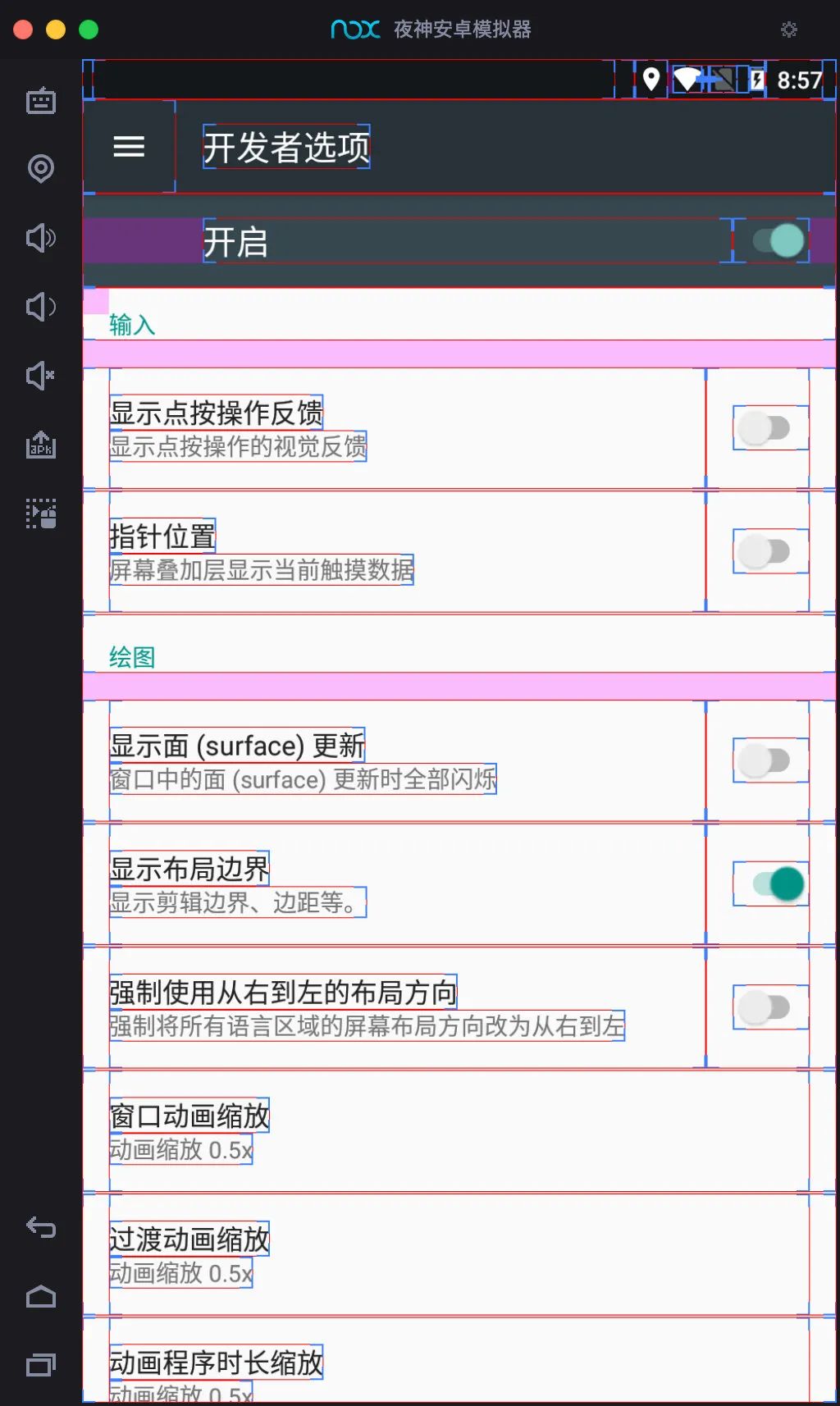
App分类 Native App 原生App 优点 直接依托于操作系统,交互性最强,性能最好,功能最为强大 缺点 开发成本高,更新缓慢,审核周期慢,维护成本高 Hybrid App 混合型App 优点 开发成本较低,可以跨平台,调试方便,维护成本低,功能可复用,性能和体验要比web app好,更新较自由 缺点 相比原生性能仍有较大损耗,不适用于交互性较强的app Web App 使用浏览器展示 优点 开发成本低,可以跨平台,调试方便,更新无需通知用户,不需要手动升级,无需安装App,不会占用手机存储空间 缺点 无法获取系统级别的通知/提醒/动效等,用户留存率低,体验差,设计受限较多 如何区分 开启显示布局界面,当看到出现方框则使用的是原生 定位 ActivityName & PackageName PackageName「包名」 应用的唯一身份标示,系统通过包名识别不同的应用,如两个相同包名的应用在安装时会提示覆盖 ActivityName「类名」 Activity:android四大组件之一,就是一个和用户交互的界面 $adbshelldumpsysactivity|grep"mFocusedActivity"#Android8以上$adbshelldumpsysactivity|grep"mResumedActivity" 查找当前Activity 启动入口appActivity和Activity的区别: appActivity在App中是唯一的,它的作用是用来启动app的 $aaptdumpbadgingD:\apk\base.apk|find"launchable-activity" App页面布局 布局类型 框架布局 所有控件都被放置在左上的区域 下一个子控件会重叠覆盖上一个控件 线性布局 控件的排序方式:垂直/水平 绝对布局 采用坐标轴的方式定位控件 左上角(0,0) 往右x+ 往下y+ 相对布局 根据参照物的位置,来确定控件的位置 表格布局 通过表格的行列布局控件位置 元素定位 打开uiautomatorviewer $cd/Users/zhongxin/Library/Android/sdk/tools/bin$shuiautomatorviewer uiautomatorviewer id定位 resource-id定位,App是允许「resource-id」相同,如果有相同的resource-id,那么获取第一个元素 androidDriver.findElement(MobileBy.id("com.lemon.lemonban:id/category_title")).click(); text定位 androidDriver.findElement(MobileBy.AndroidUIAutomator("newUiSelector().text(\"全程班\")")).click(); className定位 类似web tagName找到元素类型 androidDriver.findElement(MobileBy.className("android.widget.TextView")).click(); Xpath定位 androidDriver.findElement(MobileBy.xpath("//android.widget.TextView[@text='全程班']")).click();androidDriver.findElement(MobileBy.xpath("//android.widget.FrameLayout[@resource-id='com.lemon.lemonban:id/navigation_tiku']")).click(); 坐标定位 TouchActiontouchAction=newTouchAction(androidDriver);PointOptionpointOption=PointOption.point(445,1539);touchAction.press(pointOption).release().perform(); toast元素定位 Toast是一种简单的消息提示框。当视图显示给用户,在应用程序中显示为浮动。和Dialog不一样的是,它永远不会获得焦点,无法被点击。 获取方式1:隐式等待 androidDriver.manage().timeouts().implicitlyWait(8,TimeUnit.SECONDS);androidDriver.findElement(MobileBy.xpath("//*[contains(@text,'错误的账号信息')]")); 获取方式2:显式等待 WebDriverWaitwait=newWebDriverWait(androidDriver,5);WebElementelement=wait.until(ExpectedConditions.presenceOfElementLocated(MobileBy.xpath("//*[contains(@text,'错误的账号信息')]")));element.getText(); 使用Appium定位 1.填写连接信息 填写连接信息 2. 启动会话 Appium 调试代码 packagecom.zhongxin.day03;importio.appium.java_client.MobileBy;importio.appium.java_client.TouchAction;importio.appium.java_client.android.AndroidDriver;importio.appium.java_client.touch.offset.PointOption;importorg.apache.tools.ant.taskdefs.Touch;importorg.aspectj.apache.bcel.ExceptionConstants;importorg.openqa.selenium.WebDriver;importorg.openqa.selenium.WebElement;importorg.openqa.selenium.remote.DesiredCapabilities;importorg.openqa.selenium.support.ui.ExpectedConditions;importorg.openqa.selenium.support.ui.WebDriverWait;importorg.testng.annotations.AfterTest;importorg.testng.annotations.BeforeTest;importorg.testng.annotations.Test;importjava.net.MalformedURLException;importjava.net.URL;importjava.util.concurrent.TimeUnit;publicclassElementLocator{privateAndroidDriverandroidDriver;@BeforeTestpublicvoidsetUp()throwsMalformedURLException{DesiredCapabilitiescapabilities=newDesiredCapabilities();capabilities.setCapability("platformName","Android");capabilities.setCapability("deviceName","127.0.0.1:62001");capabilities.setCapability("appPackage","com.lemon.lemonban");capabilities.setCapability("appActivity","com.lemon.lemonban.activity.WelcomeActivity");URLurl=newURL("http://127.0.0.1:4723/wd/hub");androidDriver=newAndroidDriver(url,capabilities);androidDriver.manage().timeouts().implicitlyWait(10,TimeUnit.SECONDS);}@Testpublicvoidtest01(){//androidDriver.findElement(MobileBy.id("com.lemon.lemonban:id/category_title")).click();//androidDriver.findElement(MobileBy.AndroidUIAutomator("newUiSelector().text(\"全程班\")")).click();//androidDriver.findElement(MobileBy.className("android.widget.TextView")).click();//androidDriver.findElement(MobileBy.xpath("//android.widget.TextView[@text='全程班']")).click();//androidDriver.findElement(MobileBy.xpath("//android.widget.FrameLayout[@resource-id='com.lemon.lemonban:id/navigation_tiku']")).click();//TouchActiontouchAction=newTouchAction(androidDriver);//PointOptionpointOption=PointOption.point(445,1539);//touchAction.press(pointOption).release().perform();androidDriver.manage().timeouts().implicitlyWait(8,TimeUnit.SECONDS);androidDriver.findElement(MobileBy.xpath("//*[contains(@text,'错误的账号信息')]"));WebDriverWaitwait=newWebDriverWait(androidDriver,5);WebElementelement=wait.until(ExpectedConditions.presenceOfElementLocated(MobileBy.xpath("//*[contains(@text,'错误的账号信息')]")));Stringtext=element.getText();System.out.println(text);}@AfterTestpublicvoidtearDown()throwsInterruptedException{Thread.sleep(2000);androidDriver.quit();}} 本文分享自微信公众号 - 测试游记(zx94_11)。如有侵权,请联系 support@oschina.cn 删除。本文参与“OSC源创计划”,欢迎正在阅读的你也加入,一起分享。