首页 文章 精选 留言 我的

精选列表

搜索[布局],共10000篇文章
优秀的个人博客,低调大师

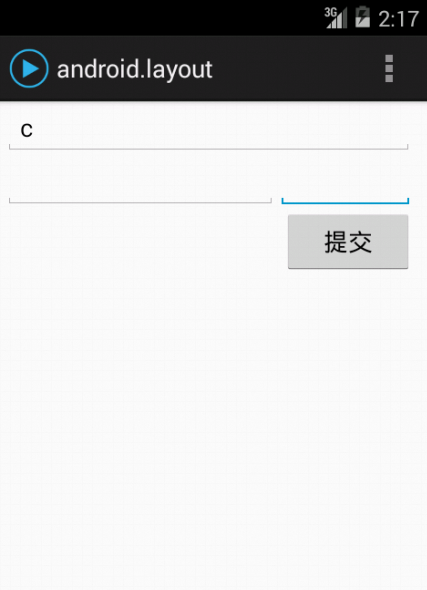
android实现综合布局

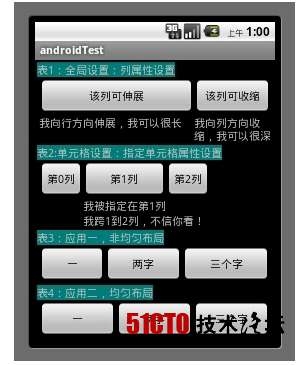
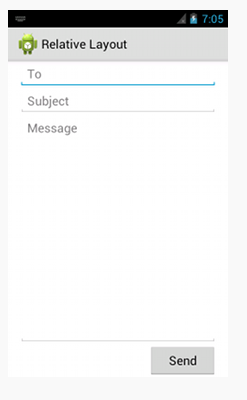
要实现这种效果, LinearLayout的嵌套实现 2.使用RelativeLayout 1 2 3 4 5 6 7 8 9 10 11 12 13 14 15 16 17 18 19 20 21 22 23 24 25 26 27 28 29 30 31 32 33 34 35 36 37 38 39 40 41 42 43 44 45 46 47 48 49 50 51 52 <?xmlversion= "1.0" encoding= "utf-8" ?> <LinearLayoutxmlns:android= "http://schemas.android.com/apk/res/android" android:layout_width= "match_parent" android:layout_height= "match_parent" android:orientation= "vertical" android:paddingLeft= "10dp" android:paddingRight= "10dp" > <EditText android:id= "@+id/EditText1" android:layout_width= "match_parent" android:layout_height= "wrap_content" android:hint= "@string/reminder" /> <LinearLayout android:layout_width= "match_parent" android:layout_height= "wrap_content" android:orientation= "horizontal" > <EditText android:id= "@+id/dates" android:layout_width= "0dp" android:layout_height= "wrap_content" android:layout_weight= "1" /> <EditText android:id= "@+id/times" android:layout_width= "100dp" android:layout_height= "wrap_content" /> </LinearLayout> <Button android:id= "@+id/button1" android:layout_width= "96dp" android:layout_height= "wrap_content" android:layout_gravity= "right" android:text= "提交" /> </LinearLayout> 1 2 3 4 5 6 7 8 9 10 11 12 13 14 15 16 17 18 19 20 21 22 23 24 25 26 27 28 29 30 31 32 33 34 35 36 37 38 39 40 41 42 43 44 45 46 47 <?xmlversion= "1.0" encoding= "utf-8" ?> <RelativeLayoutxmlns:android= "http://schemas.android.com/apk/res/android" android:layout_width= "match_parent" android:layout_height= "match_parent" android:paddingLeft= "10dp" android:paddingRight= "10dp" > <EditText android:id= "@+id/EditText1" android:layout_width= "fill_parent" android:layout_height= "wrap_content" android:hint= "@string/reminder" /> <EditText android:id= "@+id/dates" android:layout_width= "wrap_content" android:layout_height= "wrap_content" android:layout_below= "@id/EditText1" android:layout_alignParentLeft= "true" android:layout_toLeftOf= "@+id/times" /> <EditText android:id= "@+id/times" android:layout_width= "100dp" android:layout_height= "wrap_content" android:layout_below= "@+id/EditText1" android:layout_alignParentRight= "true" /> <Button android:id= "@+id/button1" android:layout_width= "96dp" android:layout_height= "wrap_content" android:layout_below= "@id/times" android:layout_alignParentRight= "true" android:text= "提交" /> </RelativeLayout> <!-- android:layout_alignParentLeft= "true" 和父控件左对齐 android:layout_toLeftOf= "@+id/times" 在指定组件左边 android:layout_below= "@id/EditText1" 在指定组件下边 --> 本文转自 matengbing 51CTO博客,原文链接:http://blog.51cto.com/matengbing/1880754

优秀的个人博客,低调大师

[转]Android相对布局

android:layout_below 将该控件的顶部至于给定ID的控件之下 android:layout_toLeftOf 将该控件的右边缘和给定ID的控件的左边缘对齐 android:layout_toRightOf 将该控件的左边缘和给定ID的控件的右边缘对齐 android:layout_alignBottom 将该控件的底部边缘与给定ID控件的底部边缘 android:layout_alignLeft 将该控件的左边缘与给定ID控件的左边缘对齐 android:layout_alignRight 将该控件的右边缘与给定ID控件的右边缘对齐 android:layout_alignTop 将给定控件的顶部边缘与给定ID控件的顶部对齐 android:layout_alignParentBottom 如果该值为true,则将该控件的底部和父控件的底部对齐 android:layout_alignParentLeft 如果该值为true,则将该控件的左边与父控件的左边对齐 android:layout_alignParentRight 如果该值为true,则将该控件的右边与父控件的右边对齐 android:layout_alignParentTop 如果该值为true,则将空间的顶部与父控件的顶部对齐 android:layout_centerHorizontal 如果值为真,该控件将被至于水平方向的中央 android:layout_centerInParent 如果值为真,该控件将被至于父控件水平方向和垂直方向的中央 android:layout_centerVertical 如果值为真,该控件将被至于垂直方向的中央 android:layout_marginTop 该控件上部外侧与其他控件的距离 android:layout_marginBottom 该控件下部外侧与其他控件的距离 android:layout_marginLeft 该控件左侧与其他控件的距离 android:layout_marginRight 该控件右侧与其他控件的距离 android:layout_margin 该控件四周与其他控件的间距 android:padding 控件内部四周填充距离 android:paddingLeft 该控件左侧填充距离 android:paddingRight 该控件右侧填充距离 android:paddingBottom 该控件顶部填充距离 android:paddingTop 该控件底部填充距离 本文转自Work Hard Work Smart博客园博客,原文链接:http://www.cnblogs.com/linlf03/archive/2013/03/08/2949759.html,如需转载请自行联系原作者

优秀的个人博客,低调大师

Android约束布局ConstraintLayout

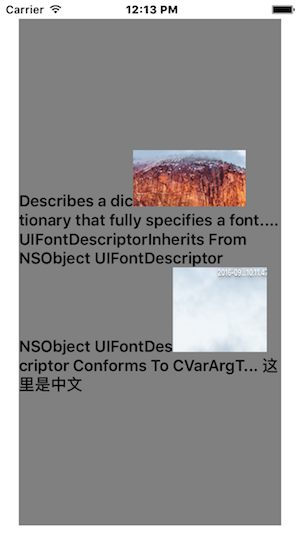
<?xml version="1.0" encoding="utf-8"?> <android.support.constraint.ConstraintLayout xmlns:android="http://schemas.android.com/apk/res/android" xmlns:app="http://schemas.android.com/apk/res-auto" android:layout_width="match_parent" android:layout_height="match_parent"> <TextView android:id="@+id/text1" android:layout_width="200dp" android:layout_height="wrap_content" android:background="@android:color/holo_red_light" android:text="1" android:textSize="20dp" app:layout_constraintLeft_toLeftOf="parent" /> <TextView android:id="@+id/text2" android:layout_width="wrap_content" android:layout_height="wrap_content" android:background="@android:color/holo_blue_light" android:text="2" android:textSize="20dp" app:layout_constraintLeft_toRightOf="@+id/text1" /> <TextView android:id="@+id/text3" android:layout_width="200dp" android:layout_height="wrap_content" android:background="@android:color/holo_green_light" android:text="3" android:textSize="20dp" app:layout_constraintTop_toBottomOf="@+id/text1" /> <TextView android:id="@+id/text4" android:layout_width="200dp" android:layout_height="wrap_content" android:background="@android:color/holo_orange_light" android:text="4" android:textSize="20dp" app:layout_constraintBottom_toBottomOf="parent" app:layout_constraintLeft_toLeftOf="parent" app:layout_constraintRight_toRightOf="parent" app:layout_constraintTop_toTopOf="parent" /> <ImageView android:layout_width="wrap_content" android:layout_height="wrap_content" android:background="@android:color/darker_gray" android:src="@mipmap/ic_launcher" app:layout_constraintBottom_toTopOf="@id/text4" app:layout_constraintLeft_toRightOf="@id/text2" /> </android.support.constraint.ConstraintLayout> 运行结果:

优秀的个人博客,低调大师

Android布局属性详解

RelativeLayout用到的一些重要的属性 第一类:属性值为true或false android:layout_centerHrizontal 水平居中 android:layout_centerVertical 垂直居中 android:layout_centerInparent 相对于父元素完全居中 android:layout_alignParentBottom 贴紧父元素的下边缘 android:layout_alignParentLeft 贴紧父元素的左边缘 android:layout_alignParentRight 贴紧父元素的右边缘 android:layout_alignParentTop 贴紧父元素的上边缘 android:layout_alignWithParentIfMissing 如果对应的兄弟元素找不到的话就以父元素做参照物 第二类属性值必须为id的引用名“@id/id-name” android:layout_below 在某元素的下方 android:layout_above 在某元素的的上方 android:layout_toLeftOf 在某元素的左边 android:layout_toRightOf 在某元素的右边 android:layout_alignTop 本元素的上边缘和某元素的的上边缘对齐 android:layout_alignLeft 本元素的左边缘和某元素的的左边缘对齐 android:layout_alignBottom 本元素的下边缘和某元素的的下边缘对齐 android:layout_alignRight 本元素的右边缘和某元素的的右边缘对齐 第三类属性值为具体的像素值如30dip40px android:layout_marginBottom 离某元素底边缘的距离 android:layout_marginLeft 离某元素左边缘的距离 android:layout_marginRight 离某元素右边缘的距离 android:layout_marginTop 离某元素上边缘的距离 EditText的android:hint 设置EditText为空时输入框内的提示信息。 android:gravity android:gravity属性是对该view 内容的限定比如一个button 上面的text. 你可以设置该text 在view的靠左靠右等位置以button为例android:gravity="right"则button上面的文字靠右 android:layout_gravity android:layout_gravity是用来设置该view相对与起父view 的位置比如一个button 在linearlayout里你想把该button放在靠左、靠右等位置就可以通过该属性设置以button为例android:layout_gravity="right"则button靠右 android:layout_alignParentRight 使当前控件的右端和父控件的右端对齐。这里属性值只能为true或false默认false。 android:scaleType android:scaleType是控制图片如何resized/moved来匹对ImageView的size。ImageView.ScaleType / android:scaleType值的意义区别 CENTER /center 按图片的原来size居中显示当图片长/宽超过View的长/宽则截取图片的居中部分显示 CENTER_CROP / centerCrop 按比例扩大图片的size居中显示使得图片长(宽)等于或大于View的长(宽) CENTER_INSIDE / centerInside 将图片的内容完整居中显示通过按比例缩小或原来的size使得图片长/宽等于或小于View的长/宽 FIT_CENTER / fitCenter 把图片按比例扩大/缩小到View的宽度居中显示 FIT_END / fitEnd 把图片按比例扩大/缩小到View的宽度显示在View的下部分位置 FIT_START / fitStart 把图片按比例扩大/缩小到View的宽度显示在View的上部分位置 FIT_XY / fitXY 把图片不按比例

资源下载

更多资源
腾讯云软件源

腾讯云软件源

为解决软件依赖安装时官方源访问速度慢的问题,腾讯云为一些软件搭建了缓存服务。您可以通过使用腾讯云软件源站来提升依赖包的安装速度。为了方便用户自由搭建服务架构,目前腾讯云软件源站支持公网访问和内网访问。

Spring

Spring

Spring框架(Spring Framework)是由Rod Johnson于2002年提出的开源Java企业级应用框架,旨在通过使用JavaBean替代传统EJB实现方式降低企业级编程开发的复杂性。该框架基于简单性、可测试性和松耦合性设计理念,提供核心容器、应用上下文、数据访问集成等模块,支持整合Hibernate、Struts等第三方框架,其适用范围不仅限于服务器端开发,绝大多数Java应用均可从中受益。

Rocky Linux

Rocky Linux

Rocky Linux(中文名:洛基)是由Gregory Kurtzer于2020年12月发起的企业级Linux发行版,作为CentOS稳定版停止维护后与RHEL(Red Hat Enterprise Linux)完全兼容的开源替代方案,由社区拥有并管理,支持x86_64、aarch64等架构。其通过重新编译RHEL源代码提供长期稳定性,采用模块化包装和SELinux安全架构,默认包含GNOME桌面环境及XFS文件系统,支持十年生命周期更新。

Sublime Text

Sublime Text

Sublime Text具有漂亮的用户界面和强大的功能,例如代码缩略图,Python的插件,代码段等。还可自定义键绑定,菜单和工具栏。Sublime Text 的主要功能包括:拼写检查,书签,完整的 Python API , Goto 功能,即时项目切换,多选择,多窗口等等。Sublime Text 是一个跨平台的编辑器,同时支持Windows、Linux、Mac OS X等操作系统。


用户登录
用户注册