首页 文章 精选 留言 我的

精选列表

搜索[定位功能],共10011篇文章
优秀的个人博客,低调大师

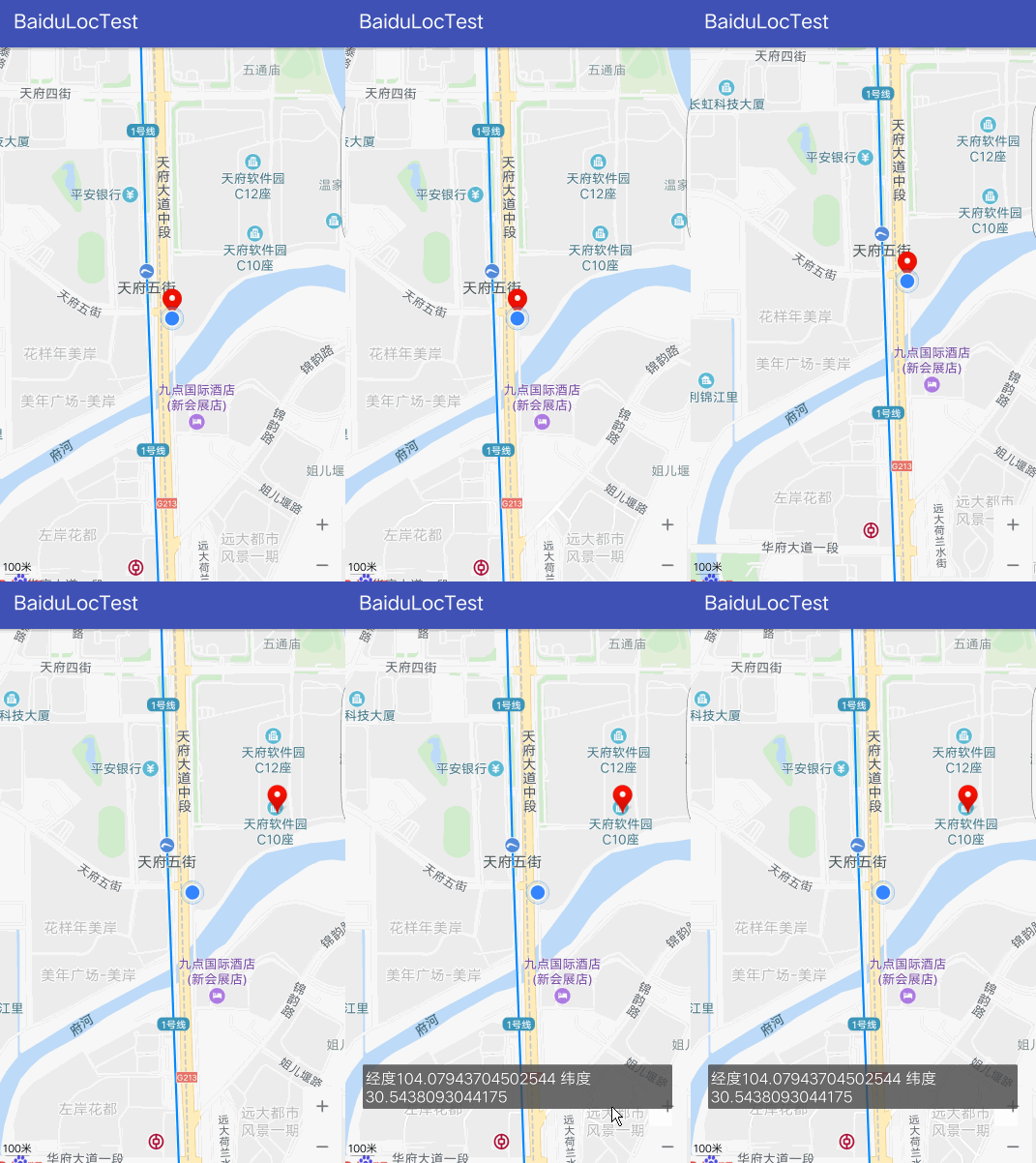
安卓使用LocationManager定位

版权声明:本文可能为博主原创文章,若标明出处可随便转载。 https://blog.csdn.net/Jailman/article/details/78030105 git地址 https://github.com/yayaa/LocationManager 安装 在gradle里边添加 compile 'com.yayandroid:LocationManager:2.0.4' AndroidManifest.xml权限添加 <!-- Required to check whether user has network connection or not --> <uses-permission android:name="android.permission.ACCESS_NETWORK_STATE" /> <uses-permission android:name="android.permission.INTERNET" /> <!-- Dangerous Permissions --> <uses-permission android:name="android.permission.ACCESS_FINE_LOCATION" /> <uses-permission android:name="android.permission.ACCESS_COARSE_LOCATION" /> 添加presenterX类 package online.geekgalaxy.layoutlearn; /** * Created by jailman on 2017/9/19. */ import android.location.Location; import android.text.TextUtils; import com.yayandroid.locationmanager.constants.FailType; import com.yayandroid.locationmanager.constants.ProcessType; public class presenter { private SampleView sampleView; public presenter(SampleView view) { this.sampleView = view; } public void destroy() { sampleView = null; } public void onLocationChanged(Location location) { sampleView.dismissProgress(); setText(location); } public void onLocationFailed(@FailType int failType) { sampleView.dismissProgress(); switch (failType) { case FailType.TIMEOUT: { sampleView.setText("Couldn't get location, and timeout!"); break; } case FailType.PERMISSION_DENIED: { sampleView.setText("Couldn't get location, because user didn't give permission!"); break; } case FailType.NETWORK_NOT_AVAILABLE: { sampleView.setText("Couldn't get location, because network is not accessible!"); break; } case FailType.GOOGLE_PLAY_SERVICES_NOT_AVAILABLE: { sampleView.setText("Couldn't get location, because Google Play Services not available!"); break; } case FailType.GOOGLE_PLAY_SERVICES_CONNECTION_FAIL: { sampleView.setText("Couldn't get location, because Google Play Services connection failed!"); break; } case FailType.GOOGLE_PLAY_SERVICES_SETTINGS_DIALOG: { sampleView.setText("Couldn't display settingsApi dialog!"); break; } case FailType.GOOGLE_PLAY_SERVICES_SETTINGS_DENIED: { sampleView.setText("Couldn't get location, because user didn't activate providers via settingsApi!"); break; } case FailType.VIEW_DETACHED: { sampleView.setText("Couldn't get location, because in the process view was detached!"); break; } case FailType.VIEW_NOT_REQUIRED_TYPE: { sampleView.setText("Couldn't get location, " + "because view wasn't sufficient enough to fulfill given configuration!"); break; } case FailType.UNKNOWN: { sampleView.setText("Ops! Something went wrong!"); break; } } } public void onProcessTypeChanged(@ProcessType int newProcess) { switch (newProcess) { case ProcessType.GETTING_LOCATION_FROM_GOOGLE_PLAY_SERVICES: { sampleView.updateProgress("Getting Location from Google Play Services..."); break; } case ProcessType.GETTING_LOCATION_FROM_GPS_PROVIDER: { sampleView.updateProgress("Getting Location from GPS..."); break; } case ProcessType.GETTING_LOCATION_FROM_NETWORK_PROVIDER: { sampleView.updateProgress("Getting Location from Network..."); break; } case ProcessType.ASKING_PERMISSIONS: case ProcessType.GETTING_LOCATION_FROM_CUSTOM_PROVIDER: // Ignored break; } } private void setText(Location location) { String appendValue = location.getLatitude() + ", " + location.getLongitude() + "\n"; String newValue; CharSequence current = sampleView.getText(); if (!TextUtils.isEmpty(current)) { newValue = current + appendValue; } else { newValue = appendValue; } sampleView.setText(newValue); } public interface SampleView { String getText(); void setText(String text); void updateProgress(String text); void dismissProgress(); } } 操作view显示坐标的类 package online.geekgalaxy.layoutlearn; import android.app.ProgressDialog; import android.location.Location; import android.os.Bundle; import android.view.View; import android.view.Window; import android.widget.Button; import android.widget.TextView; import com.yayandroid.locationmanager.base.LocationBaseActivity; import com.yayandroid.locationmanager.configuration.Configurations; import com.yayandroid.locationmanager.configuration.LocationConfiguration; import com.yayandroid.locationmanager.constants.FailType; import com.yayandroid.locationmanager.constants.ProcessType; /** * Created by jailman on 2017/9/19. */ public class location extends LocationBaseActivity implements presenter.SampleView { private ProgressDialog progressDialog; private TextView locationText; private presenter Presenter; @Override protected void onCreate(Bundle savedInstanceState) { super.onCreate(savedInstanceState); setContentView(R.layout.location); final Button locate = (Button) findViewById(R.id.button6); locate.setOnClickListener(new View.OnClickListener() { public void onClick(View view) { locationText = (TextView) findViewById(R.id.textView); Presenter = new presenter(location.this); getLocation(); } }); } @Override protected void onDestroy() { super.onDestroy(); Presenter.destroy(); } @Override public LocationConfiguration getLocationConfiguration() { return Configurations.defaultConfiguration("Gimme the permission!", "Would you mind to turn GPS on?"); } @Override public void onLocationChanged(Location location) { Presenter.onLocationChanged(location); } @Override public void onLocationFailed(@FailType int failType) { Presenter.onLocationFailed(failType); } @Override public void onProcessTypeChanged(@ProcessType int processType) { Presenter.onProcessTypeChanged(processType); } @Override protected void onResume() { super.onResume(); if (getLocationManager().isWaitingForLocation() && !getLocationManager().isAnyDialogShowing()) { displayProgress(); } } @Override protected void onPause() { super.onPause(); dismissProgress(); } private void displayProgress() { if (progressDialog == null) { progressDialog = new ProgressDialog(this); progressDialog.getWindow().addFlags(Window.FEATURE_NO_TITLE); progressDialog.setMessage("Getting location..."); } if (!progressDialog.isShowing()) { progressDialog.show(); } } @Override public String getText() { return locationText.getText().toString(); } @Override public void setText(String text) { locationText.setText(text); } @Override public void updateProgress(String text) { if (progressDialog != null && progressDialog.isShowing()) { progressDialog.setMessage(text); } } @Override public void dismissProgress() { if (progressDialog != null && progressDialog.isShowing()) { progressDialog.dismiss(); } } } view <?xml version="1.0" encoding="utf-8"?> <android.support.constraint.ConstraintLayout xmlns:android="http://schemas.android.com/apk/res/android" xmlns:app="http://schemas.android.com/apk/res-auto" xmlns:tools="http://schemas.android.com/tools" android:layout_width="match_parent" android:layout_height="match_parent" android:background="@drawable/bg3"> <TextView android:id="@+id/textView" android:layout_width="261dp" android:layout_height="137dp" android:layout_marginBottom="8dp" android:layout_marginLeft="8dp" android:layout_marginRight="8dp" android:layout_marginTop="8dp" android:text="位置信息" android:textAlignment="center" android:textColor="@android:color/holo_red_dark" android:textSize="18sp" android:textStyle="bold" app:layout_constraintBottom_toTopOf="@+id/button6" app:layout_constraintHorizontal_bias="0.504" app:layout_constraintLeft_toLeftOf="parent" app:layout_constraintRight_toRightOf="parent" app:layout_constraintTop_toTopOf="parent" app:layout_constraintVertical_bias="0.637" /> <Button android:id="@+id/button6" android:layout_width="138dp" android:layout_height="75dp" android:layout_marginBottom="156dp" android:layout_marginLeft="16dp" android:layout_marginRight="8dp" android:background="@android:drawable/btn_default" android:backgroundTint="@android:color/holo_orange_dark" android:text="locate" app:layout_constraintBottom_toBottomOf="parent" app:layout_constraintHorizontal_bias="0.481" app:layout_constraintLeft_toLeftOf="parent" app:layout_constraintRight_toRightOf="parent" /> </android.support.constraint.ConstraintLayout>


优秀的个人博客,低调大师

sql优化-检索及定位

一、执行频率早知道 >show status; 使用showstatus了解各种sql的执行频率 可搭配参数global全局查看,或者session当前连接开始计数默认不加参数是指查看当前连接 showstatus; +-----------------------------------------------+----------------+ |Variable_name|Value| +-----------------------------------------------+----------------+ |Aborted_clients|65| |Aborted_connects|589| |Binlog_cache_disk_use|0| |Binlog_cache_use|0| |Binlog_stmt_cache_disk_use|0| |Binlog_stmt_cache_use|0| |Bytes_received|1649| |Bytes_sent|11767| |Com_admin_commands|0| |Com_assign_to_keycache|0| |Com_alter_db|0| |Com_alter_db_upgrade|0| ... >常见的统计参数 Com_select:执行select操作的次数,一次只累加1 Com_insert:执行insert操作的次数,一次也只累加1 Com_update:执行update操作的次数 Com_delete:执行delete的次数 Innodb_rows_readselect查询的返回的行数 Innodb_rows_inserted执行INSERT操作插入的行数 Innodb_rows_updated执行update操作更新的行数 Innodb_rows_deleted执行deleted操作删除的行数 Connections:试图连接MYSQL服务器的次数。 Uptime服务器工作时间。 Slow_queries慢查询的次数。 >查看慢查询次数 mysql>showglobalstatuslike'Slow_queries'; +---------------+-------+ |Variable_name|Value| +---------------+-------+ |Slow_queries|4| +---------------+-------+ 1rowinset(0.00sec) 二、效率较低早查询 >开启慢查询日志 MySQL的慢查询日志是MySQL提供的一种日志记录,它用来记录在MySQL中响应时间超过阀值的语句,具体指运行时间通过long_query_time值来设定,超过这个值则会被记录到慢查询日志中。long_query_time的默认值为10,默认情况下,Mysql数据库并不启动慢查询日志,需要我们手动来设置这个参数,当然,如果不是调优需要的话,一般不建议启动该参数,因为开启慢查询日志会或多或少带来一定的性能影响。慢查询日志支持将日志记录写入文件,也支持将日志记录写入数据库表。 1>查看是否开启忙日志查询 showvariableslike'%slow_query_log%'; 2>开启满日志查询 1.配置文件修改 log-slow-queries=/usr/local/mysql/var/slowquery.log long_query_time=3#单位是秒 log-queries-not-using-indexes 2.使用sql语句修改 setgloballog_slow_queries=ON; setglobalslow_query_log=ON; setgloballong_query_time=0.01#单位是秒 3>慢日志格式 select*fromauction1.userwhereuser_name='liaoxz'; 执行的慢查询语句 #Time:1704274:41:48 日志记录的时间 #User@Host:root[root]@localhost[] 服务器用户/主机名 #Query_time:10.007816Lock_time:0.000000Rows_sent:1Rows_examined:0 总的查询时间、锁定时间、"发送"或者返回的行数、查询过程中所检查的行数 三、分析语句早实行 >show profiles profiling在mysql中默认是关闭的,在数据库会话级别可以打开,开启之后会收集在执行语句时候所使用的资源 在会话打开profilinges setprofiling=1; >使用show profiles查看执行的语句的持续时间和ID MariaDB[auction1]>showprofiles; +----------+------------+------------------------------------------------------------------------------------------------------------------+ |Query_ID|Duration|Query| +----------+------------+------------------------------------------------------------------------------------------------------------------+ |6|0.00038804|select*fromorderslimit1| |7|0.00019379|select*fromorderslimit1| |8|0.00028797|select*fromuserlimit1| |9|0.00006671|select*fromordersrightuserwhereorders.ID=user.id| |10|0.00336970|selectorders*.user.idfromwhereorders.ID=user.id| |11|0.00005291|selectorders*,user.idfromwhereorders.ID=user.id| |12|0.00004725|selectorders*,user.idfromorders,userwhereorders.ID=user.id| |13|0.00003863|selectorders*,user.idfromorders,userwhereorders.ID=user.id| |14|0.00024284|select*fromorderslimit1| |15|0.00027788|select*fromorderslimit10| |16|0.00007312|select*fromuserwhereuser='liaoxz'; select*fromuserwhereuser='liaoxz'| |17|0.00031860|select*fromuserlimit1| |18|0.02771239|select*fromuserwhereuser_name='liaoxz'| |19|0.03121868|select*fromuserwhereuser_name='liaoxz'| |20|0.02219678|select*fromuserwhereuser_name='liaoxz'| +----------+------------+------------------------------------------------------------------------------------------------------------------+ 15rowsinset(0.00sec) >通过指定ID查询执行时的持续时间 MariaDB[auction1]>showprofileforquery20; +----------------------+----------+ |Status|Duration| +----------------------+----------+ |starting|0.000038| |checkingpermissions|0.000005| |Openingtables|0.000010| |Afteropeningtables|0.000004| |Systemlock|0.000002| |Tablelock|0.000002| |Aftertablelock|0.000004| |init|0.000035| |optimizing|0.000011| |statistics|0.000013| |preparing|0.000008| |executing|0.000002| |Sendingdata|0.021981| |end|0.000012| |queryend|0.000004| |closingtables|0.000007| |freeingitems|0.000006| |updatingstatus|0.000019| |loggingslowquery|0.000032| |cleaningup|0.000002| +----------------------+----------+ 20rowsinset(0.00sec) >具体资源耗费查询(all,cpu,block io,context switch,page faults) MariaDB[auction1_1]>showprofilecpuforquery20; +----------------------+----------+----------+------------+ |Status|Duration|CPU_user|CPU_system| +----------------------+----------+----------+------------+ |starting|0.000038|0.000000|0.000000| |checkingpermissions|0.000005|0.000000|0.000000| |Openingtables|0.000010|0.000000|0.000000| |Afteropeningtables|0.000004|0.000000|0.000000| |Systemlock|0.000002|0.000000|0.000000| |Tablelock|0.000002|0.000000|0.000000| |Aftertablelock|0.000004|0.000000|0.000000| |init|0.000035|0.000000|0.000000| |optimizing|0.000011|0.000000|0.000000| |statistics|0.000013|0.000000|0.000000| |preparing|0.000008|0.000000|0.000000| |executing|0.000002|0.000000|0.000000| |Sendingdata|0.021981|0.026852|0.000000| |end|0.000012|0.000000|0.000000| |queryend|0.000004|0.000000|0.000000| |closingtables|0.000007|0.000000|0.000000| |freeingitems|0.000006|0.000000|0.000000| |updatingstatus|0.000019|0.000000|0.000000| |loggingslowquery|0.000032|0.000000|0.000000| |cleaningup|0.000002|0.000000|0.000000| +----------------------+----------+----------+------------+ 20rowsinset(0.00sec) 四、常见show命令大全 >sql show大全 >1. show tables/show tables from database_name; -- 显示当前数据库中所有表的名称。 >2. show databases; -- 显示mysql中所有数据库的名称。 >3. show columns from table_name from database_name; 或show columns from database_name.table_name; -- 显示表中列名称。 >4. show grants for user_name; -- 显示一个用户的权限,显示结果类似于grant 命令。 >5. show index from table_name; -- 显示表的索引。 >6. show variables; -- 显示系统变量的名称和值。 >7. show processlist; -- 显示系统中正在运行的所有进程,也就是当前正在执行的查询。大多数用户可以查看他们自己的进程,但是如果他们拥有process权限,就可以查看所有人的进程,包括密码。 >8. show table status; -- 显示当前使用或者指定的database中的每个表的信息。信息包括表类型和表的最新更新时间。 >9. show privileges; -- 显示服务器所支持的不同权限。 >10. show create database database_name; -- 显示create database 语句是否能够创建指定的数据库。 >11. show create table table_name; -- 显示create database 语句是否能够创建指定的数据库。 >12. show engines; -- 显示安装以后可用的存储引擎和默认引擎。 >13. show innodb status; -- 显示innoDB存储引擎的状态。 >14. show logs; -- 显示BDB存储引擎的日志。 >15. show warnings; -- 显示最后一个执行的语句所产生的错误、警告和通知。 >16. show errors; -- 只显示最后一个执行语句所产生的错误。 >17. show [storage] engines; --显示安装后的可用存储引擎和默认引擎。 五、mysql配置文件来一套 >配置文件/etc/my.cnf [client] port=3306 socket=/tmp/mysql.sock default-character-set=utf8 [mysqld] default-time-zone='+8:00' server-id=9527 user=mysql #bin-log日志相关优化参数 log-bin=mysql-master-bin #混合模式复制 binlog_format=mixed #存储二进制缓存 binlog_cache_size=16M #bin-log日志保存多长时间 expire_logs_days=7 #最大连接数 max_connections=1000 #事务提交或事务外的指令把日志写入(flush)硬盘 innodb_flush_log_at_trx_commit=1 #文件系统自动识别缓存大小是否写入磁盘 sync_binlog=0 datadir=/data/mysqldb port=3306 socket=/tmp/mysql.sock #table_cache=5000 #缓存大小设置 query_cache_size=256M #单个查询使用多大缓冲区 query_cache_limit=16M #内存表大小 max_heap_table_size=128M #线程池大小 thread_cache_size=128 #慢查询超过多长时间写入日志 long_query_time=3 #临时表大小 tmp_table_size=128M #设置索引缓冲区大小 key_buffer_size=256M #数据包大小接受设置 max_allowed_packet=64M #索引扫描,范围索引扫描,无索引全表扫描的表连接缓存的大小 join_buffer_size=16M #排序会话的缓存大小 sort_buffer_size=16M #顺序读表缓存 read_buffer_size=16M #随机读缓冲区大小 read_rnd_buffer_size=64M #缓存innodb表的索引,数据,插入数据时的缓冲 innodb_buffer_pool_size=6G sql_mode=NO_ENGINE_SUBSTITUTION,STRICT_TRANS_TABLES log-error=/var/log/mysqld.log pid-file=/var/run/mysqld/mysqld.pid #timestamp类型的列明确的注明default值 explicit_defaults_for_timestamp=true #禁止域名解析 skip-name-resolve #数据库是否支持符号链接存储,1为允许 symbolic-links=0 #数据库级的字符集,对之前数据不产生影响 character-set-server=utf8mb4 #大小写铭感 lower_case_table_names=1 服务器关闭非交互连接之前等待活动的秒数 wait_timeout=180 #闭一个交互的连接之前所要等待的秒数 interactive_timeout=180

资源下载

更多资源
Mario

Mario

马里奥是站在游戏界顶峰的超人气多面角色。马里奥靠吃蘑菇成长,特征是大鼻子、头戴帽子、身穿背带裤,还留着胡子。与他的双胞胎兄弟路易基一起,长年担任任天堂的招牌角色。

Nacos

Nacos

Nacos /nɑ:kəʊs/ 是 Dynamic Naming and Configuration Service 的首字母简称,一个易于构建 AI Agent 应用的动态服务发现、配置管理和AI智能体管理平台。Nacos 致力于帮助您发现、配置和管理微服务及AI智能体应用。Nacos 提供了一组简单易用的特性集,帮助您快速实现动态服务发现、服务配置、服务元数据、流量管理。Nacos 帮助您更敏捷和容易地构建、交付和管理微服务平台。

Spring

Spring

Spring框架(Spring Framework)是由Rod Johnson于2002年提出的开源Java企业级应用框架,旨在通过使用JavaBean替代传统EJB实现方式降低企业级编程开发的复杂性。该框架基于简单性、可测试性和松耦合性设计理念,提供核心容器、应用上下文、数据访问集成等模块,支持整合Hibernate、Struts等第三方框架,其适用范围不仅限于服务器端开发,绝大多数Java应用均可从中受益。

WebStorm

WebStorm

WebStorm 是jetbrains公司旗下一款JavaScript 开发工具。目前已经被广大中国JS开发者誉为“Web前端开发神器”、“最强大的HTML5编辑器”、“最智能的JavaScript IDE”等。与IntelliJ IDEA同源,继承了IntelliJ IDEA强大的JS部分的功能。

用户登录
用户注册